

Vladka76
-
Posts
39 -
Joined
-
Last visited
Content Type
Profiles
Forums
Events
Posts posted by Vladka76
-
-
20 hours ago, GuitarG said:
Feeling better, so if I get little more free time will make schematic for edp cable
It's very nice to read this!
-
8 hours ago, JadeRover said:
8570w just needs a modded cable that has it's end modified so that it can connect to a standard eDP display connector.
Absolutely right! And my 8770w also needs the same cable. 🙂 I looked at the schematics – he uses the DP_D port to output the image to the internal screen, which is standard. But if you have a boardview file for 8770w, please email it to me. I would be very grateful!
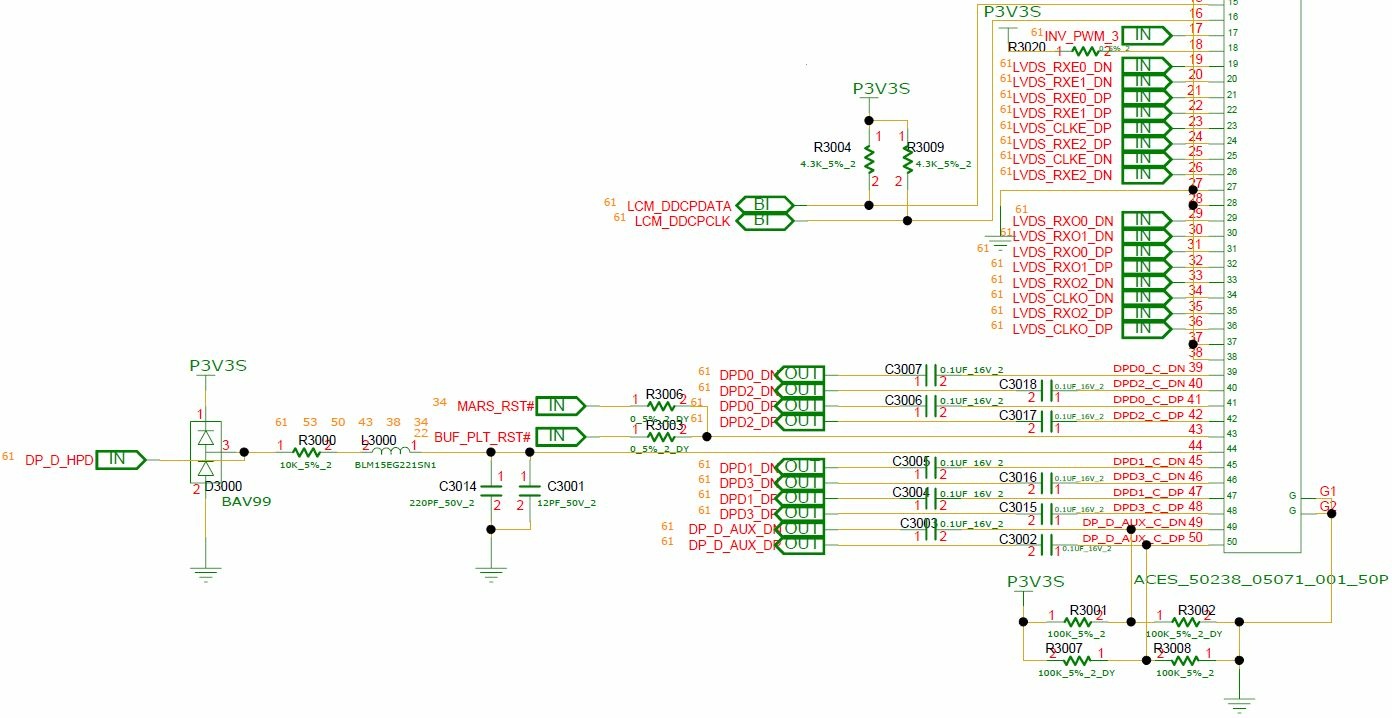
My understanding is that on the motherboard connector side, I need to swap the wires in the cable connector from the LVDS interface (16 pcs: pins 19-26 and 29-36) to the DP interface (10-12 pcs: pins 39-50, possibly excluding 43 and 44). The question is - what's the best way to handle the unused wires? Pull them out?
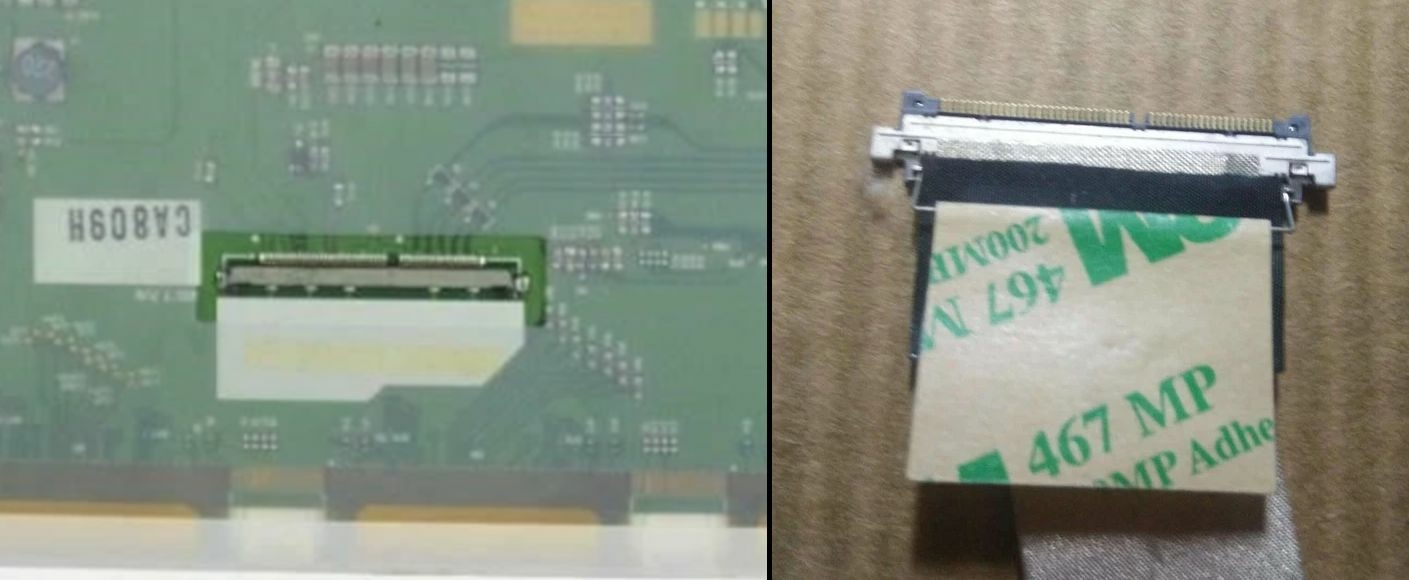
And on the display connector side, I need to completely replace the existing LVDS connector with a standard eDP 40-pin connector for displays and solder the wires according to the standard eDP 40-pin pinout. And theoretically, 😁 everything should work...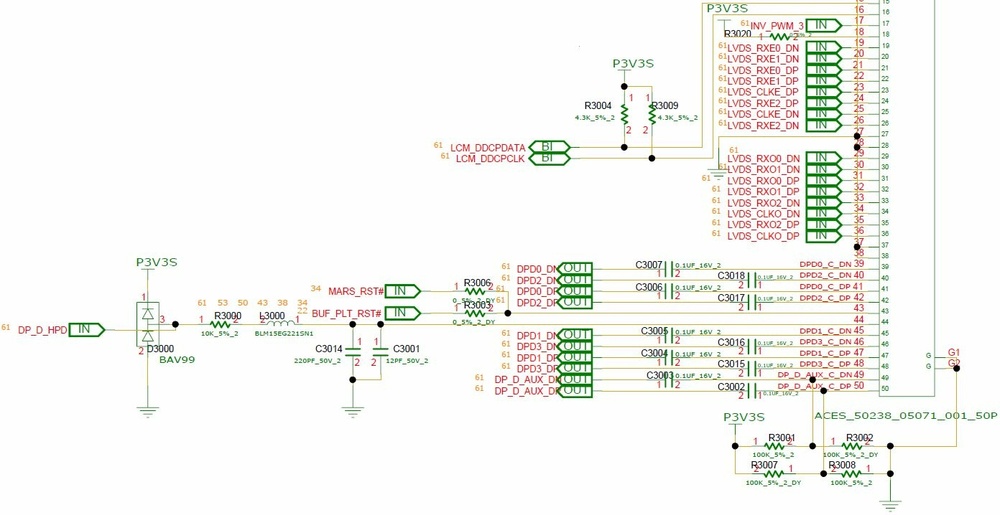
-
On 3/13/2026 at 3:22 PM, Daedalus said:
Going on @Vladka76 view of using the Clevo Cable +HP DC
Thanks, but that wasn't exactly my view. 🙂
On 3/13/2026 at 3:22 PM, Daedalus said:the only change would be the DC board doing the converting. could we not use a "other" brand solution? one thats more available than the "unobtainium" DC board?
It seems you've misunderstood the idea.
She was to use only a modified cable between the motherboard and display, without a converter board at all. Re-read the latest replies from DevilAnGeL, the author of the "Ultimate 8770W yet?" thread. You even wrote there earlier.
I've read that DELL workstations also use a similar converter board (with a newer microprocessor). I can't say how compatible it is with HP. -
10 hours ago, Daedalus said:
if I read that right we could possibly put a G6 screen into the 8570?
I think so. But in your case, I would start by examining the characteristics of your current screen. AIDA64, then panelook.com 😉
-
21 hours ago, GuitarG said:
Have you seen ultimate 8770w thread ?
Yes, I've read that before. Overall, it's encouraging. But there are a lot of things I'm not happy with:
- I think installing 4K monitors with high refresh rates on a less modern graphics card is too much. It's trendy, I agree, but it significantly increases the graphics card's workload in 3D, which will lead to frame rate drops and stuttering in games. I'd stick with Full HD and 60Hz — that's the bare minimum;
- I have no idea how to buy on TAOBAO;
- I'd prefer to make my own cable. 🙂21 hours ago, GuitarG said:I need zbook 17 g6 original LCD to check. It should be 100% compatible with mine RTX, since it's same platform and even laptop model.
Sounds like a good idea, I agree. I would also buy a screen from the same laptop model as the graphics card was intended for, because of... your least favorite word. 😀 Although, also need to pay attention to the screen hinges.
While browsing our marketplace OLX, I discovered that HP ZBook 17 g5 uses LP173WF4-SPF7 (LG Displays, IPS, 60 Hz, eDP, 30 pins — everything I need to be happy 🥰) as its native screen. The seller claims that it is compatible with g3 — g6.
Please treat your hands. Good luck. -
3 hours ago, GuitarG said:
My idea is to buy eDP 30pin cable for Clevo and use original one from HP (or buy one cheaply to not destroy original one :P).
Simply, because then we solder only one side. Muuuuch easier to make it work. And less subject to noise problems.This sounds quite logical and correct! 👍
3 hours ago, GuitarG said:Only real question is will it work with my RTX?
The answer can probably only be given in practice...
3 hours ago, GuitarG said:4K clevo cables would be a lot better (signal needs special treatment - traces length, noise supression, etc).
How difficult is it to find them for sale?
3 hours ago, GuitarG said:on Chinese forum they said guy modified clevo cable for his 8770w
Was there any information on how successful it was?
-
22 hours ago, SuperMG said:
I got the RTX 4080 in pure-eDP to work on M6800, the only problem is the heatsink for the temps. I don't have any TDP bugs, it's full speed.
🤩 This is simply great!
22 hours ago, SuperMG said:M6700 can do max RTX 5000 Turing. Everything new won't work on eDP, need to use LVDS for newer cards....
It seems that it is better to buy M6700 with LVDS cable and display?
Have you ever upgraded our EliteBooks (8560-8570-8760-8770)? 😉 -
9 minutes ago, SuperMG said:
3060 is massively bottlenecked by Intel Optimus and the old mux switch. 3060 has also the weird 40W TDP bug on Haswell based systems that use Intel Optimus. 3060 works great on pure-eDP
I guess that the DELL M6700 (with eDP), but not M6800 - is the best one for upgrading video cards?
Yes, I've heard that a discrete graphics card without an iGPU (without Optimus) is 15-20% faster. That's comforting — and it motivates to figure out how to help EliteBooks... -
2 hours ago, Daedalus said:
Nice find. Most of this forum will have a bidding war lol. Good to see they exist, I was trying to find one for my upgrade. I’d seen an IPS screen too but wasn’t sure if even this cable would work with it. Doesn’t this need an additional DC inverter board too?
However as you say @Vladka76 it won’t help us run the newest cards. I think RTX 5000 is the super best we can try with Dc.
I'm afraid just one cable won't be enough. You're right, a complete DC kit consists of a color depth converter board and two cables: an outgoing eDP cable from the mobo to the converter and a LVDS cable from the converter to the display. I tried searching for the complete kit but couldn't find anything. There are a lot of DC cables, by the way - will be no bidding war here. 😀
I also thought about buying such a cable to start creating my own experimental EDP cable. -
2 hours ago, SuperMG said:
But the Quadro Pascal such as P5000 and P5200 will work on Dreamcolor. I got the RTX 3000 from HP to work with the Dreamcolor in PEG of the M6700 and the P3000 did display in PEG but ACPI error due to the VBIOS.
Yes, all DELL's similar workstations have iGPU enabled and working - so they can work with newer cards even via LVDS interface (I've read about it, this was not my own experience; I've even heard that MXM 3060 (Ampere!) worked well with LVDS display). But our beloved HP EliteBook's don't have iGPU at all (newer ZBook's already have it)...
Yes, I've heard that in DELL's Pascal cards works only with Engineering (early) vBIOS, but Turing cards all works well.
Now I can only dream about RTX 3000 (standard MXM 3.0b) working in my 8770w... 😕 -
9 hours ago, Daedalus said:
has anyone found any links/suppliers for the cable to allow the Dreamcolour IPS screens to work with the mobo? I know guitarg was working on one.
I recently found something:
https://www.ebay.com/itm/145765636591
This cable theoretically (as it seems to me, may be wrong) connects the motherboard and the original display for the DreamColor on 8760w, 8770w - LP173WF3-SLBx ("x" may be 4, 3 or 2). All is perfect (S-IPS, matte, exotic 10-bit color depth), but connection type of this display is 50-pin LVDS. 😀 Moreover, he is relatively old and difficult to find in new condition.
The main disadvantage of this option is that installing this display and cable does not improve the laptop's compatibility with fundamentally newer video cards. A much more promising option would be an eDP 30-pin cable (for FHD displays), which respected @GuitarG is working on...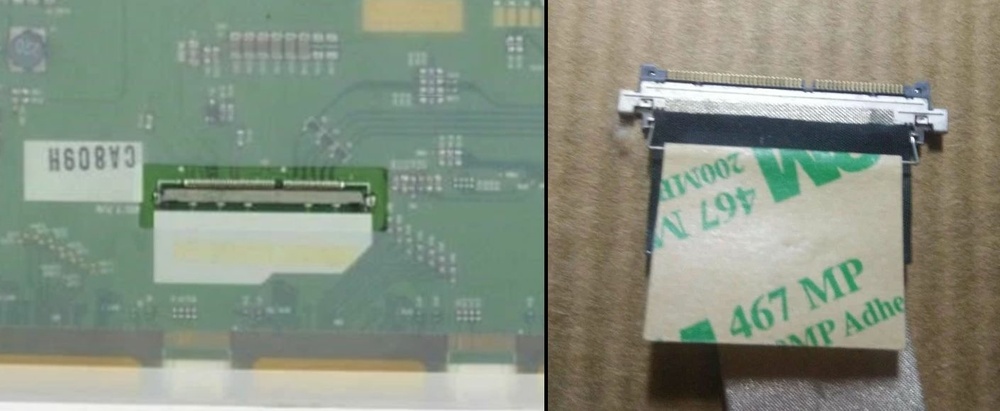
-
7 hours ago, Daedalus said:
Yep, i got stung for that too. 4x 8gb sticks "DIMISION" not great. branded 1866, clock runs them at 798, so 1600's reclothed with a fancy sticker. Micron chips but three benchtest apps report as 1600. They dont report all detail in CPUz either....
Damn....
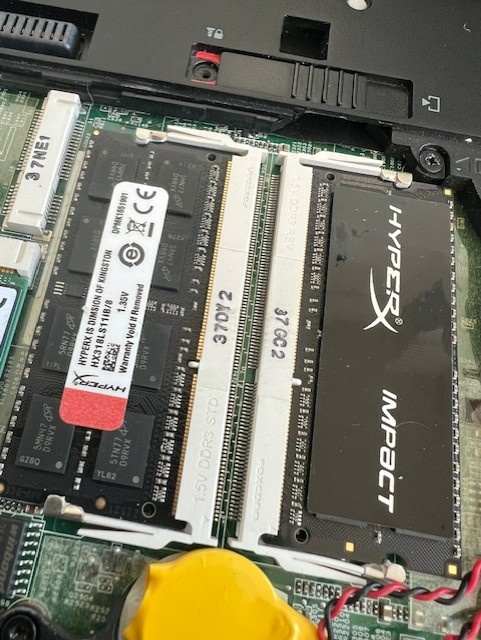
Interesting. The FBGA code "D9RVX" on your chips means the model name MT41K512M8RG-107:N, officially also 1866 (from the datasheet: the "-107" marking = option "1.07ns@CL=13 (DDR3-1866)"). This chip's frequency is the same as one I've encountered, but the FBGA code on those I've seen was slightly different from this one.
What's preventing good memory chips from running at full speed? Perhaps poor-quality resistor arrays on the data buses (all my original modules have ceramic, white resistor arrays)? Or the firmware on the SPD flash IC? It's sad. This is often the case with the Chinese – they copy almost everything well, but somewhere there's always a flaw that ruins everything...
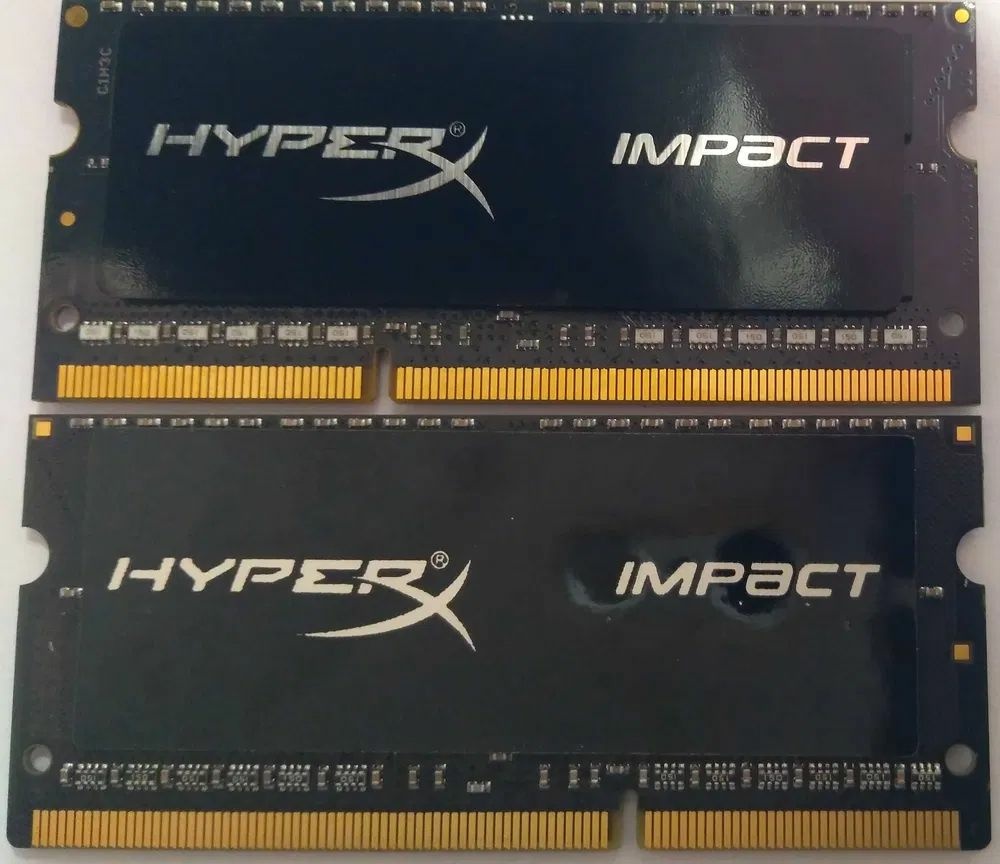
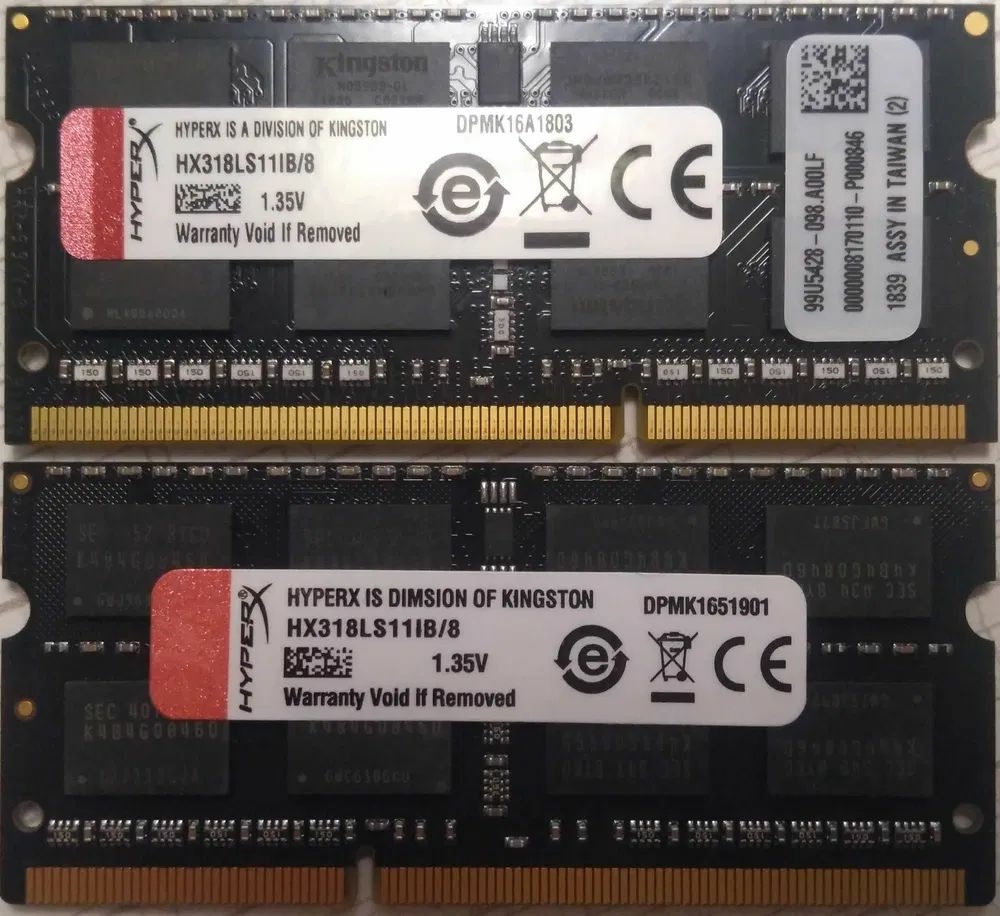
Another my photo. 🙂 Compare the quality of the sticker on the other side of the two modules (original on top, counterfeit on the bottom). The original has an aluminum base and a black ink printing, while the counterfeit has a paper base and white ink with a low-resolution print. And a resistor arrays are different in color and material...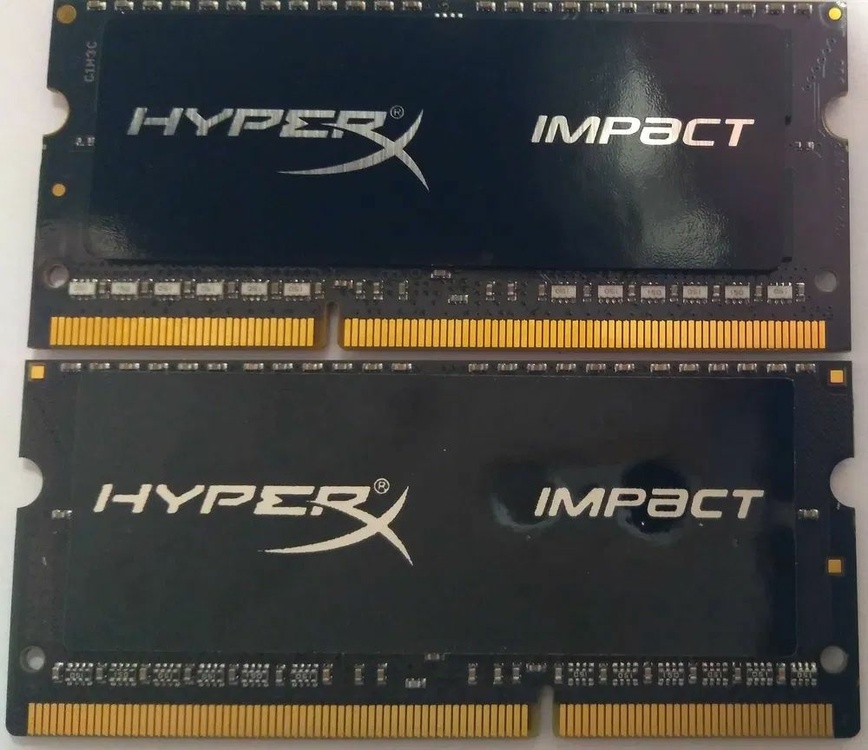
-
Here's a photo of Samsung chips and a screenshot of their datasheet.
Beware of such memory!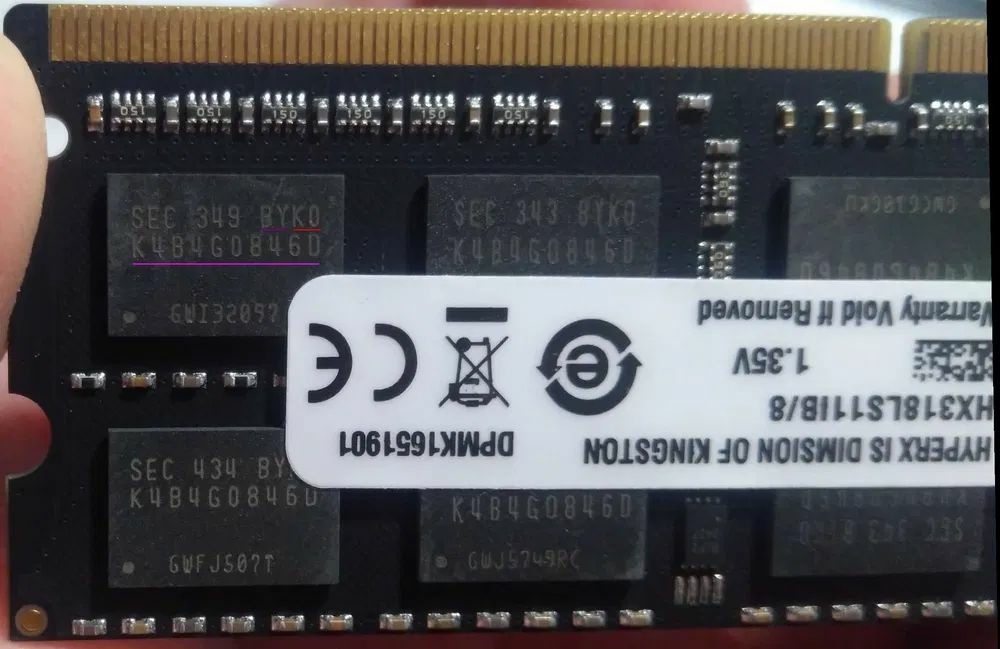
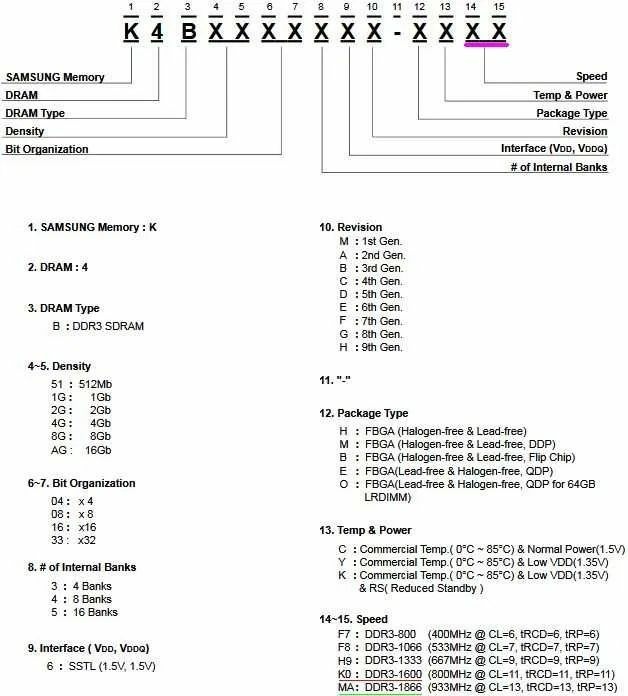
-
On 11/14/2025 at 11:18 PM, KbX said:
How did you manage to use 1867 MHz on yours?
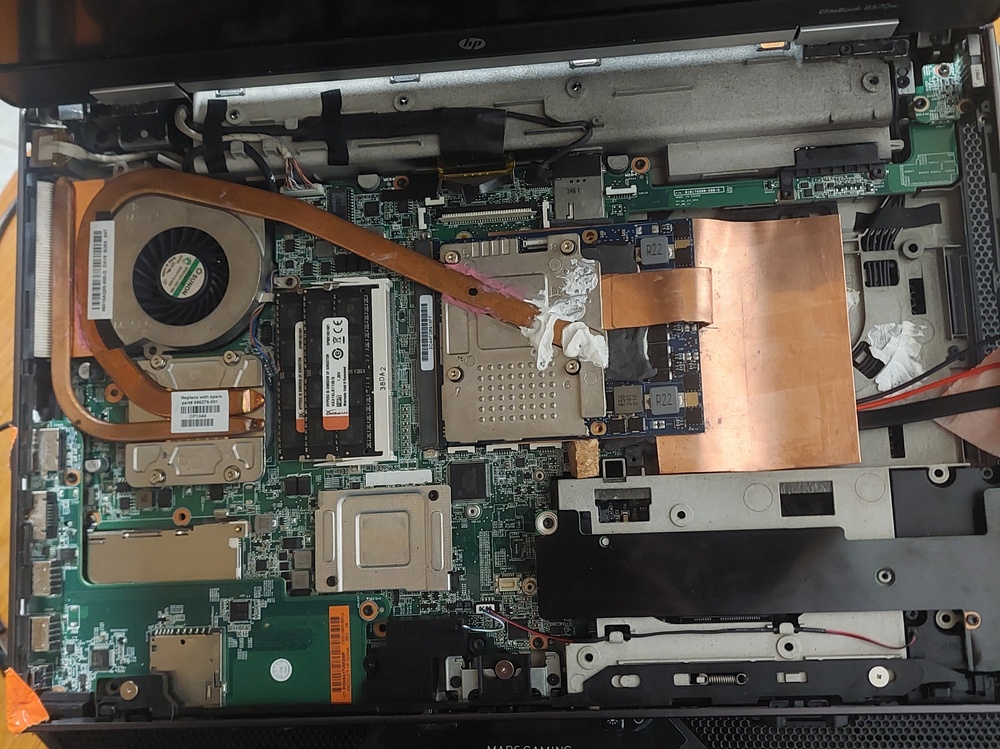
I'm very sorry, but what frequency memory modules do you have installed? 1600 MHz or 1866 MHz? Model name HX316... or HX318...? Those symbols are hard to read.
Unfortunately, in any case, these are new, but counterfeit chinese modules, unlikely to be made by Kingston (the OCR incorrectly recognized, meaningless word "DIMSION" is clearly visible). I recently encountered two such modules, supposedly running at 1866 MHz: one with Samsung chips, the other with Micron chips, as in your case. Both worked fine, but... at 1600 MHz. 🙂 I tested them on two laptops with i7 CPUs (hp 8770w and Dell E6540). Moreover, the markings on the Samsung chips indicated that they were officially 1600 MHz (but the Micron chips were officially 1866 MHz).
Check the actual memory frequency on the BIOS startup screen or using CPU-Z (see the "Memory" and "SPD" tabs). If there you'll see 1600 MHz (or near 800 MHz real frequency value), but you bought 1866 MHz, return those modules and look for genuine Kingston modules with Kingston chips, manufactured between 2017 and 2021. I was lucky enough to find three of these, and they work perfectly at 1866 MHz.
Below is a my own photo of two modules (the original on top, the counterfeit on the bottom).
Find 4-5 differences. 🙂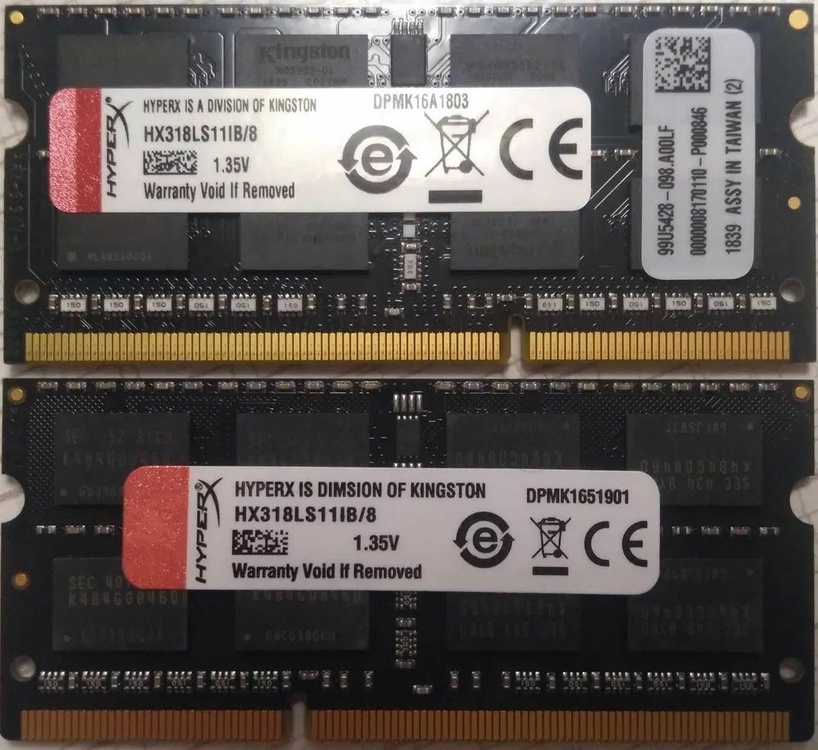
-
2 hours ago, GuitarG said:
Haha, sorry, I didn't remember how rough that draft was. My plan is to :
1) make hi res photo of both connectors to show what is connected, show starting orientation and enumerate pins we need
2) make some simple schematic in KiCAD to better show what connect to what (instead of printed sketched paper ^_^)
Would that be better to make mod yourselves ?
The plan is good, thank you! 🤩
I believe that, using its data, anyone (familiar with a soldering iron) can create their own cable-mod.
I don't have a test 8570/8770 or a test e-DP 30-pin screen, so I don't want to risk it without your help.
Please, improve your health first, and then you can work on it. I'll wait; it's not urgent. -
On 11/1/2025 at 1:44 PM, GuitarG said:
As for cable, one could already make one using my post's info.
??? But those are just rough notes, so it's hard to figure out which pin on one connector should be connected to which pin on another. I could just try to guess, but doing that on a new eDP screen and my only working laptop is scary.
I'd be very grateful for a complete pinout diagram when you get better.
I'm probably not the only one. -
On 10/26/2025 at 12:12 AM, Daedalus said:
but no way of verifying what vbios this 965m has.
Why? There's always a way to check this: desoldering the ROM chip, downloading its contents using a programmer, and examining the resulting dump. The firmware's internal version number can be used to determine which OEM manufacturer it was developed for.
Generally, you can do a lot with a soldering iron. 😉On 10/26/2025 at 1:13 AM, Daedalus said:Yup without vbios programmer I’m kinda limited.
Moreover, attempting such an upgrade without proper soldering skills and a programmer is risky.
I've seen MXM videocard's sellers offer the option to flash the card with the buyer's vBIOS for free upon purchase. Or they might flash the version that, based on their experience, is most compatible with the buyer's workstation.
I would definitely take advantage of this opportunity when purchasing. 😉On 10/26/2025 at 1:13 AM, Daedalus said:M2000m seems to be a sensible path for out the box-ish
You can also start by looking for a Quadro M2200, as long as the seller agrees to flash it with Dell's vBIOS before purchasing and gives you some time to test it. 🙂
On 10/26/2025 at 1:13 AM, Daedalus said:If say an 980m in a 8770w works then by same logic it should be fine in 8570? So vbios is the challenge, what brand and what version?
Theoretically - yes, BUT - for such a hot and big card as 980m, you need to mod 8570w, as the author of the topic did. Re-read first pages of this topic. 🙂
I would start with the Dell vBIOS.On 10/26/2025 at 1:13 AM, Daedalus said:I don’t have vbios images unique to dell/hp
It's better to search on the right by the name of your GPU and then select vBIOS from Dell:
https://www.techpowerup.com/vgabios/
On 10/26/2025 at 1:13 AM, Daedalus said:are Clevo Vbios viable to work on the 8570W's?
The thread's author would have been better off answering this question. I haven't used Clevo. I think they're less compatible than Dell.
-
 1
1
-
-
On 10/24/2025 at 8:11 PM, Daedalus said:
Just been scrolling through the old NBR archives and noticed a few familiar renegades 😉
http://forum.notebookreview.com/threads/8770w-compatible-video-cards.795753/page-2
question with my 965m headache is why 8770w had a lot more “working” cards. It seems bios / vbios options weren’t as bad on the bigger brother 8770?can anyone shed any light why the 965m wouldn’t/ work on the 8570w? Or even a 950m which is type A, at this point I’m happy to try wedging the 970/980m in, but would like to know what bios/vbios mods are needed. 965m was a proper rare beast to track down, whereas 970/980 are a lot more plentiful
In my humble opinion (IMHO), as an 8770w owner who carefully studied technical forums before purchasing:
- 8770w (17.3-inch model) can use both MXM-A and MXM-B graphics cards, you just need to replace the GPU cooling system (I have both). Therefore, it's possible that the supported cards list is wider than the 15.6-inch 8570w, where any MXM-B cards can only be installed after serious modding (which is what the author of this thread, @GuitarG, started with).
- I believe the GPU's compatibility limit of the both models is the same. For cheap workstations without a DreamColor display (and its color depth converter board) these are cards with the Maxwell-2 architecture (MXM-A: Quadro M2200/GeForce 965m, MXM-B: Quadro M5000M/GeForce 980m). Of course, when @GuitarG publishes the datasheet for his final version of the eDP-->eDP cable, which will allow 8570w-8770w owners to install graphics cards of newer architectures (I hope, up to Turing), with the mandatory requirement of replacing display from LVDS to eDP, then this limit will be significantly higher.
Compatible with your 8570w (without modding!) MXM-A cards: Quadro M1000M and M2000M (both Maxwell), M1200 and M2200 (both Maxwell-2). If you can't get the 965M to work, I'd try the M2000M; I've read that it's easier to "tame" than the newest of them (M2200), and that there are more different vBIOSes for M2000, than for M2200. But vBIOS flashing is not an easy task...
---
I (personally) was lucky – I bought a new MXM-B Quadro M3000M with vBIOS for the Dell 7710, and it worked on my 8770w without any effort. I wrote about this here earlier.
But sure, I still dream of the Quadro RTX3000 from Getec in my 8770w, it's true... 😇 😀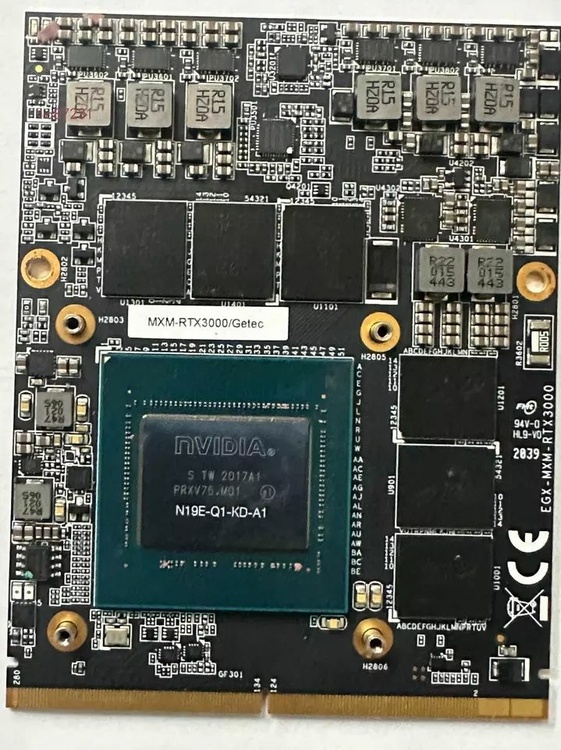
-
On 10/17/2025 at 3:51 PM, Daedalus said:
May end up returning the 965m to seller and pausing the GPU upgrade path.
Perhaps it would be better to contact a service center or a competent specialist... 😉
-
On 10/17/2025 at 3:51 PM, Daedalus said:
Well, after much work, i finally had time to put the 965M into the 8570w. All seemed to go ok, However, No output on screen or from the VGA port on the side either. However i can hear the machine spinning up, fan goes full then slows down ( so not getting the fan full speed issue). Whilst i know it needs the driver to be present, im not getting any output. Beginning to suspect the GPU is bad, so will refit the K1000M back in.
I verified it was in UEFI mode on Windoze before i went to dissasemble so could it have reverted in Bios?
edit: checked and it’s uefi-with CSM. tried once more with uefi-without CSM, no dice......
well much late night tinkering (this time with coffee) 😉 and k1000m back in and all works again. Ugh, so seems a 965m output/inf issue? I7-3940xm has Intelhd but it’s disabled I believe so no basic output to try and get machine to like the new card.
so next steps would be vbios update? But how when I get no GPU output to run NVinstall. I can’t run install with k1000m in surely as 965m isn’t connected to be “seen”Should I return 965m and go 980M? But which card with what vbios that works should I order? i suspect the whitelist is kicking in as "officially" its only k2000M and FirePro4000M, therefore how did GuitarG or any of you guys get around it? Seller advised it had hp vbios (so it should "see" it)
Could i send you guys my 965M to flash?? kinda loathe sending it back as seen no others since.
another edit:
sourced the 965M bios,
https://www.techpowerup.com/vgabios/184954/nvidia-gtx965m-4096-160107
but not quite sure how to get it on card or verify card already has it on. (The 8570w doesn’t have two mxm slots so I can’t run one and flash the other) with no VGA i cant use IntelHD either. ugh......
further edit. I think without the ability to edit bios on 8570w I’m stuck on changing whitelist to allow 965m to work. I don’t think it’s a vbios issue. However I am intruiged how @GuitarG managed to get his 965m working before he went the 980m route.
May end up returning the 965m to seller and pausing the GPU upgrade path.
First of all, check your system BIOS version (the latest is F.71A). If yours is significantly older, you should update the system BIOS; this can really help recognize the new cards:
https://ftp.hp.com/pub/softpaq/sp96001-96500/sp96092.exe
WARNING: This operation is potentially dangerous, so please install a charged battery before proceeding. If the flasher asks you to create a "recovery disk" on a flash drive, do so. Be very careful, attentive, and read all the prompts, otherwise you'll brick your laptop!!!
I would do this operation on a clean, freshly installed Windows 7, 8, 8.1 (possibly on a temporary/test disk), because only these systems are listed as supported.
After a successful BIOS update and before removing the K1000M, I recommend to set the "Legacy" mode in BIOS. If the image doesn't appear, then after replacing K1000M again, I recommend to try the "UEFI with CSM" mode, and then - "UEFI without CSM". If after all this, no image appears on either the external ports or the screen, then this 965M won't work. Either she's faulty, or its vBIOS can't be read (GOP region issue, incompatible vBIOS, etc.).
In this situation, I would still try to flash compatible vBIOS using programmer and a solder iron. 😄
If the image appears on the external ports but not on the screen, then you need to try different video BIOS versions; this is not an easy task. This can be done:
1) by flashing the firmware on your 8570w (with output to an external monitor) using nvflash program (NVIDIA Firmware Update Utility) version 5.287.0 (modified by Joe Dirt) – I've read that this verison is best suited for Maxwell-based graphics cards, but I haven't used it;
2) on another workstation with an integrated graphics card and an MXM slot – for example, a Dell Precision M6700. If you can't find such a workstation, then
3) on any other computer or laptop with a programmer, and also with your soldering skills to desolder and re-solder the ROM BIOS chip. 🙂
Warning - If you use method 1) and flash an incompatible vBIOS and the card bricks after rebooting, you'll be forced to use methods 2) or 3). 🙂
I've read that Dell's vBIOS is very compatible with our HP models. The one you found seems to be from Dell.
Our workstations have encrypted BIOSes; I haven't seen any cracked ones (I tried searching). I haven't heard of a "whitelist" of video cards in our BIOS. HP's official website offers the same file for both the 8570w and 8770w, so there's no difference in video card support in the system BIOS.
If I'm not mistaken, the author of this thread never had a 965M, or any other Maxwell card; he wrote about that once. He installed P5200 (Pascal) and RTX5000 (Turing) cards, and both worked for him. -
I will give as an example my upgrade of the video card to 8770W (maybe someone will find this information useful):
- stock screen - CMN1732 (N173FGE-LA3 from Innolux (17.3', 1600x900, TN, LVDS 40pins));
- stock video card - AMD Firepro M4000 without vBIOS chip.
I replaced the Firepro card with a new Quadro M3000M with vBIOS version 84.04.9B.00.14 (Dell), she was intended for installation in a Dell Precision 7710.
I knew there might be several problems, but I was lucky:
- automatic fan speed control - Ok,
- brightness adjustment from the keyboard - Ok,
- working in non-UEFI mode (and booting from MBR!) - Ok,
- after installing the latest driver for GeForce 9xxM (with "patch") - the image did not disappear.
No visible problems were found, so I decided not to touch vBIOS (although I was ready for it). 😃 -
5 hours ago, GuitarG said:
Well, Dreamcolor is LVDS screen, on DC cable there is pin 11 and 12 connected, those are LVDS EDID cables. They go straight to DC LCD. So at the end of the day, every panel in 8570w is LVDS. EDID hexcode for LVDS and eDP are vastly different, even in length. And they are two totally different technologies.
So I think only way could be to find out with coreboot rom. But since it uses a lot of original HP code, it still may not work. Unfortunately.
Sounds like a funeral march for all hopes... 😥
And if you replace the screen ID in the EDID firmware editor (like in "my" manual), and not via hex codes? 😧 -
On 8/20/2025 at 9:31 AM, GuitarG said:
About modification, there is a little hope left. I think HP may had whitelist of panels that will work in that laptop 😞 and it's in encrypted bios.
What if you try to change the ID in the EDID of the new screen by inserting the ID of one of the native (stock) compatible screens?
I read here that EDID is a simple EEPROM like 24C02:
Illustrated manual (in Russian, I'm sorry)
Perhaps this will be useful for you. -
@GuitarG Let me clarify: what type of eDP screen? FHD or 4K?
---
I am very glad that you managed to mod the cable.
Excellent and important work!
HP Elitebook 8570W - is it still good ? Hardware modifications
in Custom Builds
Posted
No, it's not possible OR not easy. IMHO. 🙃