

jorgeregula
-
Posts
11 -
Joined
-
Last visited
Content Type
Profiles
Forums
Events
Posts posted by jorgeregula
-
-
Same question here... Updated to 1.20.1 from 1.14 (I think), lost the undervolting control. Do I need to revert back, and how do I do that ?
-
Hi! Can some of you share what your "total System Power" is when idle? CPU package power is at 9-10 watts when idle, system power total is at 50 watts for me. It seems high but I don't know how to reduce it further.
Running a 7670.
-
On 1/3/2023 at 9:35 AM, jorgeregula said:
Has anyone already tried undervolting by changing settings in the BIOS NVRAM? The parameters for voltage offset are there as well. Does this offer any advantages -- e.g. not being vulnerable to plundervolt?
I have now applied the settings in Throttlestop using the normal method
-125 mV on CPU core and CPU P cache
- 90mV on CPU E cache
Combined with the GPU power limit at 139% this gave me a 3DMark score of 11247 (10690 graphics and 15969 CPU). Score on stock was 10150, so I'm very happy with that increase! Final preference would be to stick the voltage offset changes in the BIOS. Searching through the dump that was provided here in the thread there are a couple of candidates.
I tried playing around with the different variables available, to no avail.
First thing I tried was to set the cache ratio, since this seems like the most reliable way to get a stable undervolt ( if the cache ratio is high I get BSOD immediately) (note, before attempting any I also enable the overclocking var 0x1D9)
Tried it with both the
- Ring Max OC Ratio (0x1E7)
and
- Max Ring Ratio Limit (0x211)
And tried with both of them setting them to 37x (0x25 in hex). This causes the CPU and cache ratio to drop to 4x and a 0,4 Ghz on the E-cores and even lower on the P-cores... Since the max value for both var is 0x55 I don't think it is expressed in Mhz but in times x, so I don't know how else to set them.
I have not touched the voltage offsets since if I can not change the cache ratio it will cause immediate BSOD I fear -- unless I start really low but that sort of beats the purpose 🙂
-
Has anyone already tried undervolting by changing settings in the BIOS NVRAM? The parameters for voltage offset are there as well. Does this offer any advantages -- e.g. not being vulnerable to plundervolt?
I have now applied the settings in Throttlestop using the normal method
-125 mV on CPU core and CPU P cache
- 90mV on CPU E cache
Combined with the GPU power limit at 139% this gave me a 3DMark score of 11247 (10690 graphics and 15969 CPU). Score on stock was 10150, so I'm very happy with that increase! Final preference would be to stick the voltage offset changes in the BIOS. Searching through the dump that was provided here in the thread there are a couple of candidates.
For reference I attached the same BIOS dump that @MyPC8MyBrain provided, but formatted for easier readability, using https://github.com/BoringBoredom/UEFI-Editor/releases
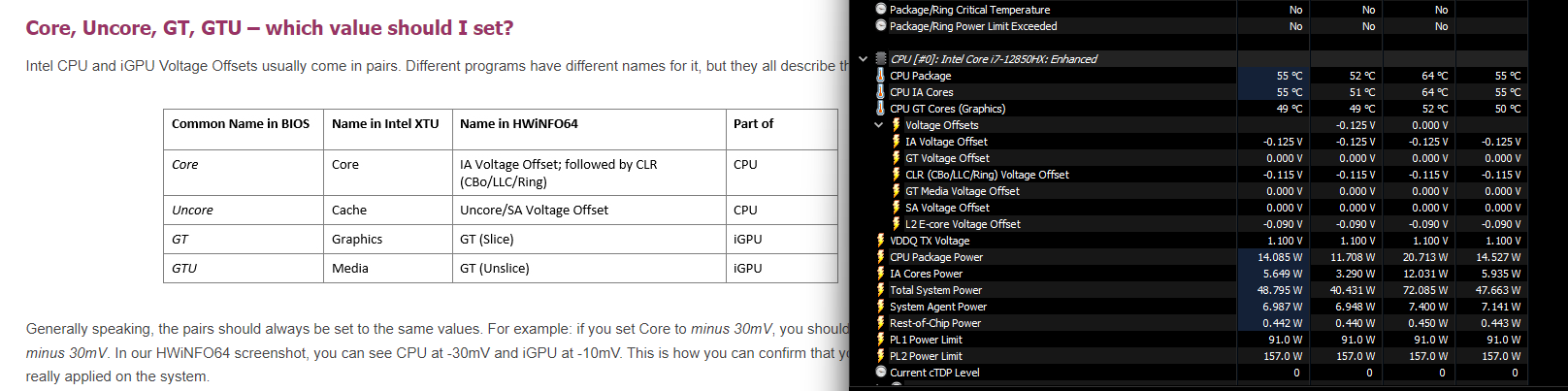
Looking at the different options available, and combining this with the info from HWinfo
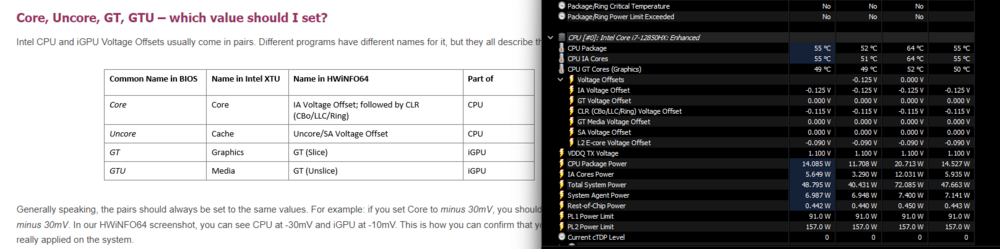
It leads me to believe that we need :
                                                                                                                Processor
     P-core Voltage Offset | VarStore: CpuSetup, VarOffset: 0x1E0, Size: 0x2
          Min: 0x0, Max: 0x3E8, Step: 0x1
                                                                                                                        Processor
     Offset Prefix | VarStore: CpuSetup, VarOffset: 0x1E2, Size: 0x1
          +: 0x0 (default)
          -: 0x1
Ring Voltage Offset | VarStore: CpuSetup, VarOffset: 0x1EC, Size: 0x2 Min: 0x0, Max: 0x3E8, Step: 0x1 Ring Offset Prefix | VarStore: CpuSetup, VarOffset: 0x1EE, Size: 0x1 +: 0x0 (default) -: 0x1E-core L2 Voltage Offset | VarStore: CpuSetup, VarOffset: 0x2B2, Size: 0x2 Min: 0x0, Max: 0x3E8, Step: 0x1 E-core L2 Configurations Offset Prefix | VarStore: CpuSetup, VarOffset: 0x2B4, Size: 0x1 +: 0x0 (default) -: 0x1 -
Yeah, it makes sense. Just wondering what @MyPC8MyBrain his secret sauce is because in his runs the CPU score does not seem to drop much 🙂
-
After installing the geforce drivers instead of professional drivers the power limit indeed unlocks.
Setting it to +39% gives 125W GPU power usage instead of 102W on an RTX A4500.
Ran an extra 3dmark run, graphics score went from 9700 to 10800, so that's great. However, now the CPU score has dropped from 13800 to 10500, and it seems to be thermally limiting. I guess my only options are undervolting / limiting boost to avoid this?
Total system power usage shows as 235W.
-
The method with disabling nvidia platform does not seem to work for an RTX A4500. The power limit slider in afterburner is still greyed out / locked. 😞
In GPU-Z I have a similar entry when it comes to power limit, and it also shows as adjustable -99% and +39%. So it should somehow be possible?
-
If the setup_var changes are done to allow undervolting, does that mean the laptop is again vulnerable to Plundervolt?
Do the changes stick after a BIOS update?
-
15 hours ago, MyPC8MyBrain said:
the system pulls noticeably allot more power from the wall with the 330 brick,
280w is the average sustained pull form the wall during Time Spy bench,
with the slim brick it pulling a max of 235w but averaged much lower 180w sustained,difference in scores is 0
I would also be interested in seeing if there is any difference in scores when connected to the WD19DCS dock. The device clearly shows in the BIOS it is then connected to a 210 W power supply, instead of a 240 W.
Perhaps the battery takes up the slack and provides some extra juice?
-
2 hours ago, win32asmguy said:
By chance does anyone happen to know the sustained TDP for the 7670 A4500 GPU? From Notebookcheck's review I can see the 7670 A5500 is about 102W but wondering if the A4500 is the same.
Same for the A4500, 102W.
Anyone knows if there is anything to be done with Afterburner or Nvidia Inspector to improve performance within that power limit? The voltage curve in afterburner only starts at 1230 Mhz / 700 mV so there's not much room for undervolting I guess? Is there any way to reduce the idle power draw for the GPU?
On my 7670 (12850HX, a4500) Timespy result is 10059.
Dell Pro Max 16/18 Plus (2025 model) pre-release discussion — MB16250, MB18250
in Pro Max & Precision Mobile Workstation
Posted
Has anyone replaced the stock thermal paste? Any impact of doing that?
I'm considering replacing it with some of the phase change thermal pads (like ptm 7950), does that bring any improvements?