Popcan
-
Posts
74 -
Joined
-
Last visited
Content Type
Profiles
Forums
Events
Everything posted by Popcan
-
Hottest spot I have seen on the 4090 is the ram, i've seen mine hit 90c (I pretty much have HWinfo up at all times.) GPU die itself has only hit 72c on the hotspot. I have been stressing the heck out of my system. I'm not 100% happy with the way the cpu runs and the bios are hit or miss if they work at all for me. I'm looking forward to your add-a-sub post! Thats pretty cool/
-
Oof! I appear to be spreading false information 😬 my bad... I stand corrected. Wanted to prove myself correct but couldn't find what I thought I knew lol.... I must have read the double sided single rank and thought that was double... idk... Here is a video that puts it in terms people like myself can understand lol...
-
The Beast Returns - Alienware m18 - i9 13980HK 24c/RTX 4090 Mobile
Popcan replied to ssj92's topic in Alienware 18 and M18x
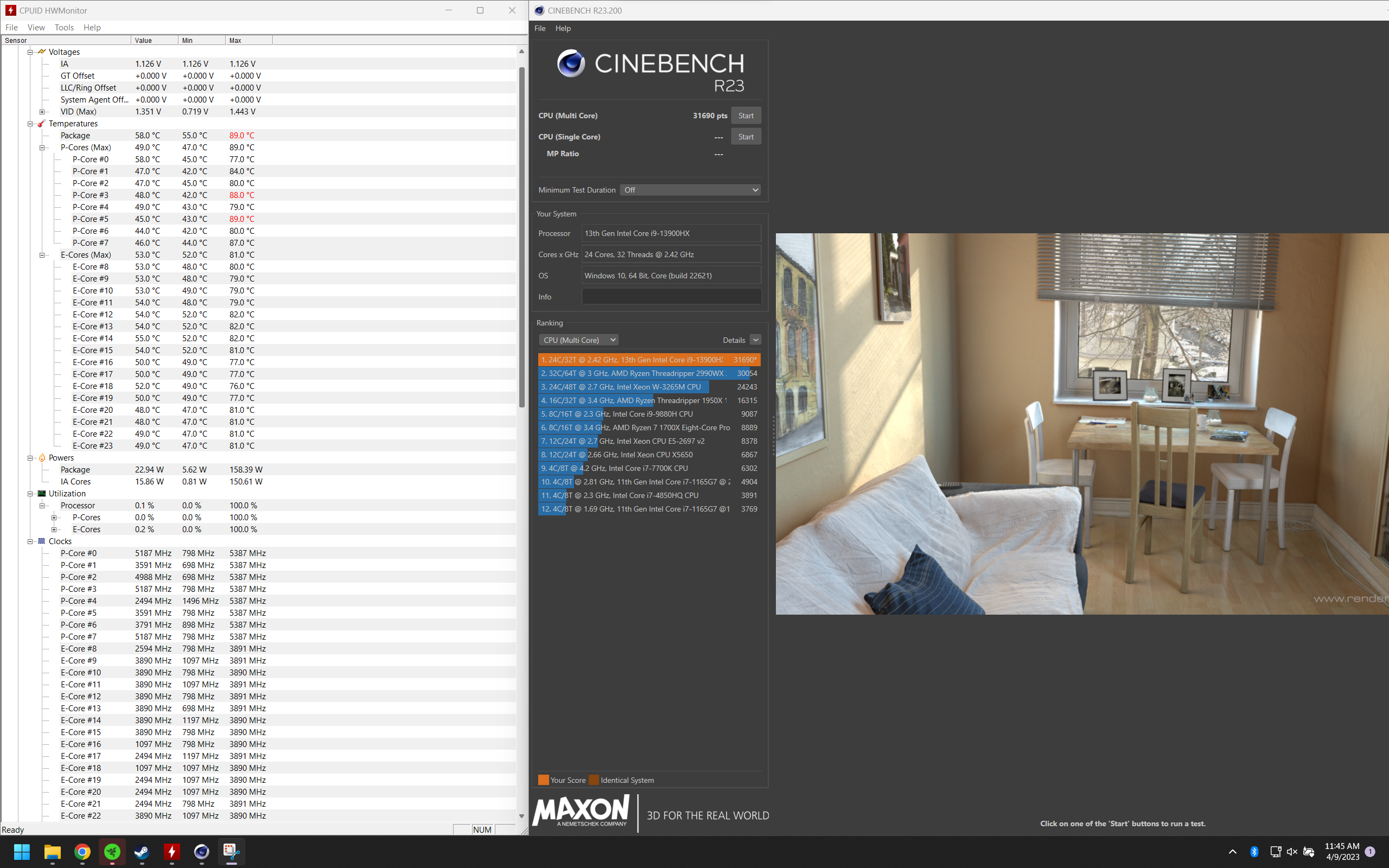
Haha my bad! It didn't cross my mind. I did take a picture of my board though lol... Its pretty straight forward. None of the fans had to come out but I did remove the screws on the big fans. The only issue I had was getting the heat sync(sink?) back on. One side of the screws look like they stick up more and I kept thinking they were cross threading. there are only 3 or 4 different types of screws. I personally take it a part in sections and just keep the screws isolated from section to section. I kind of don't mind how dell put this thing together. I do think they could have done a better job with how the bottom panel attaches. those 45 degree screws in the front corners never want to go in for me... For anyone attempting this remember what @MogRules noted about the first boot after reassembly. It takes a good while for it to turn back on. Just enough time for you to think you broke your laptop. lol If someone really wants it, I will tear it apart again and either take a video and/or take photos. Same here, If I don't have the TCC cranked it will shoot up to 100c immediately, for anything. I have been playing around with it a bunch and went back to 15 TCC it still will hit 90 regularly and even 100 once in a while. 13th gen just run hot from what I have seen and read. Jays 2 cents had a video up with a 17in msi (i think) with 13900hx and a 4090. instantly he was hitting 100c on that as well. At least it appeared that way on the video. I 100% agree 170w is too much. On a cool system I will jump up to 186w and sit there for no more than 5 seconds then jump down to 170ish and then before a single pass of r23 ill be held at 135w. I have actually tried setting 145w as short max and 130w long max in bios and it doesn't change anything for me. I wonder how the AMD chips will hold up. I have been doing a lot of stress testing to see what this machine can handle and it is VERY picky about how I adjust the bios. I don't know if I'm doing something wrong but I can change the same setting back and forth (ex: voltage, max turbo etc) in the bios and seeming randomly my laptop will get stuck at 798-2200mhz upon a reboot. I have started just saving my custom settings resetting the bios and then loading my custom settings again. That usually fixes it. Like I have said before with AWCC it has actually stopped my pc from booting multiple times and I have had to do the power button bios reset. After deleting AWCC I have since reinstalled (to get rgb and fan control back) but I have disabled AWCC XTU services and disabled windows from being able to edit the bios. This has fixed my crazy self adjusting bios issues. Waiting on my 5600mhz kit to show up still. hopefully Saturday. -
The Beast Returns - Alienware m18 - i9 13980HK 24c/RTX 4090 Mobile
Popcan replied to ssj92's topic in Alienware 18 and M18x
That's a much better score! are you hitting 100c with that? -
The Beast Returns - Alienware m18 - i9 13980HK 24c/RTX 4090 Mobile
Popcan replied to ssj92's topic in Alienware 18 and M18x
Still sounds like your bios is a little wacked out to me. I ended up repasting also last night. Used thermal grizzly kryonaut I had left over from another project. Not a fan of this element 31 stuff. They just took paste and mixed liquid metal in it. what a mess. I used 91% iso to clean up the residue. No issues, temps are the same. the biggest change is the gap between my hot cores and cool ones increased. hot cores are the same and cool cores are cooler... After reassembly the bios half reset itself, like it would when I had AWCC installed. My first test was 29000 and after that dropped to 2200ish mhz and I was still hitting 100c... getting 26000-28000 on r23. It defaulted my power setting to quite... Reset it back to ultra and loaded custom defaults. Hitting about 500 more points and r23 than before 30500ish at 15 tcc. played with undervolt some more and got it to settle at 31500. raised tcc to 12 because with 15 it was hitting 90c anyway. getting 31600 now. best score I managed was 33800 at 0tcc. 100c is still to hot for me.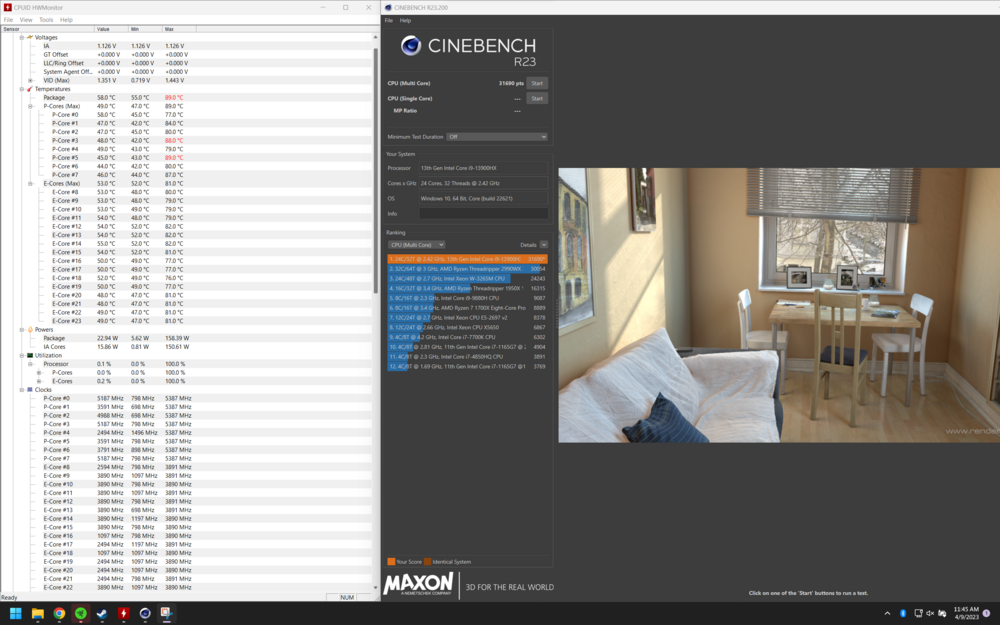
-
The Beast Returns - Alienware m18 - i9 13980HK 24c/RTX 4090 Mobile
Popcan replied to ssj92's topic in Alienware 18 and M18x
I had this exact same issue. After undervolting, it would go crazy and everytime I would put an actual load on the cpu it would drop to 800mhz. No matter what I did it was stuck like that. Awcc wouldn’t actually change anything and just say my bios had been reset to default every time I opened awcc So, I reset awcc and set it to max or whatever it’s called now. Went into the bios and set it to ultra performance and then confirmed the that the settings took via cinabench. I have started to save my bios settings and then use Load default custom user setting in the bios because my settings don’t always stay when I had awcc installed. I swear it was overwriting my setting. as soon as that clears up I uninstalled every Alienware piece of software on my pc and I have had no issues since. Only down side is I can’t change my custom fan settings or my rgb. But I like the way the fan curve is on ultra in the bios anyway. From other posts I have read awcc is using a half baked version of xtu which really messed the bios up in my case. I have had to reset the bios via the cmos reset procedure 3 times because awcc would freeze or whatever it does and then my computer wouldn’t boot. There is also a setting in bios that allows windows to modify bios settings, as per another forum post it was recommended to be disabled. I did that as well. Right now I run at 15 tcc and ultra performance with 50 offset and get 30000ish on a 10min cinabench run. while gaming or benching cpu stays at 85c mostly but jumps around from time to time. I just can’t bake it at 100c like its an easy bake oven… if I turn the tcc back to stock I pretty much am pegged at 100-102c but go up to 32000ish Could also be a crap paste job… I would be interested in seeing what people get when they repaste. I am on 1.6.0 and was on the latest version of awcc. -
The Beast Returns - Alienware m18 - i9 13980HK 24c/RTX 4090 Mobile
Popcan replied to ssj92's topic in Alienware 18 and M18x
Nice! What did you do to get those scores? I am only getting 30000 at 85c and 31500 at 100c 100 is too hot for me. -
Alienware 17 Rager GTX 970M upgrade 8 beeps
Popcan replied to Johndill's topic in Alienware 17 and M17x
It’s been many years since I dabbled with mxm card swaps but if I remember correctly. The Alienware/dell stuff would sometimes throw fits over the wrong vbios. I remember something about there being an issue with the 60hz vs 120hz panel. I’m pretty sure the 120hz panel bypassed Optimus and the vbios would address that. on top of dell being picky about non dell vbioss. From my experience most mxm cards can swap vbios just fine. As long as the mxm card matches the vbios. Example a Clevo 970m 4gb vbios would work on a dell 970m 4gb but would not work correctly on a 970m 8gb. I know it’s a pain but looking in the notebookreview archive on here would help. I know it’s been talked about over there. unless the card is just dead, I think your issues is the vbios. Also try the normal thing, reset the cmos, clean the card connector and reset it into its slot. Hopefully someone with more knowledge will chime in. -
Xmp memory mode in bios caused 2 beeps on start
Popcan replied to Yarema's topic in Alienware 18 and M18x
Awesome sauce! -
Xmp memory mode in bios caused 2 beeps on start
Popcan replied to Yarema's topic in Alienware 18 and M18x
Some systems do not like xmp. Did you try removing battery and cmos bat? A bios reset should fix you. -
Single is going to be faster, probably. By how much? Idk. From my understanding, dual rank is like having 2 sticks of ram in the same slot. You could end up with not enough bandwidth to utilize both. https://history-computer.com/single-vs-dual-rank-ram/ a good read.
-
Currently laptop ram maxes out at 5600mhz. This will change of course if it hasn’t already. The Intel 13900hx officially supports 5600mhz ram. ssj92 was referring to the xmp profile some ram supports. Which is a overclock of sorts. Pretty much the manufacturer of the ram saying it’s officially 5600mhz but will run at 5800mhz. (Or whatever it might be) Usually has better timing as well.
-
First sorta review is out. looks like the Liquid Metal isn’t making good contact on all cpu cores with this m18. A re-application might be in order. Gpu seems to be fine. on this 4080 and it hit 179 watts. On one of the LTT videos where they liquid cooled a 13900k they had a similar issue where the Liquid Metal wasn’t making good contact. Additional liquid fixed the issue. In the comments someone commented on using 5600mhz ram and it worked correctly. I will confirm when I get a chances, unless someone beats me to it. The speakers and screen def appear to be lacking compared to the other offerings. 290 nits… on the performance side, time will tell but I think there is a lot of potential in the cooling on these laptops. Gpu always had great thermals. @ssj92 seems to be the case with his friends laptop. Thank you for that quick review ssj92, despite not feeling well, hope you get better.
-
haha yeah, I did misunderstand you! Thats a big bummer that it won’t work…
-
After a few more hours of ocd filled research on the 18in laptops and the upgrade only being $100 more now I decided to take the risk. 🙃 Thanks again man! Do you have a "tip system" set up on your youtube channel? I'd like to buy you a beverage. That's awesome, I had a m16 in my cart so many times! Being able to see actual hands on reviews of them and bench tests was great. I think the m16 is really best of both the 15.6in and 17.3in laptop world. A lot to offer in a sleek and portable package! On a side note, I'm going to grab a couple 16gb 5600mhz sticks and see if they will run at full speed. Unless Alienware did some sort of Tom foolery, it should work I would assume.
-
Oh snap! I didn’t hear about the coupon. I’ll have cancel the order and get that. Thanks! Dude! Many thanks, you saved me $500! I very much appreciate it!
-
Very nice right up and video! Subbed! I think the x14 would be a great candidate for some under voltage and under clocking action. I’m looking forward to your m18 review.
-
Awesome sauce! I’m excited to see what kind of scores people can cram out of these things.
-
Just looking for opinions and also sharing my new laptop purchase with other enthusiast! 😝. This is all just my opinion. I also tend to ramble.🙃 fair warning! But this might help someone who is in the market. Just pulled the trigger after many many days of contemplation. Looking at everything from the 3070 ti to the 4090. Started with a m17 r5, then a x17 r2 then again to the m16 and finally settling on the m18. Reasoning… if you that’s what you want to call it. I was originally planning on spending $1500-2000. Browsed the heck out of the Dell outlet site. And then hopped over to the Alienware site and went back and forth. The 3070 ti is an awesome card and I had one sitting in my cart many times but I tend to hold on to stuff for a while and since this is the first non second hand gaming laptop in over 10 years I really wanted it to be as future proofed as possible. So, I splurged and got the m16 configed with the 4090. After a decent amount of researching I found that in some cases the 4080 outperformed the 4090 due to thermals. (in my research I was not comparing alienwares of course). On top of that the 4080 vs the 4090 did not justify an extra $600 to me for the power improvement. So with that extra $600 freed up, I decided to put the money towards the M18. Nostalgia is a big one, I remember drooling over the m18x back in the day with those dual graphics cards 🤤 I figured they are brand new and should be relevant for at least a few years. I ended up with a: 4080 3900hx 16gb ram (because dell overcharges!) 1600p 165hz (the FHD option doesn’t make sense to me) mechanical keyboard (of course!) Out the door for $3004 🤑 However… With the extra cooling potential of the m18 I wonder if I made a mistake not going for the 4090?…
-
oh, right on. I have been out of the loop and missed that whole ordeal. Sad that it's gone, but nice to know some of the same people are still around.
-
Thank you, yet again! =D
-
Holy smokes! Thanks to both of you so much! I was not expecting a zip folder of everything I was looking for haha! Quite the insight to back those up, I would have remembered the day after he servers shutdown =P Thanks again!!!
-
Howdy! I used to frequent the nbr under xXScionXx or something like that I can’t remember for sure, it’s been a while. Was really into this stuff in my younger years and still dabble but not so much anymore. I found this place looking for answers on my Clevo but as I looked around I got a hint of nostalgia haha. from what I’ve read so far, it seems like a good group of people on here.
-
Hello, I came across this site on my search of a upgrade path for my p870DM. I could have sworn I have seen posts of people upgrading from the 7700k to 8th and 9th gen in the past but for the life of me, I can not find them anymore. It seems like they have disappeared off the web. I have tried looking for dsanke and phoenix bios so I can upgrade. I am currently on the baked bios. The lack of search results is making me second guess myself… I have seen a few threads of people talking about it but not enough information to lead me to the answer I could be doing something wrong.. Any help in point me in the right direction would be awesome! Thank you.