

Radmeister
-
Posts
26 -
Joined
-
Last visited
Content Type
Profiles
Forums
Events
Posts posted by Radmeister
-
-
On 6/21/2024 at 2:43 AM, SvenC said:
We are limited to business laptops with support contracts for quick inhouse repairs in case of HW problems in the company.
I would like 17" with 16:10 display ratio. Leaned towards an XPS 17 but those are not available in Germany any more. XPS 16 is crap with that new keyboard with touchbar - so I hoped that 7680 might be the next best choice...
I guess if you are limited to professional laptops it’s not a terrible choice. I would also give Lenovo a look, they also regularly have crazy sales like 40-60% off and their cooling is more robust and uses PTM7950 out of the box I believe. The P16v Gen 1 looks very decent with the AMD 7940HS, or the previous gen 6 P1 with a 13900h, they are 50% off right now. The Dell 5690 looks pretty good as well, you can also get it with an oled touchscreen. I would just make sure to order it with the 165w charger.
-
 1
1
-
-
On 6/19/2024 at 1:53 PM, nero519 said:
7780 with 13950hx here, I'm fairly content with the laptop.
Essentially, every laptop with this kind of (intel) CPU will reach 100c, the thing is how high they can clock while doing it.
I had to replace the thermal paste with ptm7950, but I feel comfortable working the whole day with this one, it feels robust, high quality, I wish it had a vapor chamber and a 330w charger though, specially for this kind of price.
Don’t forget to mention, wish it had fan control, unlocked undervolting, TDP limit controls not burnt into EC firmware.
-
On 6/19/2024 at 9:02 AM, SvenC said:
I hardly found reviews on the 7680 and 7780. Some reports on high temperatures and short battery times.
How satisfied are the owners of 7680 and 7780 here with thermals and battery time?
PS: I am only interested in CPU, so I would go with iGPU or the smallest dGPU - in case that makes the difference when it comes to high thermals.
lol if you only care about CPU get a gaming laptop. The thermals are poo and without doing some shady bios hacks like I described in an earlier post you are limited to 80w..The cooler even with PTM7950 can only really handle 90w of prolonged use. So 3.6-3.7ghz…Gaming laptop with a Vapor chamber and Liquid Metal with a 175w limit that it can actually sustain will cream this thing. If you really really want one get an i5, won’t really notice a difference if you are doing long heavy cpu tasks vs an i7 unless you are doing heavy parallel workloads where you want more cores at a lower clock. Also, it doesn’t have fan control…You get 3 profiles that also change your TDP limits at the same time…
-
On 6/19/2024 at 2:04 PM, DirtJezus said:
I upgraded from my m6700 to a 7780 (13950hx + Ada 4000 RTX) and I love it. I mostly use it for Photoshop and run several modern gaming emulators and it's so fast I always leave it set to "best power efficiency" - it stays at 55C. It does get hotter if you keep it on your lap and block the air vents.
I read the ADA 5000 RTX comes with a vapor chamber - has anyone seen it ? Can it be fitted to the 4000 ?
I can confirm it does not. I have the 5000, I think I may have posted photos of the heatsink a while back in this thread.
-
Hey can any of you guys with the 7780 and the 4090 post your VBIOS?
-
On 5/4/2024 at 12:01 PM, nero519 said:
Well, things happened...
I originally bought a discounted x15 r2 for around 2k usd(12900h, 3070 ti), the thing needed to be repaired so much that when I asked dell for a replacement they eventually agreed to it, I got a maxed out 7780 (13950hx, 4090, 4k 120hz) out of it, and don't get me wrong, the thing is a great upgrade and feels much better quality, but since it has a smaller wattage than gaming laptops and doesn't allow undervolt, now im just wondering if I should sell it and get a gaming laptop, I have the same reasons you mentioned even, better cooling, more wattage, undervolt and cheaper.
That's why I wanted to know if there is a more hidden aspect in which a workstation is superior to a gaming laptop, since they are work oriented I suspected they were build to last more, but I'm not sure if that's the case.
The work laptops are more geared towards enterprises. Easier servicing and more locked down so users can’t play with settings and break things to keep IT costs down. If you use your laptop for work, in 3-4 years regardless of which option you go with you will probably be considering an upgrade. I think the hardware itself in both options will outlast their usefulness. I think a gaming laptop may also keep its value better. Depreciation on these pro laptops is brutal. Which is great if you want to buy on the grey market with no manufacturers warranty. If you already got one of these maxed out, I would maybe just keep it until it has run its course and then for the next one look at a premium gaming laptop. That’s what I’m going to do. The SCAR X3D looked damn good. I just really want there to be an AMD powered laptop with a proper Quadro card.
-
17 hours ago, nero519 said:
So.... Did anyone ever figure out a way to undervolt?
another question, did anyone switch from a workstation to a gaming laptop? how do they compare for a work environment? I mean over 8 hours of medium load, are those build to last in those scenarios?
As far as I know the AC load line is the only way to achieve any form of undervolting.
I would think an ASUS SCAR would be quite reliable. Also, they are half the price when similarly specced. I mean they might even last longer because you can actually UV, the cooling is 2x as good, I went with the precision for the quadro card, if you don’t need those features then I don’t see why you would get a precision, the scar is 30% faster and has proper cooling out of the box.
-
On 2/21/2024 at 8:11 PM, rintalahri said:
could someone kindly look at some of the 5g/wwan antennas of the number 7680 from of the screen top cover and bottom of performance chassis.
I'm planning to update a thin chassis to performance chassis upgrade. also wwan antennas should be obtained. does anyone have any knowledge to advise me.
Does anyone know where to find a modified bios that would remove the overclocking block??
Can’t help you with the wwan but I can tell you that it’s probably not worth the effort trying to find a modified bios to unlock overclocking. Firstly the only thing that is locked is UV protection, you can OC using an usb tool that unlocks the intel advanced menu. I have mentioned in a previous post along with some tweaks. Overclocking is moot on this system because the heatsink is already undersized for the wattage this cpu needs to run at stock clocks. You will NEVER hit 4.4ghz all core turbo for more than 0.05 seconds. 4.1 for about 10sec and then it starts to down clock mine gets to 3.7 by the end of a cinebench run. Even the GPU at 145watt, with new pads and PTM7950 can barely sustain, 19deg c ambient room temp and hitting 86c, throttling starts to happen at 87c, so unless you can put the internals into an Alienware M18 R2 chassis forget it, probably better off buying that and flashing the GPU to the quadro equivalent if you need those features, if not just leave it alone.
-
Just a PSA. Got a second 7780 with RTX 5000 Ada for my co-worker, his came with the 4K 120hz Oled. The GPU power limit is locked by the EC to 130w vs mine 145w on the 1080p 60hz screen. Maybe upgrading his to a 330w adapter might raise it to 145w but not sure if it’s worth the extra 250$
-
On 1/25/2024 at 7:17 PM, PHVM_BR said:
what is the TGP reported in the Nvidia control panel of the RTX 3500 Ada on the Precision 7680 originally?
Hmmm, I’ll have to see if the 330w charger changes power limit. But the 3500 on the 7780 is listed the same as my 5000 as 115w, which is the default for the optimized power profile. The max TDP allowed is 145w on mine, so not sure how he got 160w on a lower card. It’s a moot point really because stock this thing can’t take 145w for more than 3min before it hits the 87c limit and starts to throttle, mine originally settled at 125w. New pads, PTM and blocked off the internal fan exhaust and I can just barely maintain 145w, and that’s on a cooler pad. Without pad it would throttle down again since right now it sits at 86.7deg.
-
1
-
-
On 1/30/2024 at 7:29 AM, woffe said:
Hi, thanks for the answer. Yes your settings work great, but what happens on battery? Will the more Power eventually damage the battery?
It will drain faster that’s for sure, but you can always set battery profile in throttlestop and reduce pl1 and pl2 to a lower value that takes the 30w offset into account. The AC load line is actually a minor undervolt, like 3% or so.
i haven’t needed the battery yet, in my use case I’m always plugged in, even when I go on site, it’s more of an ups just in case power goes out or someone unplugs my extension cord. This thing gets about 1.5hrs on battery to start with. It going down to 1hr 15min is not the end of the world lol.
-
Hi woffe,
Not quite sure if only setting one is enough, the guide I found set both. The 70 represents 70%. So the cpu only reports 70% of its wattage, 30000 is the offset in milliwatts so 30 watts. Don’t forget to also set the prefix to (-). I wouldn’t worry too much, you could use the same settings as me, the cpu thermal throttle won’t let you go much higher than 100w sustained anyway or 160w burst.
-
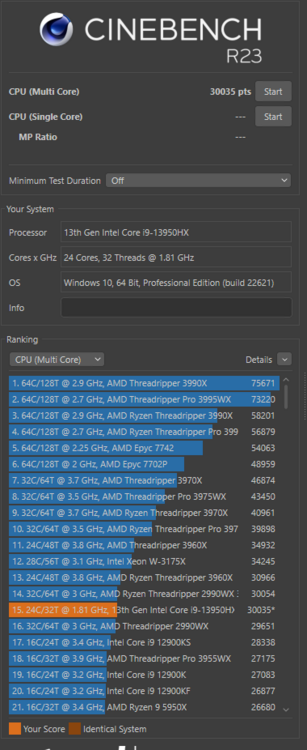
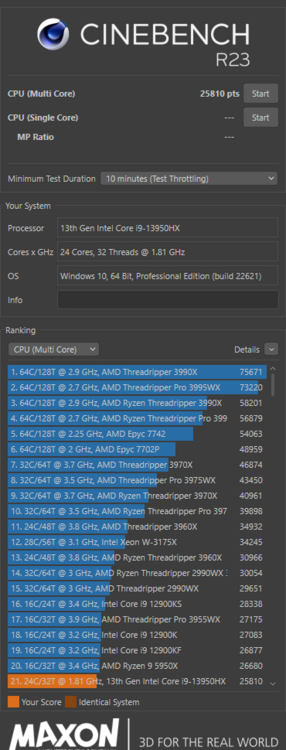
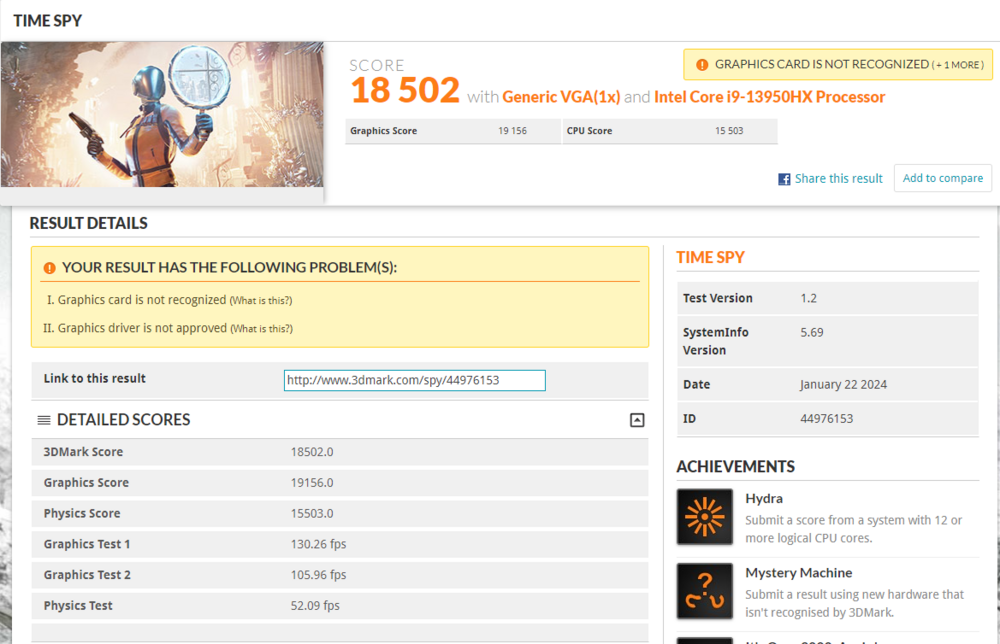
22 hours ago, Radmeister said:
So i got rid of the 85W PL1 limit. Not really it's still there but the EC will never see it because there is a 30W offset.
Using the same USB tool i mentioned and in the same window where we changed the AC loadline settings set the IMON Slope Offset to 70, 30000, and change the prefix to (-). This will make the CPU report it is using 30 less watts, so 85 is now 115, which you will never maintain anyways because of thermals.
These results are with PTM7950 and all new 12.8mw/k thermal pads and the exhaust side of the fans that blows into the chassis blocked off. BTW if any of you have poor contact with the left side of the CPU die (side away from GPU) there is a stock thermal pad that measures 1mm, i measured the compressed height using playdough and a height gauge and got 0.56 so i recommend using a 0.5mm pad with thermal paste. All the rest of the pads are 1mm with the exception of the GPU VRMs at 1.5mm.
.thumb.jpeg.98bdf7069d5f5d9fe9f177f08fb8f28e.jpeg)
-
3
-
-
So i got rid of the 85W PL1 limit. Not really it's still there but the EC will never see it because there is a 30W offset.
Using the same USB tool i mentioned and in the same window where we changed the AC loadline settings set the IMON Slope Offset to 70, 30000, and change the prefix to (-). This will make the CPU report it is using 30 less watts, so 85 is now 115, which you will never maintain anyways because of thermals.
-
 2
2
-
-
On 1/18/2024 at 8:00 PM, nero519 said:
For what is worth, this is what I have for the 4090:
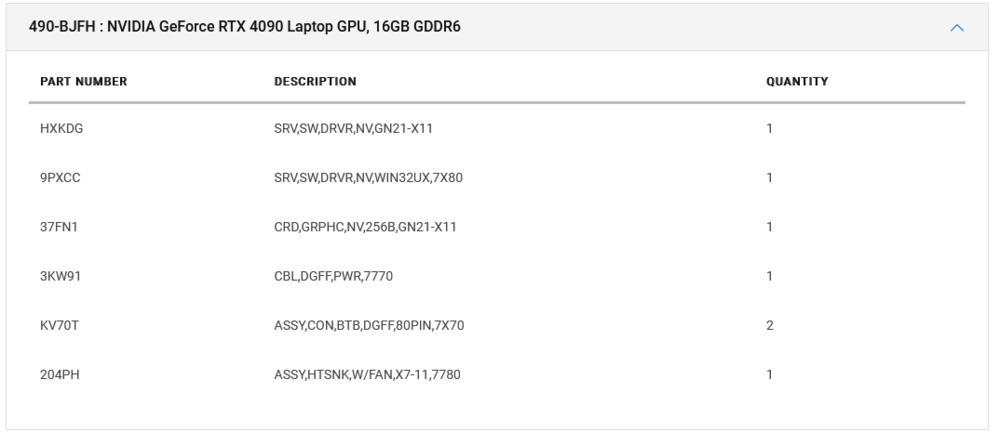
If possible, I would upgrade to a vapor chamber heatsink though
Thats the same as the RTX 5000 Ada, just note that you have a 7780 which is different than the 7680.
-
So have any of you guys been able to get rid of the 85w cpu limit?
-
1
-
-
13 hours ago, artemisDove said:
Thanks for the suggestion!
Unfortunately a gaming laptop is not really an option for my use case. Part of the reason why I buy "professional" laptops is their long life. My good ol' latitude is 10 years old, has not battery and looks dingy, but it's still around. Meanwhile some people I know have gone through 3 consumer grade laptops that start falling apart at the second year. Plus, gaming laptops sound like airplane turbines, and I do not want my colleague's to kill me.
Sadly the 12, 13 and now the 14 generation of Intels seem to be... disappointing a lot of people to say the least. Meaning the laptops also doing the same. I want to have the best possible thing even if these generations are sort of bad. I still need to get my work done.
Basically, it all comes down to finding the least "bad" of the Zbooks, Precisions and P1X's... and getting lucky to find a decent refurb that I can pay with academic money. Or... just going for the HP, even if it's not a miracle machine.
Thanks for the input! Did those GPU "glitches" occur only on Linux? Or did they happen with Windows too?
I guess in my case I won't have the benefit of the ProSupport since I will get a refurb sample (unless Dell supports those too). If these systems have so many issues, the HP might be the better choice since I do get 4 years of support.
Really sad to see how most of these workstations have such poor reception.
If you have to go the business route, sadly the dell is probably the best bet. Very easy to work inside of, also you can get crazy “grey” market deals on eBay. Plus there are millions of parts available on eBay for them if something goes wrong. Mine was a canceled order with a 9900$ CAD MSRP, never used with original packaging and I paid 3,800$. Which is pretty damn amazing for the spec. I would call these guys, they sometimes have stuff not listed on their site or on eBay yet. They have an actual store in Quebec Canada.
https://www.cikrefurbished.com
Dell Precision 7780 - Intel i7 13850HX - 32Gb DDR5 - 512GB SSD - 17.3" FHD - RTX 2000 ADA 8GB - Windows 11 Pro - Warranty 1 Year 2,400$ CAD/1650euroIt would most likely be a CAMM module for the ram so if you want more ram you’d have to buy a 64gb or 128gb module off eBay, or buy one of their other laptops, or maybe they can swap modules for you off of another one, takes 5min.The 7680 is probably ok as well, can’t see the thermals being that different and is also available with a 4K Oled screen that is 120hz, the 7780 is 1080p only 60hz, but goes super bright 500nits so great if you want to work outside and have a generator with you.
-
So after much, wayyy too much screwing around i think I have found the "best" possible performance settings for this piece of crap.
Nvidia Drivers need to be 529.11 or older, you will need Throttlestop, and you will also need a Fat32 formatted USB along with the SmoklessUmaf Beta. https://github.com/DavidS95/Smokeless_UMAF.
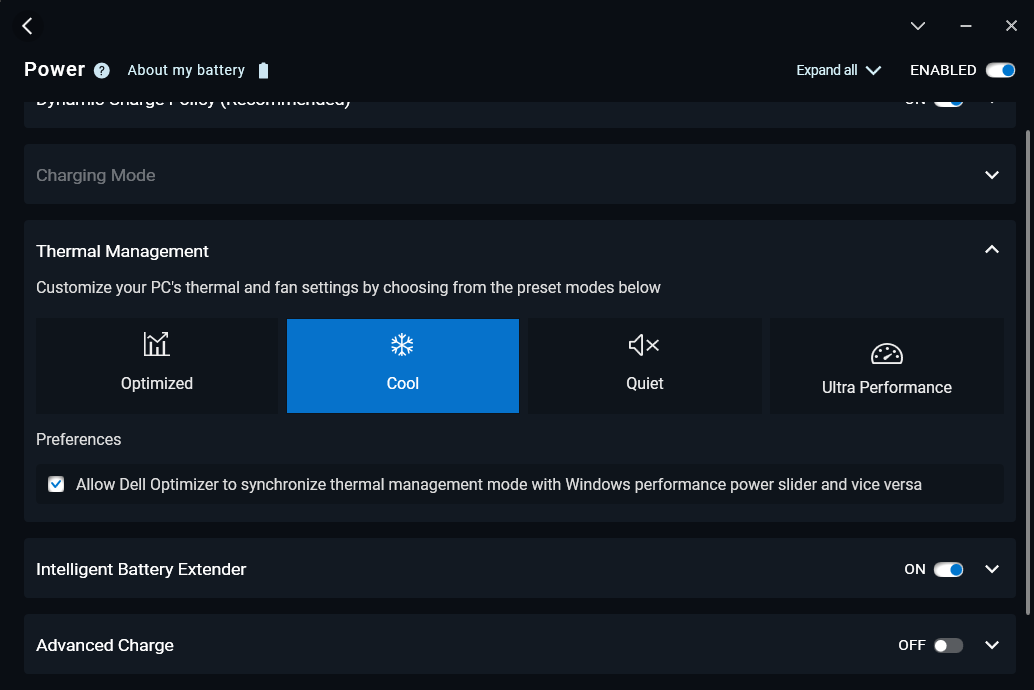
You will have to keep your dell optimizer power plan or from the bios to optimized, as cool even though it provides the best cooling, gimps out the GPU and unlike the cpu limits that we can bypass with throttlestop i have no idea how to for the gpu.
So as you know we cannot undervolt, so we must resort to the alternative that was offered by XMG/Shenker, which is using the AC loadline calibration values, for this we need the smoklessumaf beta to have a gui instead of using grub, if you want to use grub then i'm sure you already know how to do this step. Reboot, put in usb, hit F12 boot off usb. From there navigate the menus, if memory serves me right its under Power and Performance, CPU VRS Settings > Core/IA VR Settings > AC Loadline. I set it to 140
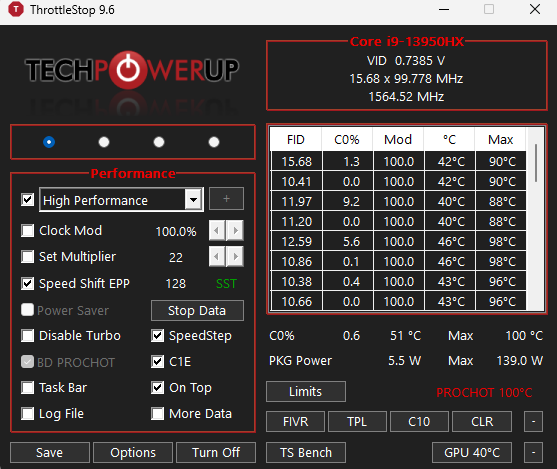
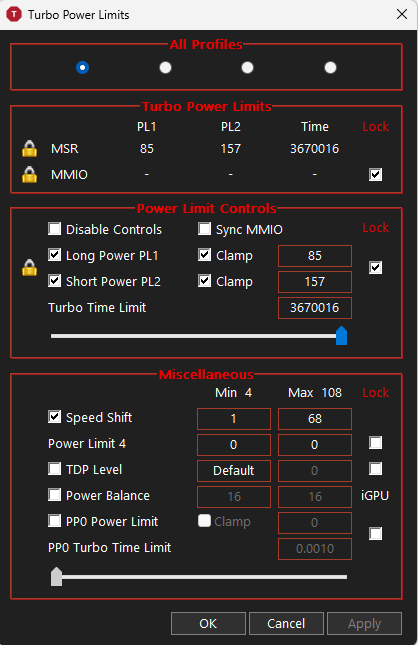
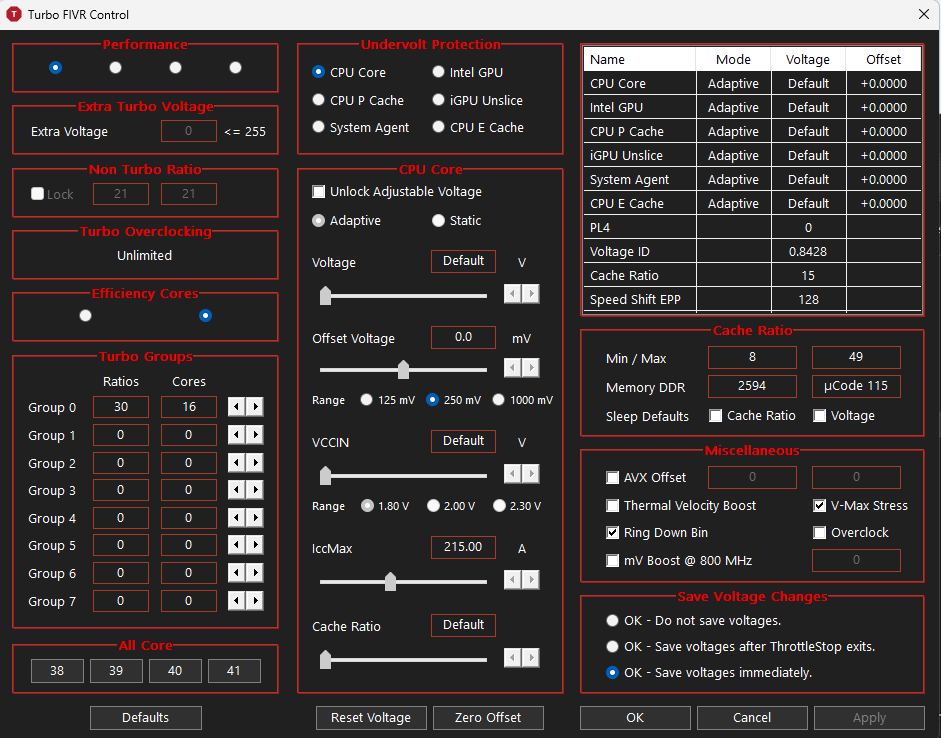
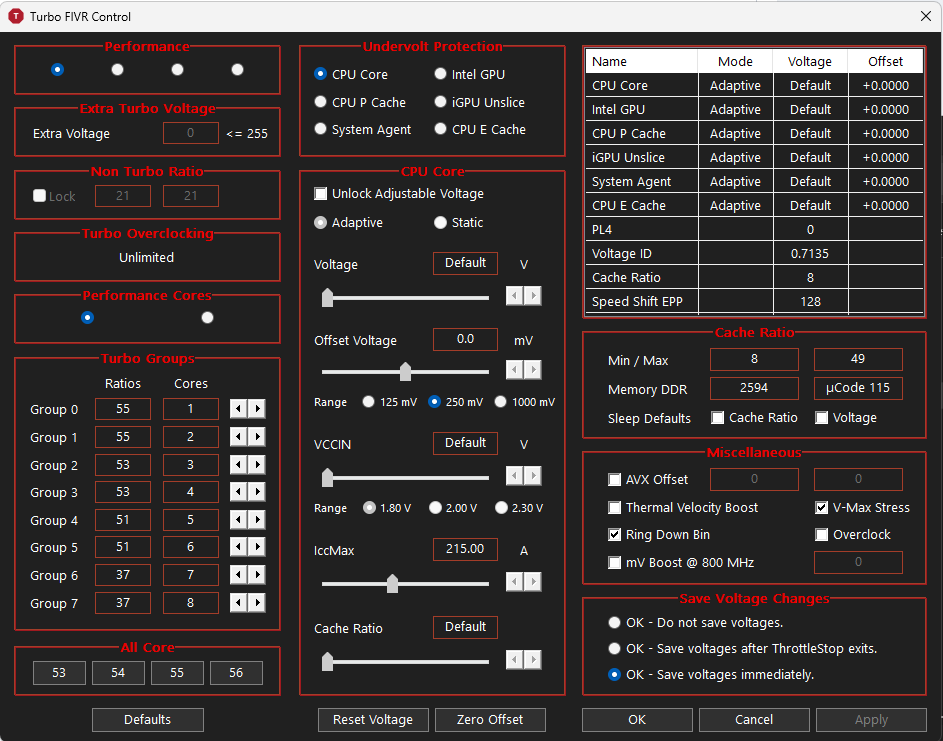
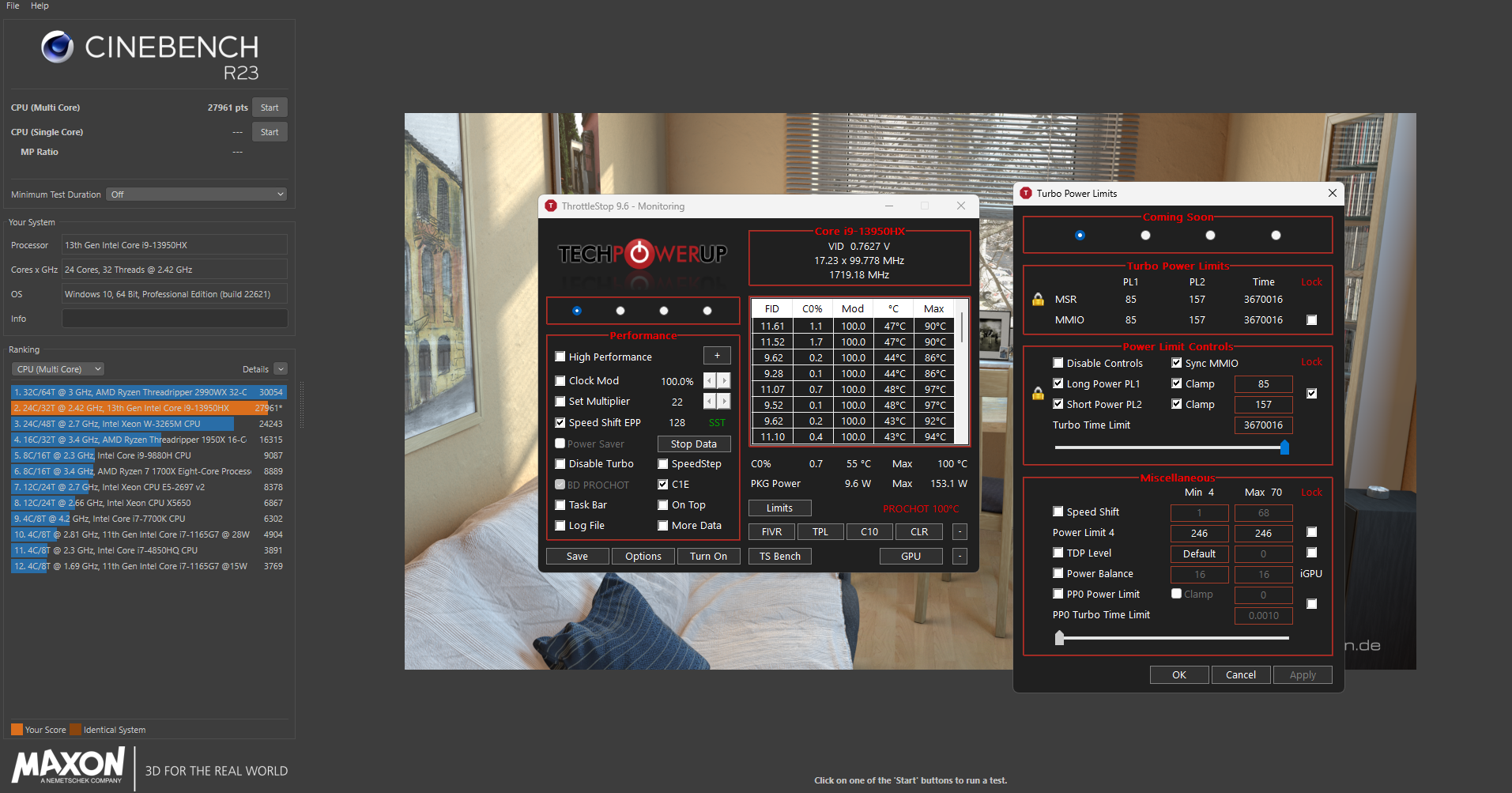
Next we will use throttlestop to get rid of the limits on tdp for the cpu because of the optimized profile. See attached.
Next - the reason why we need the nvidia driver 529.11 is because after this they removed changing the power limits using smi. So otherwise we would be stuck with 115w instead of 145w like is available on ultimate performance with no fans.
We will make a little batch file (txt file save as .bat) with the following;
nvidia-smi -pl 145
pause
Then we will create a task that runs 1 min after startup with highest privilidges that executes the .bat file to give us back our 30watts.
I find that limiting the P-core all core boost to 3.7 is ideal, and the e-cores to 3.0, i will maybe be able to get p core higher once i do the PTM7950 but for now this is what i got, also want to note all the results are on a modified ghetto fabulous ice coorel x7 running at full speed. (actually pretty quiet)
PS: In my messing around i seem to have broken the warm restarts, it always hangs on the first round, or it could just be how it is on this dell, last one did the same with no messing around so who knows.
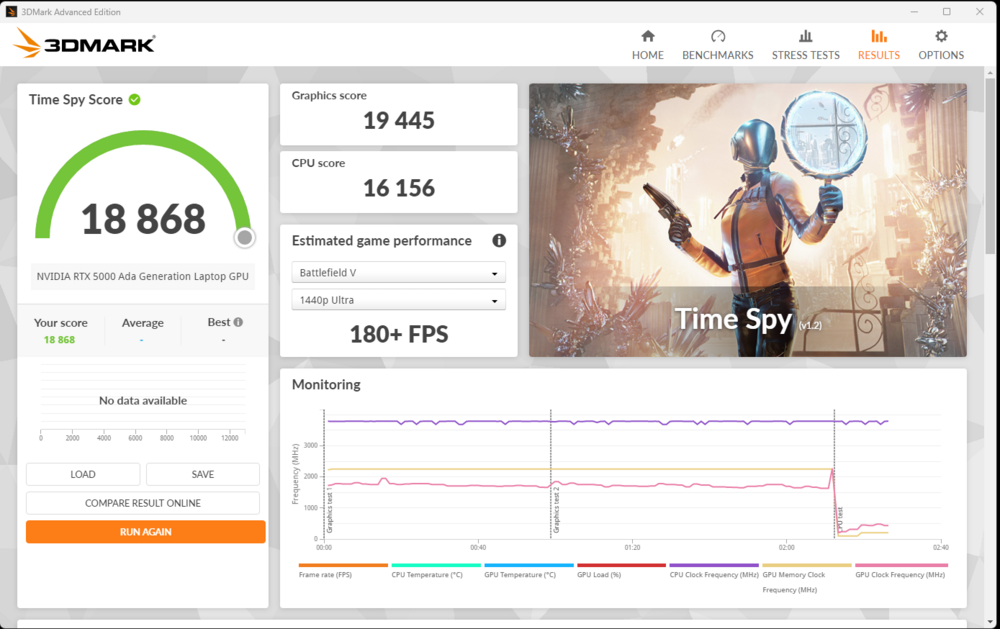
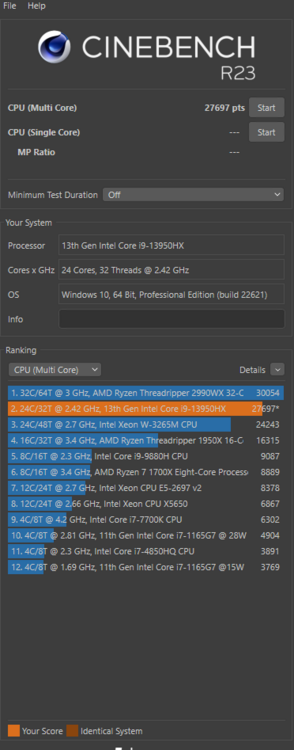
.thumb.jpg.63002fb345422fe8340b0f8c831d18ef.jpg)
.thumb.jpg.bbe862124c23be7312b3fdb847ddd79a.jpg)
-
20 hours ago, artemisDove said:
Hello everyone, first time poster here!
After using my beloved Latitude e6540 for almost a decade now, it is time to retire it. It is basically falling apart after so many years.
My current research involves VERY heavy optimisation modelling. My models do not really care about the GPU. It's all about the CPU speed, having as much RAM as possible, and stable (enough) performance under long workloads. Good cooling is important, a vapour chamber and good thermals are preferred.
I have two candidates, and would like to hear your opinion before I choose one, if that is OK.
The first is the Precision 7680: i7-13850HX, RTX 3500 ADA, 64 GB. I managed to find a supplier who is selling it refurbished at a very low price (with good warranty), so it seems like a good system to do my preliminary model runs before sending them to our cluster, or as a backup plan if the job queue is too long. It also has the vapour chamber (I think?), which is a nice extra.
The second is a new HP ZBook Power G10: i7-13700H, RTX 3000, 64 GB. This one is new, and is offered by my institution. After upgrading the RAM to 64GB, the price is slightly less than the refurb. Most reviews seem quite happy with it, but it's not a top of the line workstation.
I've read everything I could find on both models, and I am a bit worried about all the issues mentioned in this thread. For what I've gathered, other "top" workstations (ZBook Fury, P16) also have thermal problems in this generation. Some people in this thread have said that the 7780 is the better of the two Dells when it comes to thermals, but I cannot afford a new one. The choice is mostly either sacrificing portability or power, but I am wondering if I will get disappointing results or lots of other issues with the 7680.
I should also mention that I plan on running Linux on the system I get (mostly due to personal preferences). I do not know how that factors in when configuring the power profile of the Dell...
Basically:
- Should I go for the Dell if the cost is only slightly more (~400€) over the HP?
- Would I run into trouble if I try to get the most out of the system when not using Windows?
I welcome any other suggestions. Thank you for your time!
I would honestly buy a gaming laptop. I have huge regrets with this POS. Just get the ASUS Scar 18 with a 4080 and 64gb ram and call it a day, all these workstation laptops are gimped by corporate structure and old habits of limiting the user in every single way possible. Forget about fancy stuff like undervolting etc...YOU CANNOT CHANGE FAN SPEED ON A 7,000 USD LAPTOP IN 2023!!!!
The Scar can handle a lot more watts to the CPU and can be overclocked to maintain higher clocks indefinitely. This thing and the HP is probably the same, you have a beast of a CPU that can draw up to 200W when unleashed, but limit it to 85w after a minute, which if you are going for simulations that take a long time to run you may as well save the money and go for something like a 13600. So yeah, only advantage to these things is if you buy new you get their pro-care for 3 years with on-site repair after remote diagnosis, and they are easy to maintain/replace components. From my experience though, if it doesnt die in the first year, and you have a remote back up going who cares what happens year 2, it's already paid for itself. Also, these days what will you really change? Add another NVME? Easy on the Scar as well, add more ram? Easy on the scar as well. Who really cares about how easy the wifi module is to replace or the keyboard...By the time those die your laptop is off for donation.
-
So I have tried everything to undervolt this thing and it is not possible. My best guess is that it’s got something to do with the intel management engine or the intel power management engine which are embedded in the bios.
I checked a couple other bioses, Scar 18 and GE78 Raider, bios 1.8.2 uses cpu microcode 115, same on Scar 18, Raider uses 113. Both of those laptops can undervolt either in the windows runtime(xtu/throttlestop) or in the bios. Since we don’t have direct access to the Intel Advanced Menu and from everything I read about Intel Undervolt Protection which states that it prevents any undervolting beyond bios settings only, so even with it on you should be able to undervolt in the bios, so I used grub and changed the correct addresses for P core and Ring to a 125mv offset and the prefix to (-) and nothing happens. So it is clear that Dell has gimped this thing intentionally way beyond standard intel limits.
This limitation along with the lack of proper fan control is why I would never recommend this laptop or any dell to anyone. I mean they even bypass the intel fan commands which state to run the fans at 75% at 75c, in Ultra Performance profile it seems the fans run in “passive” mode and allow the cpu to down clock heavily before even coming on to 50%. I should have stayed with Lenovo and not listened to our IT guy. It’s really a shame because the unit is beautiful, maintenance is super easy on it etc.
Maybe someone with more skills than me can grab the intel management engine and Power Management Engine modules from the Scar 18 and replace them in the dell bios and recompile, I have no clue on how to put the bios back together once it’s extracted.
-
So has anyone figured out how to undervolt these things. I can’t seem to get around the Undervolt protection. I got the overclocking unlocked and can increase clocks and voltages but can’t lower them.
-
On 12/24/2023 at 6:35 AM, woffe said:
Hi,
how many points do get in CB23? I use PTM9750 an got arround 26500-27200 points for a single run. (i7 13850hx, RTX 3500,7680)
At this point I did not hit the thermal limit.
Before the repaste I got arround 24500-25200 and hit the thermal limit.
In the 10 Min. test I got arround 21000 Points. I ended up at 2,9 GHz because PL1 is still low (72-77W) CPU stays at arround 77-80c
Sooo, this is what i find works the best if you are not too worried about noise. Set the system to cool in Dell Optimizer. Then in throttlestop disable speed step, and enable speed shift, then increase the power limits to max. Also, depending on what you want more juice going to you enable or disable Intel Thermal Velocity Boost in the BIOS, with it disabled depending on cooling available you can get up to 25extra watts to the gpu. The fans on Ultra Performance are wayyy too tame.
EDIT: NVM, performance is better in CB, but it also limits the GPU to 55W which as of right now i have no idea how to increase it's limit back to 145. Really wish they would just let us change the fan curve at least to be able to increase speed above their minimums for each profile.
-
On 12/24/2023 at 6:35 AM, woffe said:
Hi,
how many points do get in CB23? I use PTM9750 an got arround 26500-27200 points for a single run. (i7 13850hx, RTX 3500,7680)
At this point I did not hit the thermal limit.
Before the repaste I got arround 24500-25200 and hit the thermal limit.
In the 10 Min. test I got arround 21000 Points. I ended up at 2,9 GHz because PL1 is still low (72-77W) CPU stays at arround 77-80c
Sooo, this is what i find works the best if you are not too worried about noise. Set the system to cool in Dell Optimizer. Then in throttlestop disable speed step, and enable speed shift, then increase the power limits to max. Also, depending on what you want more juice going to you enable or disable Intel Thermal Velocity Boost in the BIOS, with it disabled depending on cooling available you can get up to 25extra watts to the gpu. The fans on Ultra Performance are wayyy too tame.
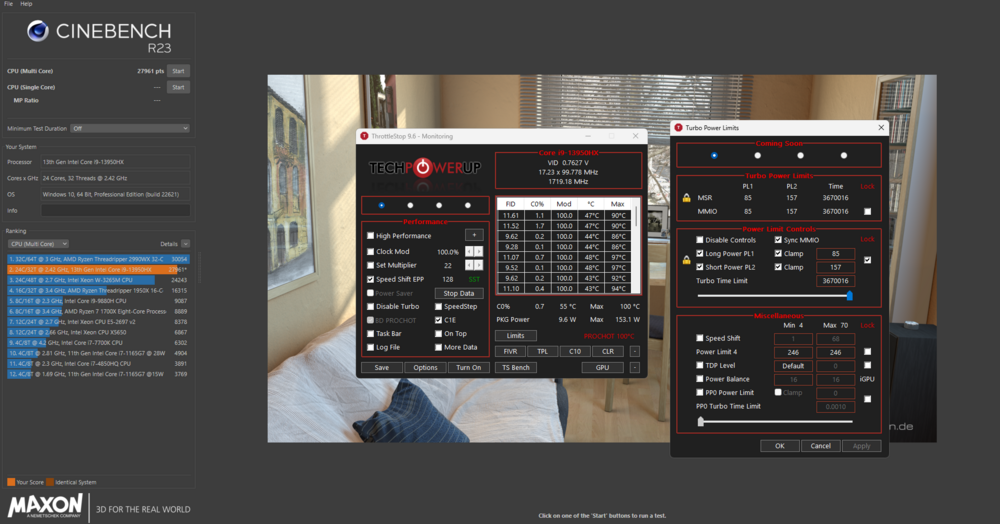
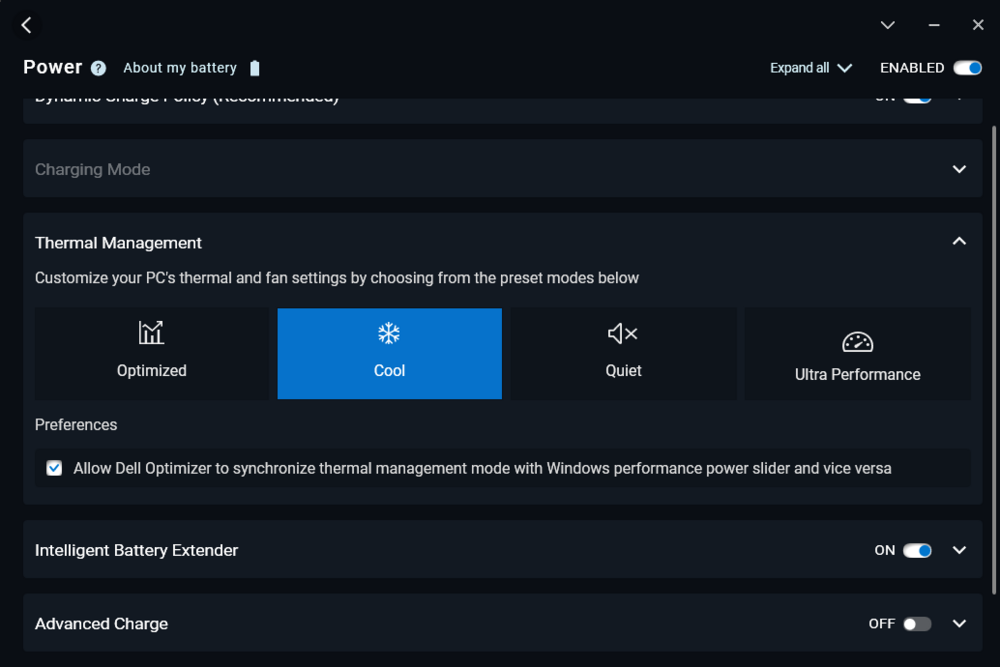
-
On 12/24/2023 at 6:35 AM, woffe said:
Hi,
how many points do get in CB23? I use PTM9750 an got arround 26500-27200 points for a single run. (i7 13850hx, RTX 3500,7680)
At this point I did not hit the thermal limit.
Before the repaste I got arround 24500-25200 and hit the thermal limit.
In the 10 Min. test I got arround 21000 Points. I ended up at 2,9 GHz because PL1 is still low (72-77W) CPU stays at arround 77-80c
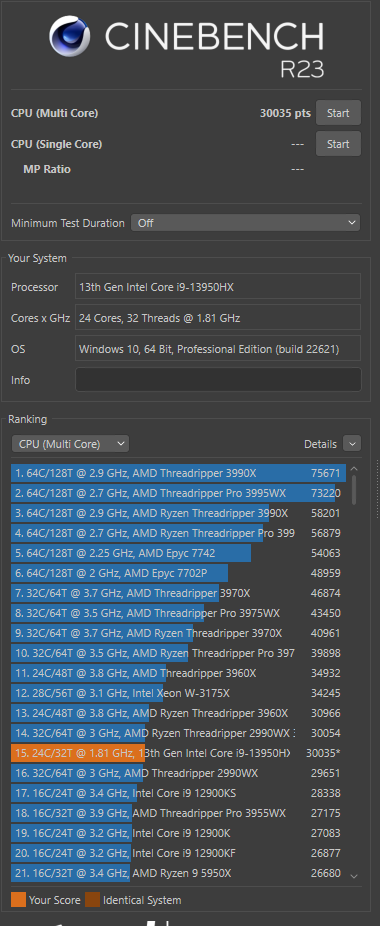
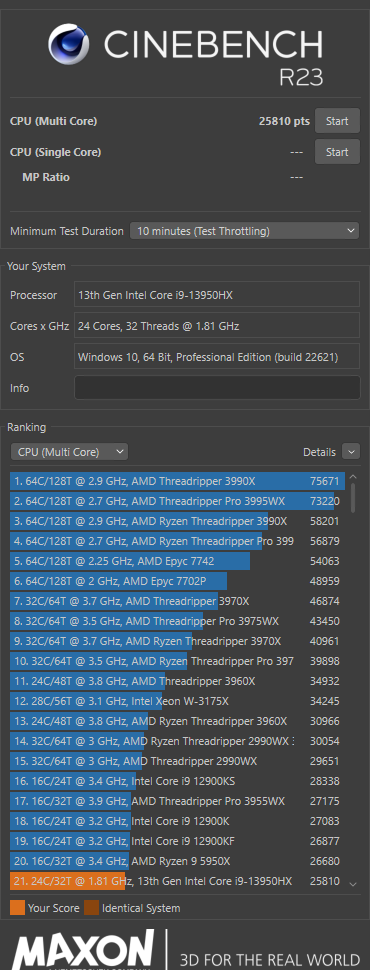
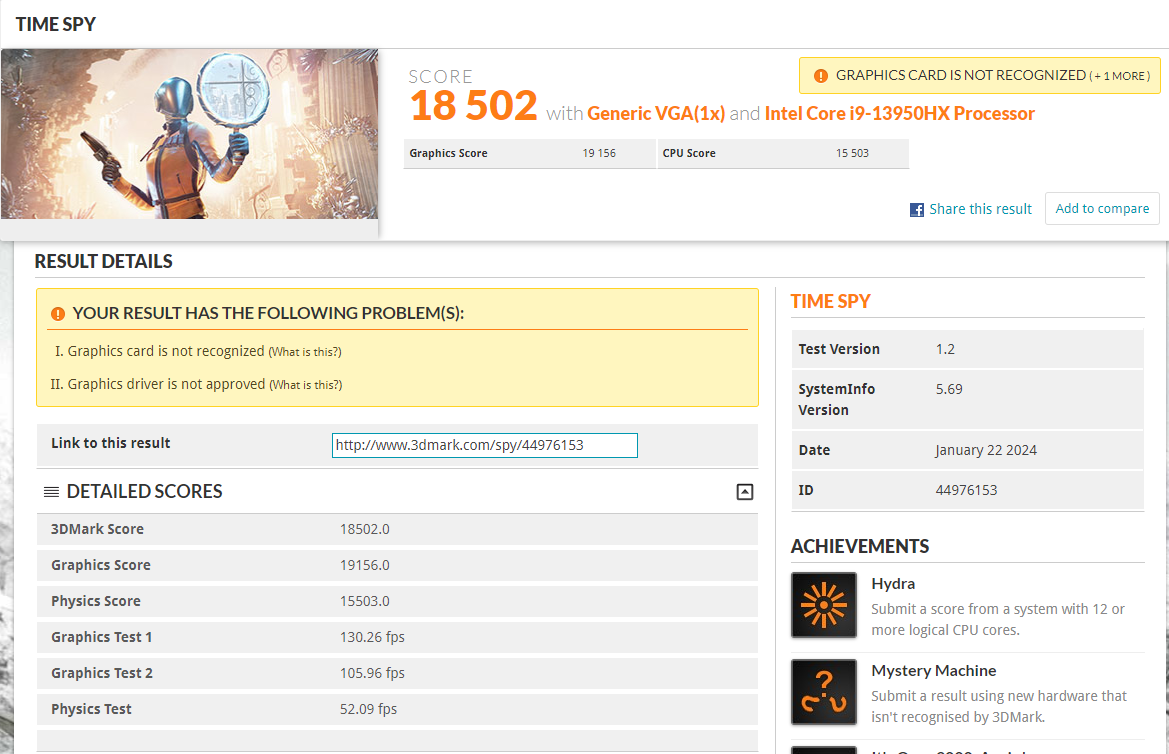
I get 26000 for a single run with 4 of the cores still bouncing off the thermal limit. I'll see what happens when i disable TVB3, but it does look like i should take this thing apart, measure all the pads, order some new ones along with some PTM7950.
.jpeg.9e929c38a83fb3f91dccdfc4092ce9be.jpeg)
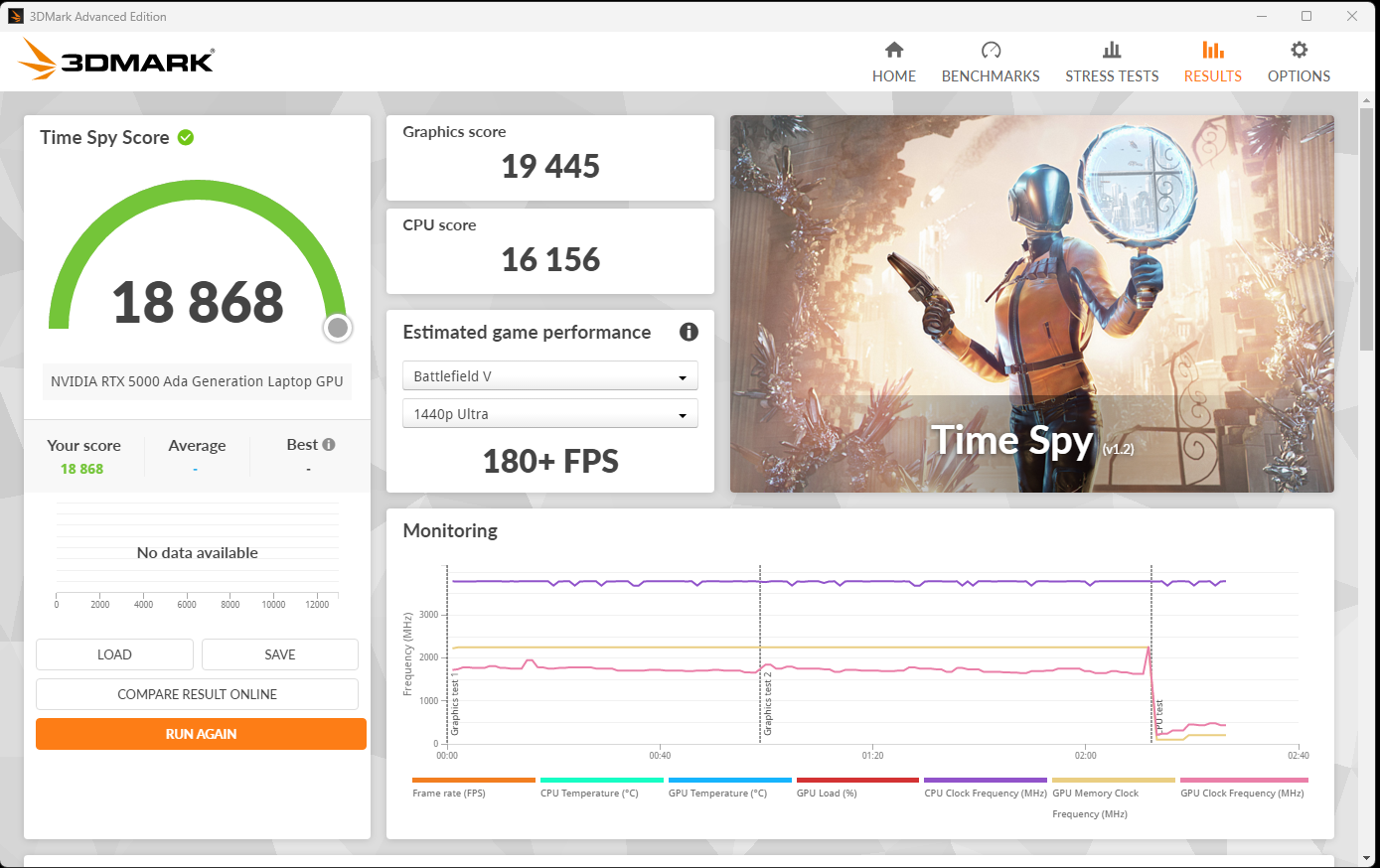
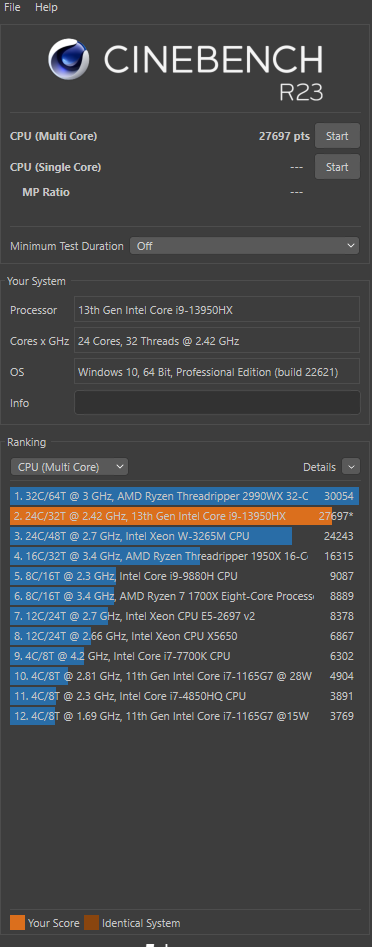
.jpg.4aa7fbec55b03bfe9ccfec1bc4b8912d.jpg)
.jpg.41860a6579885f4b4e3cbf78fe7a3b99.jpg)
Precision 7680 & Precision 7780 Owner's Thread
in Pro Max & Precision Mobile Workstation
Posted
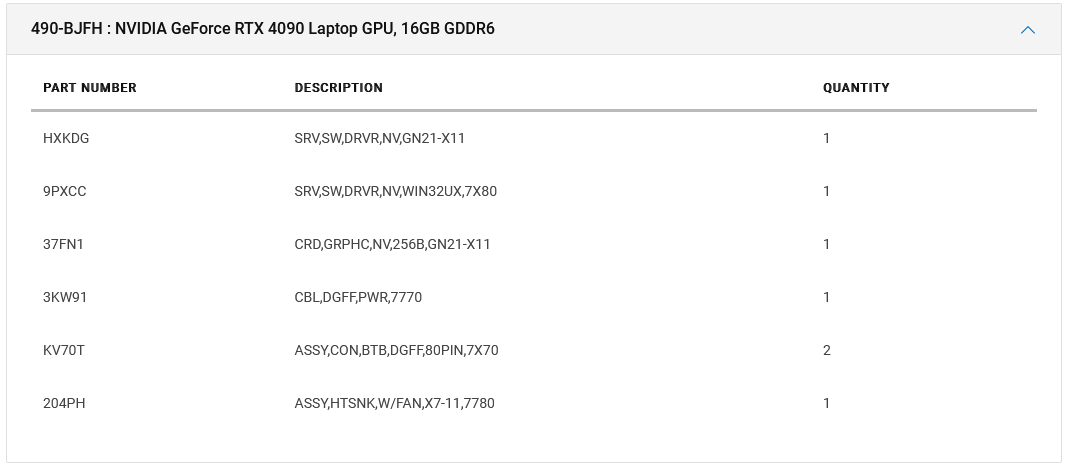
I gave up on the idea when I realized that the cooling solution cannot handle even the 240w. Why spend another 250$. Save your money and buy a cooling pad instead and a nice mouse.