
Ralph
-
Posts
21 -
Joined
-
Last visited
Ralph's Achievements


-
Nvidia-vBIOS-Clock-Power-Tweaker - PASCAL TESTING NEEDED !
Ralph replied to JadeRover's topic in Components & Upgrades
So I was right and you made some kind of mule 😅 horse ( core from P5200 ) and donkey ( P4000 card )🙃 😎 You made new card , lets call this mule P4600? 😅 -
Looking for Vbios for MSI gt75 8rg GTX 1080 200w
Ralph replied to Xerath's topic in Components & Upgrades
Stick with 150W. If you go higher then you will burn this card after short time. If you want full potential then focus on using MSI Afterburner and editing voltage/clock curve. You want to make flat line with lowest stable voltage for highest core clock. For examle you set core clock 1800mhz at 1v and everything "on right side" you set the same. Making flat line. This will force your laptop to use 1v for highest clock. You can set different clock value for different voltage but dont go higher than 2000mhz to extend your gpus life. This way you will reach its max performance. When testing you will get plenty freezes so be carefull and then lower clocks or rise slightly voltage and test again 😎 you have to find sweet spot for your gpu. Maximizing performance and keeping your card under 85-90 degrees. -
Nvidia-vBIOS-Clock-Power-Tweaker - PASCAL TESTING NEEDED !
Ralph replied to JadeRover's topic in Components & Upgrades
P4000 has 8gb and P5200 has 16gb. So my guess is that you use the same vbios for your card but someone maybe made some small changes inside your original vbios. To make it work you can ONLY flash vbios from the same gpu model as you have. It can be from different manufacturer but it has to be the same model. For example Dell P4000 vbios flashed to MSI P4000. P5200 vbios flashed to P4000 = error 43 -
Nvidia-vBIOS-Clock-Power-Tweaker - PASCAL TESTING NEEDED !
Ralph replied to JadeRover's topic in Components & Upgrades
Didnt know that memory on Pascal cards can go that high. Your oc is insane 😅 will test 2ghz on my mx230 🙃 -
Nvidia-vBIOS-Clock-Power-Tweaker - PASCAL TESTING NEEDED !
Ralph replied to JadeRover's topic in Components & Upgrades
This will not work because its hardware locked. There is protection made on board somewhere around chipset. Device id has to be the same in vbios. This is each time checked. If its different then you will get error 43. No crossflashing 😉 -
Quadro P4000 Mobile Oc vbios. Working and tested.
Ralph replied to Ralph's topic in Components & Upgrades
No I didnt find out. Propably there is like in desktop gpus ..... clock/voltage curve. I sold this card and also my old laptop so no more testing on P4000 😉 ps. good work on making your own Clock tweaker 😎 -
Quadro P4000 Mobile Oc vbios. Working and tested.
Ralph replied to Ralph's topic in Components & Upgrades
I was playing with this vbios one year ago and decided to mod vbios from imac forum. Modding original one was time consuming. I also had original dell vbios and this mod is working on MSI 4th gen. Set boot mode to UEFI with CSM. -
Quadro P4000 Mobile Oc vbios. Working and tested.
Ralph replied to Ralph's topic in Components & Upgrades
Maybe msi afterburner to overclock or at least undervolt? this is locked on mobile version. You would need signed vbios with higher gpu core/memory clocks and then flash it. Something like crossflash but this could brick your gpu. -
Quadro P4000 Mobile Oc vbios. Working and tested.
Ralph replied to Ralph's topic in Components & Upgrades
I spend some time on this card and believe me this clocks are safe in longterm and there is no point to change anything in hex editor. There is risk that you will damage gpu when you change more values. Do as you wish but I will not help on this 😎 -
bios update Help me Msi GT72 2QD i7 4720HQ GTX970m
Ralph replied to Beer's topic in Components & Upgrades
Try running your laptop in legacy mode ( not uefi ) -
Quadro P4000 Mobile Oc vbios. Working and tested.
Ralph replied to Ralph's topic in Components & Upgrades
Do some training on older gpu and if you succeed then you can try with P4000. -
Quadro P4000 Mobile Oc vbios. Working and tested.
Ralph replied to Ralph's topic in Components & Upgrades
To flash this vbios you will need CH341A programmer with 1.8v adapter. 😉 -
180w on mxm card is crazy 😅 even 150w was high but 180w is extreme high 🙃 I know that your temps are low but this will damage your card ( maybe mosfets ) 🤔 I suggest not to go higher than 165W limit. This card is expensive, no point in killing it for few extra fps 😎
-
Quadro P4000 Mobile Oc vbios. Working and tested.
Ralph replied to Ralph's topic in Components & Upgrades
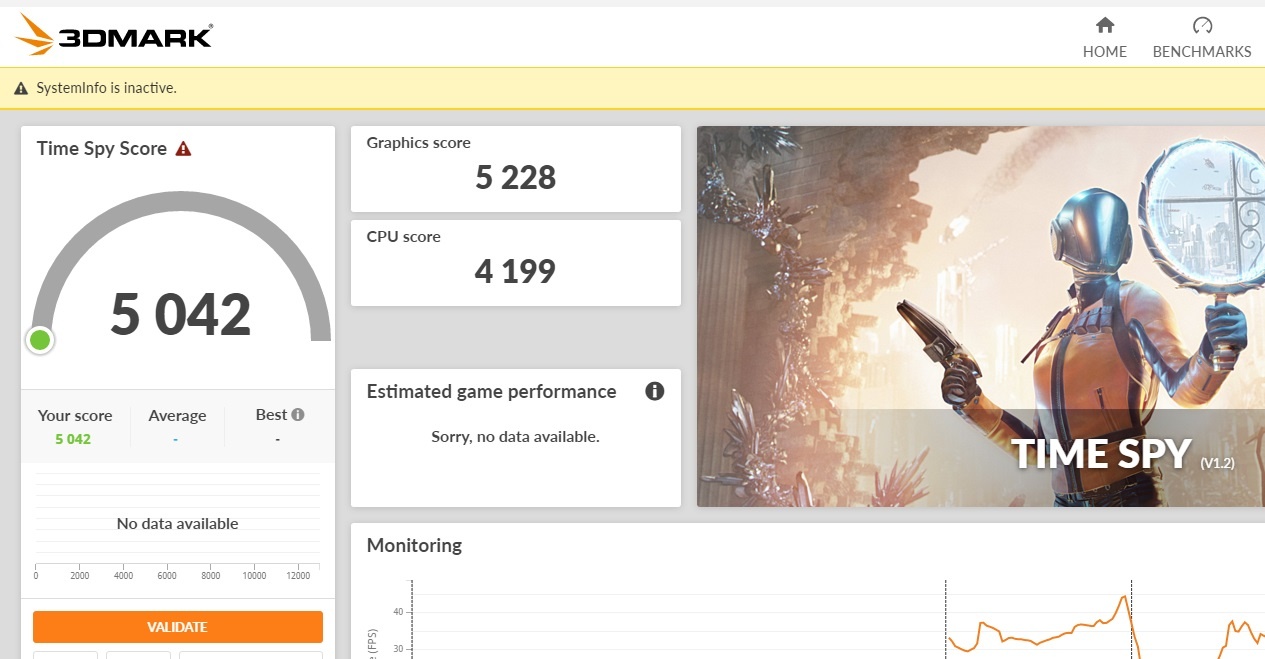
Last update. 😎 My laptops TDP is 180W so after some thinkin I made one more vbios. This version is 122W. Should be safe for my computer in longterm ( 122W gpu + 50W cpu ) I also rised slightly max core clock to 1772mhz. Extra 10W will help to stabilize clocks to stay above 1700mhz. I also must say that I applied liquid metal to cpu and gpu. This is risky and could burn your laptop if you dont know how to do it properly. Max temp are about 75-76 degrees. In nvidia driver settings I locked max FPS in games to 50. I dont see difference between 60fps and 50fps. Its fluently and it lowers temps on my gpu. Now my temp are closer to 70 degrees. This is my workaround to undervolt 😉I used this table 😅 240 FPS: target frame rate for extremely competitive gaming that requires fast reflexes 144 FPS (eSport quality): target frame rate for competitive eSport games like LoL, DotA, and CS:GO 120 FPS: Very good and difficult for the layperson to distinguish any frame rates higher than this. 90 FPS: Target VR framerate as to not feel dizzy 60 FPS (Gaming PC quality): Target FPS for most games. Buttery smooth. 50 FPS: Pretty good 40 FPS: Acceptable. 30 FPS (previously console quality): Noticeably less smooth, but still playable 25 FPS (movie quality): Barely playable. 20 FPS: Very difficult to play and frame rate may prove to be a significant handicap in games. 15 FPS: what is this sh*t 10 FPS: PowerPoint is opening skyrim.pptx 5 FPS: PowerPoint has failed to open skyrim.pptx 2 FPS: Microsoft Word? I am really happy to know that I have the fastest P4000 mobile in the world 😅 graphics score is above 5200pts in time spy. Yes I will upload this vbios 🙂 I decided to make second version. Tested 122w vbios for over one month and all was working ok but in long term I would prefer slightly lower TDP and lower temperature. So made some small changes and I give you 121w version. Update 11.10.2024 And again one more vbios with slightly lower max clock 1759mhz and TDP 120W. I think this is sweet spot. If you dont go over 80 degrees this should be good to go in long term usage. Higher clock would need TDP above 130w+ and this will likely damage your card after 1+ years. No point risking going above 120w. deleted vbios Update 14.03.2025 Well higher TDP in heavy gaming takes extra power from my old battery 😅 Dont like that. I will delete this vbios just to be sure that no damage is made. All user should use 112W version.
-
Quadro P4000 Mobile Oc vbios. Working and tested.
Ralph replied to Ralph's topic in Components & Upgrades
Did some modding 😎 I added two small fans. Size 40mm x 40mm x 7mm. There was not much space but I was lucky and made them fit. I hope that one in the center will help to cool down my gpu mosfets. Had to cut down some plastics from bottom cover. I converted fans to usb ( they are 5v ) and will simply connect them to usb port. Time to test TDP 122W and core clock 1797mhz and see how it goes 😉 maybe nothing will blow up 😅