tway
-
Posts
12 -
Joined
-
Last visited
Content Type
Profiles
Forums
Events
Everything posted by tway
-
I believe they aren't marked because cooling shouldn't be necessary for them, not sure but I don't have thermal pads on mine either and it's fine
-
@Kniben Hey sorry, which chip do you mean exactly? There's a few in that location, I believe some don't have any pads covering them on mine
-
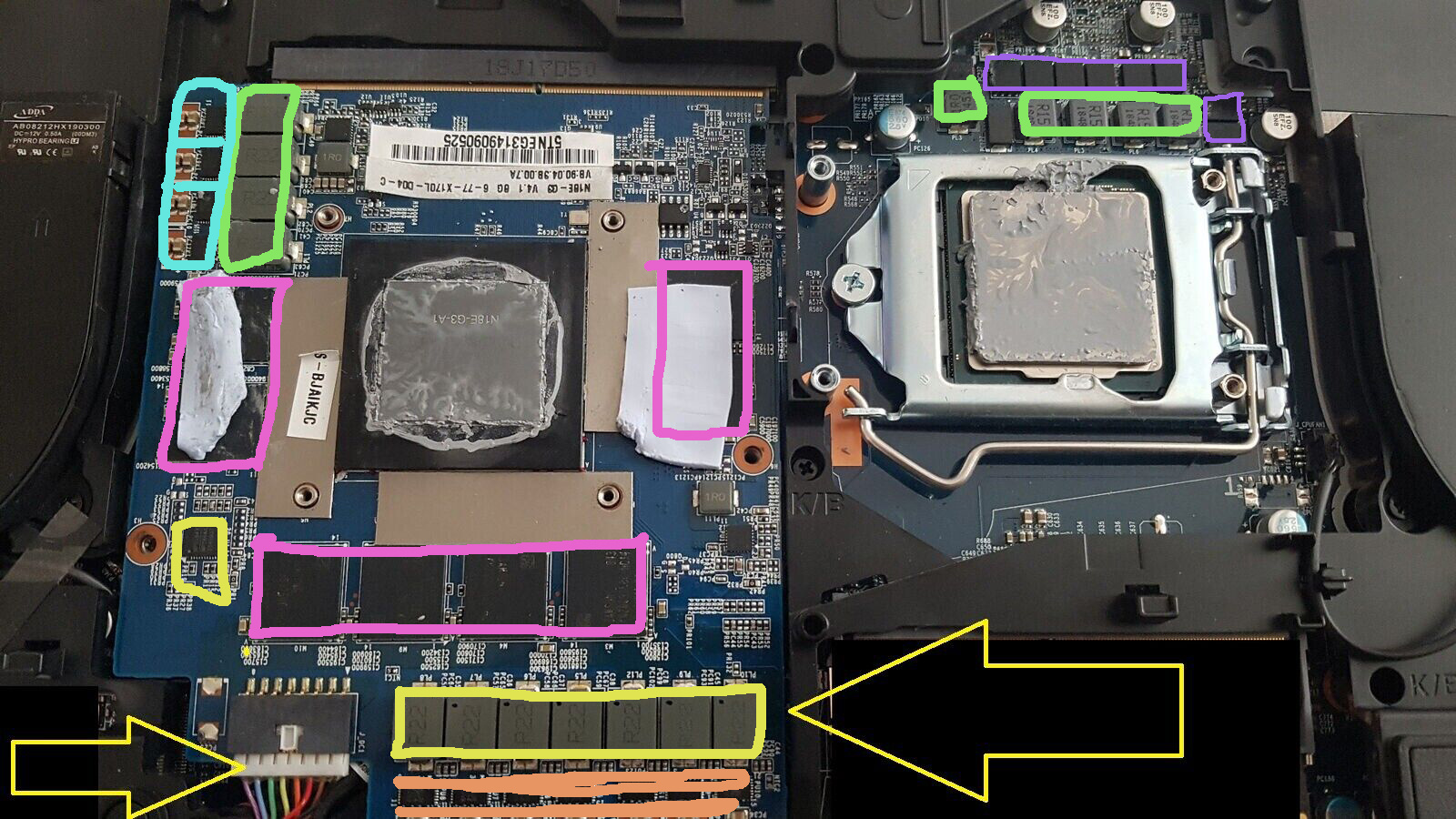
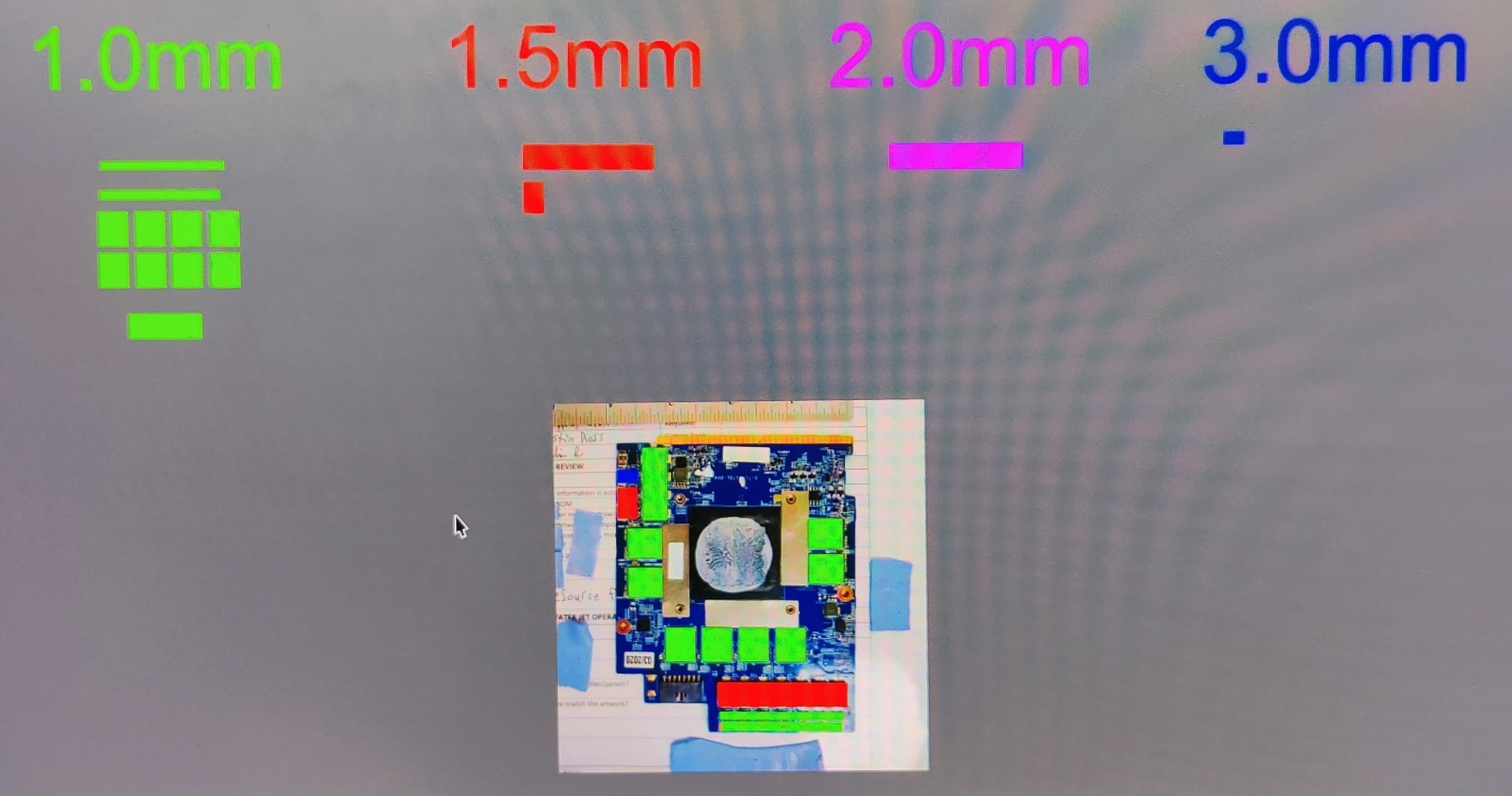
@Kniben my GPU still works great under full load even after extensive testing, still no power cuts so far. Have you tried replacing the thermal pads in accordance to the diagrams I sent and checking that they're making good contact with the heatsink? Maybe you're making the same mistake I made, it is quite hard to tell without any references. The fact you only need to underclock to -450 to be stable whereas I needed -700 (due to a missing thermal pad altogether) tells me perhaps you have them all in correct positions but maybe they lack proper contact with the heatsink especially since you mentioned they're incorrect thickness, hence poorly dissipating heat
-
I don't know how old these are but when I take my heatsink off my thermal pads have noticeable physical indents from the components they're contacting (similar to yours in the bottom left). Maybe you have the same issue as DoenerBoy where yours have minimal/no proper contact due to not being thick enough. I could be wrong or not seeing properly from the pics but either way replacing them will be much cheaper than any actual hardware so may as well try imo. Also is that liquid metal on your die?
-
Yeah it's unfortunate the P775 has these design flaws, but also I find your experience with Eurocom crazy... I personally never bought from them since they looked like scammers to me, but for the prices they're charging I expect them to fly out a representative to your doorstep as customer support 😂 who do they think they are charging this much? Apple? They are very clearly trying to exploit us, I have talked to so many private sellers with overpriced Clevo parts who point to the Eurocom ebay shop as a justification. And this is their goal all along, they know exactly what they're doing. Best we can do is not buy from them, I don't know how they aren't out of business or anything by now, some of their items have been sitting for over 2-3 years with no sale. Anyway this is off topic now but hopefully this dissuades people from giving those scalpers any money. It wasn't always like this but as of present that company is doing much more damage to the community than adding anything of value. @Kniben I hope it's just your thermal pad placement that's bad so you don't have to buy a new motherboard, especially from them. I've attached images I found in some threads that I used as references to check thermal pad placement, hopefully these help.
-
Bruh no way, I had already checked thermal pads and paste after the initial comment by runix but nothing seemed wrong at the time. Today I took the heatsink out and decided to check it against a proper diagram and realized one of the pads was actually too short and didn't cover all the necessary components, whoever placed these before me probably got the wrong size and it would have been very difficult to tell without the diagram. So I added a piece and now I can't get it to shut off even at full power, at least for now. Thanks a lot for the help everyone, can't believe it was a stupid thermal pad causing all this. Just curious @1610ftw which company are you referring to? I think I know who it is but just wanted to make sure so everyone knows who to avoid
-
@Khenglish thanks for your input. I tried your suggestions and removed the GPU underclock while tweaking some settings in XTU including IccMax and lowering PL1 + disabling PL2 however no matter what I did the issue persisted. It was only when I reapplied the GPU underclock that the issue stopped again so I think it is a GPU power problem. But I may be wrong, what specific changes would you recommend I make in XTU? Appreciate your help
-
Hey @Kniben, yes those sound like the exact symptoms I'm experiencing from the looks of it. I actually never ended up properly fixing this issue but underclocking the GPU by -700 on core increment in the clevo control centre + enabling G-Sync for both fullscreen and windowed modes seemed to have temporarily solved it and it runs stable with those changes. That is not a good solution whatsoever but it's what works for me until someone comes along and properly diagnoses the issue. I too would like to try the 780W adapter to see if it makes a difference but it's quite expensive and @DoenerBoy123stated that the issue occurs even when using the 780W PSU, so I wouldn't count on it. Someone also mentioned theirs was caused by CPU load spikes and I'd like to test it with a 6700K I have lying around but don't know if it'll work with this model and my current bios and everything. By the way I noticed you mentioned wanting to try a motherboard replacement, I don't know who this Canadian supplier is but I hope you don't give the Eurocom shop on ebay any money, imo they're single handedly damaging and preying on this community by artificially inflating the value of decade old hardware with their aggregious scalper prices. Anyway, I also find it very strange we all started experiencing these identical symptoms at roughly the same time... let me know if you make any more observations
-
Hey, this is actually really helpful thanks. Maybe it wasn't the GPU after all since that was just my suspicion for what was happening, and while I seemingly solved the issue I would still like to know the true cause to ensure nothing like this will happen again. My clock speeds for both CPU and GPU should be default as I haven't touched anything in that regard, base speed is set to 3.60 GHz and max turbo is 4.90 GHz. As for the power draw, I haven't gotten around to testing just the CPU by itself but if I recall correctly, the OCCP stability test on CPU + GPU saw the CPU not exceeding 90W and GPU not exceeding around 150W. In my original post I wrote that I was able to get the Furmark GPU stress test to shut the laptop off one time so not sure what's going on there, could that still happen even if the CPU is the culprit? One other observation I made since then was that I can hear some sort of "coil whine" coming from within the laptop itself (not the PSU, maybe it's the VRM), it gets louder/quieter in game whenever I drag the max FPS slider up or down respectively and gets very loud at unlimited FPS. It seems to me your description of the issue sounds very similar to mine so if you don't mind me asking, how were you able to fix it in the end? And what would you recommend I do to prevent this going forward?
-
Didn't want to leave this unaddressed in case anyone else has the same issues as me in the future and comes across this thread, but I ended up solving the issue. The problem was actually GPU transients and I've come to realize this is a fairly common problem among high end cards. The way I understand it is that while under a static load the total power consumption may not exceed 330W, these transient spikes cause it to briefly exceed that limit and trigger OCP on the power supply, hence shutting it off. It also makes sense why it only occurred sporadically under high loads when simultaneously doing things like opening a program or simply tabbing out, but not when leaving it under constant loads such as stress tests. I was able to fix it by either underclocking the GPU to ultimately lower the ceiling to which the transients were able to reach (also explains why it works completely fine on battery), or purchasing a splitter for the two 330W adapters to account for this extra power draw, the 780W Eurocom adapter should also work. Thanks for the help I really appreciate it.
-
Hey, thanks for responding I really appreciate any ideas I can get. Are you sure it's the power mosfets which are causing problems? I can use it completely fine with no issues if it's unplugged and using battery (I couldn't get it to turn off running the same intensive graphical applications while using the rtx 2080 on battery). I also found out it's actually flashed with Prema bios (version 1.07.MTBX2), upon researching it seems some other people also had issues with Prema bios including random shutdowns and other instabilities (although with older clevo models, not mine). Resetting the values to default doesn't help at all, but there are so many settings and I don't know what each one does. Should I try flashing the bios? I don't have the stock bios image and don't know if I'll be able to get it, but if you're certain it's a mosfet issue I wouldn't bother. The fact it works perfectly on battery under the same load which otherwise causes it to shut off when plugged in is what makes me think it may not necessarily be a critical hardware issue requiring component replacement. Please correct me if I'm wrong. Thanks again
-
Hello, I've recently picked up a Clevo P775TM1 (Metabox P775TM-G) for a decent price, however it has a critical issue I'm struggling to fix which the seller had not mentioned. The specs from my specific rebrand are as follows: Model: Metabox Prime-X P775TM-G Display: 17.3" FHD 1920 x 1080p WVA Matte 144Hz LED Graphics: NVIDIA GeForce RTX 2080 8GB GDDR6 VRAM with G-Sync Processor: Intel Core i7-9700K Octa Core (12M Cache, up to 4.90 GHz) Memory: 32GB DDR4 2666MHZ (2 x 16GB) Hard Drive: 1 x Samsung 970 EVO Plus 500GB PCle M.2, 1x Samsung 970 EVO Plus 1TB PCle M.2 (1.5TB total) Wireless: Intel 9260 AC Dual Band WIFI/BT (up to 1.73 Gbps) Whenever I open a game (e.g. basic Minecraft), the laptop has a tendency to completely shut off as if power to it is cut. I have taken it apart and cleaned all the dust out, and repasted both CPU and GPU. Monitoring temperatures during the shut off with HWInfo I can rule out overheating from being the culprit as CPU is around 70C and GPU around 60C when this occurs, with the laptop hotspots not even being warm to the touch. I've also attempted to run multiple stress tests on it, including Furmark and OCCT. Both chips reached extreme temperatures during the tests and throttled however I did not experience a shut off in either tests, only once upon launching Furmark (I have launched it numerous times). The OCCT Power test reported the CPU not exceeding 100W during the test while the GPU pulled a maximum of 150W (these will be important for later). Interestingly, when running completely on battery I could not replicate this issue whatsoever no matter what I did, and removing the battery itself before plugging in the adapter and testing it again still caused it to shut down under the same conditions so I assume it can't be the battery. In the rare case where it does not immediately shut off under those circumstances, I could instead hear a high pitched electrical noise coming from either the PSU or from within the laptop itself (or both, could be coil whine?) I am using the original 330W brick, and I've also tried a completely new 330W brick which was provided with the laptop but the issue still persists across both bricks. Most of the time this issue occurs when I switch into full screen mode, it immediately shuts off with no warning as if there's a power surge. Recklessly opening up background apps while tabbed out of a game can also lead to the same result. I noticed that turning on G-sync, or limitting the FPS in general decreases the chance of the issue occuring and I can play the game mostly fine, however by doing some of the things listed above I can still intentionally induce a sudden shut down. It's important to note that while doing basic tasks like browsing or watching YouTube this issue does not occur. I am planning to use this laptop for instensive graphical applications so I can't settle for that. Both Windows 11 and Windows 10 had the same result so it's not OS related. Given these specific circumstances, my current suspicion is that the 330W power brick may not be providing enough power and when the laptop exceeds this 330W limit it shuts off, just like a regular PC would with an underpowered PSU. I have not tried running both chargers at once as I do not have a Y splitter for the two 330W adapters and it is quite expensive. Would my suspicion be correct? Should I purchase a Y splitter (or even the 780W adapter) and try running it off both 330W PSUs? Does this laptop model require 330W+ with fully loaded CPU and GPU, how much power do these machines generally pull? The reason I am a bit sceptical is because this laptop actually shipped from Metabox with only a single 330W brick, so I assumed that's how it was intended to be used. Could this instead be a poor bios configuration, even if I reset everything to default? Would there be any other ways I could test this theory to see if it's correct before I purchase anything else for it? Could this be a much bigger hardware issue than a PSU? I have seen so many accomplishments with Clevo machines here that are way beyond me, just thought maybe with such a knowledgeable community I would be able to find some assistance since it might be a simple fix. Thanks for everyone's time