

2CPU
-
Posts
40 -
Joined
-
Last visited
1 Follower

2CPU's Achievements






-
 I believe the very latest BIOS can only be downgraded to 1.12.0. The later (more recent) BIOS burn e-fuses in the CPU as I was unable to boot after recovery flash below 1.12.0 without replacing the CPU to boot 1.3.2
 -
Wow that is amazing. I need to do this!
-
In the past I tried to adjust the CL values but they would get overwritten by the SPD read of the DIMMs upon boot. (guessing that is why they changed from my RU.efi settings) The DIMMs I purchased are only 2666mhz max per the label. I think these are TimeSpy scores: ~21k
-
I am missing these extra settings: ✅ Memory Profile: MEMORY PROFILE 0XA65 → 01 ✅ Additional Overclocking: 0X93F → 0B Would this help my Area51m RAM at 2667mhz?
-
It is more like bad BIOS PCIe handshake. Re-connecting in Windows resolves it somewhat. I am on 1.3.2 BIOS and I am 99% sure downgrading below 1.12.0 requires you to swap the CPU (later BIOS burn efuse to prevent rollback)
-
Woo the hero is here. Sweet! I will dabble in this in upcoming months.
-
Thanks for your efforts. I used your posts to reverse engineer backwards to get 2667mhz on my Area51m.
-
Simple online search shows a few options but might need to buy the 2080 cooling setup. I have the external graphics amplifier working on the Area 51m with good results.
-
Anyone else running 5070, 5080 or 5090 in AGA? For some reason my laptop doesn't stay asleep and transitions to off overnight. I just tweaked some settings in the power area (I think HDD power savings not set to never was the issue). Hope that resolves as I am required to unplug/plug back in the AGA to get the 5080 to proper PCIe settings. I am hoping to just keep my stuff open and sleep overnight and wake fine.
-
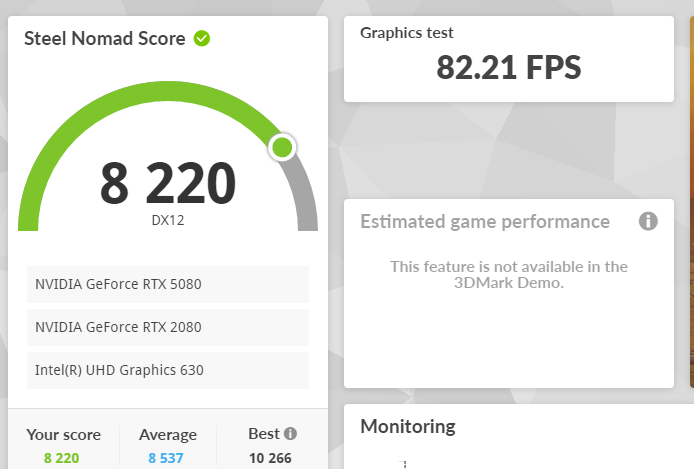
I was really worn out with the system being "dead" for ~3 hours while I actively tried everything to get one boot. I would of rather spent that time playing Borderlands 4 so I did not put it through a lot of testing. It is booting fine now at the 2667mhz (vs 2400) & maybe works better for games but need time to check. If you have mismatched sticks then you should put the worst CL rated pair in the slot 1&2.(I think I have one pair CL17 and other pair are CL19) That way the SPD read assigns all sticks with the slower CL values. The system was crazy hot yesterday so I do see minor improvement. Maybe a "good run" will yield 83 fps? Time spy: CL17 @ 2400mhz vs. CL19 @ 2667mhz yielded 0.21 more fps in bench marking. Overall I do see more consistently higher fps scoring. Just surprising to me how little you gain with a different CPU (+600Mhz w OC), RAM capacity (+32GB) and RAM speed (+267mhz). Two fps in Steel Nomad. However, all those changes cost me nearly nothing since I resold the older CPU for more than I the faster one and extra RAM. Edit: The fps in Indiana Jones does seem a lot higher.

-
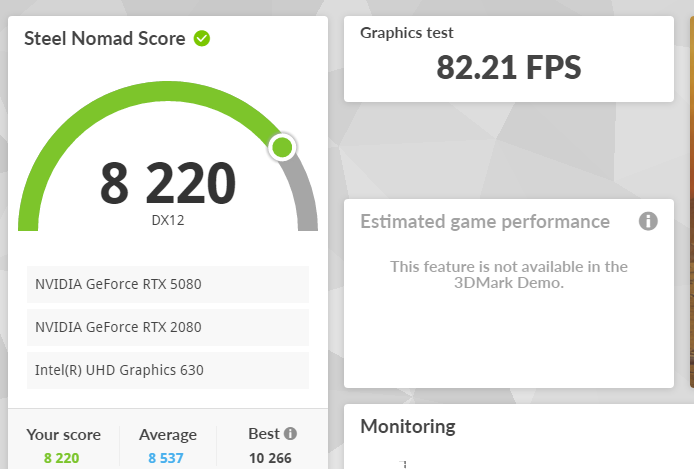
Yes, you made me go check it out. Summary is if you care buy faster RAM. But I did not see anything life changing from 2400->2666mhz Yielded the best benchmark yet: Time spy:

-
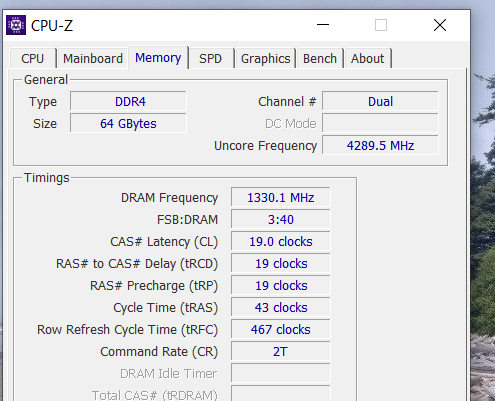
As a glutton for punishment I've tried yet again to run RAM at 2667mhz settings. Only edit of the mhz via RU.efi and nothing else. Working fine, 64GB dual channel @ 2667mhz. No problems yet but zero improvements in benchmarks. Fine by me since I spent zero dollars.
-
I am finding that the "CL settings" get overwritten each boot as I am attempting to put in worse CL settings prior to the mhz bump but they do not stay. Which would make sense since the SPD read of the RAM should be placed in the NV region of the BIOS SPI. So then I do not understand the commentary in Reddit. I am thinking the RAM speed setting of BIOS should prompt SPD read of the RAM to populate the CL settings in NV region. (Not requiring any RU.efi tweaks) Perhaps the Reddit guy just bought really expensive RAM and got lucky.
-
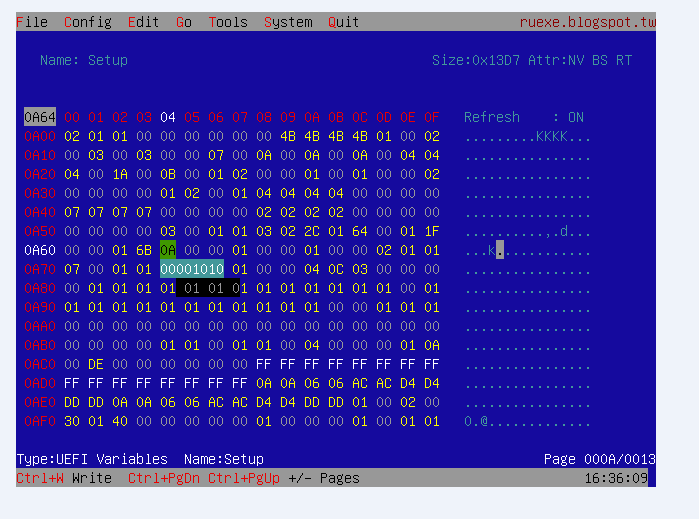
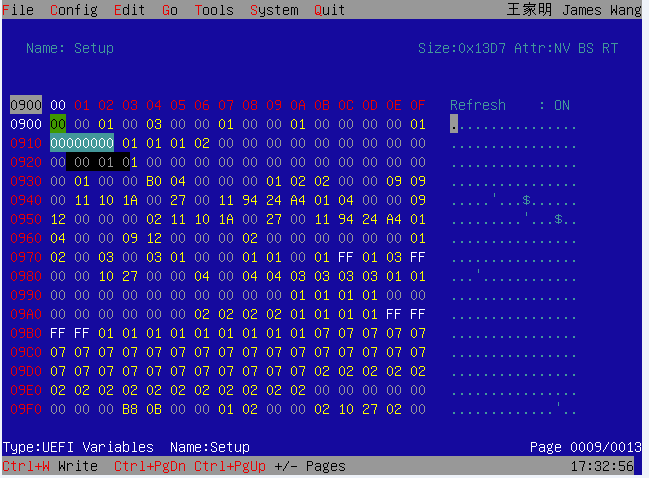
For anyone else that wants to try the steps are: Boot the USB that has the EFI shell and RU.efi (from steps above) fs0: to access filesystem and launch RU.efi Alt-F to enter menu bar Choose EFI Variables and then the scroll to the second Setup Use Control + PgDwn to get to proper addresses. Make changes (0xA63 to 6B and variable 0xA64 to 0A for 2667mhz) and then hit cntrl + w to write. Hit Alt + Q to quit and issue reset command in efi shell Screenshot of editing the speed: Here is my default CL settings at 2400mhz
-
EDIT: Per other helpful guy you can recover the laptop by disconnecting main battery. Seems I drained mine so low it recovered. Somehow I lucked out as my entire laptop battery got zapped down to 9% (not even sure how) but I was able to get the laptop to boot once with a single RAM stick (for two hours it would just blink red at me with one stick & I tried pretty much every combo). I did pull the CMOS battery a few times but that should not have cleared the non-volatile (NV) region of the BIOS chip. Hey, I'm not complaining as I was able to reflash the BIOS in Windows which did clear out the NV region of the BIOS SPI which is where my changes from RU.efi resided. Booted back again all good w default 2400mhz setting.
