2CPU
-
Posts
82 -
Joined
-
Last visited
Content Type
Profiles
Forums
Events
Everything posted by 2CPU
-
 Missed the other post.
 -
I've been setting up the system more for stability than benchmarking. I find the laptop runs the programs and games perfectly with a balance. I really appreciate finding the D3 Cold disable fix. My system suspends perfectly and all my work and settings are saved each and every day.
-
That would be really awesome....
-
Project: Unlocked BIOS Area-51m Series
2CPU replied to ssj92's topic in Alienware 13 / 15 / 17 / 51m (2015-2020)
1.3.2 was only popular to keep the higher 200W on the 2080. I personally do not care since I run the AGA. I ran my M15x from 2009 (I forget, I think two sticks banged together) -> 680M (2014) -> 980M(2018) and even got Occulus Rift running on it (such great memories Xmas work week VR stuff w coworkers). So that's 17 years on only two Alienware laptops....not bad. Area 51m "upgradability" was a total knife in the back. Zero drop-in....not even 2080 Super but the 2080 worked for me through Cyperpunk, BG3 & Alyx so I didn't suffer. Only recently with 2025+ titles did I dust off the AGA and throw in a 5080 to continue being fine. I heard from Amir that 1.7.3 has more forgiving RAM speed settings vs. 1.9.3 -
Project: Unlocked BIOS Area-51m Series
2CPU replied to ssj92's topic in Alienware 13 / 15 / 17 / 51m (2015-2020)
I had 1.3.2 on my system but updated to 1.7.3 and then 1.9.3 I think I can recovery flash back to 1.3.2 without bricking the system. When i tried from way later BIOS (you can only go back to 1.12.X) I had to swap out the CPU due to eFuses being blown by the security updates -
Would you also need to adjust the VBIOS to know that it has changed?
-
Screen swap for my Area51m
2CPU replied to DDAY3493's topic in Alienware 13 / 15 / 17 / 51m (2015-2020)
Post pics and details -
It somewhat is incompatible as the AGA link from cold boot is often poor. I have to "reboot" the AGA once inside windows to get a stable link.
-
Oh cool. What version you going to base it upon?
-
Amir.s found the next needed piece of the work around. Disable D3 cold transition on the 5 series GPUs in the AGA. Now the laptop will not crash in suspend. Set nACPI D3Cold Support = Disabled Current value: 0x425 = 01 Update to 0.
-
The cold boot BIOS choice of AGA PCIe settings are still not optimal. But since now the system does not reset overnight in suspend that is OK. I just do the unplug/plug of the AGA cable once in Windows and settings are fine. Without the suspend crash I can have those settings preserved in the OS for as long as I do not need to reset.
- 35 replies
-
- 1
-

-
- area-51m r1
- 9900ks
- (and 5 more)
-
Yes, removing the D3 cold transition has kept the system from resetting with suspend.
-
I think your D3 Cold disable has stopped the sudden resets during suspend. I will monitor and report back.
-
Tried the force speed settings with no change. 0x993 = 03 0x997 = 03 0x99B = 00 The link quality only improved with power cycling the whole AGA only after booted to windows. I do like where you are going with the debug. To me there are better dB settings for the PCIe Gen3 lanes assigned at Win10 vs BIOS cold boot. If I can query them somehow via windows and then hard code them for every boot I would be golden.
-
Thank you for the suggestions. I set 0x425 = 00 with no changes in poor link status on cold boot. Perhaps it will maintain the link when laptop is suspended overnight which would be a huge improvement. I hate having to set all my programs up yet again every day.
-
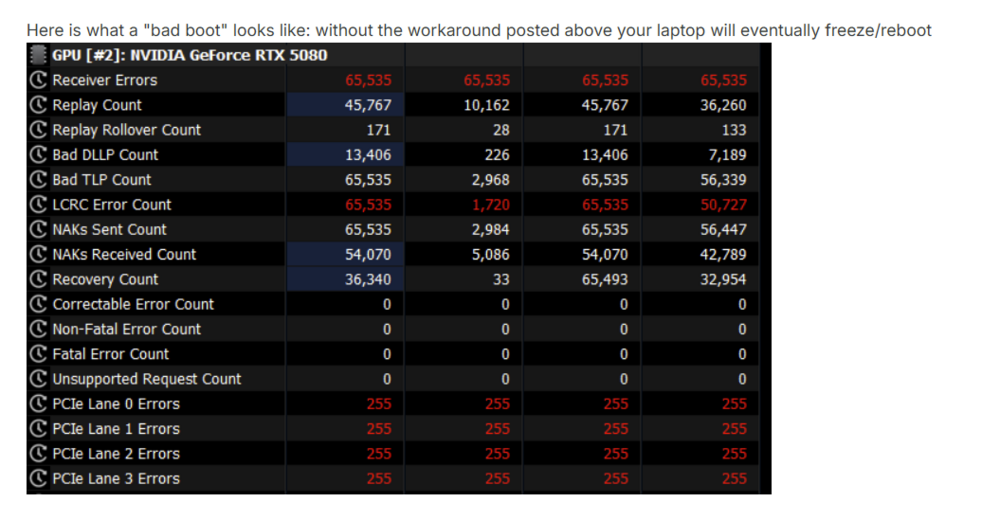
Regarding the performance testing, I have the 2080 enabled and set dedicated to PhysX. Then a soft disable (in device manager) of the internal GPU. I have it documented my cold boot AGA+5080 in the AGA thread linked at bottom: I would really appreciate some help as I got a second AGA but same issue. So it appears a 5080 when used in AGA issue.
-
I tried disabling them before and did not notice a change (at least in Steel Nomad) bechmarks. I am having an issue where the 5080 in the AGA does not sync up properly. I have to disable the card and unplug the AGA and plug back in once booted to windows. So i need 2080 enabled so the laptop screen works.
-
Yeah I think it is full of dust since AGA sitting on this rug that shoots off hair like crazy. Need to clean it.
-
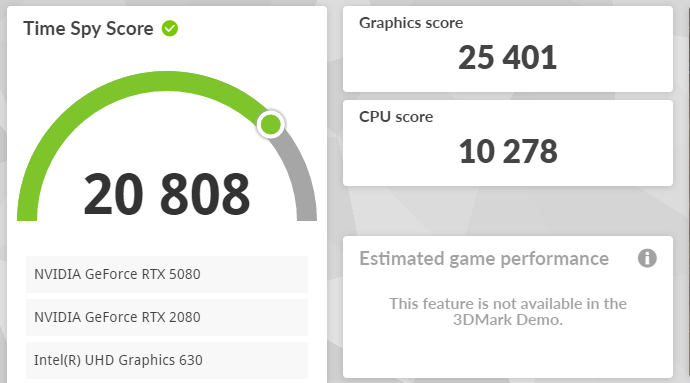
Not my best run but just checking out what CPU bump does. I can try and get a better run after getting the RAM speed up.

-
I tried 0xA65 = 01 before and my system failed to boot with blinking red alien head. (On BIOS 1.9.3 if that matters)
-
Sorry just dawned on me that I prefer to run Hyperthreading off. Turned it on for the synthetic boost.

- 35 replies
-
- 1
-
-
- area-51m r1
- 9900ks
- (and 5 more)
-
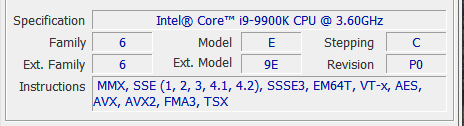
Set XTU to 50x all cores at -0.110v Maybe I just have a bad CPU. Hit 93*C & no throttling @ 4990mhz It was crazy inexpensive on ebay.

-
I recall having to run my M15x with the Dell 980M without a battery. The SMBus would hang and fans would get stuck at whatever RPM when the BIOS had the bus management issue. Amazing system that lasted me so long from 680M all the way to 980M. It even ran VR on Oculus Rift with modified Intel USB drivers.
-
I think my RAM sticks are maxed out at 2667.
-
Timespy Dev wrote that the 5080 causes CPU overhead issues due to their code. (so it is not ideal to test with) Just tried 48x @ -0.120V and came in similar. Not sure if because I have steam also running since that's how I got the demo. CPU at 85.6* Fans are set to full speed.