Kniben
-
Posts
10 -
Joined
-
Last visited
Content Type
Profiles
Forums
Events
Everything posted by Kniben
-
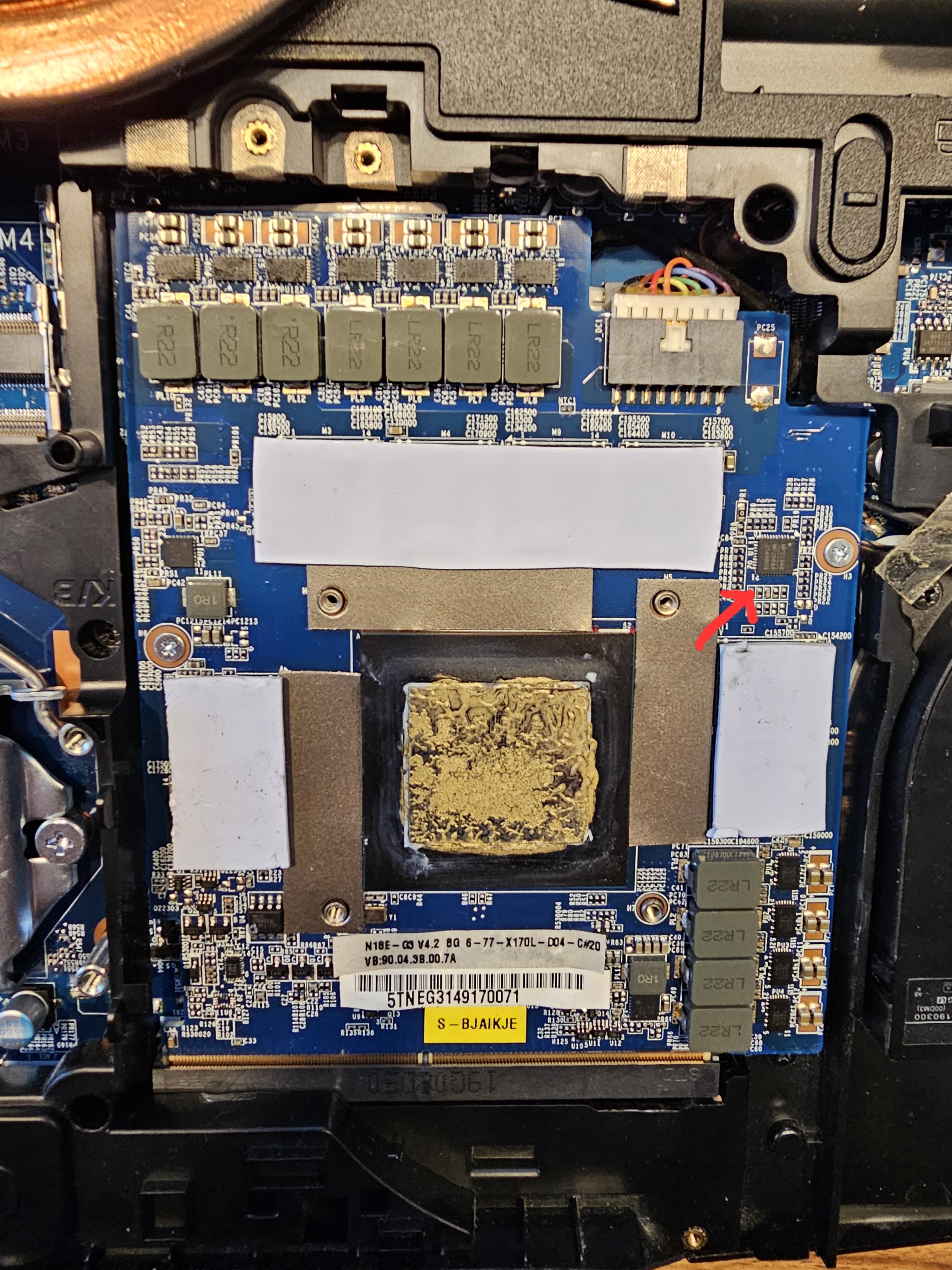
This one here What about the 1RO inductor and chip on the other side? Wouldn't it make sense to cool them as well? They aren't marked at all in the earlier images.
-
@1610ftw You are right, I should try to reduce the temperatures. I have run another combined CPU and GPU benchmark, so I'm pushing the cooling system to its maximum: GPU core: 83°C, GPU hotspot: 95°C and VRAM: 93°. GPU power draw is at 140 W, due to the reduced clock. Also what I did was play around with the core increment again, and it still remains stable at -450 (I can start and stop Furmark indefinitely) and as soon as I set it to -445, I can start and stop the benchmark perhaps three times before it shuts off again. So now we have a definitive reproducible scenario. I still think that my issue arises from the EC deciding to activate an additional MOSFET at -445, which is probably not performing well and causes the system to shut off. But without an expert here, I am unable to prove this. I have decided I will order some thermal heat pads and replace them. It's a bit unclear which thickness I should use for the different coil arrays. @tway Perhaps you can clarify? Given, that we use the exact same heatsink assembly: 2.0 mm for the VRAMs, 1.0 mm for the 4 coils, 3.0 mm for the FETs directly adjacent to them. 1.5mm for the 7 coils at the bottom, 1.0 mm for the FETs underneath, since the pads are resting on a "balcony" on the heatsink. What did you use for that small square chip next to the 4 VRAMs? 1.5 mm or 1.0 mm? I'd say go for 2.0 as that would be even with the VRAMs. Sorry for me being so thorough 🙂
-
@1610ftw You asked if somebody could use an E-meter to measure actual power draw from the AC side. Here are the results, mind you (-450 core increment) Furmark 3840 x 2160: 198 W prime95 Small FFTs, all 8 cores: 194 W Both of the above: 322 W The thermal pads I used were stock and I used them since I bought the thing in 2019. I doubt the technicians at XMG did a poor job during assembly, but I noticed one of the thermal pads not covering the inductor at the bottom and that tiny square chip. So perhaps the coil just died. I also don't know if the inductors are staged according to core frequency, meaning not all of them are used, if the core frequency is set to a lower limit. I can achieve stability by reducing the core increment by -450, while tway needed -700. Heck, I don't know how the GPU regulates its power, all I know is, when things get hot, they break or at least degrade over time and I think that has happened with the coil I mentioned. Perhaps the GPU is unsalvageable and I should buy a replacement.
-
@tway First of all, congratulations on fixing your GPU! As for my heatpads, it's probably not a bad idea to replace them. Also I need to check those screenshots again closely, if all relevant components are covered. As for the indentations, sure, flipping the pads should solve that. It might be liquid metal, has a golden colour. Don't worry, I used a modest amount and there is plenty of insulation around the die, so that won't cause a short circuit. Edit: Did some research on liquid metal and what they mean is Gallium, that has a silvery colour, so no, it's not liquid metal 🙂 Now, regarding temps, if Furmark doesn't crash, I left it for about half an hour (-450 core increment): GPU: 80°C GPU hotspot: 93°C VRAM temp: 90°C How are your temperatures with the new heatpads?
-
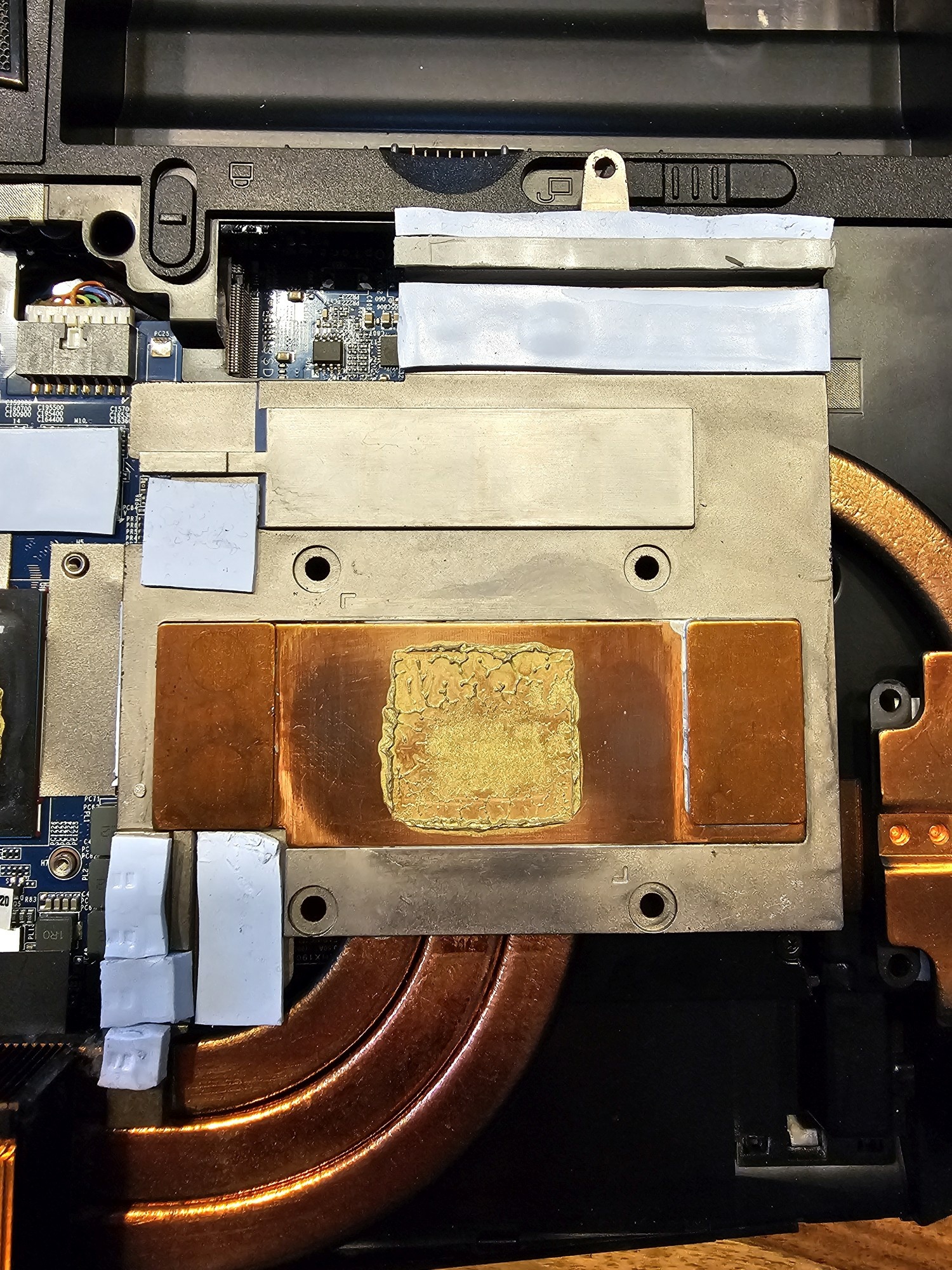
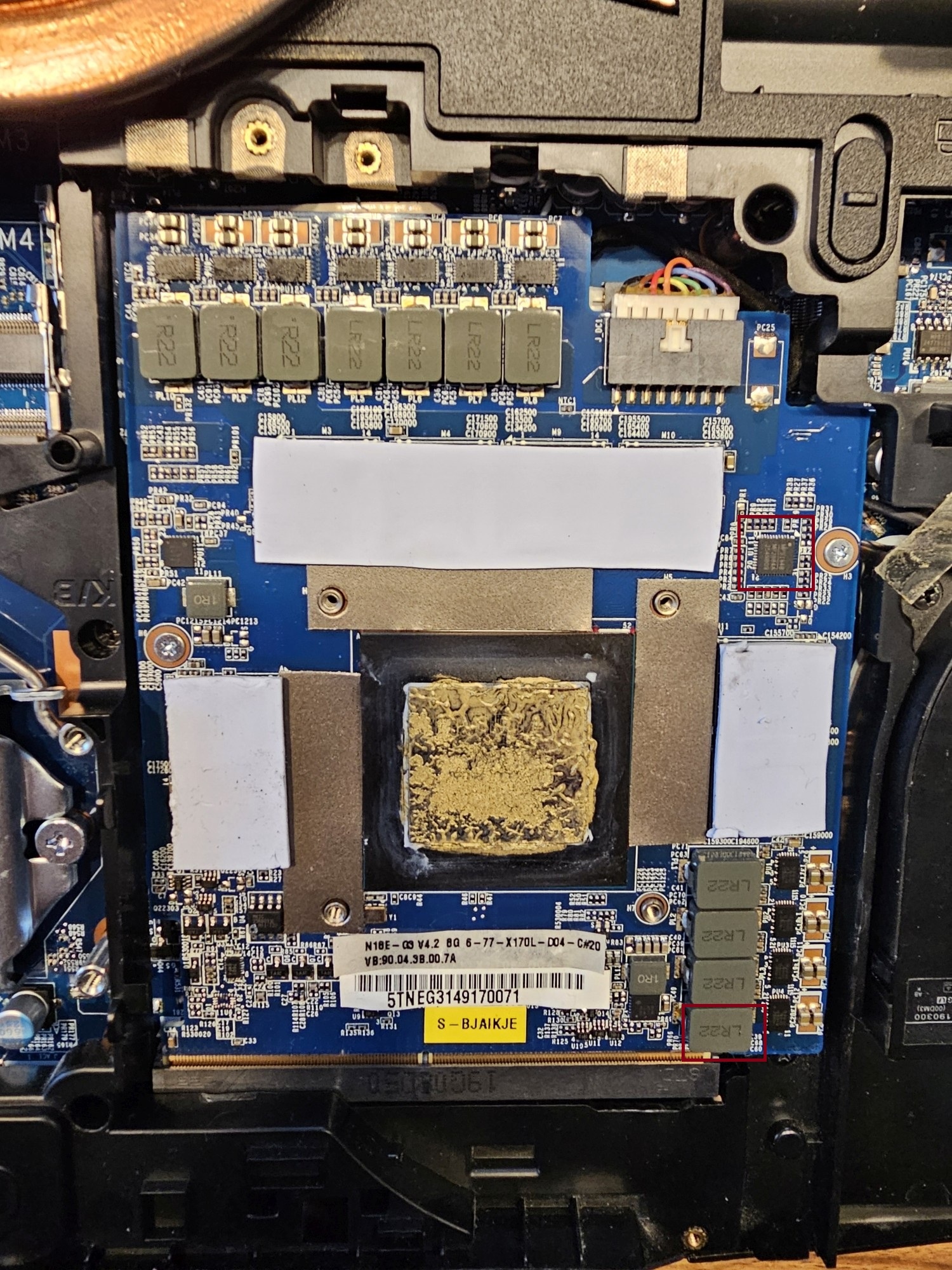
Here are some photos of my model. The first photo is the bottom of the heatsink, so if you imagine flipping it horizontally, that's how they would cover the components on the GPU. The second photo is the GPU and you can see the pads covering all the VRAMs, except for well... that little square chip on the right and also the bottom most inductor (marked by red boxes), so I did my best to re-arrange the heat pads to cover them as well. If I compare it to the schematics, then yes, there is definitely room for improvement as all the heat pads seem to be 1 mm thick, and no, the GPU still crashes under standard clock settings.
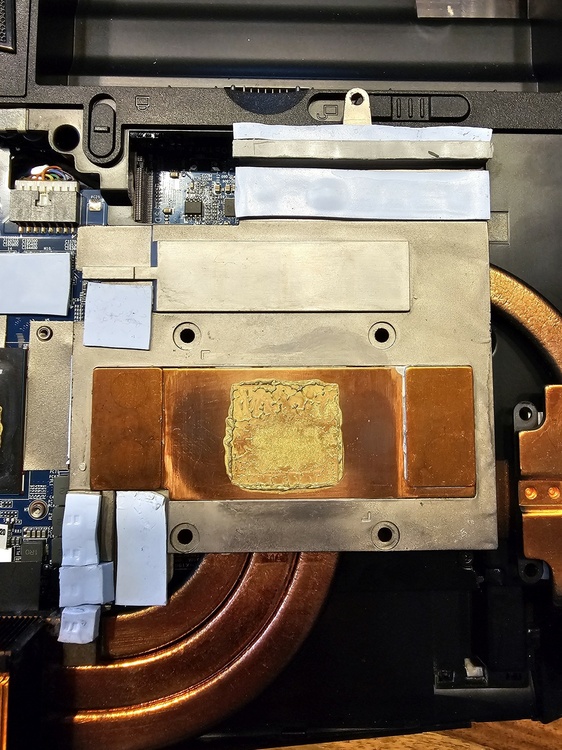
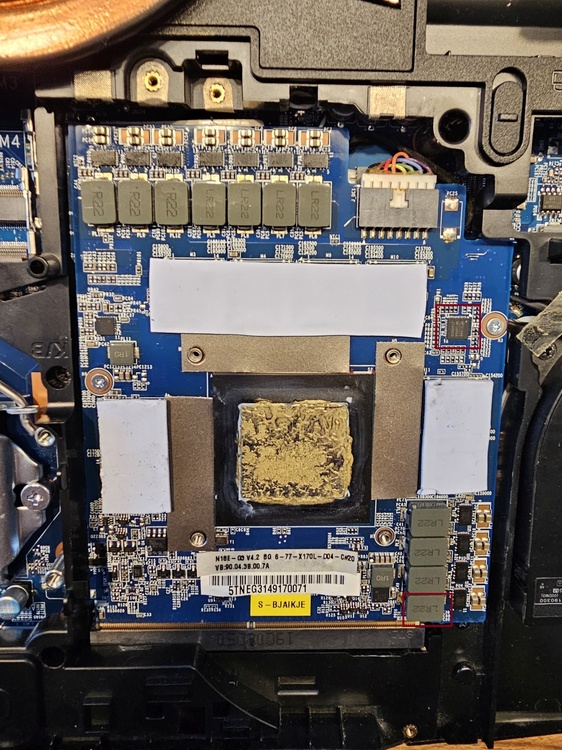
-
@tway That sounds very promising. I might just try that this evening. Perhaps something is dislodged or so. This was the mainboard supplier on Ebay, I was referring to. Razors Edge by Eurocom Notebooks
-
@DoenerBoy123I don't have access to new thermal pads at the moment, what thickness are you using? I will dismantle the laptop and take a photo of where the pads are laid out. Perhaps I'm missing a critical area. As for the power draw, I shall try to undervolt the GPU using MSI Afterburner while keeping the clock speed at stock. If successful, at least the performance will be the same. On a tangent, it still be could be the mainboard that's causing this, because that is was is supplying power to the PCI-Express.
-
Hello again! I have tried reducing CPU parameters with Intel XTU. Core Voltage Offset: -0,050 V (BIOS default) Processor Core IccMax: 150 A -> 75 A Turbo Boost Power Max: 120 W -> 60 W Turbo Boost Short Power Max: 165 W -> 82.5 W effectively halving the values to rule out any power draw from the CPU interfering. I set the GPU Core Increment back to 0. Furmark immediately crashed when attempting the benchmark. Also, I can rule out any thermal issues on the GPU as the reported temperature core temperature was around 65°C before starting it. Setting core increment back to -500, the benchmark runs stable. Also again, torturing the GPU by repeatedly stopping and starting the benchmark, no issues. @DoenerBoy123 Did you experience an immediate shutdown similar to tway's and my problem, or did it happen after some time? I would like you to test again with the stock 330 W power supply, although after limiting power draw by the CPU, I believe Khenglish is correct that 330 W should be enough. PS: I am so glad that I found this thread. Being able to diagnose the problem with others who actually know their stuff is very helpful.
-
I also managed to stop it from happening, by setting core increment to -500, not changing any other settings. Running the benchmark, quitting it, restarting and so on. Many thanks for your tip, @tway As I said, before changing the core increment, I could also trigger the shutdown, by ending the benchmark, which is comparable to a load dump, which also travels to the PSU. Strangely enough, the Canadian mainboard supplier also recommended the 780 W Eurocom adapters. His explanation was plausible though. However I am not ruling out a failure of the VRMs on the GPU or mainboard. The 780W PSUs are roughly the same cost of a used GPU which I could source for around 260,- €. I could probably get another identical 330 W PSU for around 40,- €, wire them up in parallel and see if that solves the problem or hook up a lab power supply capable of delivering 30 A at 19.5 V Since reducing the maximum clock speed also reduces the transients, we are definitely looking at some power issue here.
-
Gosh, this sounds like the same problem von my XMG Ultra 17 (XUL17E19), using the P775TM1-G platform, also an MXM RTX2080, Intel 9900K CPU. Here is a short video documenting what happens, just to confirm with you, that we are looking at the same symptoms? Furmark benchmark I can run a prime95 benchmark, and I also managed to run a prime95 benchmark and Furmark simultaneously for over two hours before deciding some other issue is causing this. I can trigger the shutdown by either starting Furmark in 4k mode, or alt tabbing back to Windows or stopping it with Esc. The first thing I suspected was the power supply, so I bought an identical one. This wasn't the solution. I managed to find a Canadian supplier for replacement mainboards (didn't buy one yet), however he mentioned this could be down to "power bottleneck", (the GPU increasing its power draw as it ages) and now upon reading most of the comments, this might be easily solved by sourcing a 780W Eurocom power supply? @tway By how much did you underclock the GPU?