

extremecarver
-
Posts
101 -
Joined
-
Last visited
Content Type
Profiles
Forums
Events
Everything posted by extremecarver
-
Actually the DELL with LG IPS was tested with 120hz fixed refresh rate on notebookcheck - seems they test all notebooks that way. On Hardware Canucks it got a crazy 43 hours battery life: https://www.notebookcheck.net/43-hours-battery-life-Dell-XPS-14-2026-lasts-almost-3x-longer-vs-MacBook-Air-15-M5-in-web-browsing-test.1262947.0.html The full system runs on 1.8w approx for browsing with VRR activated doing actual work, 1.5w on idle. It really shows that Intel dialled panther lake. Older notebooks are simply so bad because Windows is absolute crap. Linux systems simply face the problem of non optimized drivers and therefore don't fare (much) better than windows. But I guess with 1-120hz VRR display and a CPU like panther lake that doesn't let the OS decide the power management anymore - we really now reach the point were it will be hard to improve for low work tasks. Yes at high load Intel still got loads of work vs ARM based chips. LG will however also come out with OLED 1-120hz displays, I guess they will be even better than their IPS 1-120hz is now. OLED is in principal simply better as it needs less light to be bright. It's just about optimizing the electronics. I actually don't understand why notebookcheck doesn't use VRR enabled on their battery tests. Makes them pretty worthless now with advanced displays (at 20hz it's already bad, at 1hz just not usable anymore). I guess they need to improve their protocol - get a robot moving the mouse, typing from tyime to time on the actual keyboard - and moving the screen. That way the refresh rate will really get appropriate. Actually that's another plus for OLED - I guess they could manage to only update parts of the display that change - while I don't think that's possible for LCD - but I could be wrong. Meaning when typing only refresh the portion of the display that changes - while keeping the rest unrefreshed or only once per second.
-
https://www.notebookcheck.net/Dell-XPS-16-review-Two-steps-forward-one-step-back.1251724.0.html#c15814972 Too bad the LG gram 2026 doesn't yet have a WQHD 2560x1600 display with 1-120hz VRR by LG. It actually bests OLED on low to full brightness. 1.5w on idle for the full system on low brightness. 4.5w on 500 nits full brightness (that's as much as the gram 2025 lunar lake on low brightness - both 16"). That means a whopping 50 hours idle battery life at low brightness or 20 hours on idle with full brightness. Pretty crazy numbers. I guess next year LG gram pro will get that 1-120hz VRR display too - hopefullly they can ramp up the colors. But it really also shows that Panther lake is a best on low power use. Test is also interesting as it shows the new base panther lake versions without H. Pretty similar to lunar lake under max load but way more efficient on low load. Graphics are slightly worse than Lunar Lake last year as expected. It would be great if they could test an identical model once with and without H to see if the base one is even better at power use at low load or if there is no difference. I guess messing with Windows advanced power saving features will not help much on Panther lake. The thing is that panther lakes kinda does power management itself including scheduling which cores to use - instead of letting windows handle it absolutely wrongly (for windows 11, 10 was much better at it which is a shame).
-
In Taiwan it's now on presales. The X7/32/1gb model sells for 77.000 ntd (2076 Euro ) with list price of 79.900 NTD. Delivery by 25-30 April. Seems ssd prices are more affected than RAM. Big SSD are really expensive now while the RAM surcharge is not that out of line. With 7% VAT in Taiwan let's see where pricing in Europe and USA will end up. Taiwan pricing used to be quite similar to EU before adding VAT. I guess LG and others need to cut margins to sell new models. Somewhere else read about LG bringing lower power IPS displays for 2027 saving about 40% electricity by going down to 1hz refresh rate. Similar tech to Sharp igzos using oxydes. Could be until 2028 however to end up in the gram pro of world economy still exists then... But after 4-5 years stagnation in battery life things now getting better year by year again.
-
I'm writing this here because it affects the 2026 models more than my 2025 with Aerominum as exception - but there is a slight problem with that material - it's easy to chip. After my first more serious abuse - the laptop getting stuffed into a bag with several metal tools - there is some small chipping on the edges of the material. I'm not sure if this is actually better on the 2026 which looks like it has an aluminum border ring - or if that is just design. At least from the cosmetic side it will be much better on the 2026 - because where it chips the color becomes like aluminum shiny silver. The old magnesium casing certainly didn't get damaged that easily. Yes it's hard - but around the edges that is problematic. Can maybe solve by putting a ring of superglue around on the edge? Maybe LG noticed that chipping on those rare 2025 models in metal grey color and improved it for 2026 models? On the other hand the lower casing since years suffers like many other laptops from the very sharp edges. Especially on the front that is my main annoyance - it's really a pain to use the laptop while sitting on a couch with the laptop on your lap.. those edges dig into your forearms. LG really should round all those exposed edges a little. Otherwise to me the casing is perfect with Aerominum.
-
In China the X7 358H/32GB Ram/1TB is sold now for 14500rmb. Not that expensive. But it surely won't be below 2500 Euros or 2500usd with that price. China and Korea are always the cheapest places to buy the gram.
-
lg Gram - Durability long term - Paint and screen (16Z90P)
extremecarver replied to extremecarver's topic in LG
But not sure about the pro. It has a different keyboard. But likely too new to already have many with problems. Just 2 years now. -
Great. Yeah that's about as much as I got the few tries when I had managed to unlock my lunar lake in the 16 pro with max fan (on normal it would settle to around 37w). As I cannot find out at all what is messing up the power I have to settle with 30w which is nearly even possible with Silent mode (and power limits unlocked with throttlestop). I wonder what EPP setting for you is still smooth enough to tolerate. But that's the best setting with intel before power lake to really prolong idle and low power use activities battery life.. at 255 it will feel pretty bad but it's good to see two extremes first to know the difference and what to look for. Even scrolling then becomes catchy instead of smooth and opening apps really makes a big difference. I settled for 210 on battery and 60 on AC (keeps the notebook slightly cooler and actually improves on Cinebench - and I cannot notice any difference Vs 1 in snappiness.)
-
how many seconds do you actually get how much power? As the PL1/2 can be a bit unrealiable. But yeah great that you already have the new 2026 model fans. My Gram Pro doesn't have them yet - but was manufactured in early 2025. Mine came however with a much smaller power adapter (65w EU) - but it's still bigger than others being 3 connectors instead of 2 only. It must be an UK problem. Some 10-20w chargers will actually work - others won't. Mine is okay on 5v/2A (but yeah 10w charging may mean you still lose power if you use it for demanding things). As for battery power. Things you need to do. Enable lowest for the NVME drives in power manager (the setting where you can select HIPM+DIPM but lowest is even less). Use power saver windows profile by default on battery - but then increase the PL1/PL2/power limits for that to your liking with Throttlestop. Set EPP to 220 or even 230. Use Bitdfender Free as Antivirus and switch of browsing protection and similar things. Otherwise Windows 11 is draining battery way too quick. You can get into some more detailed power saving things via enabling them in the power profiles via windows registry, but they will not change much (HIPM/DIPM stuff needs to be activated in registry too). Your Cinebench 23 score of 16.000 does show it has quite liberal power usage. I think the version with older fans only reached to 15xxx points. On the Lunar Lake with liberal power settings (if you find in bios the setting that actually unlocks it - I cannot anymore) I got 12xxx - but with the default 40/30 it's only 10600 or so. Panter Lake H could get around 20.xxx but only with high power. I guess with 40/30w it gets around 18000 - it's using a bit less power vs Arrow Lake - but the biggest difference is that at 0.3-3w package power it gets much more work down vs older Intel chips. They really optimised how it can switch off parts of the CPU and the management about cpu power moved away from windows mainly to the CPU deciding if cores should sleep or not because Windows 11 still messes up the management which core should compute what to pure chance.
-
that gram book has nothing at all in common with the normal grams, and even less gram pro.
-
I think the Samsung isn't too glossy, way better than the 2021 lg Gram IPS displays - which were like a mirror. The LG OLED on the new gram has quite effective matte coating. But yes, depending on the eyes of you the refresh rate is or isn't problematic. I actually never worked a longer time with a OLED display laptop so I should try that out before I ever upgrade. I remember on CRT I was fine as long as refresh rate was 120hz. 50/60hz really strained my eyes. But I worked quite long with a 21" CRT and only upgraded once 24" IPS got decently priced. TN was really horrible but my first notebook was TNT... This Samsung is too heavy too - I linked it here because many people still believe OLED use more power - but it's crazy how little the now need at high brightness, it's like 1/3 of IPS at that brightness. On very low brightness IPS still wins - but that's not really relevant as we are talking maybe about 0.5-1w difference max in favour of the IPS. Maybe 1-2 generations more and OLED will win at any brightness. I think LG uses 480hz right now - some review mentioned it but I cannot remember for sure. that's what last years model used in any case. It's a bit better vs 240hz.
-
https://www.notebookcheck.com/Samsung-Galaxy-Book6-Ultra-im-Test-Beeindruckender-Multimedia-Laptop-mit-tollem-OLED-und-RTX-5070.1243968.0.html Not the gram pro panther lake test yet, but showing that at 150nits the OLED/5070/365H combination already beats last year's LG gram pro with the 5050/255H with IPS. At full brightness of 500nits it just trashes the energy consumption of IPS display at 400 nits. All with a 12% smaller battery and a capacitive touchscreen. Samsung but also LG according to those Korean videos just showed that IPS says are over. OLED uses way less power at anything over 100-150nits brightness now if you get the latest and greatest OLED displays, and panther lake anyhow is more efficient than any previous CPU for windows. Yes apple is still ahead on power/efficiency of CPU and GPU but the difference is getting smaller, and Apple still hasn't got OLED. And finally we got an EU price. Seems that panther lake notebooks will sell from 1800-4000euros this year depending on low spec or high spec/quality. 3400 Euro for 32/1 with RTX 5060, another 200 Euros more for 5070. No 2TB pricing out yet.. Guess the lg gram pro with 32gb ram/2TB and 5050 when it comes out will be well above 3000 Euros too. Maybe the lowest spec panther lake gram pro with OLED costing 2300??
-
I don't trust hwinfo. it shows 40/50 (PL1/PL2) for me - but then it doesn't get there even though it's not overheating and throttlestop doesn't throw any limit and just gets stuck lower. hwinfo64 just shows whatever I set with throttlestop (and as I unlocked in bios it shows unlocked). For fanspeed the AI setting works quite well - though if you remove the LG software for better battery life - you will be stuck with silent, normal and high. As for the fan - the new powerful ones look like here: So maybe the 255H version manufactured later already got upgraded, the earlier ones had the old fans - so it will be a bit of a lottery if you get old or new stock. Guess the two dual speakers are only on the RTX model however.
-
Well maybe it already has the 2026 model fans. You could find out by putting them on a scale or comparing the image to the Korean reviews of the 2026 model. How did you determine the power levels at each fan setting? I still can't find out which setting in bios actually hard locks them and how LG tools mess with it. Mine now stays on same power levels no matter the fan setting. But yeah the 255H Vs the 256/258V is twice the die size so makes sense to give it higher power.
-
The 16inch is really cheap Vs other countries in Europe however, 1130 euros new, but of course only 16/512. Not even 16/1TB. Edit wrong, that's not the pro. I wouldn't want the non pro anymore. Pro is much more sturdy feeling. (How that translates in real durability is of course not known).
-
Afte debloating windows some more, and switching of memory integrity - plus using EPP 220 (with the old tiger lake that was too slow) - I'm now around 6.2% battery use per hour with 55% display brightness which is equivalent to 85% on my old Gram (though likely when it was new more 70% - IPS get darker over years of usage) - and around 4.5% at night with 15% display brightness. 16-18 hours of real world use time. Yeah Panther lake likely can still do it quite a bit better - as it can get much more work done at very low power states. The only slow down with pretty tough restrictions is app launch. Launching a bigger program takes 2-3 seconds longer - however sustained demanding tasks are just as fast as without power restrictions - it just takes some time for the CPU to ramp up. The advantage is even surfing the web, editing texts, C10 package states of 60-70%. Meaning 60-70% of the CPU cores are fully switched off. The key was making the ramp up slow - otherwise Windows very often spikes up power. Panther lake seems to be great with higher EPP values in still just sipping power. So instead of 1-1.5w power usage for the package with those light tasks, it can do them with 0.5-1w for package. Meaning with panter lake you don't even need to debloat that much - just set high EPP and get great battery runtimes. Getting runtimes longer will after panter lake mainly be possible by better displays - and that's getting tough with the 2026 generation OLEDs already very power efficient and during daytime easily beating IPS. I also got rid of most LG tools. I think it's better to use intel for driver updates, and so far LG hasn't pushed a bios. So I disabled the LG services and run them only on demand, only intel update manager and windows update manager are allowed to run. And fan setting I just do via throttlestop/windows power plan. Yeah no AI fan mode, but the old ones all available and it just is more efficient. I have basically any hidden setting on the power plans enabled via registry - which helped a bit too. Oh and the battery now has 81wh capacity - that's 4wh more than claimed. But we all know the 80wh to 77wh was just a change as often LG batteries didn't reach full capacity. Seems to be a bit luck of draw.
-
I guess prices will be around 1900-2500€ for the Gram Pro. AMD version maybe starting at 1700€. https://www.notebookcheck.com/Hands-On-Samsung-Galaxy-Book6-Serie-Alle-Modelle-Preise-und-Starttermin.1219629.0.html In Korea the Galaxy Book 6 Pro is slightly more expensive That's less of a change than expected. But this time I guess there won't be any prices below RRP for quite a while. Last year list price was more an indicative thing and there were a lot of discounts. Good thing about the Galaxy book 6 Pro is - they will only launch a single basic panther lake CPU model. All others go H or X. The basic one is really a strong pass, besides better battery life you gain nothing over Lunar Lake and actually have even worse graphics. 100€ more for an H is a bargain considering the difference (and I'm sure if you set a high Speedshift EPP value the H will not consume any more power)
-
It's now not only RAM, NVME and even HDD drives are basically sold out until 2028. Mainboard manufacturers cannot get materials and so on. Even if they lower their profit margin prices will go up a lot. It's only about how much they preorderd with old pricing. AI datacenters just take whatever is available. AI is now surpassing humans in basically everything - so it makes sense from a business standpoint that all available ressources should be used to scale AI. Now humans will not stop eating and using up resources but things will get hairy (and that's right in the point of time where many resources get much harder to extract and less available). Getting a new laptop right now surely makes sense just as anything else you really need for work or life. I still think Panther lake is the biggest upgrade in the Gram line since at least the 11. gen. It's the first time without a big compromise either in performance or battery use. With the limited cooling power - it will be the most performant, and with the battery life it's just better than anything before. Plus OLED really improved in text readability and power use the last years. Besides contrast there is no improvement in IPS displays since many years. Higher refresh rates are pretty old - LG just took a long time to use more than 60hz.
-
Yeah, the main problem is that it must be quite a simple setting because on my first try I got it right. I gues I can only CMOS reset the bios to start from scratch - I think the load default is a saved set of options, that doesn't include all options. I don't think you can really destroy something - modern bios will restore to default after a couple of failed boots. Looking for what enables Prochot to 98° I destroyed my completely unlocked power envelope. And yeah the price increase mentioned in Korea was my reason to buy the Gram now - I really wanted it to be below 1000€ before VAT - so I can detax it in the same year. I would prefer 32GB but I rarely need it - and I have a server with 128GB for really big workloads that is idle 5.5 days of the week. The 2TB models sometimes have PCIE5 NVME disks - meaning twice the speed of PCIE4. But yeah that too is a lottery. It doesn't look likely prices will go back within the next 2 years - except if we have financial crash and then it's really hard to predict with prices of anything. After switching to Bitdefender instead of PandaDome and disabling most things in it - especially the web protection - I get pretty reliable 15-16 hours battery life for working with 60-30% display brightness depending on time of the day. I'm pretty sure with Panther lake 20 hours would be realistc after debloating Windows 11, and making sure antivirus is not set to monitor whatever. I can myself identify scam websites, and click on manual scan if I get download something where I'm not 100% sure. Bitdefender looks like right now the lowest ressource free antivirus. Trying to fully disable antivirus doesn't work well anymore with windows 11. Any kind of update will then put windows defender instead of none. That's especially annoying on a server where you are super careful anyhow and firewall plus login security is way more important than antivirus. I guess the new 2025 Ultra 5H or X7 model will be at least at 2000€ plus VAT when it becomes available in April? I'm in Taiwan next moth but prices there aren't much better than Europe. Only China and Korea are cheap.
-
Well seing that the price difference between Panther lake ultra 5 H and AMD isn't that big I would rather recommend that model. That effectively OLED now wins over the IPS in battery life and the green seams for text should be mostly solved in newest generations is in my eyes the differentiator. I would stay away from the non H series basic panther lake however.. they actually shouldn't have better battery life Vs the X/H as panther lake can basically switch off all cores that are not in use and just run the 4 LP cores, and performance of AMD will be much better at lower prices. Well let's see once they are actually sold. LG will increase prices again for all 2026 notebooks in March. Best time to buy a panther lake or AMD gram were those group buying events in January in Korea. Also I think it's still a lottery it you get an IPS black or traditional panel. At least 2025 contrast figures on tests varied wildly.
-
quite a good comparison between AMD, Intel Gram Pro vs Samsung Galaxy Book 6 with Intel X7 Also a few more videos. Panther lake really buries AMD now on battery life, but also vs Lunar lake it's 20% better in real life. Quite impressive. Also OLED is by now better at battery life at higher brightness. LCD can onyl win at low brightness levels (below 200, above OLED wins easily). OLEDs really have improved a lot over the years while LCD haven't that much (and I'm quite sure LG Gram Pro uses IPS Black v2 panels, they just didn't talk much about it). With the OLED on the Gram Pro being anti reflective now too, I think the case for LCD isn't that big anymore. Too bad there is no microLED LCD by LG. There's talk about prices of the new notebooks rising again in March, that's after they already increased them in February.
-
Oh I finally found the Prochot Offset setting in the bios - it's under thermal management and then called TCC Offset. Just set it to 2 instead of 8. I don't see a reason to limit to 92°. Theoretically 0° is possible, but my old gram sometimes BSOD with 0 as it can overshoot by 1-2 degrees. So 2° offset is optimal. Edit it's a mess. I'm not sure anymore which setting I have to activate to be able to modify it inside the bios. I cannot figure it out anymore and it's locked now. However I managed to change some setting so I can change it from Throttlestop and it works, however also don't know what I changed for that - and in the same process I messed up some limits so that EDP other throttling kicks in at way lower wattage. It's a bit trial and error - if it doesn't work then full reset the bios and try again from scratch. But basically anything is possible that the hardware supports (no undervolting as Intel blocked this many yeats ago)... Edit: it's a mess. I simply don't find out what I did initially to have unlimited power. And bios load default is not fully resetting all of the hidden options, seems they are not part of the default. the best I get is 30w constant and before a 28seconds 45w window. So 10700 on Cinebench R23 is max. I had gotten 12.000 at some point with 40w constant power and that was with 8° Prochot Offset. Now I somehow managed to keep the 2° offset set via Throttlestop - but I don't get full power anymore... Limit window in Throttlestop doesn't show anything - it simply doesn't draw more.
-
Ah and what to buy. In general I would have said, wait and get the Ryzen 7 AI 450. They are sold cheaper than the poor Ultra 5 325/335 models right now with twice the multicore performance, and still great battery life (yeah those low power panther lakes gonna be astonishing in battery life still beating Lunar Lake by 20% or so but at actually less performance). The new H (or X) panther lake look great in benchmarks, but they will cost a fortune. Now the problem is - with RAM/SSD prices skyrocketing right now - prices gonna increase a lot more than expected. A lunar lake Gram Pro on offer or a 255H model on offer looks like the best choice. Especially if you want 32GB it's gonna be a steep price. LG sells the new gram Pro with 256GB SSD in the base models to counter prices (and likely betting buyers just swap with an older NVME they still own and put the cheapest junk in just for selling and getting the price right). Oh yeah - Geekbench 6 with AI fan mode: 2700/10600 vs in silent mode: 2700/10100 Geekbench 6 GPU gives identical 30500 approx (255h would have 15.000 multicore and 40.000 GPU score on default settings with LG gram more or less). So it hardly makes a change but Geekbench has not much sustained load. PL1/Pl2 set at 45w, and Speedshift EPP to 20 (setting it to 0 may gain some more points - but is really pointless as it increases heat a lot. On battery I run EPP at 180 usually, or 210 if I have scarce access to power.)
-
Oh I see, yeah the LG tools mess around quite a bit in lower settings. But it does make sense in a way. I locked everything in Throttlestop unter TPL to avoid LG messing around the values.
-
Any software licences do not get transferred, also all websites the login cookie is deactivated. Authenticator needs to be re-initiated. But all my registry hacks and modifications survice - it would take me ages to redo all of this which is needed to tame Windows 11. So it's still much faster. And a used windows pro license is like 10€ so I don't care and just buy a new used one. I don't really know how to deactivat a license so I can reuse it on another PC. Also I think not all licenses support this. Noise is very low. Actually I ran Passmark full test on Silent with fans off, and I still got 19,500 CPU mark result - so higher than an non modified. It fluctuates quite badly but 15-25w are possible passively cooled without the fans running at all. I really didn't expect the fans kinda mainly keep the base cooler but have not that much effect on the CPU below 5-10 minutes. See the results once silent once with AI fan mode. They are better than 155H intel inside the Gram. Passmark is pretty good estimate of real use except gaming. But it's quite obvious that the lower benches which are done later suffered from the heat build up (full run takes nearly 10 minutes) Cinebench is also with AI fan mode.
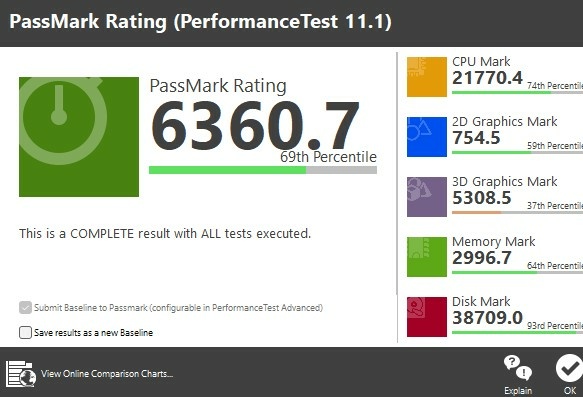
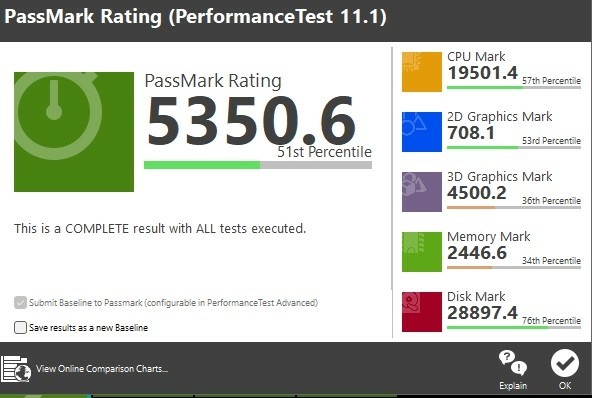
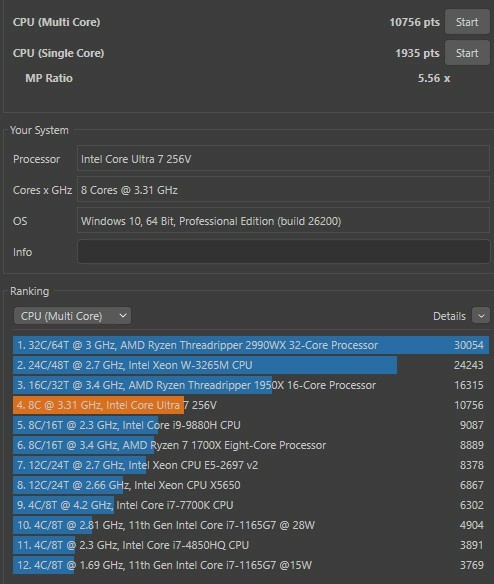
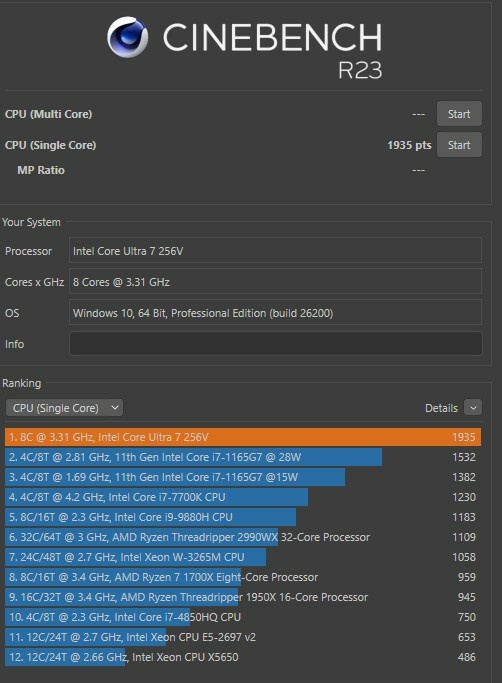
-
I asked LG Korea via email about Aerominum and it's use in 2025 LG grams. They replied that indeed they used it but exclusively in LG gram 16 pro models in metal grey colour. It wasn't used in white nor black colour models, nor in any 17". Also they said they still adapted thickness and frame of display for 2026. So I guess the rtx 5050 arrow lake models do not use it because they have black colour. Also it's not yet used on lower body also in 2026 but may come for 2027. I had gotten curious because my gram pro 16 with lunar lake feels cold like aluminium on the display but usual warm on the rest of the frame. So if it feels cold it's the new Aerominum. That's also why the white LG gram pro was 1196 grams but the metal grey 1226g with identical internals. So if they go all body Aerominum it would add well over 100g, I guess the backplate will be kept in magnesium, but the keyboard frame could switch for 2027. That way may only add 40g or so. The backplate is paper thin I don't think they will change it.