

AL123
-
Posts
151 -
Joined
-
Last visited
Content Type
Profiles
Forums
Events
Posts posted by AL123
-
-
20 hours ago, river rocket said:
My Xeon 7760 with RTX5000 died this week, so I replaced it with a Pro Max 18 Plus Ultra 9 285HX RTX PRO 3000. So far, I'm very happy with the new workstation. I use it mostly for SolidWorks (small assemblies) and Video editing for a YouTube channel I run.
I pulled the bottom cover off, started looking at the storage, and I’m trying to figure out if anyone is actually running a Gen5 NVMe in one of these. Which led me to this site and post.
Dell only offers up to 2TB now, no 4TB option anymore (was available). My assumption is that’s thermal-related and not a platform limitation.
I moved over three 980 Pros from the 7760, and was originally planning to grab a 2TB 990 Pro for the boot drive. But Gen5, pricing looks much cheaper, so it got me thinking and doing some research.
The boot drive is isolated to the side, but there’s no dedicated heatsink setup for the drive. Looks like you’re relying on airflow and whatever thermal pads Dell is using.
So the real question:
- Anyone actually running a Gen5 drive in one of these?
- If so, what drive and what temps are you seeing under sustained load? I'm leaning towards the 9100 since I have all Samsung now.
- Any throttling issues?
I’m less concerned about peak speeds and more about real-world behavior, especially longer writes (video/render workloads).
Curious what people are seeing before I go experiment on my own. Thanks in advance.
Hi re no 4TB drives on dells configurator that is a supply issue not a technical one, driven by high demand from AI for ssd nand chips.
we have 2TB Gen5 drives in most of our units but haven’t looked at thermals.
However the way the 3 fan cooling is setup one of the fans is there to generate negative pressure and pull cool air in from the vents at the bottom of the Laptop near the ram and ssds so should be better than previous generations/ other workstation designs I have seen,
Pretty sure ours have the boot drive in the right hand bay by the ram and it has a little metal heatsink with pad for thermals. Not sure on the best location for the second drive maybe the 4th bay off to the left of the motherboard will have less hot components by it, but is perhaps further from the 3rd fan that generates the negative pressure.
-
34 minutes ago, SvenC said:
Looks like the one are you able to find the page with the list of fixes? I know it exists as I clicked a link to it from dell command update tool before running the update myself this morning.
would have saved it but didn’t see this post until later
-
On 4/4/2026 at 2:46 PM, MyPC8MyBrain said:
first thing the SD25TB5 is brand new model and should still be under dell's warranty if its defected.
second, the spesific unit you got has a builtin KVM (which sounds like your stuck on one) and other network management features, i deliberately didn't get that spesific model because of the KVM and extra network and firmware nonsense.
make sure you installed the latest firmware for the doc, if that doesn't change much try validating the doc power supply by swapping it with the one from the laptop (that should be 280W vs your doc 300W they will interchange just fine) and see if you still stuck in low power mode which the smart pin could cause if its faulty or cant make contact it will default to lower power mode crippling everything until power is restored.
plug your doc power supply to your laptop and turn it on then watch post screen for low power detected during boot.
Just to check Re the firmware version I was prompted to update today
been out for Easter holiday but was prompted to update the dock and it listed multiple fixes. Annoyingly I cannot find the link to it currently
it was listed as Dell Dock WD19/WD22/HD22/WD25/SD25 Firmware update utility 01.01.13 01
the only issue I’ve seen with our users is external monitor black screen when unlocking laptop but it’s not always so hard to replicate.
-
 1
1
-
-
2 hours ago, MyPC8MyBrain said:
LMAO Dell knows they wont sell any new hardware to the private sector at these market prices, thats why they didn't even bother to design a new one for the one person who's drunk enough to purchase at current market prices.
Yeh not great for the enthusiasts currently. My only personal purchase in the next year is likely to be a MacBook Neo or Air for my daughter to use in school.
For now for work we are adjusting what we buy but not stopping purchases
I’m sure some businesses especially the smaller ones will put off refreshes, but If you have a new starter and nothing to give them then not much choice than to pay the price for what they need to do their job. Still not massive compared to the overall cost of an employee for 3-5 year lifecycle of a laptop.
-
18 hours ago, Aaron44126 said:
There is no indication that we are getting such models this year. Nothing has appeared in regulatory databases. Intel didn’t release “business/pro” versions of the HX CPUs for this generation.
Yeh I would expect Dell to wait for Nova Lake HX, as you say the arrow lake HX refresh doesn’t support VPro which is important for some business customers.
HP did offer the 14th gen raptor lake refresh CPUs alongside 13th gen despite the 14th gen offering jsut minor speed bumps and no Vpro. More marketing than anything really.
I’ll be interested to test the Dell Pro Precision 5/7 with panther lake, the price of the Pro Max Plus has increased so much that we won’t be giving everyone those as standard anymore.
Although to be honest the lower end models have increased by a higher percentage presumably due to the RAM/ SSD/ GPU being a larger proportion of the laptop cost
-
1
-
-
14 hours ago, yslalan said:
I’m satisfied with what I got from the Pro Max Plus 16-inch model, the build quality and performance are decent. It’s better than any of the Precision machines I’ve owned before, including the 7550, 7760, 7670, 7680, and 7780, in many respects. Plus, the 4K 120Hz Tandem OLED is wild, if you are not sensitive on OLED panel, don't miss that option.
In my opinion, if you’re looking for a true workstation-class machine, I would not recommend the ThinkPad P16 Gen 3. This model is heavily limited by its preset power limits and power adapter. The combined power budget is only 15W for the CPU plus 115W for the GPU. If you don't care about performance, P16 Gen3 is still acceptable.
HP ZBook Fury is probably another option worth exploring. Honestly, I don’t have any experience with HP laptops, so I can’t comment on it.
My tests of the HP Fury G1i range showed they had significantly lower CPU/ GPU power limits that throttled performance much quicker and the fan noise was incredibly loud in comparison.
Pro max range is clearly not without its teething troubles but for us it’s certainly the best balance of performance, fan noise. Alot more effort has gone into the cooling solution vs HP in my opinion and that’s important if you work in an office with colleagues or don’t want earbuds in all day just to block out the noise of the HP under heavy load!
-
6 hours ago, ProMax18 said:
Yeh I think the issue is the configurator
all of units we ordered have the quick access bottom door, it wasn’t easy to tell from the quotes initially.
On the Uk configurator it is listed under chassis options as
Dell Pro Max 18 Plus Quick Access Bottom Door
The U.S. configurator does not include a Chassis Option, and it is presumed that the latch is standard and that all laptops have it, since it is pictured with the latch.
Dell said they are shipping laptops with the latch, but they can't send me one because they are backordered. They offered to either refund me for the cost of the cover or send me a new laptop with the latch. Now, does that make any sense? WTF!
Also, if Dell is shipping the laptops with the latch, I can't find anyone who has received one with the latch.
Weird I thought they all came from the same China factory, we have ~ 100 units in the UK with the quick access panel including my own and not had any problems with recent orders with the quick access base.
Really handy that for basic upgrades/ troubleshooting staff have just one screw to remove (first time to allow latch to be used)
where as the old precision laptops really needed an ifixit kit in each office to allow them to carefully remove the base.
-
On 1/12/2026 at 8:31 PM, ProMax18 said:
Has anyone received a Dell Pro Max 18 Plus with the door latch on the bottom cover? If not, Dell is being deceptive showing us the unit with the latch and not providing us with the latch on the bottom cover.
Yeh I think the issue is the configurator
all of units we ordered have the quick access bottom door, it wasn’t easy to tell from the quotes initially.
On the Uk configurator it is listed under chassis options as
Dell Pro Max 18 Plus Quick Access Bottom Door
-
18 hours ago, MyPC8MyBrain said:
The 18-inch model increased screen size without increasing resolution — where is the 4K option, or even any panel choice beyond IPS? Meanwhile, the 16-inch model gains a few features over the 18 but drops the 4th NVMe bay. I'm also not sure what you’re comparing the new 16’s thermals against; in my experience, packing this much dense hardware into a smaller chassis leaves far less thermal headroom than the larger 17-inch and up designs.
And since Dell removed all modularity from Alienware, there’s no longer any option to order a non-ISV GPU like we used to on both platforms now.
the 17.3 inch 7780 was 1920x1080 the Pro Max 18 is 18inch 16:10 2560x1600 so a decent upgrade in my eyes, I’m never too convinced by 4k on laptops as already with the pro max 18 we have to set the scaling to 125-150% to make text/ icons easy to read sat at a regular desk with monitors to each side, but certainly agree dell aren’t going great on screen choice and there should be options for those who value them .
why no QHD on the Pro Max 16 Plus for instance?!
we don’t have many of the Pro Max 16 Plus as most users seem to be opting for the 18 inch model but when we tested them both the CPU and GPU power limits were higher and with the newer CPUs being more efficient/ powerful heavy multi threaded tasks like CFD were I think ~ 15-20% faster even vs the 7780.
Similarly for GPU compute like rendering we saw a decent uplift in performance, though most of that may be the newer Blackwell architecture as the Pro Max 16 power limit was significantly lower than the 18 IIRC ~130W vs 175W for the 18.
SSD wise both models have the same as 2023 models, 3 In the 16 inch (same as 7680 performance chassis) and 4 in the Pro max 18. The big benefit is you can opt for a quick access base now so it’s easy for users to do their own upgrades without the need for an ifixit kit just or get into the laptop!
The Core Ultra CPUs are also much more efficient had some comments abiut much about battery life while most the time they are on mains power when doing light office tasks, go into a meeting without worrying about the charger.
we haven’t looked at Alienware as need ISV certification for various engineering software and with hundreds of users messing with any swapping of graphics isn’t likely!
-
 1
1
-
-
3 hours ago, MyPC8MyBrain said:
i don't need the latest bells and whistles, i need a platform i can trust and feel confident with.
none of these overhauled new models give me any sense confident over the precision line,
ill just build myself a maxed out 7780 and run it for the next stretch.I’m seeing some crazy low prices on 7680 and 7780 on our dell portal, must have a fair few to shift.
they are definately a solid machine , but I will say cooling on the Pro Max 16/ 18 is another level particularly for heavy GPU workloads.
-
1
-
-
5 hours ago, SvenC said:
The WD19DC has two USB-C plugs and allows up to 210W. I guess the WD19S can only provide 130W, which is not even enough for the iGPU-only PMP18.
I would expect it to work if you connect your power adapter and the WD19S - so, periphery from the Dock and power from your power adapter.
I’ve only tested with the power supply connected and 1x usb-c connector from wd19dcs , this seems to work ok as a solution to not buy the new thunderbolt 5 dock but still not ideal as you have to remembered to take the 280W usb c power supply with you everywhere.
-
1
-
-
6 hours ago, win32asmguy said:
Ah that makes sense. I don't mind the plastic surface. It's higher quality than the latitude palm rest. All that matters to me is surface temps not be scalding. I do believe they are better than the precision 7780 was.
Indeed massive improvement in the cooling/ chassis temperatures. The old 7780 got particularly hot at the top left by the 2 fans fans which worried users, nothing concerning in my use so far for me despite the higher power limits.
-
4 hours ago, Easa said:
Oh and guys, I cannot find any document regarding the M.2 config on this laptop. Is it gen 5/4/4/4 or 5/5/4/4?
I did wonder that, I can’t see anything in them manual and I don’t have the technical guidebooks for these new models where I would usually check.
I guess something like HW info might tell us I can’t check on the system I have with me as it’s not approved software but I will try and remember to have a look when I have access to some test units that aren’t on our domain next week,
-
Full YouTube review is up with comparisons to HP Zbook 18 G1i looks like the Dell is the best option if you can go for it. HP is still no slouch but Dell just did a better job on the cooling this generation.
Again seems pretty similar to my real world testing results for CAD, Simulation and rendering which is reassuring I that the test laptops I had were representative of the performance !-
2
-
-
22 hours ago, Easa said:
As usual, Dell completely screws up the display choices - they should look at the possibilities HP is offering. The DreamColor panels on the Fury series are amazing. I must say that the current offering on the Pro Max Plus 18" is something that I am absolutely fine with, as the 2560x1600 is my go-to resolution in laptops, but I get your feeling. And as for the flagship model, yes. I do not like the aesthetics and I am an avid hater of the naming scheme, but otherwise, it is the first Dell laptop since M6800 that has caught my attention.
Oh, and I also have to mention that I just received a price offerings from both Lenovo and Dell. Funny thing, the Pro Max Plus 18" configured with RTX4000 (other specs are the same) has the same price as P16 Gen3 configured with RTX3000 + of course the significantly reduced power budget.
Yep it’s worse on the base Pro Max 14 and 16
they use the same 1920x1200 45% NTSC 300 Nit screens as the Dell Pro/ Pro Plus, ludicrous for a professional system let alone a Workstation these are worse than consumer grade laptop screens from 10 years ago, colours out of the box were woeful even those using regular office applications noticed.
you have to upgrade to either a touch or QHD to get even passable colours but still only 300 Nits compared to 400 on the old Precision 3000 series
all cost cutting nonsense but it seems like they are listening to feedback and better will come. I get offering one cheap display option to meet a minimum price point vs HP/Lenovo but not offering good options is inexcusable.
On the Fury 16/18 I only saw 16 inch FHD and 18 Inch QHD so far from HP and they seemed pretty comparable to Dell but there are some great high brightness options I’d like to try and they offer far more choice including QHD options across the range.
I think someone thought oh well they wil upgrade to the Pro Max Premiun or Plus, for me there is more risk we will look to switch manufacturers hence we tried HPs latest range also.
Dell won out on performance but silly decisions like this push even big customers to consider alternatives and there are some models in the HP line up such as the ZBook X G1i I was impressed by just not our core use case and so not going to start switching hundreds of users.
-
2 minutes ago, capitainealbator said:
Many thanks @Aaron44126 and @Easa
No worries if it helps I tried both and went for the Pro Max 18. I move between office and home office/ meetings and almost never need to use on trains etc I’d just use my phone for emails. If I neeed more portability I might have gone for the 16 but the 18 inch screen is so impressive, bright, QHD is perfect balance and for me Matte screen is best
-
19 hours ago, MyPC8MyBrain said:
After collecting feedback here and watching some of the review videos, I think I can tentatively justify some of the new design choices. That’s not to say I like them—but the more exposed aluminum look may be part of the thermal strategy.
From everyone’s reports, thermals seem solid, even if no one can pinpoint exactly why. My guess is that the exposed chassis is acting as a better heat conductor than the old plastic brackets.
This is speculation based on what we’ve seen so far.Storage review have now tested both the Dell Pro Max 18 Plus and HP Z Book Fury G1i their findings seem similar to my test units
The new Dell cooling design is innovative, taking risks but clears most of the rear of the laptops for cooling so 3 bigger fans and massive vapour chamber.
Plus the third fan is primarily drawing cool air from remote vents as the vent directly above it is blocked off and it is sealed off from from the sides/ other fans by foam. I credit this with keeping the chassis much cooler vs previous gen
The vents at the back are also huge, with a big gap between screen and keyboard, and a large foot to raise it off the surface it can really move some air!
-
7 hours ago, Easa said:
Even the Pro Max 18 peaks at that 105?
Yeh it just seems to be a very brief moment then the cooking kicks in, always sounds worrying but it’s within the Intel specs and we haven’t had widespread issues with the previous generation and they generally seemed to run much hotter. I suspect it is just getting harder and harder to cool these tiny chips, small area lots of heat, I think the GPUs are bigger dies which might explain why they can sustain higher power limits but not 100%
-
3 hours ago, capitainealbator said:
Hello! 🙂
I tried contacting DELL again to find out if the RTX5090 graphics card would be available; I was told that it would not be...So I'm going to order a Pro Max 16 Plus with the following configuration:
- Intel® Core™ Ultra 9 285HX vPro®
- NVIDIA® RTX™ PRO 4000
- 64GB: 2x32GB 6400 MTs DDR5 CSoDIMM, non-ECC (don't know if it's cheaper to buy it outside of Dell...)
- SSD 1 TB
Please I need some advice: which screen do you recommend?
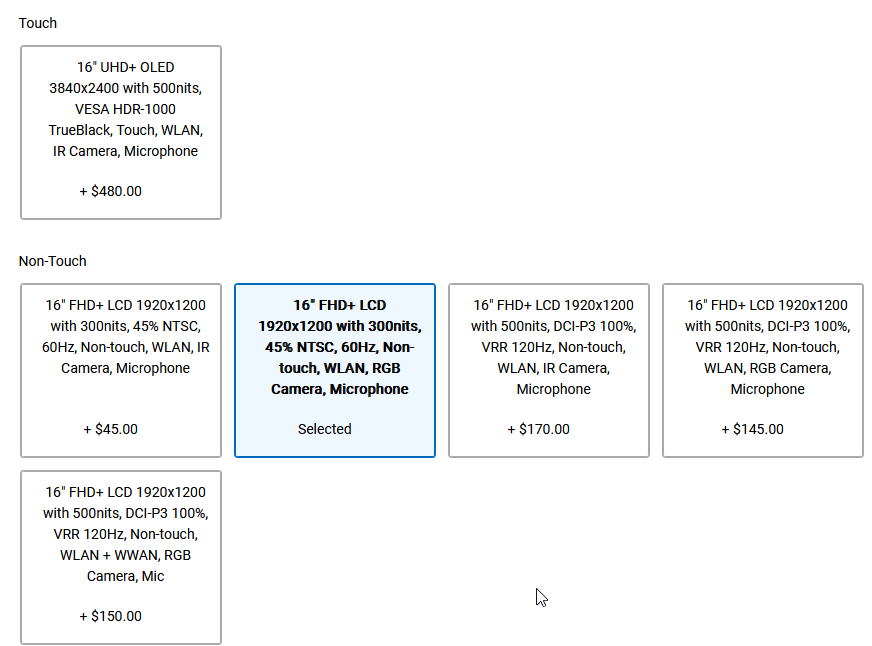
Thanks for your help,
Regards 🙂
I tested both and the OLED definately has better colours, however i am sensitive to reflections and found the glossy screen too much, but then we have a lot of glass and overhead LED lighting in our offices. I’m also not convinced by 4k on such a small screen windows apps still don’t seem to be perfect at scaling
the 1920x1200 500 Nit is impressively bright and a nice matte finished which I preferred, would be nice if it were QHD like the Pro Max 18 but being slightly smaller still looks sharp enough to my eyes
-
13 hours ago, win32asmguy said:
How is fan noise at idle? Does the profile have greater hysteresis so fans do not spin up/down quickly as load spikes occur? I would hope that now we have a very large vapor chamber and cooling capacity it can absorb these much better than the precision 7780 did.
I’ve been using it a bit today just installing software and in office environment I haven’t really noticed the fans, this is with it set to balanced power plan with best performance under settings
I did note on the base pro max 16 the fans kicked in a lot more often when set to best performance under power settings but not noticed that on the pro max 18 so far.
my only annoyance with the Pro Max 18 fans is on boot it spools up quite fast and cuts out abruptly. when joining via intune and installing updates it did this several times and made me think it was failing to boot a few times but used all my patience and waited all was fine just misleading noises!
Not great for user experience I can imagine some users will be panicking and holding the power button when nothing wrong!
-
13 hours ago, Easa said:
What was the CPU temperature during the first seconds of heavy load (PL2) ?
I think on all of these it’s pretty rediculous peaks at 105 intel limit for very short time then comes back down to more resonable levels. Seems like the fans should spool up quicker or maybe for the tiny surface area it’s just hard to cool!
I can’t test on the system I have here as it’s on our domain which means only approved applications are allowed for cyber security standard compliance
-
11 hours ago, Easa said:
Back when I tested the Fury G11 I remember the fans were really loud, especially ramping up and down with no apparent reason. It was really, really annoying. If the new Fury acts in a similar way, then that is a hard pass from me.
I didn’t spend long enough using it to see if they ramped up and down sensibly in day to day work but certainly if you do any heavy multi threaded CPU or intense GPU workload it gets loud! The sort of loud where all your colleagues turn their heads!
-
12 hours ago, 1610ftw said:
Interesting discussion, can somebody please update me on max CPU, GPU and CPU-GPU combined load for these?
175W to the GPU of course seems nice but not really that much of a benefit when total power for GPU and CPU combined is 200W which I recall was the number given by Dell for the Pro Max Plus 18?
@win32asmguy I will be interested to hear about your impressions of the Pro Max 18" compared to the Clevo X580 when it comes to the output you can achieve at a a fan noise that is acceptable for you. Having been able to go from an essentially empty bios where you cannot do anything (Clevo) to one where you can adjust it all (Uniwill) must have been great and I assume that the Dell may be not as bad but still closer to the Clevo when it comes to adjustment options. I am still stunned how bad the Clevo bios is - it essentially gives no advanced adjustment options at all except for memory when oveclocking is enabled. That is not worth it however as it messes up the CPU performance that is worse with overclocking enabled than out of the box without it.
On the Pro Max 18 Plus I ran Cinebench 2024 10 Min multithreaded CPU test at the same time as a real 100% GPU compute workload (rendering) as a bit of a torture test. the Ultra 9 285HX CPU hovered around 60-65W and NVIDIA RTX PRO 4000 Blackwell around 140-150W
overall system power was around 250-260W with brief spike to over 300W
really impressive although it would be nice to be able to fine tune the CPU dynamic PL1 in BIOS/ Dell software, but this seems like Dell struck a decent a balance for such an intense workload. The GPUs can take more power than the CPUs without overheating it seems
Fan noise remained tolerable for me and the chassis of the laptop remained remarkably cool compared to previous generations.
-
 1
1
-
-
11 hours ago, Easa said:
Just to be clear, some of you may remember my struggle last year in the ZBook Fury thread. Tl;Dr: After a great disappointment with Fury G11 I have decided to give P16G2 a try and was genuinely impressed, to the point of ordering one, but then cancelled everything once the Intel Raptor Lake problems unveiled.
So here I am, delaying my purchase month after month, patiently waited for P16G3 and having mixed feelings about it, after the actual release. I want to buy a workstation laptop that will last me almost a decade again, just like my old ZBook 15 G1 did. It does not have to be a true DTR, I have a workstation desktop as well. It has to have a decent GPU for playing outside of home, be as repairable (after warranty) as possible, and has to have a good cooling solution (no ramping up and down, quiet when idle or browsing). Other than that:
- Ideally 16" (no less and preferably no more) form factor with 16:10 screen
- GPU must be on a separate daughter board
- Arrow Lake HX CPU + RTX
- Must be dockable by a dedicated Thunderbolt dock (not some 3rd party solution)
- Must have IPS non-touch AG panel with at least 120Hz refresh, absolutely best at 2560x1600 res.
- As many connectors as possible
- At least 3 year NBD On-Site warranty
So basically those three. Now:
P16G3:
- Best, defacto unrivaled keyboard with ideal layout, replaceable
- Subjectively awesome aesthetics
- Dedicated TB5 dock
- TrackPoint
- Dedicated power button
- Horrible display options, have to perform a panel swap right after purchase, means more investment OOB
- Greatly reduced power means uncompetitive burst CPU performance and sustained GPU performance
- Most expensive out of them
ZBook Fury G1i 16:
- Stellar display options with both 2560x1600 and 3840x2400
- Great aesthetics
- More storage options
- 5 Year warranty as a base option
- Possibly plagued with same issues as previous unit
- TB5 dock non-existent, cheaper TB4 dock
- Only one USB-A port (WTH?)
- Horrible keyboad, horrible layout, replacement is a nuisance
Pro Max Plus 18":
- POWERRRRRRRR
- Seriously unrivaled power
- CAMM/CSODIMM RAM with top speed
- Best price (I have a good sales rep)
- More storage options
- Dedicated TB5 Dock
- Best warranty service
- Awful aesthetics, its just plain ugly, resembles a fat MBP
- Great display only comes in 18"
- Probably better keyboard than HP, still horrible layout, replacement is a nuisance
Now, I was absolutely and fully satisfied with the power I got from the evaluation P16G2 unit, which had 14700HX + A2000. I would configure P16G3 with something like 265HX + RTX PB 3000/4000. It looks great, rings all the bells and whistles except for the price. Problem is, I can configure the Dell Pro Max for cheaper, or, with a league better hardware for the same price, with a better warranty, and +100W of power budget. At this point IDK what to do. I will try to source all three for evaluation, but the chances of getting them all to try out are low and I dont really have time for this.
I mean, if the P16G3 CPU will be able to turbo to at least 120-130W when the GPU is not loaded (PL2), AFAIK it should, I am fine with 95W GPU sustained, for the RTX PB 3000. The Arrow Lake is amazingly efficient and does not lose significant % of power even when power constrained. Same could be said about Ada/Blackwell. The thermals should be awesome with such low wattage (if the cooling solution will be good) and the board components will be more durable. Its just me hesitating to pay V8 money for V6 power.
the HP Fury 16 G1i is definately better looking than the Dell Pro Max 16 or 18 Plus, but the fan noise under heavy multithreaded or GPU load is very loud, distracting for others in an office environment I’d have to put noise cancellling headphones on at home it’s that bad!
I guess we have to wait on the reviews of the Lenovo, while the HP Fury laptops were not as slow for more lightly threaded tasks in my limited testing there was still a difference of 5-10% depending on task. The Dell looks thing is subjective but certainly colleagues preferred the more rounded chassis of previous dells and the HP. But where you are sat in front of it that doesn’t matter.
It’s also a shame dell didn’t go for a QHD panel in the Pro Max 16 Plus they seem to be making odd decisions, minimising options to simplify the bill of materials. We are in the weird situation where the base Pro Max 16 has matte 16:10 FHD with awful colours(45% NTSC) and to make it bearable you have to upgrade to QHD but that’s still only 300 Nits.
Yet it’s bigger brother the Pro Max 16 Plus doesn’t have a QHD options just an ok FHD 500Nit display or 4K OLED, no QHD option which having seen a few now I am also convinced is pretty optimal at 16-18 inch.
If it helps I was all set to downgrade from 17.3 inch 16:9 FHD precision 7760 to the much smaller Dell Pro Max 16 Plus, until I saw the Pro Max 18 Plus, it’s hardly any bigger ( just a bit more depth/ height for the taller 16:10 screen) but it’s so impressive sat in front of it that I went for the 18! Performance/ slightly lower fan noise than the 16 was also a factor
But the main one was the screen it is bright, Low reflections and the right balance of text size at 125-150% scaling, even though I can feel my short range vision starting to deteriorate with age I can read text even at 100% scaling , just more comfortable at 125% or 150% scaling, windows recommends 150% as default.
I would suggest use a stand for prolonged use as the very small bezel at the bottom of the screen makes the screen quite low, but then that is true for any laptop you should really raise it up to eye level for best ergonomics for a full days work. I already have these at work and home and certainly helps my back/ neck however might have to upgrade as the new laptop is heavier and a little thicker it makes me a nervous the one at work won’t hold don’t think it was designed for this beast of a laptop!
-
1
Dell Pro Max 16/18 Plus (2025 model) pre-release discussion — MB16250, MB18250
in Pro Max & Precision Mobile Workstation
Posted
I saw similar on pro max 16 plus, more like 120-125W with the RTX Pro 4000 IIRC I tested where as in the 18 inch chassis the RTX Pro 4000/5000 ran at 175W sustained in my tests and the fan noise was reasonable in my opinion. Actual performance wasn’t linear though so maybe 10-20% lower for ~50W difference
not many options out there in workstations the equivalent HP Zbook fury 16/18 throttled heavily even in the 18 inch chassis I tested and the fan noise was very high!
Lenovo have gone backwards with the P16 Gen 3, only equip it with a 180W power supply so never going to do sustained high power