Easa
-
Posts
113 -
Joined
-
Last visited
-
Days Won
1
Content Type
Profiles
Forums
Events
Everything posted by Easa
-
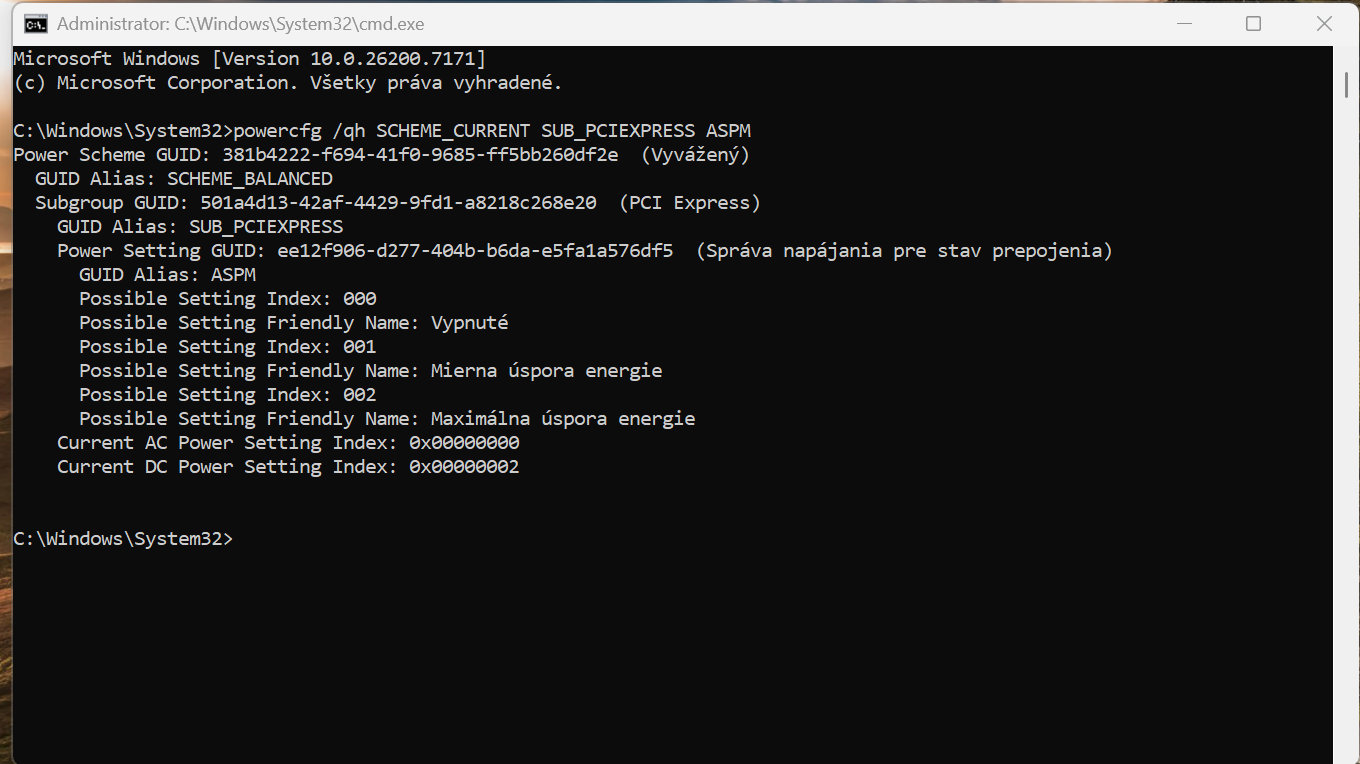
 Registry entries added. After running the command: "Vypnuté" means OFF. WHEA Errors still present, they were there even before I had the 990 Pro drives inside. Nothing changed, yet. This: https://www.dell.com/support/kbdoc/en-us/000216115/laptops-with-12th-gen-and-12th-gen-hx-intel-core-processors-may-display-warning-message-whea-loggerid17 eh? 😄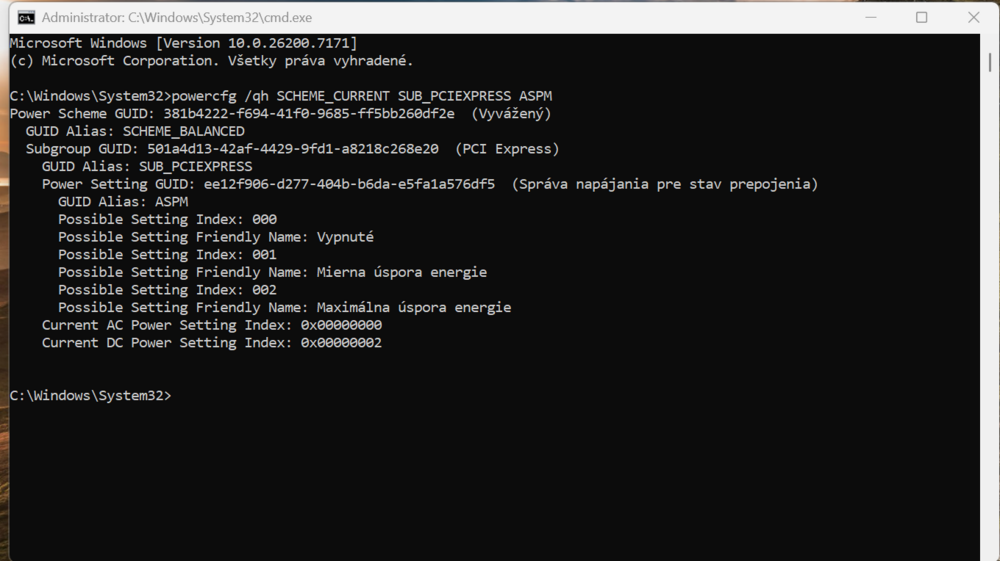
-
powercfg /qh SCHEME_CURRENT SUB_PCIEXPRESS PCIEXPRESS_ASPM_STATE throws invalid parameter I have done a powercfg /energy report, and it says that the PCIE ASPM is disabled when running on AC Power. What I am also observing that the machine sometimes freezes for like 2 seconds with no apparent reason, sometimes its when maximizing window, sometimes its when launching an app or opening context menu. No clear link to anything.
-
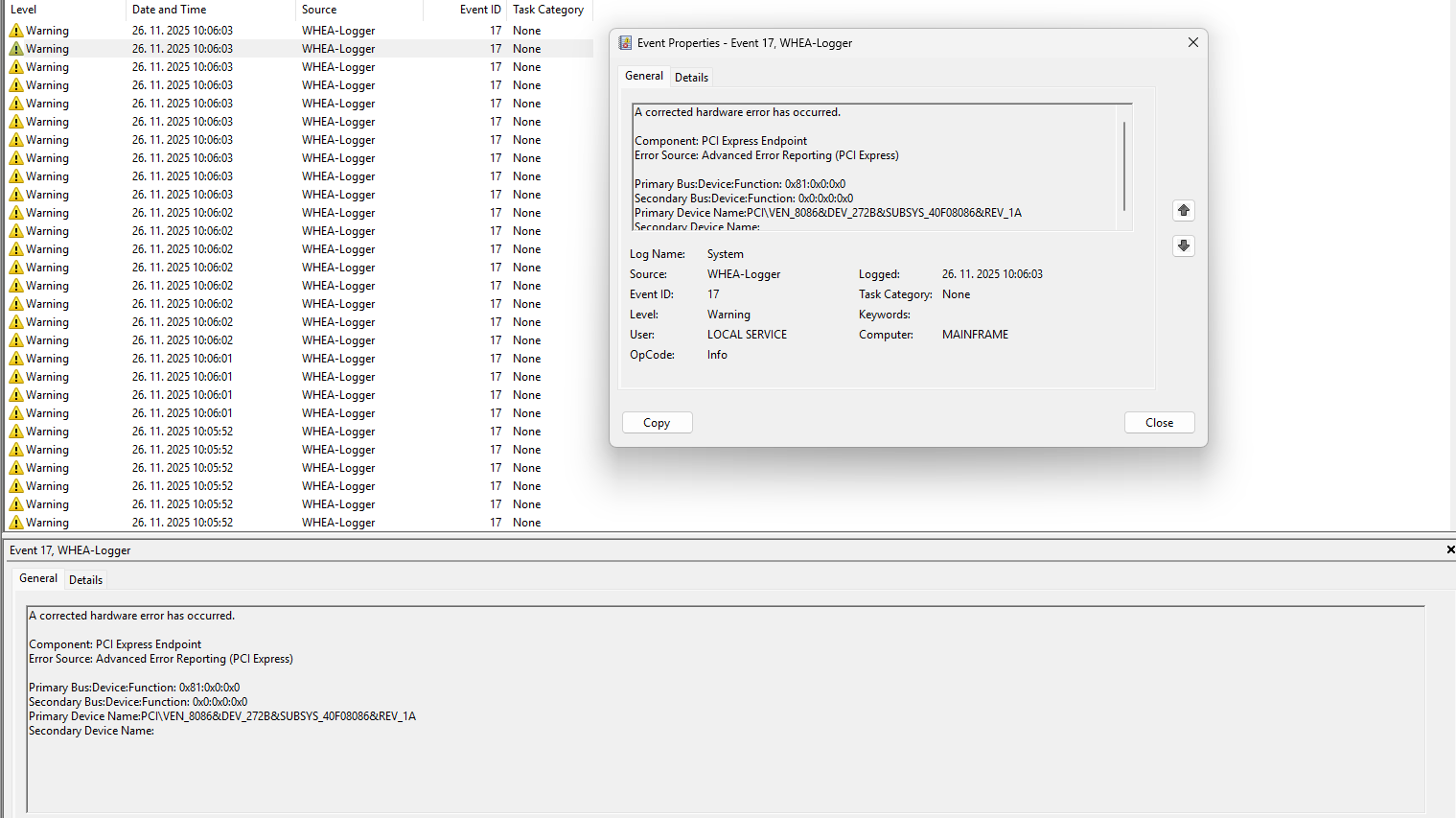
No unexpected shutdowns No WHEA errors apart from 17 Two ACPI 15 Errors always come at the same time as the whole WHEA 17 stack These devices throw an error for instance, with multiple entries. Its 41 Errors in total. PCI\VEN_105B&DEV_E11D&SUBSYS_E11D105B&REV_00 PCI\VEN_10DE&DEV_22E9&SUBSYS_000010DE&REV_A1 PCI\VEN_144D&DEV_A80C&SUBSYS_A801144D&REV_00 PCI\VEN_144D&DEV_A810&SUBSYS_A801144D&REV_00 PCI\VEN_8086&DEV_272B&SUBSYS_40F08086&REV_1A
-
Basically everything on the PCIE Bus - some Intel stuff, then Nvidia, Samsung NVMe drives...Ill try to get a complete list.
-
This exactly. Its not just the card, its like the whole PCIE Bus at once. Like I have said, it has no observable effect on the usage of the machine, but the error logs are there. The machine can run 24 hours with no errors, but once you restart it or sleep / wake it, these pop up.
-
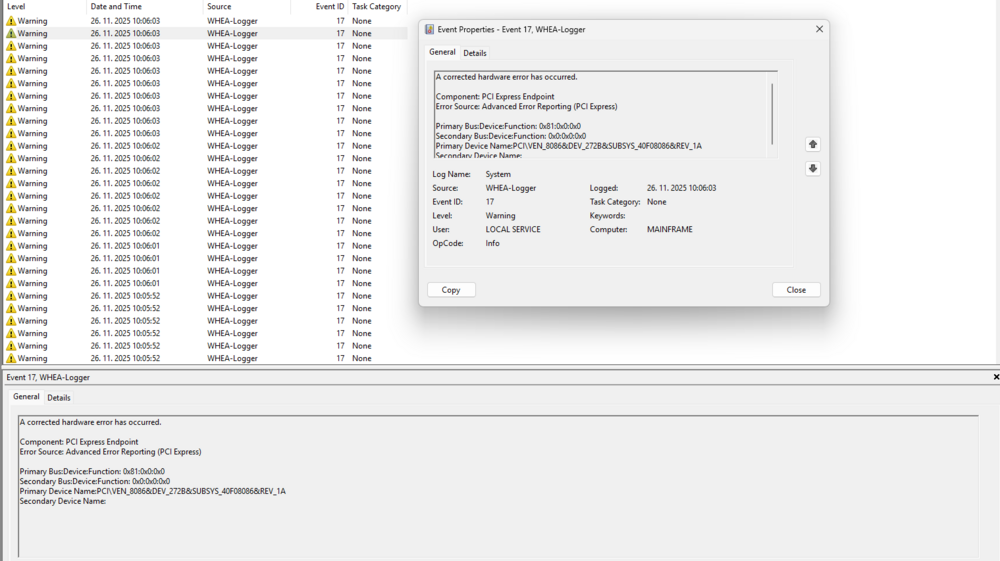
@MyPC8MyBrain Dont want to draw conclusions so early, but it seems like the problem is solved, even with the Advanced Optimus enabled there was no issue after updating the drivers & disabling PSR. What still bugs me is this (cant help myself). Flood of WHEA corrected errors. Happens during power state transitions, power source change, or on a clean boot. Has no impact on performance, no BSODs, but they are there. Just about every device that is on the PCI Express bus throws an error (the individual errors have different Primary Device Names). Should I just ignore them?
-
Sure thing, but it offers no dedicated solution, and the repairability (after the warranty period) is non existent due to CPU+GPU being both not only soldered, but also fixed by an epoxy adhesive (Lenovo does it like this for the last 10 years). BGA repairs in this case are, in most cases, impossible. Thank you for such an elaborate reply to this issue. I have performed a clean uninstallation of all graphics drivers via DDU, then installed the newest iGPU driver (from Intel, not from Dell), then the Quadro/RTX PRO driver. I have installed Intel driver only, without CC, it does not cause dGPU switching. Disabled PSR via Registry. Battery seems to behave normal, will observe the behaviour during the upcoming days.
-
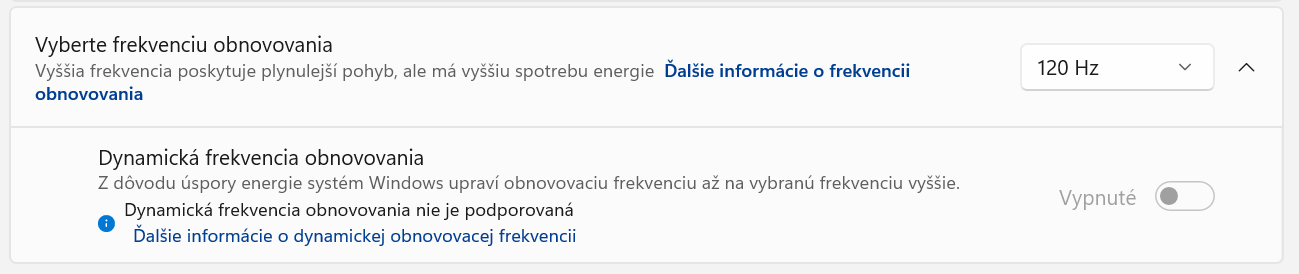
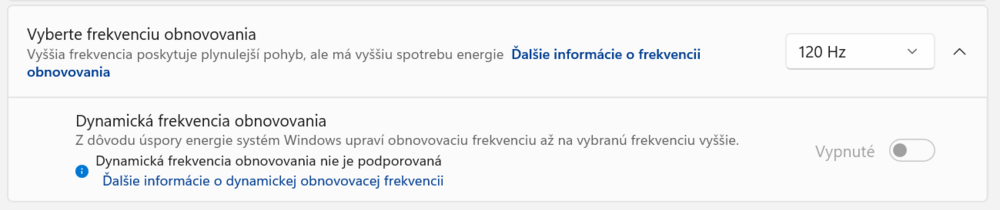
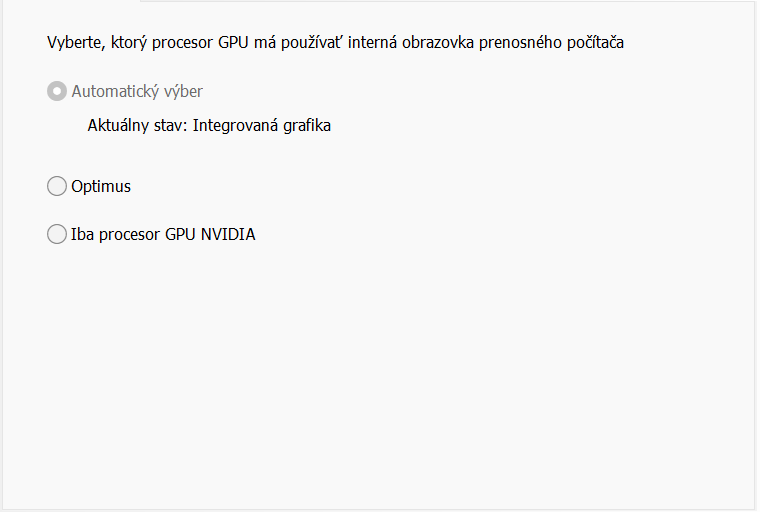
Thank you for the suggestions. I knew that it has something to do with the iGPU driver, that the touchpad entry is not really the culprit. However, I dont know why is there no entry about iGPU / Display driver failure. These systems have Dell iGPU drivers that install without the Command Center. If you install the CC by yourself (through MS Store for instance) it results in a bugged optimus behaviour, where the machine keeps powering the dGPU on and off. The last iGPU driver that Dell provides is 32.0.101.6987 from 29.7.2025. There is no dynamic refresh rate on this machine (sorry, its in Slovak language, but you see the setting): Nvidia RTX Pro driver updated to the latest version as of this morning (581.80), the regular way with a clean install, not using DDU or anything similar. Intel GFX, I am going to try it, but as I have said, it causes other problems. Dell BIOS and EC package was updated about a week ago to the latest version, which is still the last available. If the issue persists, I will have to run dGPU only, yeah. In the Nvidia Control panel, the options are Automatic, Optimus and dGPU only. What exactly is difference between the Automatic and Optimus setting? AFAIK the Optimus always goes through iGPU, even when running dGPU, and the Automatic is like an on-the-fly MUX Switch. Or am I wrong? At the end of the day, the question still stands. Why has the issue manifested only after a month? I am using the machine in the same way every single day, and there was no recent alterations to the drivers or the configuration. The only thing that I have done differently, is that I have played Witcher III while docked, for like 10 minutes, to test temperatures.
-
The laptop has been working fine for a month, since this day, I have experienced this weird issue. Without a clear link to any activity or app, while browsing or watching a video, on battery or plugged in, the screen freezes, goes black (without backlit), then flashes about two or three times and stays black with backlit on. Like when MUX switching. However, after this, the laptop either freezes or continues to work, but without image. Have to force reset. Switching off Advanced Optimus in the BIOS seems to do the trick, but I would like to keep my battery life. Also, there was no issue for a month. The drivers are the same. I have experienced this several times during the last few hours. Each time it happens, there is this entry in the eventlog, exactly like this one: Anybody has experienced this behaviour ? Thank you.
-
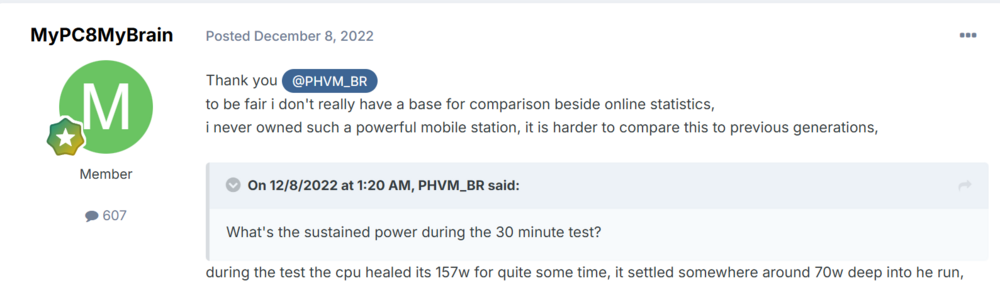
No, I do not, and you still have to disprove that fairy tale of yours. Exuse me, but do you actually understand what the term ambient means? Because unless you are in a tropical climate, where room temperature is 31-32°C, then no, you are not idling 2°C over ambient. And even this was reached, by your own words: "(on Cool Power Plan in bios, on power saver in windows, if i switch to ultimate performance in windows the score will be over 24k, but i idle 10c hotter)" So thats that. But yes, lets all compare our meaningless idle values whilst we cripple our system in every way we can. Or it just might be that you do not know what idle is. And you still have to show the actually meaningful value - the core temperatures during the CB23 rendering phase. Not the 1 minute HWInfo window with power draw topped at 26W. This power draw, to be precise: The second thing you, apparently, have no idea about, is efficiency. Under no circumstances will the i9-12950HX be more efficient than Ultra9 285HX. It has nothing to do with its temperature. Efficiency is measured by comparing the value of input to the value of output, applied here it means electrical power in => compute power out. And the old Alder Lake CPU will not hold a candle to the Arrow Lake CPU, whatever PL you cap it at. They have almost the same PL1/PL2 values, yet the Ultra scores more than 50%, even when you hit Ultimate Performance. Thats efficiency. Brought in by the advancements of lithography and architecture.
-
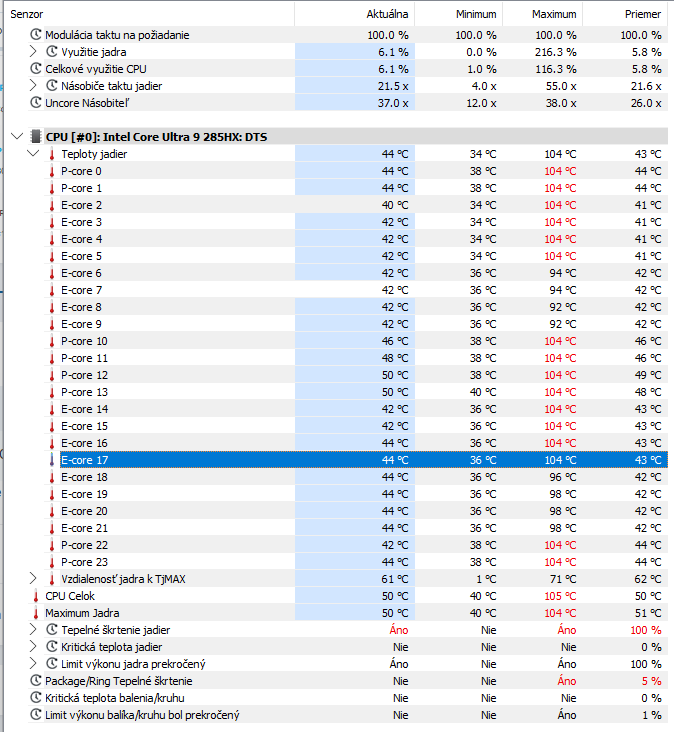
Excuse me, but where have you been for the last decade? Laptop CPUs frequently go all the way to the TjMax since Coffee Lake came. Boost to the max => Throttle => Keep sustained levels. Its not pretty, but it is like this for almost a decade. Phone SoC chips behave the same way, consoles do too, as do Macs. Precisions behaved the same way, too (with TjMax at 100°C). On the PMP16/18, this spike is there for about a second, then it drops down to 80-90s. Keep in mind that the heat transfer from these delicate lithographies is difficult, even with a vapor chamber. Overall perfomance? That overall performance, which is currently the best amongst all mobile workstations ever designed, almost on par with gaming laptops that have way more power budget, and at the same time better than both its direct competitors? Do not mistake heat for temperature, its not the same thing. Efficiency has nothing to do with the operating temperature either. The cooling system in this machine is far superior to anything that Dell has ever produced. It is able to cool down the machine whilst keeping the fans more or less relaxed. There is no issue. All the review units that I was able to source the data from behave the same, even the NotebookCheck´s PMP16 and PMP18. I have no itentions of repasting the unit at the moment, if someone here will beat my benchmark results significantly after a repaste, that would change my mind. Idling at 90+° out of the box is not normal, but lets stay out of the fairy tales please. No modern Intel CPU, not even desktop, will idle at 2-4°C above ambient, unless the ambient is 30°C (if you live in tropical climate then you may be right). I am typing this from a workstation with 285K, cooled by a quad radiator system, and even this idles at 34°C (coolant at 27.8°C, ambient 21°C). In laptop it is simply impossible, unless it has been in a cold for very long and you have applied liquid metal. Pro Max Plus 18 idles at 38-40°C , and I am 100% sure that none of the old Raptor Lake Precisions will idle at lower values with the stock TIM. P.S.: It might be about time to stop judging thermal behaviour of a highly advanced semiconductor device against the boiling point of water, just because it was the standard back in the day. Yes, modern CPUs run hot, hotter than we would like, but thats the way it is. To cool a 150W CPU to a "nice" temperatures you need a pretty beefy heatsink even in a desktop.
-
I dont think so, these CPUs behave like this in laptops, it corresponds to the Tjmax. I belive that @AL123 observed the same behaviour.
-
I believe that there is an online review comparing PMP18 to PMP16 and the HP ZBook G1i Fury 18, the PMP16 does not lose a lot compared to the 18" variant, its within single % digits. The HP was noticeably weaker in most tasks.
-
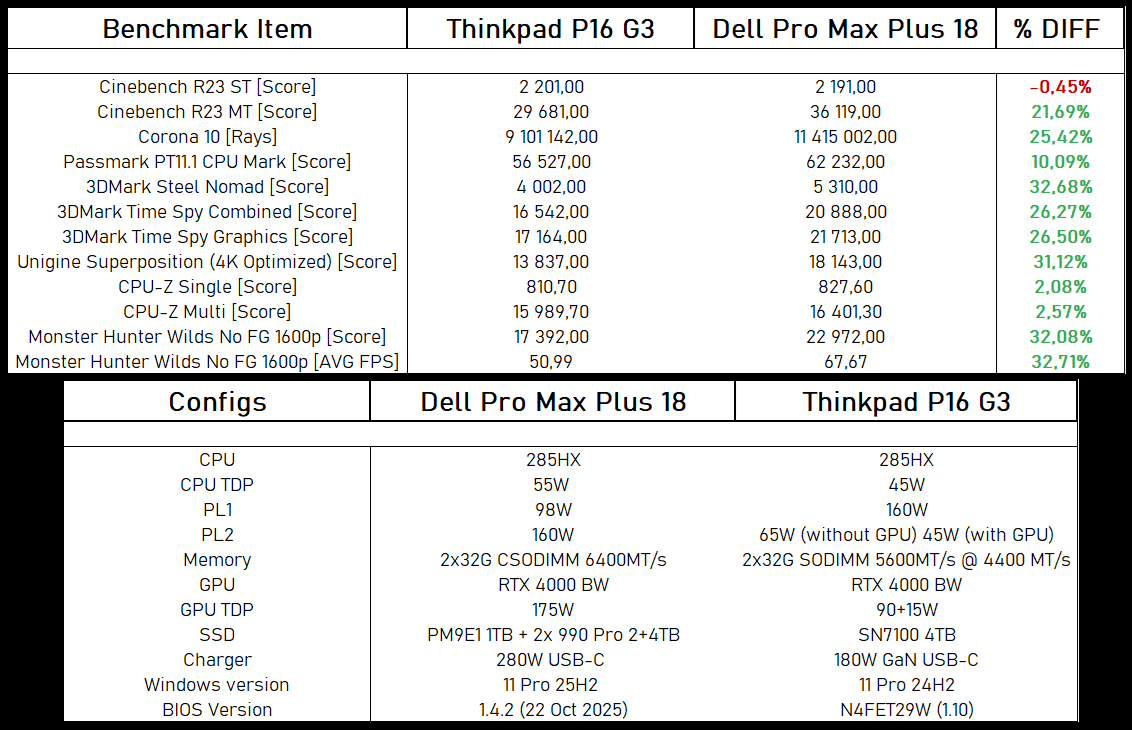
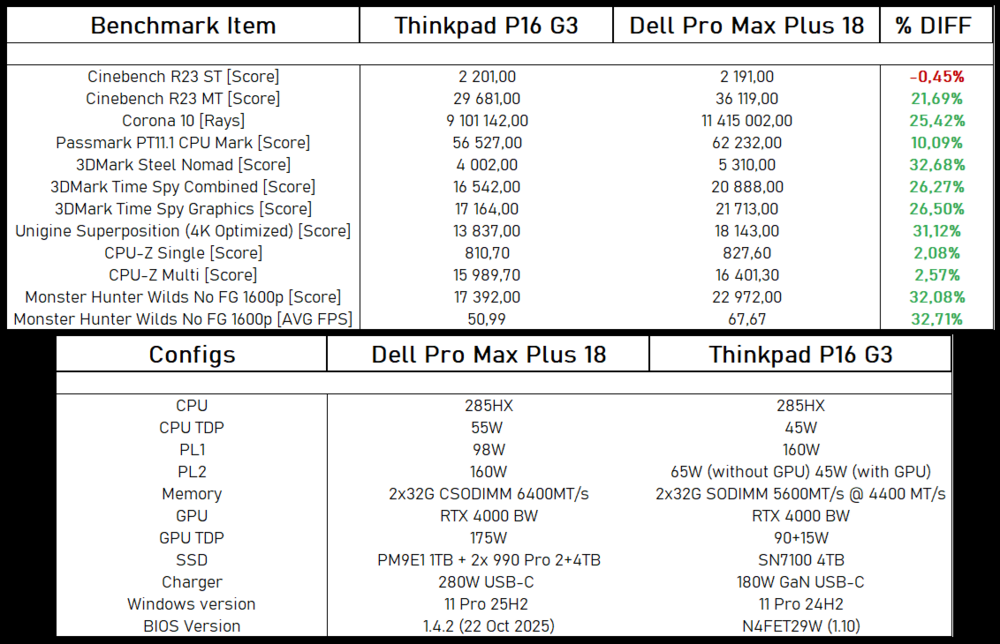
Hello guys, I am enclosing the comparison between the Dell Pro Max Plus 18 and the ThinkPad P16 Gen3 with the same configuration. You may as well ignore the PL/TDP data, as on the PMP18 it means theoretical maximums of the platform, whereas on the TP P16 G3 it is couting on the platform power / thermal limitations already. Both systems were tested with clean OS and stock power settings, same conditions 1:1, it was just a misunderstanding. TL;DR: With a 55% larger platform power budget, the Dell has about 25% more power during the sustained CPU load, during the combined load of both CPU and GPU (such as gaming) the Dell has about 32% more power. It has also significantly lower noise output, but the CPU temperature does rise up to the 105°C and can spike up to 109°C on individual cores. On the ThinkPad, the temperatures peak at around 98°C due to the more aggresive thermal policy. Measured stock memory latency in this configuration at 108ns (PMP18) vs 151ns (P16G3)
-
To be honest, my work is not GPU heavy either, and the dGPU only sees actual usage during gaming, so I see where you are coming from. And yes, having the GeForce option would be nice, as a cost saving option for those who have no real usage for RTX Pro, like you or me. From my own experience and observations though (>20 years computer hardware, including laptop board repair), the Quadro / RTX Pro cards are just more reliable, by both the GPU itself and the memory. I dont know if they are better binned, or is it the fact that they tend to run lower voltages, more strict power limits and lower clocks, but they just work. I am not saying that they are immortal, but going back 10 years, I cannot really remember the last time I had a dead or problematic Quadro dGPU in my workshop. So I would pick the RTX Pro just for this reason alone, like I did. But of course, the GeForce equipped laptops outsell them by a mile, and they tend to be abused more, so that skews the data and I am aware of that.
-
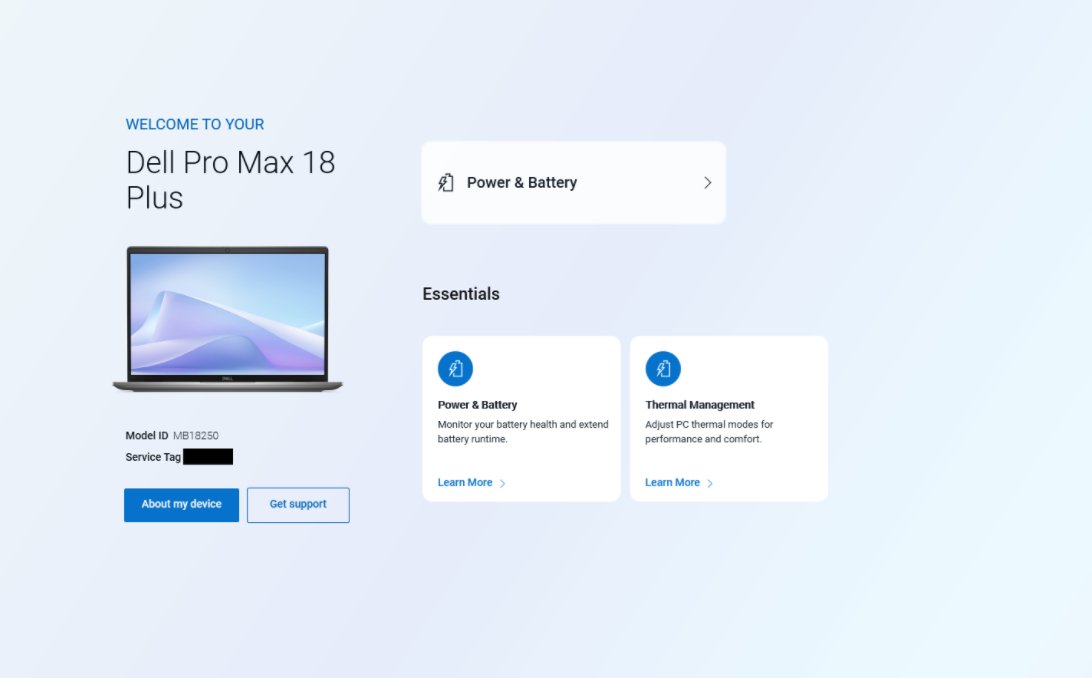
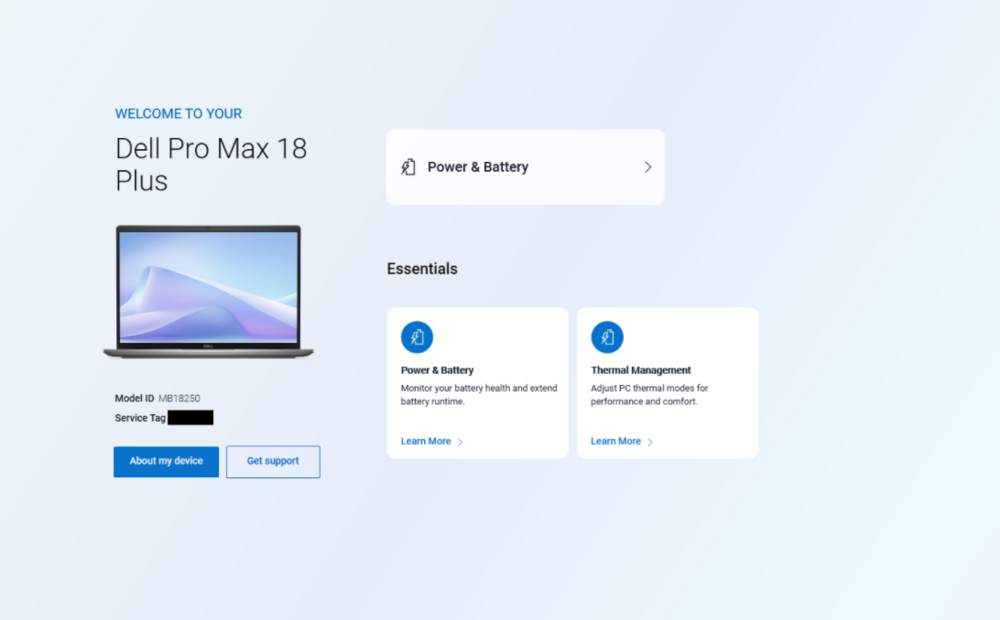
I hear you on the 4K Screen. The 2560x1600 is a perfect match for my needs, but I understand that for some folks, it might be a downgrade, especially on such large form factor. They really should give us the screen options like the HP has. 4K 3840x2400 @ 120Hz would be a great panel for this machine. However, we are not stuck, the screen that the PMP18 uses is different to the panel that was present in previous generations. But if you meant that in a way that we have one choice, then yes, thats a shame and i am 100% with you on this. Exactly like I despise them for going with this wannabe MacBook Pro Aesthetics, it looks so boring, so plain. But what exactly is your problem with the RTX Pro cards? AFAIK, the Pro model can do everything that the GeForce does + the stuff that the GeForce can not. And you pay for that of course. The only workflow that I think of, that really should be done on a GeForce card, is game development. =================================== It has been almost a month with the Pro Max Plus 18. I am happy with my choice, the machine has been flawless so far (except for the stuff that I have mentioned in this thread). I am using the latest BIOS from Nov 5 (2.1.1). BTW, my Dell Optimizer looks like this. There is just one card, Power & Battery, with the Essentials underneath. Regardless of what I click, it always brings me to the same screen, where I can choose the Power Plan. Nothing else. Cannot even cap the charging limit or behavior (I can do that in BIOS). You have it like this as well? Do you think that they will add some more options to this software? Dell Optimizer on other Dell laptops used to have more settings and options.
-
Dont. Just dont. The Raptor Lake laptops are a thing of the past now. Do yourself a favor and try out the new PMP18. The Arrow Lake CPUs run great in laptops. The architecture is stable and refined at this point (its already more than a year old), its way more effective than Raptor Lake, does not run as hot during equal tasks, runs on lower voltages. PMP18 has better cooling solution than the 7780. Also, what do you dislike about the new screen? I find 16:10 superior to 16:9, would not want to go back to that ratio, no way. Also, the new screen (except for the ghosting) looks amazing by its color rendition. I am not saying that the PMP18 is a flawless machine though, but so far I am happy with mine. I would even dare to say that its the best thing that Dell has released since M6800, we will see about its reliability though. Why have you returned the the machine ? Care to elaborate please?
-
Nope, I have the standard 64GB 2x32 CSODIMM.
-
Oh guys, and FYI, a friend of mine has received the ThinkPad P16 G3 in the same basic config (285HX / RTX4000) that I have, we are currently doing benchmarks to compare. Will post the results later so you know how our machine fares against the Lenovo. So far it looks that we are about 26% better in the gaming / combined CPU and GPU performance (measured with 3D Mark Time Spy). Measured RAM latency on my machine is @ 108ns, on the Lenovo we are @ 151ns. Quite a difference.
-
I must say that the Dell is now blazing fast with building these systems. Guess its the non existent quality control 🤣 Received mine in like 2 weeks? Back in 2014 when I have ordered my M4800, it was like 4-5 weeks of waiting IIRC.
-
I have experienced the freeze between Nvidia and Intel GPU switching too, but only when manually doing it through Nvidia control panel (like a software MUX switch), not when launching games and stuff. The buzzing speaker sound I have experienced also, when I am on the battery saving power plan and do some multitasking on the battery whilst listening to spotify through internal speakers. The third issue I have not experienced.
-
Today, a strange thing happened, or two. So, yesterday evening I have been working on the machine, transitioning from the old laptop, moving databases, installing software, etc. I have also opened the laptop to insert a 990 PRO 2TB drive from my former laptop. Everything was working fine at this point. Once everything was properly set up on the new machine, with the old drive already inside it, I have wiped the 990 PRO with DiskPart and then did a complete read test, zero fill and read test again (to check for degraded NAND). No problems there, however, the common read speeds for the 990 PRO were somewhere at PCIE GEN 3.0 level, hovering around 2.500 MB/s. Also, the factory OS Drive (PM9E1 which is an OEM 9100 PRO) runs somewhere between 6000 to 10.500 MB/s in benchmarks, dont know why. I know that the Sequential R/W is not important, however, I dont know why does it act like this. I yet have to perform a full test in Anvil to see IOPS, but I suspect that the drives are not working to their full potential in this laptop. Could anyone with PMP18 please confirm the drive performance with either CDM, AS SSD or Anvil? After I have finished the work with the drives, I have launched a Passmark Performance Test 3D benchmark to run in a loop till the morning, to test the GPU for possible errors before I fully commit to this machine. This morning (7 hours later) i came to the machine, ended the test, checked HWInfo and tried to restart the OS. When I came back from kitchen, the PC was in recovery mode, unable to post. No luck with startup repair, always loaded just into recovery. The filesystem was fine, the drive was detected, files were accessible. Ran 3 different diagnostics on the OS drive, all fine. Fixed the bootloader partition with bcdboot, everything started working again. I am flabbergasted. Now, is the OS drive failing in some weird, unpredictable way, or it was some Windows shenanigans?
-
I will certainly try to observe such behavior, once Ill be able to spend more time with the laptop. Could be during this weekend. 7 - Yes, exactly this. Nvidia tray monitor says that the GPU is inactive, but it keeps getting active. Once I got rid of the Intel control panel, it is almost always off, but the corellation with the monitoring software is a spot on! Each time that I open HWInfo from tray, the GPU comes alive for a split second. So no hardware monitoring in the background when I want to maximize the battery, okay. 9 - I do not see any eventlog entries for connecting or reconnecting the FP Reader device. It seems like it only becomes active about 3 second after the login screen appears. First, there is only PIN option, but after a few seconds the fingerprint option appears. It is a FIPS reader, so I get that its a slowpoke. 11 - I know where you are aiming at, but I perfectly understand what is the SC slot - I use Smart Card reader for our Govt application. However, I have done my research regarding this issue, and everything points me to the WWAN. The actual SmartCard reader is called "Broadcom Corp Contacted Smart Card 0" and shows under Software Devices in the Device Manager. This SC Reader is also detected by our Govt software that works directly with the SC Readers. It also registers the Contactless one, and then the third one - Microsoft UICC ISO Reader. I believe that it handles the SIM / Virtual eSIM slot as a SmartCard. https://www.dell.com/support/kbdoc/en-us/000200467/inspiron-latitude-and-precision-wwan-with-esim-causes-login-issues-for-smart-cards
-
24 hours with this machine. My feelings and findings so far: The body is really sturdy with amazing torsion strength, does not twist, just acts like an ingot. One screw (front right corner) was loose from the factory. I have not opened the device, yet. As for the problem with the bottom door, well, in the 3D Visualisation on the Dell´s website, the laptop is pictured with some sort of a halved, sliding bottom door (the one that I have posted prior to this post). I do not have this, I have normal bottom cover that is one piece. Anybody here has a PMP18 with this sliding door? Keyboard is...well, its not a ThinkPad but it is not that HP abomination as well. Its quite good. No complaints except for the arrow keys. The 2560x1600 120Hz panel looks amazing color-wise, almost like IPS Black from the new Ultrasharps, but its slow AF. Ghosting is just there. Lenovo had way better panel in the P16G2 regarding this. I miss that screen, it was really good. Touchpad is very pleasant to work with, both its surface and the click feedback are good. Fan behavior is very good, at least during office work and basic multitasking its like passive or just very quiet, have not had a chance to try out some proper loads except benchmarks. Surface temperatures are pleasant. Sound coming from the speakers is nice. Not MacBook Pro level nice, but usable for both movies and some background music. Weirdly bugged Optimus. I have installed iGPU drivers from Dell. They install as a driver only, without the control panel. If I install the control panel for the Intel iGPU manually from MS Store, it results in bugged Optimus, with the dGPU (RTX 4000) running at 8W idle basically non-stop. Have you encountered this as well? The battery life is all over the place, ranging from 2 to 6 hours in idle with no apparent causes. The total system consumption is very wild, going from basically zero to 50W, again, without doing anything other than web browser with a few tabs (brightness at 7 out of 10) Fingerprint reader dropped once in 24 hours, was missing in device manager with no apparent cause, was fixed by a reboot. I hope that I wont have to RMA this week after the delivery. The internal, factory 1TB Gen5 (Samsung PM9E1) drive tops out at +- 8400/4000 R/W and I do not know why. Eventlog keeps getting spammed with "Smart Card Reader 'Microsoft UICC ISO Reader rejected IOCTL TRANSMIT: Parameter is incorrect" - seems like a SIM/eSIM issue, I do not use WWAN currently. Anyone getting these errors on their machine? Same thing with PCI Express Endpoint / PCI Express Legacy Endpoint WHEA Corrected errors. I am unable to find the source of these. Laptop seems to be working fine. Score in Passmark seems okay, getting about 62k / 4.8k MT/ST ratings, which are quite higher than the median for the 285HX. This is just some basic rambling about the machine, I will do a proper review once I feel "at home" with it. That feeling aint coming yet.