

htfan
-
Posts
8 -
Joined
-
Last visited
Content Type
Profiles
Forums
Events
Everything posted by htfan
-
System for architecture student
htfan replied to htfan's topic in Pro Max & Precision Mobile Workstation
Looking like maybe an Alienware 16X Aurora with an Intel Ultra 7 270HX Plus or Ultra 9 290HX Plus? And an 8GB RTX 5060 or 5070? And then 32 or 64GB RAM. How's that look? -
System for architecture student
htfan replied to htfan's topic in Pro Max & Precision Mobile Workstation
Haven't bought a Dell in years, still using my 7740... Wow, their new naming scheme is confusing! -
Hi all! Have a family member starting architecture school, looking for recommendations from you pros. Not sure if an XPS (if there's a screen big enough) or Alienware or one of the Pro models would be a smarter choice. You recommend AMD or Intel cpu? Maybe more importantly, which type of dGPU? NVIDIA or AMD? Looking for something that'll last a bit. Thanks! The school emailed some recommendations and also said they'll be using Revit in the future. · 15” screen size recommended · Operating System: 64‐bit Windows 11 · CPU Type: Intel or AMD processor with 2 GHZ or higher base core clock speed. o Highest single core base clock speed (GHz) is recommended · Memory: 32‐GB RAM (64‐GB preferred) · Dedicated graphics card with 6GB of video memory. o Accelerated Graphics (for complex Revit models and Graphic files): Graphics card with 8GB or more of video memory recommended. § OpenGL 4.5 or higher required. · Disk Size: 1TB Solid State Drive Please note: due to the intensive use of computer graphics in architecture and engineering, a dedicated graphics card is required. Students that have ignored this by purchasing a cheaper laptop with integrated graphics have had to purchase a new laptop.
-
Precision 7540 & Precision 7740 owner's thread
htfan replied to SvenC's topic in Pro Max & Precision Mobile Workstation
Got it, thanks for the info! -
Precision 7540 & Precision 7740 owner's thread
htfan replied to SvenC's topic in Pro Max & Precision Mobile Workstation
Are the Thunderbolt/USB-C ports on the 7740 always on/powered? Just bought a 4-port USB-C hub and noticed that when the laptop is powered off the light on the new hub remains on. So the two ports are always powered? Is that expected behavior? And can I change that? BTW, the AC adapter is plugged in. Pretty much always is, this is used as a desktop replacement. Thanks! -
Precision 7540 & Precision 7740 owner's thread
htfan replied to SvenC's topic in Pro Max & Precision Mobile Workstation
Thanks for the reply. I was looking for the drivers at Dell's support page after entering my service tag. I did see the Dell ControlVault3 driver v.5.14.10.10, A26 you linked to, I had already installed that but went ahead and re-installed it and rebooted. I still get the conflict in Device Manager. I have the two separate entries listed in Device Manager: The Dell ControlVault w/ Fingerprint Touch Sensor under ControlVault Device, similar to your picture and the Dell Data Vault Control Device under System devices, where I'm seeing the warning. Should they both be there? What's the difference? I don't really know Thanks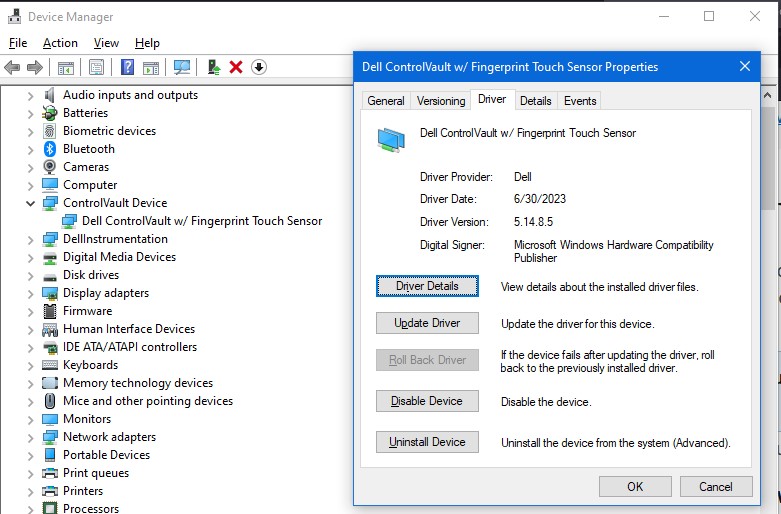
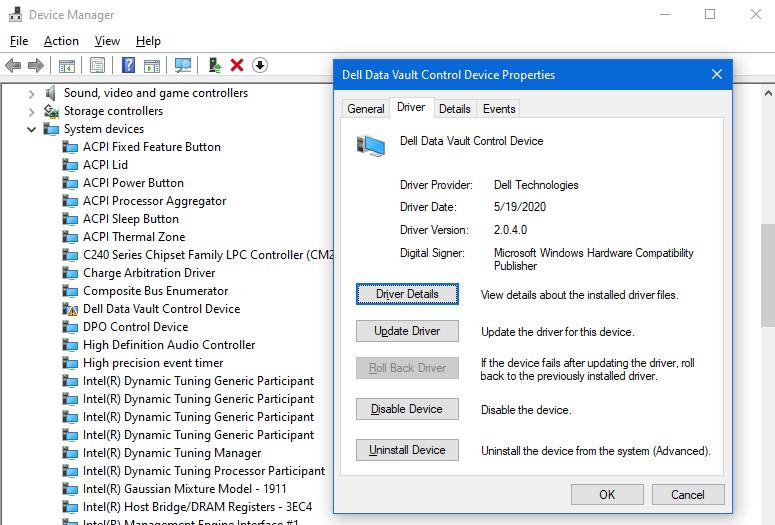
-
Precision 7540 & Precision 7740 owner's thread
htfan replied to SvenC's topic in Pro Max & Precision Mobile Workstation
While in Device Manager the other day on my 7740 I saw this conflict for Dell Data Vault Control Device. Driver version shows as 2.0.4.0 dated 5/19/2020, couldn't find any update at Dell. Anyone ideas on what's the matter? I haven't tried Uninstall or Disable device yet, should I? Thanks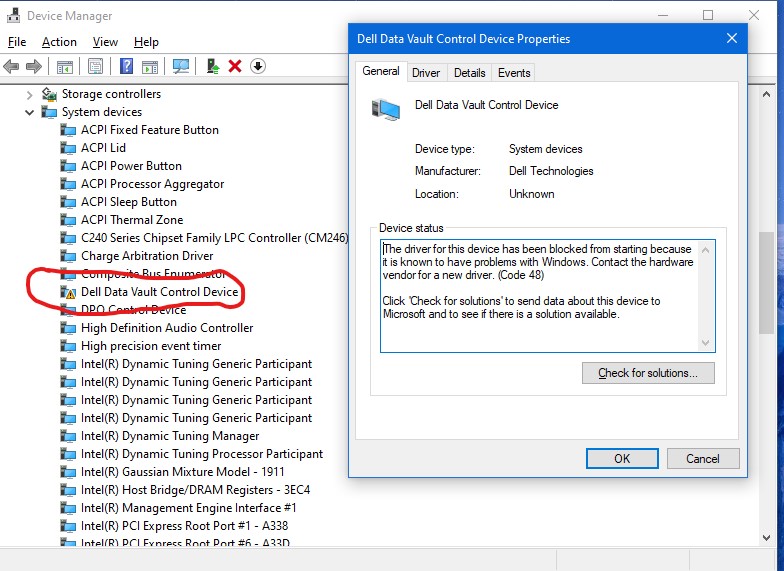
-
Adding my Thanks to all involved in moving NBR here 😎