

SvenC
-
Posts
129 -
Joined
-
Last visited
SvenC's Achievements






-
What a bad joke is that?! We replaced a few older Docks with SD25TB5 for some colleagues and I was able to test one, just to check if displays, network and power supply works. Had no problems with Windows 11 Insider Beta channel (build 26220), but I was just using it for an hour or so. Kept my WD19DC which works OK with my MB18250. On rare occasions I get the boot message that the power supply is not sufficient. Had to unplug, power off the dock and retry. But other than that it works. Might be due to my system not having a dGPU, which needs less power.
-
After every few Windows Updates my Pro Max 18 Plus "loses" the camera: IR light is constantly flashing in red - it logs me in with Hello but after that it keeps flashing. The camera indicator stays on (white light) but neither the camera app nor Teams get video from the integrated camera. Uninstalling and reinstalling the latest WIndows Update (I use Windows 11 Insider beta channel, currently 25H2, 26220.8340) combined with uninstalling the camera and camera IR devices from device manager sometimes helps. Sometimes I uninstall & reinstall multiple times and at some point the camera device starts working again. Super time consuming procedure to get the laptop working normally again. Anybody with any idea what could cause such a behaviour and how it could be solved without hassle of uninstalling and reinstalling Windows Updates? Typically directly after the latest Windows Update everything is working, but later on, after a reboot or resume from hibernate that camera missbehaviour starts. BIOS is up to date and as far as I see I've got all relevant Dell driver updates installed.
-
Is it really too hard for Dell to auto switch back to iGPU output when running on battery? Maybe some of the more hardware experienced members here can add some knowlegde or explanation if and why that dGPU output mode cannot dynamically be adjusted at runtime based on running on battery or not? Having to reboot, change BIOS dGPU output mode and reboot again, if you just want to plug/unplug your laptop and run optimized for attached hardware or battery life, is not that user friendly 😉
-
I saved a link from support.dell.com where you can enter your service tag (saved that one for mine) or search by product name on that support page. That should bring you to the software downloads page as well.
-
This one? https://dl.dell.com/FOLDER14196338M/1/DellDockFirmwarePackage_WD19_WD22_HD22_WD25_SD25_01.01.13.exe
-
I am still using my old WD19DC which is enough for my iGPU only config. We have colleagues with the new SD25TB5, I'll ask if I can test one and check. But, if I don't have any TB5 hardware (displays still HDMI and DP attached) would that help to check your issue on my side?
-
Sad but true.
-
Did Dell Command Update find and install the latest BIOS 2.6.1? I don't use that updater, always manually checking and installing updates.
-
Dell Pro Max 18 Plus with iGPU only works pretty well. Battery drain is OK - too much is typically caused by virus full scans and Windows Updates and sometimes the Windows search indexer goes crazy - If those processes are "sleeping" I get around 5 to 6 hours on light work with dimmed display. One glitch with the latest Dell provided Intel graphics driver which turns off the brightness control - brightness always max - Windows UI brightness controls do not work either - had to install the old driver and block Windows Update from installing new drivers automatically - sigh... So, the hardware seems pretty OK for my tasks - maybe the additional dGPU cause too much stress if CPU and GPU are used.
-
Multi monitor DPI scaling with my additional 27" 2560x1440 + 24" 1920x1200 would be easier with 18" 1920x1200 - without quirks (*) the 18" DPI is a bit too high - and no, I do not want to exchange the other displays to higher DPI displays 😉 (*) advanced font changer vs WIndows 11 build in scaling
-
BIOS updates and weekly full virus scans (ESET, have to use, company policy...) bring up the fans loud and clear. Sometimes too many browser tabs (e.g. with animated advertising like winfuture.de) uses a few cores with high load Visual Studio updates in sequence for 2019, 2022, 2026 and Preview and SSMS updates. Normal work is pretty silent - but hey, whats normal anyways 😉 I would buy it again - only wishes: 1920x1200 pixels 500+ nits on my 18" and the name Dell Pro Precision 7 oder 9 😉
-
Here is mine with iGPU only
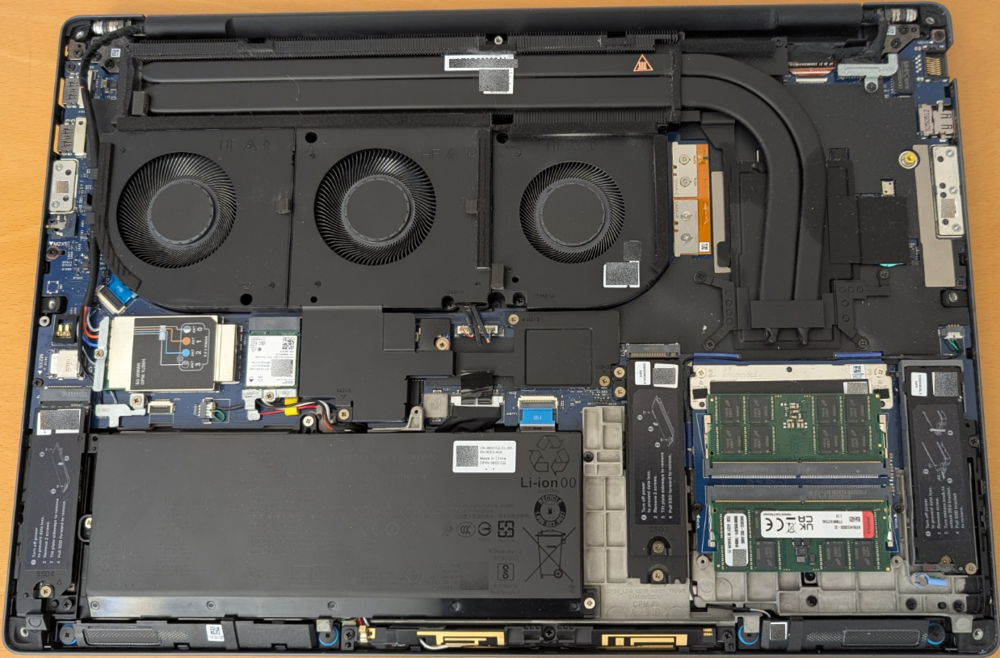
-
Did you check if disabling Intel SpeedStep fixes those intermittend noises? Maybe that cirrus driver "only" runs into trouble in some or all cases if ACPI stuff happens to save some power?
-
Funny, how new display technology seems announced as better for color accuracy (and whatever more) with potentially less power draw. But somehow an optimized LED 1920 x 1200 with 500+ nits (appreciated for both 16" and 18") could/should be even less power hungry, if you care about readability anywhere outside with daylight and much less about color accuracy - e.g. as a code and text reader and writer who likes contrast and reduced blue light 😉
-
I feel your pain and wished the same! I lost that control some years ago with Win10 updates and my need to run Hyper-V which disallowed some switches needed for undervolting my 7740 back in the times. Got worse with Win11 - never tried the BIOS offset patching way (no unimportant spare laptop to try that stuff) Would have loved to try undervolting, PLx and LLC customizations/optimizations on my 7680 which tended to get too warm and had too much battery drain - but too scared to brick my workday machine. Same with my PM18P - better than the 7680 (handed over to a colleague...) but still room for power and battery improvement. I guess Intel and Dell (and the other brands) do not want to test all power related permutations of BIOS settings and/or had too many support cases of "miss-patched" or even bricked systems if power users tried harder than they should... and Microsoft/Windows helped/helps to make undervolting and stuff as hard as possible - only those who dare know the current (always moving harder) outcome 😉 I moved on only to keep looking if this stuff comes back in an easier and saver way or if the BIOS defaults and public options are the best way to keep on going...


