

loopster
-
Posts
45 -
Joined
-
Last visited
Content Type
Profiles
Forums
Events
Everything posted by loopster
-
M17x r4 Quadro RTX 3000 upgrade
loopster replied to Hussain Alhadher's topic in Alienware 17 and M17x
I can offer this one coming from an ADLINK RTX 3000 with UEFI support, running in Zbook 17 G1. 90.06.53.00.7D.rom -
Windows 11 installation is no problem. Just use "Rufus" for building the install media and remove the 11 specific requirements in the settings. My DC came from a defective 8570w bought on ebay. Motherboard had failed (shorted chipset). i7 3820, K2000M and the DC screen were still good.
-
Uhm, I am terribly sorry for committing the dreadful crime of spreading misinformation😅 I WAS INITIALLY running 82.07.8D.00.15 with non a non-DC screen, but at some point (maybe a year ago) I flashed a different vbios with an applied overclock (1071 to 1306 ) onto my M1000M - version 82.07.97.00.04, since I was too lazy as to mod my own bios... Then two months ago, I got hold of a DC screen, installed that and it worked right of the bat with 82.07.97.00.04 - I hadn't even thought about the different vbios versions... In device manager, screen identifies as PnP-Monitor (Standard) Hardware ID MONITOR\LGD0220 No specific mobile registry overrides active as far as I can see. The 460.89 driver was installed by using NVcleanstall, which eliminates the need for manual inf modding: https://www.techpowerup.com/download/techpowerup-nvcleanstall/ GM107_82.07.97.00.04.rom
-
What driver version are you running? I'm on 460.89 with M1000M / 82.07.8D.00.15 bios and DC screen on windows 10 64 bit LTSC, no issues whatsoever. Maybe give 460.89 a try?
-
HELP NEEDED – ASUS ROG Gaming Laptop Not Turning On After Fan Replacement
loopster replied to jmitchell852's topic in Asus
Maybe this "new" fan is shorting out the 5V power rail. Try without the fan... -
Dreamcolor Display from HP ZBook 17 G2 into 8760w?
loopster replied to loopster's topic in Components & Upgrades
As expected, removing the lid switch magnet from the display bezel solved the issue of the Bios lock-up when the screen was closed. -
HP Elitebook 8570W - is it still good ? Hardware modifications
loopster replied to GuitarG's topic in Custom Builds
@JadeRover Thanks for the guide. EDID modding definitely worked on my zbook 17 with DC, even though the Nvidia control panel still reverted to 8-bit after rebooting. But the 10-bit NEC demo window consistently shows visibly less colour banding as compared to the 8-bit window ✌️. Nice. Though it does not have any effect on the 8570w. Maybe an older driver version does the trick... I'll try later. @Daedalus Sorry, no, I don't. I haven't opened up the assembly yet. Maybe this info is buried somewhere in the old Notebook Review forums archive. https://www.nbrchive.net/ -
HP Elitebook 8570W - is it still good ? Hardware modifications
loopster replied to GuitarG's topic in Custom Builds
Quick question, sorry for butting inbetween. I got my hands on a DC screen assembly and successfully swapped out the non-DC assembly on my 8570w with Quadro M1000M. How do I get the DC screen to work in 10-bit mode? The settings always revert back to 8-bit in the NVIDIA control panel settings. I'm on version 460.89 windows 10 (ltsc). Do I have to edit sth.? -
I've done that a dozen times with various keyboard models, always with good success. Even did it with models with kb backlight and mouse nub. It's pretty straightforward. Just remove the keyboard and completely submerge it in medium-hot water for a an hour or two. Maybe you also want to add some isopropyl alcohol after some time. Then dry it thoroughly with a towel and squish out all the excess water underneath the keys (and use centrifugal force to your advantage 🙂). Then use compressed air (like from a really strong compressor 🙂) to further blow out any remaining droplets until dry. Then put it on a towel and leave it for 24h (yes) on a radiatior to dry out completely. Should be as good as new after this. I was typing all of this on a zbook 17 g1 with a keyboard which had non-responsive keys and lagging input before this procedure.
-
Dreamcolor Display from HP ZBook 17 G2 into 8760w?
loopster replied to loopster's topic in Components & Upgrades
Yeah, basically. It refuses to boot with lid closed and being turned on via dock power button when a thunderbolt or display port output is hooked up to an external screen - however boots up fine in this scenario with only VGA connected. Always boots up fine though with thunderbolt, display port and VGA connected and lid being open 🙂. I presume I can't run dgpu mode only (or hybrid graphics disabled, as the setting is called in bios) anyway, therfore I won't try 😜, as this would end up in a black screen also. Whether I have the setting on automatic or hybrid graphics enabled does not make a difference with this behaviour. -
Dreamcolor Display from HP ZBook 17 G2 into 8760w?
loopster replied to loopster's topic in Components & Upgrades
Thanks JadeRover for expanding in more precise detail. Of course I was aware of the MUX business when I wrote "don't know how this works exactly". What I meant was that e.g. I am not aware of the lanes bottleneck. What I understood thus far is that the igpu in the zbook 17 G1/2 can't drive a 10-bit panel. One rather curious thing I found with this RTX3000 version of mine (presumed as ADLINK as I mentioned, bought in 04/2025) is that you cannot switch on the laptop on the docking station with the lid closed and any display port or thunderbolt port output connected to an external screen, maybe also VGA, not sure atm. - no matter directly on the laptop, or on the dock - because this will cause the UEFI/Bios to lock up, or "fail to post" for a lack of a better expression. It does post just fine however connected to dock and nothing connected, or when switching it on with external outputs connected and the lid open. Probably some handshake going awry somewhere... I think I could easily solve this be removing the lid switch magnet from the display bezel, but for the moment I am not too bothered by this to actually test out this theory... Edit: curiousity got the better of me, I checked and it works with lid closed and VGA only hooked up. -
Dreamcolor Display from HP ZBook 17 G2 into 8760w?
loopster replied to loopster's topic in Components & Upgrades
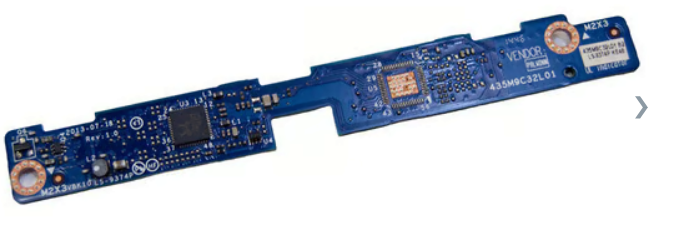
Great, dunno know whether HP RTX3000 would run in the 17 G1 though with a 3rd party DC. The thing is, the standard, non-DC Zbook uses an LVDS screen, and also the DC is LVDS I believe. I don't know how this works exactly, but apparently the igpu puts out the video signal through the display cable, which connects onto this board, and it is then converted to LVDS via this board below the screen. HP for ZBook 17 G1, 17 G2, LVDS Board (PN: 741282-001, LS-9374P) - 2630138 The ZBook DC screen converts edp to LVDS too with an internal controller board behind the panel. Dunno why, it's just a weird design to me. Edit: apparently it would run: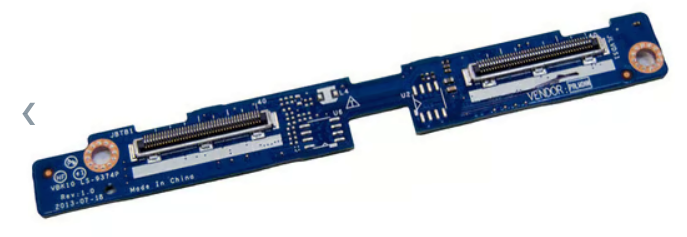
-
Dreamcolor Display from HP ZBook 17 G2 into 8760w?
loopster replied to loopster's topic in Components & Upgrades
Yeah, and I got my running just fine, thanks 😉 My machine is a zbook 17. The RTX3000 displays through the integrated GPU. That's why I have to keep hybrid graphics enabled in bios. Otherwise it will create a black screen. And that's the reason why the RTX3000 can't be used in combination with a dreamcolor screen, as the DC will automatically disable the igpu. -
Dreamcolor Display from HP ZBook 17 G2 into 8760w?
loopster replied to loopster's topic in Components & Upgrades
That is an actual picture of my RTX3000 from the ebay listing I got it from, with its heatsink mounted ofc. Was advertised as "NVIDIA Embedded MXM GPU Module with NVIDIA® Quadro® Embedded RTX3000 Mobile". Won it for 120 sth. €. HP ZBook 17 Compal LA-9371P Rev 0.3 Schematics.pdf -
Dreamcolor Display from HP ZBook 17 G2 into 8760w?
loopster replied to loopster's topic in Components & Upgrades
I have no idea what that means :-). I actually have a rtx3000 in my primary zbook 17. I think it's Adlink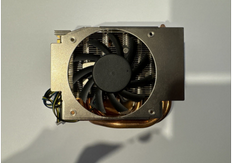
-
Dreamcolor Display from HP ZBook 17 G2 into 8760w?
loopster replied to loopster's topic in Components & Upgrades
I eventually put it in my second zbook 17 g1, which is currently running a crappy K610M. I'll probably drop the M4000M into this one, and maybe sell the 8760w with k3100m inside. -
HP Elitebook 8570W - is it still good ? Hardware modifications
loopster replied to GuitarG's topic in Custom Builds
Both are LVDS and on 460.89. -
HP Elitebook 8570W - is it still good ? Hardware modifications
loopster replied to GuitarG's topic in Custom Builds
I found that versions somewhere later than Dec. 2020 seem to break brightness control on my 8570w with M1000M and 8760w with M4000M. In each case I simply took the latest version from https://www.nv-drivers.eu/ for the respective cards listed and brightness control works flawlessly with those versions. I believe they are both on 460.89 (can't check right now to be sure). Never bothered to check what the latest functional one actually is. For the M2200 it would be the same version. -
Best way to remove sticky rubber coating from surfaces?
loopster replied to Will's topic in General Discussion
Denatured alcohol to clean off the sticky goo on top, then use a few drops of baby oil (yes, baby oil 🙂, it works best) to give the surface a fresh finish and seal it off. -
Precision M6700 owner's thread
loopster replied to Aaron44126's topic in Pro Max & Precision Mobile Workstation
Would you be so kind as to share this 100w version of the p3000m bios here? I'm tempted to give it a try on ZBook 17 G1. Would it work 🙂? -
I've got a Dreamcolor display assembly from a parted out HP ZBook 17 G2 here. Does anyone know whether the panel of this assembly can be integrated into a Elitebook 8760w as a straightforward swap? The 8760w is running a M4000M. I can't use the Dreamcolor display on the Zbook 17 with RTX3000 (or P3000 for that matter) as I understand, as the RTX3000 card needs Hybrid graphics enabled in this model, which in turn would automatically be disabled with a DC display.
-
Which GPU-Bios does your card have (you can check and dump it with GPU-Z)? Maybe you should consider flashing a different version?
-
Maybe the previous owner mucked up the card with a modded bios?
-
Bios corruption seems very unlikely to me. For a quick check, you could always try a popular linux distro in live or as an install (maybe even switching nouveau to nvidia drivers). ... or a different Bios Quadro_M2000M_82.07.9B.00.02-HP.ROM Quadro_M2000M_82.07.8F.00.1B-Dell.ROM
-
Have you tried inf-modding with this? https://www.techpowerup.com/download/techpowerup-nvcleanstall/

