GuitarG
-
Posts
180 -
Joined
-
Last visited
-
Days Won
1










GuitarG's Achievements






-
HP Elitebook 8570W - is it still good ? Hardware modifications
GuitarG replied to GuitarG's topic in Custom Builds
It did got louder and less distorted on original speakers. Also, I already had problem with missing channels (sometimes right speaker stoped worked suddenly) - that IC replacement solved it. It won't be ARM Macbook pro level, though, but still worth it IMHO. -
HP Elitebook 8570W - is it still good ? Hardware modifications
GuitarG replied to GuitarG's topic in Custom Builds
Nice work! Let me say my 2 cents, if CPU gets hot, GPU fan kicks higher gear too ? I see dents on heatpipe, it may be too damaged to work properly now. Try using "sandwich" technique to solder metals - distribute clamp force evenly using thin metal from up and down of heatpipe. Also if using premade heatpipes, check which side is cold side, because this is important. Heatpipes have hot side, CPU/GPU side simply saying and cold side, where fins are located. Most efficient are those with less bends and smaller angle. If fins are located in middle, it may also perform worse compared to fins welded on "end". Hotplate connection to gpu die is also big one, as level as possible and smooth surface helps. Lastly, always use up to date soldering paste (I made this mistake myself, I used one time paste that was past usefulness date - it connected metal but no trasfer of heat at all..) and connect metals solidly (I don't know how to describe but think of wood glueing - there is saying the less glue you use then better it holds) - good and big contact surfaces are MVP here. So anyway, nice job ! Good luck! -
HP Elitebook 8570W - is it still good ? Hardware modifications
GuitarG replied to GuitarG's topic in Custom Builds
-
HP Elitebook 8570W - is it still good ? Hardware modifications
GuitarG replied to GuitarG's topic in Custom Builds
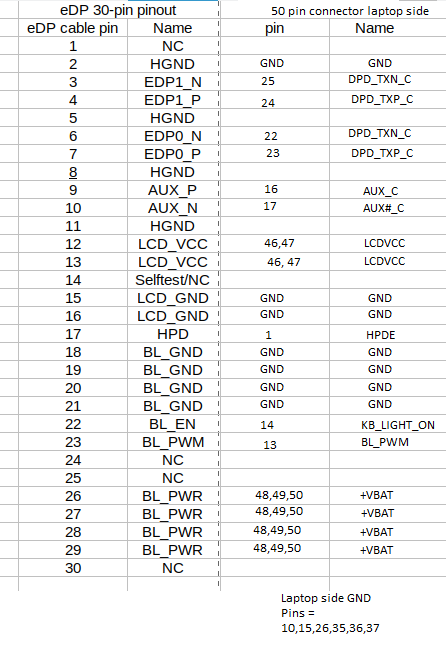
Here it is. Best to use are Clevo's eDP cables, since you need only to solder on motherboard side. Connectors are dissasembled and reassembled without damaging. There is 8560w boardview file in internets, you need to open it with Open board viewer - for examining mobo side, if you're not sure. For 4K cable you need to use 40pin cable and need to connect 4 additional cables - third and fourth pair of eDP_TX positive and negative channels. Hp original LVDS cable also can be modded, but then you need to solder both sides, and check cables using multimeter. LVDS LCD side is 40pin too, if I can remember. Unfortunately I don't have free time lately that I could go on with modding as I had been doing. So I have to end 8570w journey. I still use it sometimes, letting it retire in peace 🙂 You may hear more of me in another thread, maybe someone will use all that experience saved here to use. -
For now I changed to 280W, because I have it for "free". Just changed cables and it works exactly as it should. And here is why adapter didn't worked - no third cable to ID pin... useless ! Next step I will check if new cable works correctly using some 4k 40pin edp display.
-
Hi there! As I am slowly closing my old project, there is a new one as soon as I bought replacement for ol' trusty rusty 8570w. With a nice price tag, I though "why not". It has 12th gen i7 HX CPU, A3000 gpu, lovely vapor chamber, 32GB of ram and a lot of potential. There are some things I don't like and some I do. As for now I wanted to : -Change keyboard Done! -Upgrade IPS LCD to OLED 120HZ 2K -Upgrade power supply to at least 280W or even 330W (I use puny 200W) -Make chassis sturdier and coolder? (I mean less hot furnance, more ice freezer) -Upgrade speakers -Upgrade GPU - A3000 to at least A3500 or higher -Newer motherboard? (If I win lottery, haha) I tried using chinesium big HP charger to smaller HP charger (as I have 280W left from 8570w), but failed. So I don't recommend them, laptop don't recognize those. And original 200W is burning itself slowly to death. Already bought cable with enough DP lanes for 4K ! Part number on photo. Now I have to save money for buying that sweet, sweet 120HZ OLED from Samsung.. Case is good, generally speaking, but I hate plastic bottom plate. I plan to try CNC that in aluminium.. maybe. And I have yet to think about modding palmrest to less of that of hot plate :F (no ideas for now) Before I bought that COMPUTOR (think of aliens voice in muppets, haha) I used for 2 weeks MBP 16" with M1. I disliked some things about that bitten apple, but it's ice like coldness and very good sounding (for laptop) speakers got me shocked. Inspired me so much, that I will try to replicate that characteristic. About things I despise (and I may be too lazy to do something about) is power button right on keyboard. Yuck! Quality is something to be desired, ex. DuraKeys on older HP are very hard to leave finger print on them, here it's much easier to leave grease (maybe because high temperature ?). Finish on older palmrest is better, too (same reasons as keyboard). Motherboard is more fragile, too. Those puny connectors and locks.. I can't count times I dissasembled old girl (about milion times, no kidding) and nothing brittled or got damaged. Here I was disconnecting LCD cable (for palmrest swap) and while connecting it back it's plastic locking tab almost flied itself to Moon. And I was careful about it. Keyboard is harder to swap, but at least it's screwed on, not riveted. Anything else comes to mind I will share here. Let the fun begin .. Now!
-
I bought 40 pin cable for upgrade, I'm thinking about making another separate thread for documenting upgrades 🙂 I want to upgrade GPU, too.
-
Hi there! Did you succeed with display upgrade ? I bought used Fury G9 and I will attempt to upgrade it + mod it too
-
HP Elitebook 8570W - is it still good ? Hardware modifications
GuitarG replied to GuitarG's topic in Custom Builds
Little upgrade, after dissasembly of panel I put some thermal pad for big IC of DC board - I cut out plastic foil between lid and IC. Now panels seems to be cold, previously it was very hot to touch (especially on lower bezel). Will test more with higher brightness, but seems to help somewhat - I though previously that RGB backlight of DC screen was scorching. -
HP Elitebook 8570W - is it still good ? Hardware modifications
GuitarG replied to GuitarG's topic in Custom Builds
Well, seems DC screen have new problem lately. I left screen closed for few days and that happened. So not only do they get very hot and are too bright (on lowest settigns), but they also have trouble with image retention 😕 -
HP Elitebook 8570W - is it still good ? Hardware modifications
GuitarG replied to GuitarG's topic in Custom Builds
Yup, I changed it, from 8560w to zbook one. Fixed problems I had, but needed a little diy - screw holes were too small, so whole board didnt fit in dedicated place. And btw, those dc screen board electrically are all interchangeable. Same story with cables from that board to display panel. Good job with fan! Better than I did, haha. As for cooling, greatest weakness is not enough pipes and exhaust fins (I mean in original design) No problemo! Feeling better, so if I get little more free time will make schematic for edp cable -
HP Elitebook 8570W - is it still good ? Hardware modifications
GuitarG replied to GuitarG's topic in Custom Builds
Here you go! Green 8560w was first one I used, I didn't had names for color profiles. Default profile was red tinted. Blue board I used from Zbook, probably 17 G2, it had correct color scheme names and no weird reddish white. Enjoy https://drive.google.com/file/d/1-xPRi-aC2UFwhJCpDdd1VhPBg_OoHsAM/view?usp=sharing https://drive.google.com/file/d/1MtPXtiNuUQ_cnrOUjsHPWa0pkX3tpOAW/view?usp=sharing -
Mobile pascal TDP tweaker : how to avoid error 43 [GUIDE]
GuitarG replied to JadeRover's topic in Components & Upgrades
Allright, here's my attempt https://limewire.com/d/es62w#hLcxDrdJyT -
Mobile pascal TDP tweaker : how to avoid error 43 [GUIDE]
GuitarG replied to JadeRover's topic in Components & Upgrades
Unfortunately your method @JadeRover don't work with Turing 😞 tested two times on two different vbios. Exactly same checksum as non-modded original. Laptop turns on, backlight turns on, caps lock and num lock reacts (so I think laptop kind of POSTs ?) but.. no image on internal or external port 😞 Damn nvidia -
HP Elitebook 8570W - is it still good ? Hardware modifications
GuitarG replied to GuitarG's topic in Custom Builds
Anyone tried modding TDP in newer GPUs ? I succeded only with Pascal gen. (P5200 GPU) and it was long time ago. Turing was blocked back then. What about it today ? Worst case scenario I will try shunt resistor, I want to lower power a bit.