Kyser777
-
Posts
21 -
Joined
-
Last visited
Kyser777's Achievements






-
thanks for your precisions! I have a massive water block on my p775 and p870, would like the get the maximum power possible from the 3080 mobile the p870 can take more than 200w for the mxm gpu, what would be then the resistor needed to get 200w on the 3080 MXM? how did you decide to use 20mOhm shunt resistors instead of others?? your 180w on your 3080m is theoretical or real? thanks!
-
your contribution is amazing!! ■some question related to your special bios: -your special bios is compatible with 128Gb of ram?? [I know there was a 128gb ram compatible version of Dsanke's bios] -what is exactly the power limit removal , is there something new compared to the Dsanke's bios?? -did you make the special bios compatible with p870 TM/KM as well? ■Please can you explain and show exactly how to make the shut mode on the rtx3080 .. -which 20mOhm or more shunt resistor is needed and where to buy it -where to solder exactly -precaution and tips when soldering BTW, can we exceed 180w on the card if we use a water-cooling system? did you experiment damages on the GPU card mosfet, etc.. with the shunt mod in long term?? Thanks!!!
-
Please can you explain and show exactly how to make the shut mode on the rtx3080 .. -which 20mOhm shunt resistor is needed and where to buy it -where to solder exactly -precaution and tips when soldering BTW, can we exceed 180w on the card if we use a water-cooling system? Thanks
-
clevo p870tm/tm1-g Official Clevo P870TM-G Thread
Kyser777 replied to ViktorV's topic in Sager & Clevo
it seems that the bios reset itself when the laptop can not boot after several time, can someone else confirm? -
I did use the latest driver before , but I switched to 528.24 driver to get the dynamic boost that give me 15 more watt on the RTX3080. my config is a waste as I could double the power with my efficient watercooler. I would like to boost the TDP to 200W minimum... waiting for a mod..
-
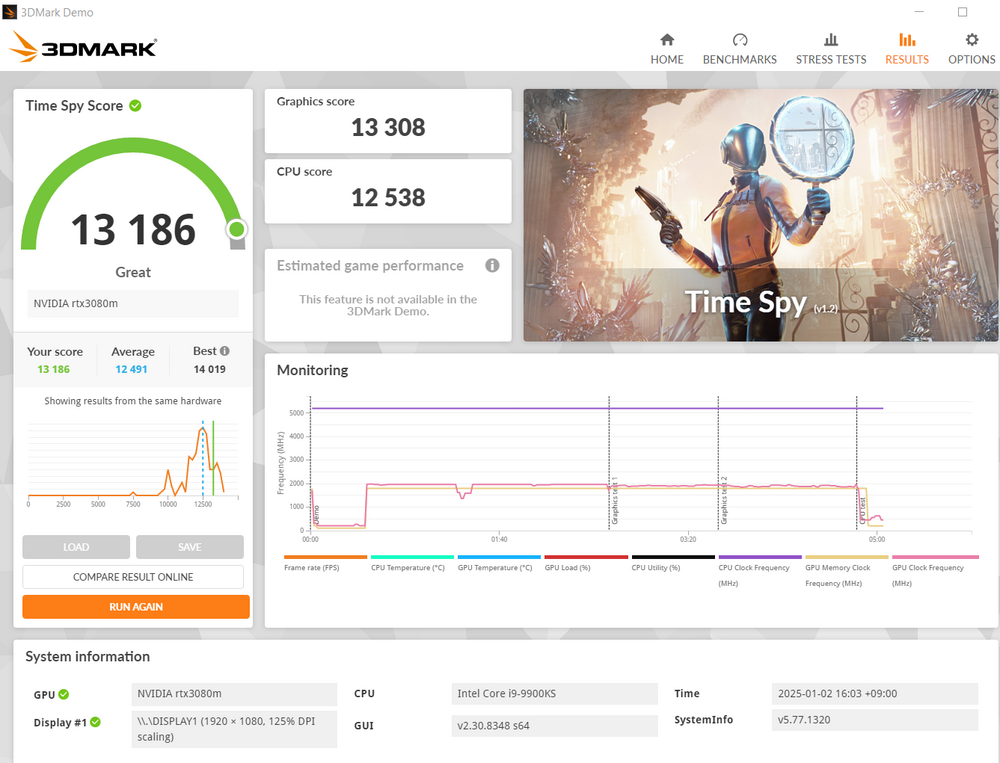
here is my result with my p775TM with watercooler: -9900ks 5.2ghz 4.9ghz cache -ram 64gb 1660mhz 14-17-17-32 1.4v -RTX3080m with dynamic boost 165w
-
yes I have an unlocked bios I understood the problem.... you needed to enable #QCKL odd ratio# to get this extra 60-70mhz
-
clevo p870tm/tm1-g Official Clevo P870TM-G Thread
Kyser777 replied to ViktorV's topic in Sager & Clevo
impossible to run away from the bios error message with 128GB of ram and thunderbolt enable I had to reduce the ram amount to keep the thunderbolt function... ------ BTW, nowadays my bios setting is resetting after some inactivity time (few hours), I changed the cmos battery with a new one under the keyboard, but the problem persist... what should be the voltage on the cmos battery to keep the setting?? is there any jumper for the cmos?? I hope I did not short something with the water-cooling system. any tips to diagnostic the problem? -
I got the same ram module than you (ballistix) how do you modify the ram speed?? , your is 1675mhz.... in my bios with memory ratio at 12 I got only 1600mhz what is your full setting to get your performance including bios etc... is there some secret bios setting needed apart from the main memory overclock menu? Thanks!!!
-
clevo p870tm/tm1-g Official Clevo P870TM-G Thread
Kyser777 replied to ViktorV's topic in Sager & Clevo
I made test when thunderbolt is disable in the BIOS , I can boot.... Why?? -
clevo p870tm/tm1-g Official Clevo P870TM-G Thread
Kyser777 replied to ViktorV's topic in Sager & Clevo
my p870 (KM version) with 128GB of Ram can not boot I got PCI RESOURCES ERROR!!!!! error: insufficient PCI resources detected!!!! however it works fine with 96GB of ram (3x 32gb) or less my bios is the latest danske 128GB I heard a problem on the forum with thunderbolt and 128GB , is it related?? any FIX??? -
clevo p870tm/tm1-g Official Clevo P870TM-G Thread
Kyser777 replied to ViktorV's topic in Sager & Clevo
how did you enable rebar?? -
any advantage to update the microcode on 9900k and 9900ks with the latest version, any update logs?
-
p775 RTX 2080 vbios flashed -> black screen ---FIXED!!!!
Kyser777 replied to Kyser777's topic in Sager & Clevo
thanks for your info! what can we do nowadays to boost RTX 3080 performance apart from making conventional overclocking? -
p775 RTX 2080 vbios flashed -> black screen ---FIXED!!!!
Kyser777 replied to Kyser777's topic in Sager & Clevo
is there a way to apply a 200w modification to a non-g-sync card vbios? there is no logic reason that it cannot be done... my water-cooling system is waiting for this 200w card! if someone have a 200w vbios for rtx 3080 as well, I will be happy too.