
PorcGras
-
Posts
41 -
Joined
-
Last visited
Content Type
Profiles
Forums
Events
Everything posted by PorcGras
-
I ran mats/mods just to see if maybe its one singular chip that's bad or it's something else... don't really know how to interpret the results tbh :))) it's all just write errors... lots of them :)) report.txt I guess it's a dead memory controller? Honestly no idea but that means that the gpu is dead for good :)))
-
I will probably look into maybe repairing the 1080 (gonna have to pay someone to do it, I unfortunately lack both the skill and equipment for that)... at least until I go all in and buy all these upgrades... I think it will be considerably cheaper ... if possible ofc :)))
-
Yep, that's the one I was talking about ... I will take this into consideration :))) Kinda bummed about spending this much money on a new GPU though :)) Edit: I just saw that vat and shipping adds another 100$ :(((((... And I will need a modified heatsink which is another 200-300$ :(((
-
damn... thanks guys! :((( are there any modifications that I have to make for the new gpu to work or? I know I need a bios that recognizes the card... which I dont think I have since I use the dsanke bios with ME disabled compatible with gtx cards ... do yall got any tips or honestly anything at this point :))) Also is this just a random occurence or did I mess something up? Do yall have experience with this kind of stuff? :))) Could my tests from the past few days of undervolting have screwed up the gpu?
-
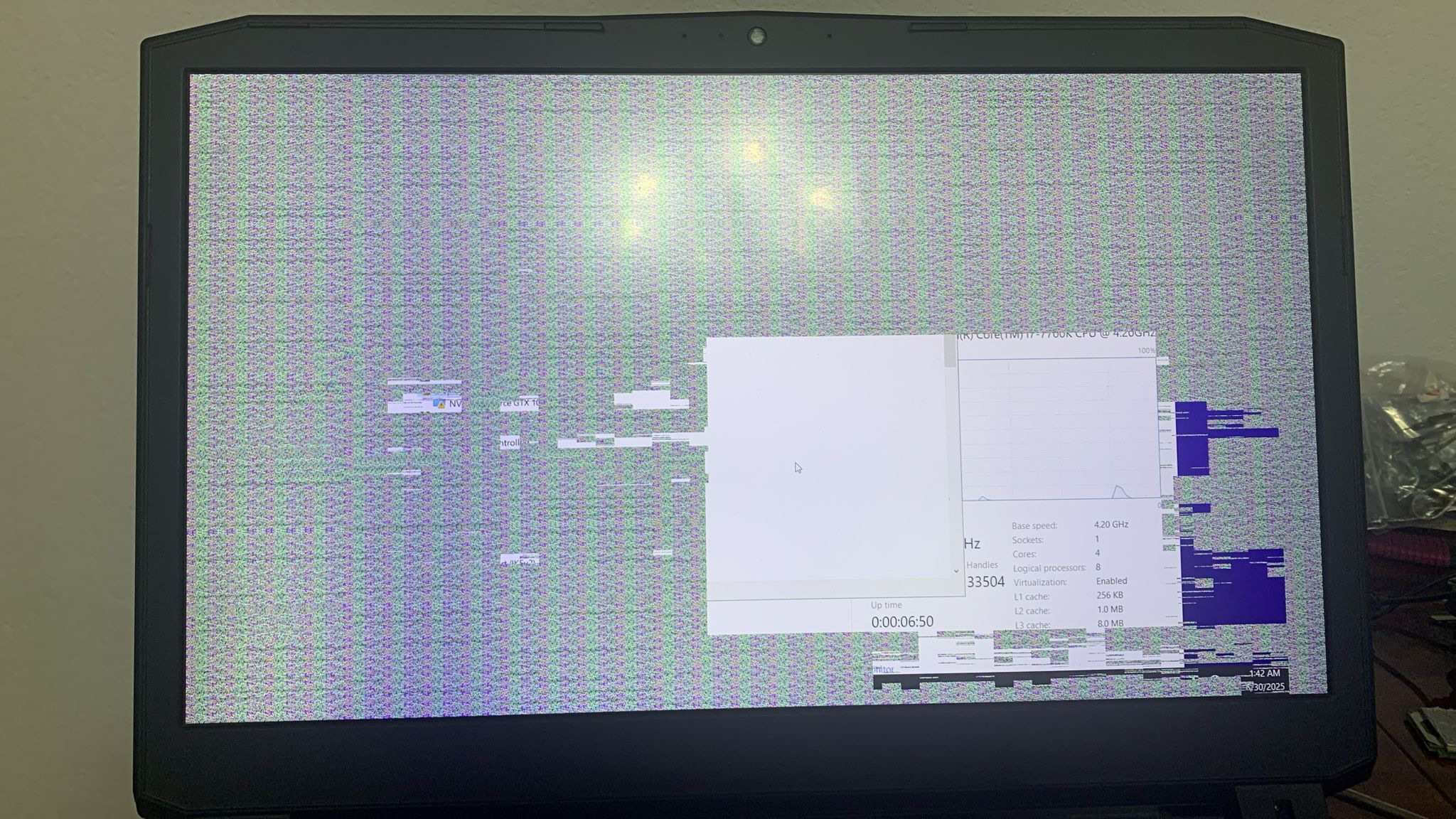
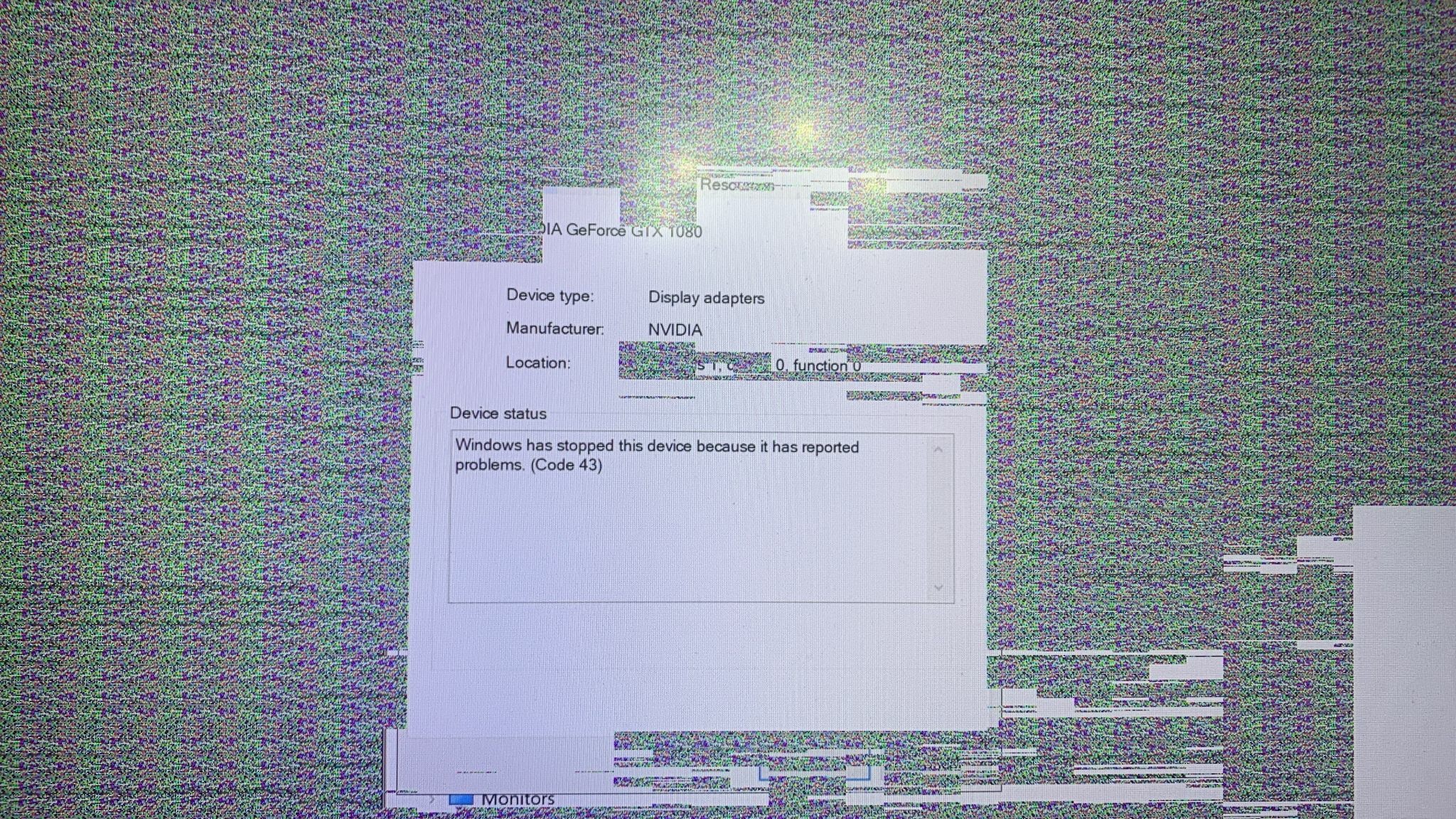
Hi guys! I was playing tarkov on my laptop (P775dm3-g - gtx1080 mxm gpu + qtj1 cpu) when suddenly my entire screen went white (i got flashbanged by the laptop basically) and even after restarting the graphics drivers using the shortcut (ctrl + shift + windows key + B) nothing would happend. After restarting my laptop, basically half of my screen was just artifacts ... I also get them in bios and when i turn on the laptop there is no longer the "clevo powered by dsanke splash screen" :(((( I undervolted the GPU like two days ago and also raised the memory clock a tiny bit (+300 i think) and it was running just fine. Since Tarkov is really bad and unstable I disabled the modifications, so the GPU was running stock when this happened ... Device manager shows an error code 43: Honesty... im not entirely sure how I'm even getting an image if the gpu is dead... or it might just be "dying" ... not sure... Sooo ... is the gpu dead or? :(((( Also... if the gpu is dead... should I get a 3080 :)) I saw one for like 350$ on ebay, not sure if thats a good deal or not ... and if I am supposed to make any more modifications to my current setup :). Thanks!
-
I suppose you already got your answer, really sorry I forgot to check the forum (life got really busy 🙂). I'll say it anyway in case anybody else comes across this: I used a small flat head screwdriver to flex the rubber thingys out of their holes and they came right out. They do have some really weak adhesive on the back of them, but it'll just fall off, it doesn't really matter. They will be snug enough to not fall out on their own when you put them back (honestly I keep them off at all times since I pretty frequently reseat the lcd cable :))) )
-

Clevo Z170 with QTJ1 - compatible memory speeds?
PorcGras replied to grisevg's topic in Sager & Clevo
I have a QTJ1 as well... my max is 2133MHz unfortunately :((( apparently Samsung RAM modules can clock higher usually but it's a problem with the cpu, they have really bad memory controllers. @grisevg I have the same exact setup as you, I would honestly test using memtest86 and see if even 2400MHz is stable :)) For me it wasnt. Also when it comes to timings, just relax the cl a tiny bit and see if that fixes anything. Before touching any other timings I mean :)) The process of figuring out what the hell was wrong with my laptop crashing once every hour was extremely frustrating honestly, I just had to accept that I'm gonna have to live with trash RAM speed Very funny that you literally described my thoughts from 3 months ago perfectly :)) -
Hi! I have the same issue unfortunately :))) I haven't bothered getting a new cable as it seems that simply reseating the cable on the monitor side seems to fix the issue for some time (remove the 2 rubber thingys at the bottom of the monitor - on the upper part of the hinge; undo the screws, remove the plastic bezel on the monitor (I usually flex it from the side and I can pop it out slowly), unscrew the panel, remove and plug the lcd cable back in If you want to change it you'll have to remove it entirely, and you can find a dissasembly tutorial on youtube, just follow the lcd cable onto the motherboard, take it off, put the new one back in :))) It should be fairly simple but extremely annoying :))) Considering this thread is almost 3 weeks old I think you have already fixed it by now, but I just wanted to say that you are not the only one with this issue :))) PS: when the display goes black, resetting the video drivers (ctrl + shift + windows key + B) may fix it :))
-
Well, ye, I get that. But the only stable setup being 2133MHz is literal trash. I would understand 2800 or 2666, even 2400, but 2133? I had to waste so much time debugging, and reinstalling windows about 3 times (long story) and dealt with so many crashes 🙂 I do understand it's part of the game but still :)))
-
I see, thankuu! One more question (sorry that there are so many but I have 0 experience with mutant cpu's and stuff like this 🙂 ) : Idk if I got the cpu with the worst memory controller possible or what but ... I was having issues in basically most applications with random "silent crashes" as in, no error codes no nothing. I ran a memtest86 memory test overnight and saw that it didn't pass, but more interestingly it had errors only on test 6 - block move. After a bit of digging I saw people recommending clocking down the RAM frequency, and so after a lot of trial and error I managed to get the test to pass and my system seems fairly stable so far (I'll make a post about it so somebody else like me that knows nothing doesn't have to suffer as much as me). I was originally running 4x16GB of GSkill Ripjaws F4-2400C16D-16GRS (actually 32GRS cus it's two dual channel kits but whatever) at 2400MHz 16-16-16-39 timings. I tried messing with the timings and loosening them to like 18-18-18-41 or something but that didn't work. What worked though was downclocking to 2133Mhz 16-16-16-39 and also bumped the voltage from 1.2V to 1.35 (I doubt it really mattered at this frequency :))) ). If y'all got any better explanations/tips on how I could overclock the RAM and have it stable (I saw people saying they were running 2900-3200MHz 😞 ) please please please let me know 🙂
-
I tried doing it in CRU by just copying over the default config and changing the refresh rate, but it still has the same issue. I'm not sure if I should change anything else 🙂
-
Aaaah, ok, I see 🙂 Thanks!
-
Thank you!!! One small problem that I have now is that I seem to have lost the vbios I had before flashing this new bios :)) I do not have gsync anymore and trying to increase the monitor's refresh rate back to what I had before (I was running it at 100hz) doesn't work anymore :)) I suppose that the vbios sits somewhere inside the bios??? Though I am not sure as I have absolutely no experience with these things :))) Also I checked and the bunched up pin is either ground or integrated graphics, but the integrated graphics don't seem to work :)) Not sure if it was supposed to work in the first place or if I need to change something regarding the BIOS or if it really matters :)) If you have any tips I would love to try them out :))
-
Ok, quick update, I was able to flash the BIOS using instructions from the last answer in this thread (I followed the link he sent with the thread started by dsanke, then I had to create a baidu account and download the files provided by him. If you patiently go through the readme you can do it, it's fairly easy), and flashed the file that @runix18 provided to the person that started the thread (the one with ME disabled)... but I am now unable to fit the CPU in my laptop... and accidentally bent a couple pins in the process which I was very lucky to be able to bend back (one of them is literally bunched up but it's either a ground pin or it somehow still makes contact without shorting anything). The CPU came with 3 washers which I mounted: - 2 under the lever thingy that presses the CPU down - 1 under the screw used to catch the bracket under And somehow it still doesn't really... sit right? Without the washers there was no change of mounting it, but even with the washers, it doesn't seem right. I don't know if I'm doing something wrong, but if anybody has any tips, that would be great 🙂
-
Hi guys! I received a P775DM3-G laptop for free from my brother and I immediately started looking into what people were using it for, and I must say I wasn't disappointed. So I decided to upgrade mine by putting a QTJ1 inside it. I read all the topics and tutorials and anything I could find on how to do it, and I know that I have to flash a new BIOS so that the laptop will recognize the new CPU. People on here were talking about the dsanke bios mod and also using a version of it with ME disabled in order for the QTJ1 to be accepted. That's good and all, but when I try to flash the BIOS using a USB stick, I get a big "insert a proper boot device error". I must be doing something wrong, I am honestly not entirely sure how the USB drive should be formatted (I made sure it is FAT32) or if there is anything special I should do to it. I ordered a CH341A programmer just in case I messed up the USB stick method and that should arrive soon. Also, I am not entirely sure if I am supposed to flash a BIOS that technically doesn't support the current CPU, I honestly don't know if that's a problem or not. Any help would be greatly appreciated 🙂 Thanks!