

Mercer
-
Posts
9 -
Joined
-
Last visited
Content Type
Profiles
Forums
Events
Everything posted by Mercer
-
Finally the new RTX MXM cards will work in our laptops!
Mercer replied to SuperMG's topic in Components & Upgrades
Can't afford the 4070 or any right now SuperMG, and as I said I need 16GB vram when I can (it's not all about processing power - multiple video FX I use need that ram - that's why the P5200 works if a little slowly right now) so it's a no go anyway. Thanks. Paypal via PM for the cable? -
Finally the new RTX MXM cards will work in our laptops!
Mercer replied to SuperMG's topic in Components & Upgrades
Sadly I can't spare that right now, I finally realised - just repaired a blown Lenovo laptop and only yesterday after getting it working I ended ordering more parts; only thing original now on this Trigger's Broom is literally the outer shell - and when I can again I really want to hold out for 16GB, for my needs - but what's the best way to get hold of your cable? Paypal again? Appreciate your quick responses and all the info SuperMG. -
Finally the new RTX MXM cards will work in our laptops!
Mercer replied to SuperMG's topic in Components & Upgrades
Ok thanks, let me have a think about it. I might definitely buy just your cable mod for reserve though. The backlight control, can that be mounted in a drilled hole? I'm thinking of running it out the dummy ODD front, with a spare I've got. -
Finally the new RTX MXM cards will work in our laptops!
Mercer replied to SuperMG's topic in Components & Upgrades
Yes, they all will be a significant upgrade I think: that A5500 has over 3 x the Cuda cores, than my P5200, for example. Are there modded bios's for all the cards you list? I read some X-Vision ones as problematic. As I said I want 16GB vram but what are you charging for that modded 4070, if I may ask? Thanks again. -
Finally the new RTX MXM cards will work in our laptops!
Mercer replied to SuperMG's topic in Components & Upgrades
Yes I don't think you can get any other higher PSU to work with these workstation laptops. I'll stick to looking at the 115w cards then. Understood. -
Finally the new RTX MXM cards will work in our laptops!
Mercer replied to SuperMG's topic in Components & Upgrades
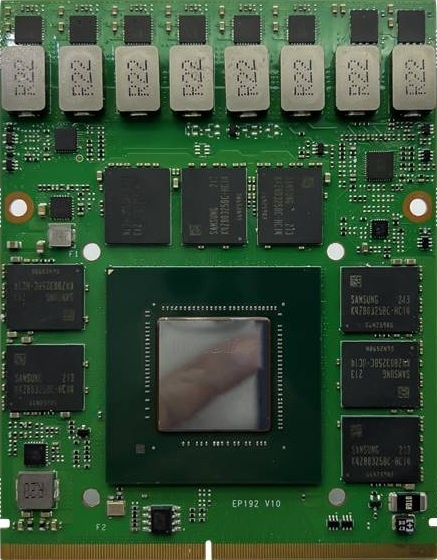
Kind of partly answered my own question I guess, re-heatshield and what you said: I see the difference in layout of chip, memory and VRMs.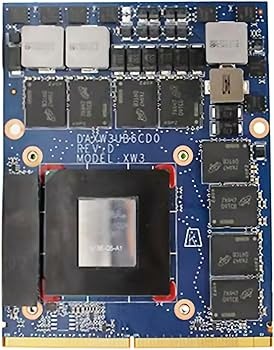
-
Finally the new RTX MXM cards will work in our laptops!
Mercer replied to SuperMG's topic in Components & Upgrades
Thanks, really appreciated. Is that because of the edge to edge VRMs? Looking at the cards and comparing to the P5200 I would have assumed my existing heatsink is OK? I'm aware the G6 Turing cards are a different wider form with staggered screw mount holes but I thought maybe these more standard 3.0B MXMs would be OK? I even thought of scouting for a G6 MB, as it's the same case as the G6 but those HP MXMs were only around in that laptop as far as I am aware, and Turing is only a little better in performance. Yes I'd prefer 115w - I'm almost permanently on a 280w G4 TB dock, but it still only supplies 230w to the actual laptop. That's tempting but I want this for Davinci Resolve Studio that recommends a minimum of 16GB vram for advanced AI tools - the P5200 is fine just a little slow with those things. Did that RTX 4090 work with the standard heatshield? And is discrete not possible with any of these cards? Not necessarily a deal breaker but I'd have to re-think a little, if the case. Definitely want the laptop screen to work too, whatever, since I use 2 screens + an Ultrastudio driven video monitor and no desk space for 2 external pc screens - the 2nd monitor HDMI out. I really like this laptop and it still kicks OK, but maybe I should be looking at 2nd hand G8-10s, but times are hard for everyone right now. Thanks for all your info, I've been reading your posts carefully, since you obviously really know your stuff. -
Not stupid at all but I don't think it will work. HP changed the MXM form factor for the G6 to non-standard staggered mounting screws and wider VRM/memory side size. The G5 heatsink won't mount/cover that properly without modification. The same era Dell Precisions and Thinkpad P7x went proprietary too, even more radically, junking MXM alltogether, I believe. I've got a 17 G5 with P5200 too; and I want to go the other way to newer RTX; at least the form factor is standard MXM 3.0B. I don't believe 9th gen 8c16t will be a huge leap over 8th gen 6c12t either, especially if you get one with the i9/Xeon MB - the cpu matters less than the gpu generally, so if you really want the P5200 you may be better off with getting just the G5 - it will probably be cheaper too, they are going for very little now.
-
Finally the new RTX MXM cards will work in our laptops!
Mercer replied to SuperMG's topic in Components & Upgrades
Hi SuperMG, how do I buy this from the UK? Also in your eBay listing, you list my laptop: HP ZBook 17 G5. What newer cards are known to work with this? Currently I have a Quadro P5200 and I'm just looking to upgrade to something with the at least the same Vram, 16GB, but with newer RTX Tensor/RT cores. I've only just joined but I've read this forum for some time and I am still a little confused about the vbios requirements. The Zbook MXMs not having vbios on card for example. I was looking at this: https://www.x-vsion.com/product/mxm-embedded-module-rtx-a5500-16gb/ but happy to use any later RTX 16B card than I have now. What card was known to work from your listing? And what if any vbios would be required for these embedded MXMs to work with my laptop. Thanks.