whyshchuck
-
Posts
21 -
Joined
-
Last visited
whyshchuck's Achievements






-
Answering your hardware-swap question - sibling model here (Pro Max 18 Plus, same 285HX CPU): - System board (motherboard): replaced. No change. - Discrete NVIDIA GPU module: physically replaced. No change. - Whole unit: I was given a different unit (fresh Windows, different RAM/disk/ panel). Same behaviour returned - and two units showed an identical WHEA-17 signature side by side. - BE200 Wi-Fi: not physically removed in my case, so I can't speak to that. One difference worth noting: my sustained AER doesn't come from Wi-Fi/NVMe/GPU at boot like yours - it's from the USB4/Thunderbolt host-router downstream port (PCI\VEN_8086&DEV_5786), i.e. my dock link. So for me the BE200 doesn't look central, though the common 285HX / ARL068 angle still fits. Net: board swap, GPU-module swap and a full-unit swap all failed to fix it, which points at the platform rather than a single removable part.
-
You use them in defualt hybrid mode or switched them to direct? With what screens resolution? Do you diplay anything with rtx on external display? At both machines I posess screen connected with DP lose identity after wake up (and switches from 2k to fhd) Both computers disconnect docking station after attempt do display anything heavy weight (eg. any modern game) on external screen.
-
Today Dell told me that Dell Pro Max 18 Plus is not compatible with SD25TB5 unless downgraded to Windows 10 (they really told me that). Before they did I had my motherboard replaced, gpu replaced and then whole unit replaced. There was couple of weeks when hybrid mode worked with dock but now itd don't (on both units). Does anyone of you use this pair of hardware together with success?
-
Dell Pro Max 18 Plus Bottom Cover WITH Latch
whyshchuck replied to ProMax18's topic in Pro Max & Precision Mobile Workstation
it makes sense. screw holes are in different places -
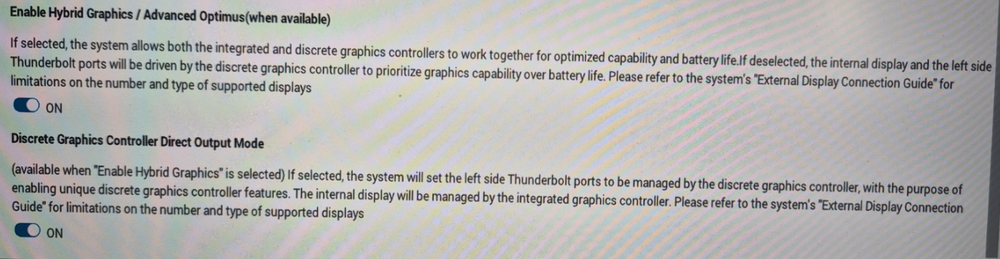
yes, in my 7560 there were empty ports listed as well. In pro max plus there is nothing. I found working combination in bios: dock and screens work well then, but it's not power efficient when not using dock. It causes internal monitor to work on RTX - drains battery in 1,5 hour.
-
Yes, it did. No I have my motherboard an gpu replaced by dell technician but it didn't help. What helped was forcing computer to use GPU for external screens. But still no ports in TCC: Do you see yours here?

-
Hi, I’m having an issue with a Dell Pro Max Plus 18 and a Dell SD25TB5 dock, and I’m trying to figure out if others are experiencing the same. Setup: Laptop: Dell Pro Max Plus 18 Dock: Dell SD25TB5 (TB5) Connection: original Thunderbolt 5 cable (⚡ + 5) Monitors: 2× QHD (2560×1440), connected via DP and HDMI Problems: Display resolution issue Monitor connected via DisplayPort only runs at 1920×1080 (FHD) instead of QHD Same happens even with just one monitor connected Expected: 2560×1440 works fine on this hardware Thunderbolt not detected The dock does not appear in Thunderbolt Control Center at all Looks like the system falls back to USB-C (DP Alt Mode) instead of full Thunderbolt BSOD on wake Occasionally getting 0x0000019C (WIN32K_CRITICAL_FAILURE) when waking monitors from sleep Temporary fix (but not permanent) Performing a “flea power drain” on the dock (disconnect power, hold power button, reconnect) temporarily fixes everything After that, QHD works correctly But the issue returns after monitors go to sleep / system idles What I already checked: BIOS: Thunderbolt enabled, no restrictions USB4 PCIe tunneling enabled No “video only” limitation Latest drivers and BIOS via Dell Command Update Tested different ports and configurations Using original TB5 cable Conclusion so far: It looks like the dock is not consistently establishing a proper Thunderbolt connection and falls back to USB-C mode. The behavior suggests a firmware / compatibility issue (possibly USB4/TB stack instability). Has anyone else with this laptop + TB5 dock experienced: fallback to FHD over DP missing dock in Thunderbolt Control Center instability after sleep / wake Any confirmed fixes or firmware updates that resolve this? Thanks!
-
I see that biggest factory csodimm configuration is 2x48. But would it accept 2x64? How do you think?
-
In fact, after change of aspect ratio, full sized keyboard would have fit 16 and 18 as well.
-
Thanks. Its even 1 cm less than in 7560. Shitty unification...
-
Hi! What is the 16's and 18's keyboard size? Are letters spaced like in full sized keyboard or compressed? One of my biggest disapointments with Precision 7560 was fact that, unlike m4800, its letter keys were to close to each other.
-
Problems with bluetooth - faulty wifi antenna in palmrest caused them.
-
I own 7560 for 3 nearly years and slowly strat to think about replacement. I always loved precisions with their capacity and potential to customize but i'm a bit worried. Since I've got my 7560 I experienced on site repairs for 6 times (six!): I have mostly whole computer replaced: - motherboards - once; - palmrest - twice; - wifi - twice; - camera - once - battery - once - fans+heatsink - twice And of course - i'm happy that all of that repairs were possible on site, without sending compter anywhere. But I'm not sure whether it's an experience with computer I want to have in future. What do you think? How do your dells perform?
-
@Brian Lawton @Aaron44126 @Rinconmike thanks for all your suggestions. After replacing PNY CS3040 with Lexar NM790 the problem disapeared.
-
Did you ever had problems with windows Dell SupportAssist diagnostics with non-factory SSD installed? I have PNY 4TB drive and every time I make diagnostics it ends with BSOD. Then after first restart he doesn't see the system drive. after second restart everything seems fine. That was the case of quick test. After full test problem is more serious - drive disapears for longer time and randomly returns after multiple restarts. Tests in BIOS are ok - without issues. Problem occurs only in windows test. That's also not a problem of specific SSD - thought so and replaced it on warranty - situation remained the same. Thanks!