
.png.720f290e5d30f4c5630eb497e49acd02.png)
Aaron44126
-
Posts
2,395 -
Joined
-
Days Won
36
Content Type
Profiles
Forums
Events
Posts posted by Aaron44126
-
-
20 minutes ago, David55 said:
Can you say here the part number for the 3080 Ti?
Did you order with Win 10 or 11?
Did you order with or without SSD door?
Anyone know whether Dell changed/improved thermal materials for the SSD drive opposite the location of the SSD door?
Thanks for the planned incoming review.
Not sure where to find the GeForce part number. On the quote, it says 490-BHOM; I think that is an order/item SKU code and not the actual part number. Maybe I'll be able to find the part number after the service tag is issued. I can say that I've had multiple engagements with sales reps and they've never had an issue "finding" the option to add to a quote. If you want to use the part number to order the GPU card separately from the system, you can try, but Dell doesn't allow that in most territories.
I ordered with Windows 11. I'm planning to use the stock Windows 11 install only for review benchmarks. I will use my own Windows 10 LTSC license/install for general use. (I have some major issues with Windows 11 that I have discussed before, in this thread and others. There's a link in my signature.) I'm planning a triple-boot setup with those two, plus Linux, but I will be spending almost all of my time in Windows 10 after getting the review out.
No SSD door for me. I don't see any practical need for it, I prefer the "look" of the system without it (...though you're not looking at the bottom of the system that often...), and I don't necessarily want it to be easier for someone to yank the drive from my system.
From pictures in the service manual, I don't think that Dell has done much to improve the SSD thermals. But, they did add DOO fans which should get some air circulating around inside of the chassis, and that could help reduce SSD temperatures a bit.
-
I did just pick up a "smart thermostat" a few weeks ago, which has the perk of being able to see the temperature and control the AC while away from the home. Not sure if that would really be helpful in your situation but maybe you could set it higher and then lower it while you are on the way home from work or something. I selected "Ecobee3 Lite" and I'm quite happy with it so far... Ecobee seems to be a leading brand and this was one of the few current models that I could find that has HomeKit support and does not have a microphone for Alexa / smart assistant support.
-
I've heard of this thing but haven't tried it. You can install it at your breaker box and it will help tell where your electricity is going.
-
21 hours ago, operator said:
How can it happen that sb. finds a better deal...?
Well an easy one is, you could order through the web (not through a rep), and then come back next week and find the price has been lowered. Another one could be that Dell puts a new deal in place shortly after you order (i.e. "five years ProSupport for the price of four years" like they had in June) and you want to take advantage of that.
-
 1
1
-
-
Seems like web prices have been updated, at least on the U.S. site. The system that I configured last week on launch day for $7,100 is now showing around $6,200. (i9/128GB RAM/A4500/512GB SSD/5 year ProSupport Plus/extras; same as the one that I bought through a rep, except with RTX A4500 instead of GeForce RTX 3080Ti.)
If you buy a system and end up finding a better deal shortly afterwards, you can go to customer service and they should credit you the difference.
-
So, I'm going to be working on a "professional"-style review for the Precision 7770 after I get it. I've been planning on doing this for a while, even before NBR died. My intent is to publish it here on NotebookTalk.
I'm planning to have two parts to the review. The first part will follow a normal laptop/notebook review format and in addition to some benchmarks, I'll be looking at things like available options, design & build, disk performance, fan behavior/noise, temperatures & max/average clock speeds, and so on. I'm picking up a "Kill-a-Watt" power meter, IR temperature sensor, and dB meter to help out with this. For the first part, I will specifically be looking at running tests with the system in its stock/default configuration and not taking any special steps to push the performance up. The second part may be published a little bit later and it will be more of a less structured grab bag where I take a look at things like the impact of Dell's thermal settings, Optimus on vs off, Windows 10 vs 11, dock behavior, undervolting CPU & GPU, what Linux support looks like, and whatever else I can think of.
In terms of benchmarks for the first part, I am looking at:
-
CPU
- Cinebench
- WPrime
-
GPU
- 3DMark (Fire Strike & Time Spy, and probably some others as well)
- Unigine Superposition
- GravityMark
- Final Fantasy XIV benchmark
- Shadow of the Tomb Raider benchmark
- (Not apt to include SPECviewperf ... I'm getting a GeForce configuration, so performance in many of those tests will be bad compared to what you'd get with a pro-RTX GPU)
It's my first time attempting something like this so I'm looking for feedback as to what sorts of things you guys would like to see in a laptop review, if there is anything specific that you think I should take a look at or if there are any benchmarks that you would like to see run that are not included above.
(The review will take some days/weeks to put together, so of course I will also be doing Q&A/AMA once the system comes in. I imagine that some other users receiving systems would be happy to participate in this as well.)
Thanks!
-
4
-
 2
2
-
CPU
-
20 minutes ago, operator said:
Mine not..... Seems like they are faster with 7770 models 🤔
There was the situation where it looked like 7770 would launch before 7670, a couple of weeks ago. They might have been more ready to go with that one.-
1
-
-
5 minutes ago, Conan11 said:
FYI, I got a quote for 7670 with performance chassis, no smart card reader and no SSD door.
Yes, the issue seems to be if you add a fingerprint reader, it forces you to add a smartcard reader, and that forces you to add the SSD door.
-
My 7770 order is now showing “in production”. (Precision 7560 order last year, placed a day or two after launch, took about two weeks to show this status…)
-
4
-
-
40 minutes ago, operator said:
Maybe a stupid question..... I clicked around on your link and configured a 7670 system there. I ended up with ¥58500. According to google this is about 430 USD. Is that true?
Seems like in the configurator, SSD door is selected as soon as you get the bigger performance chassis. If you have the thin chassis, no SSD door is selected.
I did not see an option there to choose if you want an SSD door or not.
Google:
"58500 cny to usd" -> $8,737.60
(I think maybe you tried to convert "yen" which is the Japanese currency.)
You are right, it looks like if you select a GPU that gets you the performance chassis for Precision 7670 and a security option (smartcard/fingerprint reader), the SSD door is added automatically and you can't get rid of it. They must not have made a "performance chassis + smartcard reader + no SSD door" part; I guess with eight possible variations of the bottom cover for the Precision 7670, it makes sense that maybe they didn't choose to produce all of them. For Precision 7670 (thin chassis) and Precision 7770, you do have the option to get rid of the SSD door.
You could try to get the "performance chassis + no smartcard reader + no SSD door" part separately (Taobao might have it available) and swap it out. I think it would be physically compatible, it would just partially cover up the smartcard reader slot.
-
 1
1
-
-
Precision 7560 + WD19DC and we do not have this issue. Are the LEDs on both of the USB-C cables lighting up …?
-
1 hour ago, serpro69 said:
Is non-FIPS better than FIPS? I remember reading previously that FIPS is usually "laggy". Is this still the case?
Last time I tried FIPS was with Precision 7530. It was definitely slow to read, you have to hold your finger on it for 2-3 seconds. It looks like they are still using the same sensor. Non-FIPS in Precision 7560 is very quick, less than a second.Also not a fan of the placement of the FIPS sensor in Precision 7770. Instead of on the very right side of the palmrest, it is moved in a bit towards the middle.
(FIPS would presumably be more secure / harder to trick.)
-
 1
1
-
-
1 hour ago, 西木404 said:
- I don't need SmartCard reader(just because I don't want SC slot apper), but wish to have NFC and Non-FIPS fingerprint reader,is this requirement achievable? What should I choose to ensure that there is no SC slot?
- .Also how do I choose to make sure the SSD door doesn't appear?
- 136W total when CPU and GPU are fully loaded,then how to allocate power between CPU and GPU?
1. No, if you get the fingerprint reader, you will get a smartcard reader too, I don’t think there is any way to avoid this.2. Pick the chassis option for “smartcard only” and not “smartcard and SSD door”.
3. NVIDIA Dynamic Boost will shuffle the power allocation between CPU and GPU depending on current load conditions.
Interesting that GeForce is showing as an option on the China site.
-
5 hours ago, TheVlad said:
Thanks!
Another question - if we opt for 3080Ti, is the HDMI 2.1 full 48Gbps?
I don’t know the answer to this. But, Dell typically allows the external video ports to be connected directly to the dGPU even if hybrid graphics is turned on (setting in BIOS). It should offer the standard HDMI output for Tiger Lake or NVIDIA Ampere depending on which GPU you set it to connect to. (I don’t think the specific NVIDIA GPU would matter in this regard, output options for all Ampere GPUs on offer should be the same.)After receiving the system I will check to confirm if all external outputs can be connected to either GPU.
-
2
-
-
There’s still going to be a SODIMM option, so you could bring your own modules and save a bit… just limited to two modules, so an issue if you need more than 64GB. 😕
-
 1
1
-
-
5 minutes ago, TheVlad said:
Hello there,
I see that there is no 3080Ti option in the Dell Germany configurator.
Any reason why would this be the case?
You can’t get 3080Ti through the configurator. You must go through a sales rep to get it. (This is the case in all regions.) -
2 hours ago, Augusto said:
Could someone please help me to choose the RAM?
This is actually a limitation of the Alder Lake platform. If you have 128GB then it must slow down to 3600 MHz. ...I went for the big memory capacity because I have use for it, but I would be very interested to see some benchmarks and see what speed difference it makes. I would assume that the CL decreases when the memory is operating at a lower speed so it won't make a noticeable performance difference unless you are running something that is especially memory-intensive.
See:
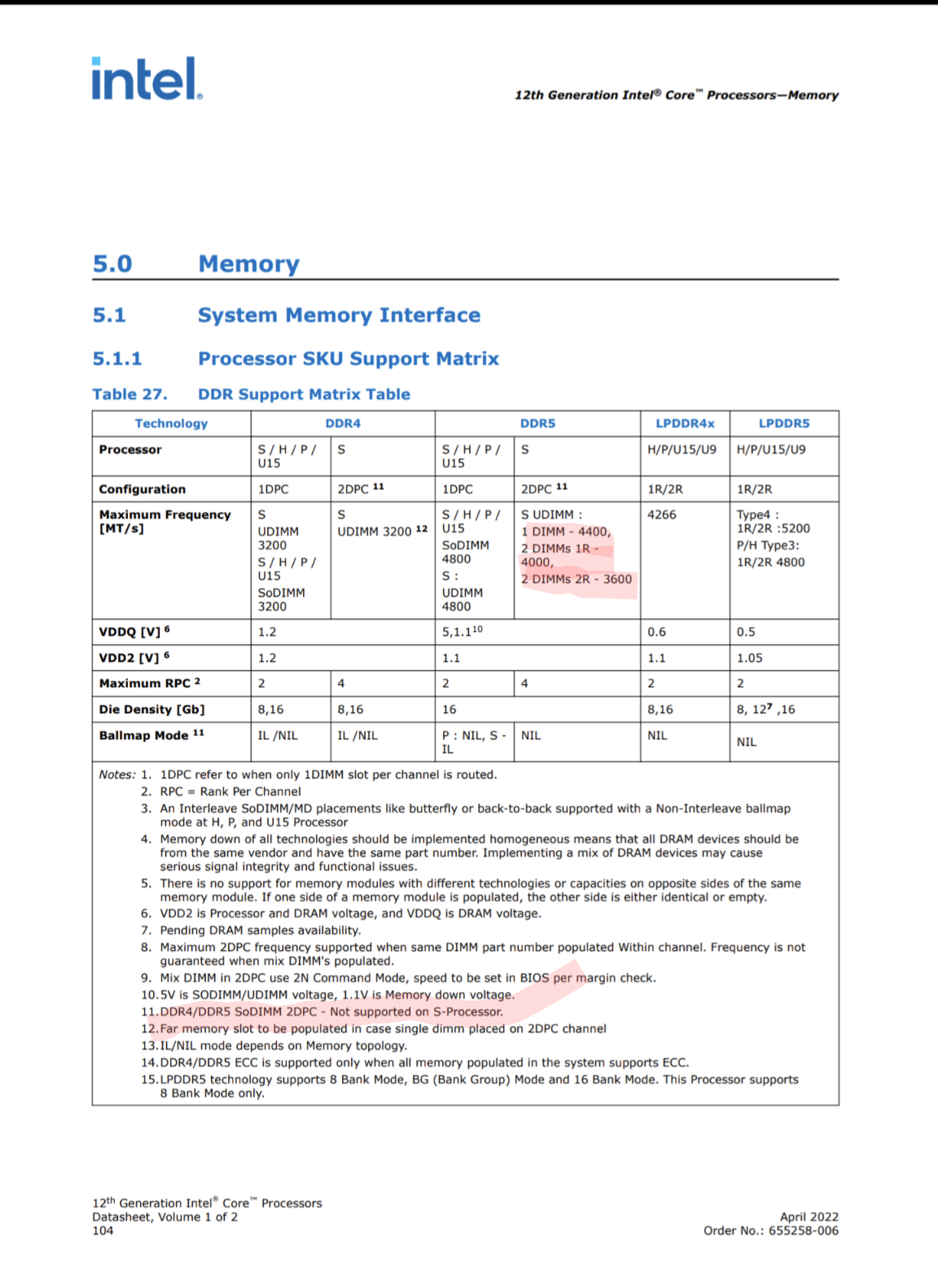
(Courtesy of @Peksha earlier in this thread.)
1 hour ago, serpro69 said:My rep tells me that Ti 3080 does not work with Linux. Has anyone actually tried that? Is this accurate information and should I consider A4500 instead?
Also, the different warranty options always confused me. How is "ProSupport" different from "Basic OnSite" ?
They're offering me 5y basic onsite support instead of 3y pro. Is this better or worse?
That's crazy. Dell might not be supporting GeForce+Linux but there is no reason why it wouldn't work.
ProSupport gets you directly to a local support person if you call in (rather than the India call center or something). I like having it, they've never given me any hassle with regards to getting components replaced and on a couple of occasions I've had issues elevated to the engineering team pretty promptly. I imagine basic onsite would be fine, you just might have to deal with another layer or two of people who don't know the system as well if you actually have an issue that needs a hardware replacement... (One would hope that you never actually have to call them.)
Note that "ProSupport Plus" basically combines ProSupport and accidental damage protection (as I understand it).
-
3
-
1
-
-
14 hours ago, MRichartz said:
What is the major difference between my GPU and the M5000M? Years ago, I was told it was RAM I needed on the card that helped to process, and why I was happy that I now had 8GB vs the 4GB I had before. But looking briefly at the specs, they have the same, only mine is DDR3 (Kepler card?) vs DDR5 (Maxwell?). Will that make a big difference? I also saw someplace reference to the eDP MBs and needing a matching screen then, which allowed more options and I think is what Adobe now looks for. Is there an easy way of knowing what my system has without pulling it apart and looking up the part numbers? I have CPU-Z to find out most of the system, but what designated that it's eDP?
I have some benchmarks from when I first tried the M5000M, upgrading from K5000M. Performance doubled (or more) in most cases.
To know if you have eDP, you basically need to find your display panel model (use MonInfo or HWiNFO64) and then look up the panel information online to see if it is eDP or LVDS. I don't think Adobe products would care which type of panel you are using.
-
3 hours ago, Aaron44126 said:
Just noticed the U.S. site is showing July 27 estimated delivery for 7770.
1 hour ago, Aaron44126 said:Estimated ship August 2, estimated receipt August 5.
1 hour ago, operator said:Strange that even your ship date is earlier... Thought they would be built in the same little chinese backyard garage. 🙂
U.S. site is now showing August 15 for Precision 7770 ETA. Wonder if they're still making adjustments, or if changes to inventory & anticipated production workflow causes the target to change as orders come in...
-
Realized the comparison of web price and rep price I gave above was off. The rep price I gave included sales tax but the web price did not. So, the discount is even greater. I saved around $1,400 (almost the price of the CAMM module!), close to 20%.
Part of that was warranty savings. The rep matched a deal that I asked about which was active in June but not July, which gets you 5 years ProSupport (Plus) for the cost of 4. So, ask about that if you’re interested in extending the base warranty.
-
1
-
 1
1
-
-
3 minutes ago, 1610ftw said:
I just checked the configurator for Dell Germany and as expected the CAMM modules are an issue.
Hopefully, CAMM becomes a standard and we get more manufacturers, places to order from, and competition. Right now, it's going to be inflated for sure 😕
-
2
-
-
Just put my order in. Got the same price as before. (Well, up just a little because I did decide to go with 512GB SSD. I'll end up moving it to a different system.) Estimated ship August 2, estimated receipt August 5.
(I hope they are early and not late. I am traveling starting August 7. I'd like to bring it with me, rather than have to wait for it if it arrives while I am gone. 😛 )
Also. I'm still using the Precision M6700 as my personal system, which I got at launch in 2012, and this Precision 7770 is replacing. August 9 would mark the ten-year anniversary since I received the M6700. Fun timing 🙂
Back to waiting. (Now to refresh the order details page an unreasonable amount of times every day to see when it advances to "in production".)
-
5
-
-
3 minutes ago, -batab- said:
Which GeForce models are actually available besides the 3080Ti that was already mentioned?
That is the only one.
-
1 minute ago, Dell-Mano_G said:
256GB is only available for first drive. This is the same as on the 7x60's. We are not allowing 256GB to be ordered in another location, 2nd, 3rd, or 4th M.2 location.
Thanks for the quick reply. I'm still a little confused on the situation with the 256GB drive. Let me ask this — since it is a 2230 drive not not 2280 like the others, does it still ship with a M.2 extender and full-size 2280 heatsink covering it so that you could replace it with a 2280 drive later if you like? (I believe this is how last year's Precision 7X60 systems worked.)
Dell Precision 7770 review incoming — call for pre-feedback
in Pro Max & Precision Mobile Workstation
Posted
Probably going to just stick with Ubuntu with my triple-boot (Win10/Win11/Linux); it's what Dell supports and it also happens to be what I am most familiar with. I might dabble with some others if I can just boot them via "live USB".