MyPC8MyBrain
-
Posts
693 -
Joined
-
Last visited
Content Type
Profiles
Forums
Events
Everything posted by MyPC8MyBrain
-
next, check PCIe root ports for reset loops. Run: powercfg /devicequery wake_armed pnputil /enum-drivers | findstr "272B 2723 271F 272C 10DE 144D 144D" look for Do the PCIe root ports reset repeatedly at boot? Does Windows show link state flapping or ports re-training over and over? Is anything on the PCIe bus reinitializing in a loop? Warnings are fine. Repeat resets are not. That’s not “normal”, that’s Dell’s ASPM implementation losing its mind. force PCIe link-state reporting, Check the active power scheme state: powercfg /qh SCHEME_CURRENT SUB_PCIEXPRESS PCIEXPRESS_ASPM_STATE You want one answer "0 = ASPM Off" If it shows anything else, flip it off before doing anything further. Kill ASPM properly (likely the actual root of this mess). Dell turns on ASPM at the PCIe root ports for battery savings, but on 2025 Intel HX + Nvidia Blackwell + PCIe Gen5 NVMe, their implementation is flat-out unstable. Disable it reg add "HKLM\SYSTEM\CurrentControlSet\Services\pci\Parameters" /v "ASPMOptOut" /t REG_DWORD /d 1 /f reg add "HKLM\SYSTEM\CurrentControlSet\Control\Power" /v "EnableASPM" /t REG_DWORD /d 0 /f reg add "HKLM\SYSTEM\CurrentControlSet\Control\Power" /v "PlatformAoAcOverride" /t REG_DWORD /d 0 /f reboot. this has to be done first or you’ll be chasing ghosts forever. After ASPM is OFF If the WHEA warnings still show up after reboot, only then move on to storage: Replace the Windows inbox NVMe driver with Samsung’s Standard NVMe Driver (through Samsung Magician driver package). Don’t do this step until the WHEA + ACPI + PCIe layer is calm.
-
check the WHEA + Boot event stack. Open Event Viewer and filter for these: Kernel-Power - Event 6008 (unexpected shutdown) System events 14/1/0 around boot You already saw WHEA 17, now verify if you also see any of these higher-impact entries: WHEA 1, 18, 19 CPU internal errors (these are way more serious than 17) WHEA 20 PCIe fatal error at the root complex DistributedCOM 10016 after boot Usually caused by Dell power service hammering Windows ACPI 15 during POST Embedded Controller firmware instability If you’re seeing ACPI 15 + WHEA 17 together, that’s a blinking neon sign of PCIe root-port resets triggered by bad power state handling in firmware. It’s a warning at the OS, but the root is below it.
-
you're right, i must have skimmed over that bit 😮 @Easa which other devices you see involved beside DEV_272B? essentially these are "corrected errors" and this is just a warning, regardless id definitely get to the bottom of these
-
W00T \ o / “VEN_8086” vendor is Intel. “DEV_272B” device-ID matches the Wi-Fi 7 BE200 module. the error often means the wireless card (or its PCIe lane) is misbehaving, link resets, transient errors, possibly due to poor BIOS/firmware, faulty device, or power-state conflicts. That Wi-Fi module appears to be failing or misbehaving causing PCIe endpoint errors. try Disabling or removing the Wi-Fi module (in Device Manager, or if possible physically) and monitor for WHEA warnings.
-
Smart move i will most likely follow suit as well! Given the current market landscape, the Legion 9i Gen 10 really is the only logical replacement for what used to be Dell’s flagship class, and it proves how redundant and outdated ISV only configurations have become. I’d love to see a proper head-to-head comparison in a non legacy, non OpenGL workflow. Better yet, even bring in a legacy ISV certified task and run them side-by-side. That would make the reality obvious very quickly. What Dell seems to overlook is that the workstation market has changed. ISV only configurations made sense 15-20 years ago, but today they’re a niche. Most modern workflows don’t benefit from ISV drivers at all, many are actually slowed down by them. That’s why systems like the Legion 9i exist: they offer workstation class performance without forcing you into an ISV locked GPU stack that’s irrelevant for 90% of real-world users. If Dell wants to stay competitive in the high-end mobile space, they need to bring back configuration flexibility, ISV when it’s needed, GeForce when it’s not. Forcing everyone into one certification path doesn’t reflect the reality of today’s workloads. Good job Dell, the operation was a success, but the patient didn’t survive.
-
oops... you got me, but i'm AI not IA 😅 kidding aside, real person generated not AI.
-
The timing isn’t random, and it doesn’t require a driver update to break. Advanced Optimus failures often build up over time because the instability sits in the runtime switching logic, not in the installed driver files. Let me break down your points directly. 1. “Why is there no iGPU / Display driver failure entry?” Because when the Advanced Optimus handshake collapses, the failure happens below the Windows logging layer. If TDR recovery fails at the firmware/EC level, Windows never gets a chance to record the actual iGPU fault. The Win32k “touchpad QA” entry you keep seeing is just the last subsystem that manages to log anything before the display pipeline dies. No iGPU error log doesn’t mean no iGPU failure, it means the driver never got to write one. 2. Command Center vs non-Command Center Intel driver You’re correct that adding CC on top of Dell’s trimmed package causes power-state oscillation. But that issue is separate from what you’re seeing here. The black-screen behavior is tied to AO switching, not CC. 3. Dynamic refresh rate: you’re right, it’s not available on this panel Correct. This panel only exposes fixed refresh modes. The instability isn’t coming from VRR; it’s coming from PSR and low-power iGPU states during AO transitions. 4. Nvidia Automatic vs Optimus Your understanding is close, but here’s the precise difference: Optimus -> iGPU is always the display controller; dGPU only renders. Automatic -> Nvidia’s runtime decides whether to bypass the iGPU (MUX-like handoff), depending on load and power state. Automatic is not true hardware MUX switching; it’s AO logic deciding when to engage a quasi-direct pipeline. That transition is exactly where these freezes happen. 5. “Why did this start after a month with no changes?” This is the key misunderstanding. Advanced Optimus failures often start after accumulated runtime state drift, not changes. These triggers are well-documented on multiple machines: * After a heavy dGPU session (like your Witcher 3 test). * After long uptime or multiple sleep/wake cycles. * After powering the dGPU during docked use. * After EC power-state desync. * After a PSR -> non-PSR transition under load. * After the iGPU hits a low-power retention state and fails to reassert scan-out. Your Witcher 3 test is exactly the kind of load-state that destabilizes the AO handshake. It doesn’t matter that it lasted only 10 minutes, you forced: * dGPU full power * iGPU low power * docked display chain * AO auto-switch upon undock or mode change That alone can push the platform into an inconsistent state that only resolves with a full reboot or, if unlucky, gets stuck in the failure mode you’re describing. This is why disabling Advanced Optimus immediately stabilizes the system. Bottom Line Nothing “changed.” The platform simply hit the known weak point: Meteor Lake iGPU + Blackwell Pro + Dell’s AO implementation + recent power-state transitions = exactly the pipeline collapse you’re seeing. You didn’t do anything wrong and there is no single “event” that needs to occur for AO to break. It’s a fragile runtime switching system, and once it destabilizes, the failures start appearing in clusters. If you want stability and battery life, then: * keep PSR disabled * update Intel + Nvidia in that order * avoid using Automatic mode * or leave AO off entirely But don’t chase the “why now?” angle, the cause is the design, not your usage.
-
This is classic Dell Advanced Optimus + ADL/Meteor Lake iGPU + Nvidia BW-series Pro GPU instability. Your user's symptoms line up perfectly with the known failure mode of Dell’s 2024–2025 Pro Max / Precision redesigns. textbook Advanced Optimus failure the pattern is too exact to be coincidence This is NOT a touchpad event. That Win32k entry is a side-effect It appears every single time the display pipeline resets. It is the last successfully logged event before the GPU chain collapses. 1. Disable Panel Self Refresh (PSR) on the Intel GPU Intel Graphics Command Center -> System ->Power ->Disable Panel Self Refresh 2. Force-panel fixed refresh rate (disable dynamic refresh) Set the panel to a fixed 120Hz, not variable. Windows Display Settings ->Advanced Display Turn off VRR/Adaptive Sync. 3. Update these three components (in order): Nvidia Studio/Enterprise driver (not Game Ready) Intel GFX from Intel’s site, not Dell Dell BIOS + EC package 4. If issue persists: leave Advanced Optimus OFF Dell’s implementation is unstable on MTL/BW right now. This is not user-specific — it’s widespread. 5. Optional but effective In Nvidia Control Panel: Manage Display Mode ->Prefer discrete GPU (but leave MUX off so you keep battery life) This reduces the number of switching events.
-
is Vegas "tropical" enough? These weren’t cherry-picked images. I simply went back to my older posts and selected the most recent ones I had shared. You’re free to read the thread from my first post onward, there are plenty of screenshots covering idle, load, and various test conditions. As for ambient: yes, I understand exactly what it means. Those measurements were taken under specific conditions that I already documented at the time, BIOS Cool mode, Windows Power Saver, and a controlled environment. When switching to Ultimate Performance, I explicitly noted the +10°C increase. None of this was hidden or misrepresented. Regarding efficiency: I never claimed architectural efficiency of Alder Lake exceeds Arrow Lake. My point was strictly about thermal behaviour under mobile constraints. Architectural efficiency on paper and real-world thermal behaviour in a confined chassis are not the same thing, and they often diverge. Your interpretation mixes two separate discussions: Silicon-level efficiency (input power -> compute output) Thermal behaviour and sustained performance in a mobile cooling budget The former favors newer architecture. The latter is heavily dependent on bin quality, power limits, chassis design, and thermal headroom — which is the context of my earlier comments. So let’s keep the discussion technical and grounded in actual mobile behaviour rather than assumptions about what someone ‘does or doesn’t understand.
-
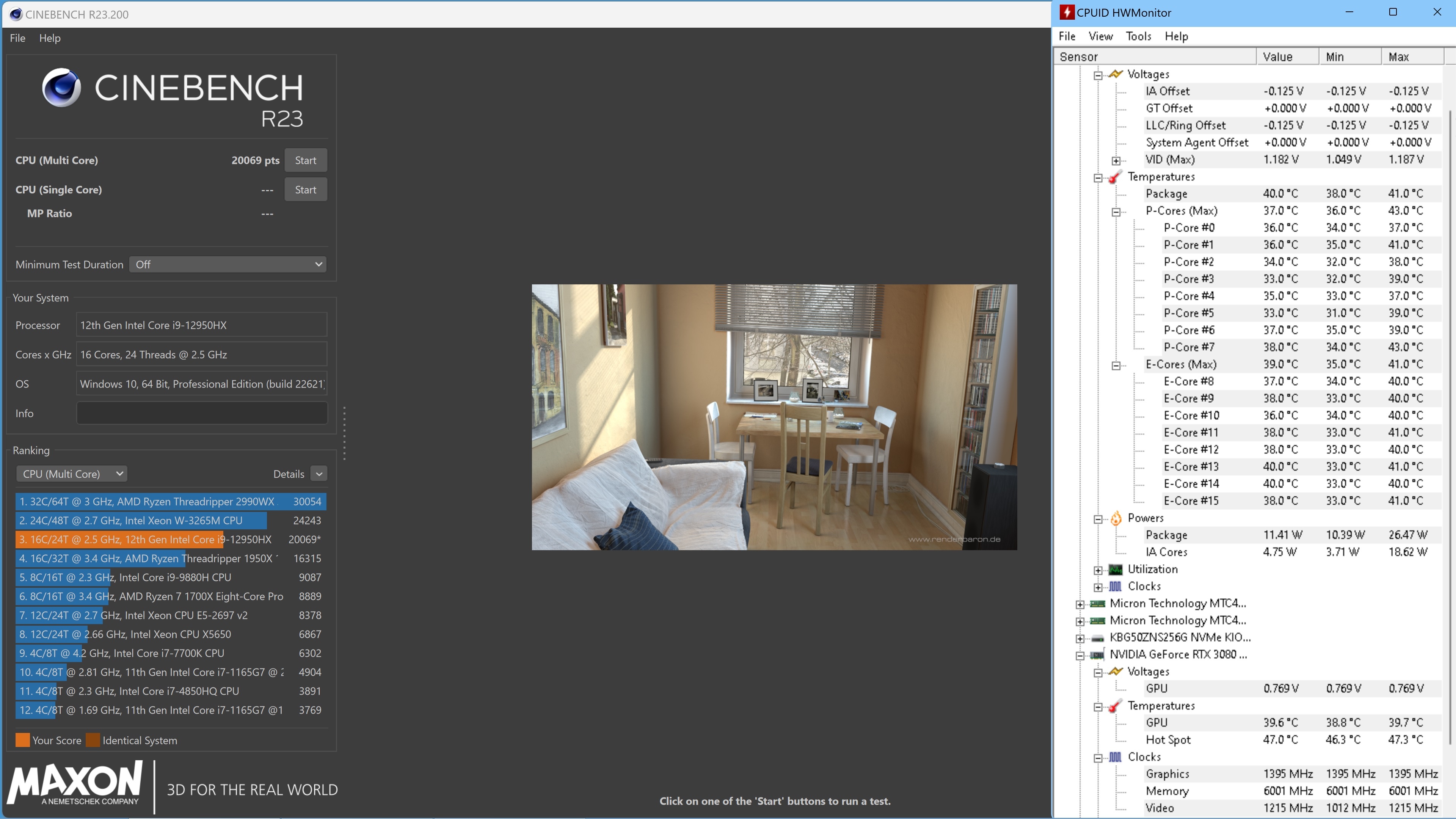
Wooohat… you don’t believe in fairy tales? 😮 Then maybe you’ll believe the i9-12950HX running cooler and more efficiently than your brand-new i9-285HX?" (Images of my own system below — since you think numbers like these belong in storybooks.) Surface temps, idle temps, and CB23 results were all posted in this forum long before the current generation even existed — nothing new, nothing fabricated. None of this was “luck of the draw.” It took 3 months, 6 replacement units, and refusing to accept canned responses from entry-level techs who weren’t even aware of these thermal behaviors. I escalated repeatedly, every time with technical data they couldn’t refute. Only after that did the correct unit arrive. Had that final system not performed the way it should out of the box, I was ready to walk away from Dell altogether — and I’ve been buying Precision systems since the M60 era in ’02–’03. This isn’t my first rodeo. So no — these numbers aren’t fairy tales. They’re what happens when you understand the platform, strip out the inefficiencies, and hold Dell accountable for delivering a properly binned unit.
-
My personal experience with multiple high-end Dell Precisions confirms this extreme variation: 6 Bad Units: Three 7670s and three 7770s all idled at 90∘C+ and throttled easily. 1 Golden Unit: The final replacement unit, with the same model and same flagship CPU, ran at Ambient+2∘C at idle—proving that a low-voltage, low-heat chip does exist in the bin, but that the average chip is a thermal disaster. The high temperatures we’re seeing aren’t just an unavoidable side-effect of efficiency — they’re largely the result of wider binning tolerances. In other words, the chips span a much broader quality range, which leads to higher heat output on the weaker bins. Intel smooths that out by raising the allowed thermal ceiling (higher Tjmax), so everything appears normal under sustained load. I can dive deeper into my theory, but that’s the short version. I’ve been busy dealing with life since 2022. I stopped tracking the fine-grain CPU landscape right around the time 13th gen showed up. And to make matters worse, Intel introduced ‘Undervolt Protection,’ which locked out ThrottleStop and shut the door on the one tool that made laptop tuning predictable. So yes — I missed some of the incremental changes, but the fundamentals haven’t shifted: hotter silicon, wider bins, higher Tjmax, and fewer user controls. True — with a distinction. Yes, the scheduler will push the CPU/GPU to Tjmax regardless of paste quality when the heatsink’s thermal capacity is this limited. But that doesn’t mean the paste is irrelevant. Your operational thermal buffer matters. If the system is already idling in the 80–90°C range because the interface material isn’t performing well, then half of your thermal window is already gone before the real workload even starts. That window should ideally begin only a few degrees above ambient, not 40–50°C higher. Starting that close to Tjmax means you hit the ceiling almost instantly, which forces the system into aggressive throttling long before it should.
-
ooh wow 105c TJmax 🤯 that cant be good for the silicon die or overall performance. ignore Intel attempt to cover up their cheap edge silicon die slices, that much heat is still excessive and indicates one of two things, either cooling is insufficient for the 285HX in that chassis or the cpu needs repasing and reseating, another user experiences similar temps is not an indicator for this being ok! it just means you both have similar issue. last round i went through 6 replacement before they finally sent a unit with proper cpu, before that i was idling at 90+ out of the box and was ready to just give up on dell, with a good cpu i was idling out of the box 2-4 degrees above ambient. (its documented somewhere in the 7670/7770 owners thread, and that cpu was no where near the 285HX efficiency)
-
what you're describing sounds more like badly pasted CPU, repast it before you kill the silicon die.
-
indeed they are, it was just a brain fart on my part. i wasn't following the cpu scene closely since Intel made that change i sort of glossed over that bit.
-
While I’m already on a roll… what happened to the Xeon option in the new lineup? And we’re still stuck with no real keyboard upgrade path on the flagship models. You basically need to buy a teenager’s Alienware if you want a proper keyboard or a non-ISV GPU out of the box. And yes, I’ll say it outright: I miss the old clicky keys, and everyone in the office can deal with it. If they offered a lever that advanced the paper like a typewriter, I’d probably add that too just for the experience. 😅
-
A bit of context on ISV GPUs, ECC, and why these distinctions made sense in the past but hold very little value today—especially in mobile systems. Historically, ISV-class GPUs (Quadro/RTX Pro) ran ECC VRAM enabled by default, and you couldn’t override it. Their drivers were built for long-duration, mission-critical workloads, so clocks were intentionally conservative. This made sense for environments where any calculation error could have financial or legal consequences—think Wall Street, CAD/CAM shops, or regulated verticals. Back in the early 2000s, Precision mobile workstations were literally the only laptops offering system-level ECC memory, and ISV certification actually mattered. The software ecosystem was a mess—standards were looser, OpenGL implementations varied wildly, and ISV drivers guaranteed predictable behavior across entire application suites. That was the right tool for that era. Today? The landscape is completely different: Modern applications and frameworks self-validate, self-correct, and handle error states internally. DDR5/DDR7 include on-die ECC and advanced signal-integrity correction long before data ever reaches system memory. Driver ecosystems are mature and unified; the old instability that justified ISV certification is largely gone. Even system ECC memory is increasingly redundant for most mobile workflows. The big reality check: In mobile platforms, the theoretical advantage of ISV GPUs—sustained stable clocks—simply cannot manifest. Modern mobile thermals hit the ceiling long before ISV tuning makes a difference. Both Pro and non-Pro GPUs will throttle the same once the chassis saturates. That endurance advantage only shows up on full desktop cards with massive cooling budgets. That leaves one actual, modern-day benefit: Legacy OpenGL pipelines. Outside of that niche, ISV certification brings almost nothing to the table—desktop or mobile. Bottom line: ISV certification made sense 15–20 years ago. Today, especially in mobile workstations, it’s a legacy checkbox with minimal practical value. Non-Pro GPUs offer the same real-world performance, and in many cases, better flexibility for modern workflows.
-
Bingo. 🙂 This may come as a shock, but people like us do exist, Dell. Our workflows cannot run on ISV-certified GPU drivers. ISV certification adds nothing to what we do, and none of our end users run ISV drivers. We validate our environments and new releases exclusively using non-ISV drivers. And as several members here already pointed out: we need a business-class system that we can also game on after hours. I don’t see how that contradicts the workstation designation. Do they really expect us to buy an Alienware just to play games after work? Or should we simply settle with the limitations? Which one is it, Dell?
-
I get that — I do the same myself — but I still need to run 4K workflows, and the option simply needs to be there. This is supposed to be a workstation, and productivity should never be treated as optional. For years we had full configurability, down to choosing whether or not to include a webcam in the bezel. Now we’re stuck with the same IPS panel generation after generation. It’s not as if Dell lacks compatible displays; they have an entire lineup they could fit here. Yet the flagship productivity platform doesn’t even get a touch option, let alone a modern high-resolution panel. Removing basics like a 4K option sends the message: here’s the flagship — be happy we still give you 2K. That just doesn’t sit right. And I hear you on Raptor Lake being dated — loud and clear. The 16 is still a valid system, but the lack of any non-ISV GPU option makes it a poor fit for many workflows. Not everyone runs ISV-bound workloads, and Dell’s current configuration approach essentially signals that this entire segment is now reserved exclusively for ISV-certified use cases. This is exactly what I mean when I say the platform feels compromised at every turn. Dell and Precision line used to stand for an uncompromising frontier. What makes it even more of an oxymoron is that Dell isn’t struggling financially — the company was bought back by its original owners and is in a strong position. This overhaul wasn’t driven by necessity; things were working well. It feels like optimization for the sake of optimization simply because they can, not because the platform needed it — unless the goal is to turn every model into a flat, disposable pizza-tray design you’d grab at a 7-Eleven.
-
The 18-inch model increased screen size without increasing resolution — where is the 4K option, or even any panel choice beyond IPS? Meanwhile, the 16-inch model gains a few features over the 18 but drops the 4th NVMe bay. I'm also not sure what you’re comparing the new 16’s thermals against; in my experience, packing this much dense hardware into a smaller chassis leaves far less thermal headroom than the larger 17-inch and up designs. And since Dell removed all modularity from Alienware, there’s no longer any option to order a non-ISV GPU like we used to on both platforms now.
-
i don't need the latest bells and whistles, i need a platform i can trust and feel confident with. none of these overhauled new models give me any sense confident over the precision line, ill just build myself a maxed out 7780 and run it for the next stretch.
-
I have the MB16250, MB18250, AA16250, and AA18250 all spec’d to the max, but I still can’t bring myself to pull the trigger on any of them. Every one of these new units feels compromised in one way or another. The MB16250 is probably the least compromised, but based on past experience its thermals are still weaker than the MB18250—and that one comes with the odd tall screen ratio that I’m not sold on. I also looked at the AA16250 and AA18250. Hardware baseline is solid, but Dell removed every bit of modularity these platforms used to have. That alone is a huge step backward. And the configuration pages now look unprofessional and borderline insulting. The way they structure component options feels deliberate—almost as if they assume no one notices. For example, they list a single 16GB or 32GB module supposedly running in “dual-channel,” yet they offer no 2×8GB or 2×16GB options, not even a basic single 8GB stick. Everything is pushed toward unnecessary upgrades and more expensive configurations that absolutely don’t need to be forced. or they intentionally omit the top Intel CPU options from the AA16250/AA18250 lineup entirely. How does that make any sense except for ‘going green’ on their cost structure? What a sad state of affairs. For the first time ever, I’m seriously considering buying the discontinued 7780 instead.
-
that is nothing to be excited about (in the context of manufacturing that is). when a student finishes his homework under 2 min what does that signals to most people?
-
https://ollama.com/library/llama3.1 Minimal Requirements for Llama 3.1 8B (Quantized) VRAM (GPU Memory) ≥ 8 GB VRAM System RAM ≥ 16 GB If you are interested in the larger, more powerful Llama 3.1 variants, the requirements scale up dramatically, moving them out of the range of most standard PCs: Llama 3.1 70B ≈ 35 - 50 GB VRAM Llama 3.1 405B ≥ 150 GB VRAM Hardware support https://docs.ollama.com/gpu Compute capability (CC) https://developer.nvidia.com/cuda-gpus
-
to the best of my knowledge when optimus puts dGPU to sleep iGpu will function through hdmi port, optimus is not dell's software its nvidia's software designed specifically to switch between the two, if hdmi is not working it has to be something else preventing the port from being used.