

electrosoft
-
Posts
3,302 -
Joined
-
Last visited
-
Days Won
184
9 Followers








.thumb.png.362386d2804d5f9fbcf2ec7f5aa009c5.png)
electrosoft's Achievements






-

*Official Benchmark Thread* - Post it here or it didn't happen :D
electrosoft replied to Mr. Fox's topic in Desktop Hardware
Gigabyte and Asus raising prices of the 5080..... Prices on the rise again....Microcenter Edition Cheapest 5060ti 16GB is now $739.99 Cheapest 5070 is now $769.99 Cheapest 5070ti is now $1159.99 Cheapest 5080 is now $1779.99 5090 is vapourware atm but my Microcenter does still have a singular Asus 20th anniversary kit in stock for $11k+ after tax (More below) Microcenter does have the best overall prices on Nvidia cards across the stack compared to PCPP of cards actually in stock.... Asus has the 5090 Astral (all three editions white, black and LC) in stock on their site for $5500, $5600 and $5700 respectively but it's a sham. It is part of a bundle deal you have to order with a slew of their other items coming out to $9107+....at that point, I'd just pony up for the 20th anniversary edition....which means never. After that, cheapest third party 5090 available is $8599.99 on Amazon for the GB Aorus Infinity Edition... ---------- Cheapest 9060xt is $799.99 ($589.99 on PCPP) Cheapest 9070 is $719.99 ($699.99 on PCPP) Cheapest 9070xt is "on sale" Steel Legend for $799.99 (normally $899.99) ($829.99 on PCPP) One of the few rare times MC has the worse pricing across the board for AMD cards for normal pricing.... ------------------------------------------------------------------------------------ @Papusan look at this 5090 "conversion factory" just sucking up any and all 5090s and converting them for rack AI deployment....can't blame Nvidia for capping that cheaper source of 5090s and funneling that $$$ into their own pocket instead....right? https://videocardz.com/newz/heres-where-the-last-rtx-5090-cards-are-going-massive-ai-conversion-factory-exposed-in-china-founders-edition-included By the new year, if not sooner, I expect them to be offering $6k+ ------------------------------------------------------------------------------------- Galax HOF 5080 with dual 12vhpwr connectors but only one or the other alternative mode? But swarovski crystals and a $3k price makes it perfect?! Ewwww, I'm good.... https://videocardz.com/newz/galax-launches-worlds-first-rtx-5080-with-dual-12v-2x6-connectors-costs-3000 -------------------------------------------------------------------------------------- Like I said, locally buyers will come to your place or meet up locally, have rigs to test your 5090 and hand you a fat stack of $5500 to buy your 5090. They used to do Zelle, but methinks that is a bit too traceable..... One of my Fallout 76 buddies who lives up on the other side of Philly caved and sold his Founders Edition for $5700 locally to someone who actually wanted it for their own use (in theory). I think I mentioned him last year when I got to experience his coil whine first hand. He got in on the VPA program with Nvidia summer of 2025 and snagged it but he needed the $$$ and replaced it with an open box Reaper 9070xt for $679.99 (~$634.99 after MC discount) so when all was said and done he netted a ~$3k profit even after the 9070xt pickup and more importantly the $5k he applied to some bills overall. We were playing and I asked him how was the downgrade on his 9800X3D system and after struggling for a few days at 4k max settings (over chat all I kept hearing was 'sheesh this SUCKS....CHUNKEEEEE!') he admitted defeat and dropped down to 1440p and swapped his 32" 4k display for his secondary 27" 1440p display. In his words, "this sucks, but it is what it is..." 🤣 He has a 2x32GB of G.Skill kit (I think it is F5-6000J2636H48GX2-TZ5NR) I know he picked up before the ramapocalyse that he is going to sell as soon as he can land a "6000 anything 2x16GB kit for sub $300." -
*Official Benchmark Thread* - Post it here or it didn't happen :D
electrosoft replied to Mr. Fox's topic in Desktop Hardware
😁 -
*Official Benchmark Thread* - Post it here or it didn't happen :D
electrosoft replied to Mr. Fox's topic in Desktop Hardware
We've seen the "barely off the line and onto the pallets for direct sale," song and dance before with both Cryptodemics we went through....no middle man just pure profit for the AIBs. I never thought the 5090 was discontinued. They've just redirected them to the AI market prioritizing that profit sector especially considering 5090s were being ripped apart and sent to China for AI deployment and I am sure elsewhere too. We just tend to narrow focus on China considering its economic and technological importance in the world. I posted earlier about not being a discontinuation and poking fun at Jensen: ---------------------------------------------------------------- New 7500X3D back from RMA working exactly like it should on the $237.50 after MC CC use 7500X3D + Asrock B850m bundle deal from Microcenter tested with the TG 2x8200 24GB sticks..... Refund already issued for the returned Noctua 420mm. I have the H9 Flow 2025 Edition here but right now all the components are installed still in the Phanteks but it will have to move seeing as I have no room to install the RAM cooling in the Phanteks due to its design with the Lian Li Lite 360 installed up top.... This is with the aRGB of the Lian Li not even connected...lots of default I'll need to address with OpenRGB or something similar to rein in the "Carebear Stare!" status once moved but hardware wise this is final boss form for the H9 Flow 2025 case change incoming.... -
*Official Benchmark Thread* - Post it here or it didn't happen :D
electrosoft replied to Mr. Fox's topic in Desktop Hardware
I've often said, and ended posts here, with being thankful to even be in the position to have the ability to purchase and play with some of these toys and high tech items. I have a nice pile of hardware amassed. Only thing I'm on the lookout for atm is a decently priced set of the G.Skill 6000 CL26 1.40 sticks. I could use a few more NVME drives too but overall I'm good. After the shutdown and demise of NBR, @Reciever and @Hiew picking up the reins and running with it with NBT really let us carve out our corner again and just let it flow. I always like it when a long time member from yore discovers NBT and pokes their head in to say hi! And yeah, the WVPII is definitely a blessing on my 5090 which some say could rise to $10k in the new year as supply dries up. I have yet to have my cable deviate or yell at me yet (I'm running the MSI yellow cable included with the MEG 1600T), but I've got it locked down. 🙂 -
*Official Benchmark Thread* - Post it here or it didn't happen :D
electrosoft replied to Mr. Fox's topic in Desktop Hardware
Microcenter officially no longer carries the 5090 as every card with no remaining stock still lingering is now marked as, "No Longer carried." Only card left in stock anywhere for 5090 in Microcenters is the Asus $11k+ after tax bundle and only two of my five localish (~45-100mi away) have 1 in stock each. Why are they still there? Most likely because third party sellers have other models for sale for $4k cheaper.....I'm sure they will eventually move..... Just about every model of 5080 in stock but cheapest price is the $1699 (on sale for $1669) GB WF SFF 5080. Same for the 5070ti but the cheapest model is the Ventus for $1199 on sale for $1149... Newegg is completely wiped out of 5090s as is Amazon and Best Buy. All we have are third party sellers with the lowest price being ~$7k for a Windforce 5090. Only 7 models of 5080s in stock on Newegg with the cheapest being the PNY for $1699.99. Cheapest 5070ti is the $1179 Eagle.... Ugh -------------- I received an email from BHPhoto today informing me the Gigabyte 9070xt Gaming is discontinued. I forgot I had it on my "inform me when in stock," from eons ago. We'll see where that goes.... Cheapest 9070xt is the $800 Reaper and prices are rumored to be going up again.... Certain cards can't be found stateside (GB Aorus Elite and PowerColor 9070xt Red Devil are two examples) as most likely AIBs are going to start consolidating which cards to carry based on profitability. Smart move is to offer lower tier cards at inflated prices to weather the price storm rather than have more expensive models get too close to 5070ti pricing and potentially rot in this PC gaming market downturn, but again, we will see.... --------------------------------------------------------------------------- I said it before and I'll say it again... 270k is an absolute banger and price:performance it is a monster. Toss in Microcenter bundle deals and it gets crazy.... ----------------------------------------------------------- No thanks. Picked up my on hold at Best Buy H9 Flow 2025 Edition yesterday for $109.99 that checks all my boxes especially with my army of P14 Arctic 140mm fans. I think I have at least 12 of them strewn about for my build out..... I had $90 in rewards sitting in my account from when our TV decided to fail earlier this year and we needed a new one so final price was $21.38 He was mostly disappointed in the assembly frustration and MSI trying to be "fancy" and causing access issues and usability. Beautiful to look at but pricey, frustrating to build in and hard to access features once built. I can't imagine dropping $800 on a case. Then again I never imagined dropping $2k on a GPU so who knows in the future?! 🤑 -
*Official Benchmark Thread* - Post it here or it didn't happen :D
electrosoft replied to Mr. Fox's topic in Desktop Hardware
I've been running the 9070xt and then the 5080 for over a week now as I slowly test and certified the Dark Hero "ready for deployment," and moved it into the Phanteks so I've kind of got used to playing WoW and Fallout on the Dark Hero with the 9850X3D running at 5600+ with the Corsair Vengeance 9200 sticks tuned to 8000. The overall setup is basically a tighter, slightly faster refinement over my Hero + 9800X3D + TG 8200 sticks on all levels. I do like how the Dark Hero drops the primary GPU slot down another notch. It really centers the GPU in a nice way depending on case or gets it even closer to bottom fans for stronger air flow which will be the case when all this moves into the H9 Flow Then I slapped the 5090 back in there yesterday and was quickly brought back to reality just how much better it is overall in every way.... I'm also running the Lian Li 360 Lite now after having run the Noctua 420 for several days. The Lian Li actually fits up top on the Phanteks and after adjusting the pump curve (same as I had to do with Noctua) it is running just as quiet. Fans aren't as quiet but quiet enough. Continued testing back and forth and the Lian Li runs just as cool as the Noctua and both trounce all my other AIOs so I'm going to send back the Noctua as it isn't worth the $300 vs the $85 Lian Li with AM5 at least. I do need to set up an RMA with Asus to replace my x870e Hero due to the flickering/dying RGB logo panel. Doesn't affect the board at all, but for resell it will put a dent in its value for those who care. 19 months of solid service handling 8000+ like a boss.... ----------------------------- Yeah, the sudden lack of 5090s on the shelf and price spike followed by the leak from a factory. Classic Jensen. Trust me, Jensen will continue to pillage the consumer sector to feed the AI segment as the GB203 full fat die is already used in the RTX 4500 with 32GB of memory. If that card was in greater demand on the level of GB202 cards, Jensen would have no problems gobbling up those dies. If Nvidia suddenly introduced let's say a RTX 4600 with the GB203 and 64GB of memory for $7500 and it became a smash hit being sucked up like the 090 / 6000 cards, 5080s would suddenly shoot to 2000+ to start if not more and stock would start to dwindle fast. ------------------------------------ 5080 24gb rumored for January as 5080 is discontinued and the 5090 goes through an "allocation change" vs a flat out discontinuation which makes sense in case the AI bubble collapses they can just go, "Hey AIBs! Look! GB202's are back!! Kiss the ring!" https://videocardz.com/newz/nvidia-rtx-5080-24gb-reportedly-launching-in-q1-2027-board-partners-still-waiting-for-details -
*Official Benchmark Thread* - Post it here or it didn't happen :D
electrosoft replied to Mr. Fox's topic in Desktop Hardware
Personally, I think prices are going to go higher. 5090s will now dry up everywhere and be hoarded for personal use or those who reach a, "I can't say no," offer will sell theirs off for what will most likely be AI deployment either domestic or abroad. Locally, there are a few buyers openly offering $5500 cash for any and all 5090s. They will come to you, test your card, hand you a fat stack and carry on. When they say, "Any brand, as long as it is working we pay $5500," you have a pretty good idea of where those cards are going.... Pricing will be fractionally in sync with the RTX 5500 and as eventually GB202 5090 dies are limited, even the RTX 5500 will go up in price along with the 5090s still out there. Basically, as long as purchasing and converting a 5090 into an AI card makes financial sense / profitable, pricing will continue to trend upward. Luckily, I have this sub $1k 5080 and 2x 9070xt (one being in the wife's system) cards so if the right offer suddenly appeared, I can't see myself turning down $7k but not till next year at the earliest and probably summertime at that. You also have to think that this EOL is fresh and brand new and whatever stock is out there is going to evaporate quickly and then the second hand market turns into a resource strapped buy/sell with prices trending up. Like I said above, I'm still holding onto mine for a few reasons and one of them being I expect prices to trend up a bit more before leveling off in relation to the RTX 5500 pricing. I'm still playing on the 9850X3D + 5080 config atm as I've been too busy/lazy to break down the current test setups and start the transition to final boss form. The performance hit is real in WoW. I'm not used to seeing full utilization and sitting under 100fps quite often but for the right $$$ I could live with it but it has to be a price point that is high enough to override going years with a significant and noticeable performance drop. $6k which would be a $4k profit won't make or break me in any which way, shape or form and I don't need the money, so is it worth the loss of superior performance for the next year+? I still get aggravated when buyers get salty over pricing. I've come to realize they fully understand current market conditions. They are just hoping to sob story / brow beat you into giving them yesteryear level pricing.... -
*Official Benchmark Thread* - Post it here or it didn't happen :D
electrosoft replied to Mr. Fox's topic in Desktop Hardware
I was out of town for NYCC, so I just got a chance to watch this. I liked what I saw. He's coming into it with rested, fresh eyes and open to BTF and other changes. That's a good thing. He isn't jaded. You KNOW those parts are binned AF especially with his buddy Shamino working there. I am sure that 9950x, 270k and Astral 5090 BTF are gonna RIP. Cardboard boxed MBs including 2x AMD and 1x Intel. Asus basically sent him $10k worth of hardware and you know what? I'm ok with it. Dude is a legend and I'm glad he's come back home. Oh they most certainly will except as much pricier AI cards. 5090 resell values will be directly tied to the pricing of GB202 formerly 5090 die cards so they will plateau around $6k-$7k unless prices continue to rise for the AI 5090 aka RTX 5500 which is estimated to cost ~$9200 with 84GB of memory but I suspect it will go for more and rise quickly and 5090s could eventually hit ~$8k. Eventually 5090s even on the second hand market will evaporate as they are snatched up for AI. If they start to resell for $7k+ by next year, there is a very strong chance I will let mine go but we will see in the moment. Either way, the 5080 GB203 is fully tapped out so the only way to see a true xx80TI card would have to be an even more cut down GB202 but with the way AI is snatching up everything, that ~15k core count card would probably be paired with 64GB of memory and sold as yet another AI product at this rate. Ironically, it is the limitations of the grid that could be one of the factors that slows down the onslaught of AI. It will hit a wall either through lack of buildout resources, debt fatigue, failure on ROI or all of thee above. Bad enough when they would message you telling you "a friend" had what you were looking for and to email them at *****@*****.tld, but now they're trying to use the old phishing approach of making names appear as close as possible in messaging. Definitely going to snag that. The amount of adjustability and features being unlocked recently is awesome. Everyone checking their ASIC scores? 🤣 I suspect they did it because the GB203 in the 5080 is full fat and to offer a 5080 Super in the future could only be a power bump so they went ultra conservative with its power profile. Of course if current rumors are true and they discontinue consumer level 5080 and 5090 models and only offer a 5090 24GB model, it will suddenly be a 600w capable unit too.....thank you Jensen.... -
*Official Benchmark Thread* - Post it here or it didn't happen :D
electrosoft replied to Mr. Fox's topic in Desktop Hardware
And it starts....as predicted 5090 discontinued 5080 16gb discontinued Incoming 5080 24GB as the new flagship gaming card... I would not be surprised to see it for $1499.99 moving forward... Get ready for the 6080 24GB as our new "flagship", no 6090 and needing to spend blackwell pro levels of $$$ for what would have been 6090 performance bump but Nvidia putting all gaming "gains" behind DLSS and FG.... "According to a notification from the factory, Nvidia will no longer manufacture any RTX 5090 models, including the D variants," a message cited by @hongxing2020 reads. "Going forward, the highest-end GeForce graphics card will be the RTX 5080 24GB, while the RTX 5080 16GB version will be discontinued. Please spread the word." With the rumors showing AMD bringing the heat next gen, I have no problems moving back to AMD for, oh what would it be now, the 5th time over the last 10+ generational leaps since 2000? Pretty disgusting if this pans out.... New eventual product stack at this rate till 2028: 5080 24gb 5070ti 16gb 5070 12gb 5060ti 8gb 5060 8gb 5050 8gb -
*Official Benchmark Thread* - Post it here or it didn't happen :D
electrosoft replied to Mr. Fox's topic in Desktop Hardware
I get this way too with wallpapers. The motherboard is the conduit to all and if it is system themed wallpaper, it has to be to that AIB. I am also open to mash ups...like I'm running an Asus MB but with an MSI GPU...that's worthy of a mash up. -
*Official Benchmark Thread* - Post it here or it didn't happen :D
electrosoft replied to Mr. Fox's topic in Desktop Hardware
So I'm in need of a Windows 11 Pro key. Has anyone used gvgmall or ggkeys to purchase a super cheap one? I won't script auto activate, but I'm sure as heck not paying retail off the shelf prices either.... ------------------------------------------------------ Current rig is in "ghetto" mode with the 5080 and X870E Dark Hero running on the Noctua 420mm in the soon to be departed Phanteks. I ordered an NZXT H9 Flow to replace it from best buy on sale for $109.99. The Phanteks has no room up top to seriously mount anything 420 and 360 blocks access to the top part of the MB along with the case being so wide/long that any AIO that needs to front mount has to have longer tubes. Noctua and Lian Li both have too short of tubes to reach. It could use more room in the back too. I've used it for 5yrs and 8 months. It has earned a worthy retirement. I've been testing the Noctua 420mm against several AIOs I have on hand (Yes, I have a problem): Lian Li Lite 360 Lian Li Galahad Performance Arctic LF II 420 ID Cooling Frostflow 280 (hottest of the AIO lot) Arctic LF III 360 Performance (mid 70s...this was disappointing) eK Nucleus 240 Asus Prime LC 360 Trofeo Vision 360 Paladin EX400 Air Cooler Stock AM5 OEM cooler (Insta throttle for shiggles) All with a center dot of KPX Tested on AM5 9850X3D delidded Pure stock (~150w-160w max load) Final verdict? Noctua beats every other AIO from 4c to 10c EXCEPT the $85 Lian Li Lite 360 ARGB which tied with it at ~66.5c. I think I mentioned before the Lian Li Lite 360 was getting best in class temps in testing last year and rave reviews. Downsize is the pump noise but tuning the curve in BIOS to 50% took care of that when not under high load. Don't let the Noctua fool you. That pump is loud. It has three manual selections on the pump high balanced and quiet and only quiet truly made it near inaudible. The other two it is very easy to hear. Fans it is no contest. Noctua is crazy quiet under load vs the Lian Li, but at low loads both are quiet. Difference is the Noctua is near dead quiet. The secret sauce to Noctua are those fans. Under load, the Lian Li fans are definitely front and center. Not a deal breaker but under load the Noctua fan noise level is that of many AIOs at idle. I'm going to switch to the Lian Li Lite 360 for a few days and see how it fares for normal D2D usage vs the Noctua. If I like what I see, I'll probably return the Noctua but we'll see.... -
*Official Benchmark Thread* - Post it here or it didn't happen :D
electrosoft replied to Mr. Fox's topic in Desktop Hardware
I love my PC hobby, but I've been Mac and iphone as my core setup for years now for work along with an iPad. With all the cross platform tools, there's a reason many of the big houses now deploy Macbooks for dev work. I agree with @Mr. Fox on this one @Papusan. You have to attack the problem on all levels and the reason Microcenter implements a one per household / ID checked policy on many products IS to prevent scalpers and also in this case straw buyers and agents from buying up 5090 products and just either finding a way to sell/ship them as is or ripping the cores and memory off the board and shipping them that way. This isn't much tighter than their valid ID on file / One GPU per month quota they had during the Pandemicryptoboom. It is also why Microcenter routinely has items in stock while you can't find them any place else online because bots don't work when you can only reserve items online for pickup and then have to eventually enter the store front to purchase and pick up in person. In short, on any level, any potential scalper/straw buyer/agent that is turned away by this new requirement opening up even one unit for a legit customer is a win. I agree the main culprits are the corporations and big AIBs/resellers, but would you rather scalpers and straw buyers be able to walk in and just buy out everything they want? Toss out the baby with the bathwater? Trust me, if Microcenter decided to go all Newegg/Amazon and just volume sell online, their stores would be even barer than they are now for many products. $7k desktops anyone? It is the one thing still hanging on atm for 5090s..... As for the 5070, at MSRP to me it was one of the sweet spot cards I called around launch. Yeah for a bit there it was running like dogwater.... I just load it up and go get something to drink... 🤣 I usually don't complain. I know you guys are all over it when you get time. Ruh Roh! You tend to keep things in threes.... This means either one of the Apex's is on its way out or you're heading towards being done with AM5 before Nova drops 🤣 Looks nice! Again, I was tempted to snap it up but I've yet shockingly found myself with a pile of hardware again that I will have to wait till January to downsize. I'm on the cusp of kicking myself up into another tax bracket because of this year and I definitely don't need that.... Or I am going to have to go the local/FB/CL route which I haven't done in a bit to offload some gear. -
*Official Benchmark Thread* - Post it here or it didn't happen :D
electrosoft replied to Mr. Fox's topic in Desktop Hardware
K|NGP|N coming back to the OC scene: "K-Pop Kung Fu Class" as a reason for switching studios was not on my bucket list of reasons to move to another location.... Looks like he's going with Asus..... New OC channel: https://www.youtube.com/channel/UClS4F_eKD3PCihwI9ZvrdwQ Welcome back! --------------------------------------------------------------------------------- Same boat.... I thought about selling but I switched to my Power Devil 9070xt then 5080 in my main rig for a few days and watching those frames seriously drop and sitting at 100% util more often than not in WoW 4k ultra 10 sent me scurrying back to my 5090. Yeah, I could pocket $3-4k+ profit right now and then what? Sit around and bitch whine and moan about being capped out and not getting the performance I want for the next 12-18 months just to see the prices of the 6090 requiring a kidney assuming it launches by Q1 2028? I'd rather enjoy the here and now with state of the art performance for the next 15 months if not more.... Have you given your 5090 the mvolt+ treatment yet? -------------------------------------------------------------------------- That is awesome news @Reciever! Know your worth and demand no less. Sometimes you have to be proactive and other times those around you will see and acknowledge your quality work and reward you thusly. Now, just go ahead and finance that 5090..... 🤣 ----------------------------------------------------------------------- Glad to see you taking the small, but meaningful, steps to right the ship and being able to drive again has to feel good. Losing self autonomy is never a good thing on any scale and driving is a big one. Just keep trying like you said to stick around and keep us up to date on the tech sector doom and gloom. 🙂 --- I am not shocked at that EVGA report. Nvidia and Jensen needed AIBs and gamers years ago but at every chance afforded to them well before the AI BS, they made sure to put the screws to AIBs and cook the books with crypto and continue to push prices as far as able while casting their illusions of MSRP and deliver less for more each and every cycle. EVGA went out on a high note with their GPUs and Motherboards and downsized to peripherals. I don't blame them one bit. --- The cable, according to TG data collected so far with the WVP2, is the primary issue regardless of MSI burning up or other makers like the PNY reported a day or two before this one. It was an Asrock PSU. In the comments: He literally recommended over and over to his friend to get a WVP2 or at least a better 3.1 compliant PSU. With the WVP2 I am pretty sure he would have immediately seen a high imbalance on a pin or two but without a WVP2, or a 3.1 PSU that reports pin monitoring or an Astral. Without any of these reporting protections, you are basically piddling blindly in the wind every time you use your 5090. Before my WVP2 and MSI sending me an Ai 1600T PSU, I purposely used the included tentacle just in case for warranty claims. Switched to the MSI PSU and its included 12vhpwr cable keeping MSI completely responsible for the warranty chain and then added a WVP2 and their warranty on top of it for extra added support. De8auer said they haven't had a single report of a WVP2 burning up yet from WVP2 to GPU connection. At this point, anyone running a 5090 without a WVP2, a pin monitoring compatible PSU or at the least using the tentacle to keep any burning issues warranty claims valid are playing with fire. -------------------------------------------------------------------------------------- Ditto, I'm holding onto my 5090 for at least another year if not more. Zero reason to sell. I'll re-evaluate the landscape next October/Nov when the 6000 series is potentially on the horizon. Hopefully the AI bubble will have popped or at least deflated a little by then. That makes sense with the 5090FE. The value proposition of it getting it for retail was its main draw by far. Price not being an issue, Astral is a sick card and removing price as a factor, I'd take an Astral over my Vanguard all day everyday on industrial aesthetics alone albeit I did find my Vanguard had the best silicon in my testing between it, the Astral and the Ventus but I would have to rerun those tests in the here and now with mvolt+. Whew, I'm glad you kept the overall better sample with the best fclk. It did seem the best on paper. Have you done any 8000+ testing yet? I agree on pressure. I was having issues with the delidded 9850X3D and the TG Heatspreader with 8000+ testing suddenly failing. One flaw I've found with the TG HS is heat expansion and cooling eventually loosens up the screws a bit. This might not be a problem with a tight pairing and a block keeping the pressure where it needs to be, but right now I'm still sorting out the Z-height issues so the pairing isn't as tight as it could or should be atm so eventually over the course of hours or days, my memory settings will fail. I dug through some older AM5 compliant heatsinks I have on the shelf and found a set of shorter by ~2.5mm non-spec standoffs I plan on swapping in to compensate to see if that helps along with shoring up proper pairing pressure to get temps to be a bit better. At the moment, I am not super pleased with the TG HS, but we'll see after this final testing. -------------------------------------------------------------------------------------------- I still need to get back to the G16 for some Bios tuning and testing but my desktop has been my focus atm. Yeah, three of them showed up. Two sold for $3500-3700. One was delisted but it had scam written all over it at the time. Do a completed sales history search on 9955HX3D 5090. Purchasing from an official outlet definitely was the way to go and get that three year warranty. With the way the market is going and offerings, it will be the best overall for the next few years. We won't see a 6000 mobile refresh till 2nd or 3rd quarter or 2028 at this rate. I plan on playing both retail and forever. I've always played Paladins since launch but I also alt druids and hunters from time to time. During Vanilla, I was all about my Paladin, priest and hunter. Priest had Benediction in Vanilla and Hunter had Rhok'Delar. I was guild leader with a top raiding guild back in the day and once we had MC and BWL on farm, loots eventually trickled down since we ran DKP globally and once everyone was geared up enough I let alts tag along for runs to get some good loot too. We had a server first Hand of Ragnaros but could NOT get the second half of the binding to drop for Thunderfury! 🤣 I burned out halfway through BWL and went casual after that. WoW stopped being fun and became more a job and managing egos. I'm pretty sure I am going to main a druid this time around and alt a hunter again.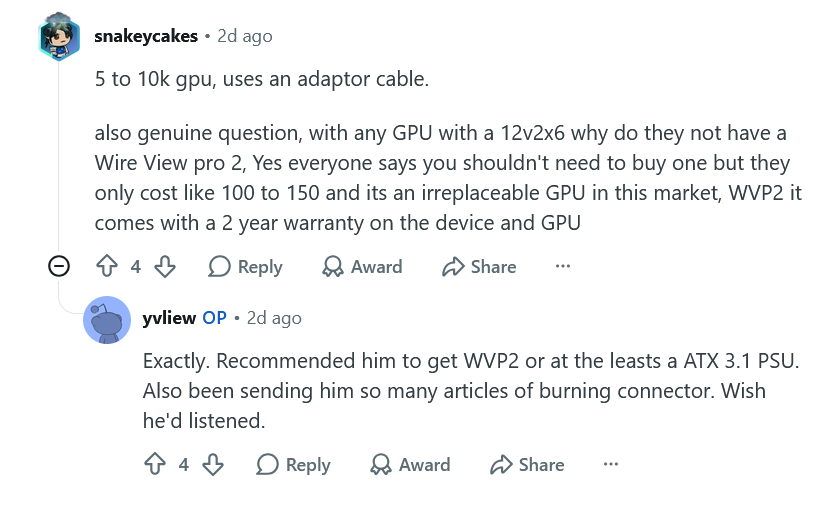
-
*Official Benchmark Thread* - Post it here or it didn't happen :D
electrosoft replied to Mr. Fox's topic in Desktop Hardware
De8auer going over data from problems detected with the WVP2.... ~9 months in production data sample window compared against WVP1 dataset Sold 5x as many WVP2 as WVP1 WVP1 reports of melting/issues ZERO reports of melting WVP2 units 98% of the cases are cable issues 2% were WVP2 replacements for various reasons up to and including a faulty connector 0% were the GPU connector itself... Noctua edition has beautiful refinements and obviously runs quieter. Noctua uses a different heatsink and PCB for full PWM control vs just DC control on the original. Original WVP2 price on TG website is $140.28 Noctua Edition is $222.18 So Noctua is ~58% more Extrapolating on Amazon, the current WVP2 is 169.99 so expect potentially to pay ~268 on Amazon when it finally arrives. -
*Official Benchmark Thread* - Post it here or it didn't happen :D
electrosoft replied to Mr. Fox's topic in Desktop Hardware
100% I do think Nvidia came up with this new standard because they could see: A> The writing on the wall in regards to power consumption and the idea of running 4+ 8 pin connectors wasn't feasible space wise which leads into... B> The rise of AI and multiple cards all using a single power cable for arrays of AI equipped Nvidia GPUs... The issue is the connector is problematic but again how many connectors do we see blowing up in AI farms running thousands of these cards? Too many variables on the end user front and I'm not saying the connector isn't chock full of fail (it most certainly is), but it is a big Venn Diagram of problematic connector to the left and user error to the right.... Best bet, again, is to run the tentacle or at least get a PSU that is the same brand as your card so if something blows up, the company can't point fingers elsewhere. It pains me to side with PNY on this one, but since PNY doesn't make PSUs, running the tentacle would have kept the warranty responsibility on them. Unfortunately in today's market it really is a good price and that is why they sold out ASAP. 😞 And yes, for personal AI work, I would take a 5060 Ti 16GB over a 9070 XT atm.... As for cables, while that sucks, the warranty chain is entirely on MSI and yet again a reason to make sure to use the included adapter with your card or at least use a PSU that is from the same 5090 AIB so any melting connector issues are entirely on them. If you are using a 5090 with a third party power cable for vanity sake then things can get muddled when something melts down. Many times it isn't even the 12vhpwr connector itself but cable that blows and takes your connector with it. Again, I ran the tentacle religiously on my 4090 and 5090 till the WV2Pro AND getting an MSI 1600w PSU. How ya feeling these days @Papusan? Health on the mend and getting better? ---------------------------------------------------------------- Somehow Gigabyte shanked it with their 16" 9955HX3D 2026 laptops (they opted to replace Intel with this refresh from their 2025 variants). Insanely loud fans, subpar performance..... But as the game performance charts show, when X3D shines, it insanely shines. Part of this is due to some games loving that cache. The other part is the absolutely atrocious memory settings and adjustability on 15th gen Intel laptops.... Some OC controls in the BIOS but no CO offset like MSI and Asus.... Timestamped for 9955HX3D vs 275HX





