ÊtaPegasus
-
Posts
51 -
Joined
-
Last visited
Content Type
Profiles
Forums
Events
Everything posted by ÊtaPegasus
-
Hi , could you tell us how much power you draw when running cinebench r23? It is normal to have thermal throttling on the cpu with dell precision 7550/7750 (see my previous posts). But you should be able to pull above 100w before throttling. It might be interesting to lookout for the heatsink assembly and clean the dust and dirt. On the other hand, i would suggest to use PTM 7950 (you can buy some legit ones on Moddiy.com) as it last much longer than any paste i used (including Thermal Grizzly Kryonaut wich dries out quickly to to the high temps). Another thing to put temps under control (see my experiments in previous posts) you can try using throttelstop : - limit max multiplier to the max multicore allowable for you cpu. For my i7-10870h i put a max multiplier at 44 instead of 51 and it reduced temps spikes drastically. - limit the max allowable temperature by introducing an offset to the max temperature. In mine, i used a 10°C offset in the options tab and it limited the core temperature to 90°C. Doing as stated above, you can limit the thermal spike while maintaining most of the performance.
-
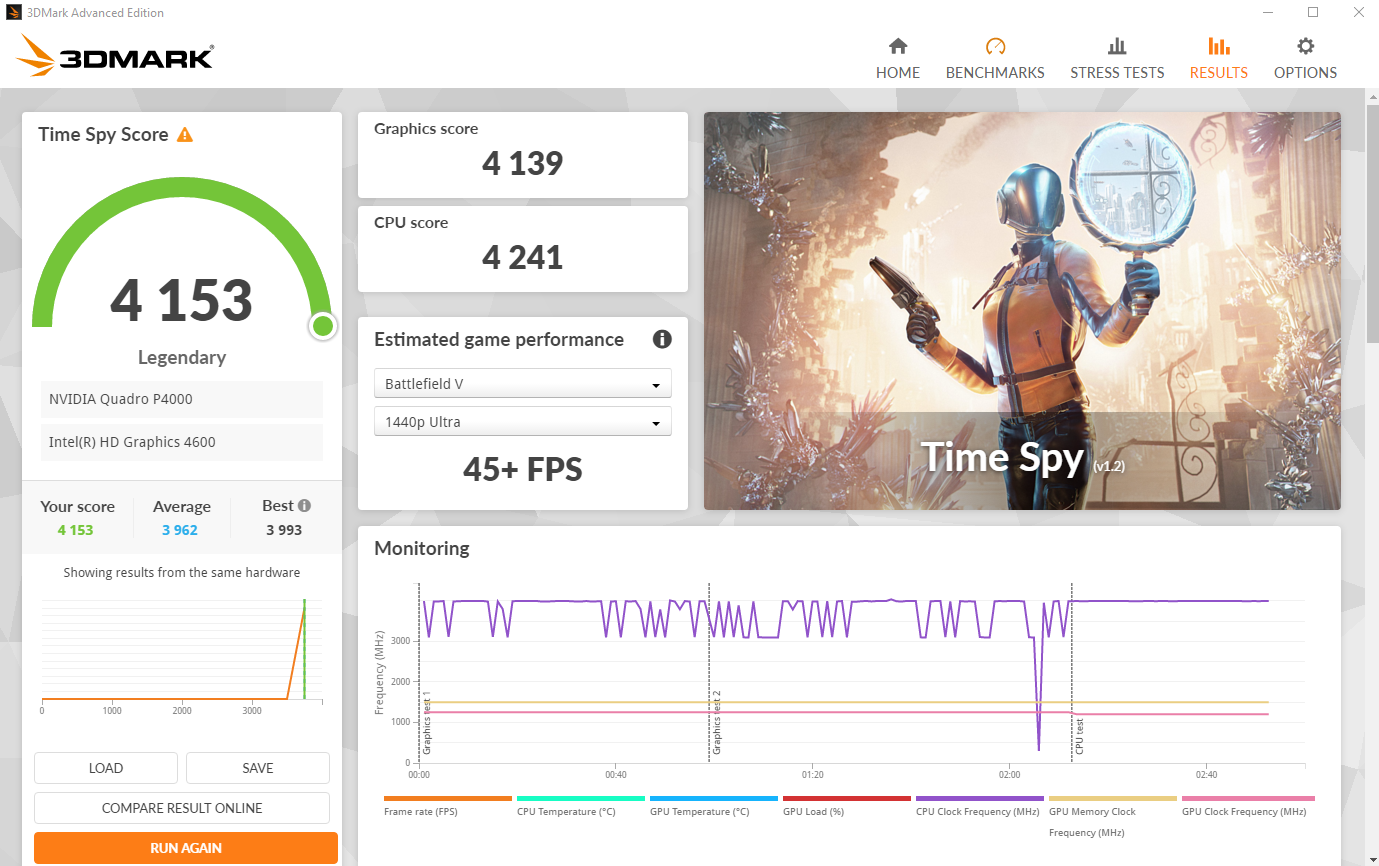
My system specs : Ryzen 9 9955HX 32GB DDR5-5600 Kingston Fury Geforce RTX 5070Ti 2560x1600 - 300Hz - 500Nits IPS display 2x2TB Samsung 970 Evo Plus 330W power adapter Impressions : Positive Excellent build quality. Coming from a daily user of Dell Precision laptop (7550 at home and 7680 at work), the chassis feels very sturdy and even more "premium" than these workstation : All aluminium chassis, no flex on keyboard deck, no flex on the screen. Even compared to some recent gaming laptop i test (Lenovo Legion 7i for example) i find the XMG more polished (no pun intended). The display (eventhough i chose the IPS version) is miles away from the one i'm used to on the Dell lineup (FHD IPS) or even my desktop one (AOC 27 G2 - FHD IPS 144Hz). The brightness is way better, the color accuracy is excellent with pre-install color profiles, and i did not expect a high refresh (300Hz in dGPU only mode, 240Hz in optimus mode) rate panel to be this good even when not gaming. The performance uplift from my previous Dell Precision 7550 is, as expected, huge with almost double the performance. The most striking thing to me is the cooling solution and associated thermal performance. While playing Metro exodus, in optimus mode, at native resolution, all settings in ultra, i can pull 140W on the GPU and up to 90W on the CPU and yet, the remperature stays below 80°C with the fan at around 60%. Comparing this to my Dell Precision 7550 in wich i had to cripple my CPU when gaming to obtain the same thermal (i7-10850h limited to 2,7GHz still at 75°C) i am genuinely impressed. 3x USB type A, 2 on the right side, one on the left side. This allow me to connect my wireless mouse, my cooling pad and my external drive for backup. That's a huge plus from my previous laptop. The keyboard layout is great with a better typing experience than on my Dell Precisions and no useless copilot key. The 330W power brick is smaller and ligher than the 240W one used in the Dell Precision and older Alienware system. The control center is so far stable and responsive, while allowing me to modify anything i deem necessary (fan table, power limits, ligthing, battery mode, etc...) The bios allow for CPU undervolting via PBO curve optimizer, ram tweaking with frequency and timing control. This reminds the good old day of the Alienware M17x R4! Sound quality is good and better than expected. Fan noise is really less annoying than on my Dell Precision. I did a test and force full blast fan on the XMG and the Dell Precision 7680 side by side, and the XMG fan noise does not have the same high pitch annoying sound. Negative The motherboard modular design gave me some trouble when intalling my SSDs. The daughterboard where mounted a bit close to the motherbaord and i had to unscrew all the left daughterboard to regain the millimeter needed to install my SSD. Issues with my bluetooth earbuds (JBL Wave Flex). Some time i have lags in the sound and it take few seconds to come back. I tried multiple drivers and couldn't resolve the issue. More annoying than really a problem since i can also plug my headphone in the 3.5mm jack. Here is a TimeSpy benchmark (stock CPU, +350MHz GPU core, +350MHz GPU memory, optimus mode on, Overboost mode) : Timespy
-
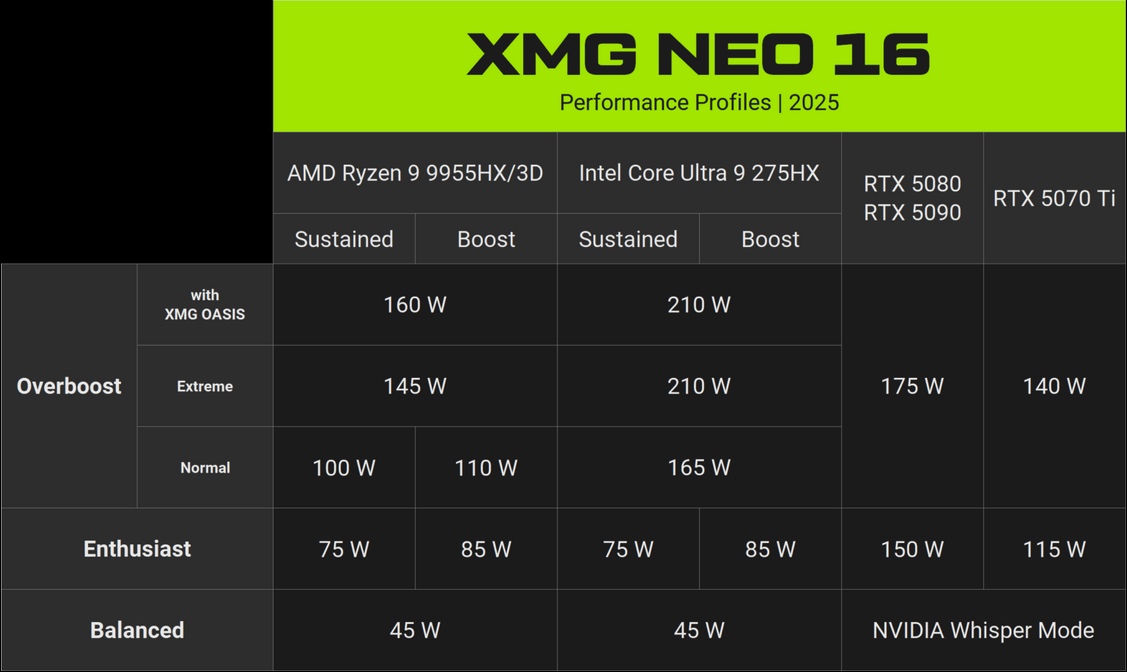
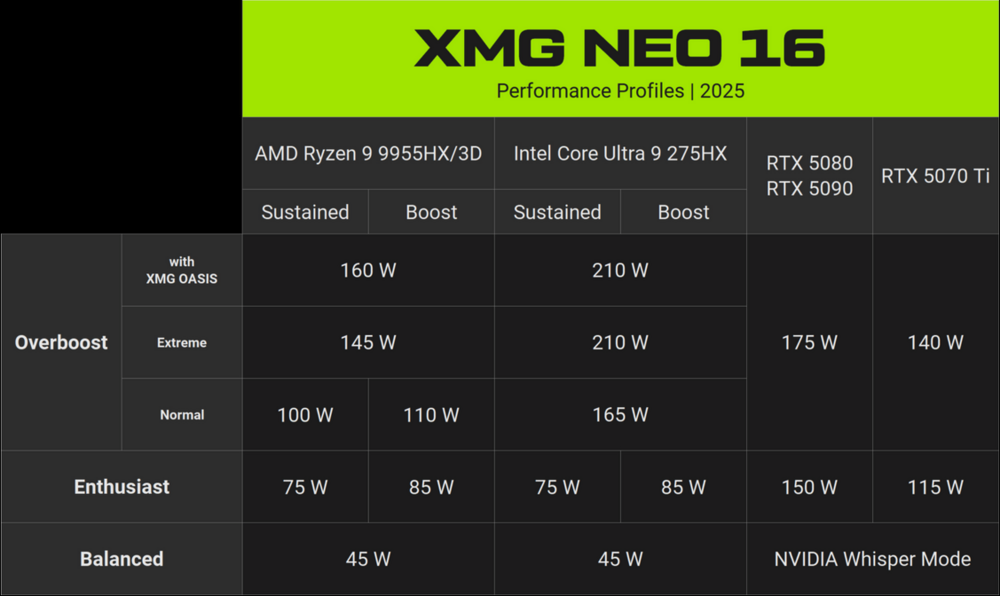
Release date : May 2025 9th gen AMD HX Fire Range CPU (Ryzen 9 9955HX and Ryzen 9 9955HX-3D) - 16cores/32threads Nividia Blackwell GPU (RTX 5070Ti, RTX 5080 and RTX 5090) Up to 96GB DDR5 5600MTs non-ECC memory 2 NVMe slots (1x PCIe4 + 1xPCIe5) Full driver support for Win 11 16-inch display (IPS or Mini-LED) - 2560x1600 - 16:10 ratio - 300Hz All-metal (aluminium) chassis Product page : XMG NEO 16 (A25) Useful information : XMG PRO & NEO 16 (2025): Deep dive and on-going updates Driver and Bios download portal (including Bios tuning guide and control center): XMG Downloads This laptop is also compatible with the latest portable watercooler Oasis Mk2 to reduce working temps and fan noise while increasing power limits. Power limits table for various configuration and performance profiles in Control Center : A complete and thorough written review from notebookchek : Review A shorter version in video : Video review I'll try to post a review from the version i purchased (see sig) with some benchmarks later.
-
A solution to the TDP throttle issue have been found last year by @Jerryzago you should read his topic "Alienware 17 R1 fan issue" in wich he details the procedure to follow in the unlocked bios. At the time, he managed to use the full 80w TDP of the PNY Rtx 3000 without the weird throttles. I concur with you about the usefulness of putting an Rtx card in the Alienware 17 R1, it will be heavily bottlenecked by the Cpu
-
You could try yo use an aftermarket full copper heatsink (the ones mande by Cicichen on ebay). The bracket is screwed into the heatsink, so you can just modify the holes and then accomodate the misplaced core. I was thinking of doing so myself with an HP Rtx 3000 but I sold my Alienware 17 R1 in the meantime. I'll try to find a photo of the heatsink to illustrate my words.
-
For the sake of the experiment, i purchased a brand new 0VP47 heatsink on ebay. I can confirm, the GPU plate is slightly different and the fans are different (their noise is better in my opinion). With stock paste, i can now sustain up to 110W on CineBench R20 and keep the clocks to 4.4GHz on almost all the run. So the heatsink was the culprit after all. I will repaste with PTM7950 and see if there are any more improvement.
-
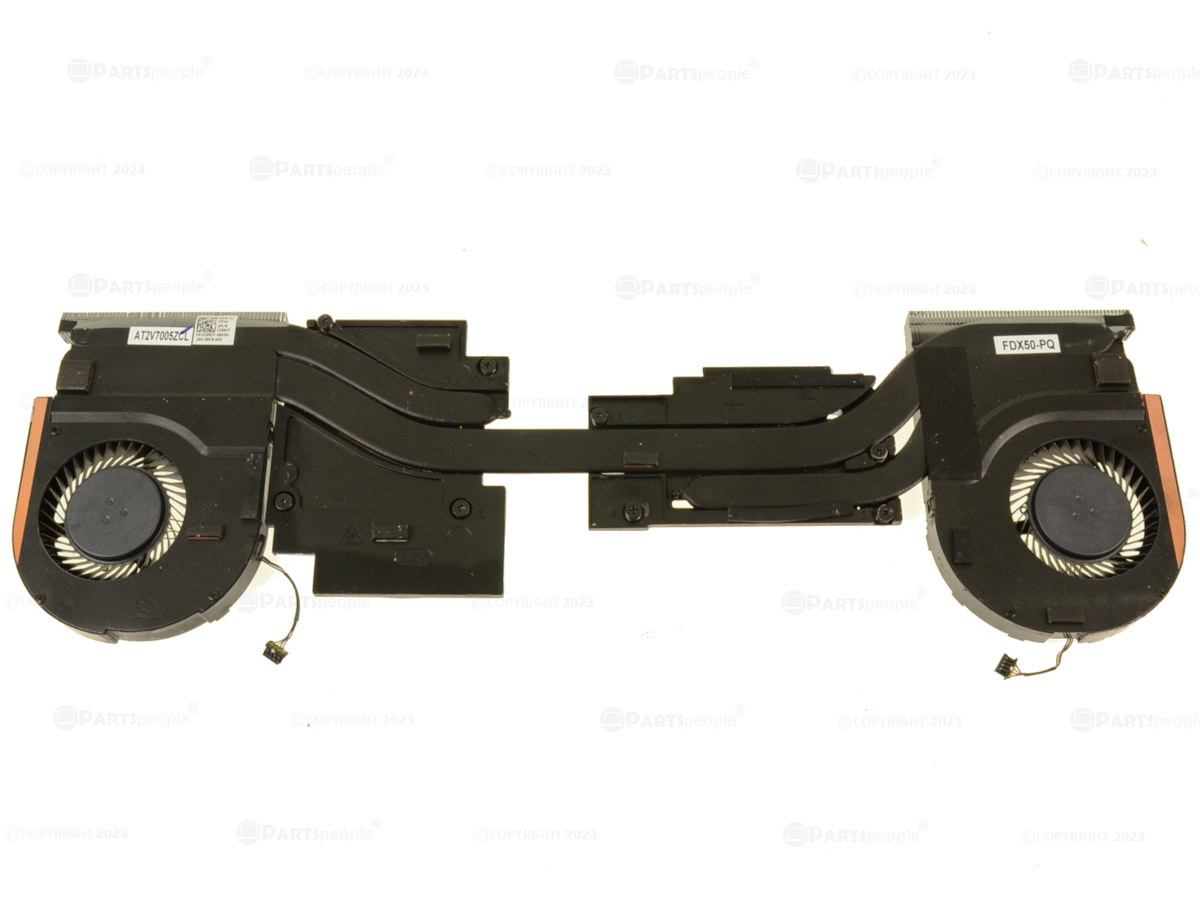
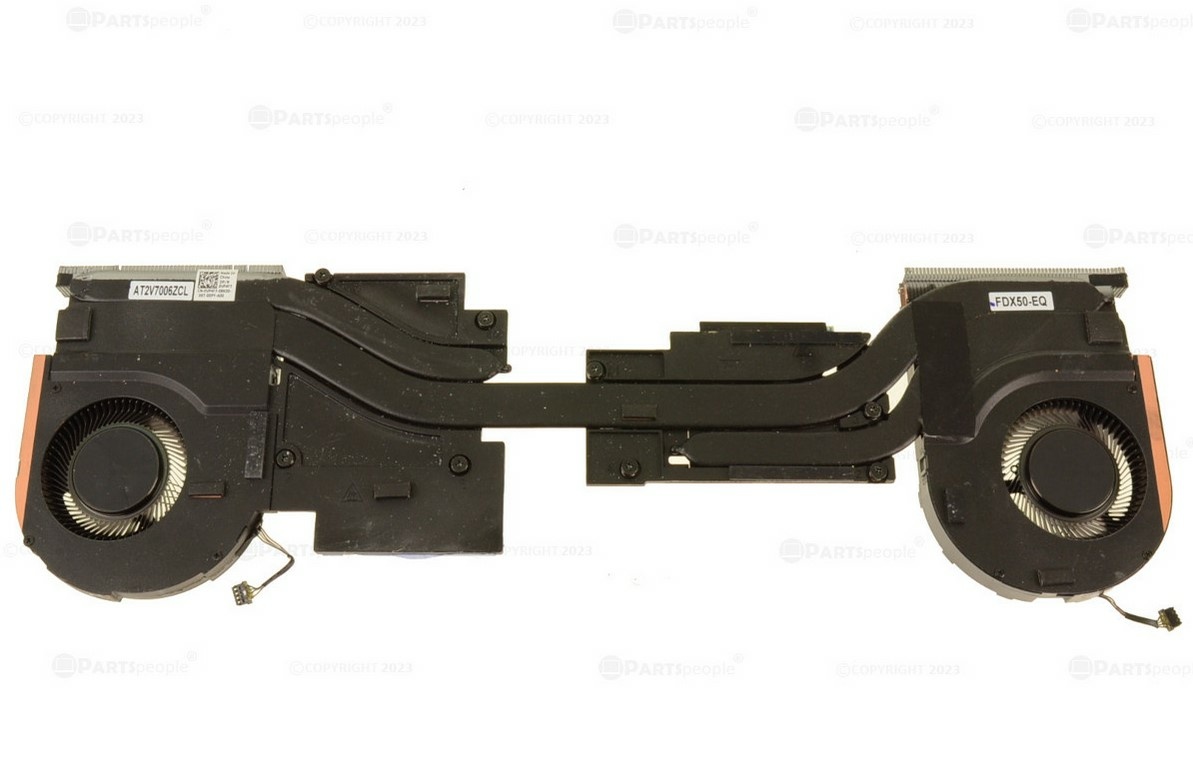
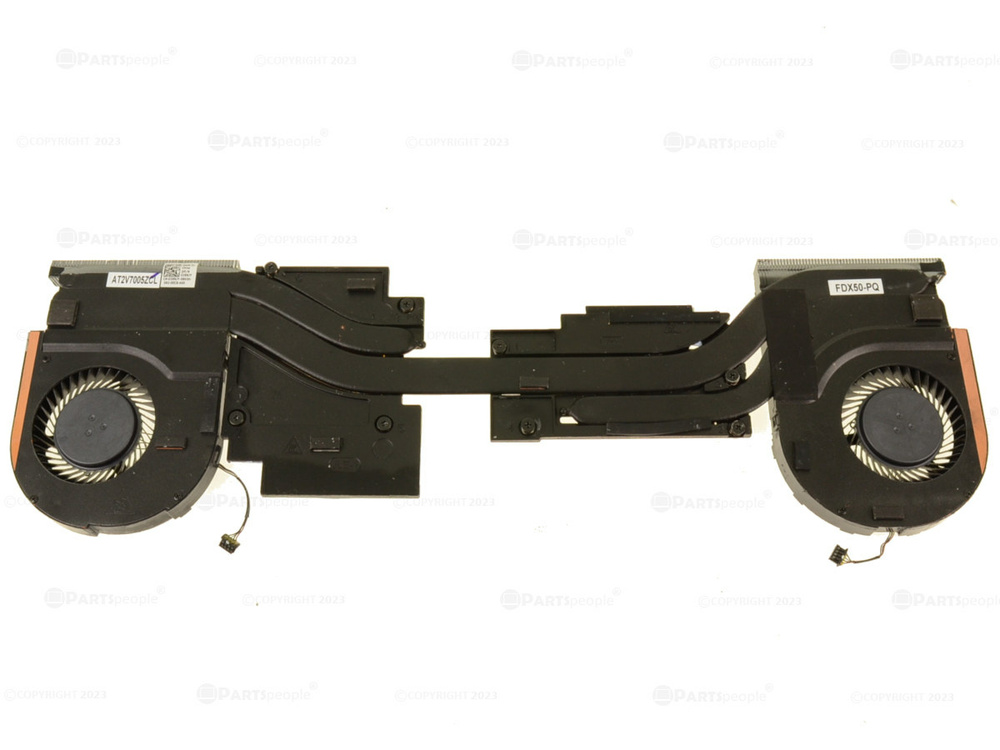
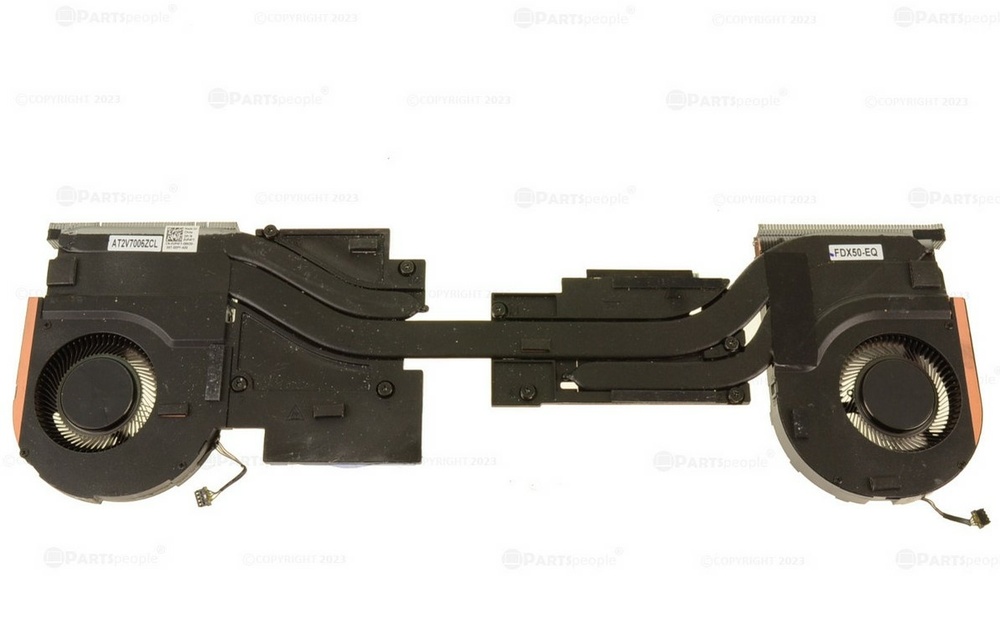
Thanks for your replies. I checked my cpu temps du ring CB20 run and the temperature scatter was around 7°C across all cores. I guess my PTM7950 application is valid then ? I found another thing through : when I swapped my Nvidia Quadro T1000 for the Nvidia RTX 5000 max-q, I kept the same fan/heatsink assembly. Checking again on part People, there seems to be 2 different heatsink assembly P/N for Quadro T1000/2000 cards (first picture - P/N 3XNJY) and RTX cards (second picture - P/N 0VP47) but I can't see any noticeable differences based on the pictures (the GPU seems a little bigger and the fan fin array a bit different too). Could you tell me wich heatsink you actually have and if the différence between them is signifiant enough to justify the replacement ?
-
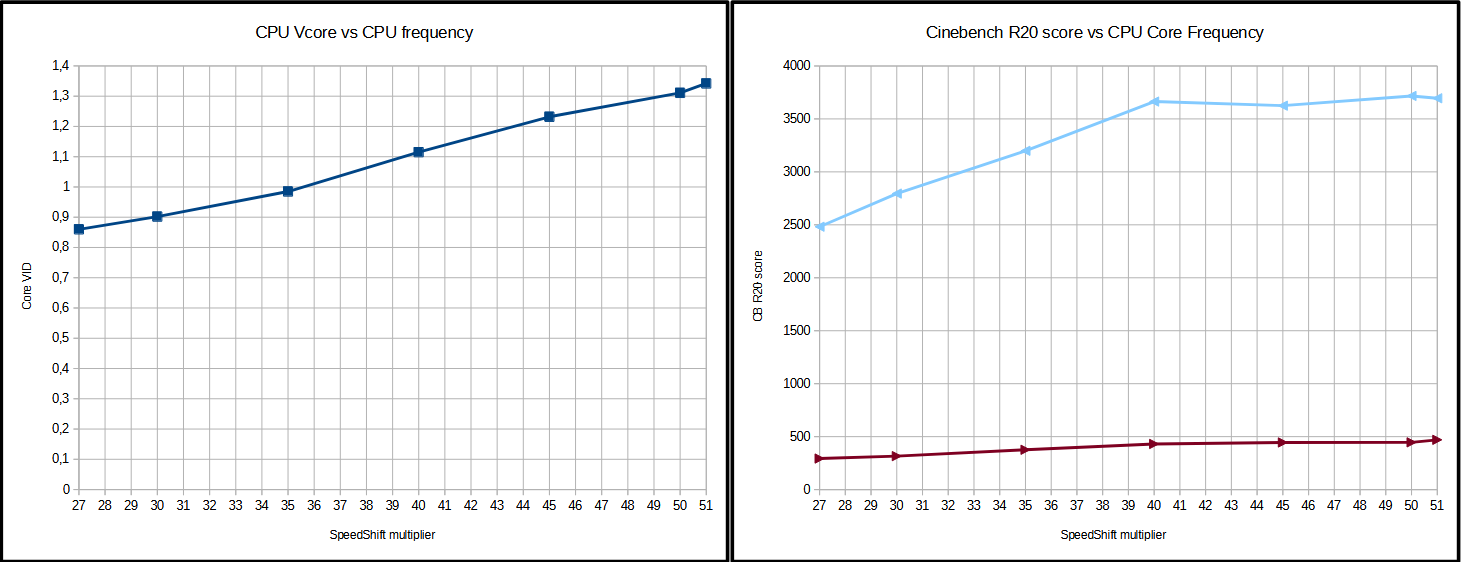
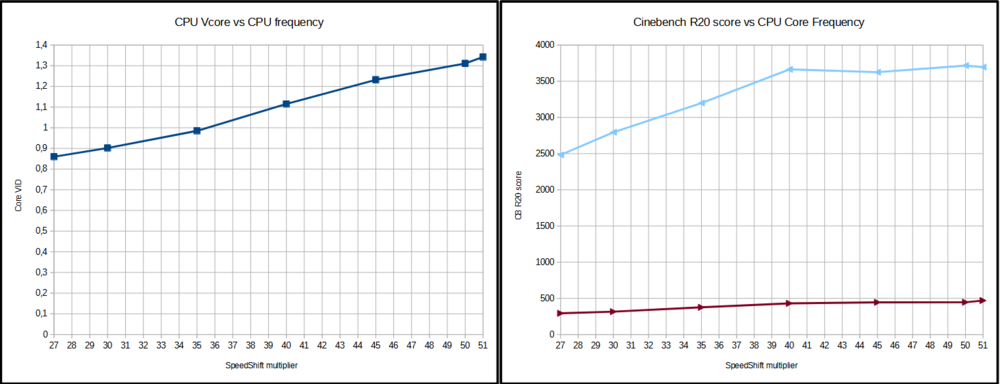
Hello everyone, I'm looking for some advice here. I've been trying to take advantage of the 5.1GHz boost clock of my i7-10850h but it seems that i'm thermally limited way before i can achieve such multi core speed (i use PTM7950 by the way). Several things have been bothering me : - Every time i open a brower, launch a game or windows launch an update, the CPU would boost to 5.1GHz and reach immediately at 100°C --> hence a lot of fan noise and heat - Linked to the behaviour described previously, gaming with 5.1GHz boost would only give higher temperature and power consumption and almost no gain So i tried to understand how was the boost algorithm working on this 6 core 10th gen, and lo and behold, the voltage required to boost above 4.0GHz seems absurd to me on a laptop chip : almost 1.35V for reaching 5.1GHz... Secondly, i tried to run CineBench R20 to evaluate if there was a point of diminishing returns : yes there is, at 4.0GHz i'm reaching the PL1=75W and 90°C, so no gain going higher imo. I'm actually using theses settings to take temperature under control : - Prochot limit redueced to 90°C (instead of 100°C via Throttlestop) - Power package limit to 75W PL1 and PL2 (instead of 135W PL1 / 75W PL2) - Max multiplier limited to x40 (instead of x51 via Throttlestop) --> This limit a lot of the temperature peaks due to the lower core voltage needed to stay at 4.0GHz --> i still get 92% of the single core performance (compared to 5.1GHz) with almost 15°C reduction. Are there other people owning a Dell Precision 7550 that can confirm this thermal behaviour? If not, any advice on how to improve the thermal performance?
-
I can confirm PTM7950 works like a charm. It keeps my i7-4940mx @4.0GHz in tue range of 85-90°C under all core load. Mine is coming from Moddiy and seems legit.
- 19 replies
-
- 1
-

-
- fan control
- 17 r1
- (and 2 more)
-
I've just unlocked my bios with Javers A14+ version after updating my service tag. Even though i have a i7-4940mx, i still had to use the Nvram reset procedure to make it boot. I confirm it's a PITA on this AW17 Ranger, even more since i have 4 memory modules.... I just looked around the settings available, could you guide me through the fan tables? How am i suppose to set the fan TRIP values to obtain a more aggressive fan curve?
-
Thanks a lot for your investigations @Jerryzago! I am willing to take the leap and buy again another RTX 3000 but first, i need to unlock my bios. Could you describe the exact operation needed? And if it's not to much to ask, wich unlock version you are using and are you willing to share it? BTW, your cpu scores are low, i can reach almost 11k with mi i7-4940mx @4,0GHz (link : https://www.3dmark.com/fs/31231794)
-
So the solution migth be the Intel HD driver ? There well May be a compatibility issue between some Intel HD driver and Nvidia driver then. Btw, wich Nvidia driver are you using ? I am gonna check wich one I have installed. Edit : I checked my Intel HD driver and it's the la test from Dell too... There must be something else you did to solve throttling !? Could you take thé time to describe exactly what you did ? This might be the solution to the Haswell generation throttling issues, and you démonstrated it was somehow software related.
-
If i understand correctly what you did, when you unlocked your bios and forced the GPU fan to run at max speed, the throttling stopped ? Could you do the experiment on the other way and try to put the stock fan curve again and see if you replicate the throttling ?
-
Hi, can you post a picture of the throttling in GPU-Z? I believe you are experiancing the same issue i had (see the topic about the RTX3000 issues on Haswell Alienware). I do believe there is some sort of conflict between the PNY RTX 3000 vBios and the system Bios of the 17R1. As for your fan not working, did it work before you swap GPU's?
-
I will confirm with a GPU-Z screenshot this afternoon, but my RTX5000 max-q (7550) has a TDP of 90W. If i remember correctly, you can update the TDP of your RTX3000 by a Dell vBios update.
-
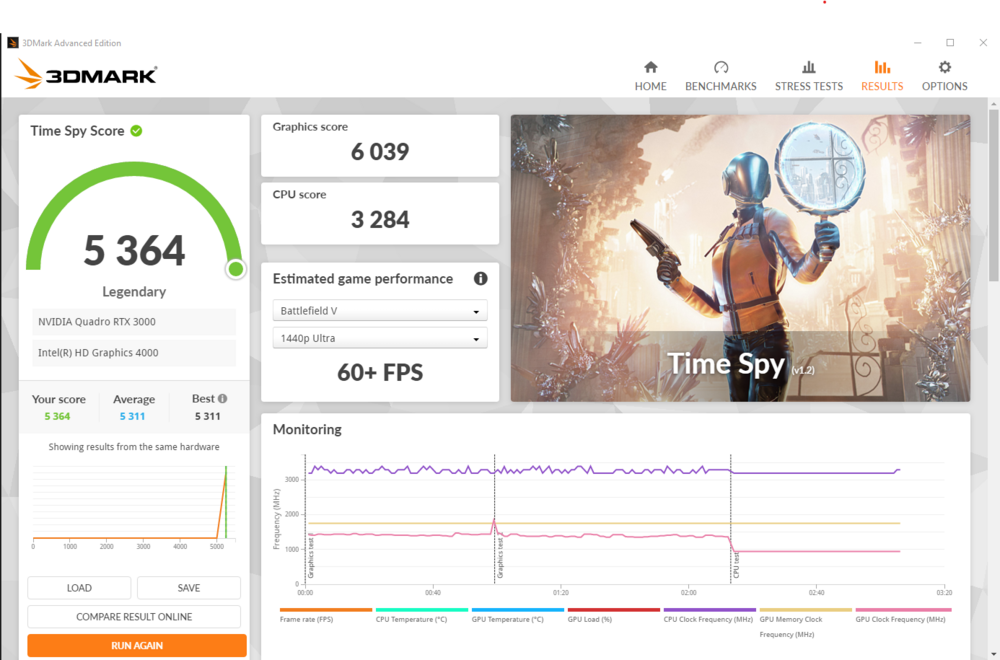
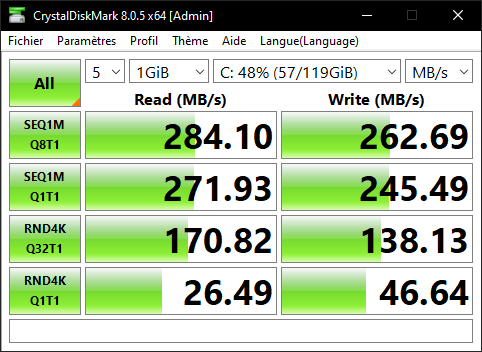
Alienware M17x R4 : i7-3630qm | Nvidia Quadro RTX 3000 (standard MXM 3.0b) Some drive benchmarks : Transcend mSata TS128GMSA230S... working in SATA II mode... Anyone knows what are the drive running in SATA III in the R4?
-
I do not own an external programmer... What voltage are you talking about, the vBios chips' or the mxm connector ?
-
MSI 1070 Longevity? Aetina 1070 Viability?
ÊtaPegasus replied to Naberius's topic in Alienware 17 and M17x
Any news about the "standard" Gtx 1070? Still working great ? Or do you already have issues with it 4 month after installation ? -
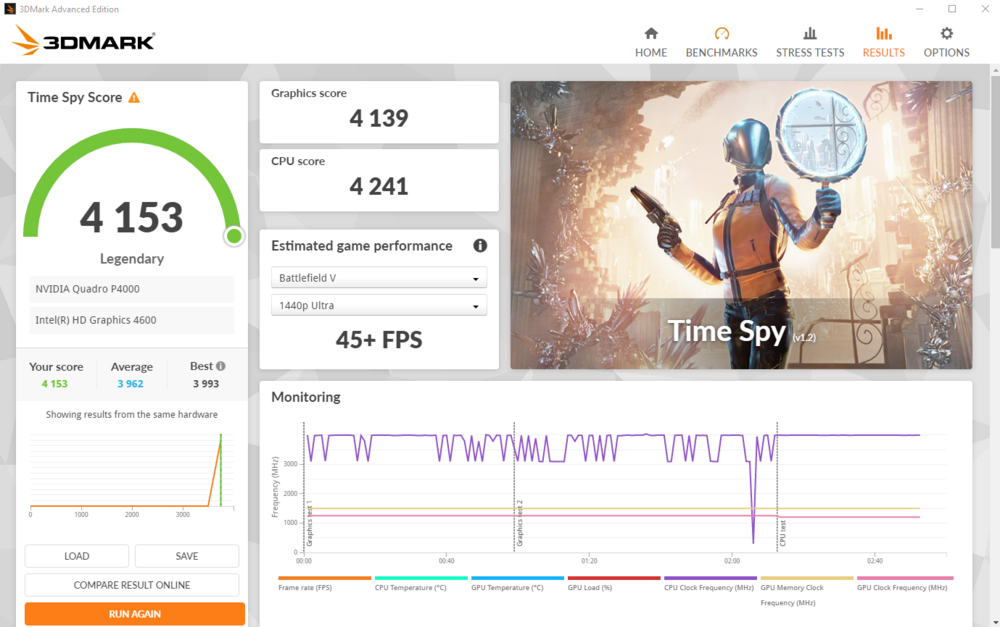
And 1st place for TimeSpy too! I just need to figure out why my graphic driver is no longer approved.... Until then my score isn't valid for 3dmark....
-
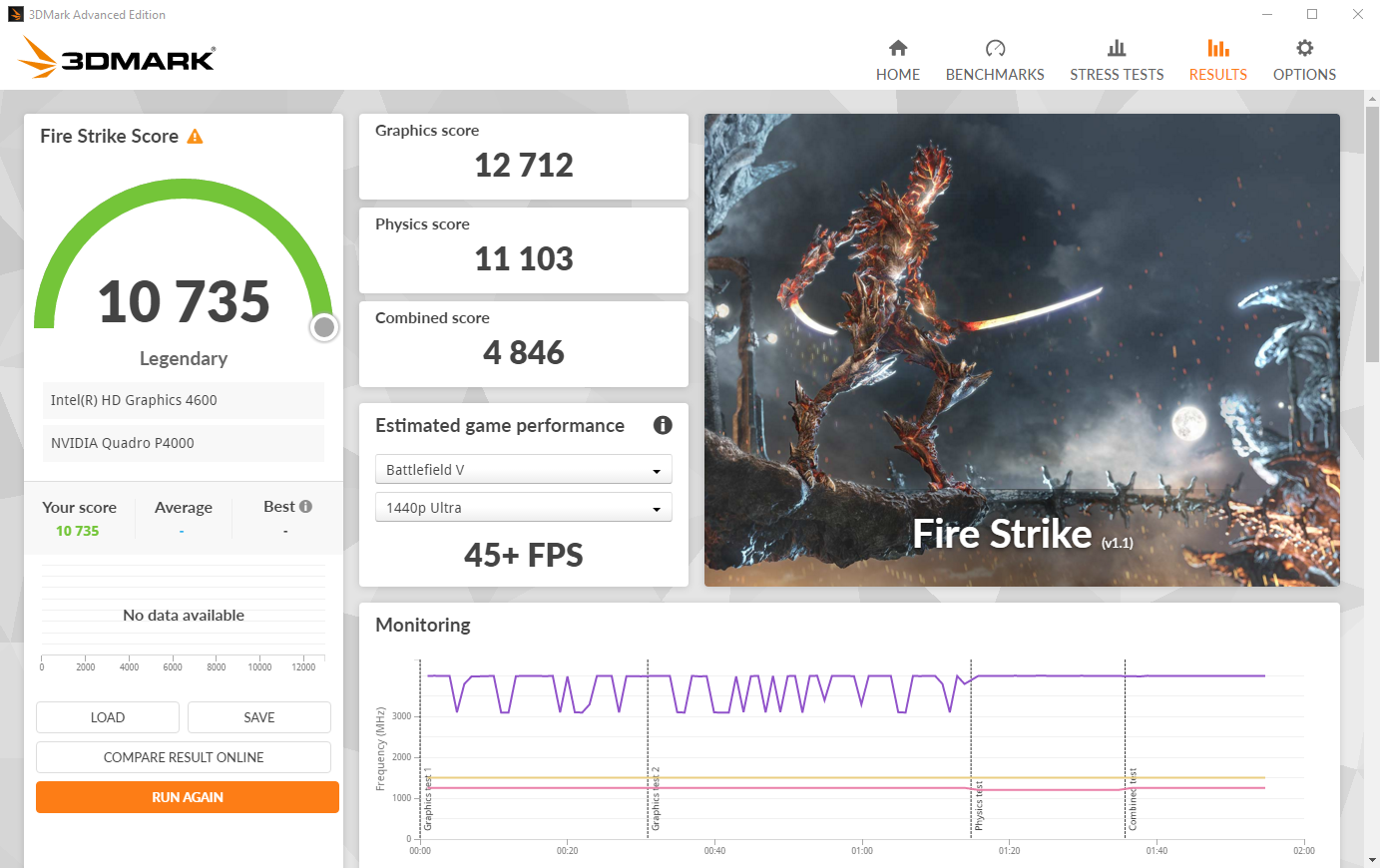
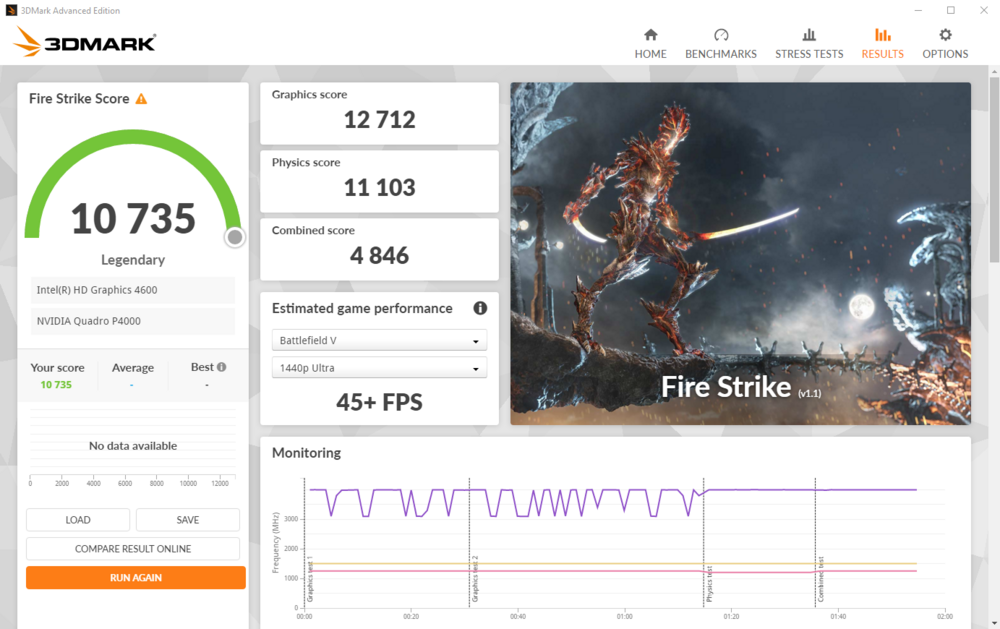
New best score for my Alienware 17 R1, i managed to broke 11 100pts at 4GHz and 73W so i'm really happy with it! Btw, i have the first place on Firestrike with i7-4940mx + Quadro P4000 !
-
The card isn't heating at all, i mounted to test without heatsink and the die was ice cold...
-
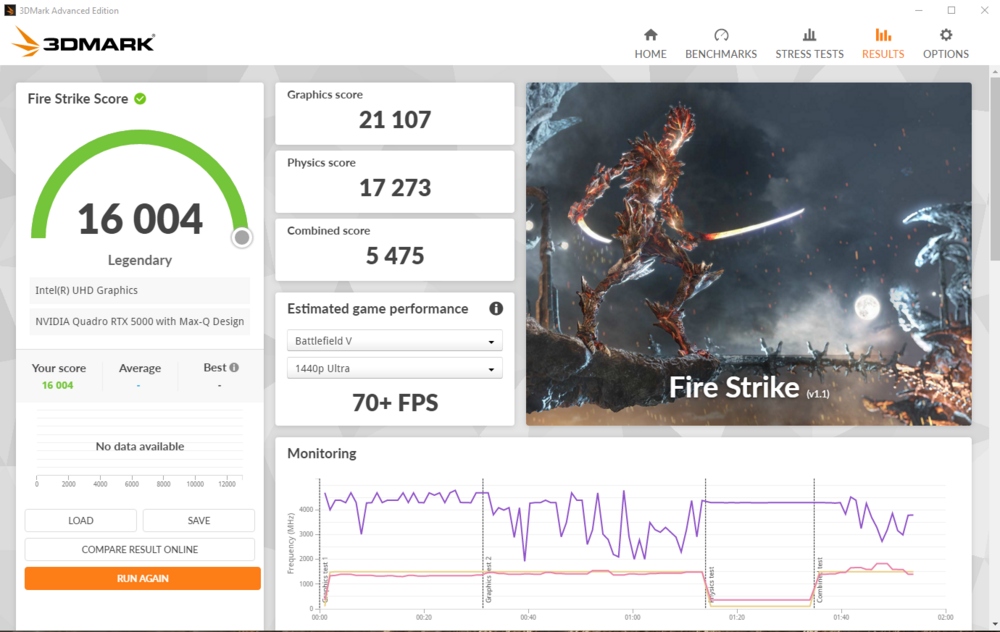
Dell precision 7550 : i7-10850h | RTX 5000 Max-Q | 64GB DDR4 3200MHz RAM
-
In continuity mode i have those results : - Coil #1 = value fluctuates a lot, cannot stabilize measurement - Coil #2 = value fluctuates a lot, cannot stabilize measurement - Coil #3 = value fluctuates a lot, cannot stabilize measurement - Coil #4 = 30 > value > 130 - Coil #5 = 118 - Coil #6 = 65 As for the suspected damaged coil on the back : 1392 in continuity mode, no readings in ohm mode Any ideas on what's going on with this card?
-
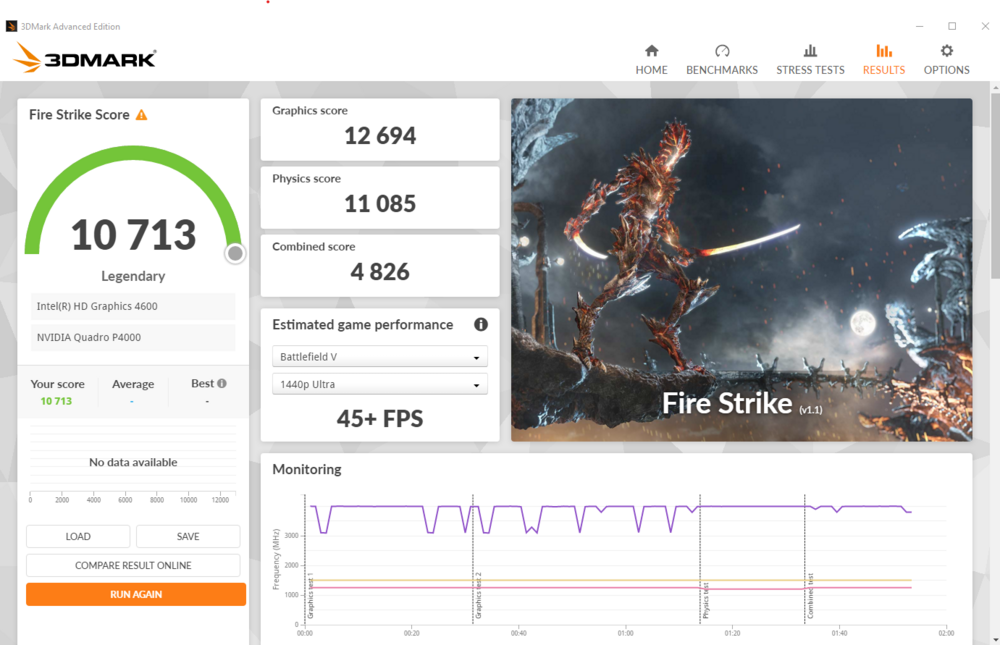
Alienware 17 R1 Ranger : - i7-4940mx @4GHz 1.09V - 32Gb DDR3 G.Skill 1866MHz - Nvidia Quadro P4000 Best firestrike score so far : 10713 It seems that i can't overclock higher than 4GHz, whatever the value i put in the bios above 4GHz is not considered and the cpu runs at 4GHz max. Any ideas?
-
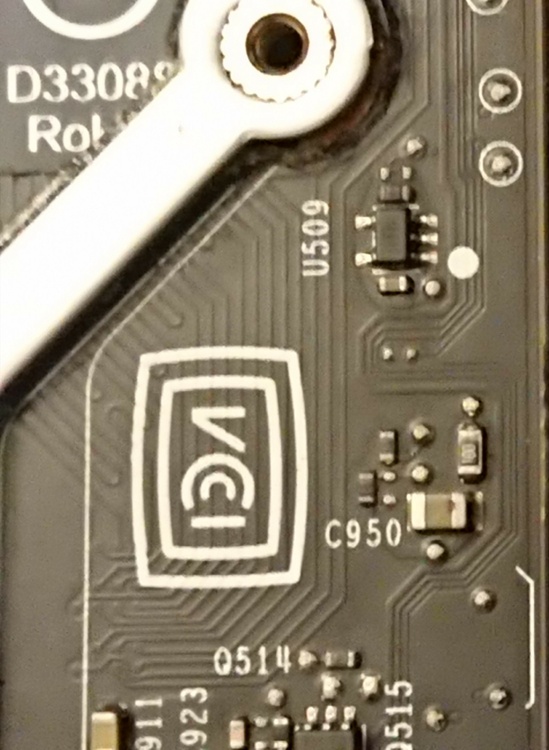
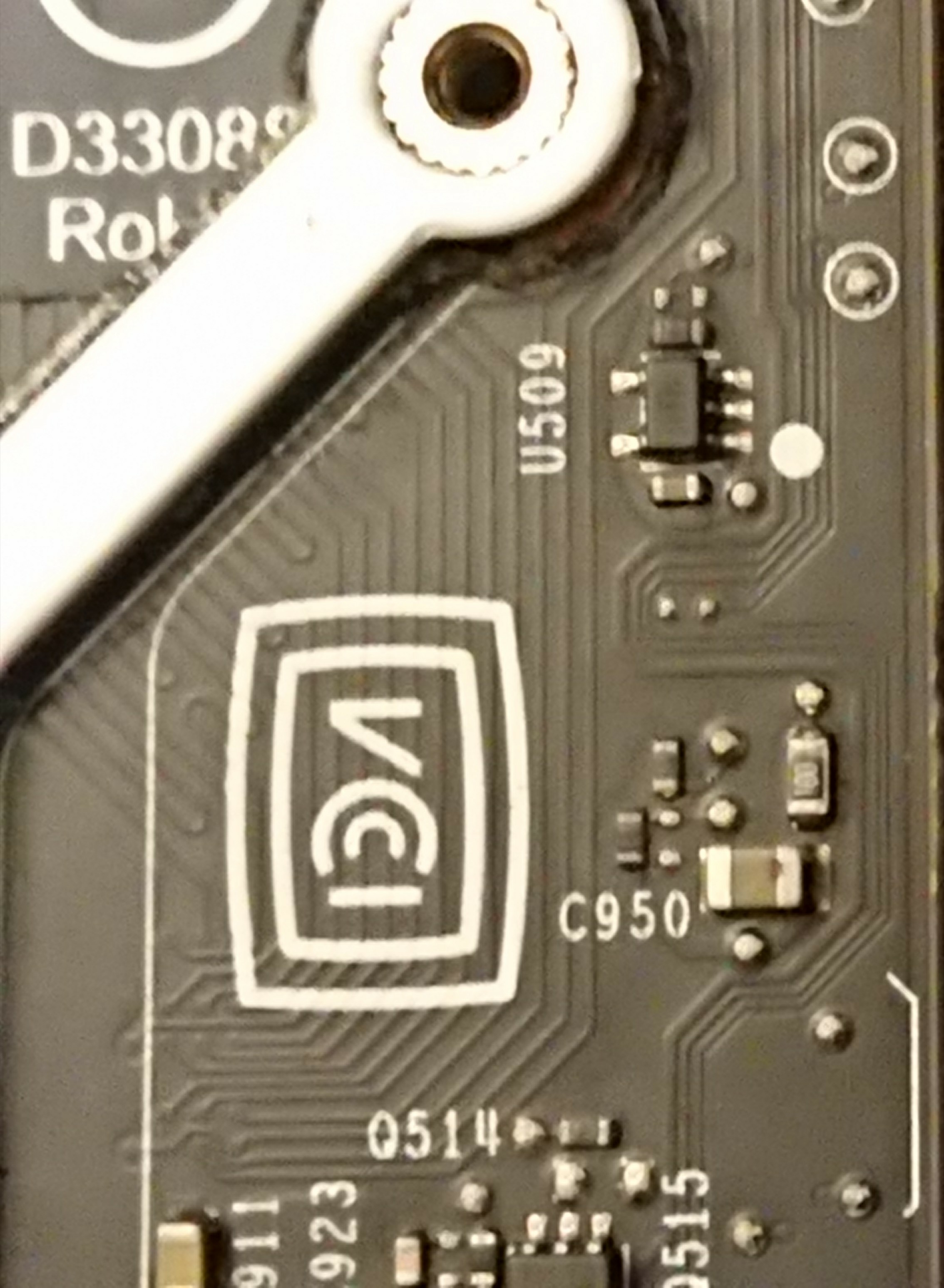
I took a closer photo of the capacitor. It does seems to have suffered some damage, no ?