

SuperMG
-
Posts
853 -
Joined
-
Last visited
-
Days Won
4
Content Type
Profiles
Forums
Events
Posts posted by SuperMG
-
-
1 hour ago, ssj92 said:
Not the physical cable length but the actual tabs that connect over the mxm pins?
By a little (2mm) Don't worry it'll work as I have an a5500 + R4 ready for the next week
-
 1
1
-
-
10 minutes ago, FrancoTecno said:
quadro rtx a4000 dont fit with the GPU holes. this laptop dont use a X bracket and it have the supports soldered into the motherboard, follows the original mxm 3.0 type B format. the gpu die its on the left
There's always a solution for everything (unless we're talking about Nvidia vbios modding, it's impossible:/).
You can do: Custom heatsinks, custom mxm holding, etc.
-
8 minutes ago, FrancoTecno said:
actually my best upgrade option is to buy a quadro rtx 3000 and make the 12gb vram mod. because i like a stable gpu with 8gb of vram or more. this is my only main system. isnt an auxiliary laptop so i need the most safe option to upgrade
Or get the Quadro RTX A4000 for 350€. 16GB VRAM, RTX 3070 level. It's a DP/HDMI/HDMI/DP card. RTX A3000 12GB is 250€ but it's low TDP. (no backlight mod adapter included on both)
For the Turing RTX 3000, I don't think there are 12GB modded VBIOS for it.
-
Just now, FrancoTecno said:
my goal is to upgrade this gtx 1060 anyway, the goal is an RTX card. actually the monitor is being carried with the eDP output at 2560x1440 165Hz
It's actually better to get an RTX card to work internally. Please find the eDP cable for this laptop or make one by studying the schematics. It's just wires and connectors, no chips in the cables.
-
Older Aetina cards didn't need 4G decode enabled in the SBIOS.
Anything Pascal and above aren't compatible with the LVDS output. It's eDP/DP for internal.
Yes if you got your external monitor working with "eDP" on DP_D, it's a good sign that the card displays using the Display Port protocol.
If I was you, I'll find the eDP cable for your laptop and then study the output pins of the cable and determine if it can do 1080p, 1440p, 3k, etc...
-
12 minutes ago, FrancoTecno said:
dont makes too much sense that video outputs depends of 4G Above decoding, what brands sell MXM cards for individual use? i sent request to PNY, Aetina and PCP and i dont receive any type of reply. at the moment only x-vsion and zrt replied me
It makes sense. It happened to me.
Without 4G decode or without disabling the legacy OPROM (pure UEFI VBIOS), the GPU won't post and the laptop will throw an error and stay stuck in the pre-post.
Aetina can sell individual but the price is very expensive and you need a SBIOS with 4G decode to use them.
ZRT, X-VSION, ENBIK sells to individual, sadly their RTX 4080 and RTX 4090 have eDP in port D but it's disabled once the drivers are loaded. Only way is to override the EDID. Another way (which seems impossible from now), it's to find a VBIOS that has eDP enabled and doesn't disable once the drivers are loaded.
The best cards without any issues are RTX 4070, RTX 3080, RTX A5000 (needs testing) and A5500 (needs testing) since they have eDP or DP in DP_D and they aren't disabled. Yes DP output works in eDP screen because the HPD data is in DisplayPort protocol.
-
Okay guys.
The 4 heatpipes (2in1) heatsink for the M17X R4 has been shipped and so the backlight mod v2 cables.
I'll test the A5500.
-
3 hours ago, Daedalus said:
With the Zbook, arent they "different" Dreamcolor boards so could be a different issue? how the output is displayed? if I recall, Zbook G5 are P/N L28742-001 (been trawling the heck out of HP manuals lately to find P/N for the 8570W ( i find 653278-001 or 690626-001) for ours.
As long as the LCD input is an eDP signal then it can work. But it can depend in the dreamcolor boards. Someone needs to try it.
-
3 hours ago, JadeRover said:
Hello, yes I think I know what the problem is.
You 8770W with dreamcolor screen connects directly to the GPU in the MXM slot meaning that the GPU must be configured to have eDP output to the dreamcolor screen (dreamcolor LCD uses LVDS but all laptops from that era with DC screen use an internal eDP to LVDS converter -> GPU needs eDP output to be set on the correct lane for it to work)
Your 8770w had eDP on lane "D" of the MXM slot *, the signal then goes to the LCD connector, then to the eDP to LVDS converter and finally to the LVDS DC screen.
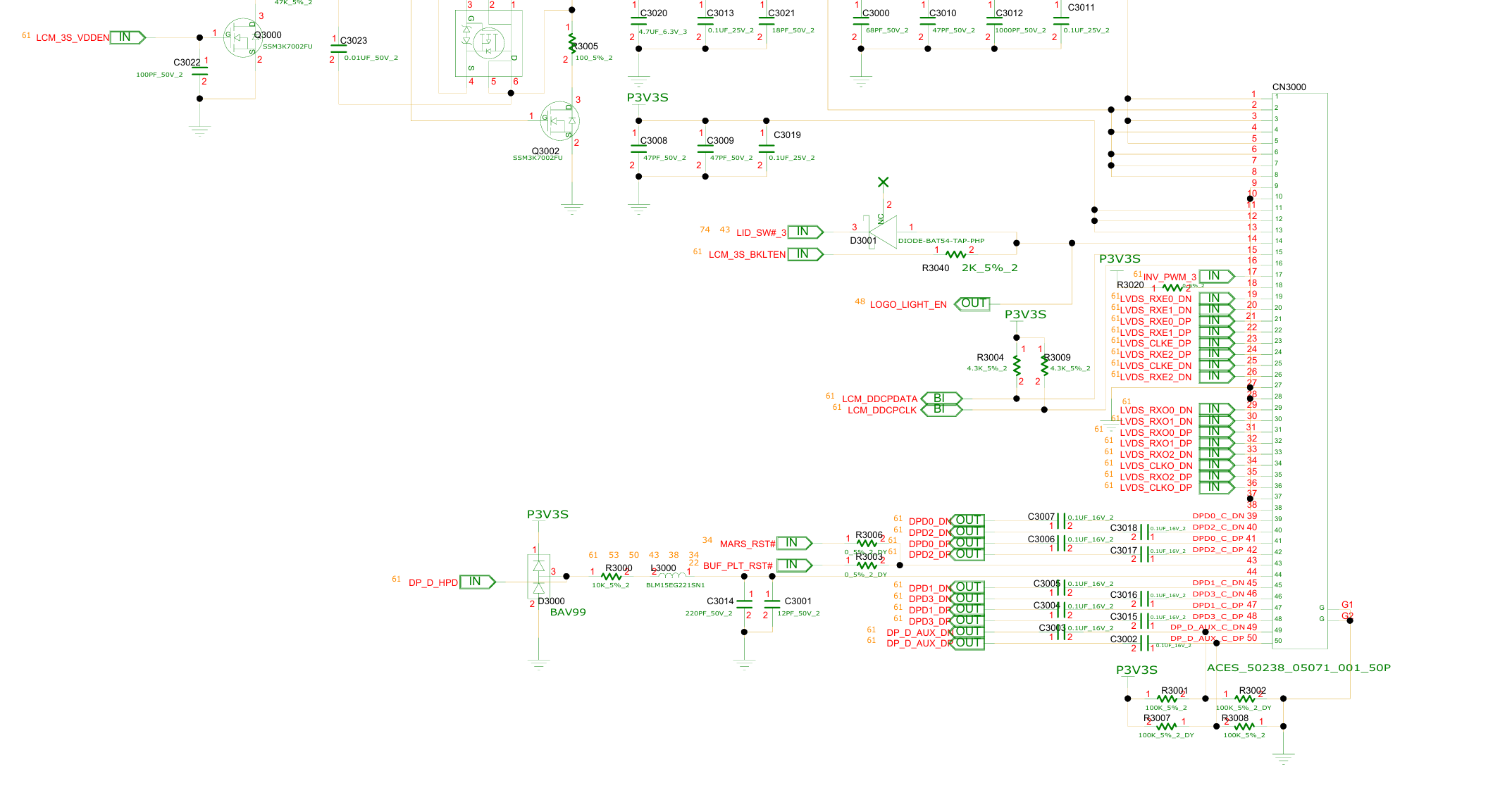
See schematic of your 8770w, eDP are on the last 10 pins of the LCD connector, signal are named DPDx_Dx = DP_D
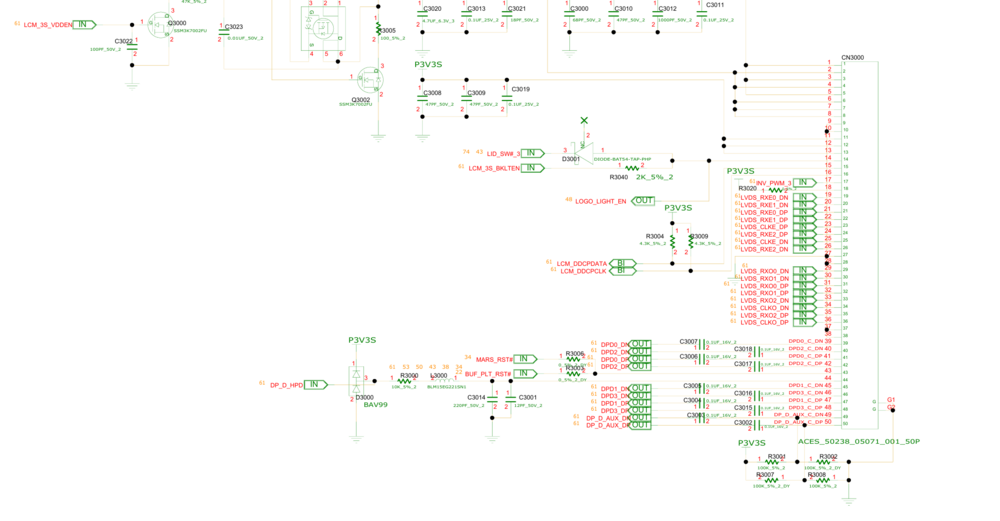
The issue is that the zbook 17 g3 you got the card from uses eDP on lane "C" ! So the card is configured to output eDP on the wrong channel compared to your 8770w = no display. (I know this from my first hand experience getting MXM cards to work on my 17 g3 and getting no display as well because of eDP lane mismatch)
The fix is simple, you need to flash a vbios that has the correct display configuration to the card.
This dell vbios has eDP on DP_D (as it is from a precision 7710 that has eDP on DP_D): https://www.techpowerup.com/vgabios/221521/221521
They are several ways to flash the correct vbios. I recommend getting a CH341a programmer with 1.8v adapter, it costs 10 dollars max.
Good luck and ask away if you have more questions
* This is good news as this is the standard for MXM gpus, you could even upgrade to an RTX card by x-vision or other brands that come only with a vbios configured with eDP on DP_D !
I'm curious.
So his GPU has HDMI in DP_D then? If it has simple DP in DP_D, it should have worked. As "eDP" HDP are just DP signals.
I think the RTX Turing will work (if all ports are DP/DP++) on the Zbook G3 17. Sadly not with the X-Vsion nor with ZRT cards 😕
-
26 minutes ago, Nizmeïster said:
In that case, I don’t really understand what’s preventing at least the video outputs from working. Maybe it has something to do with the routing through Optimus. The only GT60 with eDP is the one with the 3K or 4K IPS display, the 16F4 version 3.0 motherboard model. Maybe on that one, with the eDP backlight mod, everything would work properly.
Don't use Optimus and LVDS.
No one has tried pure dGPU in eDP with a MSI and a new RTX MXM. Maybe this could fix some the issues you mentioned
-
10 minutes ago, Nizmeïster said:
When I mentioned the fans, it’s actually an EC firmware issue that likely doesn’t properly detect the 4060, probably due to an incorrect temperature sensor report over SMBus. But to me, the biggest issue still remains external display support...
DP/DP/HDMI/eDP. Same as the RTX 4070 MXM.
Works perfectly fine on my M6700 and 7720. I had all the display ports, even the USB-C on the 7720.
-
25 minutes ago, Nizmeïster said:
After selling my GT60 Haswell 16F4 V 1.1, I’m still going to get back into a few experiments with a 16F3 that I managed to repair. For now, it’s running an i7-3920XM / 32GB HyperX 1866 MHz / GTX 1060.
I’d like to manage to install something in it that performs better than a Quadro RTX 3000 maybe a Quadro RTX 5000? But these cards seem impossible to find now, or out of stock... I might consider an RTX 3060, but I assume that hasn’t been tested yet.
The 4060 could work in the GT60 16F4, with the known fan issues and no external display output. Maybe the Ampere models could work better...
I have a Dell Precision M6700 Red Covet with RTX 5000 16GB if you want with the 120Hz 3D screen. No fan problems and the RTX 4070 and 4080 worked in this laptop with the backlight mod.
-
On 5/18/2026 at 5:23 PM, FrancoTecno said:
You mean, the RTX 2000 Ada need 4g decode to work?
For Aetina it was the case for their Ampere and Ada cards. Maybe PCP is using the same VBIOS as Aetina?
For X-Vsion it's different. I saw the GPU-Z screenshots and the GPU was outputting in DP without 4G decode enabled in the SBIOS.
-
3 hours ago, ssj92 said:
It needs to be made longer (the part that goes over the pins) for Alienware systems
It's already longer because of the newer design.
-
Hello everyone!
Do you want to upgrade your old laptop MXM GPU? But you can't since the newest RTX Turing, Ampere, Ada and Blackwell won't work with your eDP display?
I have the solution for you! No more blackscreens!
The backlight mod v2 upgrade to enable eDP display for your MXM card!
Here's the old thread for the backlight mod v1:
Every cards from Turing to Blackwell generation, from brands like Aetina, Adlink, PNY, ZRT and X-Vsion will work with this mod!
Thank you to everyone who bought the backlight mod v1! I have sold everything!
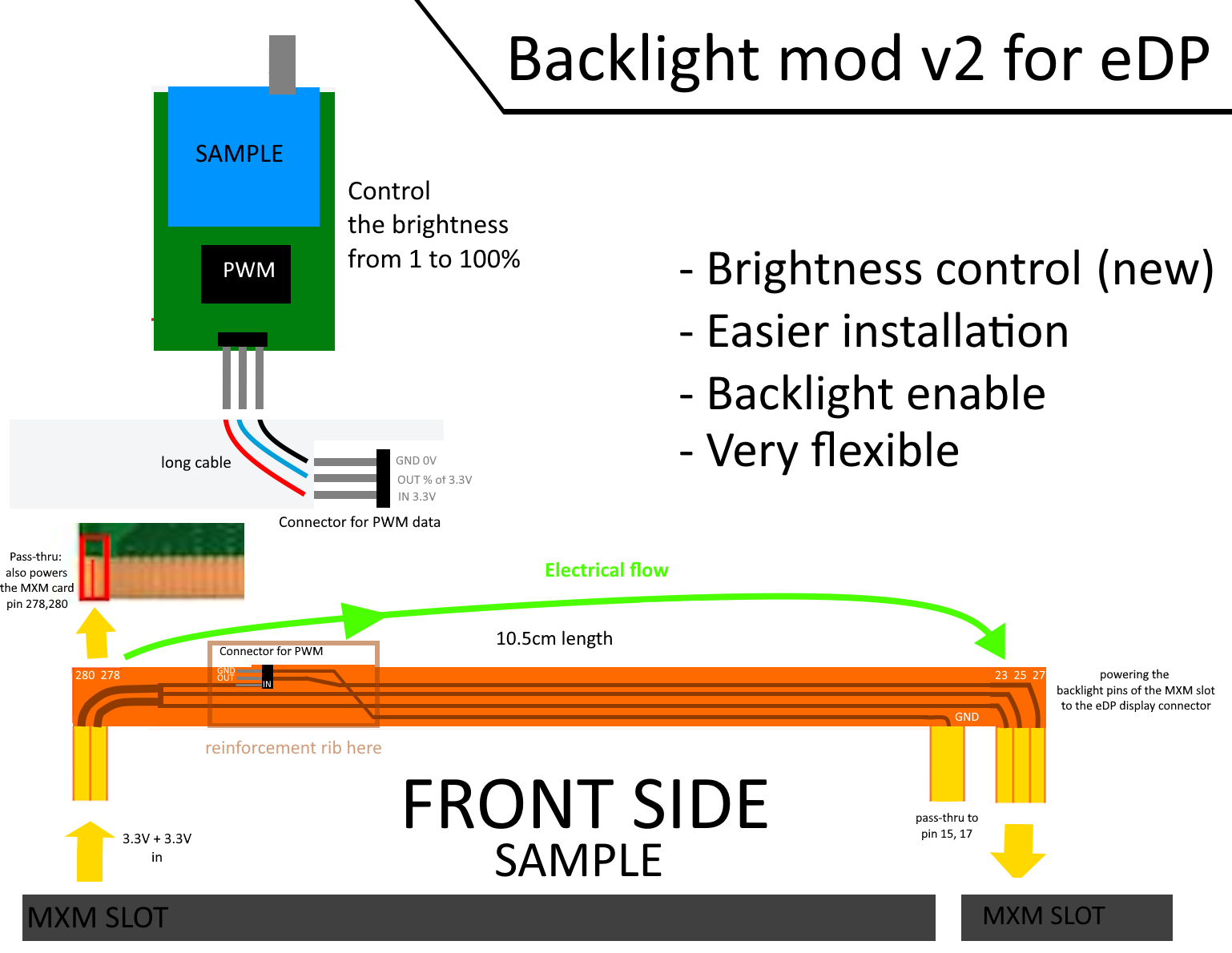
The backlight mod v2 will offer BRIGHTNESS CONTROL thru a tiny PWM module that you can install inside your laptop's case or in the SSD/HDD 2.5" bay or directly outside the laptop. (Backside of the PCB is insulated)
How to control it? With the small knob, you can directly control the brightness from 1% to 100%!
The v1 was stuck at 100% because 95% of the laptops I tested lacked the PWM brightness module in the motherboard. Only the Clevo P570WM3 had brightness control with the v1 mod!
The flex FPC cable is longer than before! From 7.5cm to 10.5cm! Why? To allow easier installation! It's now way easier to install the V2 than the V1.
Signal 23 and 25 are the same, nothing changed there.
Available: in 2 weeks! You can pre-order in my private messages.
What's included in the package:
1x FPC cable
1x PWM Module
1x 15cm cable for connecting both
For people who already bought the v1, I'll include 2x FPC cables for the same price!
Compatible with GPUs:
Nvidia RTX 4050, 4060, 4070 MXM-A (ZRT, ENBIK, X-VSION)
Nvidia RTX 4080, 4090 MXM-B (ZRT, ENBIK, X-VSION, need EDID override because the drivers disable the eDP, which results to a non-PnP screen in windows)
NVIDIA Quadro RTX A5500, A5000, A4500, A4000, A3000, A2000 MXM-A (X-VSION, for Aetina, PCP, you need 4G decode enabled in the SBIOS)
Nvidia RTX 3050 Ti, 3060, 3070, 3080, 3080 Ti (X-VSION, ZRT)
Nvidia RTX 3000, 4000, 5000 (Aetina, PNY, ADLINK, PCP).
Compatible with laptops (v1 tested):
- eDP screen (eDP/DP in DP_D port)
- Enable pure-UEFI in SBIOS
- Legacy Options OFF
- Optional 4G Decode enable in SBIOS for Ampère and Ada cards from Aetina, PCP, PNY...
(EDP) Dell:
Precision M4700 and M6700
Precision M4800 and M6800
Precision 7710 and 7720
(EDP, needs testing) Alienware M17X R4 (120Hz), Alienware 17 R1 (120Hz). Will not work with M17X R3 because the SBIOS doesn't have UEFI and the newer RTX cards must need UEFI in order to display with the DP protocol.
(EDP) Clevo: P570WM3, P870 series, P775 series, P770 series, P375SM, X170 series (MXM based laptop and eDP screen but it needs substantial heatsink mod, no one tried on this pc yet)
(EDP) HP: ZBOOK G4 17, G5 17, G6 17
MSI: I don't know which models use eDP (probably the Pascal models) but... A lot of users report fan control issues with RTX MXM cards in LVDS Switchable Graphics based systems, so I don't know about their compatibility.
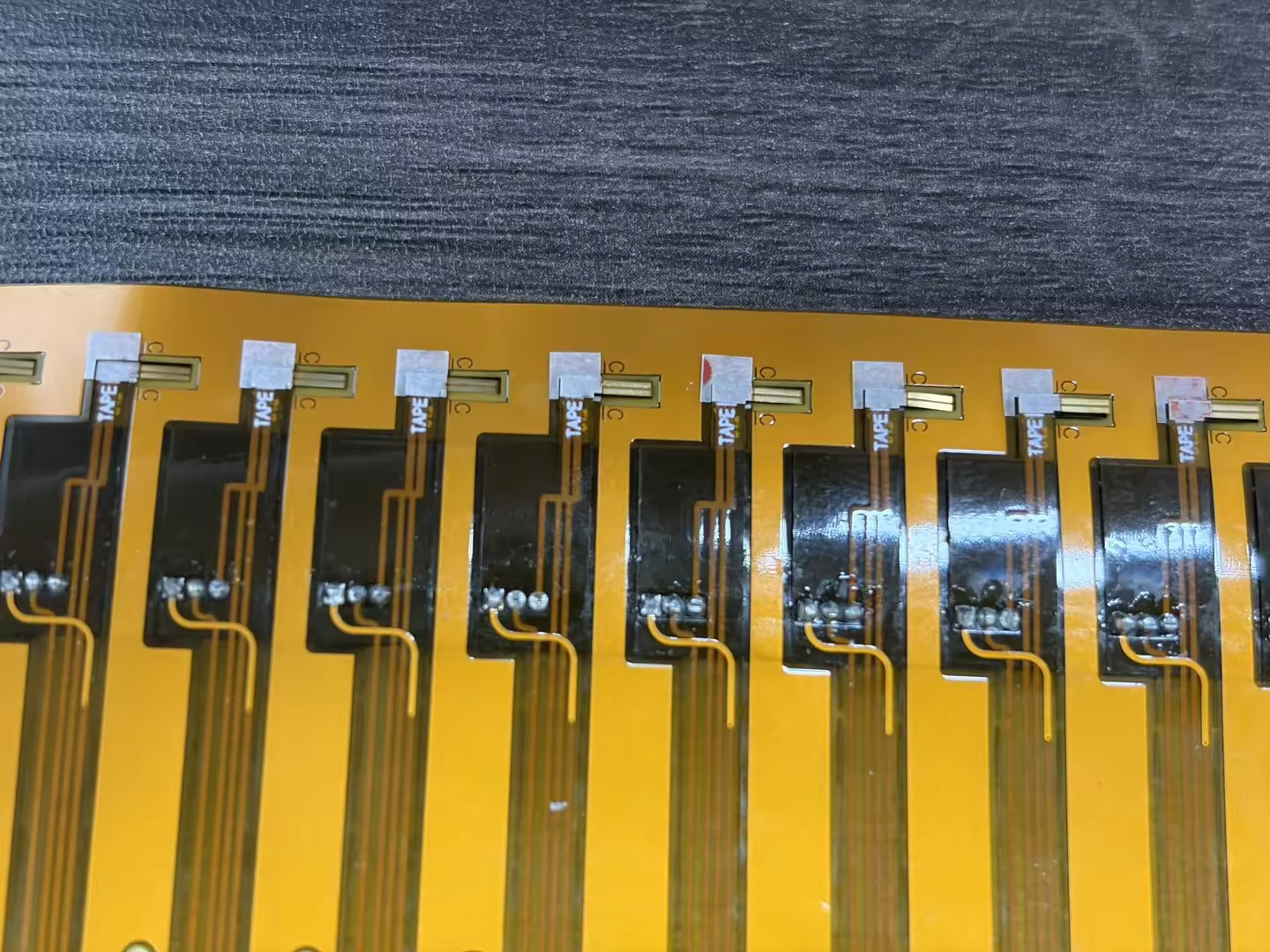
Some sneak peek:
-
5 hours ago, Nizmeïster said:
Do you think it might work better than the regular 4060? Although, admittedly, there might not be the temperature sensor issue with that one.
The risk is that these cards must need 4G decode to work on + they're crazy expensive for what they are. Yes they have DP on DP_D and I don't think this will fix the "EC fan controls".
-
2 hours ago, sliderfra said:
IIRC there's a WIDI card (Wireless display) that used to be on AW M18X, was on the DMC port (the weird port). That or either a TV tuner card with a coaxial cable.
It's a DP_A, how can I receive its video output? Any receiver for SiBeam?
-
13 minutes ago, kela-slk said:
Hi. Can anyone share an unlocked BIOS for the P570WM or Prema BIOS? I have a laptop with LVDS, so is the P570WM3 BIOS compatible? With the LVDS version, is it possible to use the master graphics card for image output (like the M1000M as on the Alienware M18X R1), and install an HP RTX5000 on the slave to use Optimus switches to the powerful RTX card in games? Its works on p570wm?
For the GPU: Yes that works but it's better to use AMD HD 7970M/8970M + RTX 5000 with registry edits on regedit. You won't have any TDP issues (issue was: stuck at 70% max).
SBIOS depends since there are 2 motherboards revisions for this laptop. LVDS + eDP.
-
15 hours ago, triturbo said:
How do you do that?Hello, here is it: https://winraid.level1techs.com/t/guide-remove-uefi-image-from-nvidia-vbios/34363?page=1 or ask ssj92 for the help.
-
1
-
-
I had a 3080 in a SG and I was getting 9100 score in TimeSpy, The same card with the same settings, got me 11500 in dGPU eDP.
Even on my RTX 5000 Ada with iGPU on, I was losing 10-15% performance, Dell Precision 7780.
eDP is preferred because you can upgrade to better displays (not in M6800) and it's in DisplayPort standard with full dGPU performance.
dGPU > SG
-
4 minutes ago, Nizmeïster said:
Do these cards work in Optimus mode?
Yes but not recommended.
-
3 hours ago, ssj92 said:
If A5500 works for you in eDP then maybe I will get one. It would be worth testing to see if they support eDP first without backlight cable. Who knows maybe XVSION listened to you?
Would also be worth checking if it works in SG mode on M17xR4. Because my A4500 from Aetina didn't even show up at all in M18xR2 regardless of vbios I tested. It only showed up in AW18.
Interesting there's still no blackwell cards
No they don't have backlight pins.
-
On 4/30/2026 at 7:12 AM, ssj92 said:
If you read my A4500 thread you will know flashing dell A4500 vbios allowed the laptop to boot in Optimus but the vbios mismatch causes error 43 in device manager.
on my laptop the number lock light turns on when booting to windows. most likely its stuck somewhere due to no lcd detected.
I found the MUX switch schematics, it was in the M17X R4 schematics. The MUX doesn't require any backlight signals in the input. Maybe the screen directly communicates to the laptop about the backlight not being on..
The MUX is just a basic DisplayPort Mux which works in desktops and laptops.
For the A4500. Yours is from Aetina which needs 4G decode to be enabled in the SBIOS, otherwise it won't post. They can potentially work in the newer HP and Clevo laptops if the 4G decode is present.
X-Vsion sells very cheap A4500 and A5000 both are working without needing to have 4G decode to be enabled. The CEO showed me proof. The ReBar and 4G decode were disabled in the SBIOS on the GPU-Z screenshots.
Same for the A5500, which is the one I bought. 7424 CUDA cores, DP in DP_D, 16GB VRAM, 115W VBIOS. I'll test it in the dirt cheap Alienware M17X R4 32GB GTX 680M I bought.
I'll upgrade the screen and LCD cable to eDP one and use the backlight mod v2 cable.
Sadly I didn't receive yet the LCD eDP cable nor the backlight mod v2 cables...
-
I saw in the schematic of the R3 and R4 that there's a DP_A but it's not a regular video output.
It's a wireless HD output from the DP MUX switch, it's going thru the DMC module, 05XHG5.
Did anyone try the wireless HD in an external monitor?
Geforce RTX 4060 in an MSI GT60
in Components & Upgrades
Posted
The RTX 4070 uses the standard MXM layout and X-bracket layout.
The A4000 is different, it's not standard MXM layout because of the core offset, which is in the middle.
However a standard X-bracket will work on the A4000 like on the RTX 4070.
For both layouts, 4070 and A4000, you need some new heatsinks because of their higher TDP and the different MXM layout.