dude-137
-
Posts
21 -
Joined
Content Type
Profiles
Forums
Events
Everything posted by dude-137
-
Thank you for sharing :-) Have a piece of the picture now Would it be possible to share the frequencies and undervolting your PC runs with?
-
Hi everyone! :-) I'm considering upgrading from my Clevo P751TM1-G (i9-9900K, RTX2080) to this model with i9-10900K/11900K and RTX3080. Wanna ask a few questions about this model before making final decision and starting the hunt. Does it have Fn+1 fans-blasting mode like in older desktop-notebooks? How loud it is, and how loud are the fans on average in normal mode? On Clevo P751TM1-G, i have no base and no turbo frequencies, the CPU is set to all-time frequencies at 4.2GHz on all 8 cores up to 5GHz on 1-2 cores and undervolted to -95mv. That's the highest-performance stable zero-BSOD below-90-degrees config I found. The fans and the heatsink look much more massive, assuming it is able to decently handle these top-tier CPUs at decent frequencies + RTX3080. Is the cooling system truly decent in this model? If you own this model with 10900K/11900K could you share your frequency configurations and temps? :-) Also, I've had an unpleasant situation with the PCH chip on Clevo P751TM1-G. And then, or better say now currently, it runs at 100-107 degrees (95 degrees with Fn+1). Which, ofc, keeps me nervous. Could you share your PCH chip temps? Just so that I can feel more confidence if/when I buy it. Would be very thankful for the infos! :-)
-
My setup has been as follows (during 7 years since I got the PC): ObsidianPC Unlocked BIOS, no turbo and no base, constant freqs only, 4.2GHz for all cores to 5GHz for 1-2 cores, all power limits are set to max, Undervolting -95 as stable (never causing any BSODs) CPU temps are at <=90 degrees with this config. This is the config I received from ObsidianPC and haven't had a need to change (until get a better/heavier heatsink and rise the freqs, if I manage to find one)
-
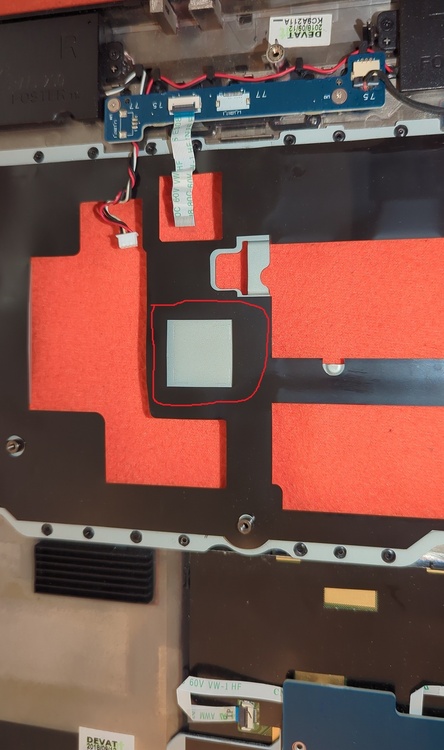
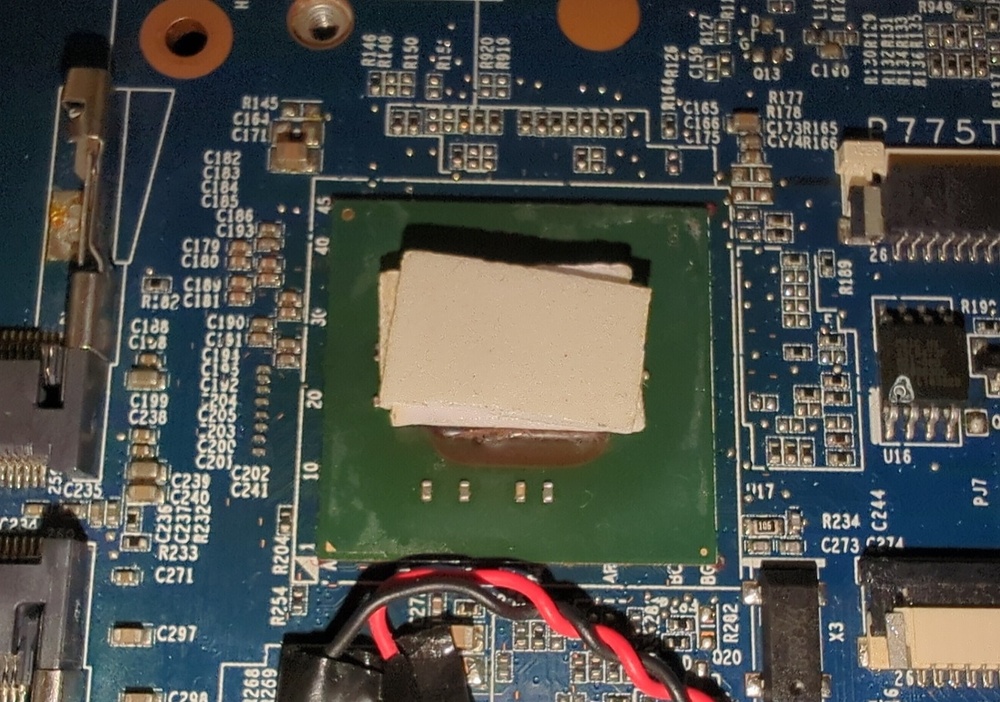
I've made a hardware mod with applying a square copper plate on the chip and thermally connecting it to the metallic frame right above it. Changes: - First 15-20mins after boot, looks better, 95 degrees instead of 103-106 without Fn+1, 82-84 instead of 95 with Fn+1. - (no Fn+1) As the time goes by, temps gradually go up and up, and at some point I reached a new maximum: 110. Holy hell. - (with Fn+1) Temps go down slower than before, but still they go down to 82-85 degrees with Fn+1. - What the hell: I think, the metallic frame above PCH / under KB is just really bad at temperature dissipation. I understood this by removing KB and touching different areas on it while having the PC running. At some point, the area under PCH reaches its heat limit that can no longer be effectively transported with this bad temperature dissipation, and so temps just go up and up. Now my HW-level idea and plan is to lead the heat out of that area directly to the fans, the most realistic and light-weight idea is to do it using naked copper wires @ 0.5-1mm thickness, routing them from the PCH / square copper plate and the frame area above - to the left to the CPU fan, and to the right to the GPU fan - having them attached to the frame and thus also sharing some heat with it and its distant areas that are currently "unreachable" for the heat. Attaching the wires to the inner side of the frame first of all, and maybe also adding on the upper side. Good idea, or mehh? xD If anyone has any ideas, tips, advises, I would be grateful. :-)
-
Yeah that's the thing I think too, this looks too bad I've never overvolted anything, I only undervolted the 9900K to the stable -95,and that's it. Btw, maybe there's smth I could check also in the BIOS? I have Obsidian Unlocked BIOS, where/what should I look for if anything?
-
@Scruffy, It has already been replaced in a repair shop. Fortunately, the nightmare is over. But for how long - remains the question. I don't want a repetition of this shit. And this is why the above challenge is now a matter of a very high priority for me.
-
I haven't found any reliable information on this, despite multiple attempts. My PC is Clevo P751TM1-G with 9900K and RTX-2080. What is its 15.6"-size successor? The (hypothetical?) Clevo model I'm hunting has: - either 10-11th-gen Intel CPU (10900K, 11900K), or basically any 10+ gen with its iGPU completely disabled and out of the pipeline - RTX 3070 or 3080 (no 40-series or newer, the 30-series has to be my toppest top because Windows 7 drivers are up to 30-series and are unavailable for 40+, correct me if I'm wrong) - The Clevo spirit: the more components are replaceable / not soldered - the better - at least 2 M.2 disk slots (P751TM1-G has 2x M.2 and 2x SATA, but I'm not using the SATA ports and could sacrifice them) This ideally matches X170KM-G, but it's a 17.3" giant, not a 15.6"-size successor of P751TM1-G
-
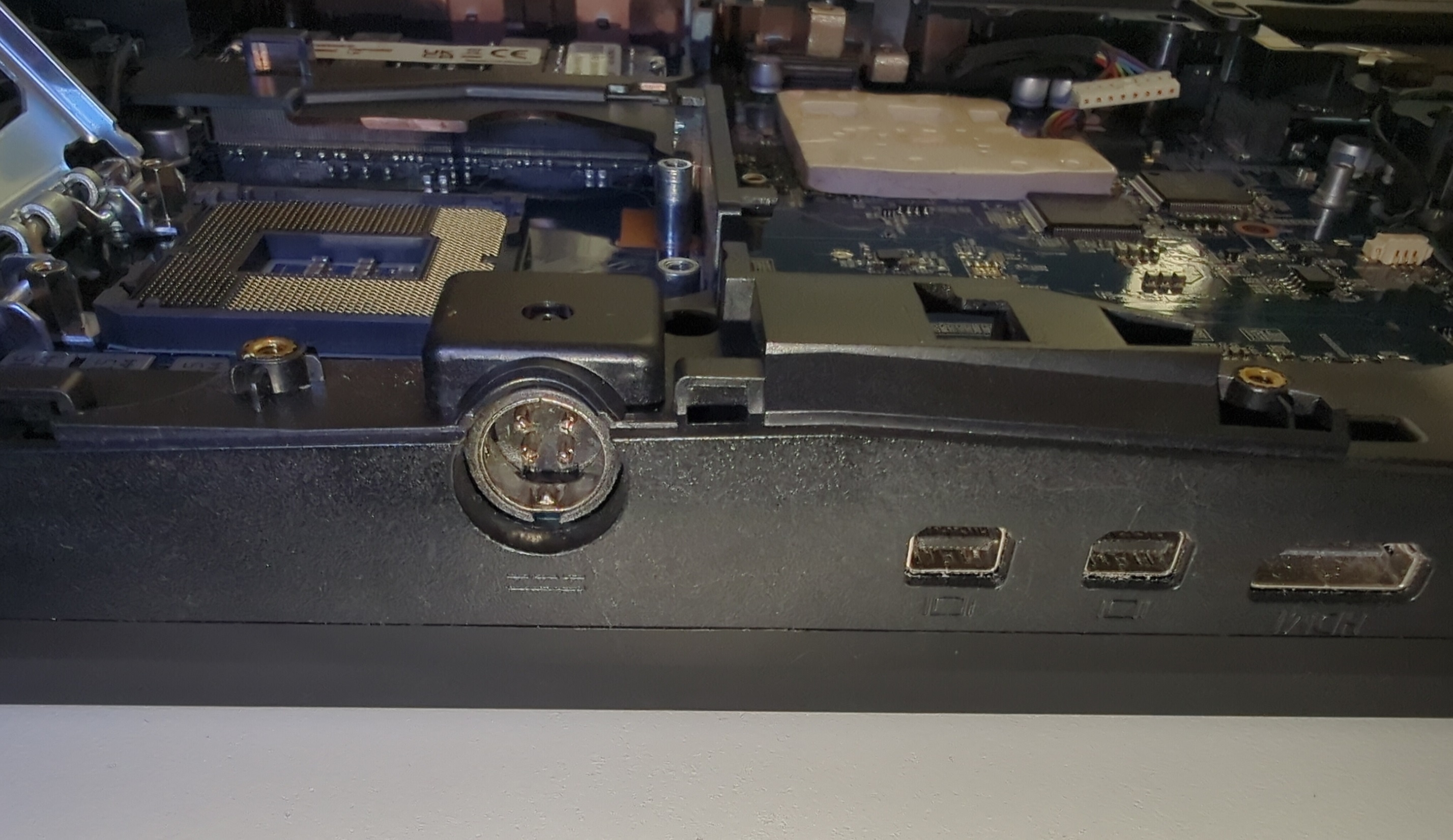
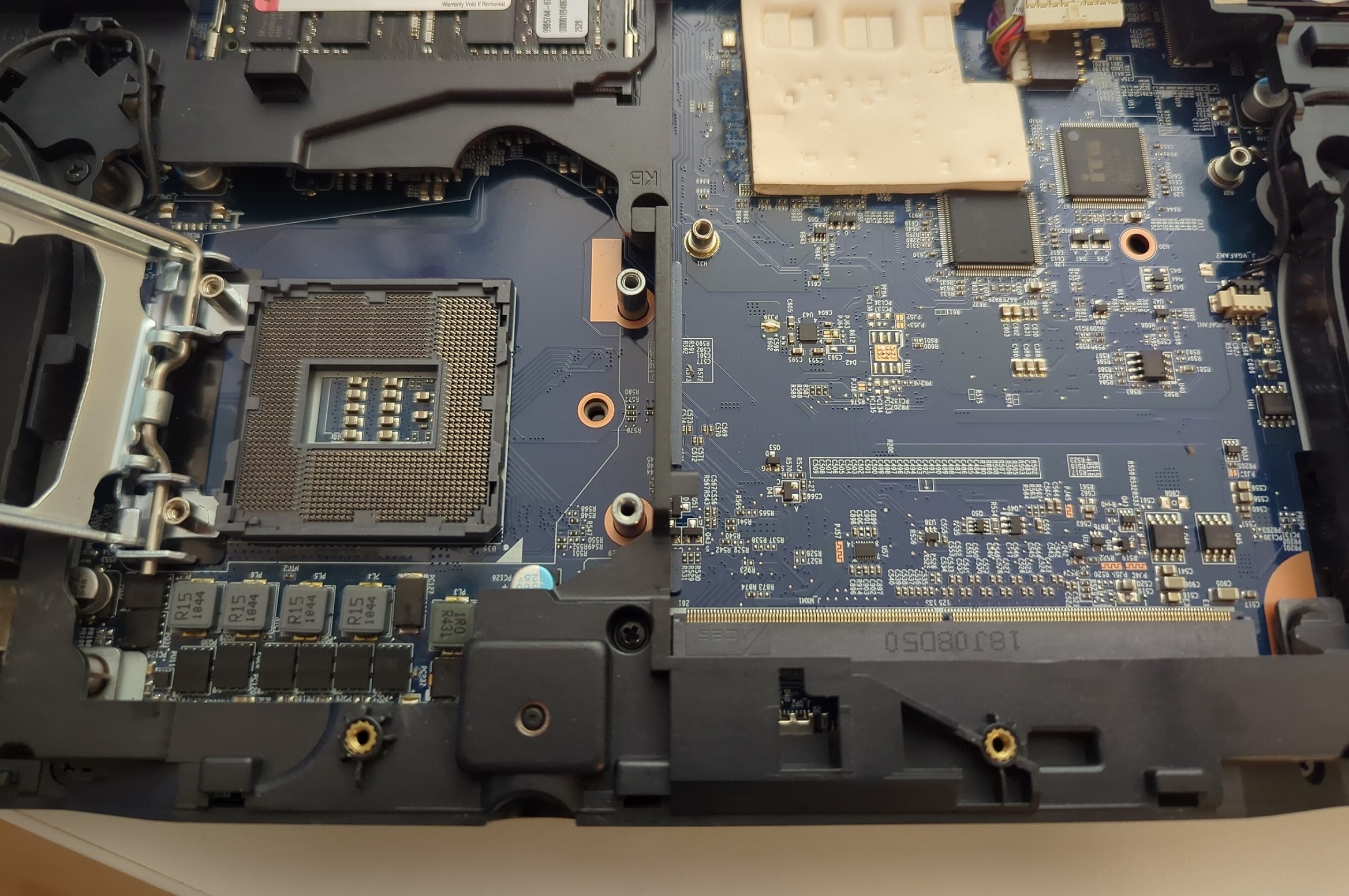
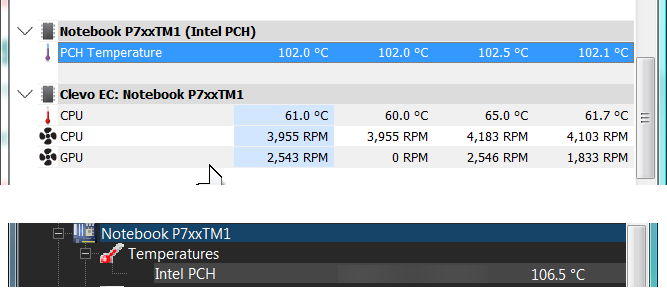
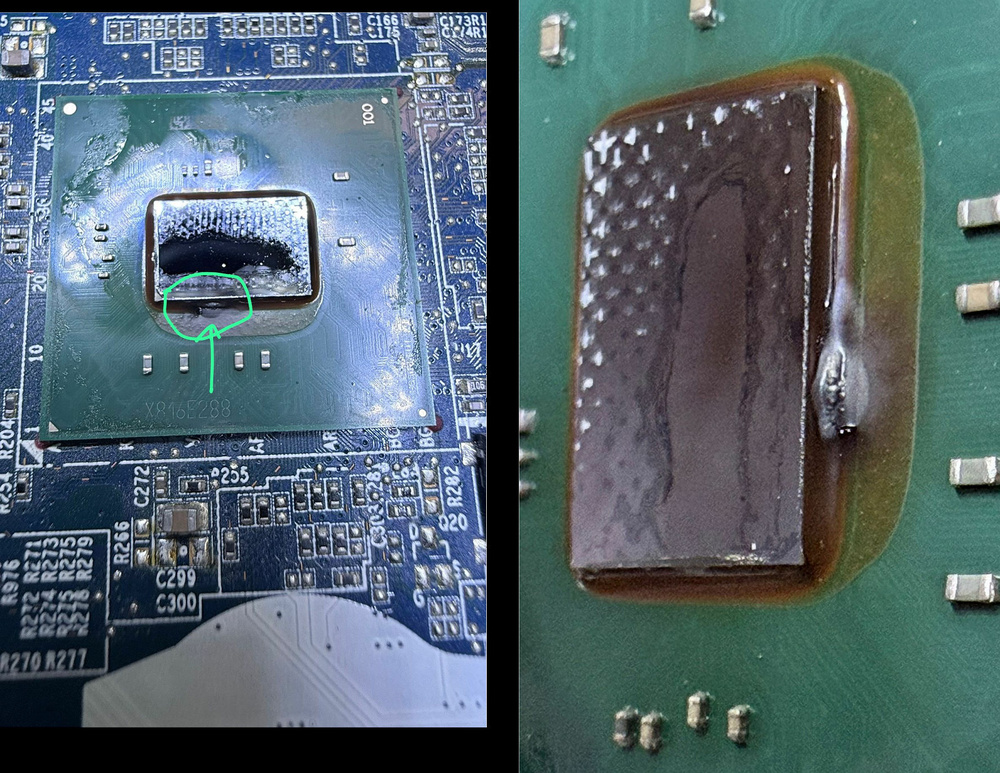
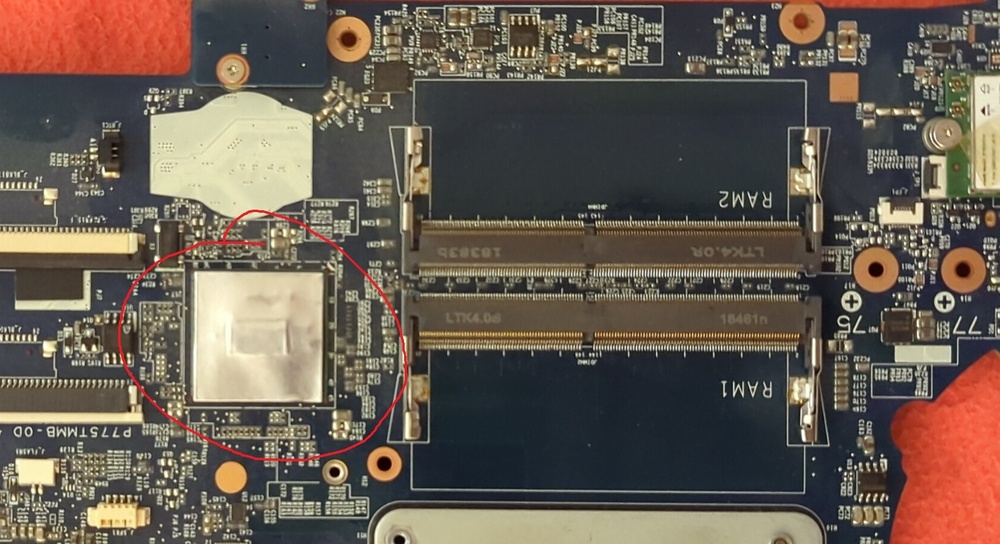
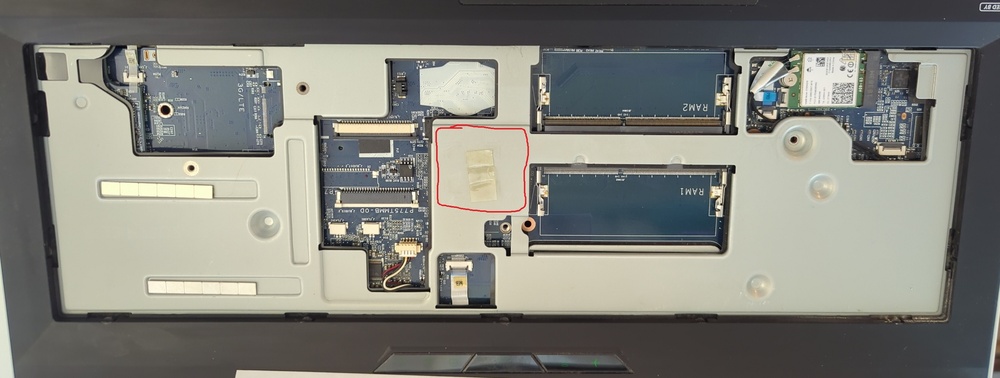
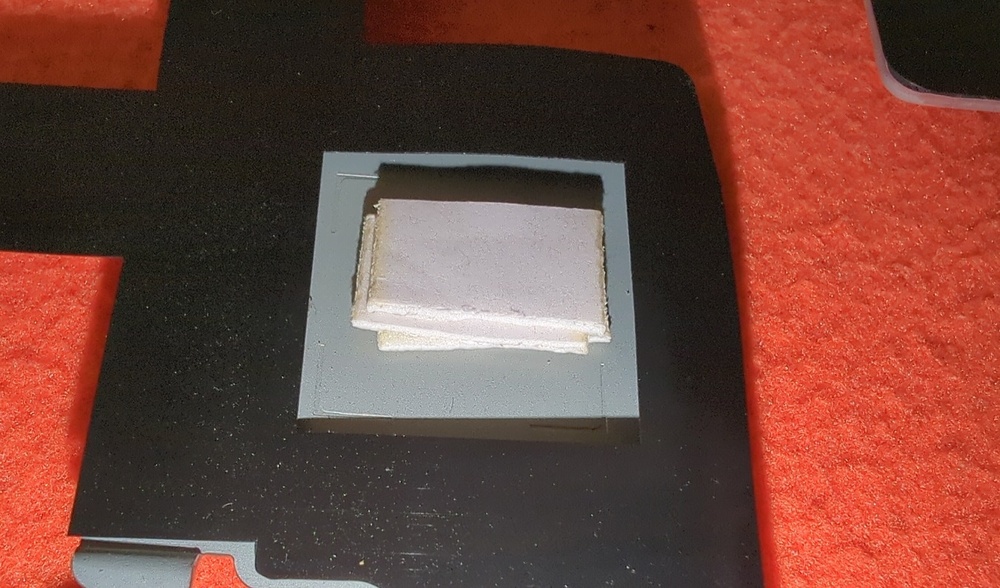
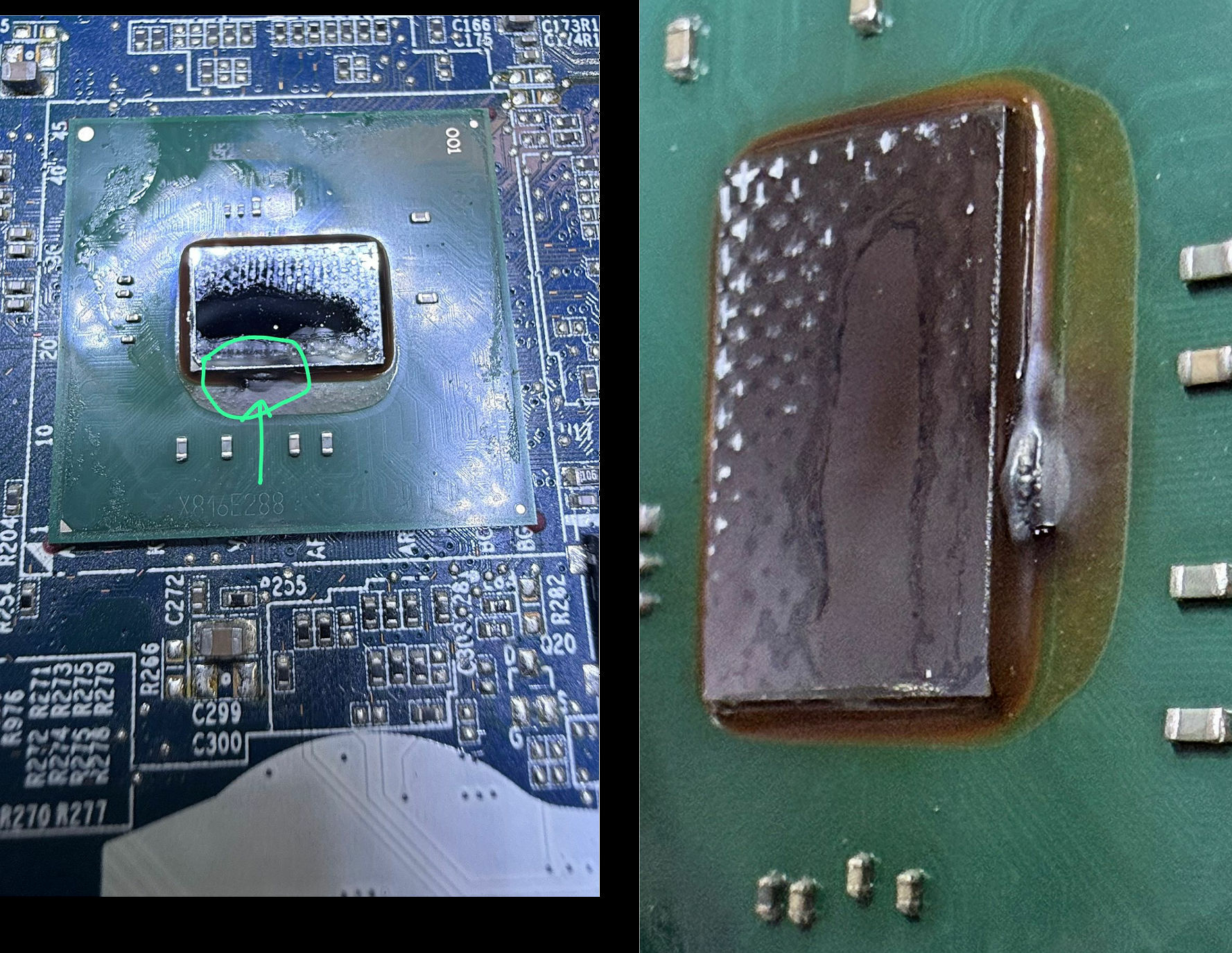
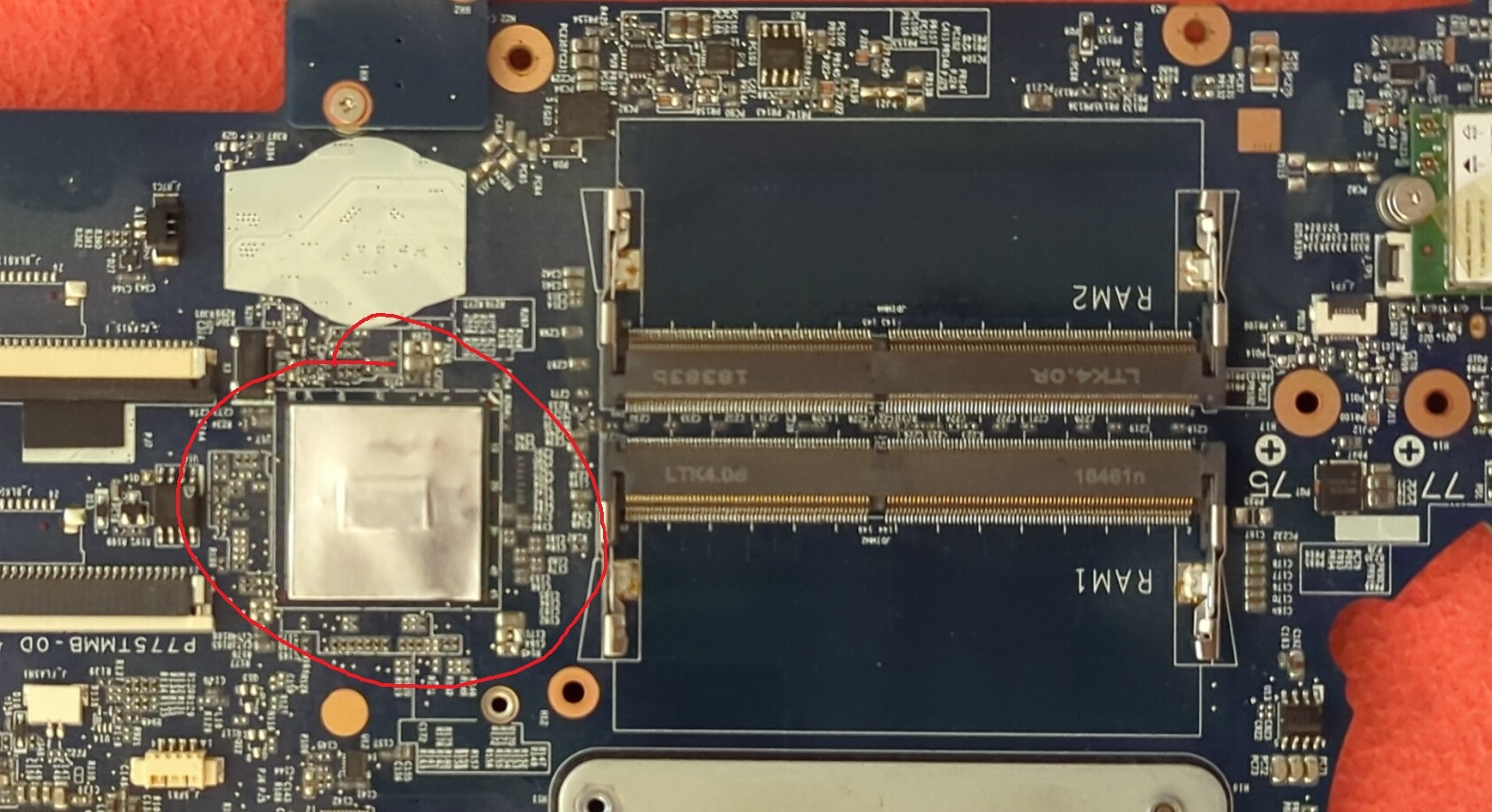
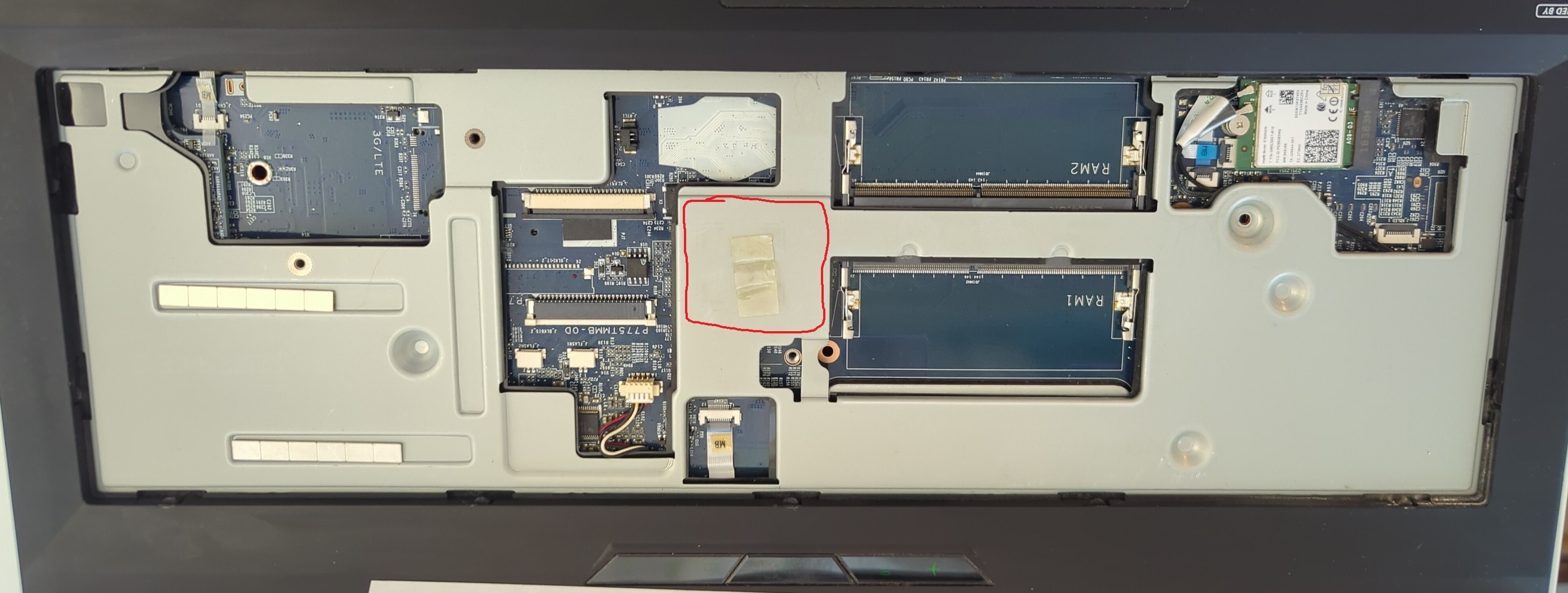
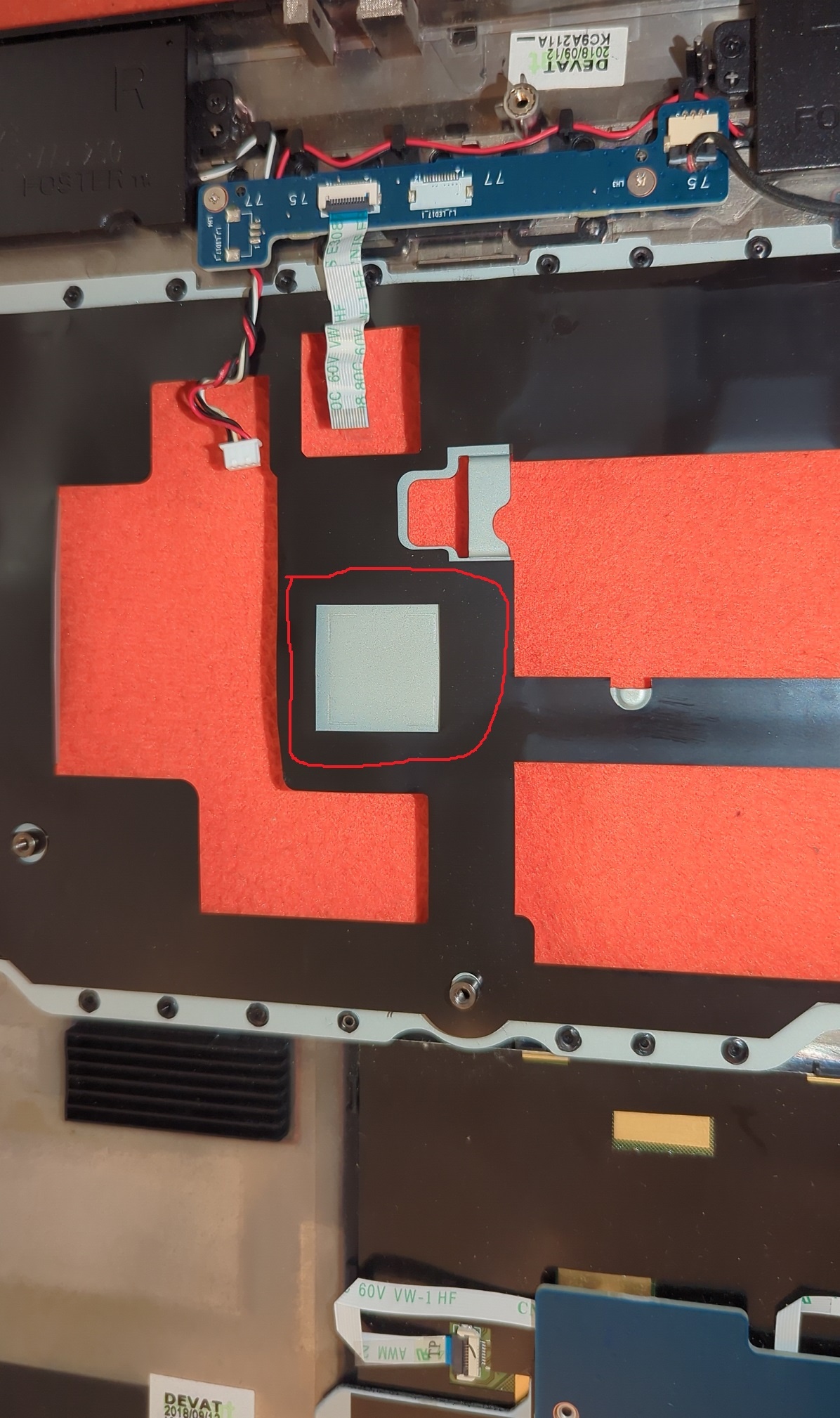
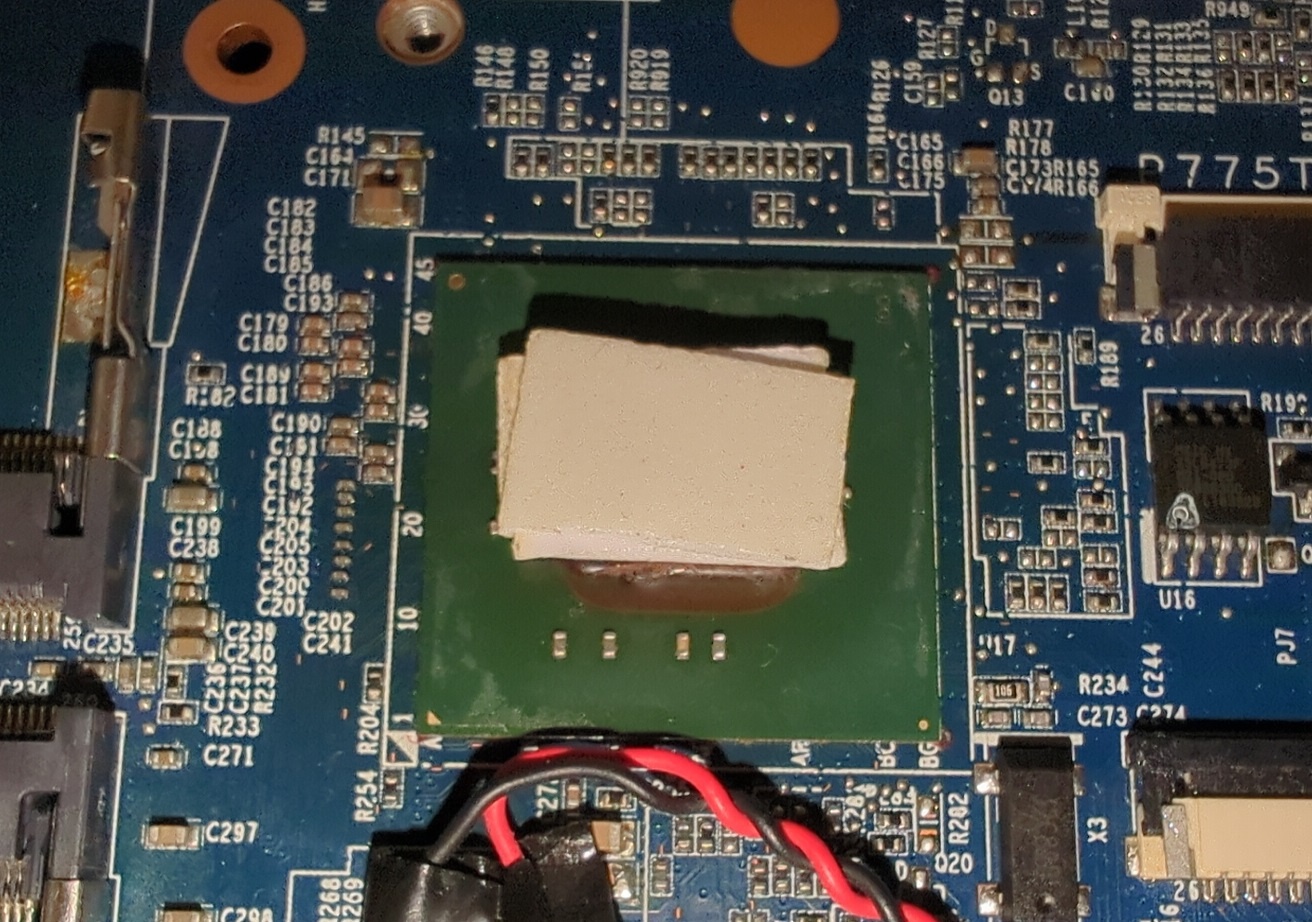
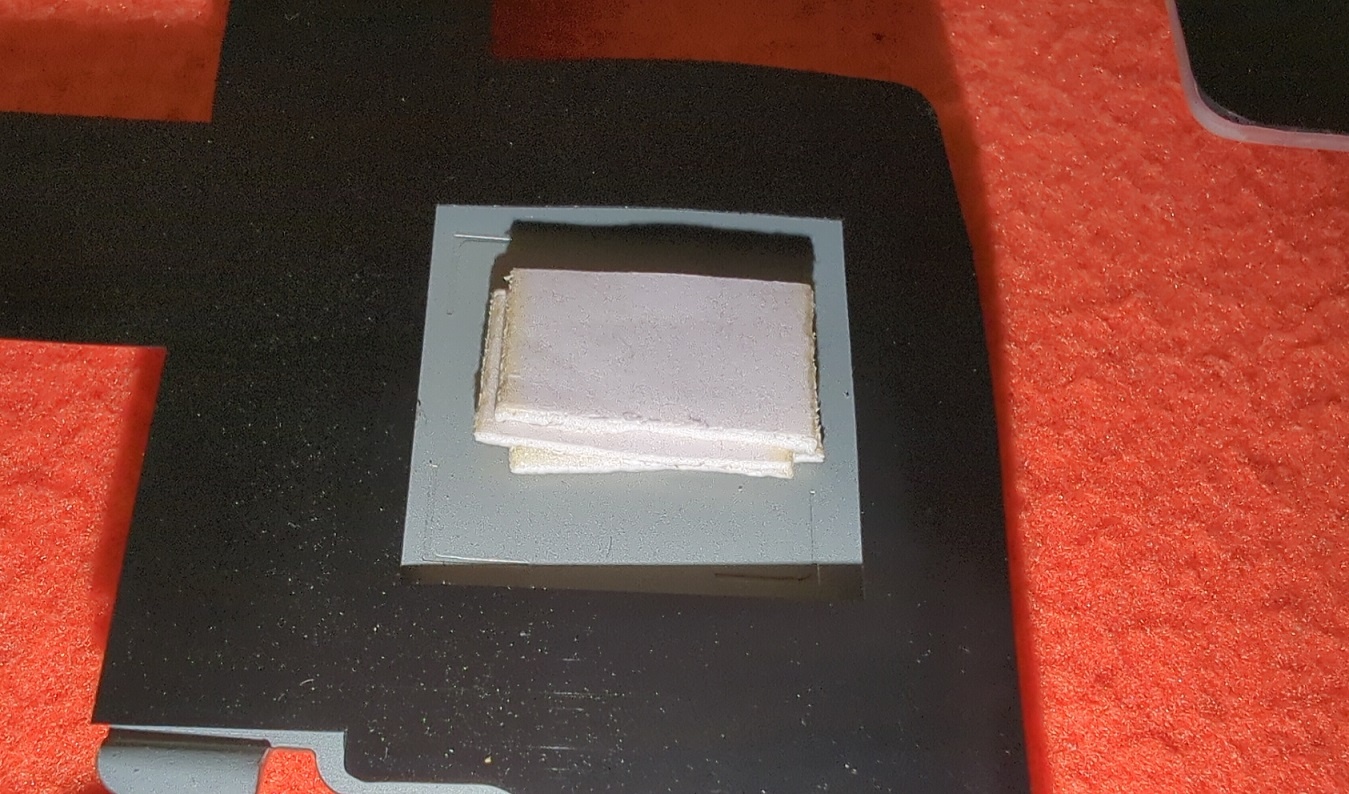
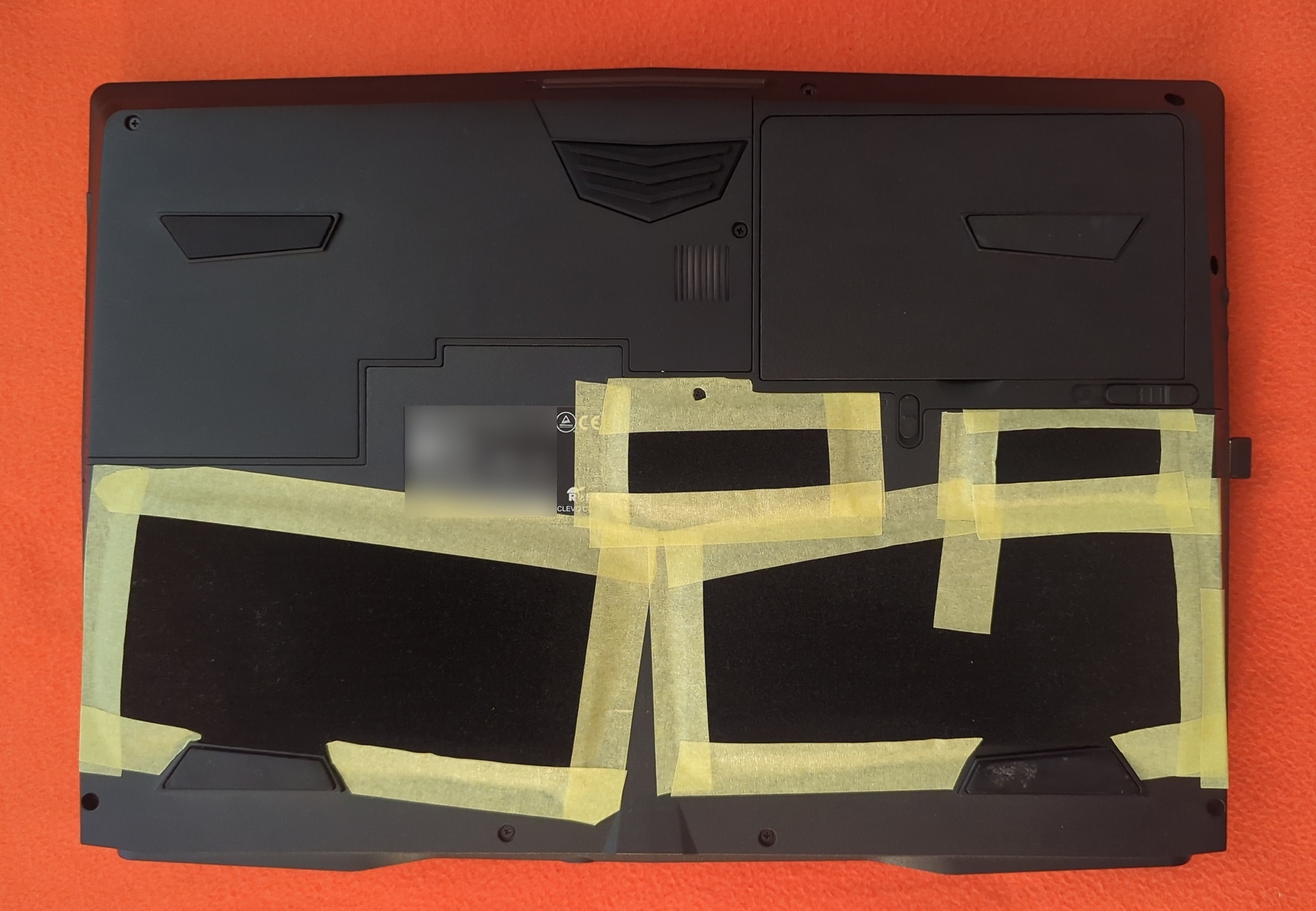
A while has passed, more research and observation was made. Out of the blue, I noticed something I've never been paying attention before. The PCH temperature field in my HW monitoring program. And I made a bad conclusion: the PCH continuously runs at 102-103°, sometimes reaching 106+°! All the time! (see image 1). This effectively renders it as the hottest-running component on the entire MB! I also noticed that doing Fn+1 gradually lowers PCH temps to 90-95° and then they sit in this range. But then what, need to be in Fn+1 mode all the time? For the temps that are not extreme but are still very high? Combined with the fact that the component that bricked my PC was PCH (see image 2 where two images are combined), I made the following assumptions: No proper thermal handling of PCH in all laptops, which might be one of the main reasons why laptops' MBs die. - In all laptops, no proper cooling of PCH is bad but is taken by laptop manufacturers as normal-by-design. Sadly, Clevo is among the bad guys that haven't done anything in this direction. - For proper thermal handling, the placement of PCH should have been on the other side of MB where airflow actually exists, not under the keyboard (see images 2, 3, 4). - Or even better, it could have been moved to under-the-heatsink location, so that the heatsink was actively cooling it, and the owner could apply thermal paste not only to CPU and GPU but also to PCH. - My PC got bricked because of 7 years of continuous use with this design flaw and with PCH always running as hot as 100-107°, which caused the chip to fail permanently one day. Custom PCH thermal handling solution/mod is really needed, especially in powerhouses like P751/P775/P870, in order to make them live much longer. Look at how the situation is out of the box, on images 2, 3, 4. Unfortunately I have no idea about how to measure the distance between the PCH's metallic cover layer and the barebone's metallic frame below the keyboard. And this is important to know to proceed. Generally, I have several ideas that come into mind are: 1. Putting a good silicon thermal pad of the right thickness right on the PCH's metallic cover layer, so that it aso touches the barebone's metallic frame, thus thermally connecting PCH to it and helping to keep it cooler by using the barebone as one big heatsink. 2. Finding some thin copper heat-dissipator-style heatsink that can be applied on PCH in CPU-style (with thermal paste like MX4) and would fit between the PCH and the barebone's frame, and bending its copper "arm"/heatpipe in a way that it touches the metallic frame, thus again "leaking" the heat to the barebone's frame. Honestly, I don't think such thin solo CPU-style heatsinks exist. UPD: no, this is a stupid and unfeasible idea. 3. <..?..> Are my assumptions correct? Are there any other ideas for thermally connecting PCH to the metallic frame under the keyboard? PS: To roughly estimate the distance from PCH to the frame, i stuck 3 1mm pieces of double-sided tape together, put them on the PCH, and put the top laptop cover with KB-bay back, to finally get this stacked tape block stuck to the metallic frame, which means that the distance (and the needed thermal pad thickness for the idea №1 above) is 2.5mm < x <= 3mm. See images 5, 6. As I know, such a thick thermal pad of 3mm thickness won't make it any better, so the idea №1 above needs to be modified or discarded (am i right?).
-
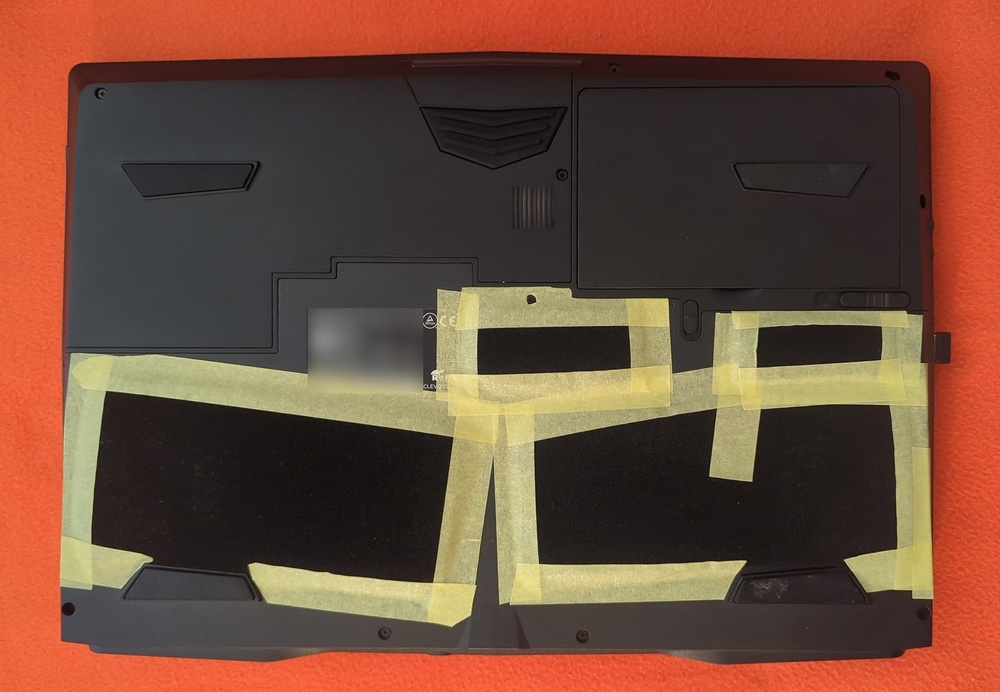
What do you think about this, are there any potential negative sides? So far I see only the positive ones: - Significant simplification of dust cleaning - Significant reduction or almost complete removal of dust reaching and sticking to the fans (only some amount of the smallest particles make it through) - No need for any physical interaction with the fans and their surroundings - The fans keep being "young" for much longer - Thus, the default cooling efficiency stays the same much longer and doesn't degrade over the time
-
Has anyone done this?
-
Done! According to the repair shop diagnostics, the faulty component that needs to be replaced is the Platform Controller Hub (PCH) chip. Any idea what this chip is? What is it responsible for, how could it permanently fail? Yeah, should consider getting one in the future. 😊
-
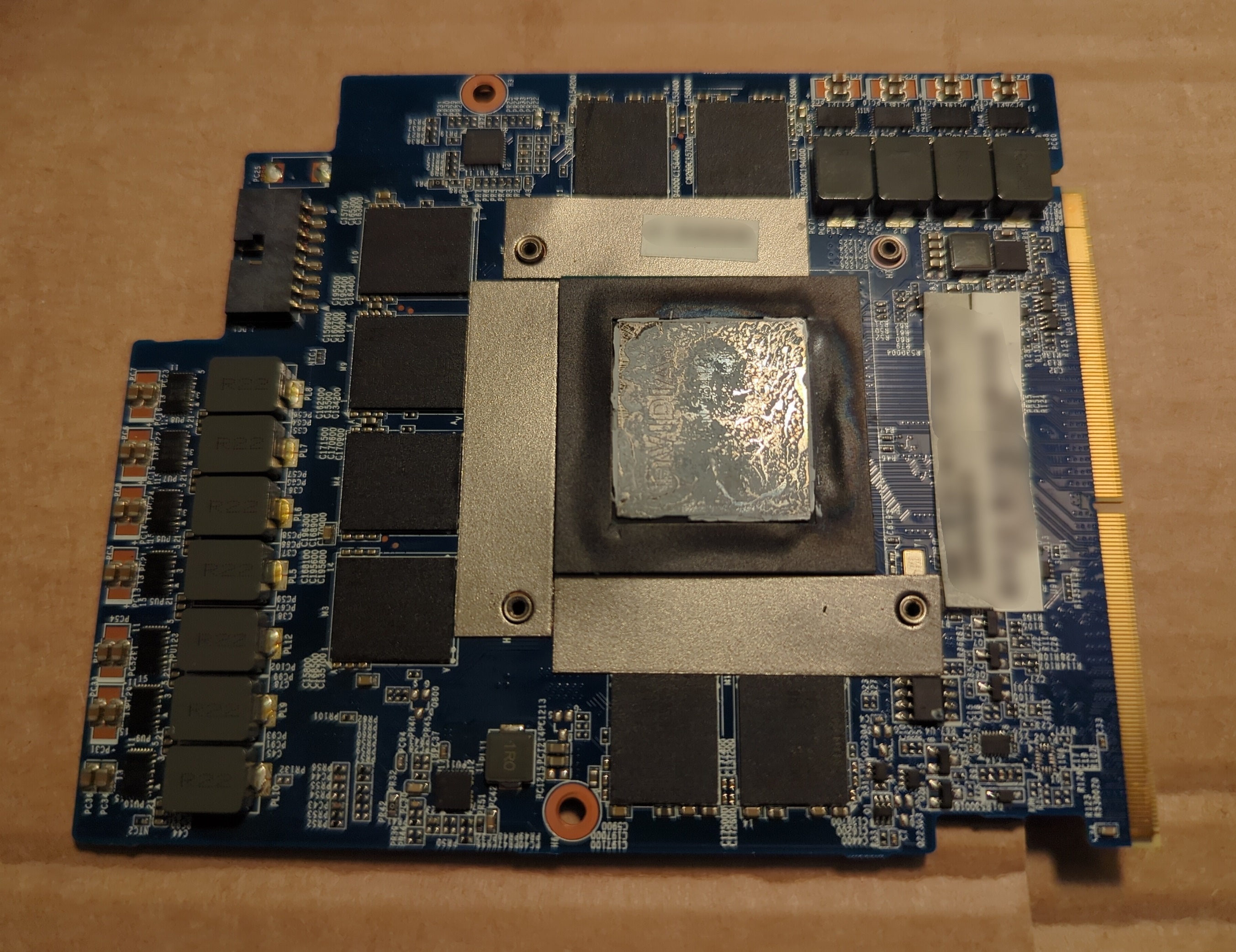
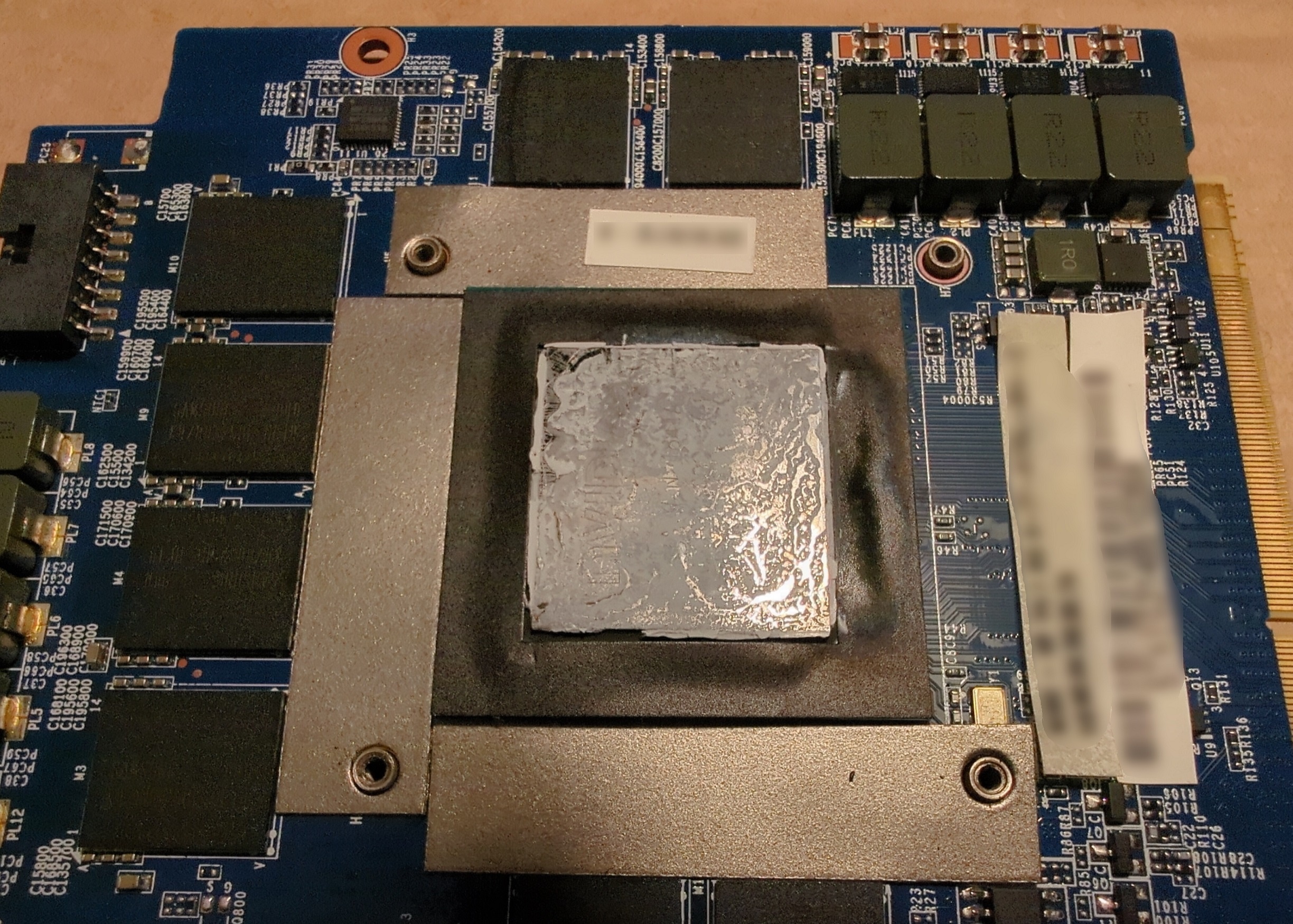
@zex4, @JadeRover I've removed absolutely all components except the motherboard and tested, no reaction on the plugged charger. I have then completely disassembled the laptop, to investigate the MB in more detail. I noticed a couple of differently coloured spots. Dunno, either it's normal, or it's unnormal, or it's simply caused by the white marshmallow-like cooling pads being stuck to those areas. I've attached the pictures (1: the spot near the power plug, 2: what's on the other side, 3: the other spot, 4, what's on the other side [some unknown chip]). The charger is out of the question, I have both 330W and 230W, and also my friend has an older-gen Clevo. Chargers are alright. I don't have a spare GPU, there's been no need, but anyway, as I removed all components leaving the MB alone, and it still doesn't react to power in any way, GPU is kinda out of the question i guess I don't have a multimeter unfortunately, and nearly zero practical experience in diagnosing micro-electronics
-thespot.thumb.jpg.0c885bbd557ecb419e86ffa32dc988c2.jpg)
-whatsontheotherside.thumb.jpg.72f512792aa673d4806a5637fb9047c8.jpg)
-thespot.thumb.jpg.c3bd2cf64558a1cf8fec0ff3b9cbf90e.jpg)
-whatsontheotherside.thumb.jpg.22ae4123f75108b60705d6bd7d9eaa34.jpg)
-
Just happened out of the blue. Ironically enough, I just created the "Improving Cooling / Fans Upgrade In Clevo" thread, and 10 hours later my Clevo P751TM1-G suddenly dies. What happened: So I was watching YouTube, then the laptop suddenly turned off. This was accompanied my some very quiet sound of, well I don't know how to describe it plus everything happened too quickly, maybe a click, maybe something else, I don't know, but there was some quiet short strange sound I'm quite sure. Then I tried to turn it on, I think the power LED blinked orange, maybe 1 time, maybe 2, I don't know. And then, the entire system stopped reacting to anything in any way. Pressing power button - nothing happens. Power adapter is plugged - no LED light, no anything. It pretty much seems just dead. I've currently removed the heatsink, CPU and GPU. I think, there was a burnt smell a bit to the left from the center, where the power port and CPU are, but the smell was weak, could feel it only when holding my nose a few cm away. Or maybe this is the standard smell of heated electronics? And, the only strange visual thing I've noticed is the strange gradient of that black thing surrounding the main GPU chip. You can see it on the attached images. Does this look bad, or is it normal? In any case, I tried to plug the charger with these parts removed and see if the orange power LED is back, and it's not. I guess in order to reach the power block i need to continue the disassembly, but for now I'll just wait for some replies. I'm ready to disassemble further and take images of various parts upon request. What could this be? Can it be repaired or replaced? What/where should I check? I would be thankful for any tips or help. I really hope the solution can be found. If it's the end, it will be a huge loss, and a fullstop of doing all tasks, processes, duties, work, and pretty much everything, until a new barebone+motherboard is found-ordered-received.
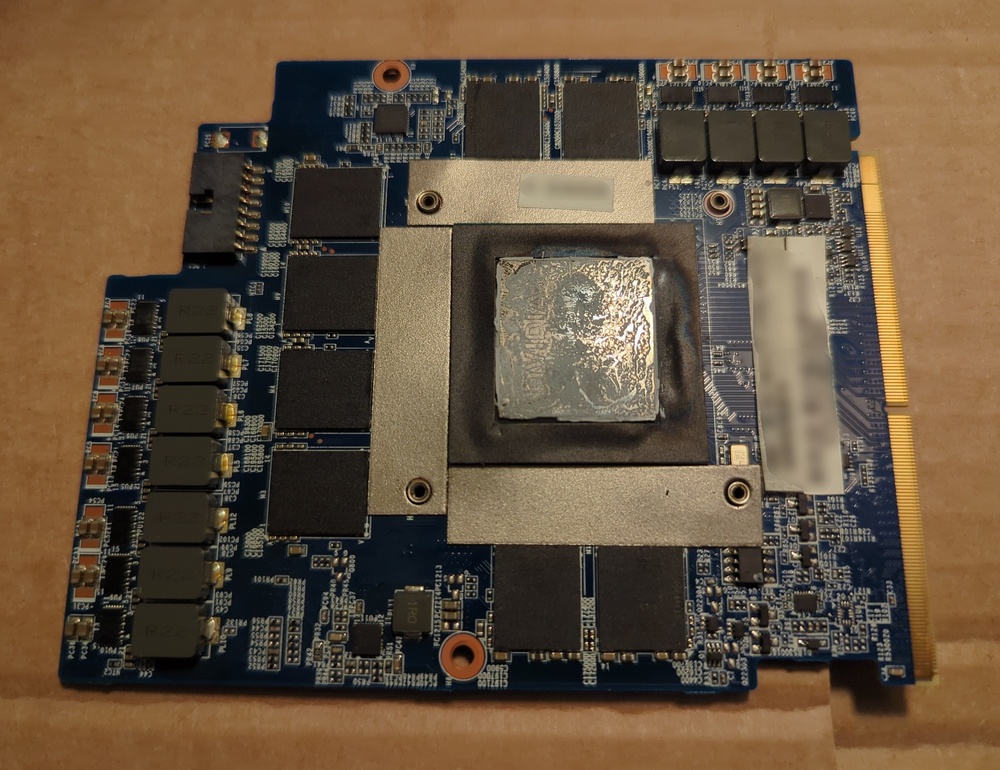
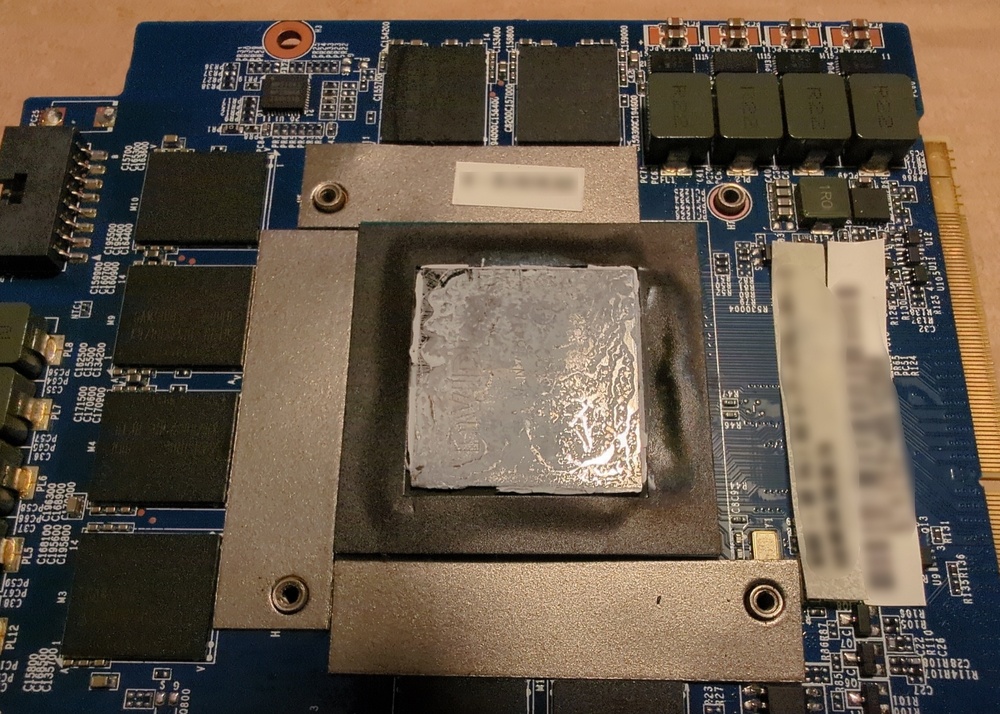
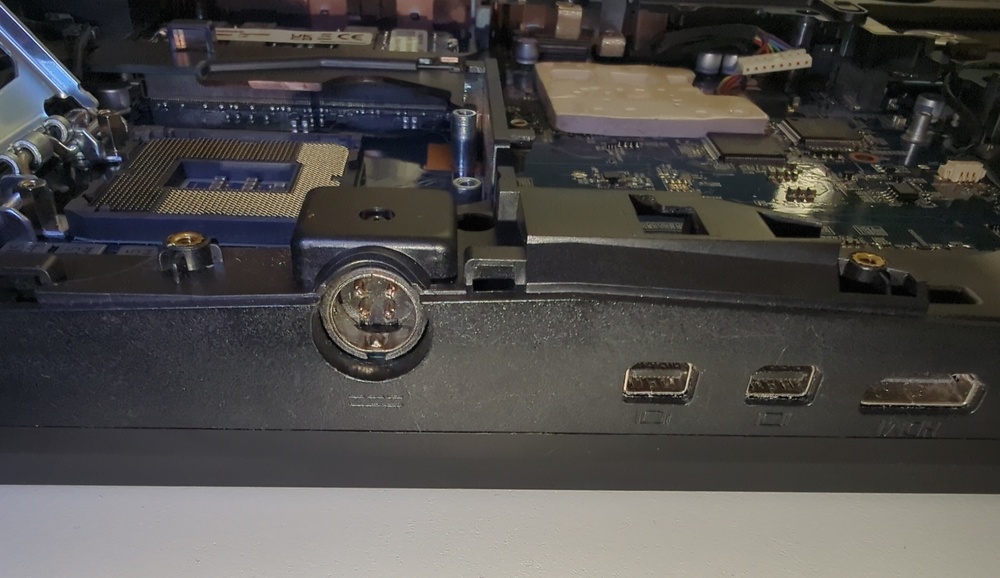
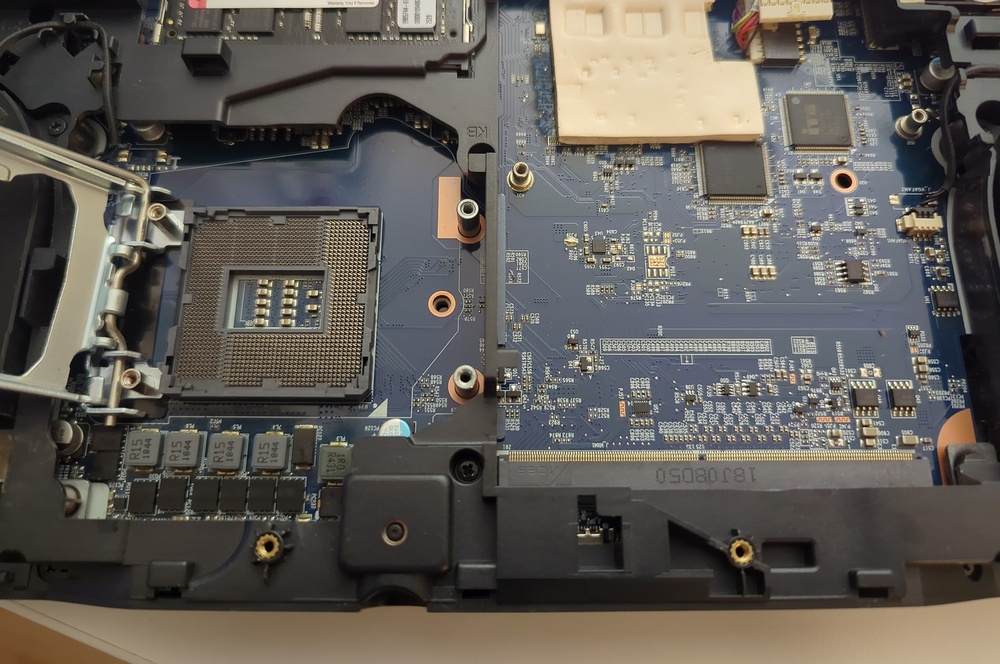
-
I'm looking for the ways to improve cooling on my Clevo P751TM1-G having i9-9900K + RTX 2080. But the thread is useful for P75xTMx(-G)/P75xDMx(-G)/P775TMx(-G)/P870DM(-G)/X170KM-G/etc too, as the fans are physically the same in all of them. The CPU in my Clevo is undervolted and configured to have the all-core frequency of 4.2GHz (sometimes having to set it to 4.1GHz). Higher than that makes it run too hot. Given that the CPU's default all-core frequency is 4.7GHz and can be overclocked all the way up to 5GHz, there's certainly a huge theoretical performance improvement potential. Would be grateful for any recommendations / tips! :-) In particular, I'm curious about the potential fans upgrade. The default fans both on the CPU-side (Left) & GPU-side (Right) in P751TM1-G are: ADDA, 6-31-P7753-100, 180925, 00DM3, DC 12V, 0.5A, 17 leaves I'm quite sure there should be various different models of fans that are swap-in-compatible with the Clevo's default fans. Has anyone upgraded their fans to more powerful ones? If yes, could you share the model names? Here's how I would prioritize power vs. noise: 1. Ideal case - a model that is both more powerful/better-cooling and quieter :-) 2. A more powerful and better-cooling model, without caring about its noise. 3. A model that is the same as the Clevo's default fans in performance, but quieter. PS: Fans is the most obvious upgrade idea that comes in mind, but are there any other possible cooling-hardware update options or other ideas?
-
p751tm1-g Clevo P751TM1-G vs. USB-C Dock vs. issue with USB-C ports
dude-137 replied to dude-137's topic in Sager & Clevo
Update: Just got another laptop for testing the issue, HP ProBook 430 G5. And like with Lenovo T490, the dock works flawlessly with it, the problem was not reproduced. Another +1 that the problem lies in the Clevo. -
Something strange is happening with the USB-C ports of my Clevo P751TM1-G. So I ordered and received a new great USB-C dock-station, with the purpose of stop using and wearing-off the laptop's USB ports and connect all devices at once via one USB-C. The dock is powered by a 100W USB-C adapter, so it supposed to eat 5 external HDDs simultaneously just for breakfast, and still have plenty of unused power available and unused. However, there's a big issue. Every time I connect an external HDD (a more power-hungry device than external-SSD/KB/mouse/flash-pen/SD-card/etc), the dock disconnects completely, together with all connected devices. No power between the dock and the laptop's USB-C, 0V, 0W, just like it's physically disconnected (also measured with the USB-C volt/watt/ampere-meter). So I have to re-connect the dock to the laptop to get the dock and all the connected devices back, together with the connected external HDD. Then the HDD initializes normally and everything seems alright. I disconnect it, then connect it again, and the same issue happens again. So it happens every time I connect an external HDD. With its both USB-C ports. Why this situation is not the dock's fault: I tested the dock with my friend's Lenovo T490, with the exact same USB-cables and charger, and in the same mode (without using the dock's power delivery feature). And everything works great, the dock doesn't disconnect when the external HDD is connected to it! Could something be wrong with the Clevo's USB-C ports? I have an unlocked BIOS on it, with a crapload of various settings and parameters, is there smth I could check there?
-
p751dm2 bringing a Clevo P751DM2 that doesn't boot back to life
dude-137 replied to dude-137's topic in Sager & Clevo
Hm, when I was checking it last time I haven't noticed anything unusual. Doing it again is a pain, every time the heat-sink is removed the CPU/GPU have to be cleaned and re-pasted Well, the quest for getting another 7700K has started then, dunno how much time it will take, will keep the thread updated -
p751dm2 bringing a Clevo P751DM2 that doesn't boot back to life
dude-137 replied to dude-137's topic in Sager & Clevo
@Kastner, I guess you're talking about the situation when laptop self-restarts with short fan blasts about 3-5 times, when for example the RAM configuration changes, right? If yes, it usually happens 3-5 times or so, not permanently stuck. Given the update and info in the previous post above, are you sure the situation you describe could have a relation to my situation? -
p751dm2 bringing a Clevo P751DM2 that doesn't boot back to life
dude-137 replied to dude-137's topic in Sager & Clevo
Updates & details: 1. I now recall what exactly was happening 1 year ago. Before I made the operation of CMOS replacement / BIOS reset + changing of RAM, I could boot into BIOS. However, the situation was still very unhealthy. After ~5 minutes or so of being powered on and BIOS screen on, the fans were suddenly starting to blast at maximal speeds, and the right lamp indicating power was blinking orange instead of glowing green! And after a minute or two, the laptop was shutting down by itself. If i remember correctly, Fn+1 was not functioning + only the right 3rd of the KB was glowing green - from power-on until self-shutdown. And after the operation, the laptop stopped being able to boot into BIOS and was having black unlit screen. With the fans and orange-blinking power lamp remaining the same. Fn+1 was not functioning. Please disregard the info about the "changed behavior" in the first post, and consider that it stayed the same since then and until today. 2. Posting this with a 4-5 days delay, been powering on the laptop >30 times and logging the behavior. Attempt 1: 00:00-10:00: silent idle with black screen, power-on lamp glowing green. Fn+1 was functioning, and the standard weak blue KB led was glowing together with the KB's right third glowing green. 10:00-11.30: fans were blasting, the power lamp was blinking orange every ~1.5 seconds instead of glowing green despite the laptop being still powered on! 11.30: self-shutdown. Attempt 2: 00:00-01:25: silent idle with black screen, power-on lamp glowing green. Fn+1 was NOT functioning, only the right third of the was glowing (green). 01:25: self-restart accompanied with short fan blast 01:30-07:30: silent idle with black screen, power-on lamp glowing green. Fn+1 was NOT functioning, only the right third of the was glowing (green). 07:30-12:00: fans were blasting, the power lamp was blinking orange every ~1.5 seconds instead of glowing green despite the laptop being still powered on! 12:00: self-shutdown. Attempt 3-4: 00:00-07:00: silent idle with black screen, power-on lamp glowing green. Fn+1 was NOT functioning, only the right third of the was glowing (green). 07:00-11:00: fans were blasting, the power lamp was blinking orange every ~1.5 seconds instead of glowing green despite the laptop being still powered on! 11:00: self-shutdown. Attempt 5: 00:00-07:30: silent idle with black screen, power-on lamp glowing green. Fn+1 was NOT functioning, only the right third of the was glowing (green). 07:30-12:00: fans were blasting, the power lamp was blinking orange every ~1.5 seconds instead of glowing green despite the laptop being still powered on! 12:00: self-shutdown. Attempt 6: 00:00-01:25: silent idle with black screen, power-on lamp glowing green. Fn+1 was NOT functioning, only the right third of the was glowing (green). 01:25: self-restart accompanied with short fan blast. 01:30-07:00: silent idle with black screen, power-on lamp glowing green. Fn+1 was NOT functioning, only the right third of the was glowing (green). 07:00-11:00: fans were blasting, the power lamp was blinking orange every ~1.5 seconds instead of glowing green despite the laptop being still powered on! 11:00: self-shutdown. Attempt 7-9: 00:00-07:00: silent idle with black screen, power-on lamp glowing green. Fn+1 was NOT functioning, only the right third of the was glowing (green). 07:00-11:00: fans were blasting, the power lamp was blinking orange every ~1.5 seconds instead of glowing green despite the laptop being still powered on! 11:00: self-shutdown. Attempt 10: 00:00-07:00: silent idle with black screen, power-on lamp glowing green. 07:00-09:00: fans were blasting, the power lamp was blinking orange every ~1.5 seconds instead of glowing green despite the laptop being still powered on! 09:00: self-shutdown. Attempt 11: 00:00-01:25: silent idle with black screen, power-on lamp glowing green. 01:25: self-restart accompanied with short fan blast. 01:30-04:15: silent idle with black screen, power-on lamp glowing green. 04:15-05:15: fans were blasting, the power lamp was blinking orange every ~1.5 seconds instead of glowing green despite the laptop being still powered on! 05:15: self-shutdown. Attempt 12: 00:00-01:25: silent idle with black screen, power-on lamp glowing green. 01:25: self-restart accompanied with short fan blast. 01:30-08:30: silent idle with black screen, power-on lamp glowing green. 08:30-09:30: fans were blasting, the power lamp was blinking orange every ~1.5 seconds instead of glowing green despite the laptop being still powered on! 09:30: self-shutdown. Attempt 13-15: 00:00-01:25: silent idle with black screen, power-on lamp glowing green. 01:25: self-restart accompanied with short fan blast. 01:30-07:00: silent idle with black screen, power-on lamp glowing green. 07:00-11:00: fans were blasting, the power lamp was blinking orange every ~1.5 seconds instead of glowing green despite the laptop being still powered on! 11:00: self-shutdown. Attempt 16: 00:00-01:25: silent idle with black screen, power-on lamp glowing green. 01:25: self-restart accompanied with short fan blast. 01:30-07:00: silent idle with black screen, power-on lamp glowing green. 07:00-09:30: fans were blasting, the power lamp was blinking orange every ~1.5 seconds instead of glowing green despite the laptop being still powered on! 09:30: self-shutdown. Attempt 17: 00:00-09:30: silent idle with black screen, power-on lamp glowing green. 09:30-10:30: fans were blasting, the power lamp was blinking orange every ~1.5 seconds instead of glowing green despite the laptop being still powered on! 10:30: self-shutdown. Attempt 18-19: 00:00-01:25: silent idle with black screen, power-on lamp glowing green. 01:25: self-restart accompanied with short fan blast. 01:30-07:00: silent idle with black screen, power-on lamp glowing green. 07:00-11:00: fans were blasting, the power lamp was blinking orange every ~1.5 seconds instead of glowing green despite the laptop being still powered on! 11:00: self-shutdown. Attempt 20: 00:00-01:25: silent idle with black screen, power-on lamp glowing green. 01:25: self-restart accompanied with short fan blast. 01:30-25:30: silent idle with black screen, power-on lamp glowing green. Fn+1 was functioning, and the standard weak blue KB led was glowing together with the KB's right third glowing green. 25:30-27:00: fans were blasting, the power lamp was blinking orange every ~1.5 seconds instead of glowing green despite the laptop being still powered on! 27:00: self-shutdown. Attempt 21: 00:00:00-00:00:0000:05: restart with very short fan blast. 00:00:05-00:01:25: silent idle with black screen, power-on lamp glowing green. Fn+1 was functioning, and the standard weak blue KB led was glowing together with the KB's right third glowing green. 00:01:25: self-restart accompanied with short fan blast. 00:01:30-03:00:00+: silent idle with black screen, power-on lamp glowing green. Fn+1 was functioning, and the standard weak blue KB led was glowing together with the KB's right third glowing green. 03:00:00+-03:00:00+: fans were blasting, the power lamp was blinking orange every ~1.5 seconds instead of glowing green despite the laptop being still powered on! 03:00:00+: self-shutdown. -> had go to sleep lol. PC was off when I woke up. Attempt 22: 00:00-01:25: silent idle with black screen, power-on lamp glowing green. Fn+1 was NOT functioning, only the right third of the was glowing (green). 01:25: self-restart accompanied with short fan blast. 01:30-07:45: silent idle with black screen, power-on lamp glowing green. Fn+1 was NOT functioning, only the right third of the was glowing (green). 07:45-12:15: fans were blasting, the power lamp was blinking orange every ~1.5 seconds instead of glowing green despite the laptop being still powered on! 12:15: self-shutdown. Attempt 23: 00:00-01:25: silent idle with black screen, power-on lamp glowing green. 01:25: self-restart accompanied with short fan blast. 01:30-04:45: silent idle with black screen, power-on lamp glowing green. 04:45-05:45: fans were blasting, the power lamp was blinking orange every ~1.5 seconds instead of glowing green despite the laptop being still powered on! 05:45: self-shutdown. Attempt 24: 00:00-05:45: silent idle with black screen, power-on lamp glowing green. Fn+1 was functioning, and the standard weak blue KB led was glowing together with the KB's right third glowing green. But sometimes it was stuck in fan-blasting mode and ignoring Fn+1 for a short while. ~05:00-05:45: Fn+1 stopped functioning. 05:45-07:00: fans were blasting, the power lamp was blinking orange every ~1.5 seconds instead of glowing green despite the laptop being still powered on! 07:00: self-shutdown. Attempt 25: 00:00-01:25: silent idle with black screen, power-on lamp glowing green. Fn+1 was functioning, and the standard weak blue KB led was glowing together with the KB's right third glowing green. 01:25: self-restart accompanied with short fan blast. 01:30-29:30: silent idle with black screen, power-on lamp glowing green. Fn+1 was functioning, and the standard weak blue KB led was glowing together with the KB's right third glowing green. 29:30-30:45: fans were blasting, the power lamp was blinking orange every ~1.5 seconds instead of glowing green despite the laptop being still powered on! 30:45: self-shutdown. Attempt 26: 00:00:00-3:00:00+: silent idle with black screen, power-on lamp glowing green. Fn+1 was functioning, and the standard weak blue KB led was glowing together with the KB's right third glowing green. -> aborted, had to leave. Attempt 27: 00:00:00-00:01:25: silent idle with black screen, power-on lamp glowing green. 00:01:25: self-restart accompanied with short fan blast. 00:01:30-24:28:00: silent idle with black screen, power-on lamp glowing green. Fn+1 was functioning, and the standard weak blue KB led was glowing together with the KB's right third glowing green. 24:28:00-24:29:00: fans were blasting, the power lamp was blinking orange every ~1.5 seconds instead of glowing green despite the laptop being still powered on! 24:29:00: self-shutdown. Attempt 28: 00:00:00-06:31:15: silent idle with black screen, power-on lamp glowing green. Fn+1 was functioning, and the standard weak blue KB led was glowing together with the KB's right third glowing green. 06:31:15-06:32:15: fans were blasting, the power lamp was blinking orange every ~1.5 seconds instead of glowing green despite the laptop being still powered on! 06:32:15: self-shutdown. Attempt 29: 00:00:00-00:01:25: silent idle with black screen, power-on lamp glowing green. 00:01:25: self-restart accompanied with short fan blast. 0:01:30-26:00:00+: silent idle with black screen, power-on lamp glowing green. Fn+1 was functioning, and the standard weak blue KB led was glowing together with the KB's right third glowing green. 26:00:00+-26:00:00+: fans were blasting, the power lamp was blinking orange every ~1.5 seconds instead of glowing green despite the laptop being still powered on! 26:00:00+: self-shutdown. -> had go to sleep lol. PC was off when I woke up. Attempt 30: 00:00-04:30: silent idle with black screen, power-on lamp glowing green. 04:30-05:30: fans were blasting, the power lamp was blinking orange every ~1.5 seconds instead of glowing green despite the laptop being still powered on! 05:30: self-shutdown. Attempt 31: 00:00-01:25: silent idle with black screen, power-on lamp glowing green. 01:25: self-restart accompanied with short fan blast. 01:30-10:45: silent idle with black screen, power-on lamp glowing green. 10:45-11:45: fans were blasting, the power lamp was blinking orange every ~1.5 seconds instead of glowing green despite the laptop being still powered on! 11:45: self-shutdown. Attempt 32: 00:00-01:25: silent idle with black screen, power-on lamp glowing green. 01:25: self-restart accompanied with short fan blast. 01:30-07:45: silent idle with black screen, power-on lamp glowing green. 07:45-09:00: fans were blasting, the power lamp was blinking orange every ~1.5 seconds instead of glowing green despite the laptop being still powered on! 09:00: self-shutdown. Attempt 33: 00:00-01:25: silent idle with black screen, power-on lamp glowing green. 01:25: self-restart accompanied with short fan blast. 01:30-03:45: silent idle with black screen, power-on lamp glowing green. 03:45-04:45: fans were blasting, the power lamp was blinking orange every ~1.5 seconds instead of glowing green despite the laptop being still powered on! 04:45: self-shutdown. Attempt 34: 00:00:00-25:38:00: silent idle with black screen, power-on lamp glowing green. Fn+1 was functioning, and the standard weak blue KB led was glowing together with the KB's right third glowing green. 25:38:00-25:39:00: fans were blasting, the power lamp was blinking orange every ~1.5 seconds instead of glowing green despite the laptop being still powered on! 25:39:00: self-shutdown. -
p751dm2 bringing a Clevo P751DM2 that doesn't boot back to life
dude-137 posted a topic in Sager & Clevo
Hi everyone! ☺️ I'm struggling with bringing my Clevo P751DM2 (i7-7700K, GTX 1070, Prema BIOS) back to life, and hope to find help here. It turns on but doesn't boot. It hasn't been my main PC for like 5 years, and has been unused and stored in the box until about 1 year ago. Here is what happened. A) ~1 year ago. I decided to re-use it as a secondary PC, took it out from the box, booted it into BIOS and checked the settings. Then, I decided to open it and re-paste the CPU and GPU. I removed the heat-sink and took the CPU out to clean it from the old thermal paste better. Suddenly, the IHS fell off. First I panicked, but after a short internet-search and some reddit threads i thought that this is nothing critical, and some people actually detach it intentionally for delidding. So I just cleaned the CPU and the IHS from the old thermal paste, applied Arctic MX4 on the naked CPU, applied the IHS on top back where it was, applied the paste on it, fixed the CPU in the socket, cleaned/re-pasted the GPU, and assembled everything. A few weeks later, I decided to start preparing it. I booted it into BIOS a couple of times. Then I changed the RAM configuration, replaced the CMOS battery (included waiting for a few minutes to reset the BIOS). At some point, it supposed to re-POST (and get back to BIOS after self-restarting several times) as RAM configuration changed, however it didn't happen. Here's the behavior that started: When turning on, the screen remained black, no BIOS, no anything. The laptop stayed powered on, with the lamps on, but with zero activity and black screen without lit. And when pressing Fn+1, the fans didn't start blasting at the maximal speed (which I thought is a very low-level thing that should work at all times as long as the laptop is powered on). After some minutes (~3-5 minutes I guess), the fans suddenly started to blast at maximal speeds, and a minute later the laptop turns off. When powering on again, the same stuff repeats. I had to stop and postpone doing anything with the laptop. B) Now. A few days ago I came back to the laptop with the aim to find out what the hell is going on, possibly fix it and start using it. I powered it on several times, with the same result as before. Tried removing all RAM and keeping just one brick, removing the battery and using only the adapter. I opened ChatGPT, described the situation, and asked what it could be. But when I mentioned that IHS fell off, ChatGPT raised a red flag, stated that this is bad and the best would be to get a new CPU instead of trying to re-apply IHS back. It also claimed that simply re-pasting the naked CPU and re-apply IHS back is not quite ok, can cause various issues, and a special high-quality thermal adhesive must be carefully applied instead. I checked other AI chats (Duck, Proton, etc.), and they didn't rise any red flags and even listed re-applying the IHS back as one of the solutions. But at least now I got a candidate that potentially zombied the laptop. Before checking the online markets, I decided to give the original CPU the last try. I opened the whole thing again, detached the IHS, re-pasted the naked CPU, applied the IHS back on top, re-pasted the IHS and fixed the CPU in the socket. The laptop didn't get back to life. However, the behavior changed: Now, when powering on, the laptop stays idle with the lamps on and screen turned off like before. A few minutes later, the fans don't start raging like 1 year ago and the laptop just reboots itself. This repeats several times. After several such repetitions, it stops rebooting and just turns off. The situation with Fn+1 remains the same - nothing happens. What I also noticed, is that the battery takes about 1 whole day to be fully charged, according to the lamp colour. I started charging it yesterday afternoon with the unknown current battery charge, the lamp has been remaining orange until the late night, and only today in the morning it was green. I decided to re-plug the charger and see what happens. I re-plugged it, the lamp still remain orange after 5 hours have passed. What the hell's happening with the charging. I'm not sure if this situation was the case 1 year ago. I think it wasn't (but i can be wrong). Does anyone know what's going on, what could be causing the issue? Could it be indeed the CPU, and is replacing it worth a try? Or is the situation worse than that? I would be thankful about any advice or help with getting it back to life.

-thespot.jpg.6e08c1e1e9402e7f37ea07d25f37de29.jpg)
-whatsontheotherside.jpg.2baaac8faef783c157dff0a59e4a9fc9.jpg)
-thespot.jpg.afbc21483ff28a079d4c885adcc65cd3.jpg)
-whatsontheotherside.jpg.c7dc95b29e987f9de945a2f6256f4c24.jpg)