MODDER1
-
Posts
20 -
Joined
-
Last visited
MODDER1's Achievements






-
HP Elitebook 8570W - is it still good ? Hardware modifications
MODDER1 replied to GuitarG's topic in Custom Builds
Yup! Update: did another test today (8192mb) for the entire memory, about 2+ hours of running, and the result is PASS, with no anomaly nowhere, so it means the memory are good i would say. Like i said, i also changed the Vbios, and did run two unigine heaven today, for some long minutes (until the throttle), and no artefact. I will continue to test, but i will say there is maybe an Hope that the card still good.🥹 -
HP Elitebook 8570W - is it still good ? Hardware modifications
MODDER1 replied to GuitarG's topic in Custom Builds
Hi @Vladka76, thanks for the guidance, i will definitly run back this Test with parameter you said. In fact the test was not so long, then i think it's as you say, it did not test everything like it should have for this type of problem. Thanks a lot and good luck to me! -
HP Elitebook 8570W - is it still good ? Hardware modifications
MODDER1 replied to GuitarG's topic in Custom Builds
Update: i ran the mods MATS test, and seems like memories still good, it was a flawless PASS; still need to put the card under charge to see if it works normally; and ow i did flash a new VBIOS on it (MSI techpowerup) via NVFLASHK, was a success and the card is working fine, but i think i will need to do some additional tests to be sure of everything Little Update on PSU side: for the little story, i did buy a 230W PSU for the workstation, but it was not recognize by the Laptop, because it did not have the special Pin that allow the PSU to charge the laptop. So had to mod it, with the use of 100K ohm resitor to close the circuit, cut the charging cable from the original HP PSU, solder it on the new generic one (V+ & GND), and solder the Pin (central tiny cable) with a resistor to the V+ cable of the generic PSU, and just like that, i have a working 230W PSU working fine. Maybe it can help someone here, we never know. -
HP Elitebook 8570W - is it still good ? Hardware modifications
MODDER1 replied to GuitarG's topic in Custom Builds
Yes unfortunately🥹 I would say yes, as i'm using thermal pads with different thickness so everybody can access the plate. Could be if being honest, but the general state of the card was and is good actually, but yeah GPU are not like RAM for examples that lives forever ahah Still on test to understand the issue, will try tomorow -
HP Elitebook 8570W - is it still good ? Hardware modifications
MODDER1 replied to GuitarG's topic in Custom Builds
true! but how tho? i would need the mobo at the same time i think -
HP Elitebook 8570W - is it still good ? Hardware modifications
MODDER1 replied to GuitarG's topic in Custom Builds
OH MYYY Daang, thanks for the knowledge sharing mate, i will try to test as you suggest. I played for example GOW2 for a long moment and there was no issue (53° max), where my confusion. Thanks again for your answer! -
HP Elitebook 8570W - is it still good ? Hardware modifications
MODDER1 replied to GuitarG's topic in Custom Builds
Bad news from my side, can someone maybe help on this? I did realign the heatpipe (fins) and the fan to allow a better cooling, the temps where great i would say at idle (28-29° on the die, the best till now) but then when trying to test the efficiency, i did launch a unigine heaven benchmark and after like 2-3 minutes, the card suddenly started glitching, artefact and frozen screen, and then hard disk automatic repair. It has never hapenned before altough i did a lot of testing till this time, i tried some research and found that it might be the vram chips (fried?) but when turning on the laptop after the repair it works like nothing hapenned (drivers install, and everything works fine) then it means that the chips are good i would say But then, i will lauch a game (like COD4) play it a bit, and then i stop and nothing happen, but the card start to artefact again even though the temps are decreasing (around 40°, it started), that is where i'm lost It might be the vbios (instability), i still didn't check properly the version because everything was working fine till now, but i would maybe need to flash another one. -
HP Elitebook 8570W - is it still good ? Hardware modifications
MODDER1 replied to GuitarG's topic in Custom Builds
if it was a question for me, i would say that the fan is always at max i think, and not depending on the the CPU temp. -
HP Elitebook 8570W - is it still good ? Hardware modifications
MODDER1 replied to GuitarG's topic in Custom Builds
Its an honor general 🫡! appreciate the feedback! -
HP Elitebook 8570W - is it still good ? Hardware modifications
MODDER1 replied to GuitarG's topic in Custom Builds
Thanks a lot for the knowledge sharing! A pipe bender would allow me to be more precise in fact Thanks mate! It's encouraging for me that the base is good and it can only get better. What i will try know is to align the fins and the fan near perfection, it will definitly help pushing the heat better. -
HP Elitebook 8570W - is it still good ? Hardware modifications
MODDER1 replied to GuitarG's topic in Custom Builds
And yes, i was thinkin like adapting a system for each of the cards, i also saw a pub from GuitarG earlier, who wanted a solution just like that. Then i also had an observation that the exhaust air was hot, but not hot enough (like it's not really pulling away much heat), so i might investigate on this also. -
HP Elitebook 8570W - is it still good ? Hardware modifications
MODDER1 replied to GuitarG's topic in Custom Builds
There are also some cables running there, the upper zone is the best i think for fan intake. So PWM from fan 1, 5V et GND from DVD port pins, and yes it requires a brutal haircut ahah, but pretty simple using hot air station. This is the way, i haven't done it yet from my side, but running the laptop without the keyboard for now. Yes, it's an alienware vBIOS i think, not sure though, but running smoothly till now. By hands, pretty simple, but you have to be gentle tho. Why, don't, that why i'm there for😉, Thanks! -
HP Elitebook 8570W - is it still good ? Hardware modifications
MODDER1 replied to GuitarG's topic in Custom Builds
Hi, the system i worked on so far, "working fine" i would say, its a pure copper plate ajusted to the components of the card, i did dig some cavities for "R22" components in it to allow a direct and good contact between the plate and the GPU die of the 980M. At idle i hit 32-33° for the GPU and 46-47° for hot spot with PTM7950, the plate and heatpipe being cool i would say, but then under load the temp continue to spike and hit the 92° limit and the card start to throttle. I think may be its the heatpipes, that i don't cool effectively underload due to a bad alignement with the fins, or not enough heatpipes? And what's happening is that the heat is not pushed outside quick and effectively enough maybe? What you guys think the improvement is there ? Also, can someone confirm that the hotspot on the GPU is also at the level of the Die? Thanks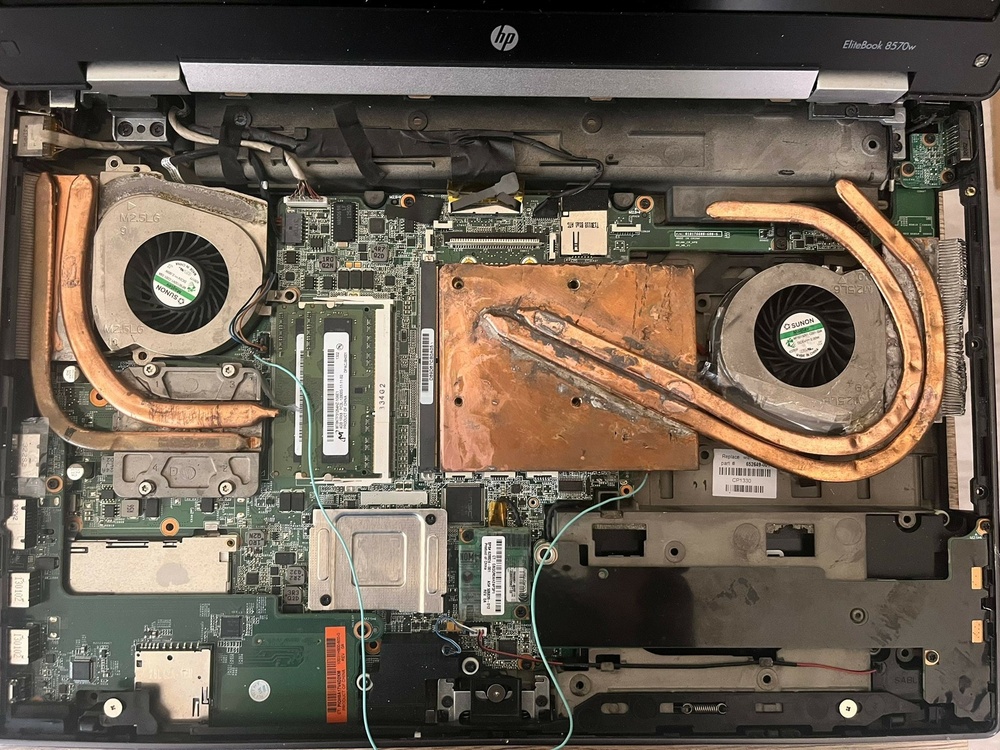
-
HP Elitebook 8570W - is it still good ? Hardware modifications
MODDER1 replied to GuitarG's topic in Custom Builds
Yep, I'm working on the copper plate at the moment, trying to dig some slots for R22 composants (they are higher than the GPU die), so everything fit well and the plate can sit on the die. And when done, i will solder some high performance heatpipes on it (minimum 2)to keep the card cool. Will share some pics later. -
HP Elitebook 8570W - is it still good ? Hardware modifications
MODDER1 replied to GuitarG's topic in Custom Builds
This is good! Yep i saw it. I don't know about underneath, but for the memory on top, it could be very good, much better heat transfert in theory