meowpressreturn
-
Posts
27 -
Joined
meowpressreturn's Achievements






-
Some time ago Windows surprise-updated my Precision 3551's BIOS. After the unexpected, unwanted, and unrevertable update the machine had truly ghastly coil whine which I was only able to stop by disabling TurboBoost in BIOS. Hadn't realised Windows could do that and have since disabled driver updates in group policy and also turned off the UEFI Capsule Firmware Updates option in BIOS. If the BIOS needs to update I'll do that on my schedule thank you very much. Even then its really scary. First time I updated my 7540's BIOS I had to do so with an external 1080p monitor and keyboard plugged in and the lid closed because of some stupid Dell bug that was freezing BIOS updates for 7540s with 4k screens. To unfreeze I literally had to open the machine and pull the battery in the middle of the (endless) BIOS update. Dell's plan to get it to update was to replace my new motherboard with a refurb one to see if maybe a BIOS would update on that, however I read about the monitor trick on the old site and got it updated that way first. (This, btw, was part of an effort to make Dell Premier Color recognise the screen. It didn't work. In the end Dell had to swap my new screen for some refurb one, just to get DPC to work, so that I could set the profile to a reasonable and not eye wateringly 'viBrAnT!!1!' colour configuration. (I couldn't use Intel settings to adjust it because with their latest version of the Intel gfx driver at that time, any adjustment of colour profiles in the Intel application would cause a black screen requiring a use of the recovery environment to reset Windows to the previous system restore point)). These experiences have not left me with a great impression of BIOS and driver quality control.
-
Turned out I did have to cut a bit off one of those plastic label thingies because it had been placed rather badly and was blocking the connector. Still haven't got around to putting in those extra SSDs as haven't been doing anything that uses a lot of space on this machine yet. Came across up a couple of sticks of SK Hynix going second-hand, so with those it now sports a modest 32GB which will have to suffice for now. All fine in MemTest86, but the dirty secret is some of it has Lenovo stickers (Treason!)
-
My 7540 came with 2x8GB SK Hynix HMA81GS6CJR8N-VK DDR4-2666 PC4-21300 RAM in the two hard to reach slots under the keyboard (B+D). My original plan was to replace those with 2x32 or 4x32 but continually put off doing it as always busy and getting at those slots is a PITA. Its not my daily driver so other expenses took priority, and hey, old RAM prices can only get cheaper over time right? lol So next idea was get 2x8 of the same type and settle for 32 GB. But the SK Hynix RAM I saw on Amazon a few days ago is gone already. Is it ok to add 2x8 DDR4-2666 PC4-21300 RAM from a different manufacturer like Samsung or Crucial into the other two slots that are currently empty (A+C)?
-
Good (great) 14" (Dell, or maybe other) ?
meowpressreturn replied to 6730b's topic in What Laptop Should I Buy?
This is a thing of beauty. Proper touchpad buttons, a touchpad small enough your wrists actually get some room to sit on the palmrest, indicator leds, decent key travel with no useless gaps between keys, fullsize cursor keys, dedicated volume keys, the correct number of copilot keys, no shutterless webcam perving at you 24/7, and all in a decently chonky case that won't break just by looking at it. -
All about Windows 10 (LTSC included) news and announcements
meowpressreturn replied to Papusan's topic in Windows
Thanks! The account creation was the trick to getting it working. I created another account as local first (so that it would use the folder name I want), and made it an administrator account. I found it was getting offered the 'enrol now' link - unlike my normal local account which isn't an administrator. Then I linked it to a Microsoft account and did the settings backup thing to satisfy the pre-condition before proceeding, and then enrolled the ESU without any further trouble. So there are 3 accounts on that machine now: When I login with the admin Microsoft account the update screen shows the machine as enrolled for ESU When I check the update screen using my usual local non-admin account it still mentions nothing about enrolment When I check the update screen as the old local administrator account it offers the option to 'enrol now' Only done one machine so far. Will sort out the others later. Probably I'll nerf one to Windows 11 to try and get used to it, but will try to ESU my daily-driver for now. -
All about Windows 10 (LTSC included) news and announcements
meowpressreturn replied to Papusan's topic in Windows
Well, its 4 days to EOL and all my (non-LTSC) Win 10 machines are still waiting for that mythical ESU enrolment option to show up. -
One bump, much less prominent and in a different location on the palmrest. The similarity is the cause, i.e. over-tightening a screw so much that it pushes up the plastic on the palmrest.
-
I have a similar bump on my Precision 3551. It was added by the Dell tech back when they were doing the second, or was it third? motherboard replacement.
-
Asus EEE PC 1215N - Internal USB Hub Mod
meowpressreturn replied to AnthonyBF2's topic in Custom Builds
This is really cool! Looking forward to more such threads! -
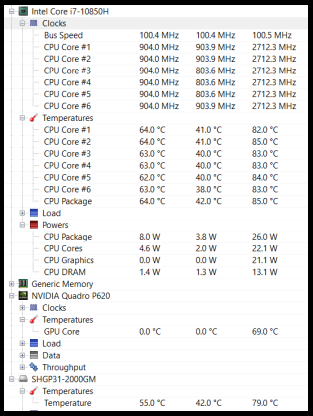
(this laptop = Precision 3551) Toasty! Order of screenshot below is current, min, max, and that current can be considered as idling, though today I'm in the other room and don't have the usual desk clip fan blowing across the keyboard which improves the idle temp by a good 5 degrees and can even get the SSD down near 50. The minimum temps are only seen very shortly after booting. The GPU reports 0 because its inactive, its real temp will be in the 60s too. Its a cool day here today so room ambient is probably a good 2 or 3 degrees under 30c 🙂 A while back I had to disable the turbo boost because it caused horrendously annoying coil whine, and this vastly improved temperatures too. With turbo active Dell lets the CPU go to 99, and it will do that anytime It has to do any kind of work and then idle in the 70s and 80s. With boost off it usually peaks in the 80s. The previous Samsung SSD I had used to idle in the 70s. I switched to SK Hynix P31 Gold which has much better thermals, and it needs them because whoever designed this machine didn't think the SSD was worthy of any airflow.
-
My new(ish) precisions suffered from lots of stutters and lags and sound glitches at regular intervals, and I found that hunting down and killing Dell stuff running in the background makes things a lot better. I also had awful troubles for a long time where my Precision 3551 would completely lag keyboard input for a second or two every 30 seconds or so. It was driving me absolutely nuts. I eventually discovered that this was occurring only when the discrete GPU (Quadro P620) was active. For reasons long forgotten I had Chrome set to always use the nvidia instead of the build-in intel (and would usually have YouTube open in Chrome on the external monitor playing something or other). I switched it to force intel, and with nothing using the nvidia GPU it doesn't seem to do this any more. That one I don't think showed up as interrupts though. Can't remember how I figured out what was causing it. I do have interrupt problems with an ancient Latitude 6430, where plugging anything into one of its USB3 ports will cause interrupts to go to about 30% and then stay like that until the machine is restarted or hibernated (the solitary USB2 port is fine).
-
Garbage trackpad. Garbage keyboard. I bet that palmrest gathers pools of sweat. Look at all that wasted real-estate on the side where you could put lots more USB ports. Nice big screen though. Does nobody actually do any work on computers these days? As a mindless content consumer why would I pick this over a Macbook? As someone actually doing some work why would I pick this? (over ... what?, its all garbage now! fml) I guess someone leasing them for a corporate fleet won't have anything to get alarmed about though. It looks exactly like every other generic blah machine and can run powerpoint.
-
Buy non-original battery ...or not?
meowpressreturn replied to 6730b's topic in Pro Max & Precision Mobile Workstation
That's good to hear. I've an ancient Vostro that I've been using on charger only without a battery for 15 over years. That battery suddenly decided it was faulty and would not charge anymore mere days after its warranty expired (after a year of perfect performance), and my older Latitudes with removable batteries are happy enough without one too. Somewhere along the line I had got an idea there might be throttling issues with newer Precisions with internal batteries and a GPU where the battery was needed to supply extra juice because the charger wasn't quite enough when the GPU was loaded. I've never tested that myself though. -
Buy non-original battery ...or not?
meowpressreturn replied to 6730b's topic in Pro Max & Precision Mobile Workstation
Problem is Dell stop selling the batteries much too soon. My machines are still warrantied for another couple of years - except the battery which only got 1 year, and do Dell have those batteries anymore? lolnope What is particularly irritating is how the batteries do show up in the Dell site, and its only when you try to put one in your cart that it tells you its out of stock. My Precision 3551 battery is at 17% wear and doesn't seem to have swelling yet, so hopefully I can keep using it for a while yet. Its already pretty hopeless for using off the charger for anything more than moving from room to room or sending a few emails (Especially if trying to work in Visual Studio). Can maybe get a bit over an hour. Haven't tested if the machine can post with no battery or not, if it does maybe I can still use it with a bigger charger and no battery once this one gets spicy? Amusingly the 11 year old (long life) battery in my E6430 has finally started popping a warning dialog saying I may notice shorter usage time. (That ship sailed a decade ago. ) -
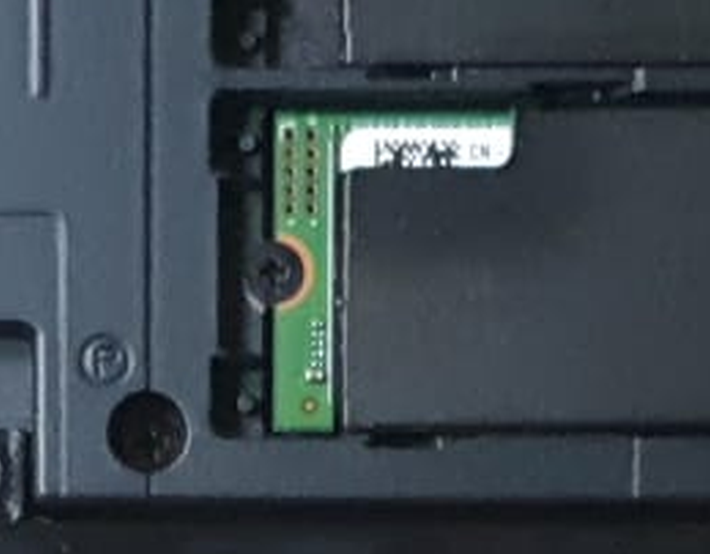
Finally got around to upgrading the 512gb SSD in my 7540. (Put in a 2tb SK Hynix P31 Gold) I had to resort to PLIERS to loosen the screw holding in the original SSD! 😱