Scruffy
-
Posts
93 -
Joined
-
Last visited
Content Type
Profiles
Forums
Events
Everything posted by Scruffy
-
multiplyer 47x then voltage offset - (minus) and check if -80 is ok. generally with 9700k i have -80 and 46 on all core. tried -100 millivolt but was not stable. ps: where did u get rtx 3080 heatsink from ? t
-
clevo p870tm/tm1-g Official Clevo P870TM-G Thread
Scruffy replied to ViktorV's topic in Sager & Clevo
an rtx 3080 heatsink for that model made by you would be really appreciated 😄 till now im good with my home made one 🙂 -
clevo p870tm/tm1-g Official Clevo P870TM-G Thread
Scruffy replied to ViktorV's topic in Sager & Clevo
this exact heatsink was used by a russian dude... it reported to have high temperature on full load when only with air cooling mode. that's because it's not made of full copper and it has 2 heatpite each gpu side... too few for better performance. it's on yt..... search for p870 rtx 3080... there are metro exodus test and u can see gpu temperature is really gigh. i talked to that guy on vk and he confirmed heatsink was expensive and he get gihg temperature. for me best performance/price is the other heatsink viktor showed us in this thread. for 100€ my heatsink is not that bad too 🙂 ps: about that 3080 with p870 score that are close or equal 4080-4090.... to get that score, massive overclock has to be done..... if an 3080 mobile score like 4080 mobile..... fair comparison would be compare overclocked cpu, overclocked gpu on both system.... -
power limit 1 to 135000 , also power limit 2 to 135000. then on processor on bottom of that bios page, put the "-" and then 80mv. try with all core to 4.6ghz.
-
unless ur under air conditioned enviroment in summer i downclock the cpu to 4 4.2ghz max .... during winter i have 4.6ghz with -80mv. power limit set to 135 watt. more then 4.6ghz must be usefull only for benchmarking .... no real need to daily use a notebook with such high cpu frequency in normal gaming. this is all my opinion about longevity of notebook.
-
EUROCOM SKY x9c model (p870tm1‐g) added rtx 3080 mxm but no display yet
Scruffy replied to oops's topic in Sager & Clevo
what heatsink are u going to use for the 3080 ? good news ur getting picture now 🙂 -
EUROCOM SKY x9c model (p870tm1‐g) added rtx 3080 mxm but no display yet
Scruffy replied to oops's topic in Sager & Clevo
did u try with hdmi if u get any picture ? -
what video card u have ? (post picture) also does the card pop up in device manager as generic , or u just have black screen ?
-
clevo p870tm/tm1-g Official Clevo P870TM-G Thread
Scruffy replied to ViktorV's topic in Sager & Clevo
4090 superposition 1080p high 4090 superposition 4k optimized test made with alienware m16. my stock 3080 with 9700k @4.6ghz score 16,5k on 1080p high and around 8000 at 4k -
clevo p870km bios question and upgrade to rtx3080 on the way.
Scruffy replied to Scruffy's topic in Sager & Clevo
problem with the vapor chamber is that it's not available at all and at low costs. originally the normal one with gpu heatsink only was 150€ new, while the gpu+ cpu plate was 180€ new. now i cant find it cheap and cant find any tutorial to make it suitable for the 3080. -
EUROCOM SKY x9c model (p870tm1‐g) added rtx 3080 mxm but no display yet
Scruffy replied to oops's topic in Sager & Clevo
i mean he has no display, but without ram does the pc make some beeping ? (so it mean pc see the ram when inserted). things like that. -
clevo p870km bios question and upgrade to rtx3080 on the way.
Scruffy replied to Scruffy's topic in Sager & Clevo
would be really cool if someone from russia can bring to europe the modded heatsink for the 3080. now that summer is coming im hitting the 86° gpu limit when gaming 😞 -
EUROCOM SKY x9c model (p870tm1‐g) added rtx 3080 mxm but no display yet
Scruffy replied to oops's topic in Sager & Clevo
ok so it's effectively a tm product. remain to test withour ram if it act different. -
EUROCOM SKY x9c model (p870tm1‐g) added rtx 3080 mxm but no display yet
Scruffy replied to oops's topic in Sager & Clevo
do you have backlight ? if u put usb drive with a led light in it, does it blink ? synthom without ram are the same? without gpu? without ram or gpu it should act different.... like with no ram beep; if it is still the same is cpu compatible ? installed properly ? it should support till serie 7 of intel if bios is original. -
hi u have to install the driver from clevo website for your model. in addition after u discover what realket chip it is, u can upgrade the realkek driver part and let the sound blaster software untouched. i did it with my old alienware m17x r4.
- 1 reply
-
- 1
-

-
- clevo p670
- soundblaster
- (and 1 more)
-
dell poweredge r730 as gaming rig ? bios mod needed
Scruffy replied to Scruffy's topic in Desktop Hardware
update: till now i was able to make nvme boot working and also resizable bar working 😄 now i need only to fix fan speed and improve system stability.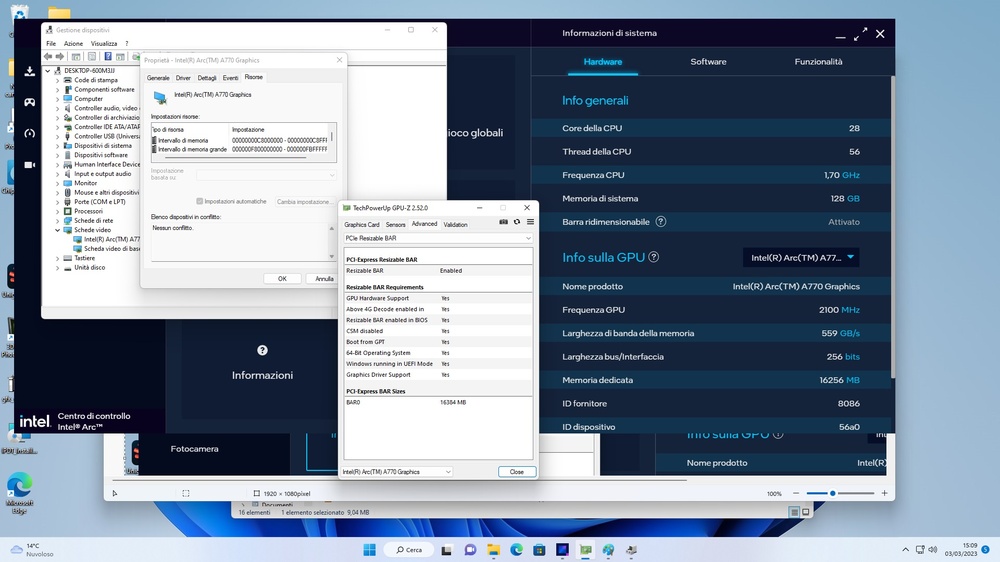
-
Help find vbios Clevo Gtx 1080 1BAO v.86.04.80.00.23
Scruffy replied to runix18's topic in Sager & Clevo
here is some vbios from dsanke bios rar for clevo VBIOS_With_GOP_Updated_To_0x3000A_For_GTX_1000_Series_Graphic_Card.rar -
dell poweredge r730 as gaming rig ? bios mod needed
Scruffy replied to Scruffy's topic in Desktop Hardware
update: i had to entirely remove the mainboard to dump bios as in r730 it is located at the bottom of mainboard. r730_original_and_nvme_rebar ive attached original bios dump. originale.bin is the dump from working server. bios2.bin is my attempt to insert rebar support and nvme boot support. about nvme it already had an nvmexpress ffs, but i inserted the one provided by a dude on a site to make boot option from nvme available. now can someone check if all is ok, and maybe remove bios protection so i can flash it without disassembly tyhe mainboard again , or maybe now that i have original dump , i can flash only bios part without me or other are not needed. also is there a way to make intel arc a770 supported by bios, because now server doesnt recognize it and make server go full fan speed (very loud ) 😄 also now that i have done this can i add support for other things to make it more desktop and ofcourse server compatible ? i dunno maybe creative audio suport, rtx support and so on. edit: both nvme and rebar doesnt work. im still doing some try. edit2: nvme is always seen in windows booting from an 2,5 ssd, but i cant boot from it (nvme to pcie adapter) -
hi all, i went into loving to experiment new thing and decided to make a dell poweredge r730 server rack as gaming pc, but till now i come out only with problems , even if there are some video on yt showing that this machine is capable of running games just fine. first problem was to make ssd nvme in pcie slot bootable. now i can boot using clover usb drive, but injecting nvme efi into bios i think is possible as there is some tutorial for other dell server workstation. second big problem is vga... i picked un an intel arc a770 and it give me whea uncorrectable error everytime i try to install a driver, chiposet vga no matter it give me that bsod. i then find out that bios doesnt even have resizable bar support, but for that too there is a github project... i would like to get some opinion about that and if all this project can be made . server just work fine with an old nvidia 9800gt. my question now is: to make intel vga compatible with this server , do i need to check gop version, biuos support or what can caouse the bsod im getting ? i know i could have get a desktop pc straight away, but was liking toi get into server software , config and capabilities to get new know how on the argument. ps: system has 2x 14 core cpu and 128gb ddr4 2400mhz with dual 750 watt psu.
-
clevo p870km bios question and upgrade to rtx3080 on the way.
Scruffy replied to Scruffy's topic in Sager & Clevo
hi for the keyboad software look for HK.5.0001.1.54 on clevo official site. Hot Key software. for the bios ask viktor. he helped me with that. but better tell us what bios u currently have and what ec bios version u have too, because when i first flashed bios i had also to check gop version too. -
what temperature u have with one 1080 and vapor chamber ? because ive see lots of 1070-1080 die for too much overheating. maybe they had the single air heatsink. for nvidia driver to get installed after dsanke bios just install geforce now and it will install the latest driver just fine. at least it was that way with my clevo.
-
Motherboard probably dead on p950hp, but I still want to investigate it
Scruffy replied to yhancik's topic in Sager & Clevo
hi if u can make a motherboard picture where it get power from psu. there should be one big resistor and 2 mosfet. check voltage on that big resistor multimeter set to 20 or 200dc if volt exceed that 20v ; ground on any metal of mainboard and red probe on resistor. with a picture i can give more detail. -
clevo p870km bios question and upgrade to rtx3080 on the way.
Scruffy replied to Scruffy's topic in Sager & Clevo
i flashed whole bios. "fpt -f biosname.rom -rewrite -y" as written on dsake guide. first "meset", with automatic reboot, then backup bios ;flash bios and then "fpt -greset" command -
clevo p870km bios question and upgrade to rtx3080 on the way.
Scruffy replied to Scruffy's topic in Sager & Clevo
solder an adapter on that notebook mean disassembly it and if i can skip that part is much better, so today i got the power to try flashing the bios , and in case of disaster, my steam deck was ready with programmer 😄 i used the fpt flash with viktor modded bios and all went super ok 😄 tried installing driver from latest nvidia driver file from nvidia site and all is perfectly working. best part was i didnt need to disassemble the notebook 🙂 now the last think i need to do is clean the cloudy inside lcd ..... so boring big tnx to everyone who helped me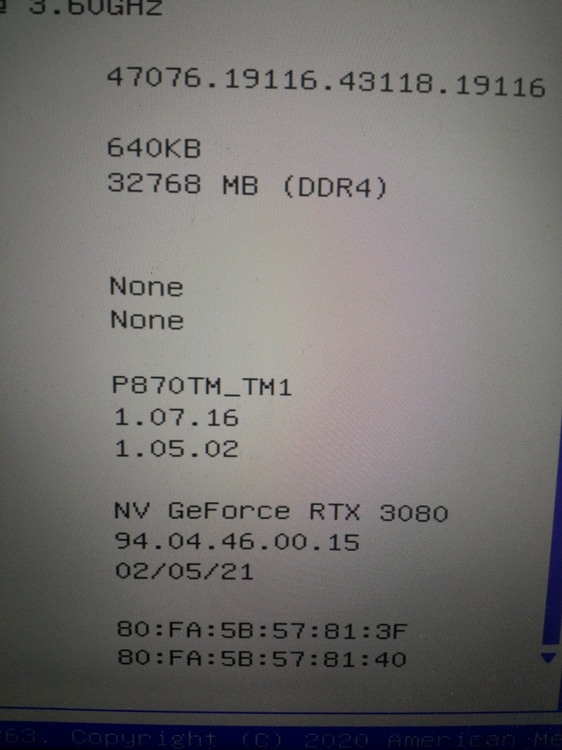
-
clevo p870km bios question and upgrade to rtx3080 on the way.
Scruffy replied to Scruffy's topic in Sager & Clevo
hi, by rtx 3080 support i have rtx support now and my 3080 works, but i have to mod inf driver each time. iahve dedicated programmer, but flashing with that mean take apart whole notebook and i dont want to do it now. i have flashed bios like 5 times always with fpt procedure. why i cant flash it with that way ? ps: looking for viktor heatsink reply ... where are u man ?