
Hyper
-
Posts
19 -
Joined
-
Last visited
Content Type
Profiles
Forums
Events
Everything posted by Hyper
-
I upgraded my nVidia graphics driver to version NVIDIA RTX Driver Release 595 R595 U2 (595.79) | Windows 11 https://www.nvidia.com/en-us/drivers/details/265805/ And now I can adjust my screen's brighness just fine. And I can enjoy all the advanced features of my expensive nVidia card including desktop recording without the Intel card getting in the way.
-
Perhaps when Reddit and Discord are going to force everyone to verify their ages that users who do not want to do that are going back to traditional forums. Until that time we have to accept that we're not as large here as the old NotebookReview forums once were.
-

Best way to remove sticky rubber coating from surfaces?
Hyper replied to Will's topic in General Discussion
Isopropyl alcohol will usually remove it. But it may be hard on the plastic leaving white stains. And often the entire plastic part is disintegrating and cleaning the sticky residue will not stop the process. -
Update: I uninstalled all graphics drivers and monitor drivers using DDU (Display driver uninstaller) in safe mode. Then I ran Lenovo Commercial advantage to reinstall the drivers. All drivers are reinstalled. Still the same problem.
-
Ty. I installed the new BIOS. Unfortunately that did not solve the issue.
-
Thank you. I installed this version after removing all display drivers with DDU but unfortunately it did not fix the issue for me. I notice that when I put my grahphics card settings to discrete only in BIOS, the screen brightness goes to peak directly from the next BIOS boot. I also noticed that the Intel graphics card remains active in the device manager even when I set my BIOS to only use the discrete graphics card. Do you have the same quirks?
-
Unfortunately, that did not solve it for me. I also got a thread at the Lenovo forums going about this, but no solutions yet that work. https://forums.lenovo.com/t5/ThinkPad-P-and-W-Series-Mobile-Workstations/Lenovo-P16-Gen-3-Screen-brightness-controls-fail-when-using-dedicated-graphics-only/m-p/10020358
-
Which version of the nvidia driver are you using. Do you have a download link to the version that works fine on yours?
-
When I set the BIOS settings of my Thinkpad P16 Gen 3 to use my dedicated nVidia graphics card ONLY, my monitor switches to full brightness and the brightness controls of my laptop and Windows do not work anymore. Does anyone know how I can fix this?
-
My mobile workstation history in 3DMark results
Hyper posted a topic in New here? Introduce Yourself
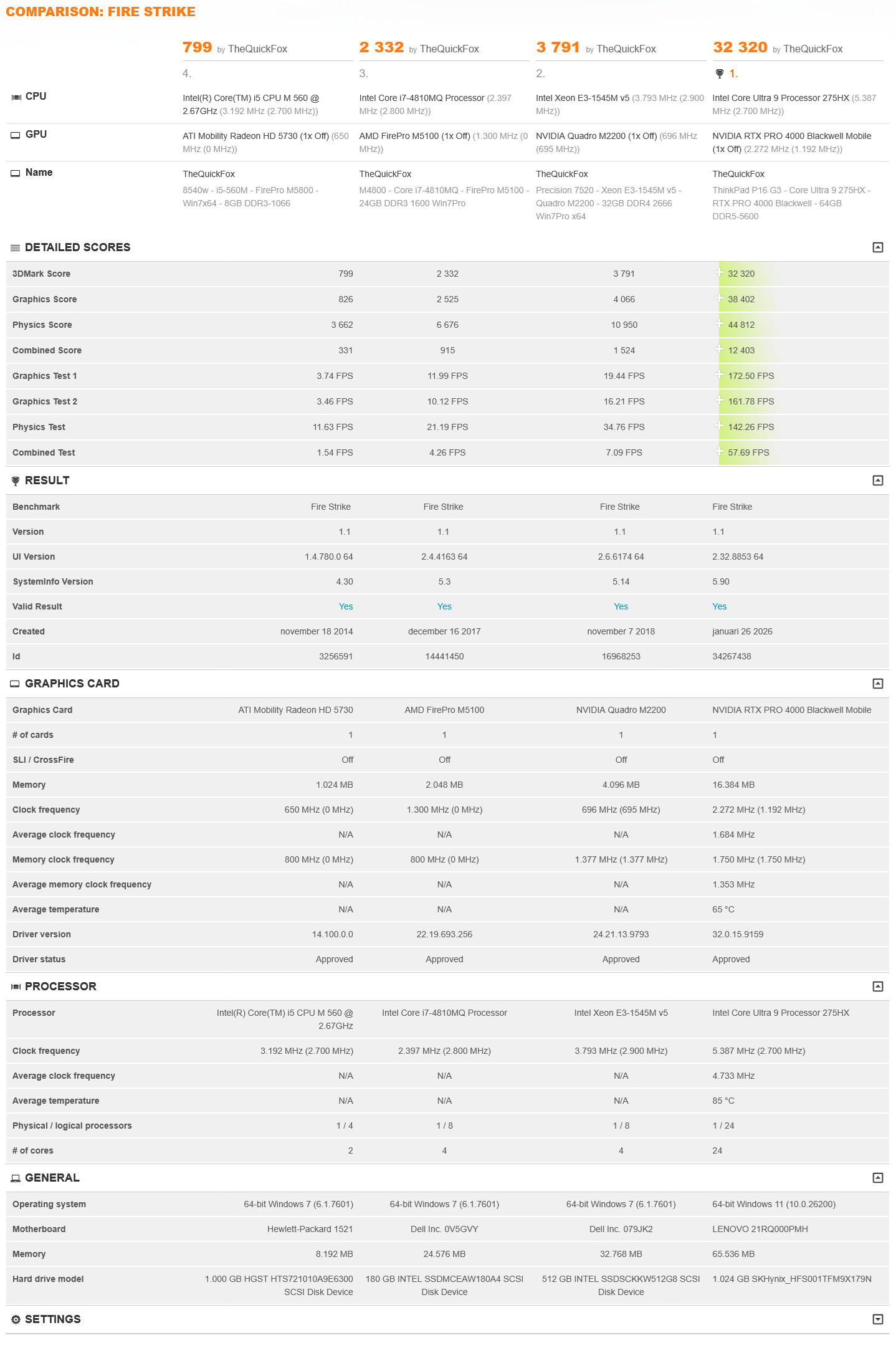
Hi, I'm a PC enthusiast that used to be active on the now-dead Notebook Review forums. I like premium business notebooks for their no-nonsense reliability and build quality but I also like a notebook with a powerful graphics card for 3D and gaming. Therefore, I always went for a professional mobile workstation as my laptop. I still have all of them because I like PC hardware and with all of these systems I have many years of life history. For example, in 2012 I had a major accident that sent my to a foreign hospital for a week. Could not leave my bed after surgery. I had nobody there to keep me company, could not understand a word of Czech TV and had no internet. But at least I had my Elitebook 8540W with me with all of my music, with some games and a diary to write in. Here is the history of my systems: 2010: HP EliteBook 8540W (Core i5-560M - FirePro M5800 - 8GB DDR3-1066 - Win7Pro x64) 2015: Dell Precision M4800 (Core i7-4810MQ - FirePro M5100 - 24GB DDR3 1600 Win7Pro x64) 2018: Dell Precision 7520 (Xeon E3-1545M v5 - Quadro M2200 - 32GB DDR4 2666 Win11Pro) 2026: Lenovo ThinkPad P16 Gen 3 (Core Ultra 9 275HX - RTX PRO 4000 Blackwell - 64GB DDR5-5600 - Win11Pro) ^Click image for full size It's quite stunning how much PC technology has improved over time.
- 1 reply
-
- 3
-

-
- mobile wrkstation
- history
- (and 4 more)
-
I have flashed many Dell bioses and not yet has one failed. If course, it happens but the good thing with Dell is that the actual flashing is being done outside of the OS. So the actual flashing is being done in a clean software environment. All the failed flashes that I experienced with other branded systems/motherboards was when flashing from within Windows. Some tips: If you have bad memory, don't flash your BIOS. Because the BIOS data will pass through the memory before flashing so bad memory can corrupt the BIOS data before it is flashed. Make sure your notebook battery has some charge before flashing. If power fails, you sill have battery backup power. Be patient. Do not interrupt the flashing. Modern PC's with DDR5 memory can take up to 5 minutes to calibrate their memory timings after a BIOS flash or when detecting the memory. Screen will be black. Just give it time.
-
You also asked on Reddit. Answer is the same: I can't tell anything about the battery. I always use it with the AC power supply and only use the battery in case of power emergencies.
-
After using Dell Precision mobile workstations for years I made the switch to this Lenovo Thinkpad because with similar configurations the price of a Thinkpad was around € 1000 lower. Of course it blows my old Precision 7520 with Quadro M2200M (Maxwell 2nd generation) out of the water. I got configuration 21RQ000PMH (Core Ultra 9 275HX - RTX PRO 4000 Blackwell - 64GB DDR5 5600) Yesterday I've been running various FutureMark / UL benchmarks which I will link here if you like to compare this laptop to your configuration: 3DMark FireStrike: 32320 3DMark FireStrike Extreme: 19358 3DMark FireStrike Ultra: 10819 3DMark TimeSpy: 15846 3DMark TimeSpy Extreme: 8382 3DMark Port Royal: 10860 3DMark Steel Nomad: 3855 3DMark 11 Performance: 40876 3DMark 11 Extreme: 20436 3DMark Vantage Performance: 115267 3Mmark Vantage Extreme: 82618 3DMark06: 64523 3DMark05: 79223 3DMark03: 275953 PCMark 10: 9763 PCMark 10 Extended: 13417 GeekBench 6 CPU: 16277478 GeekBench 6 OpenCL: 5667305 GeekBench 6 Vulkan: 5667321
-
Overheating Precision 7510
Hyper replied to Reshen's topic in Pro Max & Precision Mobile Workstation
I got a fan malfunction on my (similar) 7520 when it was new. Dell replaced it under warranty. They replaced the whole fan assembly unit, cooler and heatpipes included. This is how the malfunctioning fan sounded. -
I gave my M4800 some love with a 512GB mSATA boot SSD, 4TB SATA 2.5" SSD and a fresh install of Windows 11 instead of Windows 7. BIOS + MBR + Windows 7 Pro x64 to UEFI + GPT + Windows 11. I'm happy to report that Windows 11 works fine on this system. You need to use the system requirements check bypass in order to install the OS. I used mostly the Windows 10 x64 drivers from Dell except for the AMD FirePro M5100. Here I got the drivers directly from AMD. Issues I had was a BSOD with the Intel Rapid Storage driver installed. I uninstalled the driver and used the Windows-provided storage driver instead. And when I disabled switchable graphics in the BIOS I got a black screen in Windows. So switchable graphics needs to stay enabled. With this the system works very nicely and stable.
-
Buy non-original battery ...or not?
Hyper replied to 6730b's topic in Pro Max & Precision Mobile Workstation
I would not go that way. Li-Ion batteries are a bit risky. Even brandname original batteries of major notebook manufacturers have had serious problems in the past. 3rd party batteries are riskier because you don't know to which quality and safety standards they are manufactured. They probably will be fine, but it's a gamble. And if you're on the losing end of the gamble there can be fire. Just buy original Dell ones for your laptop. -
I went through quite a hell getting an additional 16 GB of RAM for my Dell Precision 7520. I wanted to upgrade the memory from the factory-installed 16GB DDR4 2666 to 32GB. The ordered Crucial modules, recommended by the Crucial configurator did not work however, so I contacted Dell support via chat Dell recommended me other (Dell branded) memory that I ordered but also were incompatible. After contacting Dell support again, they recognized that they recommended the wrong modules and told me that the only compatible memory modules are the ones that I already had installed. (Dell F875V / Kingston XF875V). Small problem: they were nowhere to be found in The Netherlands. I ended up buying them from eBay and finally I got a working memory upgrade. I'm quite disappointed with this lack of memory compatibility. With other Dell computers I never had issues to install additional 3rd party recommended modules. Perhaps the 7520 is a bit special because the Intel chipset officially only supports up to DDR4 2400 memory. So it can be a bit tricky to buy a configuration with minimal memory and buy the memory elsewhere.
- 14 replies
-
- 1
-

-
- precision 5560
- sdd
- (and 2 more)
-
Dell Precision / Windows 11 information
Hyper replied to Aaron44126's topic in Pro Max & Precision Mobile Workstation
I'm in the process of reinstalling my Dell Precision M4800 from BIOS/MBR/Windows 7 to UEFI/GPT/Windows 11. With mixed feelings because Vista and Windows 7 are my all-time favourite Windows versions. But Windows 7 ESU is on it's last legs and I got some BIOS/MBR related problems so it is time to bite the bullet. Maybe a good thing because I had years of issues with the AMD FirePro M5100 + Intel HD Graphics drivers on Windows 7. I only could find one version of both that properly worked together. Perhaps AMD driver support for Windows 11 is a bit better. I'll have to see about that. Already got my first BSODs but this time with the intel Rapid Storage Drivers. Uninstalling them was the solution here. (Inaccessible_boot_device) To be continued.