
tps3443
-
Posts
2,126 -
Joined
-
Last visited
-
Days Won
88
Content Type
Profiles
Forums
Events
Posts posted by tps3443
-
-
On 1/23/2026 at 12:04 AM, Mr. Fox said:
I literally just now watched this video and was coming here to post it. 👍 @tps3443 might want to watch this.
Someone used the wrong screw and drilled through the card @Mr. Fox lol what the heck. People are something else man. I’ve had mine apart like 4 times now. You would have none of these issues though. That’s not a screw that would be included with it either. All the screws in that section do not look like that at all, and they all match.
-
 2
2
-
 1
1
-
 1
1
-
-
21 hours ago, Papusan said:
Asus is Asus. I will see it before I belive it (always empthy). Prices will go up. On all SKUs. Those that want 16GB cards that can't afford xx80 will go either with 9070XT or 5070Ti. They will pick what they see first in the store (nvidia if they only want Nvidia). I expect more pressure also on 5080 cards.
Picking your favorite brand and SKU model will be much harder forwards. But if you are in for new 16GB cards, you will get one. But it takes longer time than before. And more expensive.
Same as I did with my 5090. Empty everywhere in the spring months but grabbed one once I had the chance. There will always come a chance you find what you need/want.
It's Wccftech, but still. As I already pointed out... You get cards if you really want. Just don't buy from scalpers/scammers.
$3299 (ROG Astral)5080, LOL
Edit. 4090 have offered an fantastic value over the years. But the vanilla 4080 was a huge failure for $1200.
480+420 EK rads in push and pull. Two D5 and EK-made EPDM rubber tubing. EK block for the Cpu. Fan for cooling the ram. AIO and aircooled cards. + loads of fans in the D1000 big black box.
That’s great, yeah I’m genuinely amazed that just (2) 480’s is so powerful. It’s easily better than my previous External Alphacool 1080x45 rad.
I’m wondering about adding another though in the future, but the only way to add another would be to introduce warm air in to the case. And I never like doing that.
Currently I’m setup with (1st) 480mm GTX rad in the basement (Air passes through the bottom sides of the case) the 2nd 480mm GTX rad is in the top roof portion of the case, so it exhausts warm air out of the case. So my case stays incredibly cool inside.
If I added to the front= Warm air inside case.
if I added to the floor below the 5090 warm also blows inside.
-
1
-
-
@Papusan What are you running for a custom loop?
-
1
-
-
What a deal this is for a HWLabs GTX480.


-
1
-
-
2 hours ago, electrosoft said:
@tps3443 on a whim I asked AI "sample ddr5 8800 timings" as I compare these three sets and their XMP profiles vs my spelunking 8800->9200 for shiggles and guess who popped up in the search? Yep, YOU brother! 😁

-----------------------------------------------------------------
I guess PSU makers now realize this connector is here to stay and it makes sense to add protection mechanisms AND provide another reason for consumers to purchase yet another PSU.....$$$
As for the Matrix, I said it on launch day it was available on the US Asus website for pre-order for well over 6hrs as I kept checking and it finally went out of stock so it wasn't like they sold out in a flash here because consumers realized the $4k cost was insane for that. I had it in my basket and at the "click to order" state each time to verify.
Still wondering what the MSI Lightning Z is going to clock in at......
----------------------------------------------------------
Rubin slated for second half of 2027 which is inline with adjusting back to a fall release cycle IMHO so almost three years between cycles.....

-------------------------------------
5090 prices are trending up hardcore.
All sellers are mainly out of stock.
Expect future restocks to be priced accordingly.....
Amazon SHIPPED and SOLD BY Astrals are now $4199.99!

Price hikes are incoming....
That’s really funny! Hopefully the video is useful as it covers everything I learned with LGA1700 and DDR5 overclocking. For 8800 Gear 2, I would probably use a 40-54-54-54 as an easy starting point, and 32k tREFI. Those rams were on chilled water and 262k tREFI is heavy with heat and also very temp sensitive so it’s a double edged sword, and 1.620v VDD/VDDQ is also kinda heavy with heat. 😂 it actually didn’t need that much, and I was able to dial it back. But that was its first boot, and just typed in something crazy and it seemed to just scoff at it, which was why I made the video.
I’m really unfamiliar with Z890 IMC strength. But very curious to try the platform out with maybe something cheaper like a 245/265k.
-
2
-
1
-
-
1 hour ago, Mr. Fox said:
Do they have any board partners stupid enough to use it? Hope not.
So what’s the issue with the actual board though?
Performance wise I just wish I could do is flash my bios. The bios holds me back. And it’s not all that much.
I could care less if the board was 40 pieces lol. It’s a 5090. It performs.
-
1
-
-
49 minutes ago, Reciever said:
Biggest bummer if what I read is correct, you have to plug your monitors into the GPU handling the frame generation. Not sure if my 3090ti can do 4k120hz without DSC. So not sure if it's worth the hassle of testing.
Definitely an interesting software though probably pick it up.
Is that the same thing as when you minimize a game and it has to regain signal?, and it’s not an immediate response? It was like that with 4080/4090’s that couldn’t handle it. Every-time I would press the windows button in a game, the monitor would go black and have to regain signal again then It would finally reveal the desktop. Fortunately they fixed it with the 5090! Pressing windows button is immediate. My 3090 didn’t have the issue either. It was a pain with 4000 gen.
PS: Last week I refreshed my GPU’s pads and TIM, re-surfaced the block real nice!


-
44 minutes ago, Reciever said:
It would be interesting to see this in conjunction with lossless scaling.
We just get two 5090’s for that. Double the GPU! Double the melting fun! 😂-
 2
2
-
-
8 hours ago, Papusan said:
What stands CES for? Electronic for corporate?🤐 Why did nvidia bother with CES? To promote new AI chips/servers for business.
NVIDIA Confirms No New GPU Announcements Planned for CES 2026
Published 11 hours ago by Hilbert Hagedoorn
They are probably burned out with all the Chinese compliant models released. We already had (3) RTX PRO 6000’s in the USA. I’m probably missing one.
RTX PRO 6000D
RTX Pro 5000 72GB
RTX 5090D
RTX 5090D V2
I tell you something very interesting and cool, and I wish AMD would properly optimize it. I think if game developers were on board too, it could be great!

-
2
-
1
-
-
1 hour ago, Clamibot said:
Lossless Scaling allows for up to 20x frame gen. It offers very interesting results.
I wonder what that would be like with a 5090! I hear it’s great for older GPU’s giving more power when needed, but I always hear DLSS4 is far superior. But I have never tried lossless scaling.
I remember when I first upgraded from a 3090 to a 4080S, and was just blown away by how great FG was.
I typically just run 2x FG my self.
-
3
-
-
We’re getting 6x Frame Gen in Spring of 2026 for RTX 50 series guys!! lol. I personally love frame Gen. I don’t care what the haters say. I use it especially in older poorly optimized titles that are CPU limited, it will turn 30% GPU usage in to 70% GPU usage on an older game. It has the same effect on newer games as well.
-
2
-
1
-
-
23 minutes ago, electrosoft said:
Yeah I just couldn't do the MSI Unify Z890 even at $399.99 knowing I've been sitting here working with Asus BIOS for the last several weeks with the Strix. Asus is such a greedy dog water company, but their BIOS is the best for my use cases atm across several in the house and gets the most love and engagement in the forums too while I finish sorting out the memory side of this equation first (as I always do since 12th gen / AM5).
--------------------------
Updated and same as before. DOS status update progression bar on PD_Update and auto exit then delayed silence on ASMx4242 till it popped up with the "Update or erase successfully. Reboot now?" Window. I don't recall getting that window last time and checked processes to make sure it had completed.
Yeah, its great working with Asus bios. One bios that's pretty annoying is ASRock lol. My sons Z790 DDR5 bios is a pain and very confusing. Theres like 4 different settings for CPU load line. The ASRock bios reminds me of Aorus/Giga bios.-
2
-
1
-
1
-
-
Playing the newer Avatar expansion. Native 4K with Frame Gen on, graphics on Unobtanium. Card reaches almost 1,000 watts! and averages around 800-900 watts from my 5090FE. Been running a few hours now.
Cable melters DREAM right here. My 5090 spends its life pumping pixels, and I’ll say this is on the higher end of what I see in games, even more than Starwars Outlaws, and a cyberpunk 2077. It also uses 20GB VRAM.

-
3
-
1
-
-
Has anyone here melted their cable yet? I see many ordering the Powerview II. Looks pretty dang nice!
-
1
-
-
47 minutes ago, Mr. Fox said:
The problem is laptops are built with a obsessive degree of focus on embracing compromise. They are compromised in every possible measurement, sacrificing performance and giving the greatest levels of priority to:
- Form factor
- Weight
- Power consumption
- Battery run time
- Noise
- Aesthetics
Performance is always a secondary consideration and less important. The only way to truly appreciate a turdbook is to value those other things more than one values performance. They are built to be disposable, limited use products... limited in lifespan, service, repairability, upgradability and performance.
It is full of compromises yes! But, with some re-pasting, with some tweaks in Throttle stop, it has turned into a butter smooth gaming beast where you find yourself just enjoying the experience of gaming or working, without seeing any limits the machines may have. See, it's okay to have a 4090-gaming laptop when you own a 5090-gaming desktop.
I think if we can accept that laptops offer a lower level of performance compared to desktops, but they can provide a smooth portable experience, then we'll be okay with them. I owned an Intel ARC B580, and that thing absolutely sucked in comparison to my 4090 laptop GPU, they were many miles apart. So, it was far better than that was! lol. No VR support, horrible upscaling, weak performance in games. If I get tired of the laptop, I just walk over to my desktop. So, since I have a fallback system, I am okay with any downsides with the laptop has, and I think that is why some can bare it.
If I do sell it, I probably won't get another laptop.
-
1
-
1
-
On 12/31/2025 at 1:36 PM, electrosoft said:
I do think the 5080 is "better" value compared to last gen. Faster, new tech, less than the 4080 at launch (matching the 4080 Super price).
With Nvidia having a lock on the market past the 5070ti, I'm surprised they didn't price it at $1199.99
You never used it on your P750 class Clevo laptop back in the day with the 8086k/8700k CPU? But yeah, Throttlestop has been a staple for me in various capacities since the Alienware M15x when pushing my 920xm/940xm chips back in 2010....
I think Kevin (Uncle Webb) still mains it and works on it even to this day. Such a blessing of a piece of software to have. I've lost count how many times it pulled locked down laptops out of the dregs of performance.
When I was in MC the last time, I checked their 285hx/5090 Raider they had on display and the BIOS is still available. That really is their main selling point. Asus locks theirs down to a degree and only gives you UV. Dell has some OC controls but nothing like MSI and definitely not like Prema.
Yep, laptops can be subject to degrading too with 13th/14th gen chips. Hopefully Acer released an updated BIOS to counter that if needed but the nature of Intel's HX chips from many makers limit top end voltage anyhow by design because they are really packing a desktop part in there now since the 12900HX just neutered down power wise.
I'm not sure how well tREFI boosting would work out in a small, hot, confined box like a laptop especially without even decent heatsinks on the modules especially with some laptops clocking in at 6400+ now. Still would make a fun modding project.
That connector is platform agnostic in the worse way.
Sapphire Nitro+ 9070xt is probably the nicest looking card out of all the 9070xt's on the market and the hidden 12v2x6 rear design is slick but the very nature of the connector will require some cable twists and turns regardless of orientation.
You also have the cables passing over the blow through portion of the heatsink fin stack basically blowing hot air on the cables/connector itself. I'm not sure if the active air flow helps or hurts in this scenario. Warm air or no air? Kobayashi Maru
The higher end (340w+ rated) 9070xt's can also be subject to 500w+ transients.
I do notice, especially in the MSI 5090 one, a serious bend on the cables in picture one meaning a lot of bend and downward pull/pressure.
Not that it gives a pass to the piss poor excuse of a connector, but you can't just throw caution to the wind with this thing.....
And yet again, advocating for light colored connectors to see scorch marks early on......
Always...ALWAYS give open box / returns a try. You have a full return window in place AND you can score some fantastic deals.
I've literally saved tens of thousands picking up open box items for the last 30 years for personal and professional use.
Yeah, you get some stinkers but you just return those for a full refund.
Remember, I scored my 1.125v Vanguard 5090 for $1971 open box from Microcenter in August saving $600-800 off the original MSRP and now try finding one in the states for a not insane price.
Open box 265k for $205 w/ BF6 code included
Open box Z890-A Strix for $176 basically brand new
That's over $1k in savings right there and that's just the tip of the iceberg of items I picked up open box / return /refurb.
5080 MSRP is ok value vs last gen in the face of same pricing, performance bump (however mild) and new technologies in the face of inflation. You are getting better for the same price.
It is not good value compared to the 5070ti which at MSRP is the new "sweet spot" for Nvidia this cycle and only because the 9070xt keeps them honest.
Cache is the blessing and the curse.....again.
Overall, the 9800X3D is the winner (no shocker there), but if he ran this at 4k (or even 1440p), you would see that cache take a bigger hit and the results would start to flatten out a bit and I suspect in the lows especially the 14900k and 285k would take over.
I would have preferred some 4k results and on a 5090 vs 1080p and 4090, but you take what you can get. 🙂
All bets are off as we head into the pricing unknown of 2026 but for the last few months, we've clearly been told about supply/demand and we have:
TSMC raising prices
TSMC booked up till 2027 and potentially beyond
DRAM makers controlling output
AI markets gobbling up memory
DRAM makers booked up for at least this year
Crucial flat out abandoning the consumer sector (I will never buy from them again even if they come back)
Nvidia cutting back output on consumer grade GPUs to favor AI allocation
I can't see prices going to $5k MSRP for a 5090, but I can definitely see supply on the fall and prices on the rise overall including the 5090.
$2499.99 MSRP for an FE is not out of reach.....
You simply tell work, "Look buds, I got to hook up this WV2 for my peeps in the Overclocking thread in NBT, so you'll be aight!"
I am sure they will think about it for a few seconds and nod their heads in agreement and tell you it's ok and get those results to us ASAP!
😁
I do not remember using it with my Sager 15" 8086K laptop. I remember benching/gaming without any sort of phantom throttling. I was battling heat with that thing most of all.
The biggest issue I have had with this laptop is not really throttling, but the bios is so locked down that I could not turn off the CPU power saving features. When I play games on it, Intel SpeedStep and C1E were just always working at their hardest. So, all of the CPU cores were flickering down/up/down/up/down to lo/high frequencies. All of the CPU core frequencies looked something like this graph below. And this was causing GPU usage to just tank. Since installing throttlestop, I have turned those features off, it has allowed me to change the max pwr limit some as well. It was also causing micro stuttering really bad.
For the first time, the machine actually runs smooth.
PS: I am running my default GPU bios again with full performance. I am not sure why its performance was gimped before.
The machine is able to run normal 5.1-5.2Ghz in games, and 3.9-4.1Ghz on the E-Cores in games. I keep my 4090 undervolted to 2.1Ghz@800mv so the CPU always runs full speed in games, and those two are not fighting over power sharing.

-
3
-
1
-
-
53 minutes ago, Papusan said:
Long live the QC. Matrix up in review on Tweaktown. The gap of the 12V-2*6 connector cover is now on the opposite side vs what OP in reddit see. Closer to the 4th fan this time. Fantastic.
The unlucky one.

From the review unit from Tweaktown
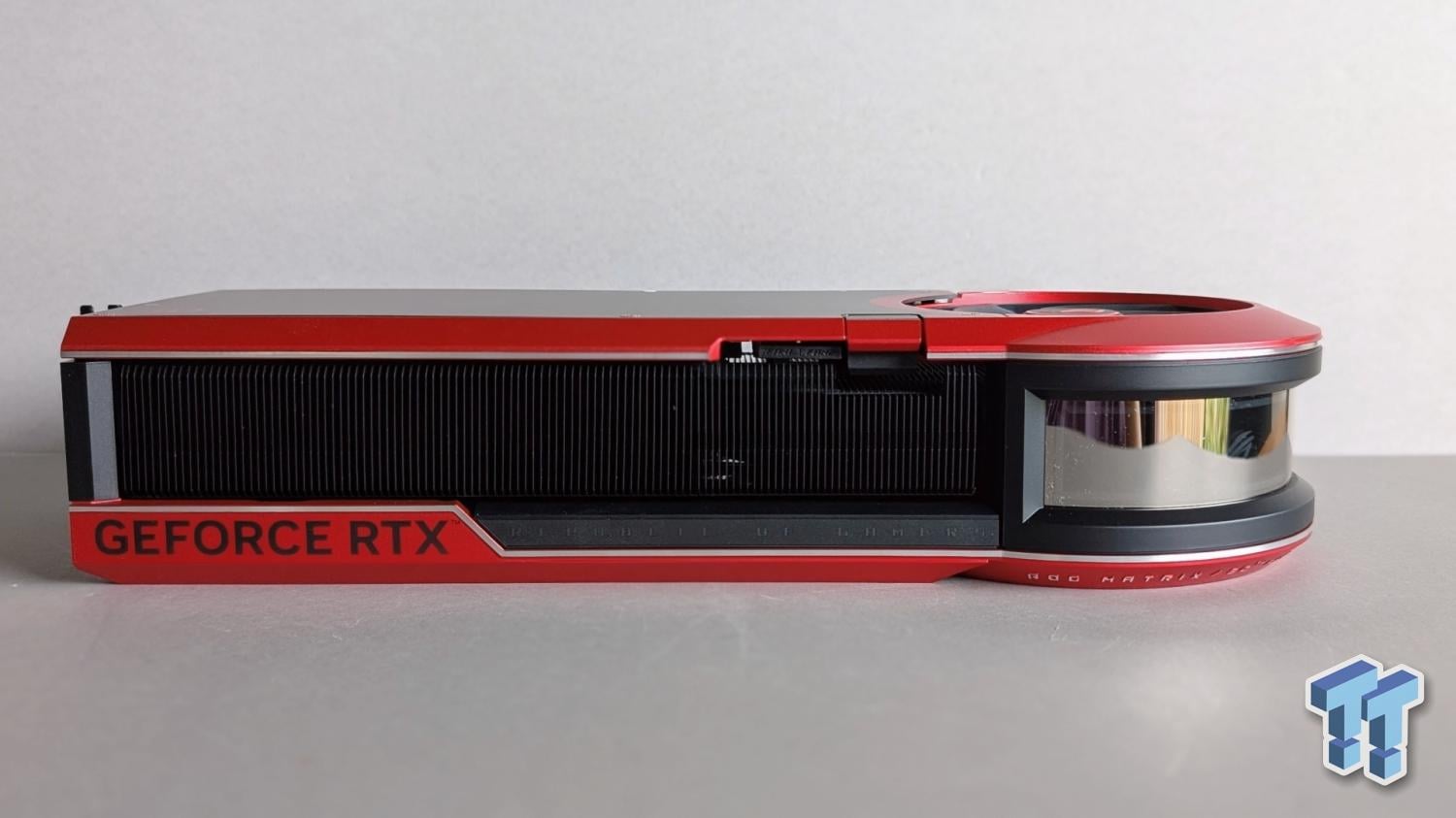
And what is a day without new nice pictures?😀 People think weaker low powered Radeon cards is safe, LOL
Another Sapphire RX 9070 XT Nitro+ burns out again: blamed on the 12V-2×6 connector and the brand's Stealth design. Will they recall it from the market?
Seems people have problem connecting the tiny trash.

And more of the Yellow-tip fiasco from MSI. What could go wrong,LOL
That’s insane!
I’m shocked by the MSI cable burning up on people, you won’t see me running one now with a shunted 1200w 5090fe though. But, I did run a MSI 1KW BABY PSU with yellow tip cable on my 4090 Gaming OC which had the 666w bios on it. Never had a single issue. I didn’t undervolt that card much, I just blasted it to the max 2,940Mhz daily that it would run in 4K. No issues with the yellow tip MSI 2x6-12v cable while I had it.
I have been playing the new Mafia Old Country game lately with my 5090, I was playing for hours, decided to check MSI AB graph after closing the game out. Little did I know it’s chugging along at 900 watts during cut scenes. Little dinky Lian Li 2x6-12v cable is doing the job well though.
They are plugged in completely. Power usage goes crazy when I’m not looking though, I don’t really keep an eye on it like that anymore.
Definitely shocked to see a 9070xt burn like that, when my 4090 was excellent. These cables are nuts. I don’t understand it.
-
2
-
1
-
1
-
-
31 minutes ago, Talon said:
ThrottleStop with laptops is unfortunately or fortunately the way to go still. Luckily the DEV still provides updates and I also used it with my 13900HX to really unlock that beast. It sort of lets you bypass the cancer that is X-Load limits on gaming laptops. It also lets you have really fine control over power limits when you want them, which is ideal for tuning for each game/load scenario. Luckily some laptop OEMs provide some pretty great tuning, while others are pure trash. Lenovo actually provides a pretty great gaming laptop product, with really good tuning. Unfortunately they don't have fully unlocked BIOS, and the latest version apparently patched out the backdoor to get into the unlocked BIOS. So if I do consider a new laptop again in the future, it will have to be MSI again. They still provide their unlocked/hidden BIOS, the tuning is all recoverable within reason and their BIOS is more desktop like with it's menu options actually working and not bricking the machine.
Yeah this thing is completely locked down. The only thing it has working in its favor right now is, I repasted it with TG putty and Supercool LM, did the whole shebang all up. So temps are great (compared to stock temps) And it feels like the 14900HK might be a good sample, but I’m speculating here. But, you can’t undervolt it. So it’s always just blasting away with auto voltage while it shoots upwards of 5,850 boost browsing around windows lol. 😂 (And apparently these chips degrade? ) it’s some how completely reliable though, and mine has not degraded. But if it’s gonna happen it’ll be in this exact scenario. #1 Hot CPU? CHECK! #2 Auto voltage going wild? CHECK!
You do get what you pay for with MSI, and I keep hearing about Lenovo being really good as well.
If I could pick a single option, it would be to have the ability to set tREFI manually to 262k, would probably opt for that instead of CPU voltage control. That alone would drastically boost gaming performance. These laptop manufacturers need better engineers/design teams.
-
2
-
1
-
-
Hey everyone. Man, throttle stop is amazing. Am I just learning how to use this tool, and what it’s actually for? What the heck is wrong with me lol. 😆 i have been over here dealing with some low GPU usage, and very weak CPU clocks, and poor 1% lows.
Now I’m gaming and my 14900HX will nearly hold 5.2P/4.1E in most games FOREVER. After long duration, it’s still holding 4.9-5.1P, and eventually goes back to 5.2/4.1.
I had reinstalled windows on my machine which was running very poorly. And speed step was kinda hindering its performance.
I’m super impressed here with this 14900HX, never really liked it all that much until now I suppose.

-
1
-
2
-
1
-
-
Hey friends just a quick note. I used Microsoft Copilot to help with some more undervolting profiles. And it actually works very well and gives good numbers very quickly, it makes it a little faster too than testing each profile. So far this method works with my GPU.
I told MS Copilot that my 5090 can run Furmark 4K at 3,082Mhz@940mv and it can run the same test at 3,322Mhz@1075mv. So then I can quickly ask it “what frequency” it can run at every other voltage point in between.
It told me 3190@995mv, which also works perfectly fine.
I type it in, and it runs it completely stable lol.
It helps to know the top and low with your GPU of course. And you must be keying in 100% stable high/low profiles. You might have a profile that seems stable, but crashes in games after 3 or 4 hours.
-
2
-
2
-
-
5 minutes ago, Mr. Fox said:
They do look pretty awesome. All of them. I miss HEDT platforms. The most fun I ever had with overclocking was X299. CPU and memory overclocking was epic.
I won't be doing anything with computer stuff until I find work though. Lots of applications out and a couple of opportunities that look very promising. A lot of email generated rejections without an adequate review of my qualifications, most likely based on my age (even though that is illegal). I may end up redoing my resume and dropping out the first 20 years of my career history to keep my age concealed from AI filtering and biased recruiters.
Oh yeah I agree, I just enjoy dreaming from time to time, I personally cannot afford any of these CPU’s right now lol. Hopefully you find something soon though employment wise. I’m about to be right there with you. I’m ready to move jobs. I’ve been employed with same company for over 5 years now. Have been making the same money for the last 4 years of that, but my qualifications and workloads have changed substantially to doing more and more. It’s just not sustainable anymore.
-
1
-
1
-
-
13 hours ago, Mr. Fox said:
Nice! That's going to really be awesome. You're much safer going that route than ordering it from a vendor outside of the US because of how incompetent the shippers are (or dishonest creeps) when it comes to grossly overcalculating tariffs. So many horror stories of victims being charged 2 or 3 times more than the actual tariff. There will be a special place in hell for the folks that do that. I believe it is intentional. but it could just be incompetence. You know they are not giving the "extra" money collected to the government, they are just padding their wallets with the excess collected "by accident" from
consumersvictims.
This is pretty dang impressive.
New TRX50 Threadrippers are the absolute best chips available. Intel is supposed to be dropping their equivalent at some point. But nothing yet.
I’d want one of the 9970X chips which are 32/64 cores.
And don’t forget the Threadripper 9980X 64/128, people are hitting 150,000 in R23 with those chips on air cooling at just 5.1Ghz, and they can push MUCH more on ambient custom water cooling. For $4,500 USD street price.
Now, if someone is gaming and needs lots of CPU power, the Threadripper 9980X kinda sucks. Too many cores. And not really viable. Games just don’t handle it as well. I think Process Lasso might fix this though.
This is where the 9970X 32/64 comes in, these chips clock super high. And they absolutely throw down in gaming with performance comparable to the standard 9950X Ryzen chip, and some random outlier results with even better performance than the 9950X. This is where the 9970X will outpace the 9980X though. I have seen a comparison and it gets oddly obliterated in the 1% lows. Even in heavy multithreaded loads we see the 9970X pull ahead of the 9980X. This makes the 9980X only about +25% faster on average. So I really think the best balance is 9970X (32/64)
I do not recommend the Threadripper pro chips at all for any gaming due to the OCTO channel memory which will double bandwidth, but also double the latency. (who would? lol)😂
I think the entry level TRX50 is excellent with amazing future upgrade ability for YEARS.
I love these big brute systems. My current Dominus Extreme and w3175x performs great in gaming and all of my work apps. But that’s the end of the line. There is no newer higher core count drop in CPU which is unfortunate. And that’s where I think a TRX50 motherboard really shines. Someone could snag a 24/48 9960X for now, and in 5 years they could drop in a 9980X when it’s more in range price wise lol.
-
2
-
-
18 minutes ago, Mr. Fox said:
Yes, you should be good to go. If you can afford it, buy the EKWB 90° rotary fittings, as they are more durable.
I edited my posts above several times so you may have been shopping between edits.
Absolutely lol. Those cheaper 90's will leak. I have seen some brand-new one's leak if any sideways pressure is applied due to weight of a hose or something, and the swivel gets STIFF. The last time I had one leak, I found a small puddle on the back of my 5090FE when it was on air cooling. The scary thing is, I am still using some of them in my build in random places lol. (Those have not shown any signs ifleaking and my loop fortunately holds air, but if I could go back I probably would not have used the cheaper 90’s)
@Reciever Maybe add another pump D5 with the basic top only in the near future in case one fails. The extra pressure and flow allow you to not depend on running 1 single pump at 100% for good performance. Those big rads like flow. Then you can run more pumps and lower speeds or on a PWM profile. Mine are setup where all (4) pumps fall to 20% speed when the CPU is below 50c. If CPU goes over 50c, it means my GPU is pushing some frames, or I am running a load lol.
With 1 pump, you can run it on the auto/lower PWM RPM, let the water temp reach equilibrium under a full system load, then unplug the pumps PWM, the pump will shoot up to max RPM or max flow rate. You will then see the temps drop on all of your components. This alone tells us more flow will be beneficial. My system still does this with (4) pumps all running at a lower speed on auto with PWM plugged in. Then if I crank them to 100%, I will see everything fall in temps.
That's a nice kit you have assembled in the cart though!-
2
-
-
On 12/10/2025 at 1:07 PM, electrosoft said:
In regards to voltages and 5090s, in the same vein as I was asking awhile ago here about subjecting naturally lower voltage cards to forced, higher voltages via EVC2 or now with the XOC. There is a reason cards are coming off the fab binned at various voltages and qualities:


--------------------------------------------------------------------------------------------------------------------------
9800X3D vs 265k at all thee resolutions (1080p, 1440p, 2160p)
Pay particular attention to the 1% and .1% across all the results:
--------------------------------------------------------------------------------------------------------------------------
Is there a review out on this stuff comparing it to other pastes along with other LMs and PTM?
There is not, but I cannot count the tubes of standard liquid metal I have used over the years. And it does not last long. Of course it will last some time, but it loses its cooling ability. And the first sign is loss in stability. It feels just like degradation.
-
1
-
1
-

*Official Benchmark Thread* - Post it here or it didn't happen :D
in Desktop Hardware
Posted
Hey fellas. Yeah I’m just burned out on just barely gett’n by is all. I’m 35 years old now been contemplating life a lot lately, me and my wife both work full time from home, life is good in the new house. Bills are paid, but that’s it lol. Things are getting really expensive lately like (Daughters new braces 😬) kids will need cars in a 2-3 years (I’m broke). I need to do something on the side and make some major moves. About ten years ago I use to buy and sale junk cars, this was extremely lucrative. There were times when making $2,500 on a good day wasn’t impossible. I have been complacent and living on auto pilot for several years now doing the minimum.. The 5090 had to go though, I needed the funds to help fund a truck+car trailer+winch. In this case, not a truck but close, I bought a clean and well kept used Tahoe Z71 4x4.
Lately I learned that we got to step outside of that comfort zone and take some risks in order to gain something or see change. If nothing changes, nothing changes. Life is hard, none of us make it out alive. 😂