
Vladka76
-
Posts
51 -
Joined
-
Last visited
Content Type
Profiles
Forums
Events
Everything posted by Vladka76
-
HP Elitebook 8570W - is it still good ? Hardware modifications
Vladka76 replied to GuitarG's topic in Custom Builds
These are consequences, not the root cause. Migrating from an LVDS video interface to eDP opens the door to a world of newer graphics cards (IMHO, up to Ada Lovelace, e.g. 4060-4080). 🙂 The last NVIDIA GPU architecture to support data transmission between GPU and the screen via LVDS was Maxwell 2.0 (e.g., GF980/M5000). Starting with the Pascal architecture (e.g., GF 1030/P600), support for LVDS was removed - only the eDP interface remains. --- Note: Unfortunately, everything mentioned above applies specifically to mobile PCs (laptops). A friend of mine, an economist with no technical background - followed my advice and installed a new GeForce 1650 (Turing) into his old Dell Workstation T3400, which dates back to 2008 (featuring an X38 chipset with PCI-e ver. 2.0, a Core2Quad Q9650 CPU). To my relief, the card worked properly; with some remote guidance from me, he installed the latest driver, and now he's working and gaming every day... In our case, however, we’ll have to take a more complicated and somewhat risky path. It hardly seems fair, does it? 🙂 -
HP Elitebook 8570W - is it still good ? Hardware modifications
Vladka76 replied to GuitarG's topic in Custom Builds
@SuperMG, perhaps you have for sale an eDP cable for 8770w, p/n 6017B0352401? 🙂 😉 -
HP Elitebook 8570W - is it still good ? Hardware modifications
Vladka76 replied to GuitarG's topic in Custom Builds
You’re luck - that means the backlight isn’t failing yet. However, hp and Dell have a different DC conversion boards and their signal processors. Thank you. N.B. Although, I wouldn’t mind picking up a DC version of fully functional Dell M6700|M6800 for a good client who needs a machine for both work and gaming. 🙂 I’ve long wanted to get my hands on one of these competitors of my 8770w. 🙂 It's interesting to me... -
HP Elitebook 8570W - is it still good ? Hardware modifications
Vladka76 replied to GuitarG's topic in Custom Builds
@JadeRover I’ve decided to make a custom (yet universal) cable rather than hunting down a DreamColor (DC) kit. The reason is clear to me: these DC displays (LP173WF3-SLBx, x=1...4, for 8770w x=4, for 8760w x=3) haven’t been manufactured for about 14 years, and - worst of all - their aging backlights tend to shift toward a red tint over time. Furthermore, these panels are limited to a 60Hz refresh rate, and I’d prefer something higher, if possible. I don’t want to be tied to an old, rare display that could start turning reddish at any moment. I have other arguments as well: - Our respected guru GuitarG wrote on another forum: "...unfortunately DreamColor is power hog, takes at least 15W." - I suspect that the additional signal conversion that occurs when changing interface from eDP to LVDS might slightly degrade image quality. By the way, I did find on our local marketplace OLX an entire display assembly from a DC-equipped 8760w. The seller claims the screen isn’t showing any red tint yet. It uses a different stock video cable (his p/n ...801), but the seller insists it will work on an 8770w. I think I’ll pass, even though it’s a tempting offer. 🤭 -
HP Elitebook 8570W - is it still good ? Hardware modifications
Vladka76 replied to GuitarG's topic in Custom Builds
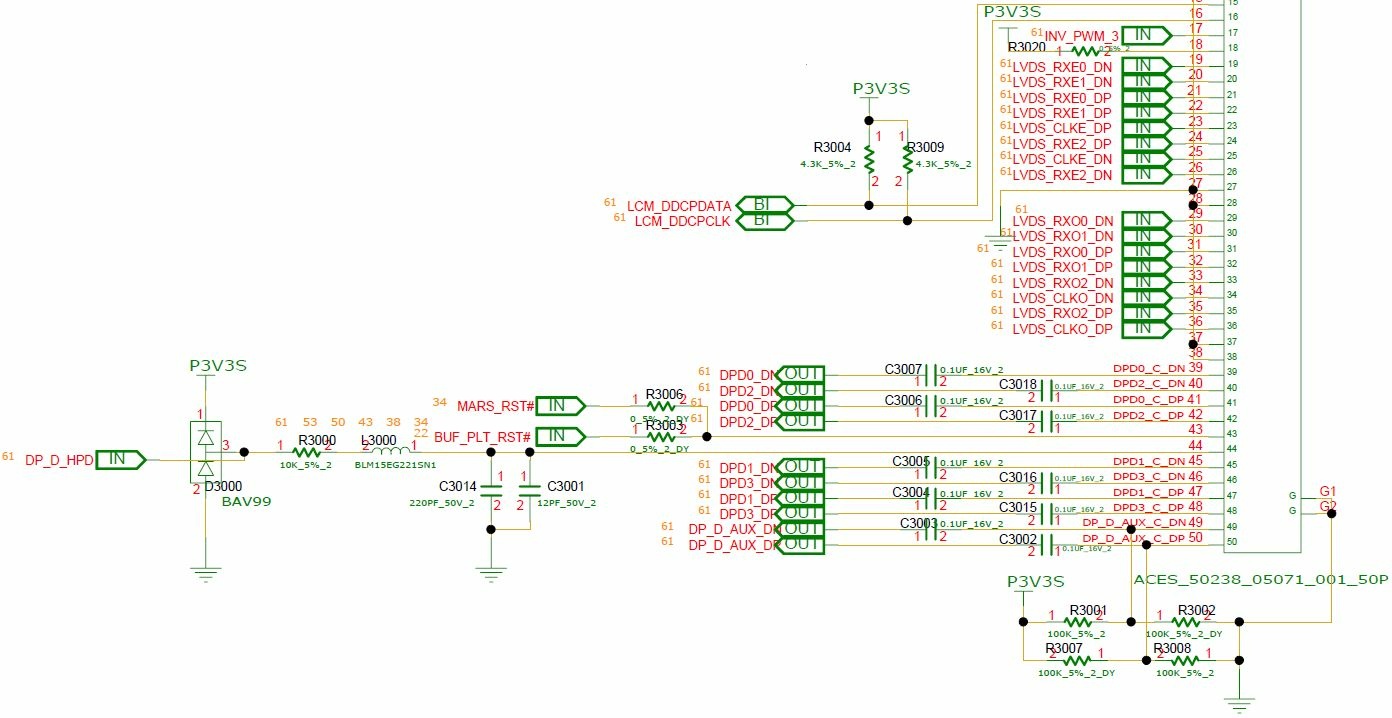
IMHO, the only place where chinese copy(?) of DreamColor cable for 8770w is available (9996 pcs left): Direct link to AliExpress Warning: his p/n 6017B0352401, so pls click on the correct proposal (xxxxxxxxx301 is the LVDS version). I would venture to guess that owners of the 8570w can also buy it, but then they will have to carefully pull almost all the wiring terminals out of the connector of the mobo's side and rearrange them to the correct positions, according to the GuitarG pinout table. But the cost of an error due to inattention will be significant (pinouts of 8570w and 8770w are very differents), so they will have to take this risk upon themselves. Based on GuitarG's research, I have compiled my own, so far in theory, version of a custom cable for 8770w mobo -> 30 pin eDP. Dear @JadeRover, can you help me check the correctness of my work?.. And one more question for you. Somewhere earlier our GuitarG wrote that he was able to get the 30 pin screen to work, but not the 40 pin screen. In this case, what would be the best way to deal with the microcables of the two left unused pairs of the eDP interface? Just insulate their exposed leads near the 30 pin connector? Or would it be better to pull their wiring terminals from the connector on the mobo side and insulate them near both connectors? Or even pull them out of the cable completely?.. The custom cable pinout for hp 8770w mobo -> 30 pin eDP screen: ---------------------------------------------------------------------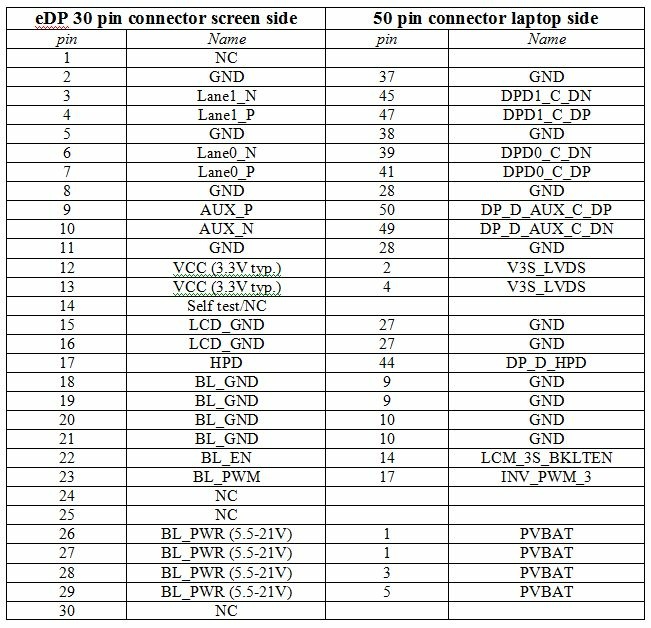
-
HP Elitebook 8570W - is it still good ? Hardware modifications
Vladka76 replied to GuitarG's topic in Custom Builds
Congratulations, but how long did the test take? 🙂 A couple of minutes?.. If so, that’s not quite right - these tests are often configured to check only 10–20% of the total video memory (or a specific fixed small amount). That might be enough in case of a death of single memory chip, but for more complex issues, I strongly recommend to let the GPU warm up well during the long full test. To enable a full test, you need to open the MATS configuration file named 'runmats' for editing - and locate the line at the very end that calls the MATS program; it look something like this: "$LOCATION/$PKGNAME/mats" -e 20 (check only 20 Mb of VRAM) or "$LOCATION/$PKGNAME/mats" -c 10 (check only 10 percent of VRAM) ...and delete any symbols after 'mats"'. 🙂 Or you may comment non-modified line with symbols '#' and a following ' ', both placed in the beginning, and a add new one with a call of MATS without arguments. And you may wish to add as the last line of this file the command: poweroff Then your PC will be auto powered off shortly after end of check (it's very useful in case of long test caused huge size of VRAM). The results will be written into text .log file placed in the same directory. Enjoy. 😉 -
HP Elitebook 8570W - is it still good ? Hardware modifications
Vladka76 replied to GuitarG's topic in Custom Builds
Of course. -
HP Elitebook 8570W - is it still good ? Hardware modifications
Vladka76 replied to GuitarG's topic in Custom Builds
IMHO, no. I’d say it looks like the GPU die separating from its substrate - a situation when data lines between video memory chips and a GPU break when the card heats up. Unfortunately, this is irreparable... 🥹 In case of an Nvidia card, it’s best to start diagnostics by testing the entire video memory using the appropriate version of MODS/MATS tools for that card's architecture. You’ll need a small bootable USB flash drive for this. If a specific memory chip is died, it will get very hot shortly after power is applied. In that case, you can use the "wet finger" method. 🙂 It would probably be best to realign the heatpipe(s) using a non-functional, "dummy" graphics card?.. -
HP Elitebook 8570W - is it still good ? Hardware modifications
Vladka76 replied to GuitarG's topic in Custom Builds
Gemini wrote to me that in 9x revisions of audio processors, IDT used "a much more aggressive and intelligent dynamic range compression algorithm. It 'pushes' quiet sounds and gently limits peaks. Subjectively, this is perceived as a sharp increase in density, 'thickness' of the sound and volume without any noticeable speaker wheezing." (c) Furthermore, "In 9x revisions, the algorithms for virtual stereo widening and bass boost compensation were refined, which are hardwired into the codec's processing logic." (c) So it turns out the AI was right about everything, right? Is the difference really noticeable to the ear? --- P.S. Just curious - why did you replace your 92HD80 with 92HD94 and not with other 9x? -
HP Elitebook 8570W - is it still good ? Hardware modifications
Vladka76 replied to GuitarG's topic in Custom Builds
Hi! Could you clarify: how noticeably did the sound improve after this upgrade? What exactly improved, in your opinion? Are all the audio ports working and any issues with jack sensing? I'm looking at the datasheets: the main difference between 92HD9x and 92HD8x is the replacement of the Class AB power amplifier with a Class D amplifier. And the closest equivalent to 92HD81 is 92HD91 (there's no datasheets for 80 and 94). 🤔 Does this upgrade make sense if the original audio processor is working properly? -
HP Elitebook 8570W - is it still good ? Hardware modifications
Vladka76 replied to GuitarG's topic in Custom Builds
Yes, this is it. Congratulations on the screen type. Take care of it, such LCD's are quite rare now. -
HP Elitebook 8570W - is it still good ? Hardware modifications
Vladka76 replied to GuitarG's topic in Custom Builds
Last year, I bought a brand new, sealed M3000m designed for Dell Precision 7710/7720, which came with the stock BIOS 84.04.9B.00.14 (exactly the same as in the link to technopowerup site above), and it works on my 8770w without any issues. However, my screen isn't a DreamColor at all - it's ordinary N173FGE-LA3 (HD+, LVDS 40-pin). Are you sure you have a DC screen? What's the hardware ID for your screen (look in Device Manager, string MONITOR/xxxyyyy)? -
HP Elitebook 8570W - is it still good ? Hardware modifications
Vladka76 replied to GuitarG's topic in Custom Builds
No, it's not possible OR not easy. IMHO. 🙃 -
HP Elitebook 8570W - is it still good ? Hardware modifications
Vladka76 replied to GuitarG's topic in Custom Builds
It's very nice to read this! -
HP Elitebook 8570W - is it still good ? Hardware modifications
Vladka76 replied to GuitarG's topic in Custom Builds
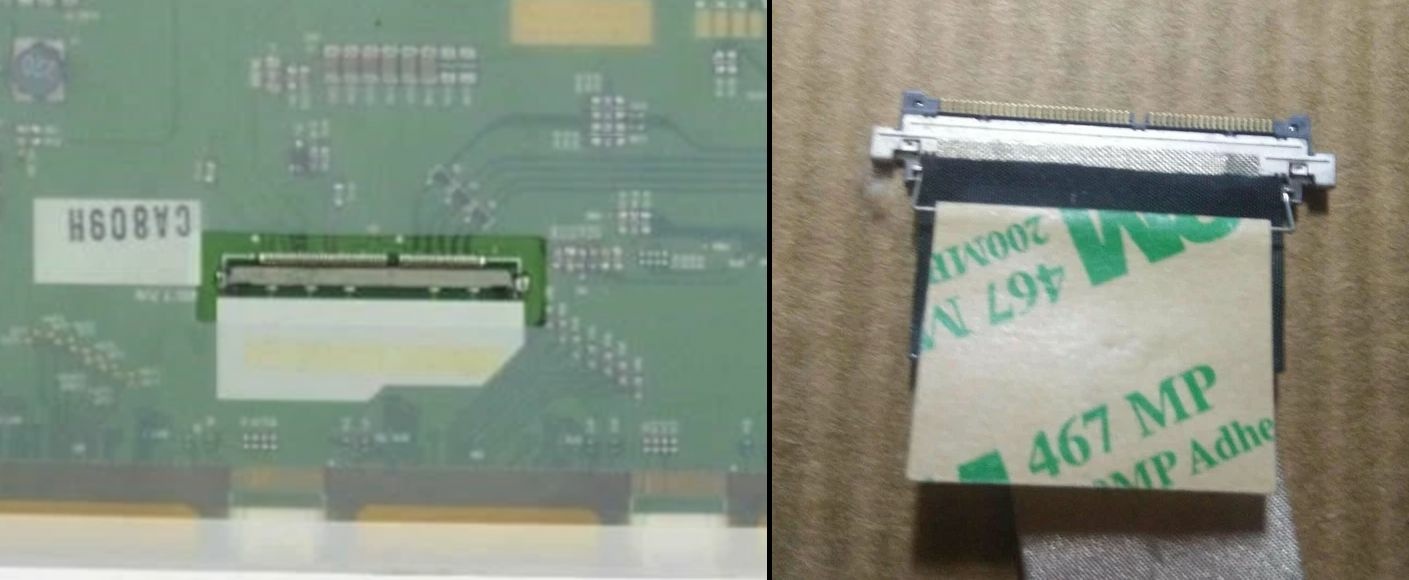
Absolutely right! And my 8770w also needs the same cable. 🙂 I looked at the schematics – he uses the DP_D port to output the image to the internal screen, which is standard. But if you have a boardview file for 8770w, please email it to me. I would be very grateful! My understanding is that on the motherboard connector side, I need to swap the wires in the cable connector from the LVDS interface (16 pcs: pins 19-26 and 29-36) to the DP interface (10-12 pcs: pins 39-50, possibly excluding 43 and 44). The question is - what's the best way to handle the unused wires? Pull them out? And on the display connector side, I need to completely replace the existing LVDS connector with a standard eDP 40-pin connector for displays and solder the wires according to the standard eDP 40-pin pinout. And theoretically, 😁 everything should work...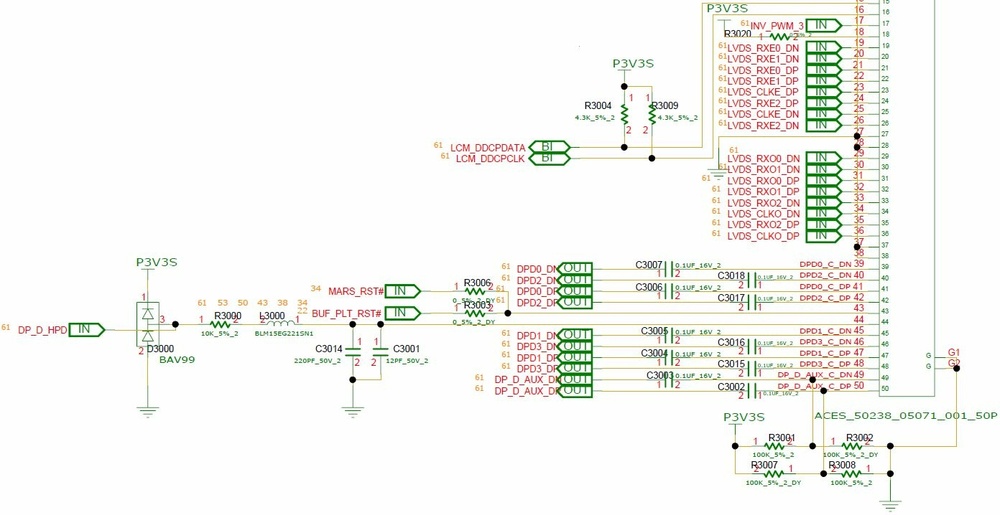
-
HP Elitebook 8570W - is it still good ? Hardware modifications
Vladka76 replied to GuitarG's topic in Custom Builds
Thanks, but that wasn't exactly my view. 🙂 It seems you've misunderstood the idea. She was to use only a modified cable between the motherboard and display, without a converter board at all. Re-read the latest replies from DevilAnGeL, the author of the "Ultimate 8770W yet?" thread. You even wrote there earlier. I've read that DELL workstations also use a similar converter board (with a newer microprocessor). I can't say how compatible it is with HP. -
HP Elitebook 8570W - is it still good ? Hardware modifications
Vladka76 replied to GuitarG's topic in Custom Builds
I think so. But in your case, I would start by examining the characteristics of your current screen. AIDA64, then panelook.com 😉 -
HP Elitebook 8570W - is it still good ? Hardware modifications
Vladka76 replied to GuitarG's topic in Custom Builds
Yes, I've read that before. Overall, it's encouraging. But there are a lot of things I'm not happy with: - I think installing 4K monitors with high refresh rates on a less modern graphics card is too much. It's trendy, I agree, but it significantly increases the graphics card's workload in 3D, which will lead to frame rate drops and stuttering in games. I'd stick with Full HD and 60Hz — that's the bare minimum; - I have no idea how to buy on TAOBAO; - I'd prefer to make my own cable. 🙂 Sounds like a good idea, I agree. I would also buy a screen from the same laptop model as the graphics card was intended for, because of... your least favorite word. 😀 Although, also need to pay attention to the screen hinges. While browsing our marketplace OLX, I discovered that HP ZBook 17 g5 uses LP173WF4-SPF7 (LG Displays, IPS, 60 Hz, eDP, 30 pins — everything I need to be happy 🥰) as its native screen. The seller claims that it is compatible with g3 — g6. Please treat your hands. Good luck. -
HP Elitebook 8570W - is it still good ? Hardware modifications
Vladka76 replied to GuitarG's topic in Custom Builds
This sounds quite logical and correct! 👍 The answer can probably only be given in practice... How difficult is it to find them for sale? Was there any information on how successful it was? -
HP Elitebook 8570W - is it still good ? Hardware modifications
Vladka76 replied to GuitarG's topic in Custom Builds
🤩 This is simply great! It seems that it is better to buy M6700 with LVDS cable and display? Have you ever upgraded our EliteBooks (8560-8570-8760-8770)? 😉 -
HP Elitebook 8570W - is it still good ? Hardware modifications
Vladka76 replied to GuitarG's topic in Custom Builds
I guess that the DELL M6700 (with eDP), but not M6800 - is the best one for upgrading video cards? Yes, I've heard that a discrete graphics card without an iGPU (without Optimus) is 15-20% faster. That's comforting — and it motivates to figure out how to help EliteBooks... -
HP Elitebook 8570W - is it still good ? Hardware modifications
Vladka76 replied to GuitarG's topic in Custom Builds
I'm afraid just one cable won't be enough. You're right, a complete DC kit consists of a color depth converter board and two cables: an outgoing eDP cable from the mobo to the converter and a LVDS cable from the converter to the display. I tried searching for the complete kit but couldn't find anything. There are a lot of DC cables, by the way - will be no bidding war here. 😀 I also thought about buying such a cable to start creating my own experimental EDP cable. -
HP Elitebook 8570W - is it still good ? Hardware modifications
Vladka76 replied to GuitarG's topic in Custom Builds
Yes, all DELL's similar workstations have iGPU enabled and working - so they can work with newer cards even via LVDS interface (I've read about it, this was not my own experience; I've even heard that MXM 3060 (Ampere!) worked well with LVDS display). But our beloved HP EliteBook's don't have iGPU at all (newer ZBook's already have it)... Yes, I've heard that in DELL's Pascal cards works only with Engineering (early) vBIOS, but Turing cards all works well. Now I can only dream about RTX 3000 (standard MXM 3.0b) working in my 8770w... 😕 -
HP Elitebook 8570W - is it still good ? Hardware modifications
Vladka76 replied to GuitarG's topic in Custom Builds
I recently found something: https://www.ebay.com/itm/145765636591 This cable theoretically (as it seems to me, may be wrong) connects the motherboard and the original display for the DreamColor on 8760w, 8770w - LP173WF3-SLBx ("x" may be 4, 3 or 2). All is perfect (S-IPS, matte, exotic 10-bit color depth), but connection type of this display is 50-pin LVDS. 😀 Moreover, he is relatively old and difficult to find in new condition. The main disadvantage of this option is that installing this display and cable does not improve the laptop's compatibility with fundamentally newer video cards. A much more promising option would be an eDP 30-pin cable (for FHD displays), which respected @GuitarG is working on...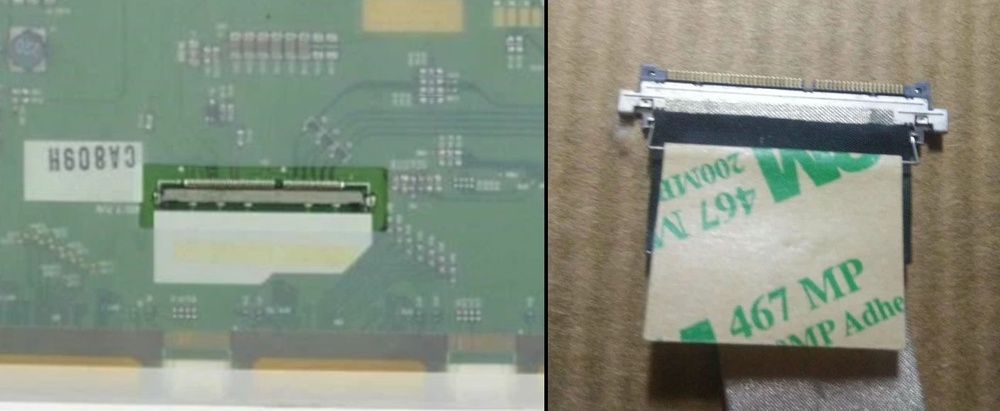
-
HP Elitebook 8570W - is it still good ? Hardware modifications
Vladka76 replied to GuitarG's topic in Custom Builds
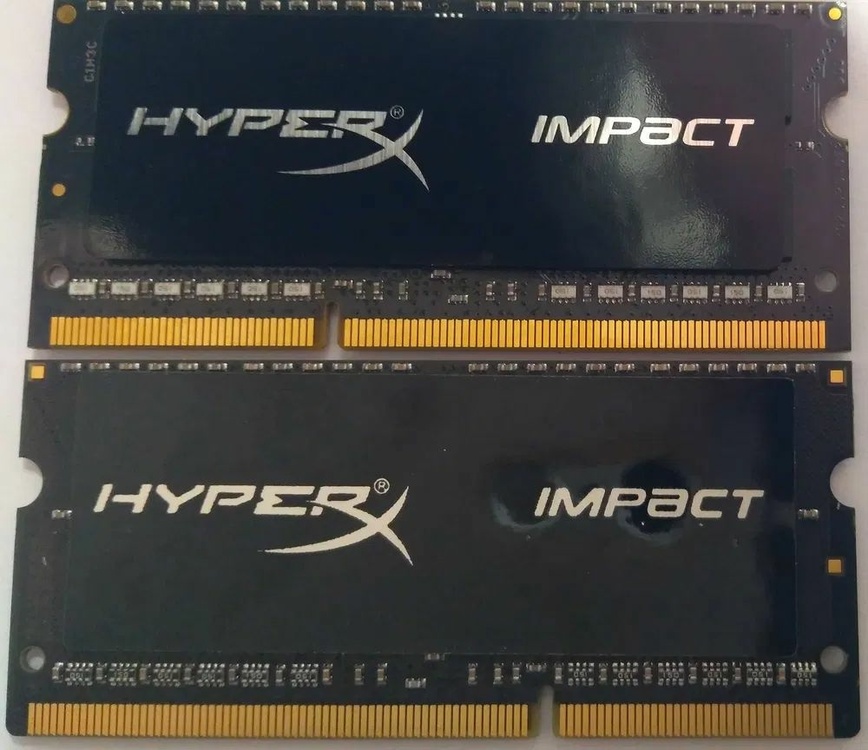
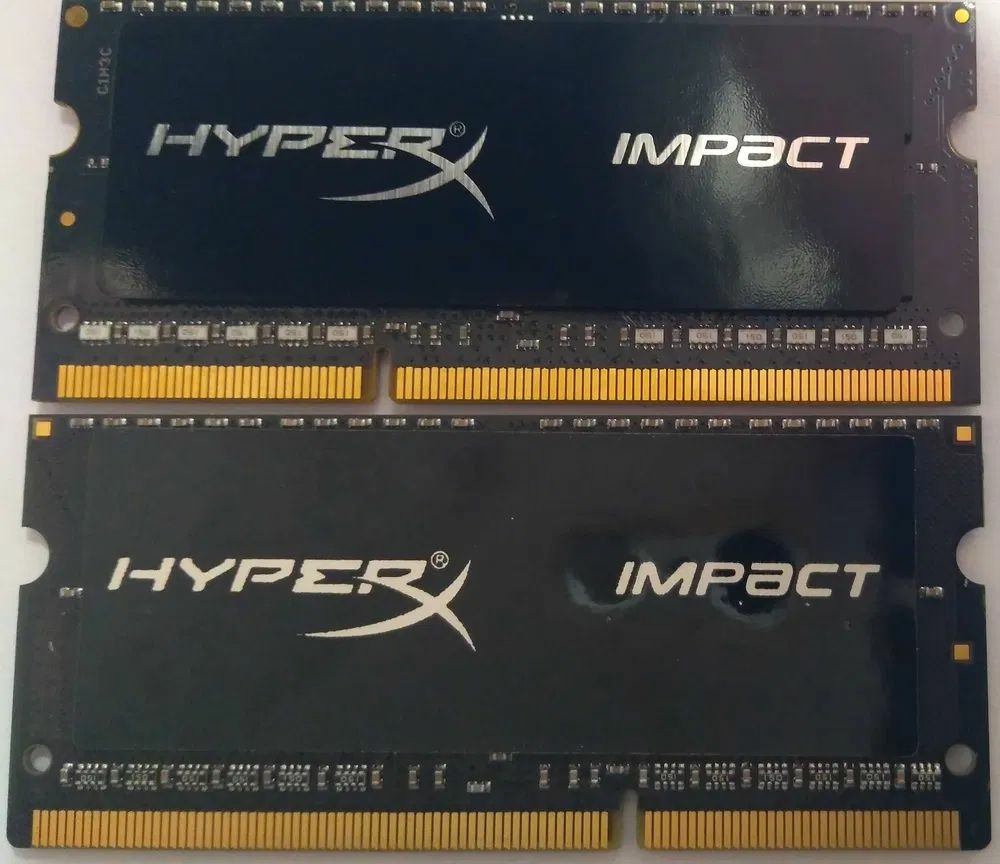
Interesting. The FBGA code "D9RVX" on your chips means the model name MT41K512M8RG-107:N, officially also 1866 (from the datasheet: the "-107" marking = option "1.07ns@CL=13 (DDR3-1866)"). This chip's frequency is the same as one I've encountered, but the FBGA code on those I've seen was slightly different from this one. What's preventing good memory chips from running at full speed? Perhaps poor-quality resistor arrays on the data buses (all my original modules have ceramic, white resistor arrays)? Or the firmware on the SPD flash IC? It's sad. This is often the case with the Chinese – they copy almost everything well, but somewhere there's always a flaw that ruins everything... Another my photo. 🙂 Compare the quality of the sticker on the other side of the two modules (original on top, counterfeit on the bottom). The original has an aluminum base and a black ink printing, while the counterfeit has a paper base and white ink with a low-resolution print. And a resistor arrays are different in color and material...