John Ratsey
-
Posts
242 -
Joined
-
Last visited
Content Type
Profiles
Forums
Events
Everything posted by John Ratsey
-
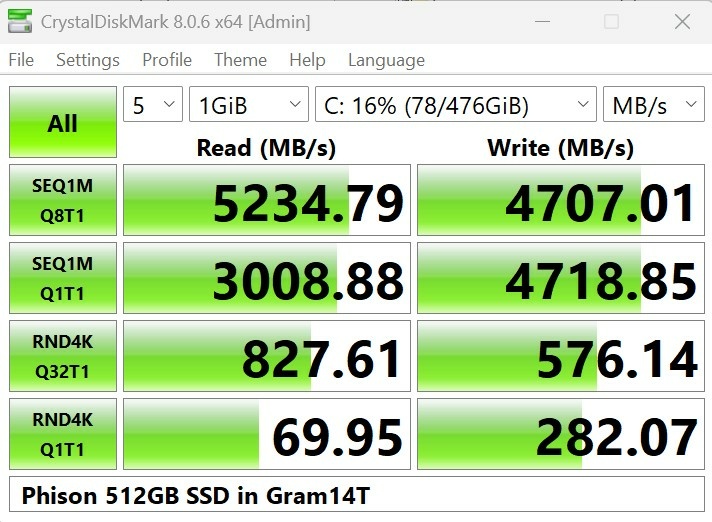
I commented in my mini-review of the 14Z90RU that I needed to find a reason to buy the 14Z90T in order to compare the two models. Conveniently, a family member's 12 year old Samsung notebook was finally falling apart which provided an opportunity to pass along one of my notebooks so I ordered the 14Z90T from Amazon. It was an ex-return which hadn't had much use. My 14Z90T came in a fairly plain brown box which contrasts with the premium-looking black box of the 14Z90RU. My first finding was that the 14Z90T was, indeed, heavier than the 14Z90R. At 1.12kg it is what the specifications claimed. Why is it heavier? i don't know all the reasons but the bottom of the 14Z90T weighs 109 grams vs 64 grams for the 14Z90RU. The lighter part is a silver colour inside, a 2025-02-26 date stamp and is marked "Material>Mg". The heavier part is dated 2025-02-22 (the notebook manufacturing date was 2025-03-17) but without other information. It has a black finish on the inside. Why paint it - for better absorption of heat radiated from the electronics? Is it magnesium? Another difference is T has a long bar on the outside instead of the two back feet (14Z90T on left, 14Z90RU on right). My 2024 gram Pro also has the long bar. Is it to reduce recirculation of the hot air that is blown out of the backs of the notebooks? I also wondered if the 14Z90T had two fans, which would explain the extra weight. No, it's only got one fan but it is slightly larger than that in the 14Z90RU. The T has the expected two SSD slots but the slot nearest the CPU is marked SSD2. I can see no difference in the performance. Perhaps that slot is deemed secondary because it's nearer the CPU and likely to get hotter. The supplied SSD is the same model of 512GB Phison SSD as in the RU. Performance is good but not class-leading: The keyboard has the Copilot key where the right Ctrl key belongs. There's also a squiggle on the left end of the space bar. I haven't yet discovered the meaning of this. The T model has the infra-red camera for login.
.thumb.jpg.b2628600eb7b2b3d310b223b1681076b.jpg)
.thumb.jpg.209149c4db8c484bf3c2103657419a8a.jpg)
.thumb.jpg.078b4dcaaf027e4709507f732126a729.jpg)
-
18. This Gram 14 has a micro SD card reader, which appears to be absent from the 14Z90T. 19. The audio quality seems to be quite good (but my hearing is quite old). 20. The battery capacity is around 69Wh and not the 72Wh on the label. However, this is still more than most 14" notebooks and very good considering the notebook weight of less than 1kg. There may also be a clever battery charging algorithm at work which has realised that I don't need the full 72Wh. It would be intriguing to directly compare the 14Z90RU with the 14Z90T to analyse how they compare on overall performance, heat management and power efficiency, but I haven't yet figured out a justification for buying a second 14" notebook.
-

Good (great) 14" (Dell, or maybe other) ?
John Ratsey replied to 6730b's topic in What Laptop Should I Buy?
If you prioritise weight over performance then the LG Gram 14 is worth looking at. I've posted details of one version here. -
Two more findings: 16. There's no IR camera or fingerprint reader so it's back to typing in a PIN or password. 17. Key action feels slight more positive than on my 2024 Gram 17 Pro.
-
Some more observations: 9. Build quality seems solid. The smaller size compared with my bigger grams is obviously a factor. 10. The back feet (rubber pads) on the base are about 6mm (1/4 inch) thick, presumably to help airflow to the vents on the bottom. I had put my own rubber pads of similar thickness on the SuperSlim for this reason while the back of Gram 17 sits on rubber pads. LG seems to have realised that airflow to the fan is a potential performance bottleneck. I wonder if they have applied the same improvement to all the current production. 11. The keyboard has bigger lettering which is centered on the keys while my other two grams have smaller lettering which is offset towards the top left corner. 12. The display is advertised as 350 nit brightness and, in normal lighting, needs to be used at nearly full brightness for good eye comfort. My gram 17 shows the same characteristics. The SuperSlim display is brighter (advertised at 400 nits). 13. Playing a 3 hour video MP4 file at about 80% display brightness used 10.7Wh of battery - a power drain of about 3.6W. I'm very happy with this. 14. Simple benchmarking using Cinebench 23 and Geekbench 6.4 revealed that the single core performance of the i5-1334U is at least as good as the grams with the Ultra 7 155H. The multi-core performance of the i5-1334U is, however, about 20% slower. Changing to the high fan setting didn't make much difference. I'm happy with this. I'm not looking for a mobile powerhouse but something which does normal tasks quietly and without making a lot of heat. 15. LG continues to supply a brick of a PSU. The basic PSU weighs 234g and the UK mains cable another 108g (ie 35% of the weight of the gram 14). A modern wall-wart GaN PSU plus 2m of USB-C cable weighs no more than 230g and is easier to carry around. The only time the computer needs 65W is for simultaneous charging and high CPU load. Otherwise a 45W PSU is sufficient.
- 3 replies
-
- 1
-

-
- lg gram 14
- 14z90ru
- (and 1 more)
-
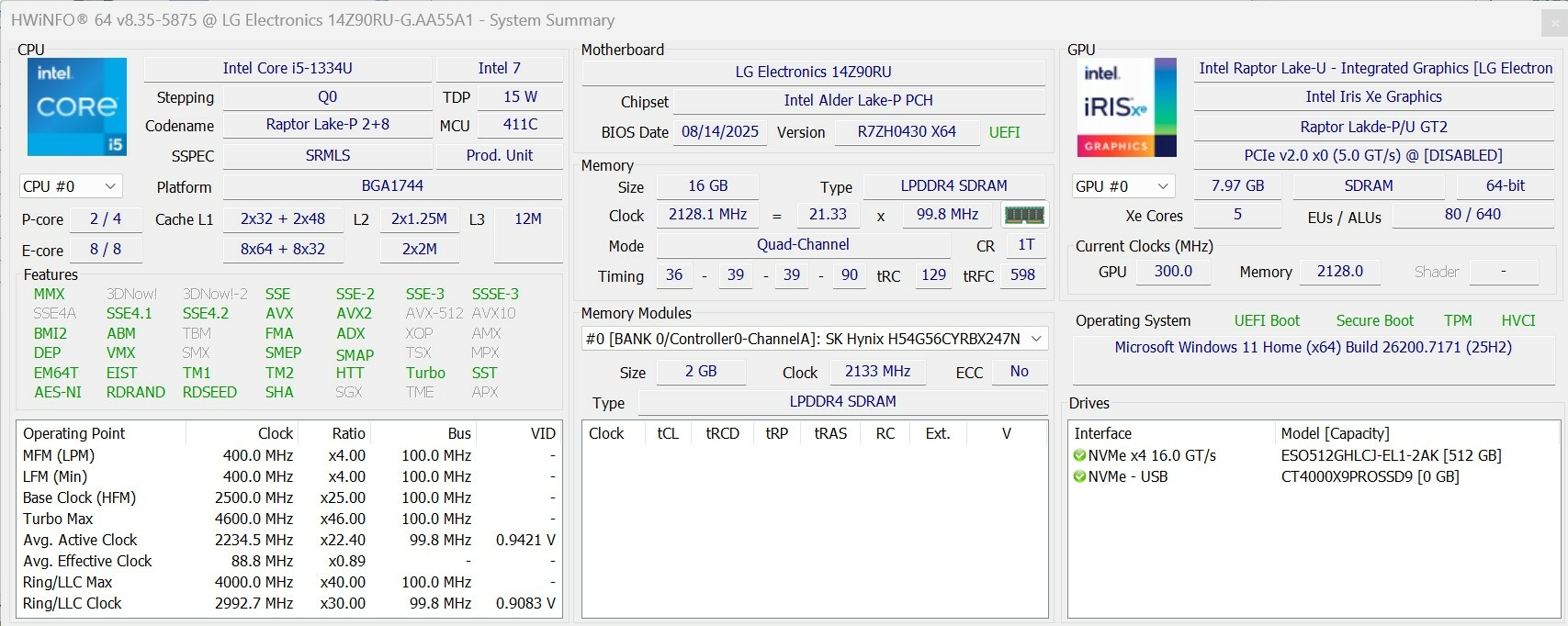
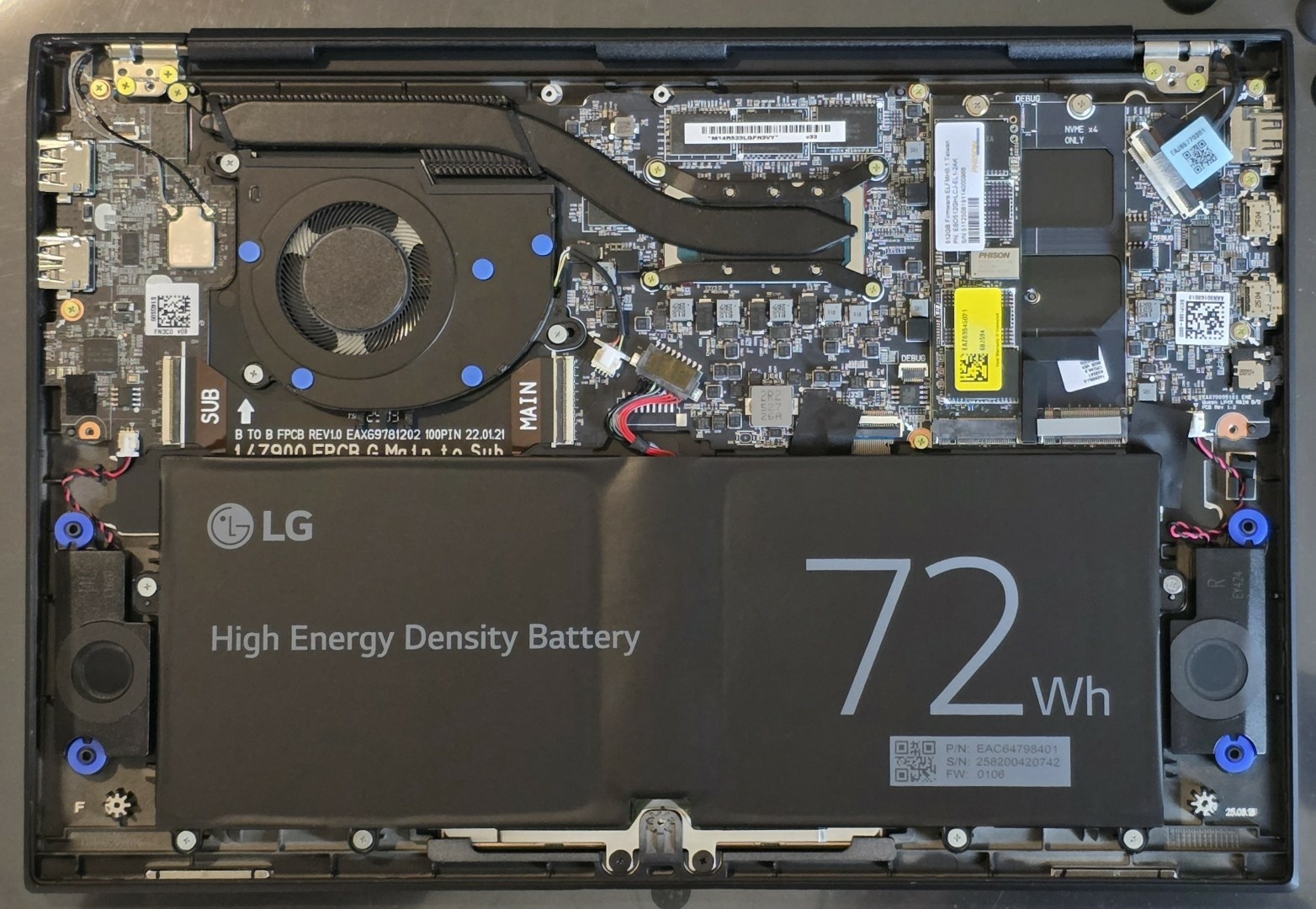
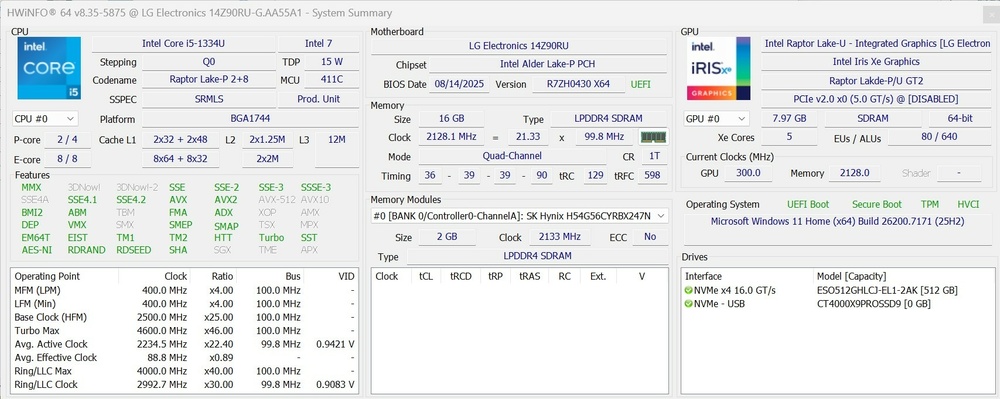
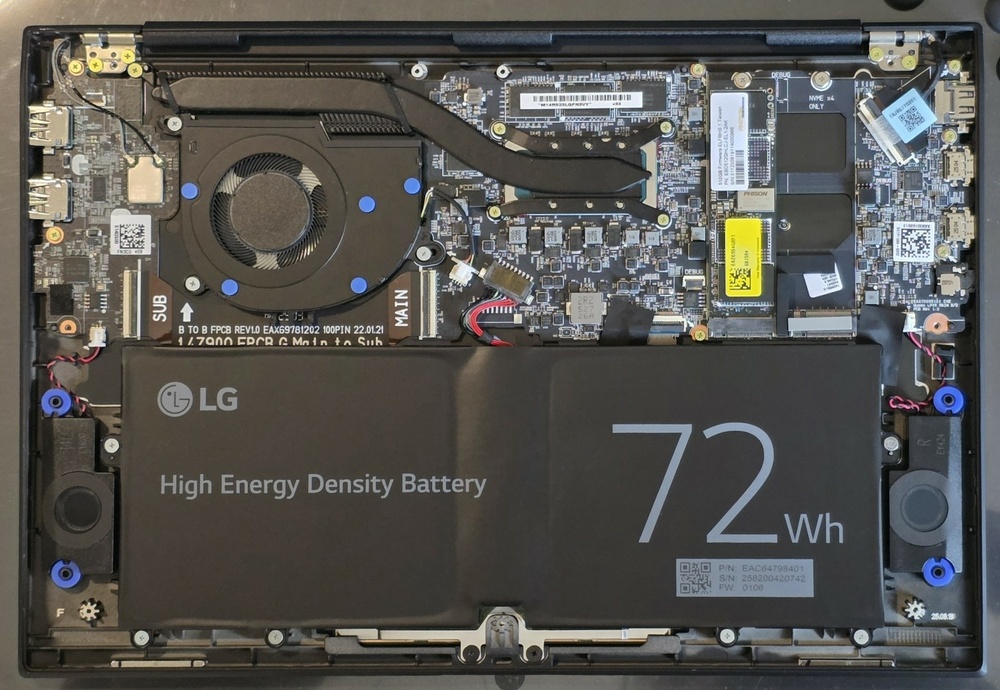
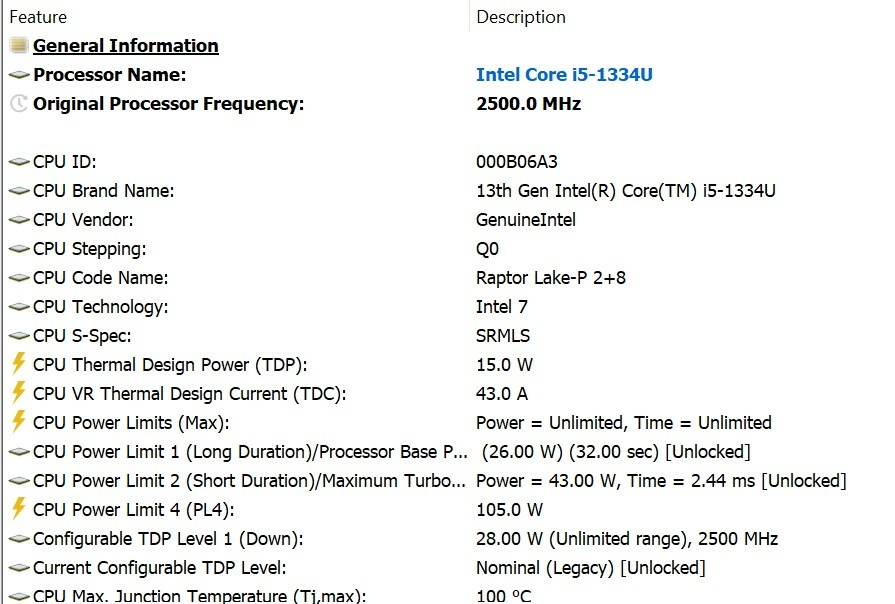
As noted here, I stumbled on a new and less expensive version of the LG gram 14 and ordered one. It arrived today and my initial observations are: 1. Yes, it is 2025 production despite the R in the model number. The label on the box says that mine was made (in China) on 24th September 2025. 2. According to my kitchen scales (which have weighed many computers) it weighs 964g, so less than the advertised 999g. There was a time, many years ago, when Dell computers always weighed more than advertised so these days I'm pleasantly surprised when my purchases weigh no more than advertised. 3. The hardware seems to be a mix of Raptor Lake and Alder Lake parts. The CPU specs are here. 4. The WiFi module is the Intel AX211 (same as in my 2024 gram Pro). Thus supports Bluetooth 5.3 and not 5.1 listed in the on-line information. 5. The case, battery and display seems to be that used for the other 2025 models (the bottom cover has a February 2025 date stamp). 6. The keyboard is backlit. It has two SSD slots, so no spec trimming for the budget model. The supplied SSD, however, is Phison - not a well-known brand. 7. HWiNFO provides some useful information about the CPU power limits: This shows that the CPU is capable of much higher power for shorter periods. Under load the fan noise is noticeable but not annoying. 8. On first charging the battery showed 69.7 Wh - about 3% short of the rated 72 Wh. This may improve with a bit of power cycling. More will follow.
- 3 replies
-
- 1
-
-
- lg gram 14
- 14z90ru
- (and 1 more)
-
No. The OLED I was referring to is in the LG gram SuperSlim. My gram 14 has the standard IPS panel. I agree that the 2025 machines should be more power efficient but I'm happy with something that has a bit of inherent hardware throttling to limit the maximum power drain by rogue applications. I've now got my gram 14 and will put my observations in a separate thread.
-
Something else I've noticed: There are now LG grams with Ryzen chips. Use your favourite search engine to find out more but those I have found have 16:9 15.6" displays.
-
I've just noticed that LG has introduced three grams, 14Z90RU, 16Z90RU and 17Z90RU as part of its 2025 range. There is no product information for these on the LG UK website but I was able to discover more from other LG European websites. They are all fitted with the 15W Core i5 1334U CPU with 16GB of LPDDR4X RAM and either a 256GB or 512GB SSD. Perhaps the R in the model number is because of the 2023 CPU and the U in the model number is for "Updated"? Pricing is more competitive than the other 2025 models with newer Intel chips. I assume that they were able to get the older CPUs at an attractive price and reflect this in the product pricing. Displays and batteries appear to be those used for other products of the same size. I know from experience that the higher rated CPUs can't sustain their nominal speed for very long due to thermal limits of the chassis so there's not much disadvantage in having a nominally slower CPU. Curiosity has prompted me to order a 14Z90RU with a view to it replacing the LG Superslim as my travel notebook. I was unsure when I bought the latter how well I would get on with it. While my fingers liked the same keyboard as my Gram 17, the Superslim's size is a little awkward for putting in bags and I missed the 16:10 display. Battery performance under typical usage wasn't as good as I expected. The OLED display may be a factor while whatever is running in the background tends to get the CPU running faster (and using more power) than really necessary. The 14Z90RU has an advertised weight of 999 grams so I'm wondering what is missing compared with the 2025 14Z90T which is said to weigh 1.12kg. I thought hard whether I should buy the latter as the price difference is 18% at Amazon UK's current pricing but decided that I didn't want the AI systems getting tempted to send my personal data to a server somewhere. PS: Something I noticed in the notes under the Thunderbolt graphic on the translated website is the comment about power supplies: It says that even 10W will work (obviously for slow charging when turned off). I've previously found that 45W and 25W are OK although the computer will grumble.

-
Senior needs help finding replacement power cord
John Ratsey replied to oldpops's topic in General Discussion
Yes, the bigger connector is about 7.5mm diameter while the smaller one (about 4.5mm dia) was introduced when the computers got slimmer. Dell sold a short adaptor cable so that the old connector could be used with the smaller socket so that companies' stocks of spare PSUs didn't become obsolete. -
Senior needs help finding replacement power cord
John Ratsey replied to oldpops's topic in General Discussion
Does it look like this? https://www.amazon.co.uk/Dell-Genuine-Latitude-Adapter-450-ABFO/dp/B07GJQ3W7X -
Senior needs help finding replacement power cord
John Ratsey replied to oldpops's topic in General Discussion
Do you mean an Inspiron 6420 or a Latitude 6420? The latter uses the same PSU as many other Dell models and the plug has a thin pin in the middle which is used for communication between the computer and the PSU. -
I stumbled on this LG document showing the disassembly of one of the 2025 Gram 17 models (17Z90TL). It's got a nice dual fan system.
-
2025 LG Gram Pro 16 with RTX 5050, an engineering marvel
John Ratsey replied to skipper's topic in LG
I see an extra heat pipe but are the fans any bigger than on my 2024 Gram 17 Pro? Both that notebook and the Superslim 15.6 lack the micro SD card readers. Fortunately, external micro SD card readers are small and inexpensive. -
Best LG Laptops In 2025, Guide to Choose
John Ratsey replied to Johansin's topic in What Laptop Should I Buy?
I would be cautious of using "lightweight" and "powerful" in the same sentence. The performance of most, if not all, of the LG notebooks is limited by their ability to dissipate heat so they underperform compared to other notebooks with similar CPUs / GPUs. Some of the LG notebooks have two cooling fans, which helps a little, whereas others have only one. Sometimes this can be figured out from LG's specs and photos while the notebookcheck reviews include internal photos. I own two LG notebooks but my primary requirements were light weight with large, good quality displays and adequate performance. You will find some discussion of the LG notebooks in this section of the forum. -
1. I struggle to see any quality difference between the OLED panel on the 15.6" Gram SuperSlim and the IPS panel on the Gram Pro 17. The main visual difference is that the OLED panel is glossy and can cause reflection problems under certain lighting conditions. 2. Windows 11 might sort itself out in a week or two. For the first couple of weeks of my Gram Pro ownership the fan would get noisy every time I told the computer to sleep. This has now stopped so I presume the cause was Windows doing optimising when the computer was idle.
-
Comparison of the specs shows that the 2025 Gram Pro 17 is 1.7mm thicker and 70g heavier than the 2024 version. Perhaps the extra thickness is to accommodate thicker fans which will increase the cooling airflow. There's no change in the thickness of the normal Gram 17 although the specs indicate that the Arrow Lake version is 39g heavier than the 2024 model. Has that been given a second fan? If so, that will reduce the feature difference between the two models.
-
One big unknown at the moment is how much the LG Gram chassis limitations will throttle the Arrow Lake potential. In recent years the hardware improvements have tended to be incremental. Perhaps the biggest performance boost this century came from the shift from mechanical hard drives to SSDs. My reason for changing from a 2022 Gram 17 to the 2024 Gram Pro 17 was primarily to get quieter operation because of the dual fans. I haven't noticed any significant change in performance but my tests indicated an improved battery run time should the need arise.
-
I've run Geekbench 6 on my 2024 Gram Pro and, not surprisingly, the results, particularly for the multi-core CPU test, depend on the fan control settings. I could probably get slightly higher results of I closed all my open programs, but I did close Firefox with its innumerable open tabs. For the auto fan control setting, the CPU result is 1809 (single)/ 7688 (multi), the GPU result is 27722. For the normal fan control setting, the CPU result is 1833 (single)/ 10304 (multi), the GPU result is 26691. For the high fan control setting, the CPU result is 2207 (single)/ 11658 (multi), the GPU result is 27378. For comparison, I've also done the same tests on my 2024 Gram SuperSlim which has the same CPU but only 16GB RAM, one fan and nothing else running. The SuperSlim's GPU score is consistently lower than for the Gram Pro. Strangely, while the Geekbench GPU report includes "Transfer Rate 5592 MT/s" for the Gram Pro, there's no corresponding entry in the report for the SuperSlim. The OpenCL Device memory shows as 14.4GB for the Gram Pro and only 6.86GB for the SuperSlim. Does the system allocate more RAM to the GPU when there's 32GB? For the auto fan control setting, the CPU result is 2072 (single)/ 10580 (multi), the GPU result is 19618. For the normal fan control setting, the CPU result is 2013 (single)/ 10950 (multi), the GPU result is 21448. For the high fan control setting, the CPU result is 2101 (single)/ 11178 (multi), the GPU result is 21554. Regarding the keyboard on my Gram Pro, I feel it's an improvement on my 2022 Gram 17. However, I find that fingers usually quickly acclimatise to keyboards.
-
lg Gram - Durability long term - Paint and screen (16Z90P)
John Ratsey replied to extremecarver's topic in LG
I have had some very sturdy notebooks in times past which were more likely to cause damage than be damaged. Bend the display slightly and it would crack. Bend the chassis slightly and the mainboard might crack or, as a minimum, a connection would be upset. The first notebook I owned which was less sturdy was a Sony G11 (2007) which had a 12.1" display, weighed 1.13kg and had a decent battery life. I discovered that the chassis or the display could be bent a little without any adverse effects. The drawbacks were a single core CPU and a 1024 x 768 display at a time when dual core and higher resolution were becoming the norm so I didn't keep the notebook very long. LG has combined lightweight materials with thinness which makes the overall product more flexible. The electronics can tolerate this fairly well as the mainboard has shrunk from being the full width of the notebook to something the size of a postcard which is joined to other parts by ribbon cables. Your Gram 17 has revealed what happens under severe conditions, but chassis problems can usually be fixed with some tape or glue. However, when I take my SuperSlim on holiday I will be surrounding it with clothes to minimise the risk of bending and possible damage. -
My 2024 Gram 17 Pro has now been in use for several weeks. Under my normal usage situation I can't hear the fans although they are running, quietly, so the notebook has fulfilled that requirement.
-
There's a simple review of a 2025 Gram 17 here. There's a lot of emphasis on AI, but how much of that is new? The 2025 Gram has an AI fan setting whereas the 2024 models have an Auto fan setting. I wonder if there's any difference.
-
The impact will be greatest on notebooks with small screens. I've just done a quick test looking at the battery drain on this Gram Pro 17" at both ends of the display brightness range. At minimum brightness the drain was about 3.5W and at maximum drain it was 7W. There was still some backlighting on the minimum setting and I would assume that about 1.5W of the average 4.5W in the test above is for the backlight. This won't reduce with the new Intel hardware. Working on text only with a black background on an OLED panel may reduce the display power drain.
-
The Gram Book has appeared on the LG UK website. What caught my eye was "Color gamut NTSC 45% (Typical)" which, unless I'm mistaken, is underwhelming. I'm prepared to pay a extra for a notebook with a top quality display but the LG book appears to offer anything above average except for the price tag. It's a bewildering system and it's challenging trying to make sure that I select the right product out of AD78A1, AA78A1, AD89A1 and AD79A1.
-
My 2022 Gram 17 has the Intel i7-1260P with 12 cores. I've done a video playback battery rundown test on the Gram Pro 17. It took a long time. I didn't take specific power-saving measures such as turning off the WiFi and the average power drain was about 4.5W. For comparison, the similar test on the SuperSlim 15.6 with the same chipset but the OLED display gave an average 5W power drain. I would then be waiting another year for the price to drop but decided I wanted to experience the twin fan benefits without a long delay. It will also be interesting to see how much the overall system power drain drops with the latest Intel hardware. I suspect not as much as the headline CPU change suggests.
.jpg.25413505f1a8e59a244b71c28a03dca5.jpg)
.jpg.f87477d728e26b85b91a84d85892de1e.jpg)
.jpg.06af6008a383cb38732494dc07e98e49.jpg)
.jpg.b26b7b05a96a9ab8e1f56053d26f1280.jpg)