

jaybee83
-
Posts
2,435 -
Joined
-
Last visited
-
Days Won
58
Content Type
Profiles
Forums
Events
Posts posted by jaybee83
-
-
12 hours ago, Papusan said:
WVP II won't help on the stupidity mounted on the PSU panels😎
Double up of the stupidity....
yeah thats hat im afraid of, that its gonna hit me sooner or later, ugh....
aside from the segotep titanload cable that doesnt yet seem to be available anywhere, anyone got suggestions for high quality power cables, preferably with higher than standard amperage rating / AWG? open for suggestions 🙂
otherwise im just gonna stock up with several more seasonic cables and start "binning" them LOL
-
 1
1
-
-
19 minutes ago, Mr. Fox said:
I have not seen any for pin imbalance, only overcurrent protection, which I fixed by increasing the MVP2 threshold to a higher value in the firmware.
yeah naturally i also increased mine with the matrix vbios. as long as temps are in check overcurrent is not an issue, just the imbalance getting my attention.
-
 2
2
-
-
Sooooo ive had the first incident detected by the WVP II (it already paid for itself just for that!), i was playing Alan Wake II at 4K maxed out with Pathtracing and DLSS Quality and getting a smooth 70-100fps on the matrix vbios. GPU wattage was usually in the range of 650+W, so nothing crazy. GPU temps were fine in the low to mid 60s, with vram hotspot in the low 70s, so far so good.
but then the WVP II started beeping, pin current imbalance detected! some crazy values, lowest pin at like 5A with max. at 12-13A O.o alt-tabbed out of the game, checked monitoring data (had hwinfo running in the background), let everything cool off and tried again, got the alarm for a second time. then on the third try pin currents were even and stable again, super weird! cable connector was fine tempwise, saw a max of like mid 50s, nothing to worry about. plus ive got high airflow inside the case going over the gpu connector and the thermal putty applied on the connector pcb location for thermal conductance via the metal backplate.
nothing was touched, altered, fidgeted with or changed in any way. rammed that cable into the gpu like theres no tomorrow to ensure full connection and then literally case closed 😋
my usual min-max current gap is in the range of 0,8-1,2A, with some rare instances going to 1,5-1,8 (were talking to like a second each). but never above 2A. and ive been playing and testing with alan wake 2 on the matrix vbios for hours and hours by now, never any issues.
this is such an annoying connector! ugh now on the lookout for a potential cable replacement, might as well go with one of the higher rated ones, but definitely not the asus crap 🤣
doesnt make sense though, ive also checked my vdroop and its not even breaching 300mV, its like 220 or so (12.1V at idle to 11.9 under load approx.) from what ive seen on overclock.net thats pretty darn good (seasonic quality, after all).
y'all gotten any alerts yet from your WVP Ii? please share!
-
 2
2
-
-
9 hours ago, Papusan said:
Nice. Can this be real?
welp the listed hardware specs for that tier are pretty old and weak, anyways....guessing they wanna make sure they can sell their game to as many hardware-starved kiddos as possible 😆 it was just a question of when not if they would be starting to use DLSS and framegen as crutches....
finally back to gaming here, finished high on life 1 + dlc yesterday, now playing through alan wake 2 DLCs 🙂 after that not sure yet, maybe black myth wukong or star trek voyager across the unknown?
-
1
-
 1
1
-
-
2 hours ago, Mr. Fox said:
Looks this cable is just another example of overpriced A$$zeus gimmick garbage.
was thinking the same thing 😄 sticking to my seasonic original cables, im at 1 amp max difference and in the low to mid 50s max. cable connector temp with the matrix vbios 🙂
-
1
-
1
-
-
On 4/27/2026 at 5:13 AM, Mr. Fox said:
Relying upon Windoze scheduler, GameBar/XBOX bloatware or AMD drivers isn't going to produce consistent results. I don't even try. I decide for myself and choose the behavior manually using CPUSetSetter. It works fantastic if you haven't already tried it. I create hotkeys and can test on the fly to see in realtime what CPU core mask works best.
awesome! ive been using process lasso thus far, will give this a whirl 🙂
6 hours ago, Papusan said:Hmmm. Galax has left the PC market. Same did EVGA in the days. Thank's Nvidia for your effort to support gamers/tech enthusiasts and the oc'rs community.
GALAX Is No More, Graphics Card & PC Brand Exits The Industry With Palit Taking Over Control
holy crap, i didnt see that one coming!
-
1
-
-
On 4/24/2026 at 7:51 AM, jaybee83 said:
Finished testing the Matrix 800W vBios yesterday, basically grabbed top spot in all included benches except for like 2 or so, very consistently beating the Gigachad vBios!
All in all, Im currently looking at +71-72% above 4090 stock and roughly +16-17% above 5090 stock, not bad! Gotta love the upgradeability and tuning ability of desktop systems 😄
Now moving on to the Lightning vBios versions, not sure yet if ill also test the XOC versions from Asus and MSI...
Monitoring and logging via the WVPII makes things way more relaxed tbh 😄 so far looking good, connector stays very cool, max ive seen thus far was like in the mid 50s, with the inbuilt fan barely starting to spin at that point. still have to do a deepdive on the data collected for the Matrix vBios, gonna do that for every vBios tested so I have a good overview of what kinda wattage my cooling could manage long term 🙂
welp that was a quickie, the lightning Z vbioses only let me run one of the three fans 😄 wont bother testing the XOC versions, so Matrix it is for D2D now 🙂
-
 2
2
-
-
1 hour ago, Reciever said:
Was another ddos attack but things should be back to normal
oh cmon, why even bother to attack our cozy little forum here....
-
2
-
1
-
-
Finished testing the Matrix 800W vBios yesterday, basically grabbed top spot in all included benches except for like 2 or so, very consistently beating the Gigachad vBios!
All in all, Im currently looking at +71-72% above 4090 stock and roughly +16-17% above 5090 stock, not bad! Gotta love the upgradeability and tuning ability of desktop systems 😄
Now moving on to the Lightning vBios versions, not sure yet if ill also test the XOC versions from Asus and MSI...
Monitoring and logging via the WVPII makes things way more relaxed tbh 😄 so far looking good, connector stays very cool, max ive seen thus far was like in the mid 50s, with the inbuilt fan barely starting to spin at that point. still have to do a deepdive on the data collected for the Matrix vBios, gonna do that for every vBios tested so I have a good overview of what kinda wattage my cooling could manage long term 🙂
-
3
-
1
-
-
On 4/20/2026 at 9:06 AM, Mr. Fox said:
So, the temporary Mint Mobile carrier lock expired (60 day hold on a new phone) and so I unlocked my new Google Pixel 10 XL Pro and installed GrapheneOS. Super easy and really slick. Initial install took like 15 minutes including the time it took for me to read the instructions. No ADB software or sketchy apk downloads required. (Actually officially authorized by Google as weird as it seems.) So, now no more Google tracking or data collection. I created a Google-free user account named "No Google" and another named "Google Crap" with Google Play and all of the Google apps sandboxed into their own little dysfunctional world where they can't function like the Alphabet identity theft cartel wants them to.
So far all of the sandboxed Google garbage is working correctly, including my banking and financial apps. The only part that was a little bit of a pain was my Micro$lop and Google Authenticator app migration. I finally got everything but one of my four Micro$lop accounts working and I cannot get a auth code for it for some reason. I only had one recovery email assigned to that account and trying to receive a text message with a code produces an error that "this method cannot be used right now, please try again later" so maybe tomorrow it will sort itself out. Everything worked normally for the other 3 Micro$lop accounts, Google 2FA and Yahoo, just that one being stubborn.
Overall, I am surprised at how little effort this was. Other than having one account with no trace of Google garbage (which is awesome) it seems like an ordinary phone. It's crazy how snappy it functions with like 15 open source (non-Google) apps installed on the de-Googled user account. Things open so instantaneously in the absence of bloat that it is kind of freaky and surreal.
congratz on the new phone, shes a beaut! 🙂 and lulz thats funny timing, i actually just switched the other way around and went back from custom to full stock 😄 just dont have the time to tinker with custom roms anymore...
1 hour ago, electrosoft said:Welp, when it rains it pours. First, a big ole tax hit and now the wife's Altima literally died in the drive way and yep the CVT is trashed so now we need a new car. I'll probably just give her mine since she commutes 90 min / day to finish beating up and get us a newer travel/local car.....
First note is AMD treating Gamers Nexus grimey and not supplying them with a sample. HUB ended up sending theirs to Steve after testing. That is very Nvidia of them to do that.
Yeah, as expected too pricey for what we're getting but it is a mild performance bump over the 9950X3D in normal tasks with some results hitting 20% (blender) but usually ~2-5%.
Gaming wise, slightly slower in shader compiles (Intel rules the roost) and gaming it is a big, dull dud at this point needing situational games to shine a little but usually being the same or slower than the 9950X3D2.
AMD was right to not promote its gaming prowess.
Last gasp for me is how is the silicon quality overall and the IMC but everything else? Zzzzzzzzzzzzzzz
 2 hours ago, Mr. Fox said:
While it is by no means a definitive or comprehensive review, (and may not need to be,) this is shaping up as I expected it might. Not a bad product, but definitely a bad value. The juice ain't gonna be worth the squeeze.
https://www.techspot.com/review/3114-amd-ryzen-9-9950x3d2/
Roman seems to have a similar opinion. $900 is a lot of money to spend on something that doesn't matter, or shouldn't matter, to most people.
...and Wendell...
yeaaaaaaah.....nope
-
2
-
1
-
-
2 hours ago, electrosoft said:
I'd say bin on a cheap desktop board and lesser cooling to get a good chip. I did this when I was binning 12900k chips for the NH55 and used an ID Cooling mid grade air cooler to at least simulate similar cooling conditions and the variance in chips with heat and pull was pretty insane. It gets even more insane with the 14900KS chips. I did the same for the X170SM with a rash of 10900k chips. The X170KM was hilarious because I bought an 11900k model and it had one of the sweetest, cool running 11900k chips I had ever seen in it. I cleaned up the thermal interface on it and it literally ran full tilt out of the box with no adjustments needed. One and done.
Same process used for the glory years of the P870 too from 6700k up to the 9900k tons of fun binning to get them tamed for D2D use.
*Sigh* we need another real DTR ASAP....
haha im actually just looking for a good price on a fully functioning chip with no degradation issues, thats pretty much it 😛
ill have to throttle it down to fit inito the cooling / power envelope of her machine anyways, plus i nowadays have barely enough time to do a tiny bit of tuninig on my own setup, so wouldnt have any time budget to do any binning 😄 so basically just tune down the cpu to keep it under control cooling wise and then maybe do a bit of tuning on the RAM side, thats it 🙂
speaking of RAM, finished tightening the timings on my current DDR5-7600 setup, now off to vBios flashing and comparison! also finally got around to setting up / installing / updating firmware on the wireview pro II, loving it!
-
1
-
-
On 4/18/2026 at 7:08 PM, electrosoft said:
I also realized I've been running AM5 now since December 2024, so 16 months in service on this Crosshair X870e as my main driver. That might be a record for me. 🙂
I definitely plan on giving Nova a shot while I continue to play around with Arrow Lake atm. Unless reviews are amazing, I am not seeing the upside to the 9950X3D2 unless it has some of the reported fabric improvements slated for AM6 in play to let those dual X3D CCDs truly shine in unison especially in gaming.
The increased PPT and overall power draw potential bodes well but we will see.
Ha yup AM5 longevity ftw! been on it with the X670EE since Oct 2022 😄 exact reason why i got it in the first place and went all out on the mobo, enjoying the platform longevity to the max!
On 4/18/2026 at 7:17 PM, Mr. Fox said:A decrease in boost by 100MHz creates a very unfavorable first impression with me. I would have been lukewarm to it staying the same and I think it is lame that it was not increased by 100-200MHz. It will also be interesting to see if they have better quality and matched CCD bin. If they continue with having one good CCD and one trash CCD that's going to suck, too. Considering the massive increase in price it needs to deliver a scaled increase in performance. If it doesn't do that then it's just a worthless gimmick to entice people that are obsessed with the notion of having more 3D cache regardless of whether it actually does anything for them.
im definitely curious about the X3D2 and how the reviews will turn out on it. however, im cautious, a mere 10% in productivity and/or gaming will not be enough for me to pull the trigger on it. for that, Zen 6 is already too close to release. my previous upgrade coming from the 7950X to the 9950X3D made much more sense, productivity wise it was in the range of +10-15%, with gaming at a whopping 30-35%. compared to that, wouldnt make sense to switch over to an X3D2 for single digit gains...
bro @electrosoft brought up a good point with the IF though, if either that or the IMC is in any way improved ill be very curious to see what kinda extra gains we could get out of it. im a bit doubtful though, since zen 6 is gonna bring updates in those regards anyways, so wouldnt make sense for AMD to push their last zen 5 chips up, would eat away at their perfomance gap to the next gen....
btw guys, anyone with a 14900K(S) willing to part with it for a good price? think might be time for my lady's machine to get an upgrade 🙂 lemme know! im hesitant to pay full price for a new part since its already a bit dated, at the same time i wouldnt trust second hand due to the degradation issues with RPL...
-
1
-
1
-
1
-
-
On 4/4/2026 at 10:11 PM, Papusan said:
If we ordered the flight to go from Oslo (500km away) we would need to stay in trashy Oslo 2 more days. When we travelled from Trondheim (home) it was the last chance to avoid that. Now we have paid the full price because Norways is a small country that prefer profits over what people want/prefer.
Trondheim! Was actually there a while back to visit a friend, why didnt u say something? couldve gotten some beers 😄
On 4/12/2026 at 11:23 PM, johnksss said:So I was in Microcenter the other day to get me a shiny new Astral 5090 replacement and I see this on the rack for $2700
That use to cost $800.
LOL boy am i glad i upgraded my storage setup when i did, i paid less than 500 bucks per 8TB SSD (WD SN850X/P pcie 4.0).
On 4/17/2026 at 12:19 AM, Mr. Fox said:New version of ZenTimings with new features. Works nice and looks nice. Square corners FTW! Much better than icky round Winduhz 11 ugliness. https://github.com/irusanov/ZenTimings/releases/tag/v1.38
@jaybee83 @Raiderman wassup?
I have been summoned! thanks for the headsup, havent checked the forums in a while. was on my own this week with our little princess, mommy on a business trip to italy. and OF COURSE its the exact week that the little one was going through youngling daycare (9 months to < 3 yrs) to kindergarden transition (3-6 years). so needed to juggle work, household and taking care of the little one cuz during the transition shes only staying in kindergarden for 2-4 hours at a time..... SO ready for some sleep this weekend! 😄
On 4/4/2026 at 5:46 PM, Talon said:
Sometimes this is why I love this hobby. O it's no supposed to work Intel? Lets see about that.
btw, absolutely LOVE this 😄 ive been thinking for quite a while now, whether i should get my lady a 14900K(S) or maybe wait and go for bartlett lake. either way, id need to do extensive testing iterations with a bios mod with bro @Prema (if hes got time), so very curious to see how this compares to the standard 14th gen. keep us updated bro!
-
4
-
-
5 hours ago, Mr. Fox said:
MSI, in typical MSI fashion, has dropped the ball on their BIOS development. They mysteriously omitted the AMD CBS menus and sub-menus, so there are lots of tweaks that were not accessible with the stock BIOS. It has taken a couple of days worth of mods and testing to get them added back. So, basically restoring expected function and features. It's really ridiculous that it was not present because it is an AMD firmware default menu option AFAIK.
Couple this with how they behaved with the 5090 Lightning BIOS and insisting that Techpowerup take it down from their GPU BIOS database makes it hard to respect their brand in my mind. The MSI brand is all about show, not go.
There was a recent article on this that got little attention. I tried to contact @flashhez and @chew and got no response, but Svet (the MSI Forum guy) came to the rescue. The world needs more people like Svet and Prema.
Enthusiasts have unlocked hidden overclocking menus on the MSI B850MPOWER motherboard

geeez so basically just unlocking bios functions that should be there in the first place 😄 almost sounds like were back in the Clevo / Alienware days, just on desktop....now THAT shouldnt be a thing ugh
-
2
-
1
-
1
-
-
4 minutes ago, Mr. Fox said:
Have been working with Svet for a B850MPOWER BIOS mod. It's shaping up quite nicely. Will have to see how 8400 works.

interesting, what kinda tweaks / targets / scope do you guys have in mind for the mod?
-
2
-
-
On 3/9/2026 at 2:59 AM, Mr. Fox said:
When we are done obliterating Iran we need to do the same to China. Evil nations need to be exterminated. There is no place for them.
damn i saw that vid, felt really sorry for Roman, he definitely didnt deserve this....especially after doing all that due diligence! these market conditions really suck atm.
5 hours ago, Mr. Fox said:Well, now this is a nice new feature added to the latest update of Winaero Tweaker. Does the same thing as the script I have been adding to the right-click menu. Just check the box and it's ready to use. Very awesome.
been using winaero tweaker for quite a while now, love that they keep adding this kinda stuff!
-
3
-
1
-
-
8 hours ago, Mr. Fox said:
Hey stranger. Where you been? Welcome back. You were missed.
No idea on the RTX 6000. It's not a product that fits into a sane person's discretionary hobby budget so I've not given it even a glance. Curiosity killed the
catfox, so I just don't want to subject myself to temptation for nonsense like that.haha i think he was referring to the RTX 60 series, i.e. the 6090 😄
-
2
-
-
On 2/27/2026 at 8:35 PM, electrosoft said:
Jay disappointed in the Lightning.....and also experiencing the disappointment of a 1000w BIOS meets a 1.030v bin......
1.030v stock
1.045v maxed
Crashes at 3200
Locks at +300 slider
Remember last year when I kept saying voltage and stock voltage was important early on here and over on the OCN forums?
As we've seen, they go hand in hand especially now that all these 800w/1000w/1200w/2000w BIOS are in the wild.
The fact MSI didn't even bin the chips for voltage to at least complement the 800w/1000w BIOS files for normies is crazy.
If you're needing EVC2 for a $5500 card after tax to try to even attempt to get your 800/1000w where it needs to be, something is wrong.
I'm fine with most FE cards being the baseline for its price and they can afford to be trash voltage bins for the most part, but $5500? Fail MSI. Fail.
Timestamped:
there was a follow-up from Jay in the comments that AB newest version added support for Lightning voltage control, so should be possible to push that limit up further. no idea if hes gonna do a follow-up video on this though...
and no, im not defending that 5k+ USD card LOL
On 3/1/2026 at 12:30 AM, Rage Set said:Another reason why I want to live part time in Norway @Papusan besides the Snow and Cold.
When a government agency can produce an entertaining video that also points out a serious consumer issue, you got to give it to them.
"The memories may be yours, but the photos are mine" WOW. The Norwegian gov took shots at all companies.
LOL i saw that video yesterday via Louis Rossmann and thought of bro @Papusan right away 😄
On 3/1/2026 at 1:14 AM, Papusan said:Same can be said about MSI.
What are MSI affraid of? Nvidia? Or to try to prevent increased RMA requests?
MSI is actively taking down leaked 2500W Extreme OC BIOS files for GeForce RTX 5090 Lightning
MSI reportedly asked for the removal of a leaked 2500 W “XOC” BIOS file for the GeForce RTX 5090 Lightning Z, and the file no longer appears in TechPowerUp’s BIOS collection.
That said, MSI taking down these BIOSes is unusual, because almost every XOC BIOS that I can think of has eventually been leaked, and no one has had an issue with it.
So far, MSI has not published a public statement detailing its takedown requests.
well THAT should be interesting... if theyre ever gonna do a public statement on this, that is. good that the community has surely made a gazillion local copies of that vBios (myself included), so we dont really care about any takedowns 😛
15 hours ago, electrosoft said:Ended on a sad note, though. His sister was murdered in Washington State. 😞
It was good to see the large outpouring of support though via his sister's gofundme and messaging. ♥️
say wut....what was that about? armed robbery or smth? any details available? thats crazy! altho i must say i dont know how i feel about starting a frigging gofundme after a family member was murdered....dunno if its just me but that leaves a bad aftertaste in my mouth....
-
3
-
1
-
-
6 hours ago, electrosoft said:
He runs a pretty beefy MO-RA setup and bins the snot out of his gear each and every cycle and tunes it up pretty good but I don't remember Sugi being into all the Y-cruncher / OCCT/ Karhu e-peen swinging contests so I'm not sure....
Clearly stable enough to game tho! 🤣
LOL stability e-peen, has it really gotten to that?! 😄 i can only speak for myself, especially for RAM tuning, stability is key in all the apps you are personnally using on a regular basis.
i have found for my usage profiles 3x runs of anta777 absolut via tm5 ensures 100% stability for all my use cases, including transcoding, gaming and work related stuff 🙂
but then again, im a 24/7 stable settings kinda guy, havent done any bleeding edge benchmark stability runs in ages 😄
-
1
-
1
-
-
On 2/22/2026 at 1:02 AM, Raiderman said:
This is actually a handy little reboot tool from AsRock! I really hate mashing the Del key, and somehow missing it, and booting to windows.
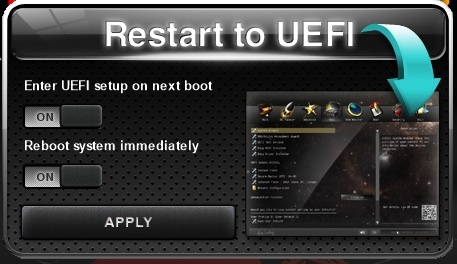
niiice, nifty lil tool. would it work on other mobos as well? or asrock specific?
13 hours ago, electrosoft said:Sugi pushing AM5 rig to the max:
5800 on all cores 9950X3D
8800 C34
5090 running 2500w Lightning BIOS clocking 3427 pretty much rock solid the entire play session
wtf 😮 i wonder how many IMCs he had to bin for that RAM speed (and how stable it is).
-
1
-
3
-
-
3 hours ago, Papusan said:
It was just question of time. Asus couldn't be any worse than MSI. Hence this one come now. Sad Asus need to be
pushedspanked by their competitors... Their reputation as THE PREFERED OC BRAND at stake. Asus own cards is almost none compatible for cross-flashing with any brands vbios versions (neither with firmware from their own SKUs). They really screwed up this gen. It's hard be on the list of shame. And Asus will stay there at least for this gen. Yep, their reputation is severely damaged. Shame on you.Another RTX 5090 2000W XOC BIOS leaks out, NVIDIA extreme OC scene is slowly waking up
ASTRAL RTX 5090 2000W XOC V2 leaked, its the newer version of the bios, which should include fixed power limit, with GPU able to reach 2000W now.
nice, more testing to do! 😄
-
1
-
-
4 hours ago, Mr. Fox said:

https://www.overclock.net/posts/29562444/
That's not how that works, but please go on about how you really don't understand what you're doing some more.. it's enthralling 💀It is a downgrade in every measurable capacity if you actually understand what you're doing, AMD is for people who don't have a ****ing clue and like to sit around in forums and circle jerk about it.. 💀💯What grade are you in? Are your classmates really mean to you, or is it a parenting issue?
lol i wouldnt even bother replying to such comments 😄
2 hours ago, electrosoft said:Installed the WV2Pro while testing on the Ultra for setup, taking the Corsair SFX SL1000 for a real run and some basic looking around.
SFX 1000w has held up nicely....

Testing with the MSI Yellow tip of death adapter during Steel Nomad runs before I get around to the big transplant. Still collecting some Ultra WoW data for my archives.
Verdict with MSI's yellow tipped 4 headed octopus? Not doing backflips....
Saw pin 2 dip as low as 6.8 and Pin 6 as high as 9.4...

Interesting coil whine test.
Connected directly to the Corsair SFX SL1000 and the Vanguard was definitely noisier than in my main case (inversely, the 9070xt is quieter in my main rig case with the P2 than with the Corsair), but when I hooked up the WV2Pro, that extra coil whine went away. That bodes very well.
huh, nice lil side bonus if the WVPII decreases coil whine on the gpu 😄 u planning to test any of the 800+W vbios versions? or sticking to gigachad?
-
1
-
-
12 hours ago, electrosoft said:
now were talking indeed! DDR5-7600 CL32 stable baby! usually id get CL38+, finally a good mount 😄 maybe the delid helped here too 😛 timing tuning ongoing...
-
2
-
1
-
-
8 hours ago, electrosoft said:
I still wouldn't run the 2001w XOC as a D2D vs the Matrix vBIOS. I guess if you don't really have a choice unless you want to whip out a soldering iron to get it working with the Matrix, you use what you can use but for normal cooling, it is the Matrix 800w for me or potentially the 1000w Lightning.
yep my thoughts currently. id be highly interested to check out the 1kw lightning vbios, but i wager that hasnt been dropped yet? ill do my rounds over at TPU 😛
ok kool both the 800 and 1000W lightning versions have been dropped:
800W
https://www.techpowerup.com/vgabios/281640/281640
https://www.techpowerup.com/vgabios/281693/281693
1000W
https://www.techpowerup.com/vgabios/281649/281649
https://www.techpowerup.com/vgabios/281650/281650
https://www.techpowerup.com/vgabios/281692/281692
2500W
-
1
-
1
-
1
-
*Official Benchmark Thread* - Post it here or it didn't happen :D
in Desktop Hardware
Posted
so, opened up my case last night and adjusted the cable connection for both the WVP II into the GPU, as well as the cable into the WVP II (a.k.a. rammed both inside like theres no tomorrow 😄) still saw some imbalance peaks but not enough anymore to trigger the alarm in Alan Wake 2.
Started with Black Myth Wukong today, I must say I was surprised to be able and max everything out completely including max RT and DLSS DLAA, running smoothly in the range of 70-80 FPS, with short peaks & dips to 90 and 60 here and there. I guess thats what tuning, OC and a higher power budget gives you 😄 according to all the reviews ive seen they werent able to get more than like 40-50 FPS with everything maxed out, thus DLSS Quality was required, at the least.
in any case, thus far i havent seen any imbalance spikes, although power spikes arent as pronounced here as with AW2 before, im almost always voltage limited, rather than power limited.
in any case, its been fun thus far, looking forward to dive more into this game with tons of eye candy 🙂
PS: just to be on the safe side, ive got my three other GPU cables at the ready to check and see if any of them would fare better if those imbalance issues start returning....