

jaybee83
-
Posts
2,421 -
Joined
-
Last visited
-
Days Won
57
Content Type
Profiles
Forums
Events
Posts posted by jaybee83
-
-
15 hours ago, biodi said:
It is alive 😀
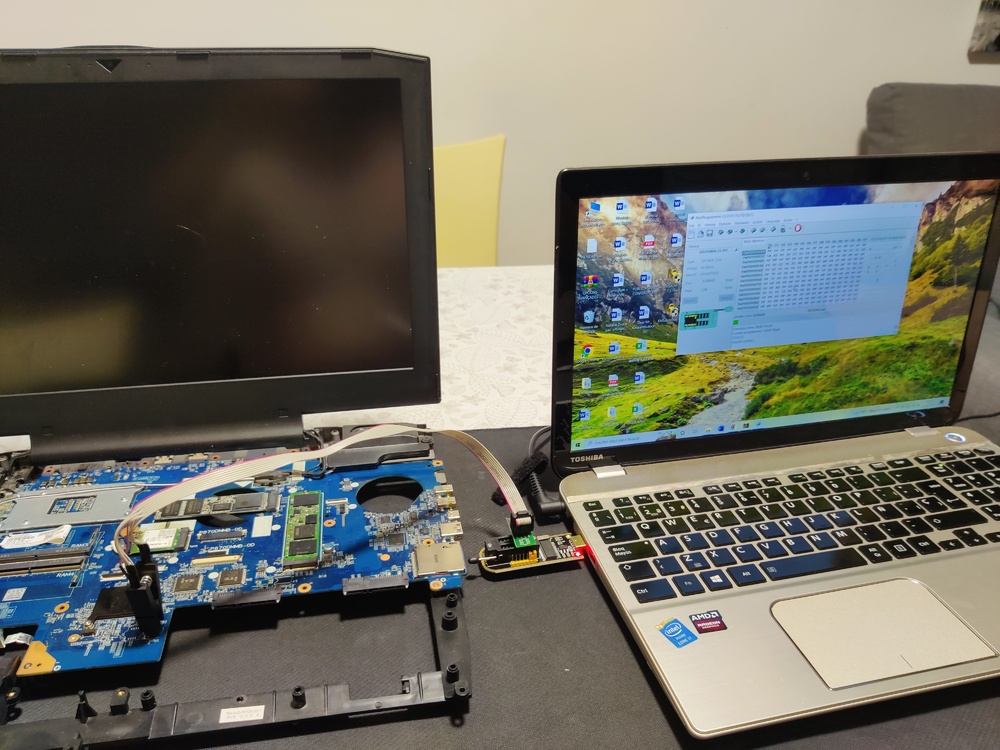
i know exactly what kind of relief u went through there hahaha. congratz!
-
4 hours ago, giltheone said:
Well, I just discovered this place, and seeing some members from NotebookReview (RIP 😔), I just had to join. So, how is everyone?
In the meantime, I am going to have a look-see, because I am searching for advice -- to see where to start a topic, or to see if there's an answer already.
You all have a good one!welcome back bud! ull feel right at home at NBT, phoenix from the NBR ashes 🤠
-
 1
1
-
-
On 7/21/2022 at 1:54 PM, Aaron44126 said:
Saw this a few days ago and finally sat down to watch it. This is the coolest bit of hackery I've seen in a while. I don't want to say that much; for anyone who is familiar with Ocarina of Time, there are just a string of fun surprises that build on each other throughout the video all of the way to the end. It was done on real Nintendo 64 with an unmodified OOT cartridge to boot.
Here's another one that explains how the whole thing works.
oh that sounds interesting, saved to my watchlist! 🙂
-
7 hours ago, Tofu said:
Fair enough, did some more testing with superposition and still seeing similar results, 115w gpu vcore won't go above ~.685 while 95w hits .800 fairly often.
Maybe it's just some kind of hard limit of my motherboard, in which case I guess I'll just have to stick to traditional OC/UVsounds like your power delivery is holding you back. even when flashing a higher wattage gpu bios, theres still a total system wattage limit in place. and, of course, u never know what weirdness can happen when flashing unofficial stuff haha 😋
-
7 hours ago, 1610ftw said:
No problem, let it be all it can be. And to be honest 5.3 on all cores ain't half bad on a laptop 😄
lol, understatement! and yes, its likely some kinda voltage or amp limit that causes the system to freeze. even highend DTRs can only do so much to try and keep up with entry to midrange desktop boards with regards to power delivery...
-
 2
2
-
-
3 hours ago, Tofu said:
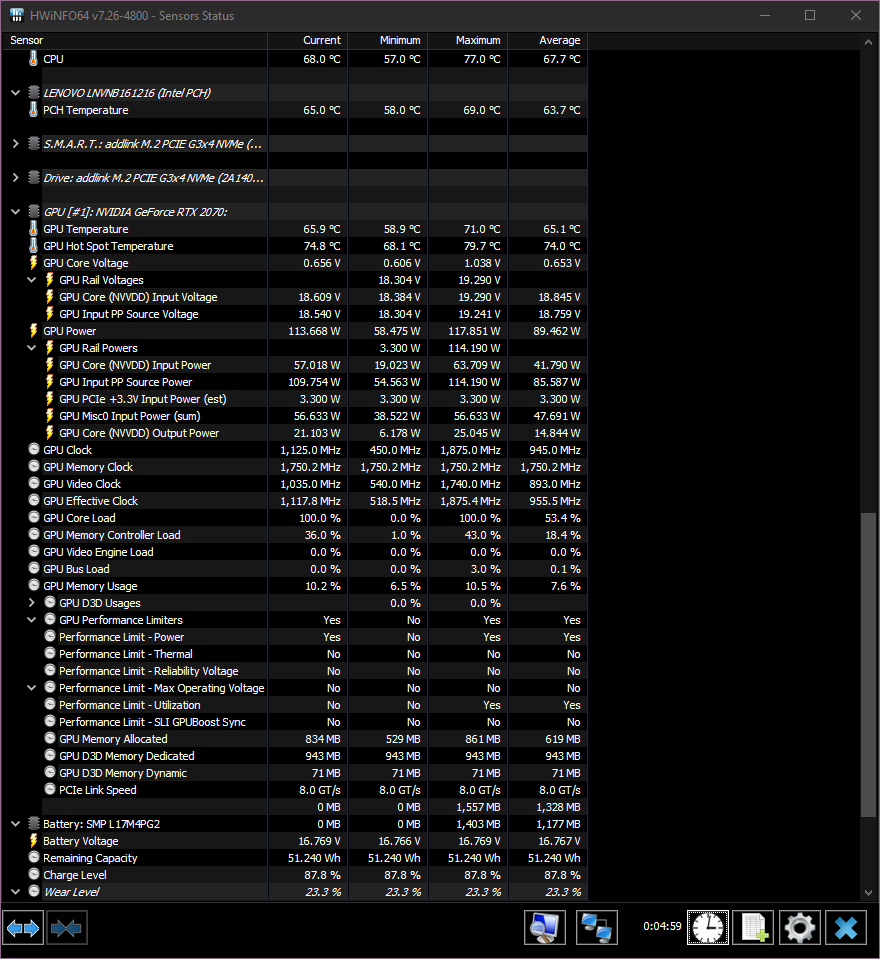
Did some more testing and I'm just confused. On stock vBIOS my gpu core hits .750v with furmark at 1440p 8x AA, but without AA it doesn't go above .615.
On 115w vBIOS I don't see the GPU core going above .685v no matter what furmark settings.
Attaching an image of hwinfo with 115w vBIOS running furmark at 1440p with 8x AA
Anyone have an idea of what might be going on?
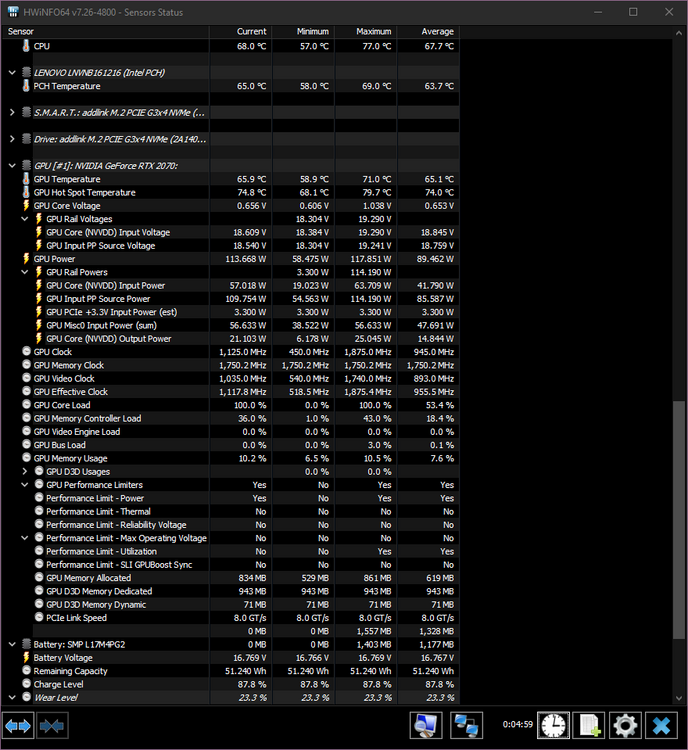
i wouldnt rely on furmark for such testing, there are way too many algorithms in place that changes the default gpu behaviour when it detects furmark running. rather check with somth like 3DMark stress tests or superposition.
-
11 hours ago, Mr. Fox said:
Easy heat sink removal... ignore part 1 video. Such a funny maniacal laugh. I have been doing it the hard way. This should also require less cleanup effort.

or you can do it with LN2 😄
-
1
-
 1
1
-
-
5 hours ago, Ashtrix said:
Intel ceded their ARC BS hype lol. Basically nothing but smoke. They do not have performance with Alchemist, some people think their next GPU arch something called Battlemage or whatever can compete. If they failed to get the Drivers and Low end there's no scope for this to fight at xx70 even. 4070 is going to be at 3080Ti level & Nvidia 5000, AMD 8000 will be even more fast with new ATX 3.0 16 pin dGPU connectors.
Their idea is to flood the market with BGA TRASH, BigLittle junk - Check, BGA Trash bundle with Intel Xe ARC - Check. Stamp some marketing nonsense stickers on the BGA book, fools will flock to buy it regardless. I think they see more money this way rather than try and fight vs the established high performance dGPU market which is not BGA. Also even on BGA they will be destroyed because Nvidia will stamp 3090 also on Mobile and performance will be worse than any desktop card with it's infinite throttling, Memory castration, Cuda castration, RT core castration lol.
gotta LOVE high quality rants like this hahaha 🤣
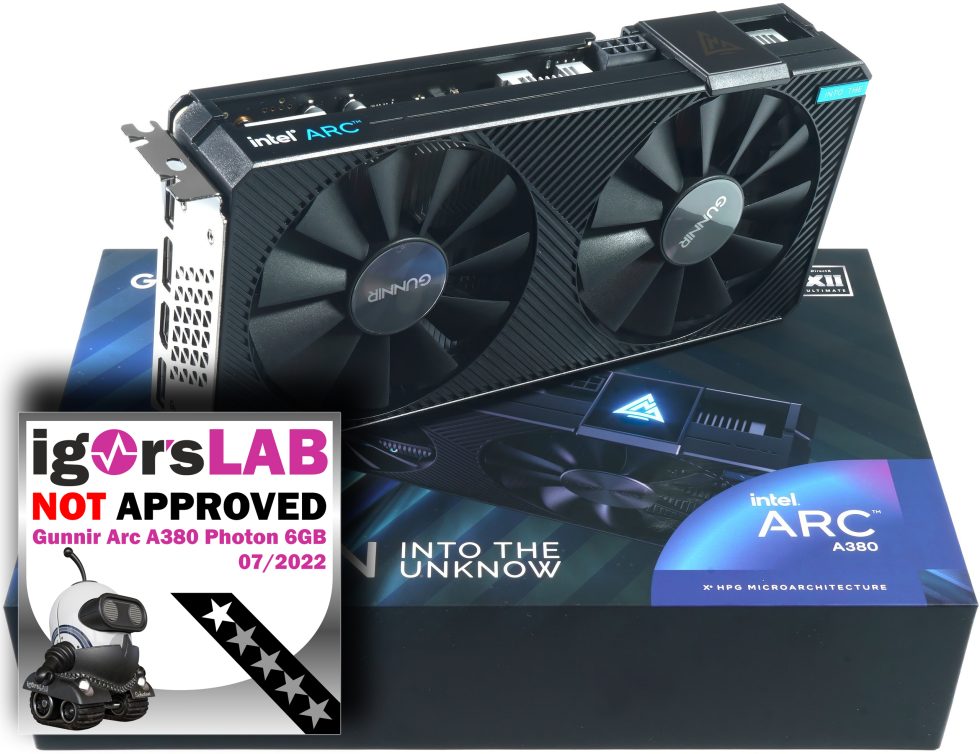
4 hours ago, Papusan said:wait wat....does it SERIOUSLY say "into the unknow" on the gpu box?!?!? LULZ 😅
1 hour ago, Talon said:Given that this is the first real stab at Intel dGPU mainstream/consumer GPU, I will reserve judgement and give them time to wrinkle things out. Jumping to conclusions based on early Chinese GPU companies that can't even spell "Unknown" correctly isn't something I'm willing to do. I remember when DLSS first came out, it wasn't great, it was blurry and people generally shat all over it. Looking back, all those videos telling Nvidia to give up or move on are hilarious now. I watched a video recently with Tom and Gamers Nexus on Arc and Intel has some interesting ideas.
I'm more excited about seeing Intel leaving voltage and power limits available for overclocking. Overclocking on Nvidia today sucks! No voltage control, no fun. Have you seen how much overclocking can do for these new Intel GPUs? It looks like fun to tune/push and it's not even out yet. I expect a lot of improvements from them over time.
word! i mean....cmon guys, did anyone seriously expect Intel's very first (not counting Larrabee) foray into dGPU land to be perfect? give them 2-3 gens and then we'll see whats up.
I for one am cheering for them to succeed, the more players in the game the better for the consumer 🙂
-
5
-
-
12 hours ago, 6730b said:
^^^ or could simply be (some, many of) these batteries (or the elctronics\sensors) are bad quality :O)
Latest entertainment after posting my above post, refused to restart from sleep, like no \ flat battery, although around 50% charge. Again, plug in the power cord and it started, and battery re-worked.
Old 56 wh (now 35 wh) Dell batt back in place. Amazon gets another return. Thanks for the audience at this topic, hoping it's been useful for those in need of batteries... 😄
the audience thanks you, very entertaining and insightful 😄
-
2
-
-
7 hours ago, Clamibot said:
I have adopted this approach. You can get hardware that's still really good for a very hefty discount, so you get much better value versus buying at the beginning of a generation.
I am very much looking forward to the day that integrated graphics becomes powerful enough for high framerate gaming at 1080p. These dGPU prices keep getting more ridiculous.
once ive scratched the itch after 2.5 years of planning, waiting, saving up and shaking my head (and fist) at the ridonkulous pandemic / mining prices, this approach at the end of a cycle certainly makes much more sense! so then maybe ill jump onto the 6090 Ti shortly before the 70 series comes out 😛
-
1
-
-
3 hours ago, Onehit said:
Not sure if it's appropriate to post here, but I guess you could say i've been searching for a matching 16gb kit of G.skill ddr3l 2133mhz for a few years now. I've tried various e-commerce places and even good ol' r/hardwareswap, but nothing. I regret not buying another pair back when you can still buy them on Newegg like 6 years ago. I think I should just keep waiting patiently until something pops up or unless, somebody else knows of where to procure such fabled sticks.
hey bud, u might wanna open up a WTB or "want to buy" thread in the marketplace: https://notebooktalk.net/forum/80-want-to-buy/
if you can, best to also include pics and model / serial numbers or at least timing info of the sticks 🙂 good luck!
-
3 hours ago, 6730b said:
So, a few days of heavy use of the GDORUN 97Wh, good capcaity, no heat, charging well, but..... 2 instances so far where the laptop failed to boot with a (fully charged) battery.
1st time booted after a short connection of the power supply, then battery behaved normal.
2nd time, charging led in front of laptop blinking orange, no boot, had to open bottom, unplug and replug the battery, then ok.
Basically. looks like (some, many?) 1\2 price batteries comes with 1\2 reliability in one way or another. Am always fond of some tests and experiments, will give the GDORUN a few days more, will maybe settle. But soon no more maybe's, it's a return then get hold of an original Dell, and hopefully close the case (...laptop bottom) for good.

could it be that the battery couldnt handle an initial power spike during boot? such spikes would require higher quality batteries, naturally
-
20 minutes ago, Eban said:
I thought this was interesting.
Dormant Black hole

I remember watching the Disney movie The Black Hole as a kid. Very cool at the time (as was star wars before they ruined it)
ah, exciting scientific times we live in... lets just hope we can make it through climate change first 😅 greetz from overheating europe!
-
2 hours ago, saturnotaku said:
I've repeatedly played and beaten both the original+DLC and Director's Cut of this game on pretty much every platform it's been released for except the WiiU. It's one of those rare titles where I discover something new every time I fire it up, be it some flavor text in a room I've previously overlooked or a different set of dialogue challenge options. It's probably my second favorite game of all time.
I've been playing Half-Life 2 recently, and all these years later, my opinion on it has definitely soured. While it has some absolutely brilliant and memorable levels, there are several stretches of the game that feel like chores to get through. I won't be touching the episodic content again as I didn't care for them when they first came out.
the episodes were really good though! i enjoyed them 🙂
-
4 minutes ago, Mr. Fox said:
I'm going to have to take the position that if 4090 and beyond won't have working Windows 7 drivers I will not be looking at a GPU upgrade for a long time. At least not for my benching rig. I might get a 3090 to upgrade from my 2080 Ti someday. Maybe when I can get a nice used 3090 for $500-750. The notion of giving up Windows 7 permanently doesn't register anywhere on my radar at this time.
at that point i can see u jumping over to Linux = custom slim system without BS with current (maybe even open source?) drivers 🙂
-
2
-
-
2 hours ago, electrosoft said:
It depends. How much more can Nvidia extract with ballooning TDPs? Will we get the same meaningful upgrade as from 2000 to 3000 or will we get 1000 to 2000 which wasn't nearly as awe inspiring? Then there's AMD pushing both Nvidia and Intel to keep it real and put forth their best silicon.
On the other hand, I am more than happy with a ~66% uplift. That 4090 will effectively bury every 3000 series card 6 feet under.
I'll wait for the 4090ti fire breathing dragon to upgrade next time.
aaaah, see, THATS the info i had in my head, 4090Ti double perf of a 3090 non-Ti 🙂 heard it on MLID YT
as for waiting for the 4090 Ti....hmmm thats a tough one. its release date will highly depend on what RDNA3 brings to the table. if AMD is daring to equal the 4090's performance right away and also catches up in RT performance, then Nvidia will not wait long to release the full fat AD102 die, maybe even right away together with the 4090.
on the other hand, if the 4090 is safely holding the non-RT and RT perf crown then the green goblin can wait to maximize their profits (i.e. "mid cycle milking") AND have the winner halo product.
in the former scenario, ill wait for the 4090 Ti, in the latter ill just grab the 4090 or 7900XT, letting me enjoy the hardware for a full year before anything else comes out. otherwise, id let that "wait forever for the next best thing" death cycle get a hold of me haha!
-
 2
2
-
1
-
-
49 minutes ago, 1610ftw said:
No, there is not a single screen bigger than 17.3" but then not too long ago there wasn't a single 16 or 17" 16:10 screen and look where we are now. There are even 3 different resolutions for the 17" screens with 1920 x 1200, 2560 x 1600 and 3840 x 2400. As far as socketing goes Lenovo even has socketed GPUs for its upcoming 16" workstation so that would not even be that much of a surprise.
there used to be 18.4 inch screen sizes available in "ye olden days" like in the Clevo P180HM: https://eurocom.com/ec/specs(223)
that was back in the 600M GPU and 2000 Intel CPU days....socketed mobile cpus! 🤠
-
1
-
-
50 minutes ago, Mr. Fox said:
OK. As expected, MSI passed the buck and shirks their responsibility. Typical loser OEM, just like ASUS. "Generally speaking, BIOS update does not cause damage to memory SPD..." But, let's have TeamGroup pay for it... nice solution for MSI. EVGA FTW!
Our friend at Thaiphoon Burner replied. He is such a great guy... and, very smart.
------------------------------------
From: Vitaliy Jungle
Sent: Tuesday, July 19, 2022 2:57 AM
To: Mr. Fox
Subject: Re: "Thaiphoon Burner PRO Corporative Edition"Hello Mr. Fox,
Thank you for the reports sent! I have examined the SPD dumps from your Team Group memory modules. They are both corrupted indeed. However the first module with the corrupted Part Number "ŠEAMGROUP-UD5-620›" has only 1 error in the first 512 bytes. This means DRAM and module organization, timings, voltages and other electrical parameters are not corrupted. The Part Number also needs to be fixed. As to the second SPD dump, it has more random errors in the first 512 SPD bytes.
Both of the SPD dumps have a corrupted XMP header. This is why BIOS doesn't find XMP profiles.
Here is how the XMP header looks like in the SPD of your Corsair modules:
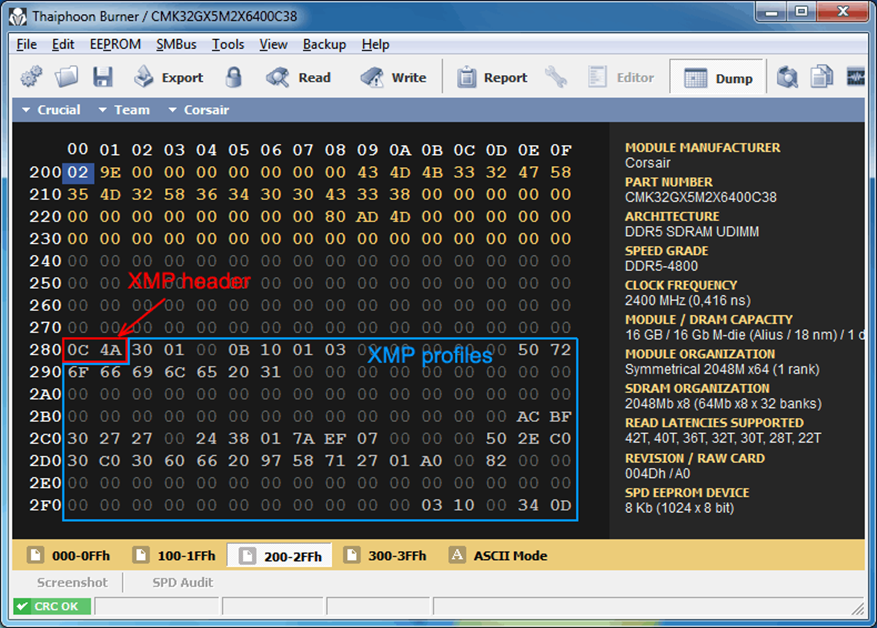
It is not corrupted like the other part of XMP bytes. And here is the XMP header of your Team Group modules:
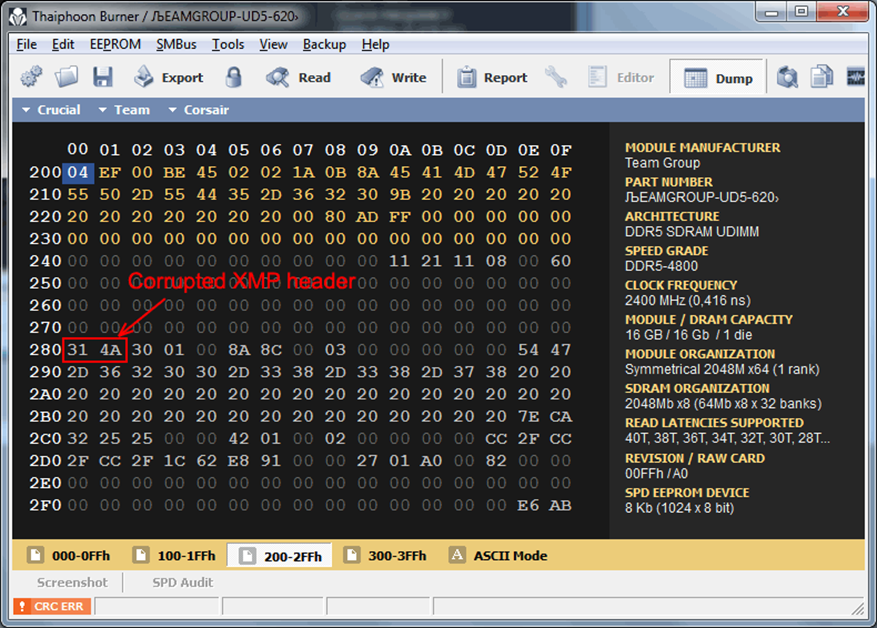
The header is corrupted. As you can see many of the XMP bytes are set to "20". This is a "blank" code and it is related to a string code. And it is not an error.
So, if the Thaiphoon Burner was ready, you could restore your SPD easily. But at this moment I am unable to help you.
Anyway, thank you for sending me reports! I felt much better when I saw that my program is already capable of decoding some parts of DDR5 SPD without issues.
With best regards,
Vitaliy.
send them Vitaliy's report, see what MSI has to say to that 😛 probably smth like: well u SURELY did something else to corrupt your RAM, aside from flashing our PERFECT INFALLIBLE BIOS! 😄
-
 1
1
-
1
-
-
8 hours ago, electrosoft said:
4090 potentially 66% faster than the 3090ti? Righteous! Thanks AMD! 😅
only? i expected DOUBLE! 🤪
7 hours ago, Tenoroon said:@Mr. Fox, My K5 Pro came in earlier and I decided to see if I could get it in a medicine syringe like you had told me, I tried sucking in from the nozzle of the syringe but the stuff seems too thick.
I am assuming you had put the K5 Pro in from the top and just pushed it all out of the syringe, but let me know if you did something differently as I'd like to avoid getting the stuff stuck. Its a lot thicker than I thought it would be; I can see how cleaning it is a pain in the rear end.ha no chance ull be able to get that through the bottom part of the syringe, definitely need to manually spoon it into it from the top.
-
2
-
-
12 hours ago, 1610ftw said:
I am not sure that the issue with a DTR system is not simply that nobody makes any money off it. The issue probably is that companies like to make LOADS of money.
Now a DTR poses two issues on the financial side:
1. It probably sells enough to make a small profit, maybe even a relatively handsome one but certainly not huge sums.
2. It shows up the thinner and lighter BGA books that by comparison look weak in multiple aspects and sales will probably be affected negatively.
This can be an issue but then if only one company offers a DTR they can also get customers from other brands who will switch brands for a proper DTR.
only to a point. most people just go by hardware "names", i.e. = hey look! this 1kg slim laptop with 12 hours battery life has the same 3080 gpu in it as the 5kg DTR with only 1 hour battery life! SAME PERFORMANCE! 🤪
-
1
-
-
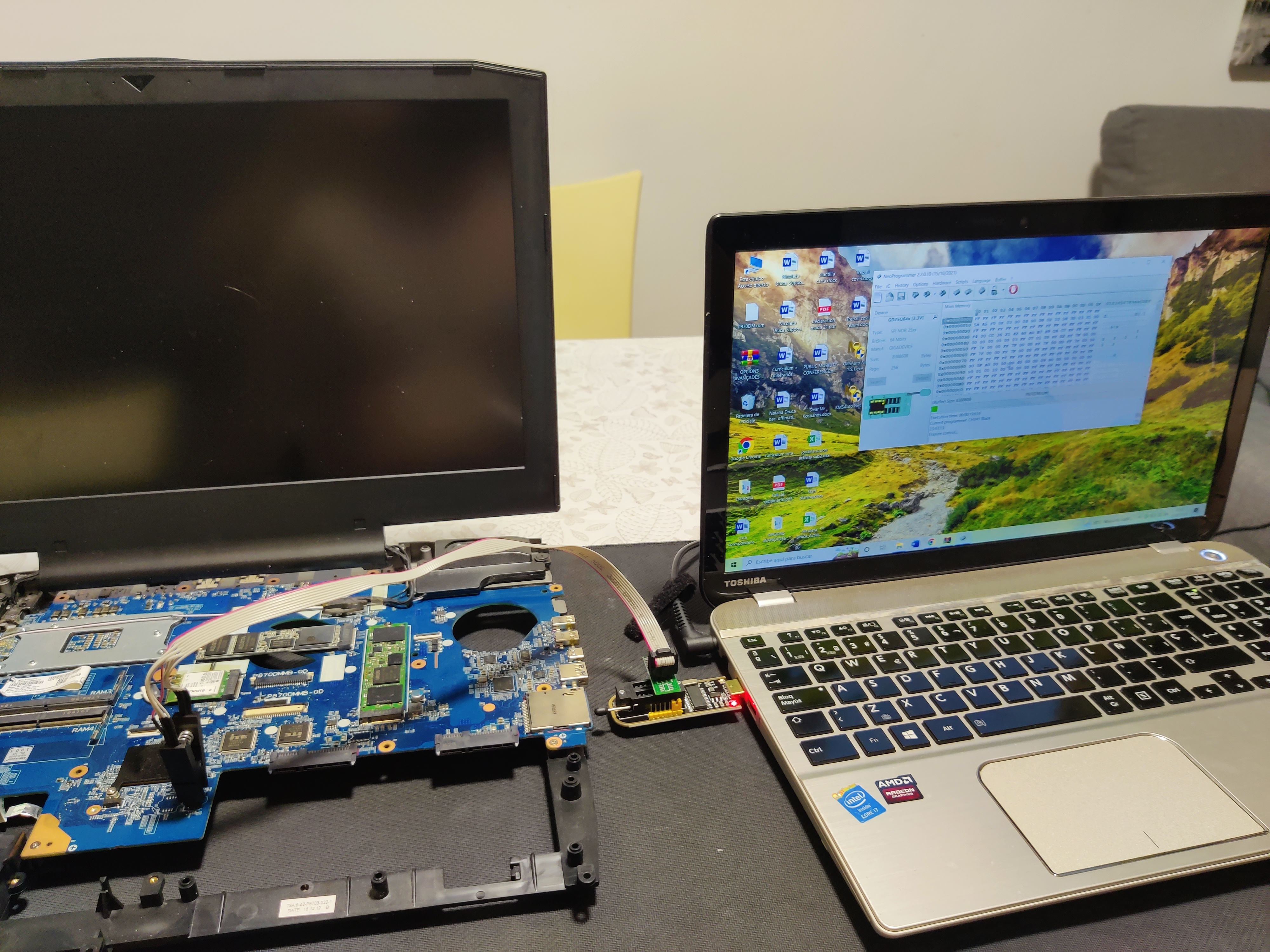
um...how do get display output? are u running on integrated graphics? in general, that entry in the bios doesnt really mean anything, as long as the card itself works 🙂
-
48 minutes ago, VEGGIM said:
Thing is, who is the one who convinces those that thin n light is better. Since comapnies who purchase DTR's replace the laptop when the warranty runs out. Thats how buisnesses do things. The thing is what would convince them to do dtr's thats not benchmarking points.
its always a question of how you spin it: u might as well build a whole ecosystem with repair shops and socketable hardware upgrades to support a platform for many years to come. that way you could argue that ur revenue per machine is much much higher than a single use disposable thin n light BGA turdbook.
-
1 hour ago, i.bakar said:
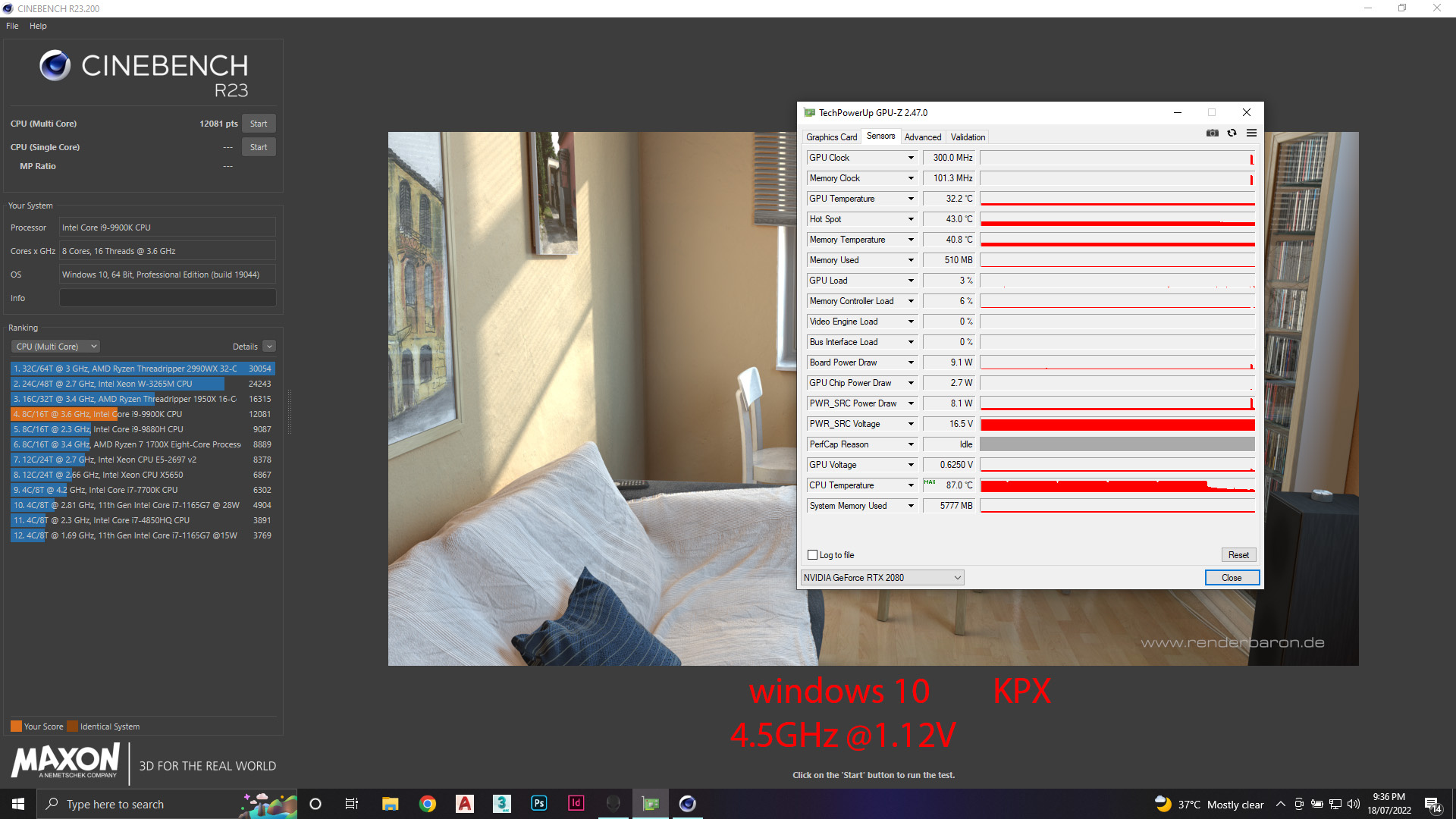
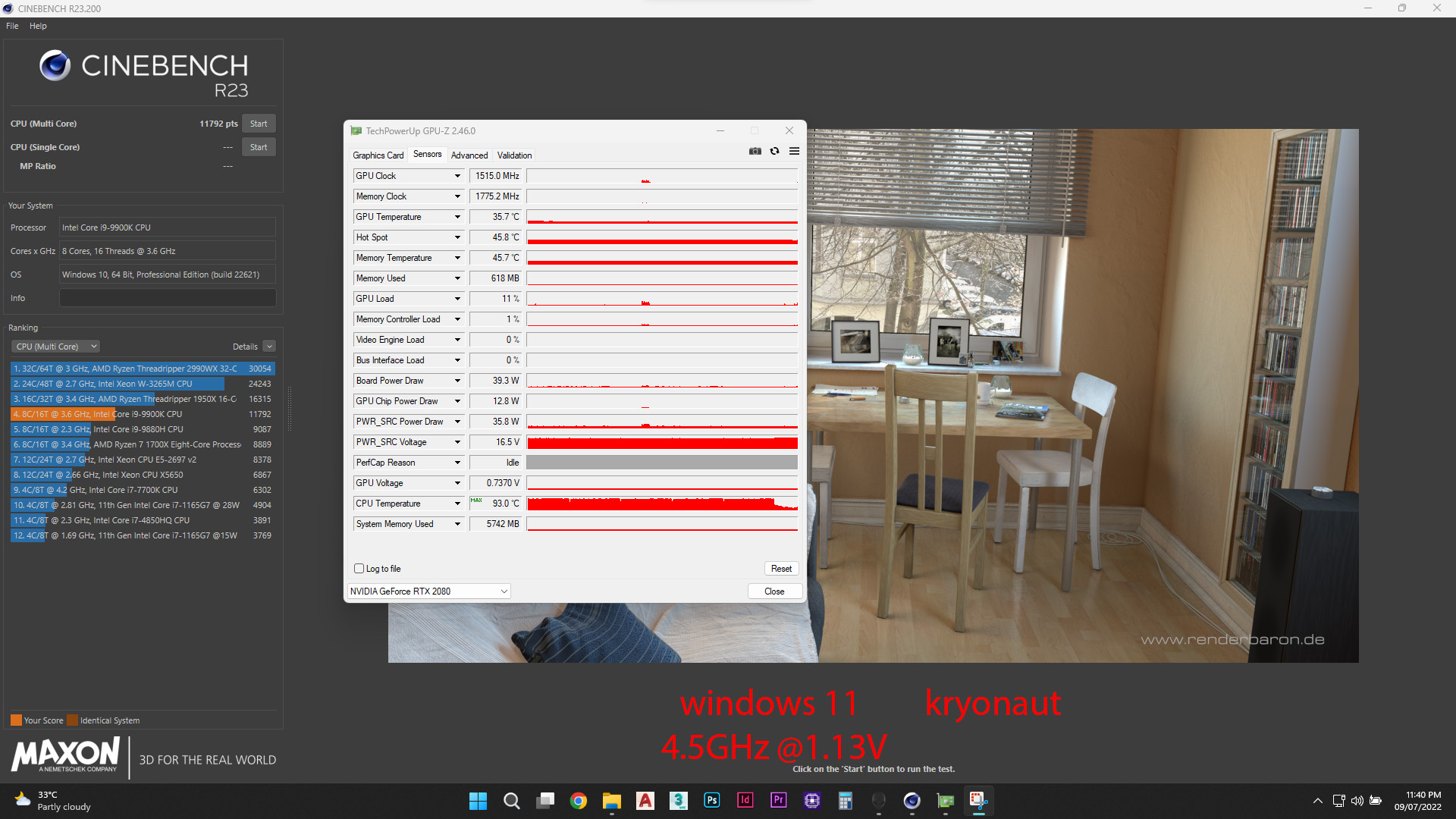
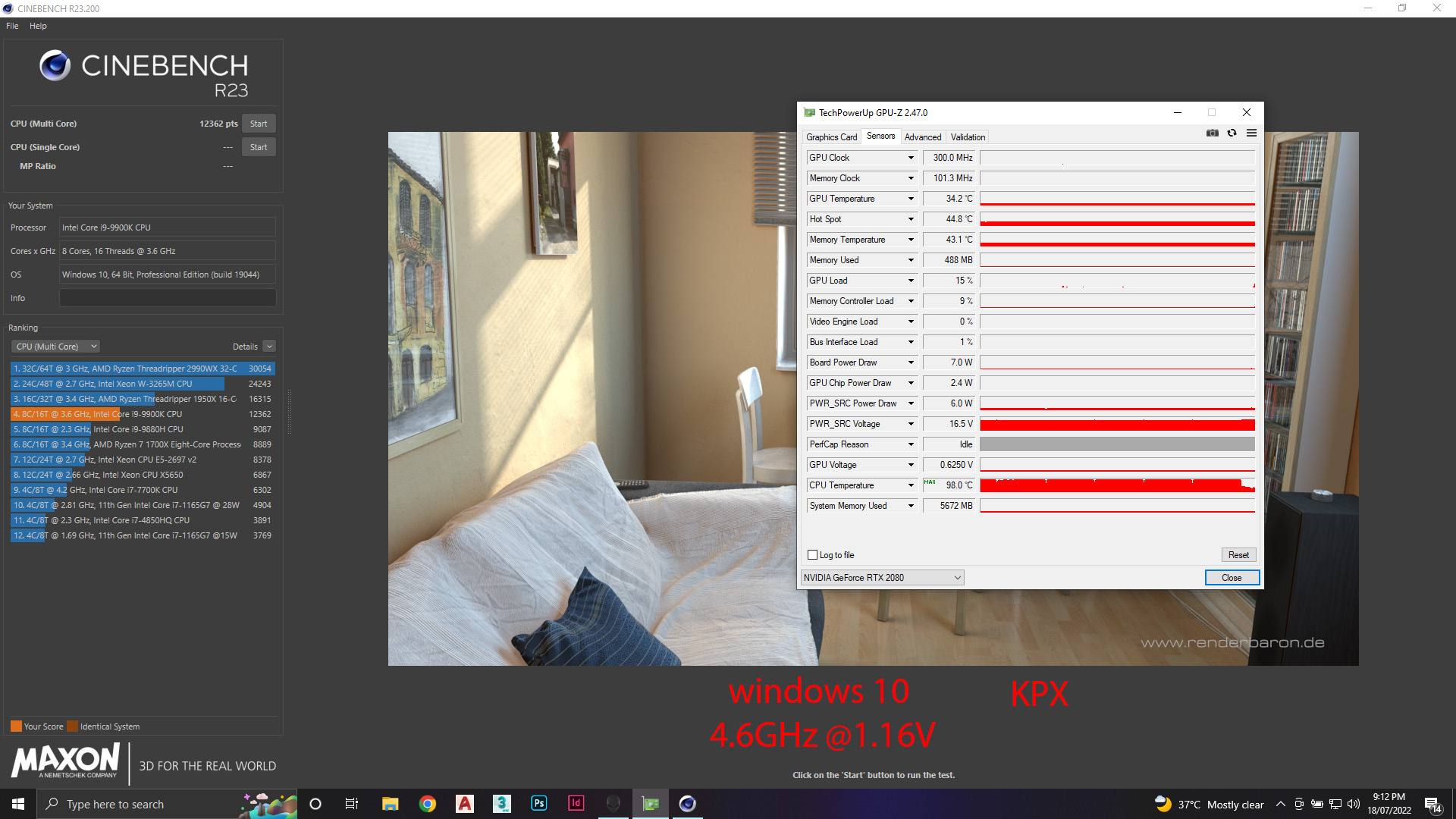
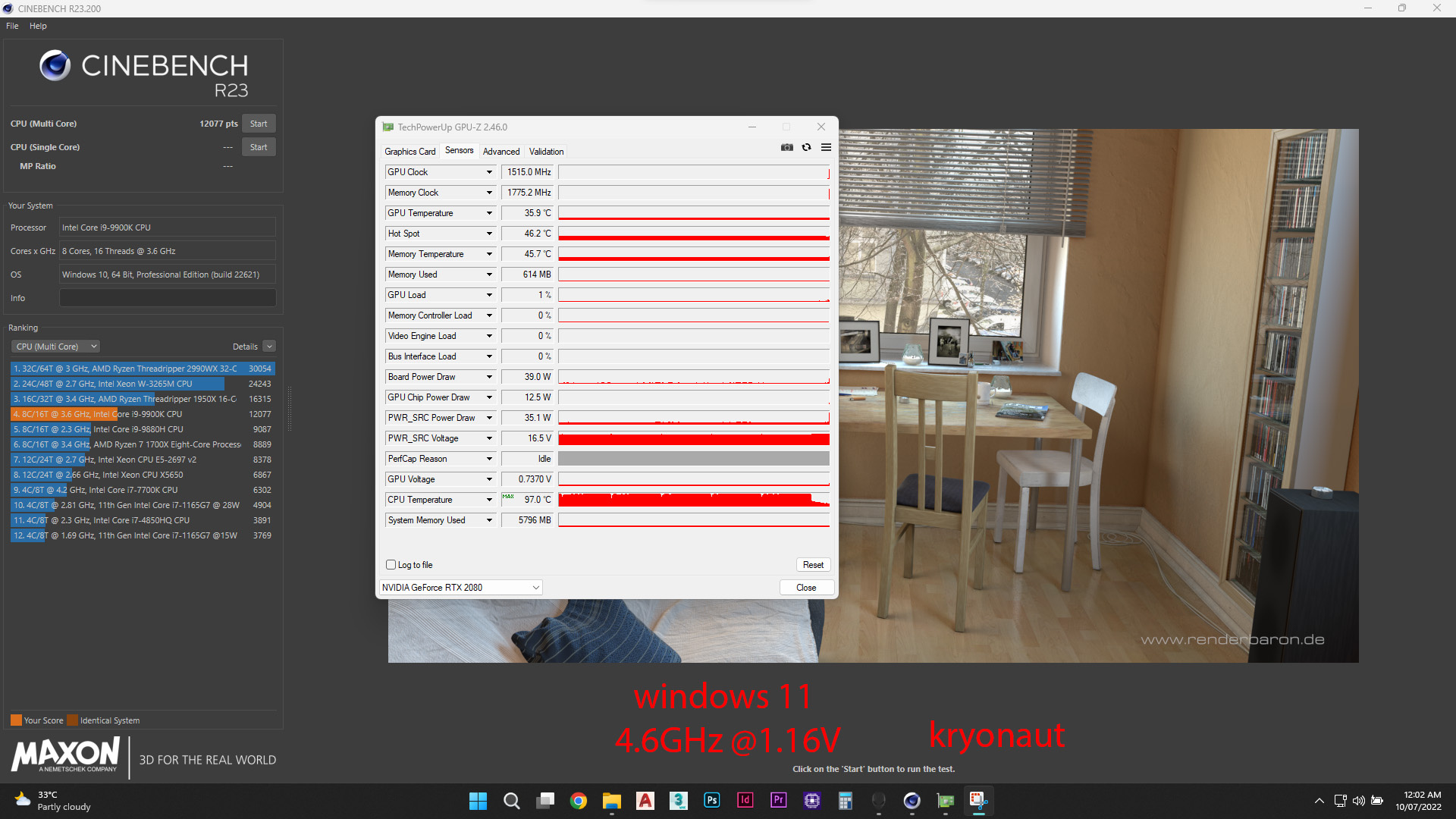
well as i mentioned before , i ordered the KPX and it arrived today and i wanted to compare it to the kryonaut that i had on my system for 3 weeks now.
just for the record my system is Alienware area-51m stock fans and heatsink no mods to the cooling system .
so i did ( cinebench 23) 10 minutes test with the same processor i9 9900K overclocked with the following numbers:
1- i9 9900K @ 4.5GHz
2- i9 9900K @ 4.6GHz
however i changed my windows the past few days from windows 11 to windows 10 which did change the volt that each clock was at so the following numbers was recorded ( difference of 0.01V less on windows10 VS windows11 )
by the way i used the same overclocking setup on alienware command center with the same offset on win10 and win11
1- on windows 11
- 4.5GHz draw 1.13V
- 4.6GHz draw 1.16V
2- on windows 10
- 4.5GHz draw 1.12V
- 4.6GHz draw 1.15V
so here is the screenshots for the results
LOOK AS THE SCORE OF THEM , HUGE DIFFRENCE !
SINCE I DIDNT THROTTLE IN ALL THE TESTS , THEN THE DIFFRENCE IN SCORE IS BECOUSE OF THE WINDOWS NOT THE THERMAL PASTE
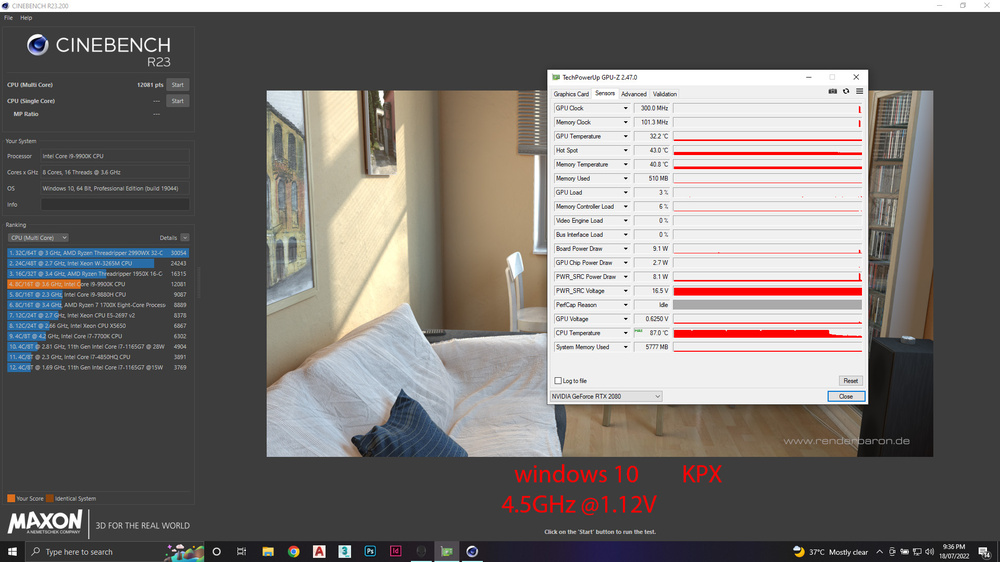
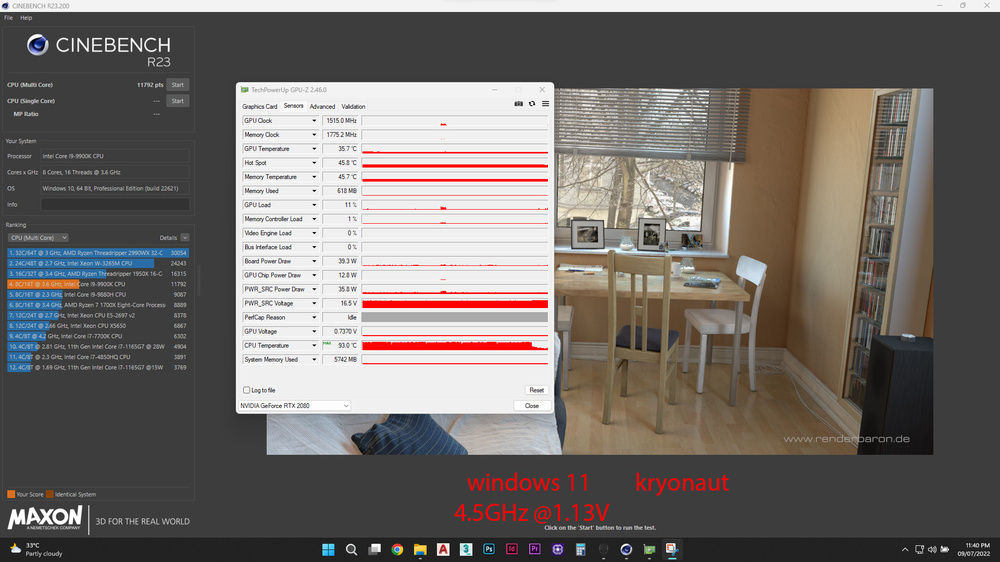
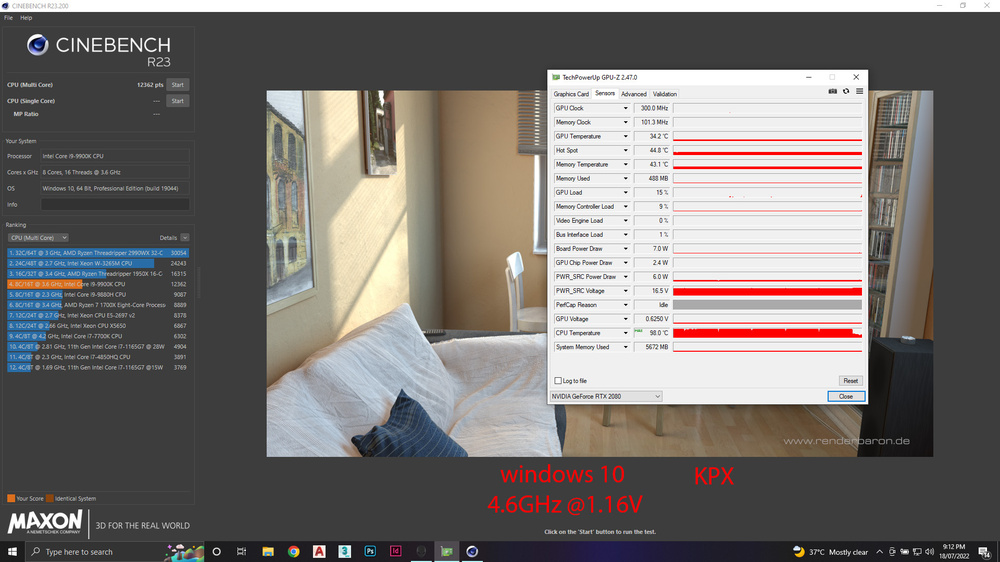
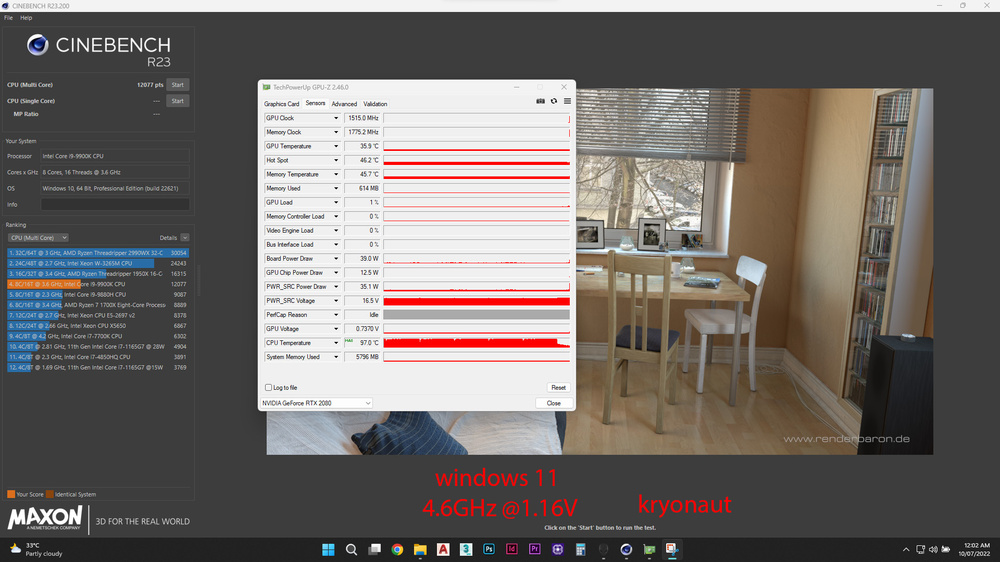
thats OS bloatware for ya @win11 vs win10 😄
-
1
-
1
-
-
14 minutes ago, VEGGIM said:
Ok another question. What constitutes as "thin and light" cuz thats really vague.
Pretend that i'm an big OEM wanting to make a laptop. What justification would their be to make a DTR that would make money or generate profit.Since thats computer companies priority #1. If it doesn't make money or if the amount of money gained doesnt gain enough profit to cover the overall development costs. Then it's seen as unworth or a failure.
Rn DTR's are mostly used for engineering market because they don't care about size or weight so they're used for scientific workloads.
yep, of course, youre right, thats the big issue here: the sheeple want thin n light crap and the companies follow the big trends / go wherever demand takes them. thats how they make money.
unfortunately, the group of people wanting big fat high performance DTRs becomes smaller and smaller each year...
DRIVERS & SUPPORT FOR LAPTOPS & DESKTOPS (Intel, Nvidia and AMD).
in Operating Systems & Software
Posted
try and disable driver signature enforcement, see if that helps.
another quite silly thing is to make sure u extract / put the driver setup files as close to root on your C drive as possible to avoid dumb error messages during install. so ideally use smth like C:\GPU Driver as your setup folder to start the install from and avoid any kind of deep folder hierarchies.