PHVM_BR
-
Posts
140 -
Joined
-
Last visited
Content Type
Profiles
Forums
Events
Everything posted by PHVM_BR
-
Precision 5680 review... the author has confirmed that the TGP for RTX 5000 Ada is also 95W.
-
Precision 7540 & Precision 7740 owner's thread
PHVM_BR replied to SvenC's topic in Pro Max & Precision Mobile Workstation
If you disabled core isolation/virtualization and it was still blocked it maybe that restoring factory defaults in BIOS would unlock undervolt. From a certain version of the BIOS, very old, it was necessary to restore the factory defaults to unlock the undervolt. Here without editing the BIOS the undervolt works on 1.24.0. If there really is a block it must have started in BIOS 1.25.0 or 1.26.1.... -
Precision 7540 & Precision 7740 owner's thread
PHVM_BR replied to SvenC's topic in Pro Max & Precision Mobile Workstation
I have W10 Pro 22H2 here. Maybe just need to disable core isolation and virtualization features in W11 for undervolt. -
Precision 7540 & Precision 7740 owner's thread
PHVM_BR replied to SvenC's topic in Pro Max & Precision Mobile Workstation
I don't understand, my Precision 7540 is still in BIOS 1.24.0 and undervolt is unlocked. I didn't need to edit the BIOS to do a dervolt. Lock must have occurred in later version, 1.25.0... The power limits are interesting, in my case with i7-9750H, PL1=75W and PL2=90W, and sometimes I manage to increase them by checking the MMIO and MSR boxes in Throttlestop. It's something random, usually blocked, but I've managed to increase them a few times and they go back to default as soon as I restart the system... I have PTM 7950 applied since the beginning of the year and my undervolt is -250mV for the core and -130mV for the cache. Out of curiosity I tested it without undervolt and with the power limits at 107/107W and the i7-9750H needs ~100W to run Cinebench R23 mukticore with maximum clock (4.0GHz all cores). With my undervolt, which is 100% stable used since the purchase in December 2019, the consumption goes down to ~60W! About PTM 7950, without undervolt and at 4.0GHz all cores during the entire test on CB R23 consuming ~100W the processor remains at 95/97°C without throttling. With undervolt at ~60W the temperature drops by about 20°C and the fans only reach ~3900 rpm (the maximum is ~5150 rpm). -
If the system receives the maximum of 165W it would be a disappointment... @Dell-Mano_G reported some time ago that the 5680 could benefit from the higher load using WD19DC. Maybe only on the stronger GPU options...
-
With around (75+75)W on the CPU and GPU both reach thermal limits. This will drain the battery even with the 165W charger... have you tested with WD19DC and verified if the system can pull more than the 165W of the original adapter? By dell thermal paste application history this 5680 seems to have a good potential after a repaste, even more in the versions with vapor chamber!
-
It is likely that your battery will be heavily drained, even plugged in, with the 130W charger. Interesting that these limits are well above the limits of the XPS 17 (9730) where the GPU is limited to 60/70W and the limit on CPU+GPU cross-loads is something like 90/95W. Probably the options with stronger GPUs have a little higher TGP...maybe something between 110 and 130W.
-
What is your GPU? Could you check the max TGP entered in the Nvidia control panel?
-
Precision 7540 & Precision 7740 owner's thread
PHVM_BR replied to SvenC's topic in Pro Max & Precision Mobile Workstation
Mine probably has that whistling sound you report, but it only occurs when the fans turn up to a high level, for a short period. If I really go ahead and change the motherboard I'll remember and post some pictures of the fans. -
Precision 7540 & Precision 7740 owner's thread
PHVM_BR replied to SvenC's topic in Pro Max & Precision Mobile Workstation
maybe 1, 1.5 and 2mm... -
Precision 7540 & Precision 7740 owner's thread
PHVM_BR replied to SvenC's topic in Pro Max & Precision Mobile Workstation
If I change the motherboard I will take advantage and change the thermal pads. Despite having experience changing thermal paste, I never changed the pads. Does anyone have an indication of the thickness of the pads on the Precision 7540? What are the best ones I can use? -
5680 has vapor chamber option (owner's manual) but no indication as to which configuration it is available from. Maybe from RTX 3500 Ada?
-
Precision 7540 & Precision 7740 owner's thread
PHVM_BR replied to SvenC's topic in Pro Max & Precision Mobile Workstation
If I really go ahead and have any difficulties along the way, I'm asking for help! Thanks again! -
Precision 7540 & Precision 7740 owner's thread
PHVM_BR replied to SvenC's topic in Pro Max & Precision Mobile Workstation
I've opened this system a few times but not at the level of replacing the motherboard. I believe everything is fine. As for the price, I got a new one with i9-9880H for 340 US dollars. What do you think? -
Precision 7540 & Precision 7740 owner's thread
PHVM_BR replied to SvenC's topic in Pro Max & Precision Mobile Workstation
Thank you very much for the quick and detailed response! As for the gain or not with 8 cores, yes my load is multicore and yes I will have an expressive gain since with the i7 I still have a good thermal space. My consumption at full load with maximum clocks (4.0GHz all cores) is only ~60W with my undervolt setting and the PL1 is 75W. Furthermore, with PTM 7950 I can sustain up to 100W without thermal throttling (95-97ºC) in medium-term loads. I'd say 90W can be sustained all the time at 88-92ºC. -
Precision 7540 & Precision 7740 owner's thread
PHVM_BR replied to SvenC's topic in Pro Max & Precision Mobile Workstation
I have a CPU bottleneck in my workflow. 6 cores are slowing down my life and so I'm thinking of buying a motherboard with i9, or 9880H or 9980HK, for my Precison 7540 with i7-9750H and Quadro T2000. Is there anything I should be concerned about or just replace the motherboard and everything will work? My other option would be to buy another machine, but the Precision 7670/7680 didn't attract me. I believe with i9 with 8 cores it will serve me for another 2 or 3 years... -
Precision 5470 Anniversary Edition
PHVM_BR replied to wallstreetbets's topic in Pro Max & Precision Mobile Workstation
@Dell-Mano_G Any news about the launch of the Precision 5480? I had read that the date would be April 20th... -
Precision 7540 & Precision 7740 owner's thread
PHVM_BR replied to SvenC's topic in Pro Max & Precision Mobile Workstation
Maybe in the moments of change the level of rotation, but as I said, it doesn't bother me. I used the phase change pad version and I believe it is the best option to avoid flow out delivering long-term durability. -
Precision 7540 & Precision 7740 owner's thread
PHVM_BR replied to SvenC's topic in Pro Max & Precision Mobile Workstation
Unfortunately I never checked. It never bothered me, although at maximum speed it is quite high (~5100rpm). I last opened the laptop in February and did the repast with PTM 7950. I don't think I'm going to open it for a long time... The performance is fantastic! -
Precision 7540 & Precision 7740 owner's thread
PHVM_BR replied to SvenC's topic in Pro Max & Precision Mobile Workstation
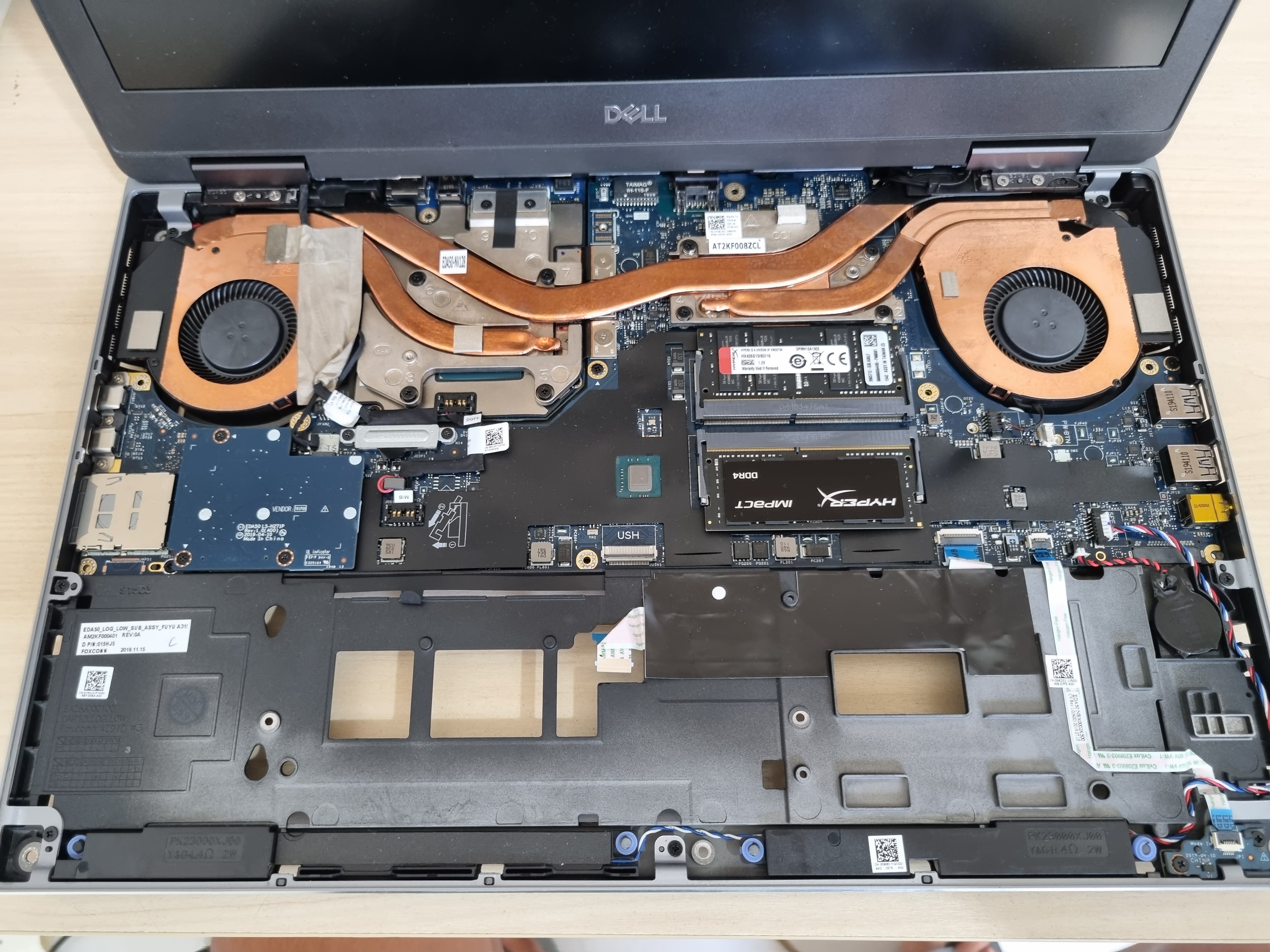
In the case of the Precision 7540 with T2000 the heatsink is the same as the version with RTX3000? Good to know!
-
Precision 7540 & Precision 7740 owner's thread
PHVM_BR replied to SvenC's topic in Pro Max & Precision Mobile Workstation
Does anyone know if the new BIOS 1.25.0 blocks the undervolt? -
Try changing to AHCI in BIOS.
-
The Beast Returns - Alienware m18 - i9 13980HK 24c/RTX 4090 Mobile
PHVM_BR replied to ssj92's topic in Alienware 18 and M18x
I intend to buy, but these 139xxHX without undervolt are uncontrollable thirsty beasts. With undervolt I believe to minimize this and maintain a (high) power consumption in a more stable way and still increase the multicore performance. Without undervolt I will skip this generation more or go for a Ryzen 9 7945HX. -
The Beast Returns - Alienware m18 - i9 13980HK 24c/RTX 4090 Mobile
PHVM_BR replied to ssj92's topic in Alienware 18 and M18x
Does anyone have a precise answer if the undervolt is unlocked on the m16's 13900HX? With the unlocking of the overclock in the BIOS is the undervolt possible? -
Precision 7540 & Precision 7740 owner's thread
PHVM_BR replied to SvenC's topic in Pro Max & Precision Mobile Workstation
I use my 7540 i7-9750h with 100% stable undervoltage of -130mV in cache and -250mV in core. The difference to stock is brutal....especially with regard to temperatures. Cinebench R23 multicore under the same conditions: Stock = ~7900 initial: 90W / ~3.85GHz / ~93°C after ~30s: 75W / ~3.65GHz / ~84°C Subtension = ~8300 ~62W / 4.00GHz / ~77°C https://hwbot.org/benchmark/cinebench_-_r23_multi_core_with_benchmate/rankings?hardwareTypeId=processor_5870&cores=6#start=0#interval=20