MyPC8MyBrain
-
Posts
685 -
Joined
-
Last visited
Content Type
Profiles
Forums
Events
Everything posted by MyPC8MyBrain
-
@yslalan as in XMP? (Extreme Memory Profile) that is true with a very big distinction, cSODIMM (CAMM-based SODIMM) = Laptop DDR5 SODIMM cUDIMM (CAMM-based UDIMM) = Desktop DDR5 UDIMM both are still essentially a CAMM adapter/interposer that allows you to plug in SODIMM modules into a CAMM memory slot, both of which are Dell-specific (and somewhat confusing) terminologies built around the CAMM platform.
-
@ceasar2k6 simple decision, get a Precision platform while you still can.
-
really, i didn't think they could find another superlative to string along, so there might be a pro max plus premium, then what? pro max plus premium supreme... with cheese 😄
-
@SvenC The "c" in cSODIMM stand for CAMM, or more precisely, "CAMM-based SODIMM". It's not a new memory standard — it’s standard SODIMM modules mounted on an interposer or conversion board that fits into a CAMM socket. Dell developed this to allow backward compatibility with regular DDR5 SODIMMs on motherboards designed for CAMM — mainly because JEDEC has approved CAMM2 as the future, but most users still rely on SODIMMs. as i mentioned above Camm isn't actually working yet on these boards, at this point in time Camm is mainly theoretical and more of a marketing hype, SoDimms performs as fast as Camm modules do on the same system and can run high density sticks, and they dissipate heat better, but Dell doesn't want people to know as they initially were set on pushing camm modules until they realized some of us are educated and don't just judge marketing hypes by the cover. edit: its important to note that Camm modules are more expensive then Sodimm modules with no actual benefit in this format.
-
it kind of starting to make sense now, i get why they renamed the line to pro max plus instead of precision, its illegal to call this crap precision. "you can roll manure in powdered sugar, but it still ain't a jelly doughnut" 😅
-
@Aaron44126 Thanks for the images, first time i see the 18 pro max plus insides, i don't think they are double stacking NVME's that's not feasible with the heat one NVME is dissipating, two in the same spot without dedicated heat spreader or fan will melt the chassis, this whole new engineering seem arbitrary without much thought put into it, its as if they learned nothing from earlier designs, grouping two (or 3) NVME's on each side of the SODIMM module is just fantastic to ensure a good heat spot. that new sliding door while very cool will likely effect the chassis overall rigidity at 18'. Edited: after inspecting your images closer it seems that they do stack two NVME's one on top of the other in slots 9 and 10 🤯
-
@Aaron44126 little typo there (corrected), Plus or not i still don't find it very attractive at this point in time, i heard from our Dell sales rep that there are 4 bays, but so far i cant find any images or literature that indicates 4 bays are still there. one other gripe i forgot to list up there is there's no Oled or 4k and or touch screen options even with these new pro max plus. its not like these options don't exist, they exist on other other models for many years yet they refuse to offer these for their latest so called new flagship models. i mean they do have Pro, Plus, and Max in the name it has to mean something 😆
-
So Dell has officially closed the book on the Precision mobile workstation line as we knew it. The new replacements? The “Dell Pro Max Plus 14/16/18” series — with the 16 and 18 clearly positioned as successors to the Precision 7680 and 7780. But let’s not kid ourselves: these are not Precision workstations in anything but name. These are consumer-tier designs masquerading as professional machines, targeting a different class of user entirely. The Pro Max Plus 18 has a larger chassis, yet Dell gives us only three drive slots. Worse, they play games in the configurator they list "3rd" and "4th" drives — conveniently skipping the "2nd" to make it sound like there are four bays, when in fact there's only 3 physical bays, while only 1 is shown clearly in documentation. This isn’t an oversight — it's marketing sleight of hand. In contrast, the 7780 gave us four full-featured bays, properly laid out and user-accessible. CAMM Reversal — Why? Remember when Dell pushed CAMM (Compression Attached Memory Module) as the future of mobile workstation memory? Now in the Pro Max lineup, they’re quietly walking that back — reverting to standard SODIMM slots in many configurations. What happened? And even when CAMM is present, we’re still looking at dual-channel limitations imposed by the mobile chipset. The “quad channel” claim is mostly theoretical — there’s no real-world advantage here. Just more thermal load, tighter spacing, and no tangible gain over high-density SODIMMs. Memory Capacity Quietly Suppressed The chipset on these machines easily supports dual 64GB or even 128GB SODIMMs — but Dell doesn’t mention this anywhere in the Pro Max specs or Precision 77xx/76xx. Why? Because they want to steer buyers toward lower-spec configs, or upsell you on proprietary CAMM options instead of allowing user-driven expansion. USB-C Power Delivery — A Downgrade Replacing the classic barrel power jack with USB-C PD might be trendy, but it's not durable. The barrel connector was rock solid — especially under heavy workstation loads. Now we’re expected to hang 280W power brick off a USB-C port? That’s asking for long-term trouble on machines meant to endure years of field use. Let’s Call It What It Is The Precision line used to mean something — high-end mobile workstations with expandability, durability, and pro-grade features. The Pro Max Plus 16/18? They’re not successors in spirit — they’re rebranded watered down consumer machines chasing a broader market by hijacking iPhone naming convention!? as if that bandwagon is synonymous with performance the precision line brought to the table for almost 3 decades. The sad reality is: the Precision 7680/7780 were likely the last true professional mobile workstations from Dell. What we have now is branding — not legacy.
-
found it https://www.delltechnologies.com/asset/en-us/products/workstations/technical-support/dell-pro-max-18-plus-laptop-spec-sheet.pdf.external
-
just received a quote for Dell Pro Max 18 Plus from our sales rep, they are now officially available but i haven't seen any info on Dell site yet,
-
@Mr. Fox I couldn't agree more, I hate that millennials MS execs think that a personal computer should behave like a smartphone. I have to spend so much time on a brand new system just to get it working right. my prospective is not how much time I spend to get it to work rather afterwards when it is setup to my liking. and the fact that undoing the nonsense MS is doing is possible in win11 while retaining latest technology and compatibility.
-
*Official Benchmark Thread* - Post it here or it didn't happen :D
MyPC8MyBrain replied to Mr. Fox's topic in Desktop Hardware
personally i don't get the point in deleding then slapping IHS back on instead of direct die application. in the past i used this Permatex 22072 Ultra Black Maximum Oil Resistance RTV Silicone Gasket Maker, small drop in each corner same as Mr. Fox advice. https://www.amazon.com/gp/product/B000HBIBOY all laptop these days use direct die for additional 20c savings over having an IHS, the main reason people placed the IHS back on is to compensate for the height, today there are plates specifically for that, click the video below to see a bench with one of these applied to a recent desktop 13900 cpu. -
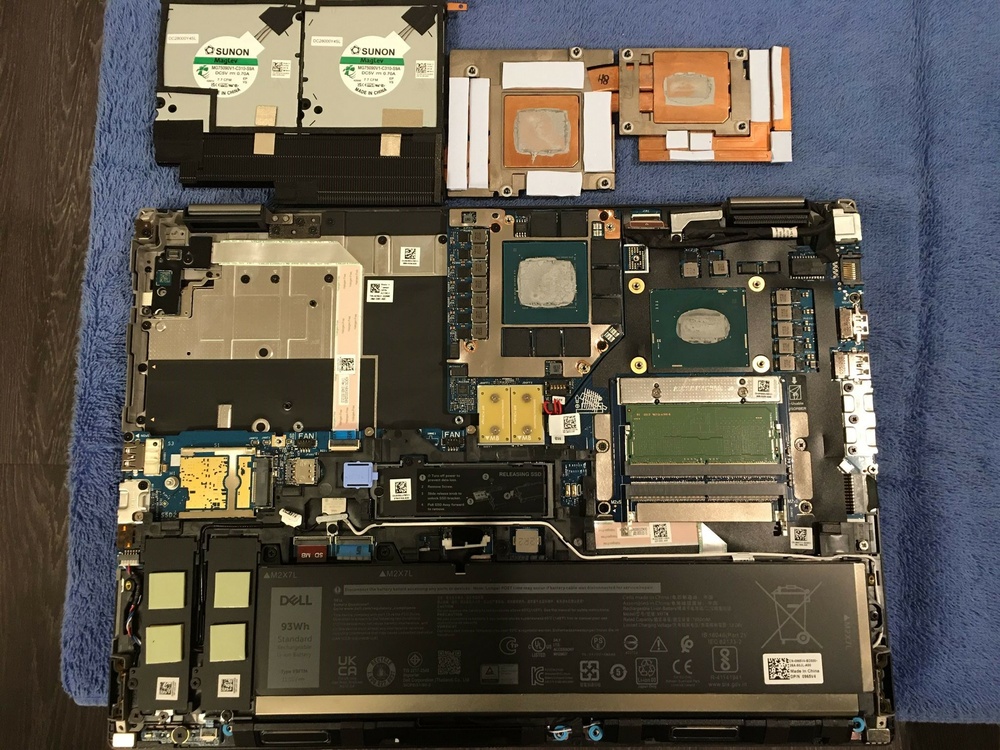
looks like there's only performance chassis for the 7x80 line.
-
the 7870 layout looks the same as the 7770, i bet one could swap the board and components. they kept the same exact thermal design and a 240w power supply.
-
i think you have the wrong image for the 7670, dGpu footprint seems similar, its also the same dGpu and footprint in the 7770.
-
did you ever do a clean install or you running base OEM image? if you are with OEM image your problem could be rooted there.
-
I have nothing against your stub solution, as you said its just HDMI sound driver. I cant recall what brought up the stub solution, I just remember something was acting up for you prior. the point i was trying to make is its clear that something is slowly creeping up on you there. i was just trying to draw your attention to possibly a pattern you maybe overlooked that could have started way back.
-
i think you're chasing chasing the wrong lead. if the SD card itself was bad you'd get read or write errors not PCIE errors. it seems to me that everything started after you created a stub for NVidia device. something happened that made you do that first, then two weeks later you notice the system is over heating. and now this PCIE issue.
-
The way I do repasting is similar to what you described up until the cleaning portion. From there, I use electrical tape all around the CPU and dGPU silicon die as close as I can. I then create a flat layer of paste that covers the entire die evenly. After that, I remove the tape, which leaves a perfect flat two-millimeter layer of paste perfectly on the die. The next step is critical, which is mounting back. Do not just tighten it down based on number order. Place the entire mount gently in its place, using its screws as guides. I like to go over each screw and turn it counterclockwise until I hear it pop on top of its screw slot. I do that for all screws to ensure that they all start in the same position. Then, go by the numbers, tightening them back, but only do a 1/4 turn at a time, going around until they are all tight. This ensures that the plates are not deflecting the paste to one side or the other as it's being seated back.
-
Linus Torvalds (Father of Linux OS) and Linus Sebastian (LTT) are not the same person. Linus Benedict Torvalds - https://en.wikipedia.org/wiki/Linus_Torvalds Linus Gabriel Sebastian - https://en.wikipedia.org/wiki/Linus_Sebastian it is, if the system is acting up with sleep power options simply uninstall and reinstall display driver.
-
*Official Benchmark Thread* - Post it here or it didn't happen :D
MyPC8MyBrain replied to Mr. Fox's topic in Desktop Hardware
i wasn't referring to the pumps, the lines into the rad are sucking air back into the loop because the in/outlet are sucking from the top (if I'm not mistaken) instead of the bottom, air bubbles will trap and expand at the highest point which is where your inlet/outlets are, if you flip the rad upside-down so inlet and outlet are at the bottom, air will still tarp at the top but you will be circulating from the bottom without air, -
*Official Benchmark Thread* - Post it here or it didn't happen :D
MyPC8MyBrain replied to Mr. Fox's topic in Desktop Hardware
this and few other pics you posted of your system are making my OCD acting up. you should raise your external res at least above the highest line point inside the case. you have huge air pockets you will not be able to get rid of, which interns reducing your cooling efficiency significantly. your external rad from the limited views i was able to catch is also setup incorrectly, your inlet outlets should be at the bottom not the top (it would be wise to flip it upside down). -
i find it hard to accept that in one month span paste could lose so much of its efficiency. maybe the fan/paste is not the smoking gun after all. did you somehow enabled hybrid mode by mistake? when you said you dual boot and see the same behavior in another OS that pretty much narrows it down to either misplaced bios setting or some odd hardware issue that might been creeping in slowly.
-
maybe its my age but i do not hear my fans working at all when on cool, i can never tell unless im in a heavy load situation. or maybe its just the acoustic differences in our environments, I'm in fairly wide open area with no clutter around. i also think all the curve in the plans (accept maybe ultra) are outdated and not really suitable for the newer gen cpu's. indeed cool also caps dGpu, i run a script to switch modes.