tps3443
-
Posts
2,244 -
Joined
-
Last visited
-
Days Won
109
Content Type
Profiles
Forums
Events
Everything posted by tps3443
-
*Official Benchmark Thread* - Post it here or it didn't happen :D
tps3443 replied to Mr. Fox's topic in Desktop Hardware
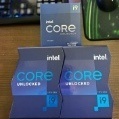
Fresh from the silicon gurus in Taiwan! upload pic -
*Official Benchmark Thread* - Post it here or it didn't happen :D
tps3443 replied to Mr. Fox's topic in Desktop Hardware
5.8Ghz P-Cores 4.5Ghz E-Cores 4.7Ghz Ring/Cache Max Power= 303 watts. I remounted my CPU, re-set my bios as well. This was also a VERY OLD windows, that has been stacked on top of over and over. So I got that situated as well. Last but not least, I reduced the voltage down to 1.275V in the bios -
*Official Benchmark Thread* - Post it here or it didn't happen :D
tps3443 replied to Mr. Fox's topic in Desktop Hardware
I reset my bios, and tried MSI FORCE2 again, I got a 132 three times in a row. I have seen some people with 150-160 on their FORCE2 rating. I’m just glad to see another brand offering some type of tool to check. Curious to hear @johnksss FORCE2 rating. PS: My chip is looking far better today for some weird reason! I am achieving some really good looking clocks with very low power numbers. -
*Official Benchmark Thread* - Post it here or it didn't happen :D
tps3443 replied to Mr. Fox's topic in Desktop Hardware
Thats awesome. What you get for the money there, it is just a crazy good value. The Nexxxos 1080x45 performs great. Plus, that enclosure includes feet as well. I don’t have the enclosure. But I’ve been wanting to get one and move my radiator off from my test bench. Make sure you flush it out good, mine was full of crud when I first got it. Nothing crazy by any means, but a few small black specs you gotta really shake the heck out of it and flush a few times is all. -
*Official Benchmark Thread* - Post it here or it didn't happen :D
tps3443 replied to Mr. Fox's topic in Desktop Hardware
|UPDATED| Ohhhhhh! A cool fancy feature. Let’s see. Drum roll please. My Ho-Hum is= 132 upload pic @johnksss What is your Ho-Hum rating? -
*Official Benchmark Thread* - Post it here or it didn't happen :D
tps3443 replied to Mr. Fox's topic in Desktop Hardware
I have some Sata ones laying around somewhere, I’ll switch over to them though. I thought these newer boards had really capable PWM headers though. This Unify-X is 24-36 watts 2-3 amps “Depending on the PWM location” for just one pwm plug. Some boards are upwards of 40 watts I believe. The pump PWM header is rated at 36 watts on the Unify-X. Anyways, that’s great you got a 13900K. Great CPU. Hopefully you’ve got a great sample coming! I re-mounted my CPU block, took my time this go around, turned off the water chiller, crossed my fingers, then prayed really hard, knocked on wood, then ran R23 LOL. It was still SUB 340 watts, just barely though. I’m only seeing about 7-8 watt difference with it on or off. I’m thinking the largest difference will be Delidding this monster and running a bare die. Temps right now with no chiller are hitting 95C on the hottest core during R23. -
*Official Benchmark Thread* - Post it here or it didn't happen :D
tps3443 replied to Mr. Fox's topic in Desktop Hardware
Are you getting a random brand new untested 13900K? Or is it pre-binned? One more thing, this MSI Unify-X is a freaking beast. One of the best motherboards I have used in a long time. I don’t know where to start, working debug LED’s is one lol. But it even includes temp sensors as well for the water. Not to mention stability in general is really top notch so far. It’s even turning my fans at a faster RPM. Usually when I plug in (10) fans in to one single pwm plug the RPM’s were never the highest on EVGA motherboards. This board doesn’t care. I was really jumping the gun before even using it, looking at other options. When in reality this board is really amazing. -
*Official Benchmark Thread* - Post it here or it didn't happen :D
tps3443 replied to Mr. Fox's topic in Desktop Hardware
Do we max out tREFI like with DDR4? I’m guessing not all DDR5 can do this. I see it goes up to like 200,000 thousands lol. Testing 90,000 tREFI. Huge BOOST! 😃 -
*Official Benchmark Thread* - Post it here or it didn't happen :D
tps3443 replied to Mr. Fox's topic in Desktop Hardware
Some DDR5 modules have a voltage limit of 1.435V. It’s just a bios settings that unlocks the DDR5 PMIC so we can max out voltage for higher memory overclocking. Not all DDR5 sticks are like this though. Some do not need to be unlocked apparently. I’m using Corsair 6000 C36 currently, and it physically won’t let you send more than 1.435V. This is where this unlock comes in handy. Or not. I really won’t know until I test it a little further if there is a benefit with more voltage. But it does let me send whatever voltage I want now. -
*Official Benchmark Thread* - Post it here or it didn't happen :D
tps3443 replied to Mr. Fox's topic in Desktop Hardware
I found the PMIC unlock in the Unify-X bios! I can really juice these modules now, it works. -
*Official Benchmark Thread* - Post it here or it didn't happen :D
tps3443 replied to Mr. Fox's topic in Desktop Hardware
@Mr. Fox Yeah this ram is handling 6800Mhz just fine so far. The newer bios may have helped, and a combination of the CPU as well. The voltage is still locked to 1.435V, it physically won’t go any higher. But 6800Mhz is good for benching, gaming, etc. I don’t know if it’s actually stable or not. I also managed to drop SA voltage to like 1.15V. Apparently auto was pushing like 1.450V. Raptor lake doesn’t need much for high ram speeds. Also, I get the feeling you’ve given in to temptation, and purchased a 13900K? -
*Official Benchmark Thread* - Post it here or it didn't happen :D
tps3443 replied to Mr. Fox's topic in Desktop Hardware
Hey not nearly as bad as Sugi0luver and his 40+ retail samples he has tested. Him and his buddies go all out! 🙃 -
*Official Benchmark Thread* - Post it here or it didn't happen :D
tps3443 replied to Mr. Fox's topic in Desktop Hardware
I have this Corsair 6000 Vengeance stuff@ 6800 so far. stability testing now, seems okay for gaming/benching/etc. Sorry @Reciever accidentally double posted 🙁 -
*Official Benchmark Thread* - Post it here or it didn't happen :D
tps3443 replied to Mr. Fox's topic in Desktop Hardware
I don’t think the CPU is golden or even special at all. I am assuming average probably. But I really don’t know or have anything to compare it to. But I’ll say this, exotic cooling or not. Of all (4) 11900K’s I’ve tested only 1 could do 5.3Ghz+ PRIME95 stable. No matter how cold that water is. No matter how large that radiator, no matter how fast the water pumps. The other 11900K’s failed. Obviously my good 11900K could do far more than 5.3 in Prime95. But I guess what I’m saying is, my cooling isn’t what made it possible, it was the CPU. I do feel like my heat transfer is absolutely atrociously poor from the cpu die to the water on this 13900KF. -
*Official Benchmark Thread* - Post it here or it didn't happen :D
tps3443 replied to Mr. Fox's topic in Desktop Hardware
Oh it’s fantastic! I’m just still figuring things out is all. 😎 -
*Official Benchmark Thread* - Post it here or it didn't happen :D
tps3443 replied to Mr. Fox's topic in Desktop Hardware
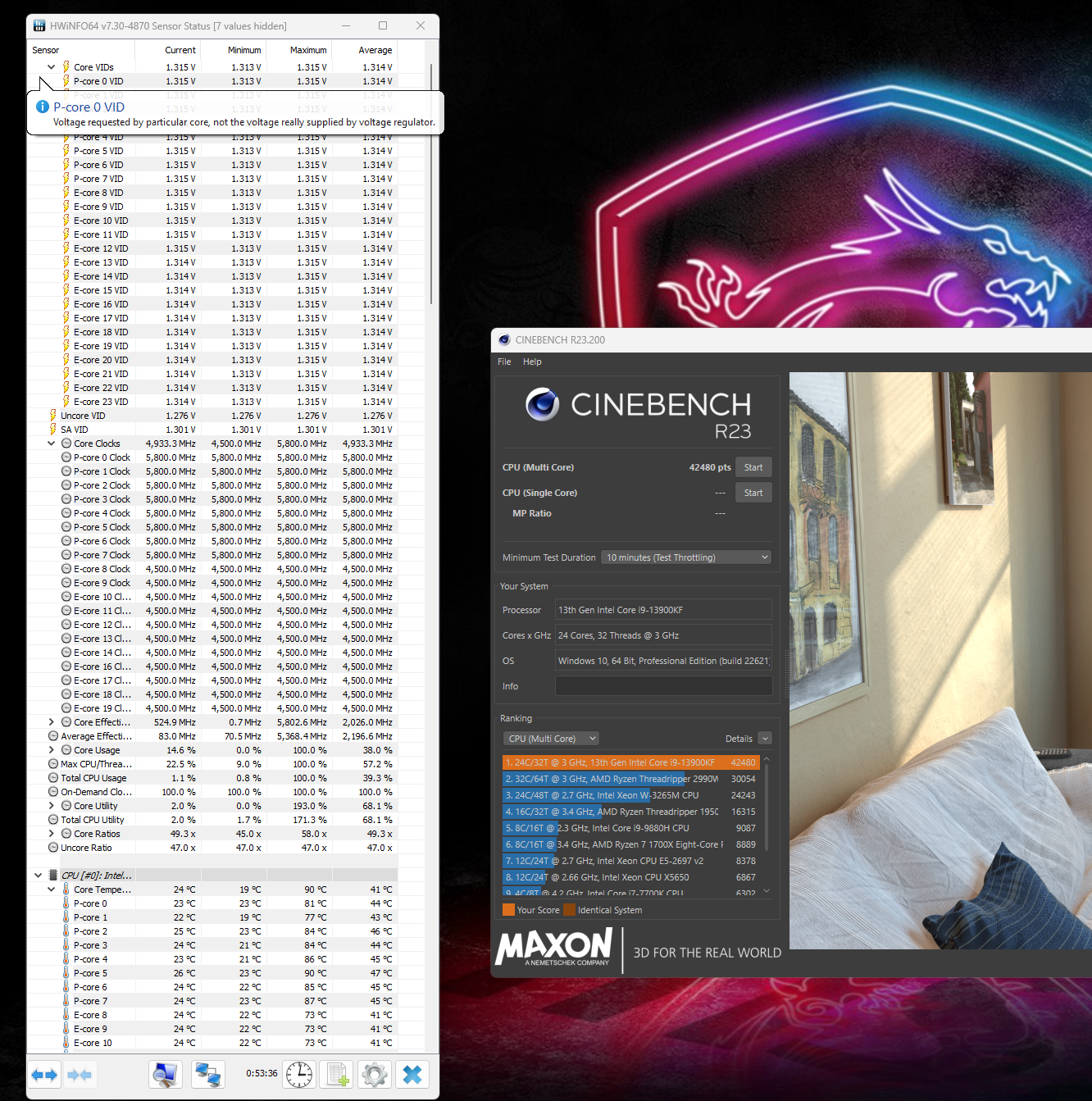
Is it a daily limit that for each user maybe? UPDATE: This is the real screen shot.
-
*Official Benchmark Thread* - Post it here or it didn't happen :D
tps3443 replied to Mr. Fox's topic in Desktop Hardware
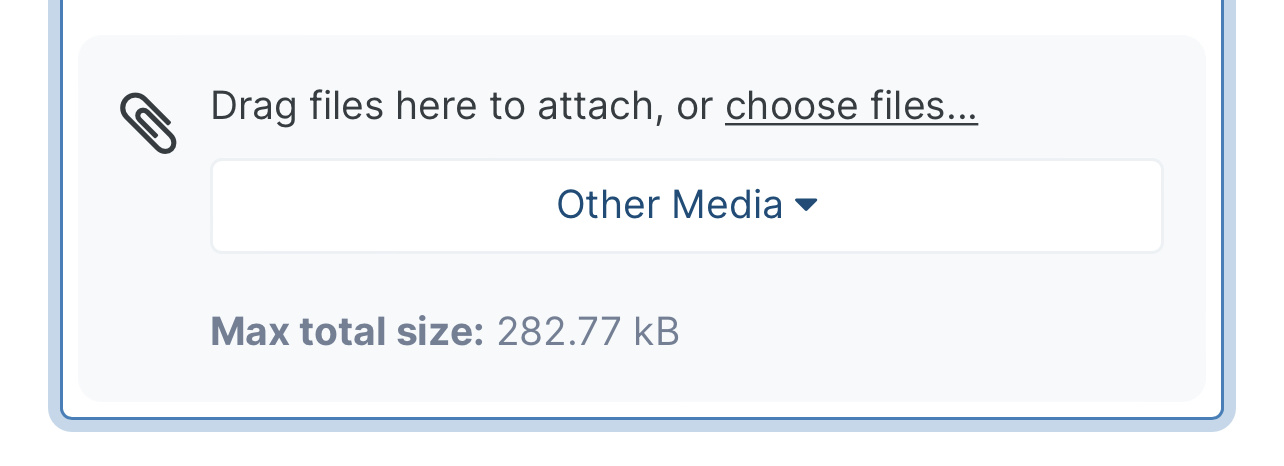
R23 (30 Minute run) 5.8 P-cores 4.5 E-Cores 4.8 Cache/Ring For some reason the forum is limiting my attachments to 282Kb lol. Clicking on the image helps quality some. -
*Official Benchmark Thread* - Post it here or it didn't happen :D
tps3443 replied to Mr. Fox's topic in Desktop Hardware
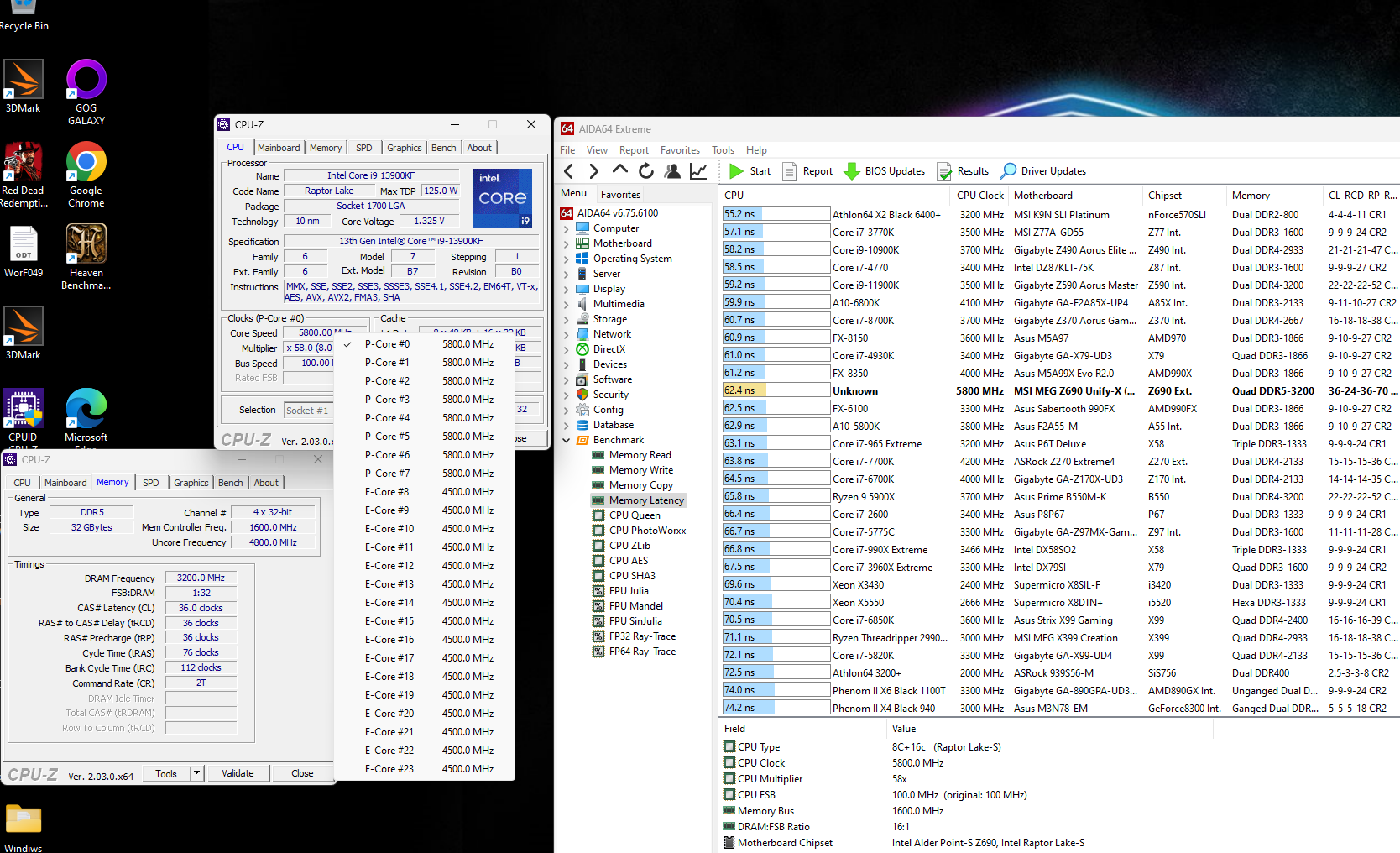
How is this latency so far? I heard it was improved from 12th gen, but I wouldn't really know. Just XMP and 6400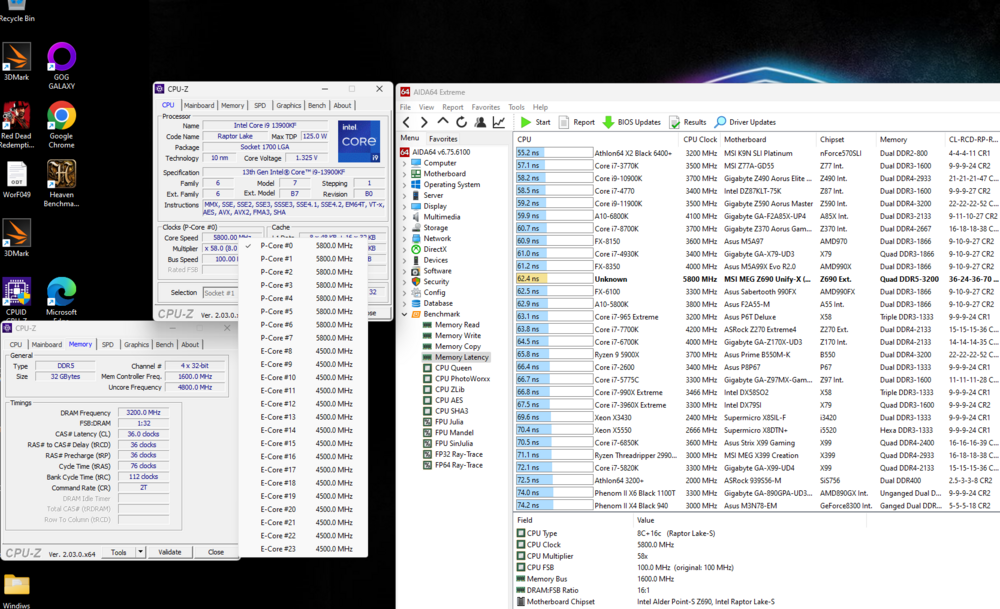
-
*Official Benchmark Thread* - Post it here or it didn't happen :D
tps3443 replied to Mr. Fox's topic in Desktop Hardware
I just typed in 6400 in bios and it seems to actually be stable. No typing in extra supporting voltages or anything like that. I’m waiting on my faster ram. I think it’ll be here tomorrow. -
*Official Benchmark Thread* - Post it here or it didn't happen :D
tps3443 replied to Mr. Fox's topic in Desktop Hardware
I don’t know if this is any good or not. But here goes. R23 10 minute run so far. Power is like 340 watts max. Definitely toasty on the temps! Lol. Much toastier than I’m use to anyways. 5.8 P-Cores @1.315V 4.5 E-Cores 4.7 Ring/Cache Corsair Vengeance DDR5@ 6400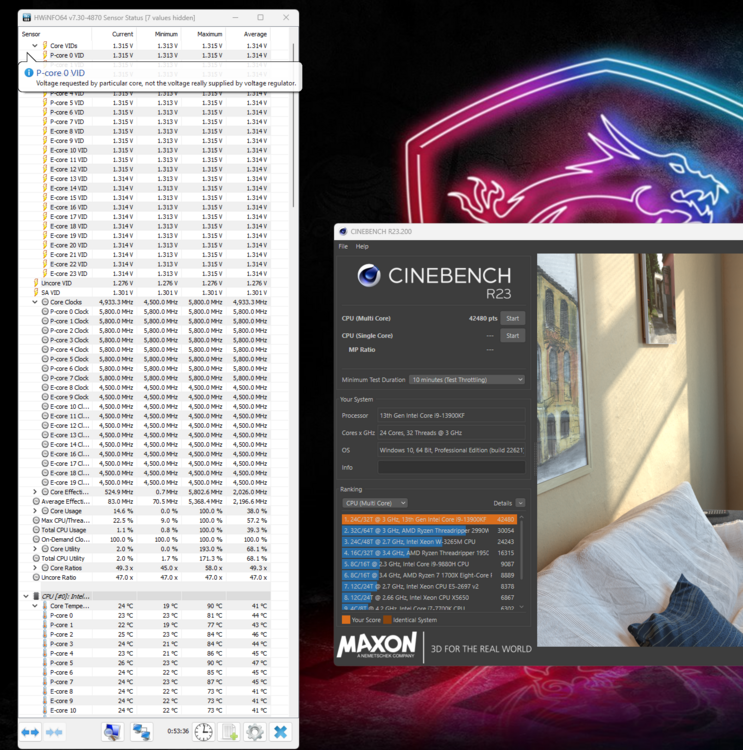
-
*Official Benchmark Thread* - Post it here or it didn't happen :D
tps3443 replied to Mr. Fox's topic in Desktop Hardware
This 13900KF@5.8Ghz, hammering through Red Dead Redemption II , and my GPU usage doesn’t tank anymore in heavy city areas! It holds steady! Very happy to see that. My 11900K wasn’t quite enough.. I guess I was lying to my self thinking it was lol. -
*Official Benchmark Thread* - Post it here or it didn't happen :D
tps3443 replied to Mr. Fox's topic in Desktop Hardware
How much are those? -
*Official Benchmark Thread* - Post it here or it didn't happen :D
tps3443 replied to Mr. Fox's topic in Desktop Hardware
I may exchange my 7200 kit for the 7600 kit. I didn’t even know they were available. They may just be the same thing though no? -
*Official Benchmark Thread* - Post it here or it didn't happen :D
tps3443 replied to Mr. Fox's topic in Desktop Hardware
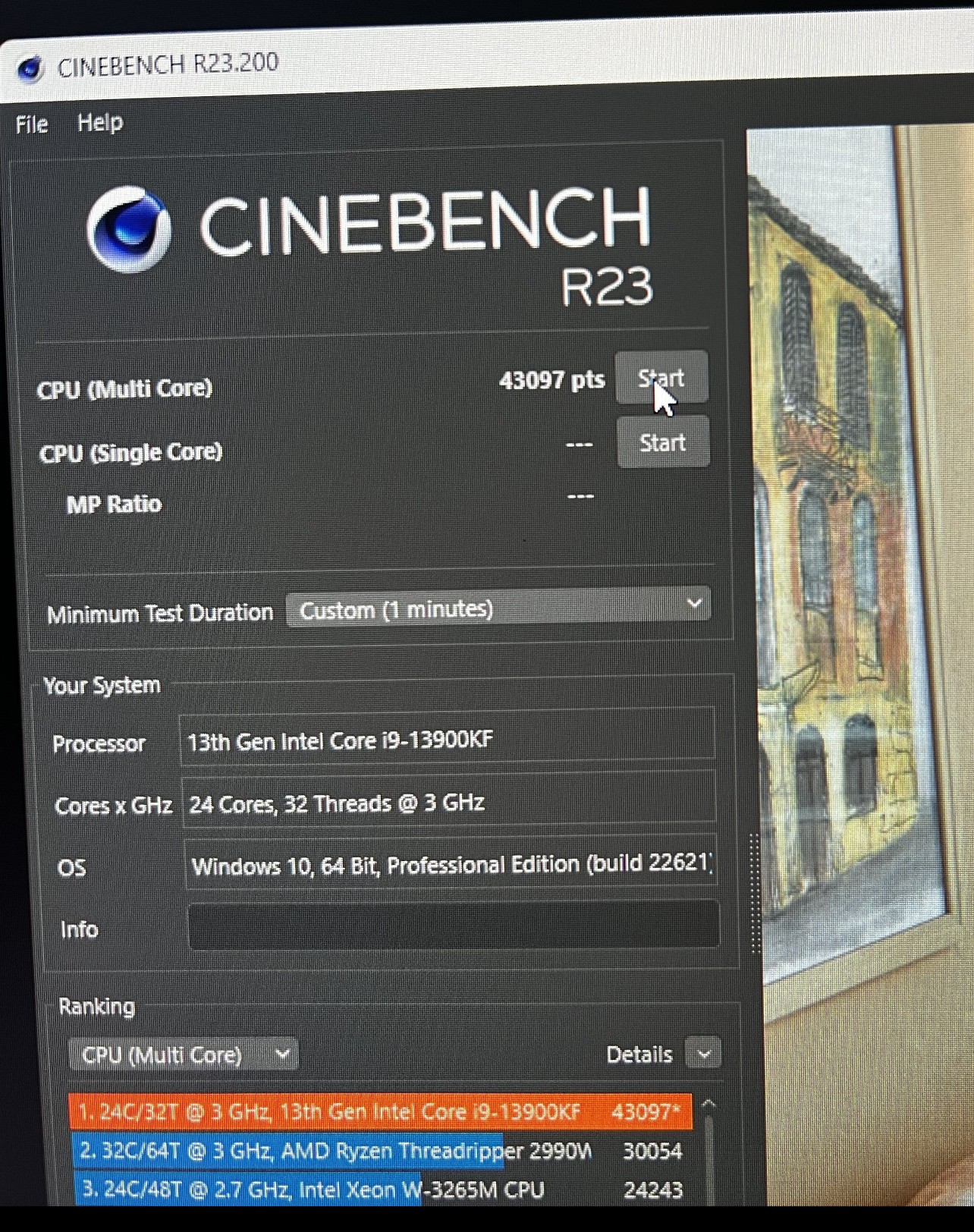
R23 score in bound. Yeah, I’ll do some stability testing, right now I’m just playing around and trying to learn this new stuff. I’m Delidding this thing for sure though. R23 broke 43K though. Definitely going to delid this. I feel like 6Ghz all core daily is very reasonable to expect.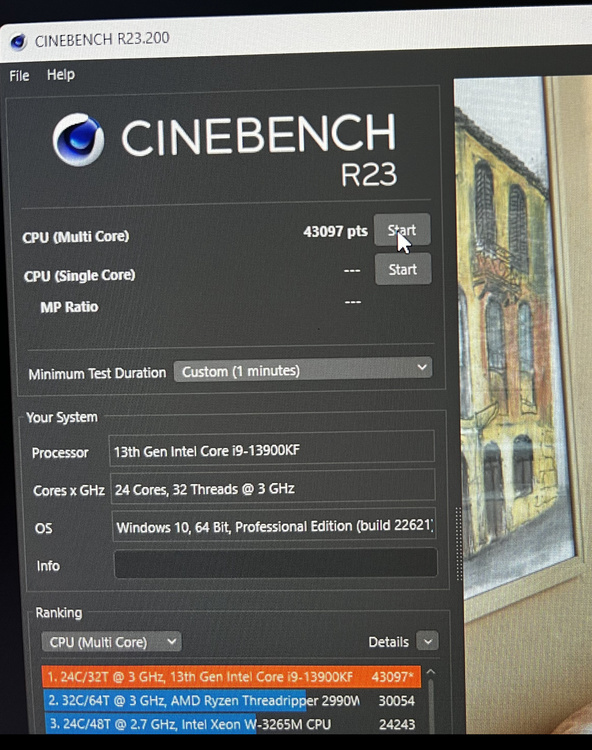
-
*Official Benchmark Thread* - Post it here or it didn't happen :D
tps3443 replied to Mr. Fox's topic in Desktop Hardware
Very nice. I’m learning the Unify-X bios and 13900KF so far. It’s a really fast processor. I’m running 5.8 P-Cores, 4.5 E-Cores, 4.7 Cache. 1.315V, and MSI LLC on level 3. I have no idea what I’m doing in this bios. Getting there though.