win32asmguy
-
Posts
705 -
Joined
-
Last visited
-
Days Won
3
Content Type
Profiles
Forums
Events
Everything posted by win32asmguy
-
*Official Benchmark Thread* - Post it here or it didn't happen :D
win32asmguy replied to Mr. Fox's topic in Desktop Hardware
These days I only check ebay for screen parts to try and build a 1200p panel assembly for the Raider. Luckily display parts are dirt cheap compared to RAM, SSD, CPUs and GPUs, so its probably a matter of time until something gets parted out with what I want. There is one ebay reseller that did have parts up there but wants 4x-6x what they should cost and was unwilling to budge on price. Back when I first started WoW I mostly multiboxed. Mages had a nice little trick where Frost Nova would gaurantee crits Arcane Explosion so I could rotate a Frost Nova every 2-3 seconds to dish out really good AOE damage. It was enough to run 5 man dungeons mostly on my own healing with a priest. -
*Official Benchmark Thread* - Post it here or it didn't happen :D
win32asmguy replied to Mr. Fox's topic in Desktop Hardware
I do see higher TDP draw on the GPU in performance mode. It goes up to 170W at QHD and max graphics. I am surprised there have been more show up on ebay. Not that I would have been happy with the ebay route as extending the warranty was far easier by having a B&H Photo "official reseller" receipt that MSI was willing to work with. I have not looked close enough at WoW Forever but it really depends on if we can get in a good community and its content is actually more fun than retail. I was actually more excited about WotLK remix coming next year. My IRL friend did purchase the pre-pack though so I will probably at least try Forever once the initial out the gate rush subsides. -
*Official Benchmark Thread* - Post it here or it didn't happen :D
win32asmguy replied to Mr. Fox's topic in Desktop Hardware
Its showing around 120W max in HWinfo after running around doing various things. Of that I think being in a group running vault farming has been the most taxing so far this season. Of course its probably hitting 55W TDP on the CPU, so in full performance mode GPU utilization should go higher. Sometimes on these 90F+ ambient temp days I also ran it at 5/10 with framerate capped at 60 just simply to keep the palm rest from warming up too much. We dont have AC in the lounge room at work. Smaller and lighter is nice for travel. The Clevo PE60 I still own is a great example of that and probably the reason I have not bothered selling it yet. In most cases it was actually a better WoW machine than the Arrow Lake Hydroc G2 as well, just simply because it gets significantly better memory latency with the 14900HX on die memory controller. I have considered just selling the others and just using the PE60 because it works pretty close to the same level for WoW as I use the Raider A18. -
*Official Benchmark Thread* - Post it here or it didn't happen :D
win32asmguy replied to Mr. Fox's topic in Desktop Hardware
Yeah we have been talking about this a bit in discord. I have not tried it myself and would probably want to do so on a different drive with a clean install. Not sure its really worth the time though as I usually only run balanced mode which is capped at 150W in crossload which running WoW it does not even reach at 10/10 graphics (no RT). I do like the 5090 performance over the 4070m, but I am guessing as far as WoW goes, anything 4080m+, 5070ti-m+ is probably enough to be smooth for what I enjoy at 1600p/1440p. I have even thought about putting some time into trying to tune the X370 more to see if it would be close enough to the Raider A18 in performance to be enjoyable. -
*Official Benchmark Thread* - Post it here or it didn't happen :D
win32asmguy replied to Mr. Fox's topic in Desktop Hardware
I have not had much time to do anything with the Raider either. My wife's Ford Explorer needed a new water pump, and that meant all timing components had to come out (and many replaced due to mileage). Its finally back together but still needs the active grill shutter to be replaced as well so that is next weekends project. The Raider generally does fine with the previous tuning config which focuses on low VSOC. Sometimes I still get the 10 seconds of lag / stuttering but I am hoping that is just video driver issues. I did get a Video TDR failure bugcheck reboot the other day but unsure if it was driver or ambient heat related issue. It may need PTM redone anyways as I probably messed it up when I pulled the heatsink to swap the display. I technically need to pull the heatsink again anyways so I can properly slip the hinge covers under the palm rest which is only possible before screwing down the hinges. Not exactly the best design but still way easier than pulling the display apart to swap the panel itself. The "new" 2026 G16 SKU with the same specs is much higher price so I think you got a great deal there. It was an open box correct? Hopefully you can at least stability test it before Amazon's return period lapses. G-Helper should work fine best I can tell. Others with the 9955HX variant reported usage results on Github so I cannot imagine the HX3D variant being any different. -
*Official Benchmark Thread* - Post it here or it didn't happen :D
win32asmguy replied to Mr. Fox's topic in Desktop Hardware
I am surprised the Asus bios has support for any overclocking options. Granted the last Asus I tried was that Strix Scar 17 which was quite some time ago. I have currently the 5600 Kingston CL40 2x16GB kit at stock timings other than tREFI 24k. This lets VSOC set at 900mv which is great for balanced mode where the chip is limited to 55W in combined loads. Supposedly memory heatsinks from Aliexpress can help keep bumping VDD/VDDQ from pushing temps as high, so thats the next thing to try with memory overclocking. I can tame the RGB by setting keyboard brightness to zero via the toggle FN-F8 key (EC can remember this setting unlike anything configured in Steelseries) then unplug the front lightbar and the lid logo RGB is gone courtesy of the Vector A18 lid. I think the Asus could be a good alternative if the bios is not limiting and you get full support using the G-helper tool instead of Armory Crate. 9955HX3D is definitely outperforming 14900HX running around in the new content zones and raiding activities. I have heard that Nova Lake HX will not have a bLLC variant, so I guess 9955HX3D will be it for another year. Who knows if there will be any mobile GPU refresh. Probably not when the AI craze still drives the market. -
*Official Benchmark Thread* - Post it here or it didn't happen :D
win32asmguy replied to Mr. Fox's topic in Desktop Hardware
Ideally stable enough so it does not crash in wow with up to 80F ambient temps without any supplemental cooling or having to use max fan speed. This goes for balanced or performance mode as both have a different fan profile. Does TM5 load the GPU? I thought it was CPU+RAM only. I have not heard of WMD. -
*Official Benchmark Thread* - Post it here or it didn't happen :D
win32asmguy replied to Mr. Fox's topic in Desktop Hardware
So far I have only tested with OCCT's 1 hour combined load test but I know that errors can pop up beyond that length. That also makes me wonder about the 7945HX3D as I was only testing 1 hour on it, and on top of that it was being tested in the winter months where the ambient temperatures on average were 5-10F cooler. Is there a guide for a better combined load test setup that the community uses or would paying for OCCT be the best option to test beyond 1 hour? I also spent a bit of time testing a tuned 5600 profile with VDDIO/VDD/VDDQ at 1.3v. No crashes or errors but memory temps do creep up over 95C in combined loads so I will probably need some kind of memory cooling. One nice thing about the MSI AMD bios is that it has a Save/Load overclocking profile function that works, so its actually easy to switch around configurations or restore them after a bios reset. Yes it was a full assembly (A-cover, camera, camera cable, display, eDP cable, L+R hinge, bezel/B-cover). Talking with another friend who replaced just a display panel, he noted that MSI was using something that looked like glue so removing an existing panel from the A-cover would most likely crack the panel in the process. Not a great thing if this is being done as an upgrade swap instead of replacing an already damaged panel. I'd like to find another full display assembly like this so I can try out a 1200p panel as well. -
*Official Benchmark Thread* - Post it here or it didn't happen :D
win32asmguy replied to Mr. Fox's topic in Desktop Hardware
It looks like vsoc at 1.25v is more stable, at least it does not start throwing errors within the first few minutes. However at that higher soc voltage it's consuming an extra 10w under load which is a significant percentage of the combined load allowed wattage. Sticking with tuned 5800 or even 5600 is probably the best option here given it's limits. I think it's still a better experience than arrow lake hx despite the limitations. Even buidzoid mentioned using 1.25v vsoc in his easy timings video to account for dud chips. I wonder if being dual ccd also puts more strain on the iodie compared to a single ccd chip like the 9800x3d. Vector a18 screen assembly arrived. Was not packed great but did not get damaged. Got it swapped and the screen is perfect and looks as good as the 5080 raider I tested before. It also solved a weird bug I experienced where I could not get into the bios if I booted with an external display connected. -
*Official Benchmark Thread* - Post it here or it didn't happen :D
win32asmguy replied to Mr. Fox's topic in Desktop Hardware
Actually nothing I have tried so far has made it stable under a stress test at 6000 or higher. VSOC up to 1.2v, VDDIO/VDD/VDDQ up to 1.3v, UCLK+FCLK at 1500, multiple memory kits (both 2x16GB Hynix A-die). FCLK is stable at 2000 with VSOC at 1.1v. If I drop to 5800 stress tests are stable. Too bad its BGA or I would be hunting down a replacement chip. Unless I am missing an important voltage that is not being configured correctly automatically by the bios. Its really odd that I can boot at 7600 but 6000 is not stable. I do not think LM helps performance unless it had a bad PTM paste job, because the CPU is limited to 145W solo or up to 85W in combined loads. Fan noise could be improved though for sure. Regarding the screen swap I found a complete used display assembly from a Vector A18 with the 240hz QHD 1600p IPS panel which is perfect. Even better it has no lid logo RGB so that is one thing that will no longer be reset to a rainbow effect depending on how Steelseries software is feeling that day. The whole unit used was only $185 including tax so not a bad deal at all and very easy to swap the UHD assembly back if the laptop needs to go in for a warranty repair. -
*Official Benchmark Thread* - Post it here or it didn't happen :D
win32asmguy replied to Mr. Fox's topic in Desktop Hardware
I am working on stability testing UCLK and FCLK but it does seem to be a pretty bad bin. Even at 3000/3000/2000 its throwing OCCT errors at 1200mv VSOC. Just for fun I did try 3800/1900/1900 in 2:1 mode which actually booted. I don't think the A-die sticks are really the limiter here because they did pretty good in the Hydroc G2. Supposedly 7600MT is the cutoff point where 2:1 mode is as good or better than 1:1 mode at 6000MT so it might be worth some exploration if its actually stable. B&H is the place to really get a good used deal on a MSI laptop to be honest, especially now that I know they can fix the warranty to your purchase date if you ask MSI. Its a shame B&H does not carry that 9955HX3D / 5080 / 1600p model that Best Buy does, then it might actually go on sale every now and then. This one definitely has PTM as a friend of mine in the UK took one apart and replaced it with liquid metal. No reason they should not use PTM on everything Vector and above at this point. I actually don't play WoW on it at 4k because there is a lag feeling to the game, even on the 9955HX3D at graphics quality 1. So instead I used integer scaling 1200p when on the road and my external QHD panel when at my desk. No idea why it lags as otherwise the framerate reported is pretty good. I have not tried it in iGPU mode but I am guessing it would not be any better. -
*Official Benchmark Thread* - Post it here or it didn't happen :D
win32asmguy replied to Mr. Fox's topic in Desktop Hardware
Yeah MSI really came through as I was not sure if I would get any kind of extended warranty given that it was an open box model. Not that there was a choice because they discontinued the config with 9955HX3D and 5090 instead of just modifying it to have 2x16GB RAM. Ended up having to dial it back to C38 and tREFI 11677. I only ever used the stock 2x16GB Hynix in the 5080 variant. These have factory seals and I was hesitant on keeping that 5080 due to price so I never opened it up. The 5080 variant however definitely could do 3000:3000:2000 with 1000mv VSOC stable. The OEM memory had locked PMIC so 1100mv VDD/VDDQ pretty much. Fan noise was essentially the same, very good. Its one of the few that can have good performance, good noise and just warm palm rests. Not X170 levels of palm rest temps which could stay at ambient temp but the chassis is simply too thin to ever really be that good. This has much better fans than the old 2024 7945HX3D. Maybe it is better with heat dissipation. They use PTM7958SP from the factory so if the old model was using a paste this might be part of the difference too. -
*Official Benchmark Thread* - Post it here or it didn't happen :D
win32asmguy replied to Mr. Fox's topic in Desktop Hardware
Got warranty activated today including the start date being adjusted to my purchase date so its a full three years. Swapped in A-die. It did not want to boot at 3000/3000/2000 with 1050mv VSOC. 1200mv worked but is probably too much. XMP 6000 C36 equivalent timings (and tREFI 16k) at 1200mv VDD/VDDQ/VDDIO but need to stability test.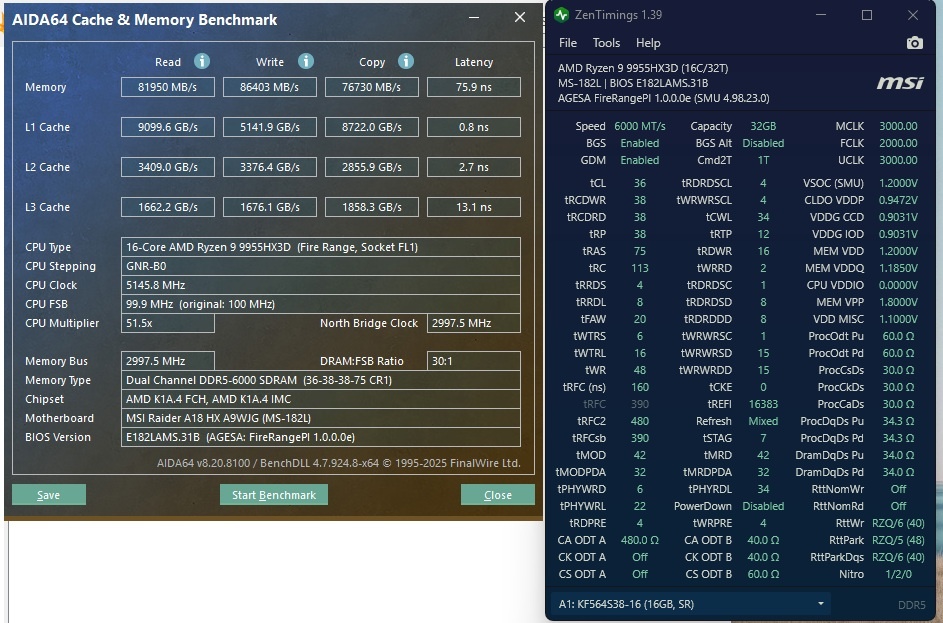
-
*Official Benchmark Thread* - Post it here or it didn't happen :D
win32asmguy replied to Mr. Fox's topic in Desktop Hardware
Yeah, I was definitely surprised to see it. I want to take it apart and swap memory but there is a factory seal sticker in place. Its MSI warranty expires in September 2026 so I provided the B&H invoice and was told I can extend it by two years for $140. However I want to be charged and have the extension confirmed before I open it up. B&H did have an AllState warranty option but those are $500 for two years (no ADH included) and less likely it could actually get repaired if the mobo failed. The stock memory is 2x32GB Hynix M-die dual rank. It actually was not stable at 6000MT JEDEC with VSOC 1.2v and like all of the new OEM ram I have seen is PMIC locked so no VDD/VDDQ beyond 1.1v. I am guessing / hoping the issue is just dual rank is harder on the IMC as the 2x16GB on the 5080 model had no problem running at 6000MT JEDEC. I do know that all of the 2025 and newer Raider and Titan models have upgraded fans with more blades and are much quieter. I think they also tuned the fan profiles though as it seems like the fans are not ramping up and down as agressively as before. Supposedly these newer fans have the same shroud, connector and power spec so they can be installed in the old models as well to improve them which is nice. The 2025 also has a heatpipe to cool the Gen5 SSD which is good. -
*Official Benchmark Thread* - Post it here or it didn't happen :D
win32asmguy replied to Mr. Fox's topic in Desktop Hardware
Yes I did. These are definitely a unicorn spec so it was too rare to pass up. Hopefully it can run the 2x16GB A-die as well as the 7945HX3D did. Maybe eventually find all of the screen assembly parts to downgrade it to 1600p 240hz IPS as well. The 2400p 120hz miniLED is not horrible using Nvidia integer scaling at 1200p but I still would prefer native 1200p or 1600p. -
*Official Benchmark Thread* - Post it here or it didn't happen :D
win32asmguy replied to Mr. Fox's topic in Desktop Hardware
As it turns out B&H had an open box 9955HX3D + 5090 model for $3375. Supposedly that config was discontinued by MSI as they ran out of Hynix 32GB modules (Micron and Samsung have compatibility issues with Fire Range). -
*Official Benchmark Thread* - Post it here or it didn't happen :D
win32asmguy replied to Mr. Fox's topic in Desktop Hardware
I still use my laptop every day at home and taking it with me to work or when traveling. My wife has now switched to either using the desktop connected to our TV or the Lunar Lake MSI Claw 8. Its a shame that Thin and Light dominates the market. I have heard Nvidia prefers those types of designs and could even refuse to supply their chips into something that they deem would go against their marketing direction like the old X170 or GT75. Then we have the BIOS lockdown cartel where even if you have the right combination of hardware you may not be able to tune it. It is cool that they sent those laptops to you for free. Is that a deal through your work? The pricing is getting pretty crazy, especially when you get into these preconfigured models where there is no option for less RAM or SSD. 9955HX3D Raider 18 is definitely a good option if you can find a deal. B&H sometimes has good pricing on open box MSI models if they also have a sale active on the new model. I still think Fire Range is superior to Arrow Lake when it applies to mobile platforms. Not even 290HX Plus can really boost 1% lows up with how difficult it is to run tuned SODIMMs stability. -
*Official Benchmark Thread* - Post it here or it didn't happen :D
win32asmguy replied to Mr. Fox's topic in Desktop Hardware
Mine came from System76, so its got their open source coreboot BIOS and EC. I just switched the GPU subsystem ID over to the X170KM so all drivers install without modding. I never backported NVPCF ACPI code for Dynamic Boost so it always runs at 150W, and I believe one of the display outputs no longer work (mDP maybe) because of physical wiring differences on the SM vs. KM board. The TB3 on the back definitely works as that is what I use all of the time. Oh and I am not sure if the seller on taobao is active anymore but back then I got a set of fans modded from the A51m R2 to work in the X170. More CFM and quieter! -
*Official Benchmark Thread* - Post it here or it didn't happen :D
win32asmguy replied to Mr. Fox's topic in Desktop Hardware
You may be able to get the heatsink from rjtech / sager. That is where I purchased mine. It was around $300 total including shipping. I still have my x170sm with the 10900k LTT golden sample and 3080m. Thought about selling it though to fund some new purchases. -
*Official Benchmark Thread* - Post it here or it didn't happen :D
win32asmguy replied to Mr. Fox's topic in Desktop Hardware
Well in the process of talking about the Raider A18 value I eventually decided to return it. I found a good deal for a used Titan 18 with 14900HX, 4090M and UHD+ 120hz. The build quality is top notch and the vapor chamber is a good boost above the Raider 18 heatpipe solution. The 14th Gen chip does almost as good as the X3D in WoW with some memory tuning. The only thing I want is to do is downgrade the display to either 1600p or ideally 1200p. I reopened my eBay store and am pretty steadily selling off my excess hardware. This week Nvidia released a hotfix driver that addresses DX12 issues in WoW which has been great. A lot of the problems like the screen going black and slowly rerendering everything after opening the transmog window in certain areas has been fixed. -
*Official Benchmark Thread* - Post it here or it didn't happen :D
win32asmguy replied to Mr. Fox's topic in Desktop Hardware
No idea why they started with UHD and later released this QHD option. So far as I can tell the mobile X3D pairs better with QHD than UHD just like on desktop. FHD would be nice but it seems to be paired only with low end laptops at this point. Eventually they should put it on sale. The price for its specs are pretty high right now and honestly not worth it. A few weeks ago I saw the X3D + 5080 + UHD 120hz config priced at $2800 at B&H and there is no reason this should be more than that with its lower specs. -
*Official Benchmark Thread* - Post it here or it didn't happen :D
win32asmguy replied to Mr. Fox's topic in Desktop Hardware
I have a bunch of alts with each profession + engineering (for wormhole toys / etc). I did not really want another 16 incher either, despite Eluktronics offering the Hydroc G2 with 9955HX3D + 5090. This Raider was a higher price as it is being sold for $3299 only at Best Buy (not Newegg, MSI direct or other usual resellers). So far it has been behaving better than the older model. The balanced profile has very good fan noise. It only does sustained 55W CPU + 115W GPU. For higher performance I have a custom profile with all points set to 55% because otherwise the fans just constantly ramp up and down. The RGB controller at some point reverted to the rainbow puke effect on boot, so I ended up having to install Steelseries GG. For a while it was just static red on all zones without any control software which was really nice. This time around I am running W11 Enterprise LTSC IoT which has been great. Sadly the OEM Hynix A-die memory is PMIC locked so no VDD/VDDQ beyond 1.1v. The 5080M has been plenty for WoW at QHD. I would just need to sell the other 5090 laptops as the Raider A18 can replace the function of the Hydroc G2 and Legion 9i G10 both. It is only a loss of battery life which is not a major concern for me. -
*Official Benchmark Thread* - Post it here or it didn't happen :D
win32asmguy replied to Mr. Fox's topic in Desktop Hardware
I am glad that this cache saturation does not seem to occur around Silvermoon Bazaar as I am running around there often with my profession alts daily. Abundance raids felt pretty smooth. I still need to try world bosses and run the raids with it. I made an decent effort tuning the Hydroc G2 with 275HX. I just came to the conclusion that it needs the water cooling addon to go further with memory. Carrying that around with the laptop is not something I want to really do. I actually get better memory temps under load with the Legion 9i G10 as its got the massive vapor chamber to dump the heat generated by the CPU and GPU. Not that it really mattered as the 2DPC SODIMM design limits speed and timings. -
*Official Benchmark Thread* - Post it here or it didn't happen :D
win32asmguy replied to Mr. Fox's topic in Desktop Hardware
I picked up a MSI Raider A18, this one with the 9955HX3D, 5080M and QHD+ 240hz display. The X3D cache is hands down curb stomping the 275HX in WoW. Easily getting 80-90fps compared to 40-50fps in Silvermoon bazaar at the same settings at QHD and significantly better 1% lows. This new revision of Raider A18 is pretty refined as well compared to the last gen. So far no audio system dropouts, no standby or display blanking issues, no problems with dGPU mode switching to iGPU mode randomly while a game was running. The Mediatek 7925 wifi card had some issues dropping the connection with the provided driver but it seems like a newer revision on Windows Update addressed that issue. Swapping to an AX210 is also an option if the problems persist. Delightfully this model has static red by default for all of the RGB instead of the rainbow puke on the Intel Raider 18. Its a shame the 275HX is limited by memory latency in WoW. The 285K does really well paired with good memory but on mobile it is very limited by heat. Maybe Nova Lake HX will help this if it has an on-die memory controller again and/or bLLC. -
Eluktronics Hydroc G2 / Uniwill IDY 2025
win32asmguy replied to win32asmguy's topic in Uniwill (TongFang)
Yeah not exactly sure how the memory cover is supposed to help temps. I'd be willing to try heatsinks to see if they are more effective. On the legion 9i I get significantly lower memory temps. I think it helps that it has four slots with only two populated so plenty of room around each module. It also has a vapor chamber so there is less heat bleed from the CPU and GPU to the memory. Unfortunately the insyde h2o bios is very picky with memory tuning so any real tuning has to be done in the OS post boot.