

win32asmguy
-
Posts
676 -
Joined
-
Last visited
-
Days Won
3
Content Type
Profiles
Forums
Events
Everything posted by win32asmguy
-
*Official Benchmark Thread* - Post it here or it didn't happen :D
win32asmguy replied to Mr. Fox's topic in Desktop Hardware
I would say the same about the AMD models. For a while there I had the Clevo NH57 which actually ran fine with a 3950X installed and CCD1 disabled. It was much more efficient than any of the other 8-core CPUs and was also hitting DDR4-3600 with the 32gb B-die kit. I think my Alienware 18 may be one of the ones with a poor CPU paste job as its reaching 100C under load. The GPU stays under 80C which is fine although the palm rest temps get up to 105F so its kind of warm to use. I have gotten used to being able to tune almost everything on the Hydroc G2 including GPU TDP from 95W to 175W. Having something that can do less feels not as nice. I guess if a default profile happens to be what I want and comfortable to use then its fine. The MSI Raider 18 would have the exact same issue with retaining RGB along with Acer. Its a shame they treat it that way and as it is only Clevo and Eluktronics seem to have fully configurable RGB including boot override. I am surprised yours goes up to 175W on the 5070ti. I thought those were limited to 140W including boost. -
*Official Benchmark Thread* - Post it here or it didn't happen :D
win32asmguy replied to Mr. Fox's topic in Desktop Hardware
Started testing out the AW 18. It came with Sunon fans that are not whiny which is nice. I agree the pitch is improved and the noise levels in general. I can also have this setting on my laptop stand without it causing whine or a pitch change which is much better than M18 R1. Its definitely a better air cooling solution than the Hydroc G2. The RGB was Aurora by default and overriding to teal still does not set it as a boot effect. Ideally I want no RGB on any subzone by default (may have to unplug the mobo connectors) and white only on the keyboard. I could even live with solid teal everywhere but it seems like the RGB controllers don't have the few KB needed to store a profile to memory... Installed the Kingston Fury XMP 6400 kit. It booted at 4800 but after enabling XMP it was not booting at all. I have heard that SREP still works on these so maybe manual tuning is possible. It will be painful though as not even a RTC reset is recovering from these memory brick scenarios. There is supposed to be a validated ADATA 7200MT 2x16GB XMP kit coming for these but I cannot find any info about it other than a part number in a support document. Its a shame these still ship with E31. This is a perfect example why I think they should ditch it and use PTM7958SP, just too much risk of it leaking through the barrier. I would certainly be fully removing the board and carefully replacing it before it became an issue. I still hear reports of wide temperature variance on these new models which likely is from poor QC with E31 application. -
*Official Benchmark Thread* - Post it here or it didn't happen :D
win32asmguy replied to Mr. Fox's topic in Desktop Hardware
Yeah mine came from Best Buy for $1k before a few gift cards and rewards I applied to it. My first goal will be to get it setup to Mine and Herb which should only need interact with target, jump, descend, and single button assistant DPS, form stance switch. Hopefully the keybinds will coexist with keyboard + mouse usage even if I have to dedicate a bar to the controller buttons. For questing its going to be more work as the addon has some kind of utility bar that I think is suppose to auto-bind quest items as needed. I actually used to have a similar addon when I was multiboxing that would let me trigger the same quest item on an entire team at the same time via a keybind slot. -------------------- The Intel Hydroc G2 does stutter when switching characters, during heavy encounters or just flying around Dornogal. I think its either addons, using Optimus mode or maxed out settings. I also have to use XTU to apply the NGU overclock after Windows boots which is not automated so I often forget to do so. Maybe an X3D could offer better performance here and this generation has higher PPT along with better thermals due to the cache location. -
*Official Benchmark Thread* - Post it here or it didn't happen :D
win32asmguy replied to Mr. Fox's topic in Desktop Hardware
@electrosoft Got the little Claw 8 setup with WoW on the stock install, performance is pretty impressive so far! It holds around 108fps at your testing spot near the Tazavesh entrance. That is unplugged with 20W/19W PL1/PL2. ConsolePort (the addon to streamline using the game with a controller) needs a bit of setup so I just hooked up a keyboard/mouse to test. Also have Amazon delivering a screen protector and case for it today and will swap to a 2TB WD SN770m along with a clean install of W11. For fun I ran AIDA64 on it and memory latency was 96ns, better than most Arrow Lake HX I have seen! So maybe the LPDDR5X is doing ok here. In this case the device has 32GB soldered which is sufficient and the form factor does not have space for SODIMM or CAMM. Eluktronics has also posted their 9955HX3D laptops for sale, but only in pre-built configurations due to memory compatibility issues: https://www.eluktronics.com/HYDROC-16-9955HX3D-MLED-5090-32G-2T Hopefully once Premamod is available they can do a proper Intel vs. AMD comparison with both systems tuned. My guess is the HX3D will do better than Intel in performance but have worse battery life. I wonder if it would consistently have better performance than the 275HX during world bosses / raids / busy Dornogal. From your positive testing with the 9800X3D it seems like it very well could. I even get a lot of stuttering upon initial login while switching between alts for profession activities and it would be nice if it handled that better as well. -
That is great to see gear 2 on the csodimms. Trfc is also good for jedec timings.
-
*Official Benchmark Thread* - Post it here or it didn't happen :D
win32asmguy replied to Mr. Fox's topic in Desktop Hardware
Also still working on that Pro Max 18 Plus order as I still think its closer to what I want in an 18 inch laptop. The sales rep said they had an internal SKU issue so a new quoted order would have to be placed. The RTX 5000 Blackwell mobile can draw up to 175W this year just like the 5090 mobile. -
Quad channel here is a bit misleading as it's two 32bit subchannels with ddr5 instead of DDR4 which had a single 64bit channel per module. CAMM's advantage will be better signal integrity over sodimm or csodimm even rivaling udimm. So 256gb might be stable at 5600mt at a given temperature compared to 4x64gb sodimm that may be stable up to 4000mt under the same conditions.
-
*Official Benchmark Thread* - Post it here or it didn't happen :D
win32asmguy replied to Mr. Fox's topic in Desktop Hardware
Well, Best Buy has the Alienware 51 18 with the 5090 on sale this week for the same as Micro Center so I am going to try that out instead! If its on par with the Hydroc G2 and does not have any issues I would probably end up pulling it apart and removing the E31 compound for PTM7950 instead. That testing spot definitely maxes out the GPU even without RT enabled. -
*Official Benchmark Thread* - Post it here or it didn't happen :D
win32asmguy replied to Mr. Fox's topic in Desktop Hardware
Yeah I was thinking about that too. This: $529 - 285K (Micro Center) $449 - Asrock Taichi OCF (Central Computers) $149 - KingBank 2x24GB 8400MT (Amazon) Although it would mean selling off the Xeon and 12900KS setup. I am not sure how a tuned 14900K would compare to the 285K but my current Z690 board may hold it back. How is the Kingston Fury kit working in the Alienware? XMP profile working? Memory latency hopefully under 100ns? You might be able to use XTU to tune D2D and NGU for a little more boost. It seems like the Dell Pro Max 18 Plus is probably not happening. They cancelled my order due to configuration issues. It was a quoted order from a business sales rep so I am not sure what to think. -
That would be great if you could test it. I generally have interest in these workstations as a professional option to Alienware with full Linux compatibility, better build quality and warranty.
-
Thanks for your continued review / information! By chance would you be able to check HWInfo64 memory information page for detailed specs on the timings for both the CSODIMMs and CAMM modules? It looks like this: That is from a non-CSODIMM Kingston Fury kit with tREFI tuned and at 1.25v. With SA Fabric and D2D tuned its around 90ns latency which while far behind a tuned desktop 285K is much better than most stock OEM shipping laptops. Some guys with Lenovo Legion 7i's have also hit close to 80ns as well. In theory a CAMM XMP module could do really well here if they offered single rank Hynix modules with desktop-grade timings.
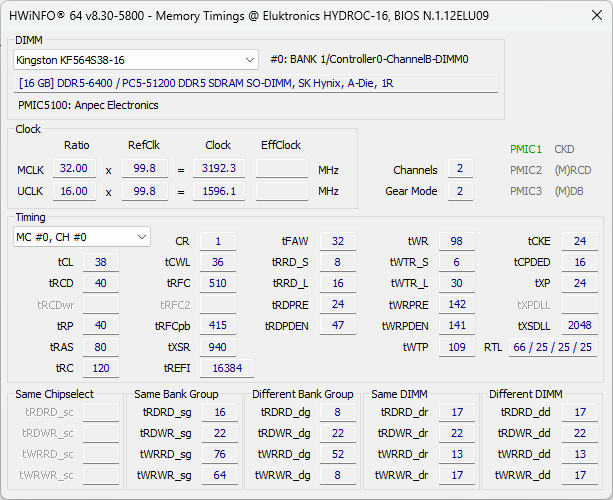
-
*Official Benchmark Thread* - Post it here or it didn't happen :D
win32asmguy replied to Mr. Fox's topic in Desktop Hardware
That kit looks great for the price. I should probably see how far my current 2x16GB kit can go. The other thing is giving another go with the Xeon. Micro Center has a lone W790-ACE in stock that could solve some of the issues I experienced with using a W-2400 in the SAGE. The Noctua cooler would be in the proper orientation which should improve airflow for both the CPU and RAM. I am guessing the bios would be similar to the SAGE with the same quirks but who knows. The nice thing about the cores on the Xeon is that they get the full 2MB L2 cache unlike the 12900K/KS where its 1.25MB. So it is essentially Raptor Lake silicon. -
*Official Benchmark Thread* - Post it here or it didn't happen :D
win32asmguy replied to Mr. Fox's topic in Desktop Hardware
Well I at least finally found the MSI bios setting for iGPU control, "Multi Monitor Support". I also found out that DDR5 on the consumer chips do not support gear1 (strangely the Xeon does support ddr5 gear1). Also set tREFI to 65k which dropped latency down to 57ns. IIRC you guys had your ddr5 tuned to sub-40ns on 14th gen so it has a way to go.. These sticks are actually Hynix M-die (4.D) according to HWInfo64. Kind of wish I had a Unify-X or other 1DPC board to work with here. I am guessing 8000 CL26-30 simply is not happening with a 12900KS either. I like the fact that in the hardware busters video he did not just run around the starting zone in circles at 500fps and declared that WoW can run on any system maxed out. -
*Official Benchmark Thread* - Post it here or it didn't happen :D
win32asmguy replied to Mr. Fox's topic in Desktop Hardware
The Xeon was a tough chip to tune. In retrospect I think I purchased the wrong motherboard to go with it. I thought the W790-SAGE would be a good choice as it was 1DPC, but the CPU orientation did not help air cooling efficiency, disabled PCIe/M.2 with the W-2400 chip, and bios bugs. I think memory is more limited by mesh clocks for latency than pure timings. With XMP enabled I could see a difference of 15ns between 2.4ghz mesh (stock) at 3.0ghz mesh (max stable). I thought about picking up a Asrock W790 WS and see if it solves the issues I had with the SAGE. I should at least run XMP + tREFI 64k. Then see if I can go back and find a deep dive tuning guide to see what to do next. I will try the weekly boss out in K'aresh and see how it does. I also have e-cores disabled in the bios for simplicity. Ah, the MSI is moving on to its next owner. I had the same sentiment about its noise level. Its a shame that at the end of the day an Alienware is still an Alienware. I was majorly turned off from the brand after the M18R1 that leaked their stupid Element 31 LM/hybrid compound past their thin barrier from the factory. Waited a month for that to arrive DOA. It did not help that it had rainbow RGB on bootup by default along with high pitched fan noise. I still have the order for the new Pro Max 18 Plus open. It will be interesting to test out if it ever arrives. -
*Official Benchmark Thread* - Post it here or it didn't happen :D
win32asmguy replied to Mr. Fox's topic in Desktop Hardware
I went ahead and swapped the z690 + 12900ks into my big fractal design r7 xl last night. Love working in that thing; plenty of room for my hands. With XMP stock it was getting 67ns latency in aida64. WoW felt much smoother and other than initial loading hiccups ran very well. The bios I am using does not let me disable the igpu surprisingly. I think the Alienware should do well with those fury sticks. Support for XMP in this Gen is a must have. They should also have options to tune sa fabric and d2d. -
*Official Benchmark Thread* - Post it here or it didn't happen :D
win32asmguy replied to Mr. Fox's topic in Desktop Hardware
It is a MSI Pro Z690-A with 2x16GB Corsair Vengeance C32 6400 memory which is stable with XMP enabled. That 12900KS is the one I had bought for the NH55 but it was running much hotter than the binned 12900K. It is already delidded and has a nicely polished rockitcool copper IHS. I would want to find a different adapter to use my Optane P5800X via the primary M.2 slot (CPU lanes) instead of a PCIe slot (chipset lanes). It makes a great boot drive and is also good for testing stuff as it is a cacheless drive. I still think about a Z890 1DPC + 285K setup, but I don't use the desktop very much right now. I need to find a solution to keep multiple machines synchronized better along with a reliable KVM so I could use my laptop at my home desk as needed. So far the MSI QHD display built in KVM does not work well. -
*Official Benchmark Thread* - Post it here or it didn't happen :D
win32asmguy replied to Mr. Fox's topic in Desktop Hardware
Wow the vanguard looks really nice! I wanted one of those too but the gaming trio was all that became available back in February without any silly bundles required. In theory they are similar but the vanguard has a vapor chamber. I still need to move mine into my z690 / 12900ks system so I can see if it does better than with the frequency limited Xeon. -
*Official Benchmark Thread* - Post it here or it didn't happen :D
win32asmguy replied to Mr. Fox's topic in Desktop Hardware
Best Buy got the Intel Claw 8 in stock so I ordered one to try it out. The last handheld gaming console I owned was a Sega Nomad / Gameboy Pocket (can't remember which came out first) so this will be an interesting experience. My hope is that with the ConsolePort addon I can run WoW for non-raiding things, and Steam / Emulation along with maybe a few offline movies my four year old likes. -
I appreciate this choice because they made a decision of function over form here. I doubt any engineers or users actually cared about how thick their mobile workstations were (within reason). Are we going back to M6800 sized systems? No. But it can at least be as thick as needed to sustain advertised performance in reasonable conditions.
-
A good telltale sign of the CPU location is usually an inch or less than from the memory slots for optimal signal integrity. Granted, the service manual photos do not really do justice showing how everything is designed and component locations!
-
Oh, tests with the dock will be great to have. They do usually ship them with the larger bricks as size is not as much a concern with something stationary. To me the biggest issue would be if its power limits are not consistent. Its not very useful if it might be at 200W for five minutes but then drop to 150W for two minutes. It can also make work tasks take longer than estimated along with fan speeds not staying consistent as well if the throttling algorithm overshoots. It would be great if it has some low latency memory options but they do not have all of the CAMM options available yet. I am guessing the CSODIMMs are probably just OEM 6400 CL52 1.1v. In the past Dell did support enabling XMP SODIMMs so that is another thing to test. How is the 120hz QHD+ display? I am guessing it also supports 60hz to save some power on battery and maybe VRR in Optimus mode.
-
They also advertise 300W power delivery over their new TB5 dock. So I wonder with the dock it could prevent / slow any battery drain issues under load (if present).
-
This is great information, thank you! Interesting to see the GPU boosting up as high as 170W. With the 7780 I think the limit was 140W, with combined loads being closer to 120W. If you do run combined load tests keep an eye on battery percentage to see if it draws down the battery in those scenarios. I feel like the 280W brick may not have enough overhead for 200W combined loads along with all other components.
-
Order is still in the build stage for me. Expected to ship August 18 so it should be build complete by August 13th or so. It's a new product instead of a refresh so I expected a delay to be honest. The 7670 was also delayed an extra month if I recall.
-
*Official Benchmark Thread* - Post it here or it didn't happen :D
win32asmguy replied to Mr. Fox's topic in Desktop Hardware
It's just a 285hx with the RTX 5000 blackwell, and a single sodimm. Everything else a base spec. It finally has a vapor chamber and three full sized fans so it should do better than the previous generation.



