harkaz
-
Posts
48 -
Joined
-
Last visited
Content Type
Profiles
Forums
Events
Everything posted by harkaz
-
clevo p870tm/tm1-g Official Clevo P870TM-G Thread
harkaz replied to ViktorV's topic in Sager & Clevo
You could boot the system blindly from a USB drive and ensure that a boot script will launch the EC flash commands and shutdown the system upon completion. Once you verify that EC has been properly flashed by checking fans with Fn+1, clear CMOS by pressing Fn+D and keeping it pressedd while you press the power on button. EDIT: The EC Flash fw includes EFI commands (in the *.nsh script file), so use EFI shell. -
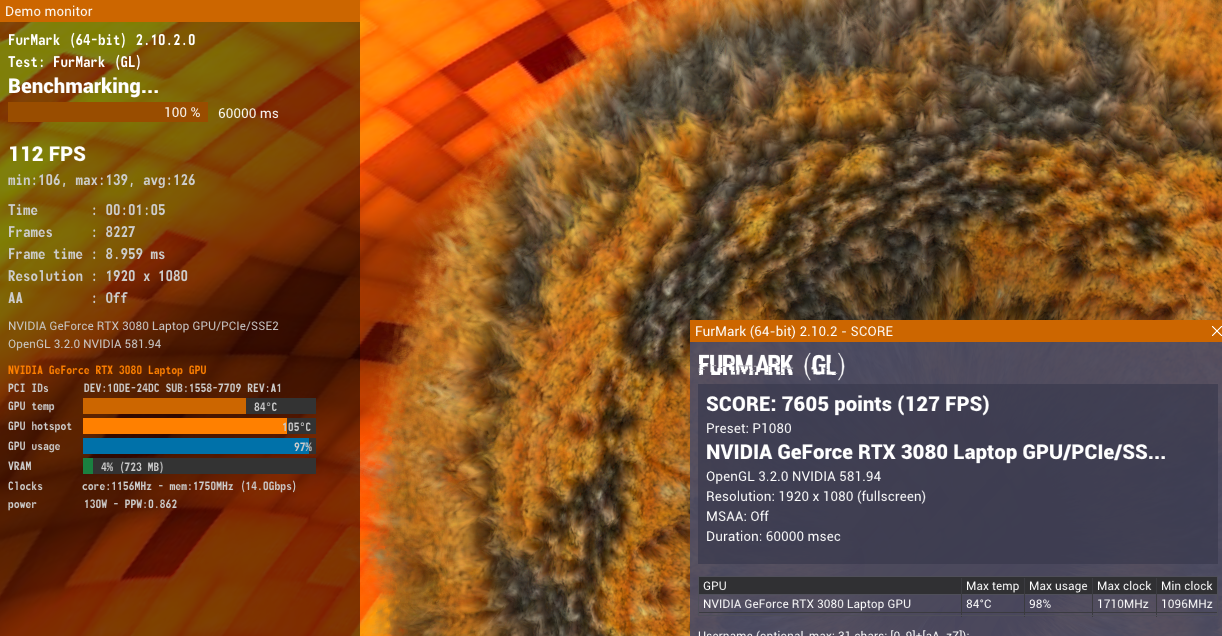
Eventually, I had a spare heatsink modified by @Developer79. Very satisfied with the result - my CPU, GPU idle temps are even better than the stock heatsink was previously for the same CPU (i9-9900K) and RTX 20xx GPU. It took me some time to add the pads and properly adjust the adapters. VRAM is may not be perfectly cooled at 100% load, which leads to 105 degrees hotspot with aggressive fan curve (100% GPU fan speed above 60 degrees). This must be related to the metal protrusions of the original/modified heatsinks being in different locations than the respective VRAM chips in RTX3080. Using thermal pads cannot fully compensate for this discrepancy. For sustained high VRAM loads, attention is needed. Not sure if the cause for 105 deg hotspot is the VRAM, as the benchmarks did not indicate throttling. No VRAM errors were detected after 1 hour of OCCT testing. Some nvlddmkm errors were fixed by disabling MPO. Furmark results: EDIT: Fixed the hotspot temp issue by reapplying paste and ensuring it covers the entire GPU core before the heatsink is mounted. Now temps reach 87.4/99.8 under sustained 100% load with significantly better performance (avg. Furmark at 131 FPS, score 7829).
-
For your spare time, an interview that views AI as an 'evolutionary history' event (45:15 and on). It may be that, no because of its qualities per se but because of the way influential people treat it. For a technology that has a risk of quality degradation with increased training on synthetic (non-human generated) data (doi: 10.1038/s41586-024-07566-y) the prediction of its future performance seems rather difficult. Present capabilities cannot predict future capabilities. And of course, it's not reasoning, it's predicting numbers that are matched to characters. It can be useful for finding patterns and making educated guesses based on its training corpus. The decisions of powerful people to treat AI as a deity will however be evolutionary history. And not in a good way.
-
You have to check the signal quality on the traces with oscillograph. If the equipment is not available you cannot know with high confidence about signal quality causing data loss. You would have to take the financial risk and remove C0, D1 and re-test VRAM. The best option financially would be to get new used GPU.
-
@Maro97 Most likely all chips that report errors (6/8). Start with the 2 that appear to be physically damaged and report most errors then retest.
-
clevo p870tm/tm1-g Official Clevo P870TM-G Thread
harkaz replied to ViktorV's topic in Sager & Clevo
Issue fixed. Enable Above 4G decoding and Above 4GB MMIO assignment with modified 128GB BIOS below for P775TM1-G (modification tested on my own config). Sent you a PM for P870DM-G. Additional modifications are needed for RTX3080 driver detection with proper subsys and friendly name display in BIOS Setup. P7xxTM1-0729-9900KS-128G-PCIfixed.7z -
clevo p870tm/tm1-g Official Clevo P870TM-G Thread
harkaz replied to ViktorV's topic in Sager & Clevo
Regarding RTX3080 issue with 128GB RAM, I also tried with PCI express for PGI to Gen3 and Force x8 - in order to start with PCIex8 always in P775TM1. Same behavior (no video). Not a PCI express bus issue. Most likely caused by a failure of the UEFI component of the graphics card to load with 128GB DRAM. -
clevo p870tm/tm1-g Official Clevo P870TM-G Thread
harkaz replied to ViktorV's topic in Sager & Clevo
EDIT: Issue replicated and fixed on my P775TM1. Refer to later post. -
Longevity and reliability of P775TM1 are second to none for laptops. I doubt that any current laptops do match that because of bad thermals and motherboard design. Besides, buying a new laptop with 32+GB DDR5 would be pretty expensive, so upgrading the old one with 64+GB DDR4 does make sense financially.
-
https://www.bbc.com/news/articles/cq635037g18o "Maybe they actually believe it," Arison said. "Or you could argue they're saying it because it's a great way to gin up more investor support, because the only way to justify these valuations is to actually claim: 'I'm going to take over every industry and I'm going to take over every job, and my AI is going to be doing all that work.'" Let me guess...
-
https://www.wsj.com/opinion/unregulated-open-weight-ai-is-an-invitation-to-disaster-c16c278f Open weights are bad.. really bad. Due to paywall, however, I was unable to find out if they started a pandemic after all.
-
Intel ME must be disabled only to address up to 128 GB of RAM - with other modification that dsanke has added. If you enable Intel ME, then up to 64GB of RAM can be addressed.
-
All latest versions of dsanke BIOS and EC work properly.
-
https://blogs.nvidia.com/blog/nvidia-to-acquire-hugging-face/ It's now official. 13B USD seems a little bit excessive for a git repo. Of course, it is a very large repo, but still. Apart from that, the llama.cpp inference engine is being maintained by employees of HuggingFace. We'll see how that affects open weight LLMs in the next 18-24 months, but I am not optimist about the future of open weights - if open-weight LLM development continues at this pace, OpenAI and Anthropic and probably the US economy will face serious issues: AI "safety regulations" are just a legal pretext to control the pace of open LLM development. (See also: https://www.reuters.com/world/china/bill-gates-alarmed-by-ai-has-policy-ideas-he-wants-discuss-with-chinas-xi-2026-08-26/ )
-
@Selim1905, @SuperMG Thanks for your suggestions.
-
Is this compatible with RTX3080 though? I prefer using the Clevo MXM. The RTX4090 is from XVision I assume. Are you referring to taobao seller? (I am unable to buy from there). Can you elaborate?
-
In my opinion, it will be a while (18 months or more) until a "bubble pop". There is more than enough time for an IPO of Anthropic and Open AI, so that the public is eventually left holding the bag of risk, as usual. There is a lot of optimism about the prospect of superintelligence, also cultivated by some CEOs, and it appears to be enough to keep investors hooked. There are many factors that can delay this even further like increased inflation caused by geopolitical turmoil, scarcity of hardware or a legal framework that could prevent consumers from running competitive, competent open weight LLMs locally. Anything that is detrimental for the consumer running AI locally is beneficial for retaining the bubble. So we can bet we will see more inflation, more hardware scarcity, stricter regulation of local AI, and more geopolitical turmoil to extend the party.
-
As of a few hours ago, it appears that the custom air RTX3080 heatsink for P775TM1 is no longer available - only the air/water version is now available: https://www.aliexpress.com/i/1005007688521117.html Well, it was overpriced anyway. I am waiting for a RTX3080 to arrive within the following days, so I am exploring alternative options. Are there any measurements-detailed instructions on how to modify the current 31-P77FN-401 heatsink (i.e. by drilling)? Any other options for heatsink mounting? How bad is it if I do not use any screws on the GPU side? If anyone knows of a modified 31-P77FN-401 heatsink that is compatible with RTX3080 and is available for sale within the EU please keep me informed.
-
It's a pity that I do not need the entire chassis, but only the modified heatsink for a RTX3080 I recently ordered (I want to avoid the Chinese ones). If you would be interested in selling the heatsink only, please let me know, as I am based in the EU.
-
@dude-137 Based on my personal experience: Using "Balanced" Windows Power Profile when idle - clock set to 3.60 GHz the temp fluctuates around 60 degrees. "High Performance" profile will lead to a gradual overheating of the PCH up to ~80 degrees - clock at 4.68 GHz. CPU core voltage offset around -72 millivolts. In my opinion, the voltage of the power rails of the PCH should be measured. I have never modified the cooling system at all and still I am far from 100 degrees (also many VMs are running synchronously).
-
@dude-137 A 100+ degrees Celsius PCH temp is definitely not normal and not a design flaw on Clevo's part. The max I have got with regard to PCH temps is 80 degrees Celsius. I would suspect an electrical problem (overvoltage maybe?).
-
Clevo P751TM1 BIOS flashing help, Thunderbolt without display
harkaz replied to Gualdo's topic in Sager & Clevo
P775/P750 are compatible as they use the same motherboard. P870 uses a different board so most likely not compatible. The vendor who sold me the laptop got the file for me from a supplier. -
Try with 'High Performance' power profile while on battery to see if system resumes ok. If the problem exists only on AC power, the PSU, the power socket, or even a cable could be implicated.
-
Cleaning the board using isopropyl alcohol may help. Also, use compressed air to remove any dust particles from the CPU socket.
-
Try installing the latest chipset drivers: https://www.intel.com/content/www/us/en/download/19347/chipset-inf-utility.html Another suggestion would be integrating the latest microcode for the new 10900k CPU to your BIOS. If all software/firmware options fail, consider a hardware issue (CPU or mobo).