PHVM_BR
-
Posts
156 -
Joined
-
Last visited
Content Type
Profiles
Forums
Events
Everything posted by PHVM_BR
-
Eluktronics Hydroc G2 / Uniwill IDY 2025
PHVM_BR replied to win32asmguy's topic in Uniwill (TongFang)
BIOS Advanced (D2D / NGU) and XTU (NGU / Ring). -
Eluktronics Hydroc G2 / Uniwill IDY 2025
PHVM_BR replied to win32asmguy's topic in Uniwill (TongFang)
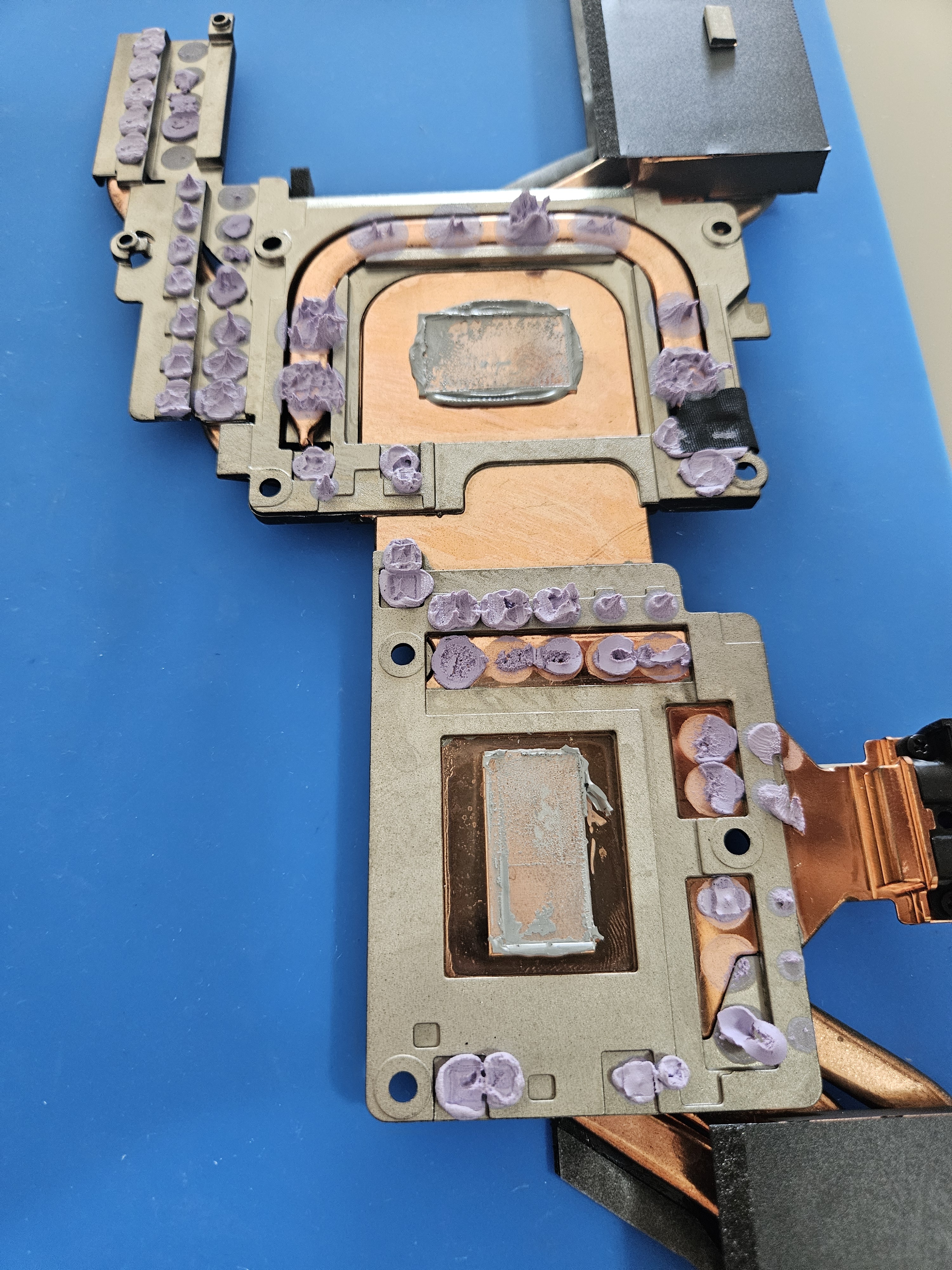
To take advantage of that 250W CPU limit, I'm afraid even liquid cooling won't be enough. Perhaps LM + liquid cooling would be possible for short/medium duration loads, but the heatsink has aluminum parts, and caution is needed in choosing the solution for its application...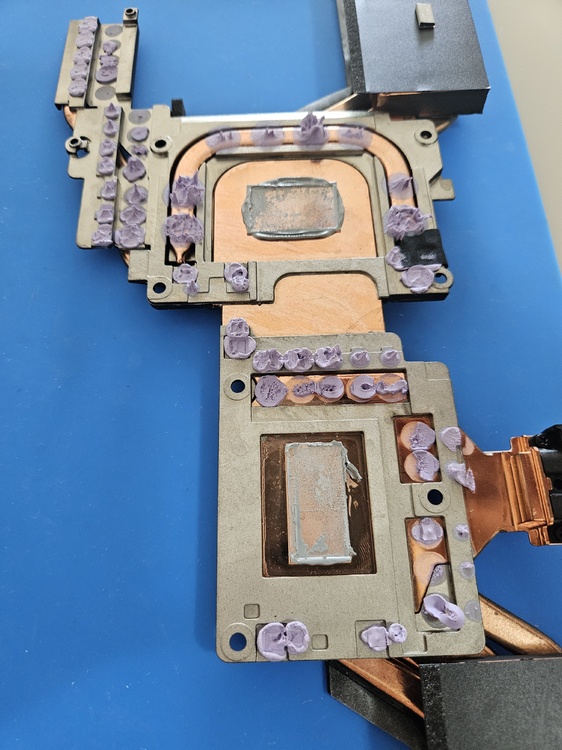
-
XMG Neo 17 E23 vs Neo 16 E25, am I right to be disappointed?
PHVM_BR replied to MiSJAH's topic in Uniwill (TongFang)
Try Custom with maximum settings / fan boost and Overboost Extreme. -
XMG Neo 17 E23 vs Neo 16 E25, am I right to be disappointed?
PHVM_BR replied to MiSJAH's topic in Uniwill (TongFang)
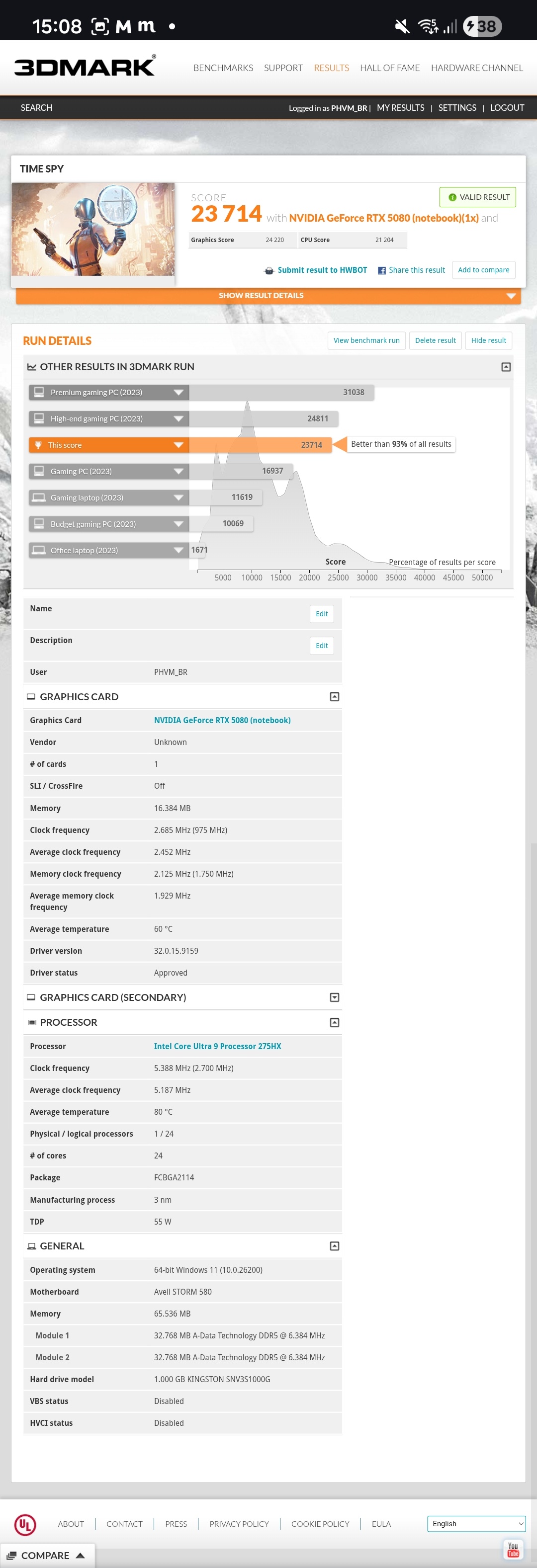
Time Spy is an older benchmark and doesn't scale well with Core Ultra CPUs. Furthermore, memory makes all the difference in CPU scores, and it seems that with the i9-13900HX you used 6400MT/s modules while with the 275HX you used 5600MT/s. With VBS disabled, stock memory (5600MHz CL46) and stock CPU, I reached up to ~17700. Everything remained the same, but with CPU undervolting and an IETS GT600, the CPU score increased to ~18500. And finally, with memory adjusted to 6400MT/s CL36, I now reach up to ~21900. I've seen scores of ~24k with faster memory. Regarding the GPU, its score with the 4090 is good, slightly below its maximum overclocking potential (up to ~24.5k), but its score with the 5090 is not so good... With a well-tuned overclock, it should be able to exceed 27k and perhaps even 28k with a good cooling pad -
Eluktronics Hydroc G2 / Uniwill IDY 2025
PHVM_BR replied to win32asmguy's topic in Uniwill (TongFang)
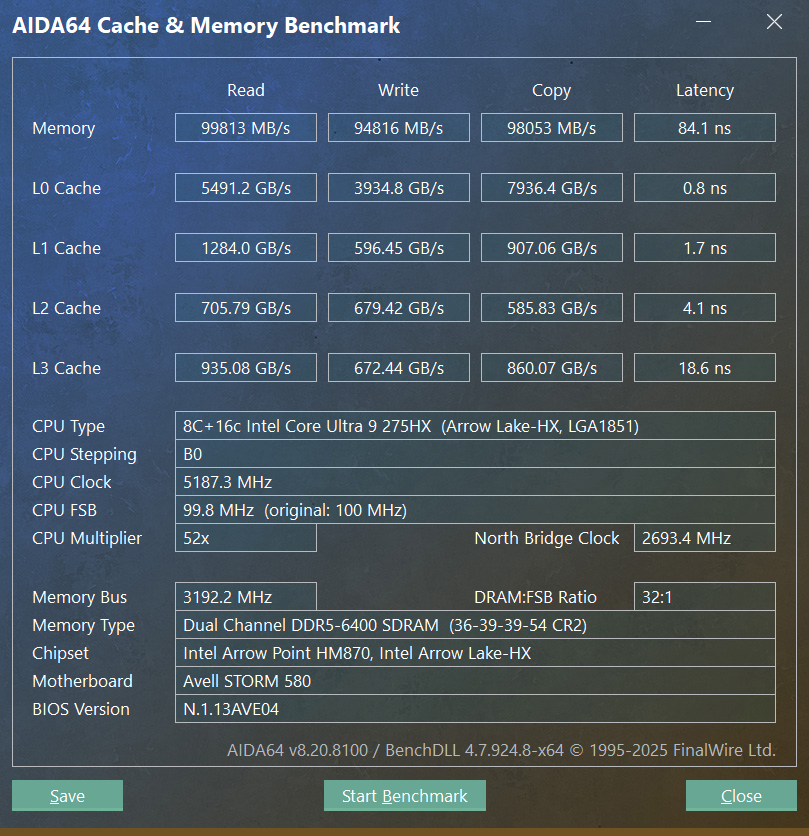
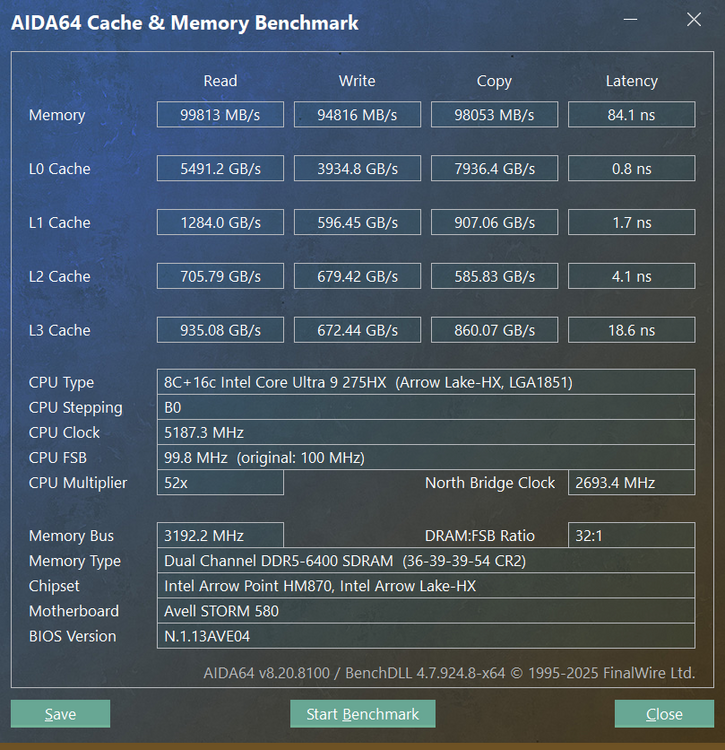
My settings were all tested in several tests over a few hours. Everything is 100% stable until then... Regarding the cache, initially I kept it at 3.8GHz with an undervolt of -80mV, but I realized during testing that the undervolt on the cache delivered practically no benefits (maybe 1 to 2W less at full load). Then I tried overclocking in XTU and discovered that for 4.0GHz it was enough to maintain the original voltage, without undervolting. With the ring at 3.8 GHz and everything else the same, I get about ~86 ns. I believe that with Hynix A-die single rank it's possible to achieve 7600MT/s CL36 and latency below 80ns. We'll see... I'm waiting for a reasonable price to buy 2x16gb Fury Impact 6400MT/s CL38 and test it. As for the BIOS update, I haven't updated to the XMG BIOS yet for fear of something going wrong, but I've seen several reports that it works. -
Eluktronics Hydroc G2 / Uniwill IDY 2025
PHVM_BR replied to win32asmguy's topic in Uniwill (TongFang)
I'm currently using the XMG CC, but it's identical to the Avell one. I haven't noticed any differences... -
Eluktronics Hydroc G2 / Uniwill IDY 2025
PHVM_BR replied to win32asmguy's topic in Uniwill (TongFang)
168 = 5600 192 = 6400 204 = 6800 ... -
Eluktronics Hydroc G2 / Uniwill IDY 2025
PHVM_BR replied to win32asmguy's topic in Uniwill (TongFang)
To enable the XMP profile in the BIOS, you need memory modules with XMP profiles. To manually adjust the memory, XMP memory modules are not necessary. Change the profile to manual and adjust the settings. Simply changing the target memory frequency is not effective. -
Eluktronics Hydroc G2 / Uniwill IDY 2025
PHVM_BR replied to win32asmguy's topic in Uniwill (TongFang)
Not yet, I just select all P-cores (or all E-cores) and set the undervolt. -
Eluktronics Hydroc G2 / Uniwill IDY 2025
PHVM_BR replied to win32asmguy's topic in Uniwill (TongFang)
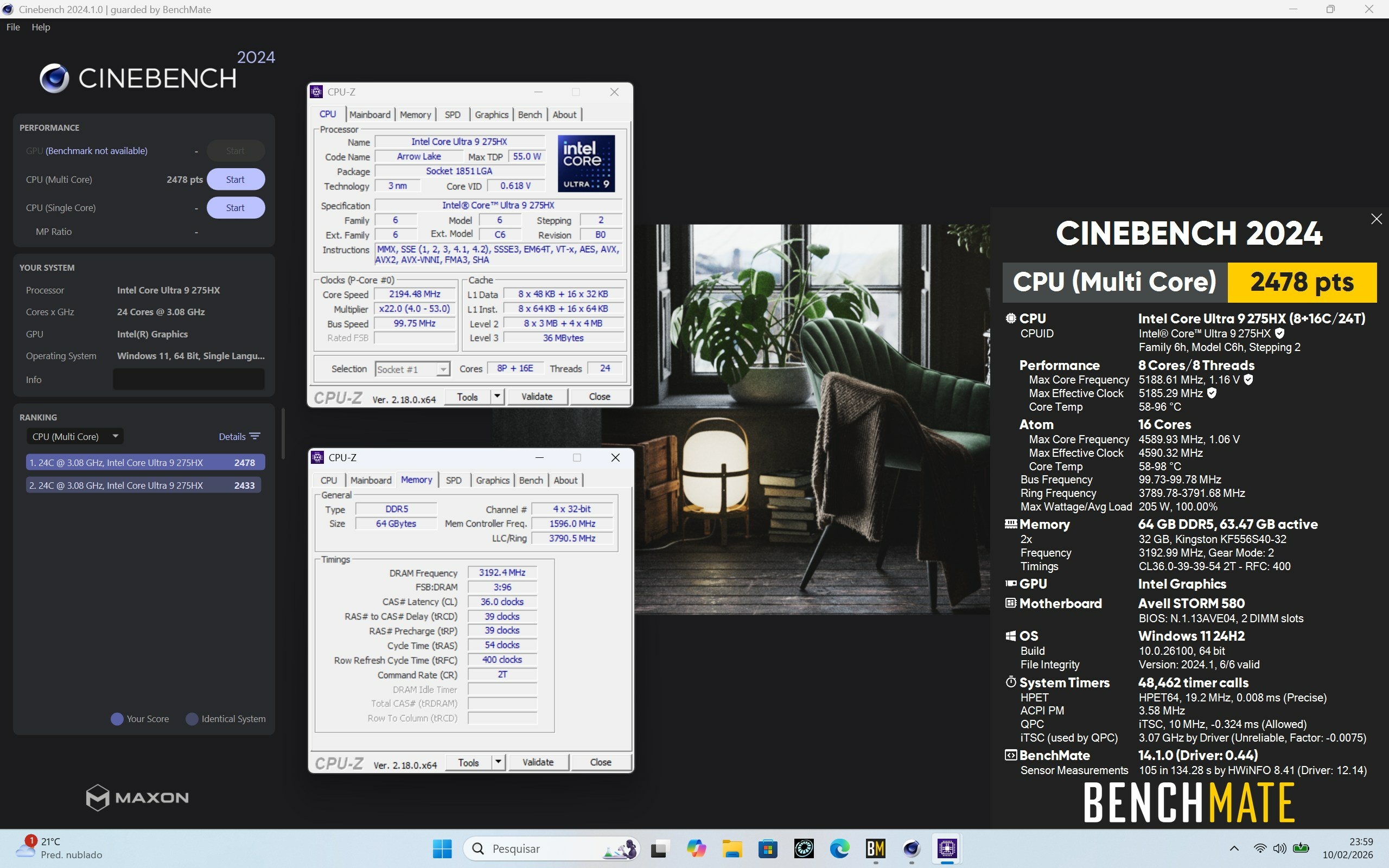
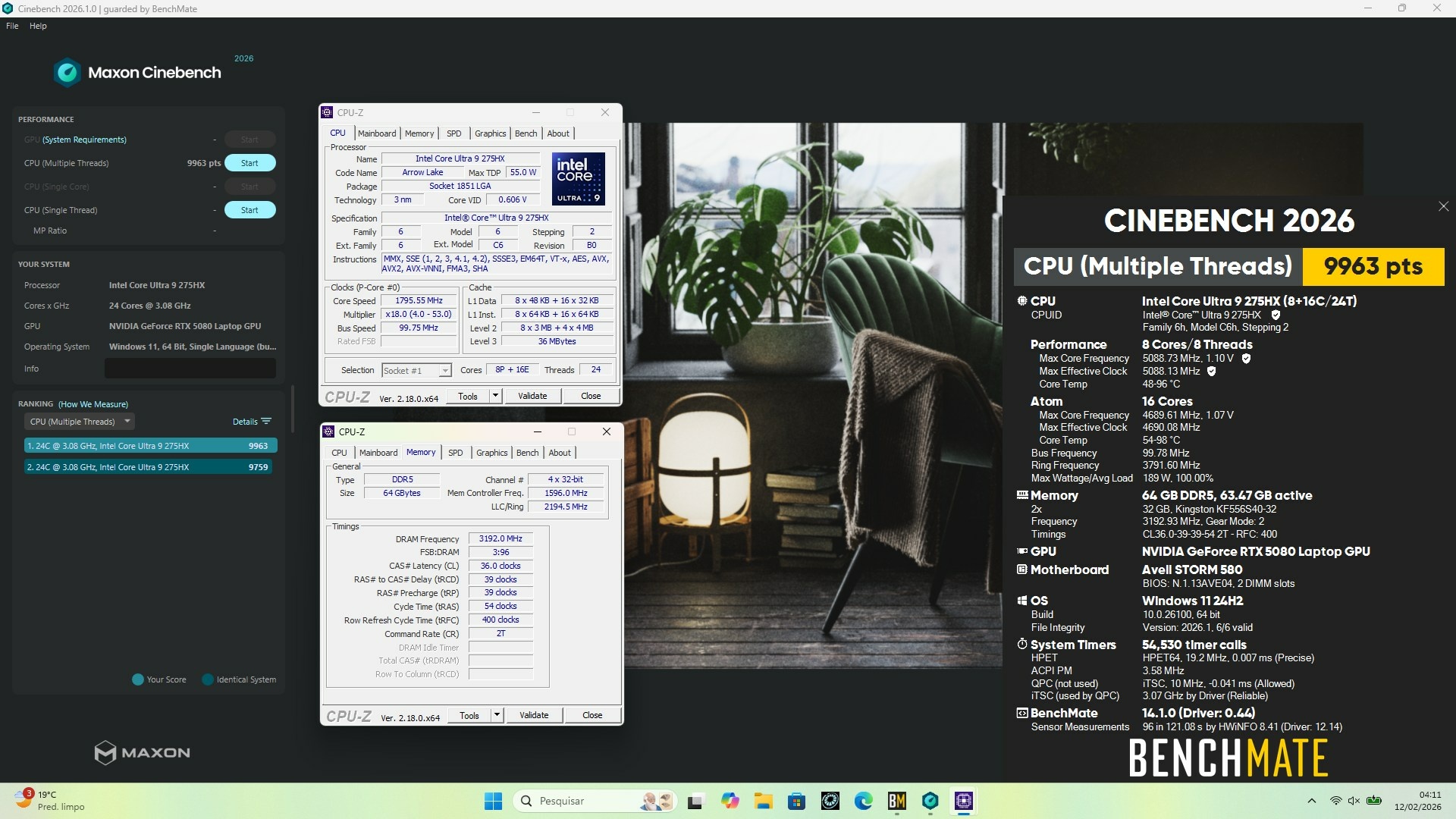
I have tREFI = 24576 To achieve 84ns I have: NGU = 3.0GHz D2D = 3.1GHz Cache = 4.0GHz For me, overclock the ring to 4.0GHz decreased the latency by ~2ns. Is it possible to get the Premamod BIOS without an Eluktronics laptop? I messaged Prema about this, but haven't received a response... I really want the higher power limit (250W vs 210W), as well as the extra adjustment options. -
Eluktronics Hydroc G2 / Uniwill IDY 2025
PHVM_BR replied to win32asmguy's topic in Uniwill (TongFang)
I don't have my laptop with me right now. I can post tomorrow or the day after, but there's no secret. Undervolt the P-core, undervolt the E-core, undervolt and/or overclock the cache, ICCMax = Unlimited on both the iGPU and the CPU. -
Eluktronics Hydroc G2 / Uniwill IDY 2025
PHVM_BR replied to win32asmguy's topic in Uniwill (TongFang)
You must disable virtualization in the BIOS. Core isolation is disabled in Windows. The XTU version compatible with Core Ultra (Arrow Lake) is version 10xxx. The version you are trying to use, 7xxx, is compatible with older generation CPUs. -
Eluktronics Hydroc G2 / Uniwill IDY 2025
PHVM_BR replied to win32asmguy's topic in Uniwill (TongFang)
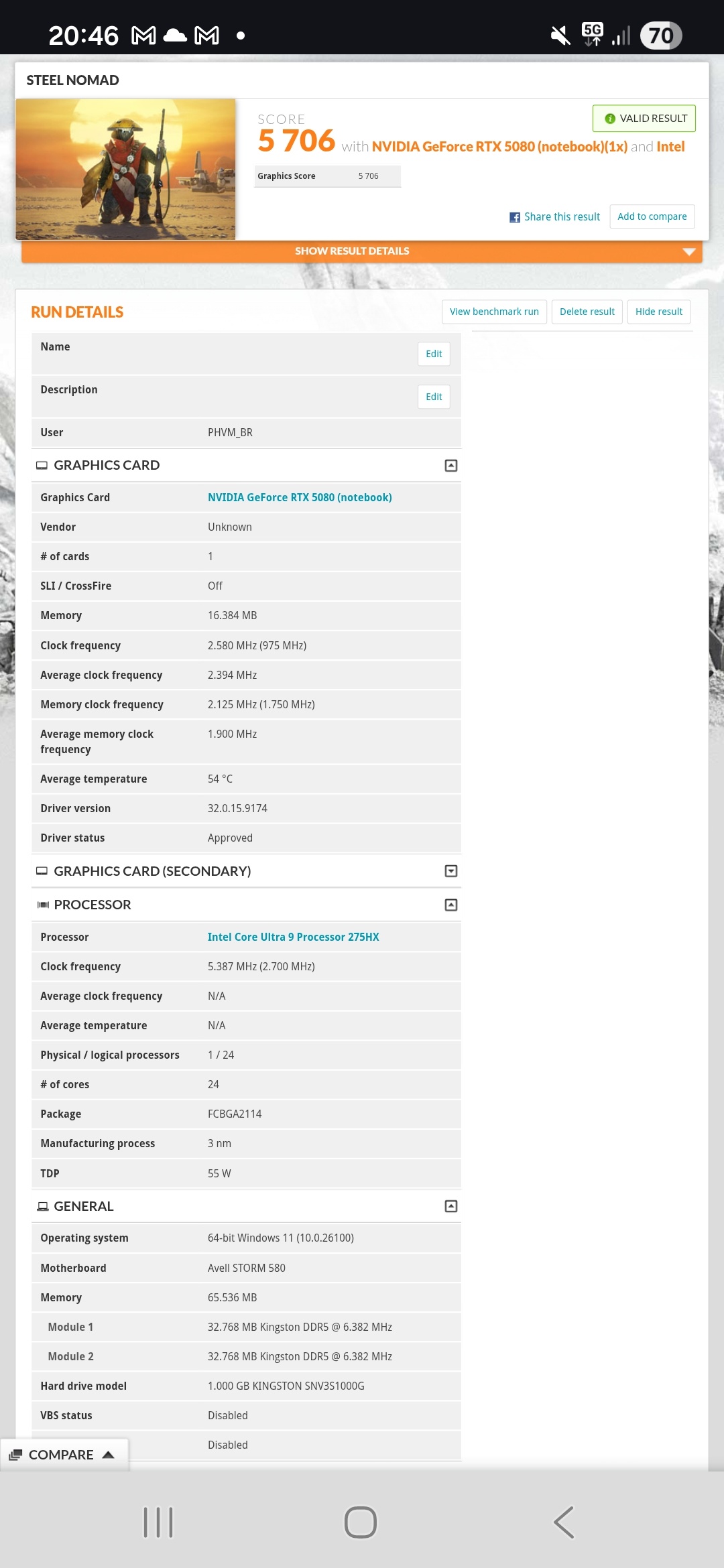
I use adaptive voltage. XTU is a heavier software than Throttlestop, so I recommend applying all settings and then closing the program. Your settings will remain until the system is turned off or restarted. If Throttlestop works better for you, use it! I've always used and preferred Throttlestop, but I switched to XTU with this system because of the extra adjustment possibilities. I don't have a liquid cooling system and I use an IETS GT600. I've tested Steel Nomad a little and haven't yet fine-tuned the system for this benchmark: https://www.3dmark.com/sn/12124446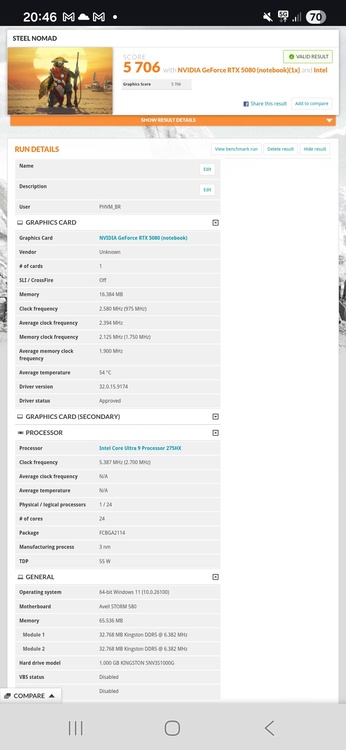
-
Eluktronics Hydroc G2 / Uniwill IDY 2025
PHVM_BR replied to win32asmguy's topic in Uniwill (TongFang)
Have you disabled Windows Core Isolation and virtualization features in the BIOS? Which version of XTU are you trying to use? -
Eluktronics Hydroc G2 / Uniwill IDY 2025
PHVM_BR replied to win32asmguy's topic in Uniwill (TongFang)
Yes, I use Afterburner. In the advanced BIOS tab, which is unlocked by checking the option in the manual settings of the Control Center, you adjust the memory and unlock undervolt protection. If you've never adjusted memory before, I recommend doing some research first. Generally, if the adjustment doesn't POST, the system itself reverts the changes and restarts Windows after a few minutes of trying to train the memory. If the system doesn't restart automatically, simply restore the factory settings: With the charger disconnected, press and hold Ctrl + F11 and click the power button for a few seconds. When the keyboard starts flashing, you can release Ctrl and F11. Wait a few minutes and the system will restart with the default settings. -
Eluktronics Hydroc G2 / Uniwill IDY 2025
PHVM_BR replied to win32asmguy's topic in Uniwill (TongFang)
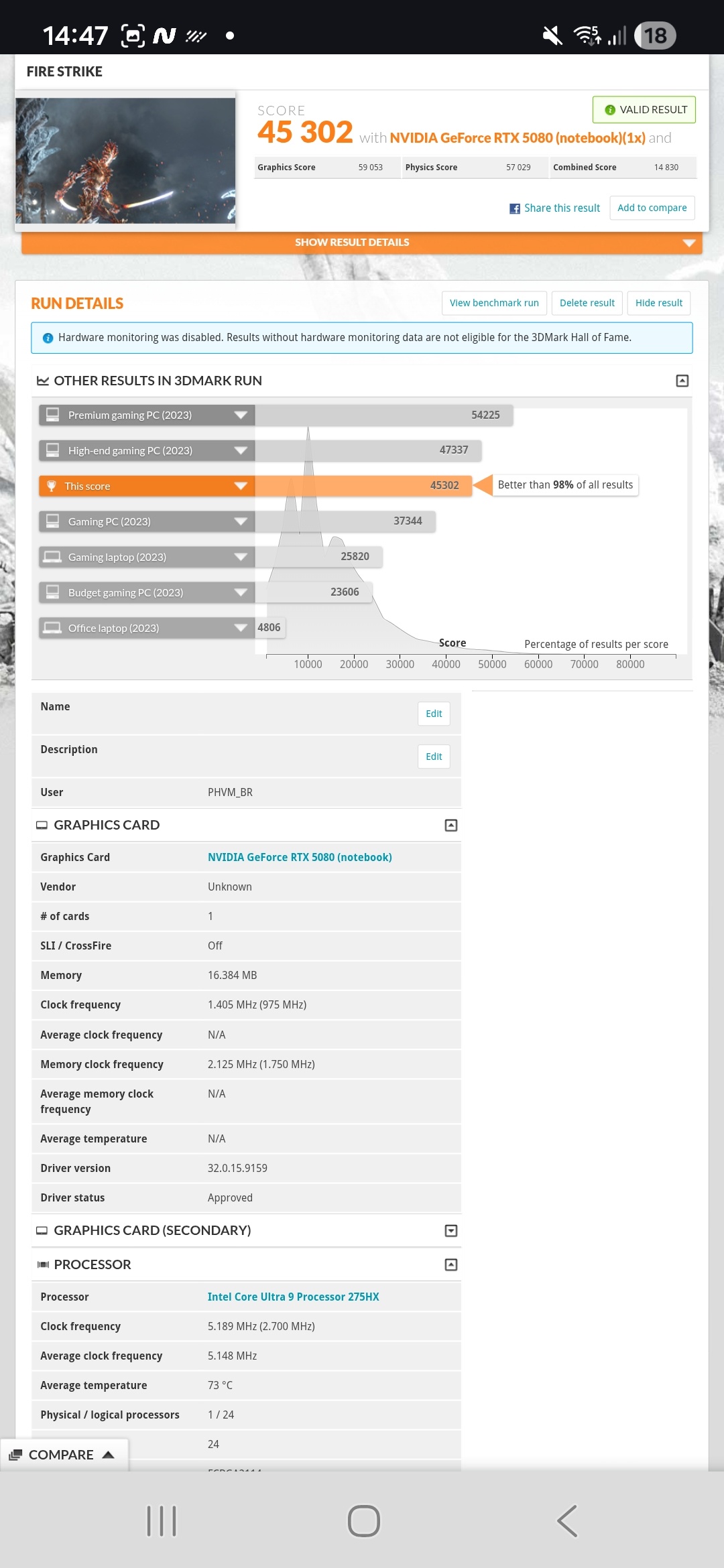
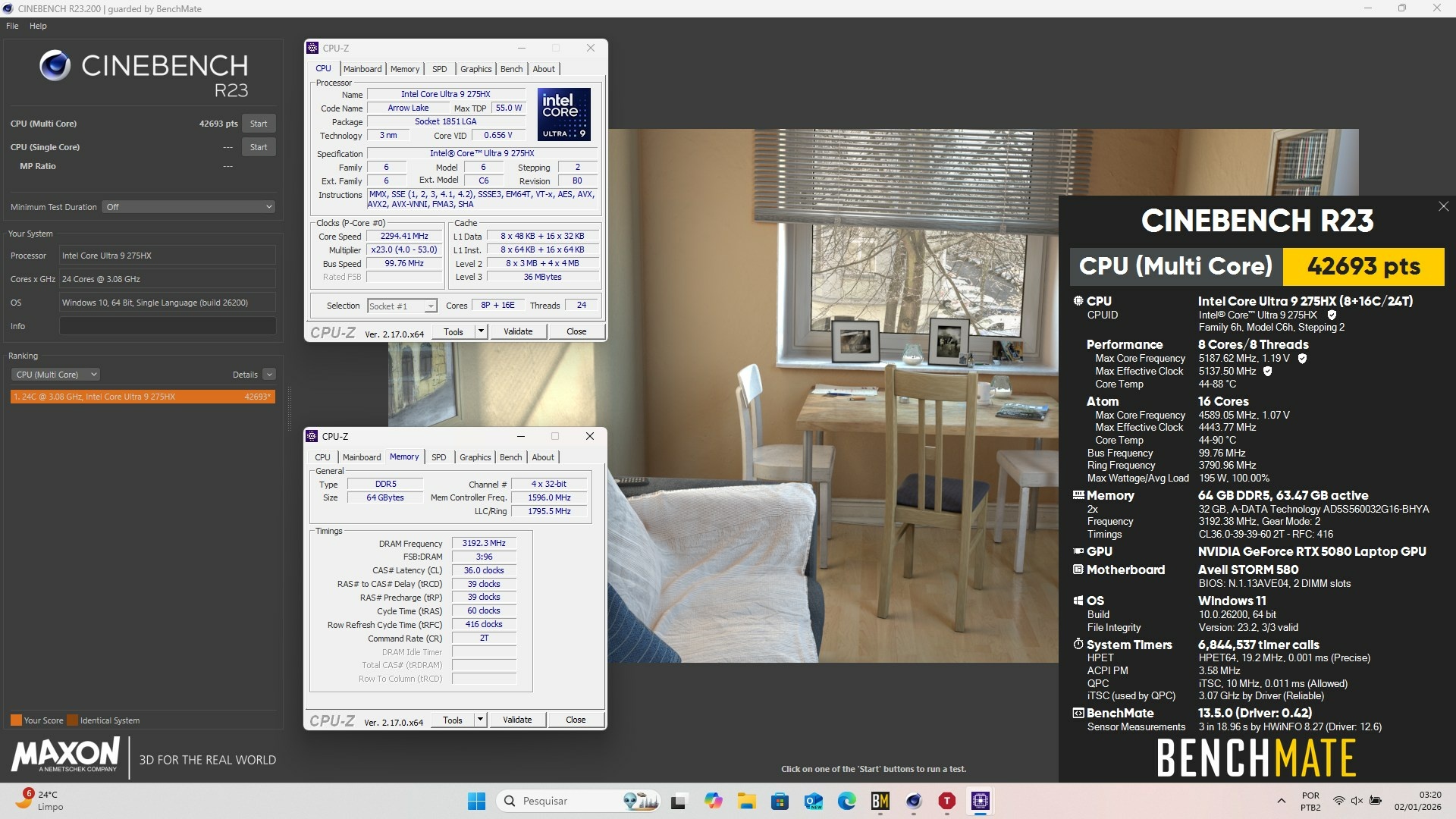
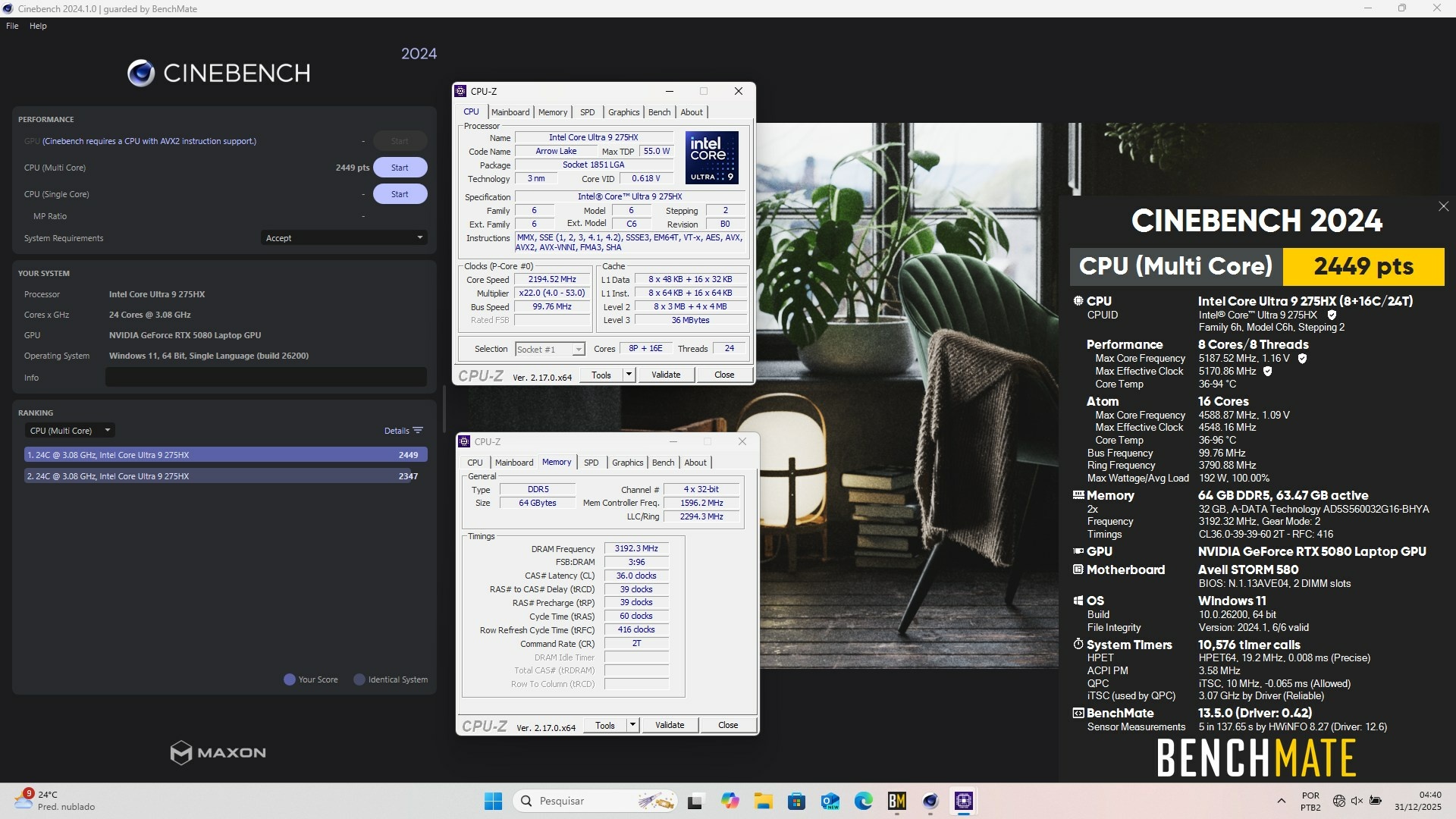
Overclocked GPU! How much depends on the application... for example, in Time Spy I get +450MHz, while in Fire Strike the limit is +430MHz... For games I keep it at +400MHz to have a safe margin and not have to worry. VRAM always supports +3000MHz. I want to update to the XMG BIOS but I haven't done it yet. To get good results, just unlock the advanced BIOS menu through the Control Center and unlock the CPU undervolt and adjust the memory, in addition to the GPU overclock. I use XTU for CPU undervolt because with it you can adjust the P-cores and E-cores separately. On my CPU, -60mV on the P-cores is stable, limiting it to 5.2GHz, while on the E-cores at 4.6GHz I use -75mV, also completely stable. I have 2x32GB of SODIMM memory, therefore the modules are dual rank, more limited for adjustment. I achieved a stable 6400MT/s CL36-39-39-54 at 1.3V. I tried 6800MT/s at 1.35V but it didn't POST. I stopped there... With single-rank memory, 7200 or 7600MT/s at 1.35V should be easily achievable. -
Eluktronics Hydroc G2 / Uniwill IDY 2025
PHVM_BR replied to win32asmguy's topic in Uniwill (TongFang)
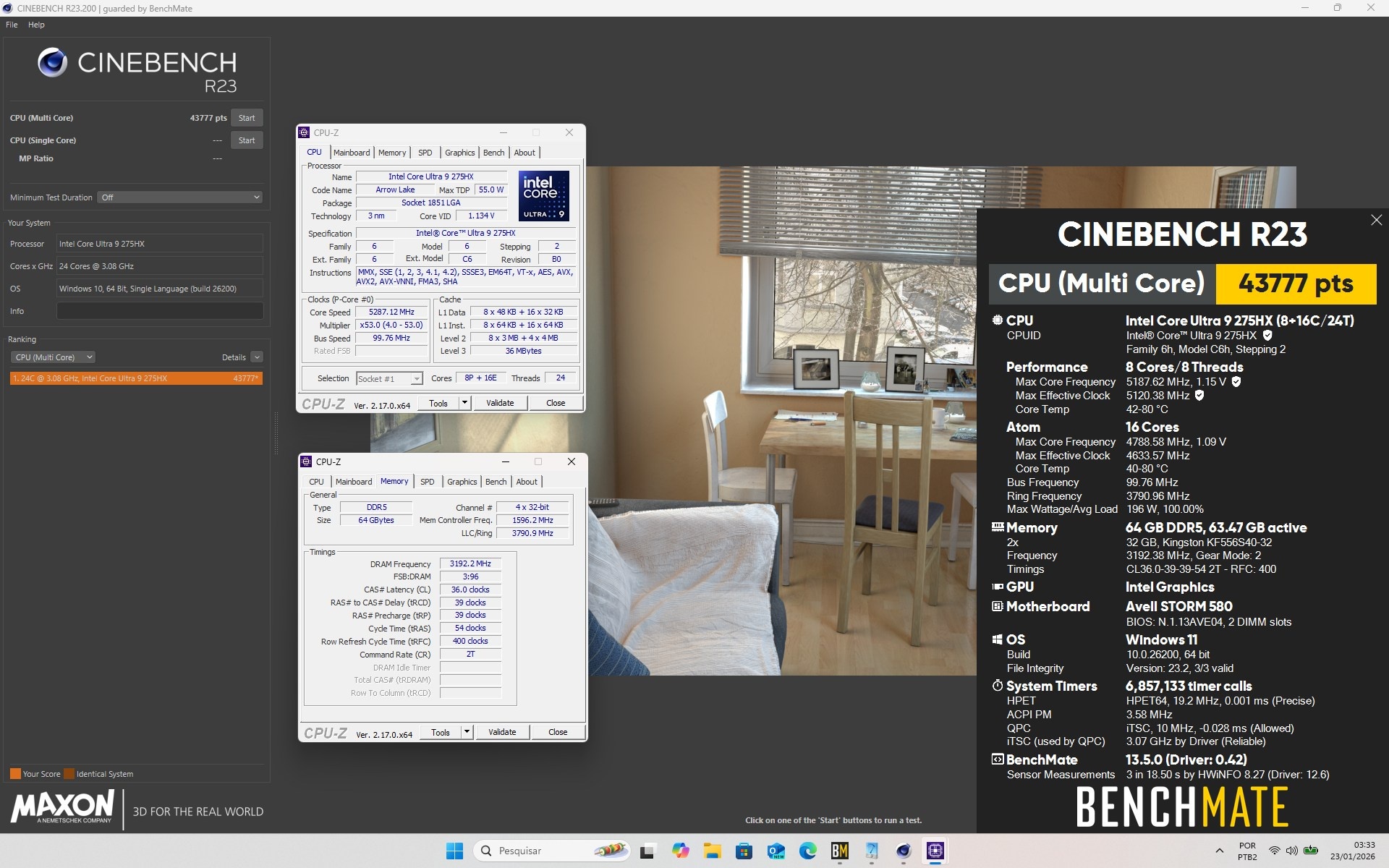
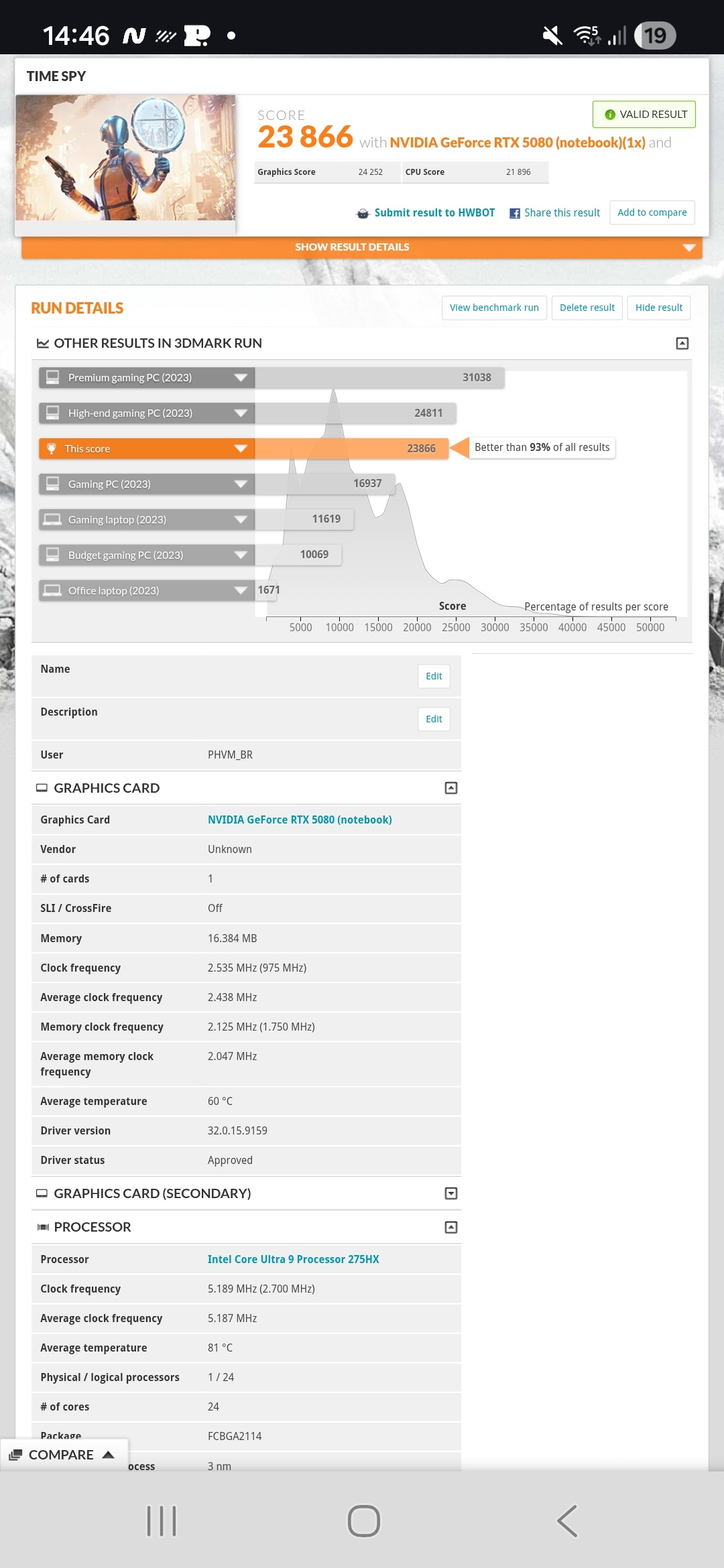
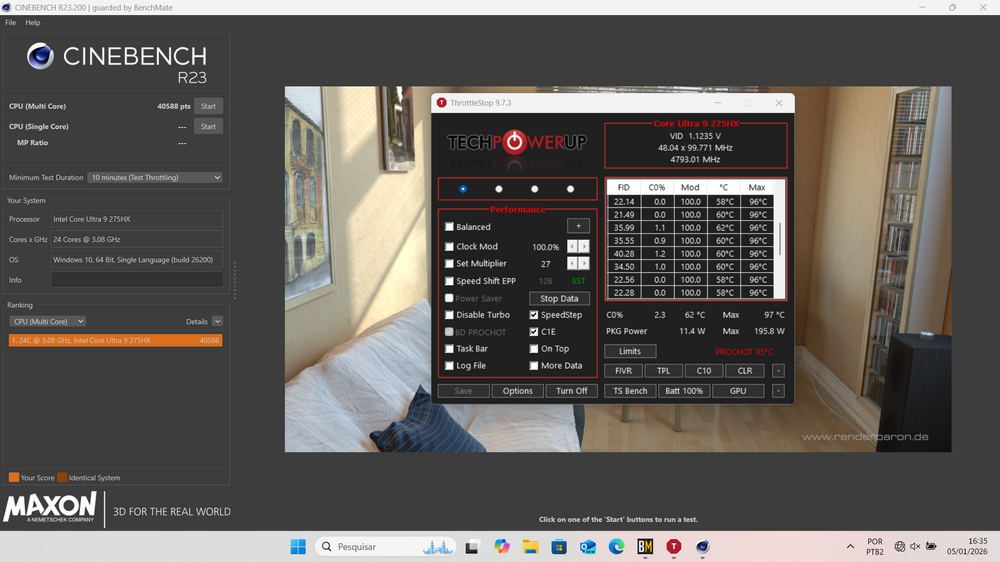
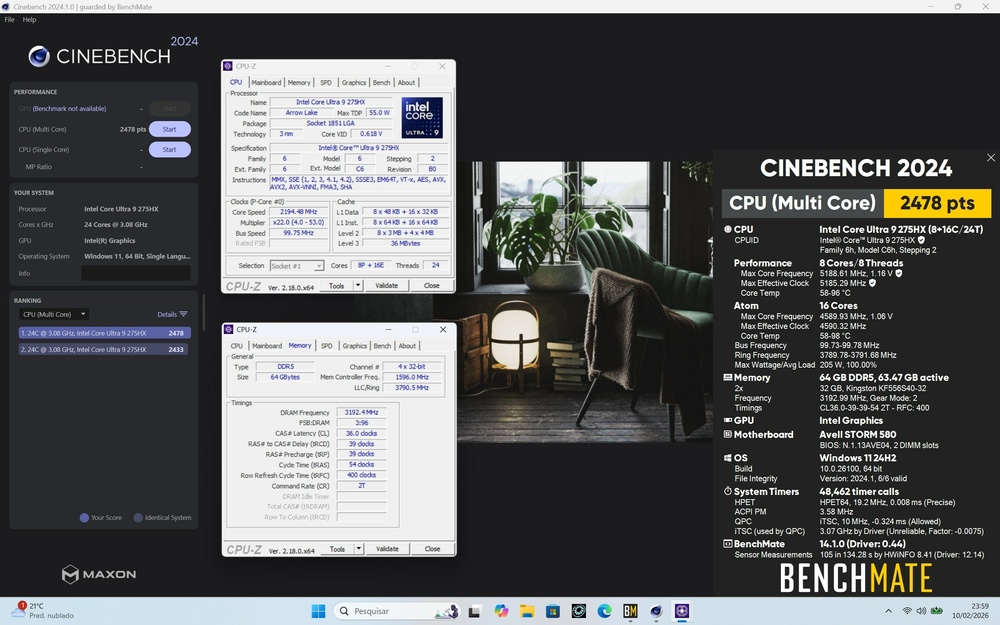
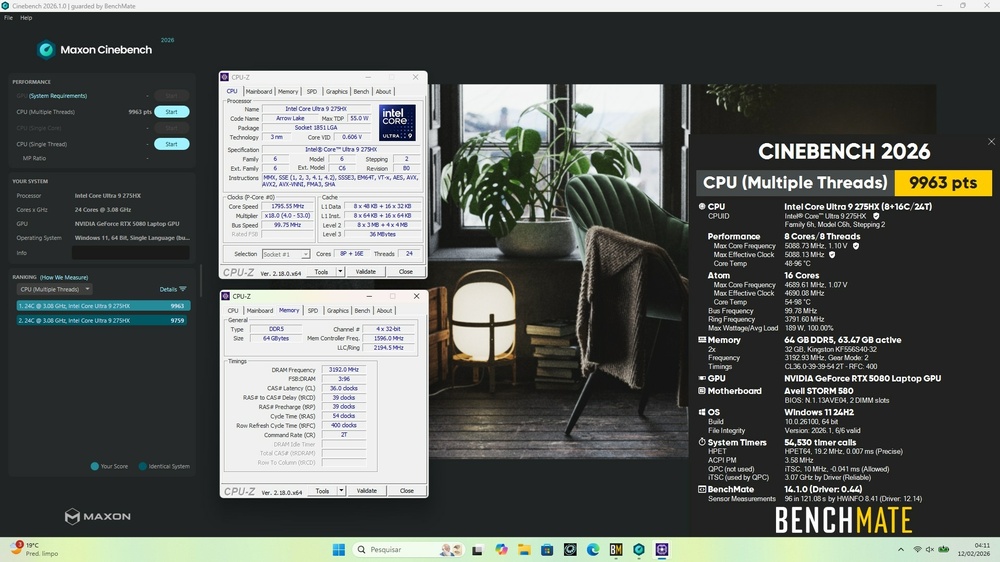
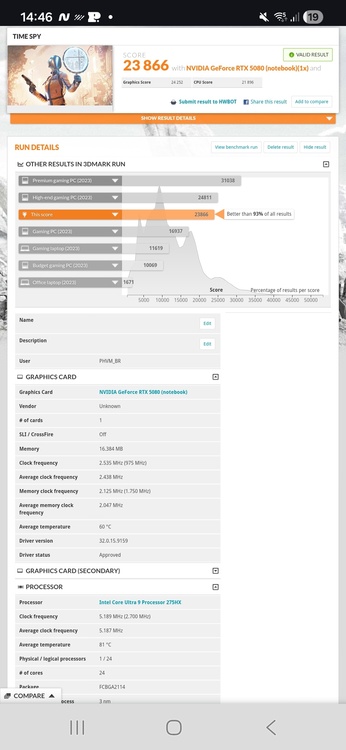
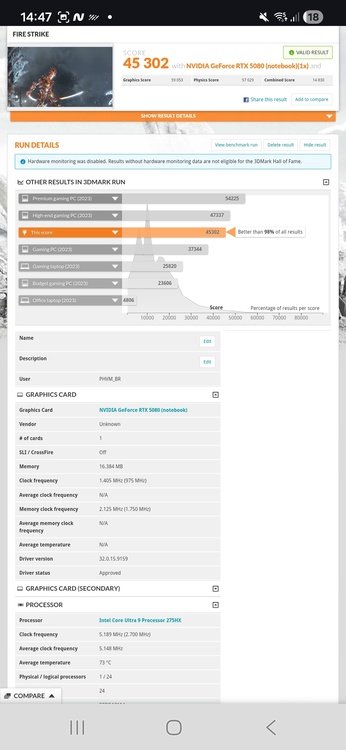
Memory: 5600MT/s CL46 => 6400MT/s CL36 (2x32gb DUAL RANK) NGU: 2,6GHz => 3,0GHz D2D: 2,1GHz => 3,1GHz Ring: 3,8GHz => 4,0GHz P-cores: 5,2GHz@-60mV or 5,1GHz@-65mV E-cores: 4,6GHz@-75mV or 4,7@-60mV or 4,8GHz@-50mV ICCMax: Unlimited 10-minute test: https://www.3dmark.com/spy/61810196 https://www.3dmark.com/fs/34303826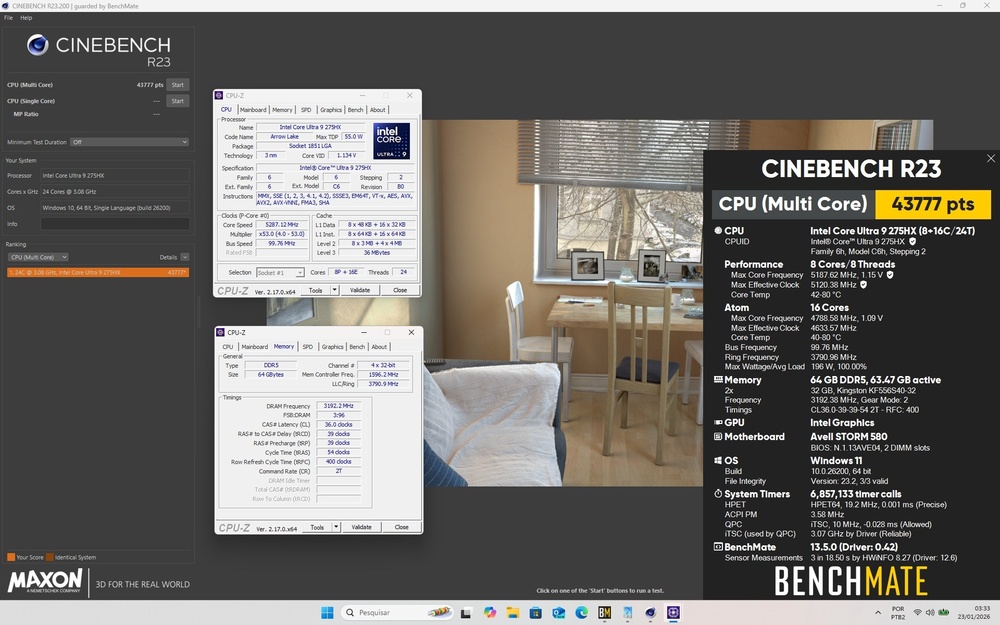
-
Precision 7540 & Precision 7740 owner's thread
PHVM_BR replied to SvenC's topic in Pro Max & Precision Mobile Workstation
My Precision 7540 operates at low temperatures, with little noise, and has excellent battery life (more than 6 hours of light use without using the dGPU, even after more than 5 years). Even under full load, the i9-9980HK in stock configuration (4.2GHz on all cores simultaneously) never reaches 90°C (except in Prime95, which is a completely unrealistic load...). I use Kryosheet on the CPU, but with a PTM 7950 it should be similar. This is fundamental to achieving this level of performance, as is undervolting the CPU. I believe the cooling system of the 7530 is the same when comparing the same GPU class of each, so it's entirely possible to have a cool system with low noise in normal office use and good battery life. I doubt that the Zbook from the same year will achieve the same results... When I had an i7-9750H (similar to the i7-8750H) in that Precision, the temperatures, noise, and battery life were even better. The i7 undervolted and under full load, could stay at ~80°C all day with the fans at ~75% (~3900 rpm). -
Eluktronics Hydroc G2 / Uniwill IDY 2025
PHVM_BR replied to win32asmguy's topic in Uniwill (TongFang)
New benchmark: https://www.3dmark.com/spy/61101323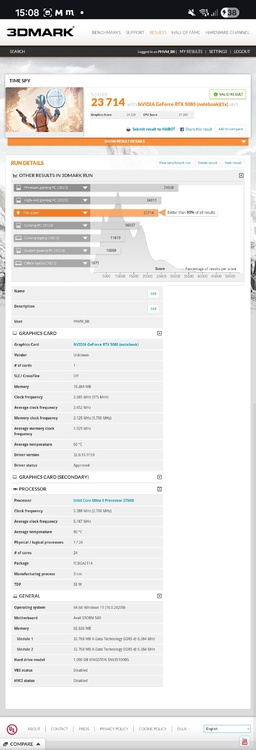
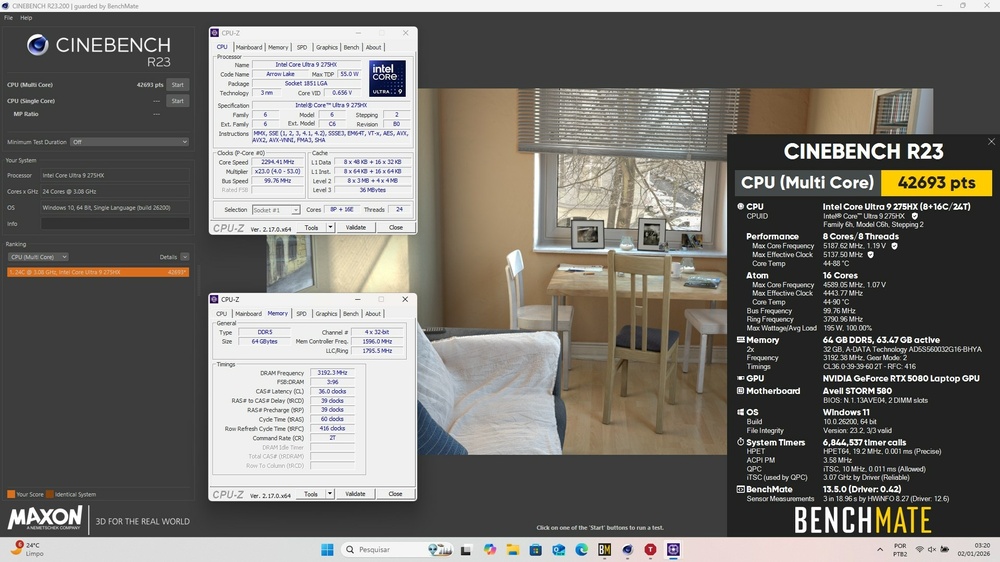
-
Eluktronics Hydroc G2 / Uniwill IDY 2025
PHVM_BR replied to win32asmguy's topic in Uniwill (TongFang)
New score now with IETS GT600: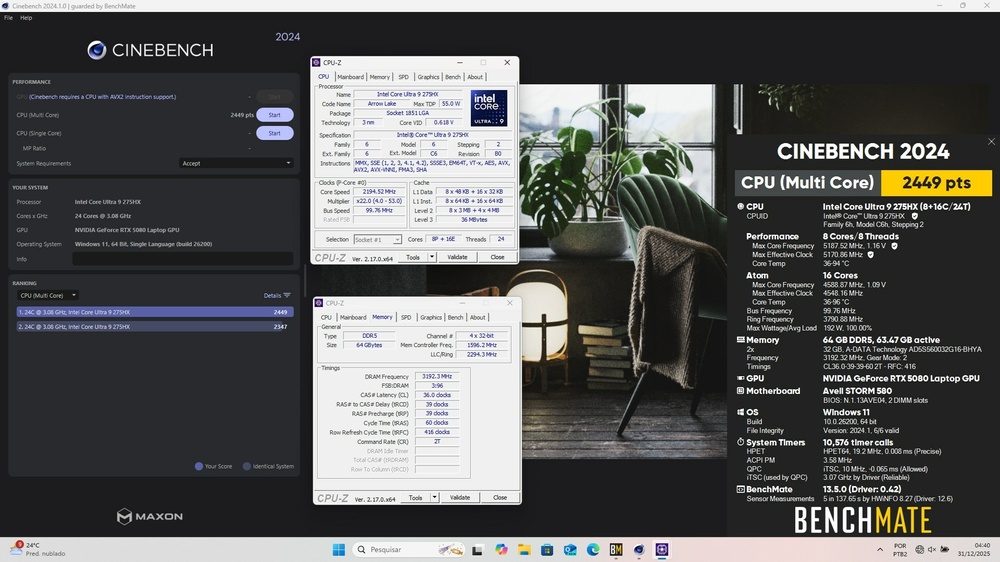
-
Eluktronics Hydroc G2 / Uniwill IDY 2025
PHVM_BR replied to win32asmguy's topic in Uniwill (TongFang)
You're right, the different layout I saw was from the BIOS of the Neo 16 E23/E24. Your BIOS and options seem to be exactly the same as on my laptop. Including the exact same version 2.22.0059. -
Eluktronics Hydroc G2 / Uniwill IDY 2025
PHVM_BR replied to win32asmguy's topic in Uniwill (TongFang)
You probably changed parameters in the advanced BIOS that you shouldn't have, or changed them in the wrong way. From what I saw, I believe you changed the ICC Max to 0 (auto) while in my BIOS this value is at the maximum (2047). It seems you also changed P-core Power Density Throttle and Turbo Thermal Protection... According to the screenshots, that's what you did in addition to what I suggested. I can't tell if you changed anything else... I had only written to disable Undervolting Protection, Virtualization features, and Overclocking Lock. I suggest you don't change anything you don't understand. I believe your best option is to reset the BIOS to the original settings. Turn off the laptop, unplug the charger cable for a few seconds and plug it back in. Then press and hold Ctrl + Alt + F11 and then press the power button. Keep them all pressed for a few seconds and release them. The BIOS will enter a factory reset process. When the BIOS reverts to factory defaults, you'll be able to make the changes you want, knowing exactly what you're altering... It doesn't appear that the BIOS for the XMG Neo 16 E25 is installed. I believe the layout is completely different. -
Eluktronics Hydroc G2 / Uniwill IDY 2025
PHVM_BR replied to win32asmguy's topic in Uniwill (TongFang)
In the Control Center's Custom Performance tab, check the "Advanced CPU Settings" box (or similar) to unlock CPU settings in the BIOS. Close ThrottleStop and delete the settings file. It's an automatically created .ini file in the same folder as the icon. Disable Core Isolation in Windows. Restart the system and access the BIOS. There will be an "Advanced CPU" tab. Click on it. There, you can disable virtualization features, Overclocking Lock, and Undervolting Protection. Restart the system and you'll be ready to adjust the throttlestop! -
Eluktronics Hydroc G2 / Uniwill IDY 2025
PHVM_BR replied to win32asmguy's topic in Uniwill (TongFang)
Yes, I leave it on the custom profile with maximum performance and boost fans for benchmarks. -
Eluktronics Hydroc G2 / Uniwill IDY 2025
PHVM_BR replied to win32asmguy's topic in Uniwill (TongFang)
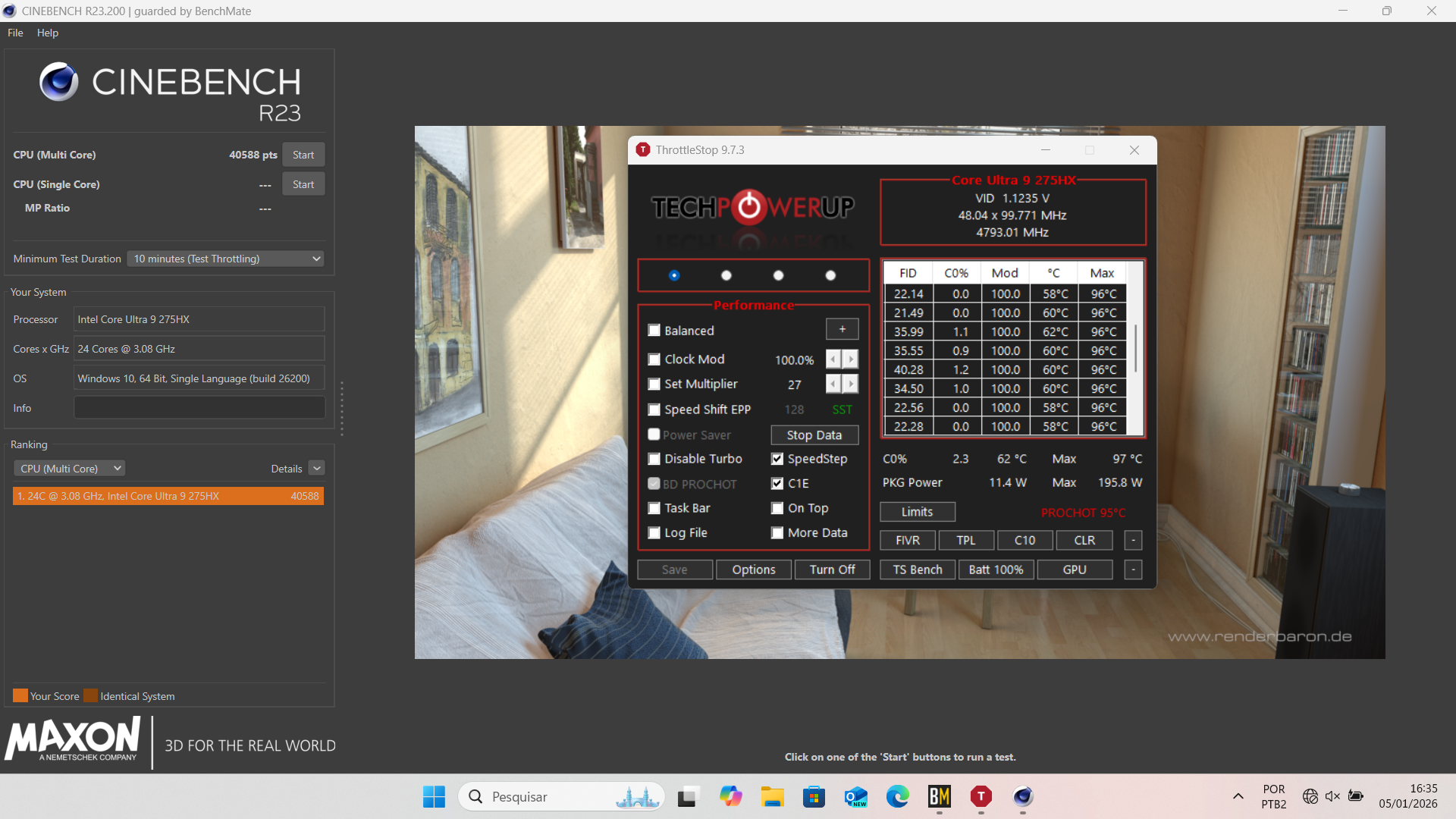
There's no OC on the CPU, only undervolting. I tried increasing the ratios using ThrottleStop, but although I can change it in the FIVR window, it doesn't seem to be applied. Both the P-cores and E-cores remain at their standard clock limit of 5.2GHz and 4.6GHz under full load. My undervolt is -60mV for the CPU Core and CPU P Cache and -30mV for the iGPU, with IccMax at maximum on all. I also unchecked the TVB option in FIVR so that the CPU doesn't reduce its clock speed due to the target temperature (I believe that with TVB enabled, the P-cores decrease by 100MHz starting at 70°C and another 100MHz when the temperature reaches 95°C).