

Talon
-
Posts
631 -
Joined
-
Last visited
-
Days Won
18
Content Type
Profiles
Forums
Events
Everything posted by Talon
-
*Official Benchmark Thread* - Post it here or it didn't happen :D
Talon replied to Mr. Fox's topic in Desktop Hardware
This looks pretty sick, I especially like that it’s coop. -
*Official Benchmark Thread* - Post it here or it didn't happen :D
Talon replied to Mr. Fox's topic in Desktop Hardware
Remember when they told us that 13th and 12th gen wouldn't work with APO? That is my biggest issue with Intel. They did say IBT has specific silicon "hooks" but I doubt. They said they're looking into bringing it in some fashion to ARL 1. Tells me they're waiting to see how initial sales look before they make that decision. -
*Official Benchmark Thread* - Post it here or it didn't happen :D
Talon replied to Mr. Fox's topic in Desktop Hardware
Being mislead by tech tubers telling you that you have to install 'additional' software was your first mistake. The Intel Performance Package is literally a motherboard driver that you install just like my 9850X3D has Chipset drivers that installs a 3D V-Cache Performance Optimizer and Platform Power Management drivers. No longer do you have to enable anything in the BIOS, it's all on by default, you no longer download the overlay (was never required before anyways) from the Microsoft store as it's all been brough in house, single Intel PPP Driver which installs everything. Intel PPP driver is now on the Intel website as well as your motherboard support page. https://www.intel.com/content/www/us/en/download/869519/intel-platform-performance-package.html Intel simply brough it all under one roof now, a single driver that does it all which is how it should have been. It's a great fix. So PPP isn't a gimmick, it's literally Platform Power Management and Optimizations that every single vendor does. I'm not sure how this misunderstanding even started. -
*Official Benchmark Thread* - Post it here or it didn't happen :D
Talon replied to Mr. Fox's topic in Desktop Hardware
https://browser.geekbench.com/v6/cpu/17330779 Geekbench doesn't like me being able to wipe the field of other x86 CPUs like this lol. Can't hurt AMD fanboy feelings. But I absolutely agree Intel needs to stop with the single gen optimization BS. They need to commit to a timeline, say 5 years of guaranteed support for SKU optimizations. It's my biggest gripe with this strategy. I do feel Intel is not going to stop here though with IBOT, I expect multiplayer games will be added soon, especially listening to Robert at Intel speak recently when he very quickly said "not yet". IBOT and the large cache next gen is very likely going to be a big game changer for Intel, they will eventually force IBOT on by default just like APO. -
*Official Benchmark Thread* - Post it here or it didn't happen :D
Talon replied to Mr. Fox's topic in Desktop Hardware
Yep! That 285K might have actually been better than my 285K I am running lol. I didn't really test the 2 fully, but that 285K I sold you did my 8400 CL38 tune, same voltages, ran 40x D2D no issue, and only had a very slightly higher P core voltage and ring voltage. But it still did the same 41x ring and 56x P cores. The chip I sold you also booted higher E core on auto voltages lol. I can boot the higher E core clocks on this chip, but the low voltage V/F stops it from scaling unless I go in adjust the V/F offset for point 8. I think that is mostly a function of interpolation failing, while your slightly higher voltage allows for better interpolation and boots with no adjustments. But ya my 285K can't do 40x D2D unless I run a manual voltage, but I've been gaming on it and testing it for a couple days now and no issue at 40x. If we had a higher ceiling you'd likely be able to go higher since you still have voltage room. -
*Official Benchmark Thread* - Post it here or it didn't happen :D
Talon replied to Mr. Fox's topic in Desktop Hardware
Are you on the latest BIOS? I updated last week and got around to tuning it a bit more. I've found on the latest BIOS, I can now tune VNNAON manually without issue, maybe I always could and never tried. I thought I remember it causing instability when touched around launch and I never tried again. Now latest BIOS, I can push D2D up to max 40x without issue, stable. I just can't use the Asus auto voltage for VNNAON. This sample needs 1.12v instead of auto 1.012v. I had a 285K that could do 40x auto voltage, but P cores were just ever so slightly worse so I kept this 38x-39x auto chip. Now I've been testing and using 40x for a couple days and it's having zero issues. Sure it doesn't amount to much, but more mental wanting to max it out lol. It's honestly a shame Intel has killed off 1851 entirely and 270K Plus will be all they release. My guess with same crap 40x limitations in place. Panther Lake has a very high D2D apparently and they've fixed the latency issues. -
*Official Benchmark Thread* - Post it here or it didn't happen :D
Talon replied to Mr. Fox's topic in Desktop Hardware
Nice results! That board and CPU look like a great value. I'm extremely confused by Intel's decision to delay a Refreshed SKU until that time frame given Nova Lake is supposed to be out later this year. Reminds me of 11th gen and 12th gen. Either they had to heavily bin to get chips able to run the new clocks or they actually fixed some things under the hood. I'm leaning towards heavy binning, but hoping for actual latency fixes that can make the refresh something that will be more impressive over an overclocked ARL chip. I also ordered a 12 core BTL-S chip lol. Mouser had them as out of stock backorder, and I decided I wanted something else to mess around with. The order went through and according to them, they have ordered one from the factory lol. I'll be shocked if it ever arrives, more shocked if it works. 🤞🤞 -
*Official Benchmark Thread* - Post it here or it didn't happen :D
Talon replied to Mr. Fox's topic in Desktop Hardware
I haven't seen a A02 version of the board yet. I've only ever seen A01. But I assume that board was returned because of that fact. I had a board from Amazon that was terrible. The Nitro Path Asus is using has made 4x boards viable now. I wish they would have done some magic like that for the 2x boards. $300 for a Z80 AYW and 265K, absolutely insane. -
*Official Benchmark Thread* - Post it here or it didn't happen :D
Talon replied to Mr. Fox's topic in Desktop Hardware
I always thermal grizzly PTM sheet on the core. No pump out, excellent/even temps, and zero risk. Stock had a PTM pad as well. I’m super happy I was able to fix the memory temps. I figured it’s either a heatsink design issue or bad pads. Glad it was fixable with quality pads. -
*Official Benchmark Thread* - Post it here or it didn't happen :D
Talon replied to Mr. Fox's topic in Desktop Hardware
Decided I wanted to repad my RTX 5090 HOF VRAM as the memory temps are atrocious since I got the card. Even with an undervolt and gaming at 500-600w, the memory temps would climb to around 82-84c which is a bit toasty for me. My old TUF ran around 70c on memory temps under load. I for some reason though the pads were 1.5mm and so I ordered some thermal grizzly advanced minus 8 pads. Turns out they were actually 1.0mm (still tried them as they compress decently). They were just too thick and the core wasn't getting good contact and it was hitting 86c lol. Tore the card down again and tried some old 1.0mm I found in my closet collection. These were absolutely shit, worse than the stock pads. Hitting 96c on memory temps with good core temps. Thought I was out of options and was just going to put it all back together with the stock pads. Decided I would try my spare Asus TUF 5090 pads I had on a spare heatsink I had purchased (long story). Luckily the pads were all in good shape and I was able to easily remove them for use on the Galax card. They were also 1mm and super compressible. I applied the pads and booted up with my fingers crossed I wouldn't need to tear the card down again. These pads are amazing, my memory temps now peak around 66-70 under 500-600w gaming loads with better than ever core temps. Finally this card is running awesome with the air cooler. I still need to break it down and to full water, but I'm waiting for my rebuild with Nova Lake later this year lol. I'm planning to finally swap PSU, coolers, the works at that time. I figured I'll go water then. TLDR; the Asus thermal pads used on VRAM is actually some super quality stuff which is why their memory temps are so good compared to other brands. I think MSI also uses similar pads as their vram temps are also amazing and slightly better than both my Asus and Galax card. -
*Official Benchmark Thread* - Post it here or it didn't happen :D
Talon replied to Mr. Fox's topic in Desktop Hardware
LOL yep! Same exact PSU. I RMA'd with MSI and they sent me back that brand new ATX 3.1 version. -
*Official Benchmark Thread* - Post it here or it didn't happen :D
Talon replied to Mr. Fox's topic in Desktop Hardware
There are some new ones for just $431 on Amazon right now. I hope you get a good one! I actually had to return an Apex to Amazon for absolutely shit tier memory OC. I learned it's definitely possible to get a bad binned board, something I had not experienced before. I really want Intel to drop the ARL Refresh in January since I have vacation and will have time to tinker and bin. But I saw a rumor of a March release which to me is just wild. Why would they drop a new CPU refresh, about 6-9 months before Nova Lake. But maybe the rumor I saw of a fixed IO is the reason. If Intel actually fixed the IO, then we might actually see the latency fixed and there could be significant gains. The rumors of 10-30% gaming gains could be true then. If they fixed gaming that much without huge cache, then Nova Lake with this fix and huge cache could be an absolute monster. -
*Official Benchmark Thread* - Post it here or it didn't happen :D
Talon replied to Mr. Fox's topic in Desktop Hardware
ThrottleStop with laptops is unfortunately or fortunately the way to go still. Luckily the DEV still provides updates and I also used it with my 13900HX to really unlock that beast. It sort of lets you bypass the cancer that is X-Load limits on gaming laptops. It also lets you have really fine control over power limits when you want them, which is ideal for tuning for each game/load scenario. Luckily some laptop OEMs provide some pretty great tuning, while others are pure trash. Lenovo actually provides a pretty great gaming laptop product, with really good tuning. Unfortunately they don't have fully unlocked BIOS, and the latest version apparently patched out the backdoor to get into the unlocked BIOS. So if I do consider a new laptop again in the future, it will have to be MSI again. They still provide their unlocked/hidden BIOS, the tuning is all recoverable within reason and their BIOS is more desktop like with it's menu options actually working and not bricking the machine. -
*Official Benchmark Thread* - Post it here or it didn't happen :D
Talon replied to Mr. Fox's topic in Desktop Hardware
https://videocardz.com/newz/cinebench-2026-released-with-support-for-amd-rdna4-and-nvidia-blackwell-gpus Cinebench 2026 has been released. New software to punish our chips with. https://www.maxon.net/en/downloads/cinebench-downloads -
*Official Benchmark Thread* - Post it here or it didn't happen :D
Talon replied to Mr. Fox's topic in Desktop Hardware
MSI finished my RMA and got the FedEx package today. To my complete shock, they gave me a brand new unit and the new ATX 3.1 version. Honestly a great RMA experience with MSI. -
*Official Benchmark Thread* - Post it here or it didn't happen :D
Talon replied to Mr. Fox's topic in Desktop Hardware
Absolute banger card. My local MC sold out of all 25+ they had over the weekend. $749 beast with high power limit, good cooling and compact size. I sold mine recently, but honestly such a great card. -
*Official Benchmark Thread* - Post it here or it didn't happen :D
Talon replied to Mr. Fox's topic in Desktop Hardware
Haven't bothered updating to latest Asus Apex BIOS yet, but this has been my daily Arrow Lake tune for around 6 months. I just laugh when I see 80+ns as "fast" Arrow Lake memory setups. This is on a clean install with shitty virtualization/hypervisor running on the system which hurts latency a tad. It absolutely wrecks gaming performance on Arrow Lake. In Cyberpunk 2077, it's almost a 17% penalty at 1080p high settings in the benchmark.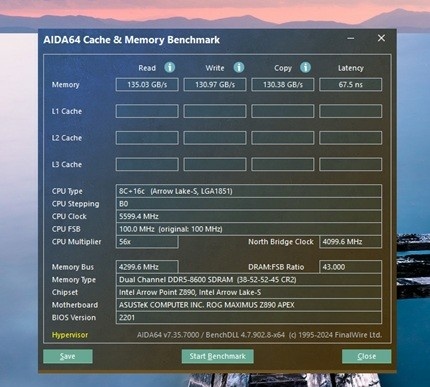
-
*Official Benchmark Thread* - Post it here or it didn't happen :D
Talon replied to Mr. Fox's topic in Desktop Hardware
290K only most likely, even if I already know that all Intel has likely done is set D2D and NGU to 32x on both, and slightly binned or overvolted the cores a bit to push clocks. Very likely some sort of Intel APO fluff with new titles as well. If they've somehow fix latency a tad I'd be really shocked but I don't expect it. Still, if I can eek out a couple hundred Mhz on the P/E cores over a 285K, it will be worth it for fun. I imagine we will get a CES launch/announcement with a late Jan street date on the refresh. It sorta blows my mind Intel has waited this long, but it is what it is. I'm also hoping they launch the Sapphire Rapids HEDT at CES. The cache on those chips looks insane, and honestly it might make for a very expensive gaming CPU if it can be clocked. HEDT was always more fun. -
*Official Benchmark Thread* - Post it here or it didn't happen :D
Talon replied to Mr. Fox's topic in Desktop Hardware
APEX. -
*Official Benchmark Thread* - Post it here or it didn't happen :D
Talon replied to Mr. Fox's topic in Desktop Hardware
It’s disgusting lol. I picked up 2 sets of 2x32gb 6000 CL30 Gskill A-Die kits from Microcenter over the last couple years for $160 open box lol. Both run 6000 CL28 on my 9800X3D when tested. Both overclock to around 7400 CL34 on Intel rigs which is insane for dual ranked kits. I have so many DDR5 kits I don’t need to worry lol. -
*Official Benchmark Thread* - Post it here or it didn't happen :D
Talon replied to Mr. Fox's topic in Desktop Hardware
It’s because he’s using the Intel 200S Boost profile which is official and warranties for 8000MTs. AMD has no such official warrantied profile. While I do agree it’s not fair, it’s a fair call in that one offers that profile fully covered by warranty and one does not. Also he’s not Intel biased IMO. His channel just focuses on more workstation and creator tasks and not shilling 1080p low gaming benchmarks as if it’s the only task that matters. Those Intel excel at given they aren’t selling 8 cores as mainstream like AMD has been for years now. 8 core is the Intel quad core of years past. At one time those other outlets shit on 1080p gaming, called 1440p mainstream in 2017 when Ryzen arrived and focused heavily on creator and workstation tasks in reviews. Today it’s all about low settings 1080p gaming for them. -
*Official Benchmark Thread* - Post it here or it didn't happen :D
Talon replied to Mr. Fox's topic in Desktop Hardware
75ns latency on 265K LMAO. GTFO. Garbage. 60-63ns is a tuned Arrow Lake 265K. Below that is amazing tuning with lottery IMC. But 75ns and that terrible bandwidth, LMAO, straight garbage. Literally tuned the TREFI to 65535 and left the 265K stupid low. Why the F would you do that other than attempting to misrepresent performance? Also heavily agree on the RTX 5090 voltages. It's amazing how good my Surpim SOC clocks with it's default 1.15-1.12v. -
*Official Benchmark Thread* - Post it here or it didn't happen :D
Talon replied to Mr. Fox's topic in Desktop Hardware
MSI issued an RMA for that PSU that is having the low voltage issue. Hopefully I get a working unit back. -
*Official Benchmark Thread* - Post it here or it didn't happen :D
Talon replied to Mr. Fox's topic in Desktop Hardware
Pushing NGU and D2D have almost no affect on temps or power. Air cooler will be fine if you keep the power limits in check like always. -
*Official Benchmark Thread* - Post it here or it didn't happen :D
Talon replied to Mr. Fox's topic in Desktop Hardware
Despite my gut feelings or fears of a bad unit, I pulled the trigger on that Asrock 1650w Titanium PSU. Grabbed it on Amazon before the price hike this afternoon. I figure if it doesn't work, back it goes. Hoping I don't get a bad batch lol. The price is just too good for a 1650w Titanium unit with dual 12V2x6. It's times like this that I truly miss EVGA, their PSUs were bullet proof. I've been using this 1600w T2 in my rig for years now and it's not showing any issues yet. Hoping EVGA is still around should I ever need warranty support as I think it's still covered for a few more years yet.





