
Talon
-
Posts
683 -
Joined
-
Last visited
-
Days Won
27
Content Type
Profiles
Forums
Events
Everything posted by Talon
-
*Official Benchmark Thread* - Post it here or it didn't happen :D
Talon replied to Mr. Fox's topic in Desktop Hardware
I will hopefully be grabbing one day 1 LOL. I swear in my next house I need an entire basement as a man cave for all of this hardware I've been collecting over the years. I want to build a rack of test benches. Setup a nice home gym in one of the corners, a coffee bar and some nice lazy boys in the other corner with a big home theater setup. -
*Official Benchmark Thread* - Post it here or it didn't happen :D
Talon replied to Mr. Fox's topic in Desktop Hardware
Hard to keep up these days, so many changes. mVolt 0.33+ add many new features, including fan controls, new System Clock and Video Clock Offsets. No idea what they are for. Also have a new Xbar Ratio that allows even higher Xbar according to some. https://github.com/b00nz/mVolt/ @Mr. Fox Sorry to hear about your fuses, but glad it was just that and you'll have them fixed up with higher amp versions soon. -
*Official Benchmark Thread* - Post it here or it didn't happen :D
Talon replied to Mr. Fox's topic in Desktop Hardware
https://www.techpowerup.com/vgabios/274990/274990 https://www.techpowerup.com/vgabios/273887/gigabyte-rtx5080-16384-250110-2 This should work. 450w from Aorus, should make all fans work and has a higher default boost. If not maybe Gaming OC, same 450w but lower boost by default. https://www.techpowerup.com/vgabios/273730/gigabyte-rtx5080-16384-250108 -
*Official Benchmark Thread* - Post it here or it didn't happen :D
Talon replied to Mr. Fox's topic in Desktop Hardware
Finally overclocking GPU is fun again. -
*Official Benchmark Thread* - Post it here or it didn't happen :D
Talon replied to Mr. Fox's topic in Desktop Hardware
How is that 5080 SFF? It's basically the only reasonably priced 5080 left at MC. Can it handle a higher wattage vBIOS? -
*Official Benchmark Thread* - Post it here or it didn't happen :D
Talon replied to Mr. Fox's topic in Desktop Hardware
The same DEV that created the original Melonvolt just released a separate tool for manually setting/overclocking the XBar without touching MSVDD at all! Just tested on my 5070 Ti and works flawlessly. Just set the offset, hit apply and bam. Amazing work. https://www.overclock.net/posts/29605861/ I guess both Devs are now sorta working together and will implement this Xbar offset tool into the Melonvolt tool so we don't have to use separate tools. Things are happening so fast lately with RTX 50 series. Getting wild. Jensen is having a bad week! Edit: Tool works great because you can add Xbar without needing to waste power or push voltage to get it to scale up. Saves if you're power limited and saves on wasted heat. Real world gaming in Battlefield 6 was about 2% on my 5070 test. But I'll take it. Added 500Mhz to my Xbar. In total about 13% over a stock card. Not bad at all.. -
*Official Benchmark Thread* - Post it here or it didn't happen :D
Talon replied to Mr. Fox's topic in Desktop Hardware
I know! I was messing with it all afternoon on all my cards. I need to shunt mod my lowly 5070/5070 Ti now. Usually the lower tier cards don’t get this fun, but now we can have fun with the entire stack. I laughed too hard at that last sentence. 🤪 Finally AI is being used for good! The tools they made being used against them is just too ironic. -
*Official Benchmark Thread* - Post it here or it didn't happen :D
Talon replied to Mr. Fox's topic in Desktop Hardware
https://www.overclock.net/posts/29605610/ Defender throws up false virus readings. So had to disable to get it. 1150mV limits by default. 1250mv with XOC button. XBar scales with MSVDD. By default Nvidia made it so you can’t scale MSVDD beyond NVVDD default baked in. But now that we can raise NVVDD, you can push MSVDD higher and therefore XBar. -
*Official Benchmark Thread* - Post it here or it didn't happen :D
Talon replied to Mr. Fox's topic in Desktop Hardware
https://www.3dmark.com/3dm/161882960 Good enough for #13 Bartlett Lake is the CPU that could have been. This chip with 8400-8800MTs would have been elite. -
*Official Benchmark Thread* - Post it here or it didn't happen :D
Talon replied to Mr. Fox's topic in Desktop Hardware
Now with Melon Volt 0.2 you can punch the voltage on that 5080, on both the NVVDD and MSVDD. No longer voltage limited on 5070, 5070 Ti, 5080, or 5090s on default vBIOS. Now just power limits until shunt that is. Overclock.net forum going wild with new version that lets us unleash the cards! Jensen is not going to be happy about this lol. -
*Official Benchmark Thread* - Post it here or it didn't happen :D
Talon replied to Mr. Fox's topic in Desktop Hardware
That was my fear with that board, great looking board and features, 2 DIMMs, but the Gigabyte UEFI has been rumored to be trash, especially for D2D tuning. This is why APEX is such king this gen, despite slightly lower memory tuning compared to OCF. If I can't push D2D, or get a reliable stable setup, being able to push slightly higher on memory OC is worthless to me. -
*Official Benchmark Thread* - Post it here or it didn't happen :D
Talon replied to Mr. Fox's topic in Desktop Hardware
@Mr. Fox @electrosoft New Asus BIOS out with "Pure" ME and updated Microcodes to 122. I'm not jumping in just yet, will wait and see any reports. I like the way my rig is running now TBH. https://rog.asus.com/motherboards/rog-maximus/rog-maximus-z890-apex/helpdesk_bios/ -
*Official Benchmark Thread* - Post it here or it didn't happen :D
Talon replied to Mr. Fox's topic in Desktop Hardware
Pretty epic bundle they got there. -
*Official Benchmark Thread* - Post it here or it didn't happen :D
Talon replied to Mr. Fox's topic in Desktop Hardware
Just saw you grabbed that SP98! I honestly debated grabbing it too. But this SP97 is so good already, I have no complaints with it. I'm able to game at 5.8Ghz P and 5.3Ghz E on this beast. @electrosoft 5.85Ghz P passed gaming for the short bit I tested, but got angry in geekbench of all things. This was all with no manual core voltage tuning though, just auto scaling. Percentage wise for gaming, over my SP89, it's about 5% faster in some tests for gaming. Nothing amazing, but what you'd expect from the clock speed bumps. -
*Official Benchmark Thread* - Post it here or it didn't happen :D
Talon replied to Mr. Fox's topic in Desktop Hardware
SP97 with just Noctua AIO. Was around 300w and 70c for a single run. Crazy good silicon. -
*Official Benchmark Thread* - Post it here or it didn't happen :D
Talon replied to Mr. Fox's topic in Desktop Hardware
Highest SP I’ve had with 270K is 89. it’s a solid 89 with balanced P/E cores and it does 5.7Ghz rock solid. It also have excellent thermals and core temp distribution. If this SP97 can’t do 5.7Ghz P I’ll be very disappointed. 5.8ghz would be pretty sick. There are just so many moving parts on Arrow Lake that it makes binning difficult but fun. @Mr. Fox Id love to see what scores your newly delidded 270K can put down in the new Geekbench 7. Get the chiller running and push it! lol. -
*Official Benchmark Thread* - Post it here or it didn't happen :D
Talon replied to Mr. Fox's topic in Desktop Hardware
I did but I'll probably end up regretting it lol. All of the 270K I've used have all been good samples, small differences really and this one might end up being worse than my current chip, hard to say. It looks fairly balanced, maybe I'll get lucky and it's a 5.8Ghz P on stock IHS with AIO but who knows. Maybe it won't scale with voltage like I said. -
*Official Benchmark Thread* - Post it here or it didn't happen :D
Talon replied to Mr. Fox's topic in Desktop Hardware
Saw that too. The IMC has me saying nah lol. Besides my current chip has been flawless at 5.7Ghz P, maybe that chip could do 5.8? Maybe. The thing about SP, is that the number doesn't always tell the full story. Sometimes chips just fail to scale with the voltage headroom they should have left. -
*Official Benchmark Thread* - Post it here or it didn't happen :D
Talon replied to Mr. Fox's topic in Desktop Hardware
Whew!! Good stuff, let me know how it fares for you if you don't mind! I was seeing around 10-13c Hotspot Delta, with a spike to 17-18c in transients but they were rare. -
*Official Benchmark Thread* - Post it here or it didn't happen :D
Talon replied to Mr. Fox's topic in Desktop Hardware
The checkmark is required to make it work, will update that in a new simple guide. Sorry that needs to be added and clarified. -
*Official Benchmark Thread* - Post it here or it didn't happen :D
Talon replied to Mr. Fox's topic in Desktop Hardware
For some reason your HotSpot.dll is only 6kb and mine is 7kb (actual size is 6.5kb). Something might be wrong there. https://drive.google.com/file/d/1tFywxgBq7HzfNxhAV3MqSKXizgKnEhUP/view?usp=drive_link That is a direct copy of my .dll that is working. Try this. -
*Official Benchmark Thread* - Post it here or it didn't happen :D
Talon replied to Mr. Fox's topic in Desktop Hardware
Did you do this to your GPU profile? [Settings] LowLevelMonitoring=0 Otherwise it will fail to launch. Edit: Also to answer your earlier question, just the normal latest Beta 3 MSI Afterburner works with this. I've tested it on both my RTX 5090 D and RTX 5070 Prime systems. Another user on OCN.net reported it working too. Sorry the instructions are just way to complicated and non-sensical. I will go back and have the robot make a clean and simple PDF. Way too much fluff. -
*Official Benchmark Thread* - Post it here or it didn't happen :D
Talon replied to Mr. Fox's topic in Desktop Hardware
Hmmm. The .dll isn't even shown? Let me go back and look at what the robot typed in the guide. -
*Official Benchmark Thread* - Post it here or it didn't happen :D
Talon replied to Mr. Fox's topic in Desktop Hardware
Did you import the sensor? Under monitoring tab, go to "Active Hardware Monitoring Graphs" -- the ... at the right of that. Checkmark on the BlackwellHotspot.dll and hit Ok then Apply. You will then have both GPU 1 Hotspot Temperature and GPU 1 Hotspot Delta at the bottom of the monitoring tab. Might need to restart Afterburner to get to populate after you enable the .dll Apologies for not being more clear. I'll update the guide. Also this is how the RTCore.cfg file should look.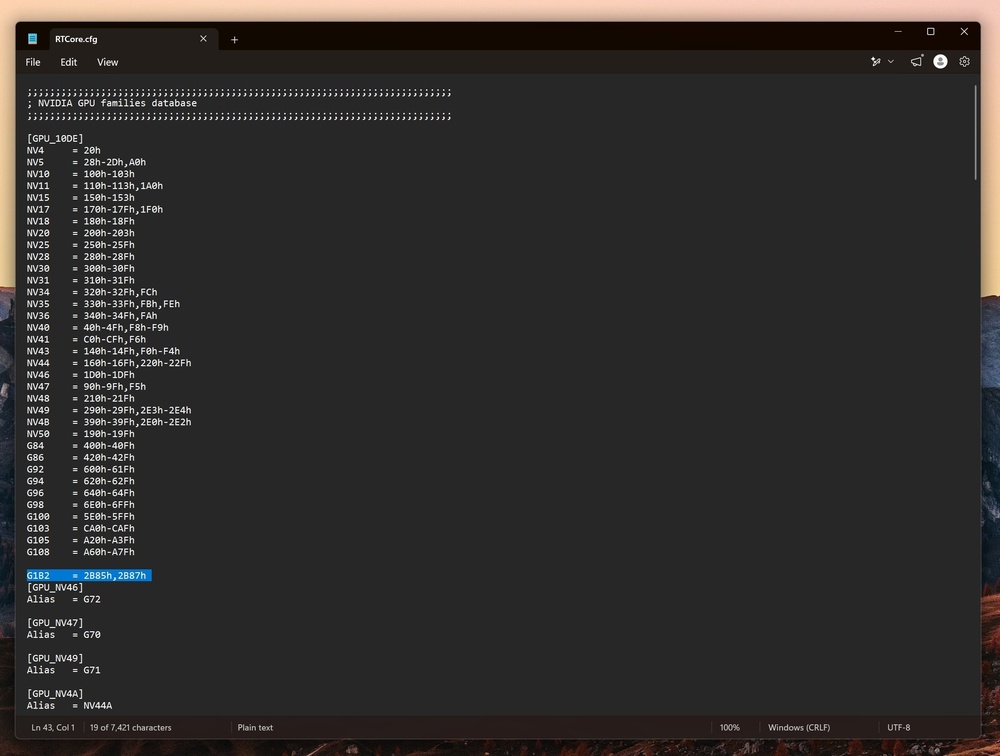
-
*Official Benchmark Thread* - Post it here or it didn't happen :D
Talon replied to Mr. Fox's topic in Desktop Hardware
BlackwellHotspot_v1.2.dll.txt Use this new version of the .dll I've added Hotspot Delta which is the delta between the coldest and hottest sensor. So now you'll get not only the hottest hotspot, but the delta between the 6 sensors. Edit: Make sure to download it as all files, and save it as BlackwellHotspot.dll