electrosoft
-
Posts
3,302 -
Joined
-
Last visited
-
Days Won
184
Content Type
Profiles
Forums
Events
Everything posted by electrosoft
-

*Official Benchmark Thread* - Post it here or it didn't happen :D
electrosoft replied to Mr. Fox's topic in Desktop Hardware
WoW with DLSS5. Big frame hit, but hopefully they sort out a solution up to and including adding in an additional GPU to off render on the secondary card. Visually much more impactful than RT ever was IMHO Absolutely gorgeous and yes I would run this in a heartbeat when playable... Maybe see about slapping the 5080 in to run along side the 5090 if required. ------------------------------------------------------------------------------------- Somebody snagged it already lol. Did your other kit from that other site ship yet? I do remember him vividly along with his multiple bannings. Sorry to hear of his passing. AMD chips are sensitive odd ducks in that I've found more often than Intel chips that too much voltage can cause more instabilities and lowering definitely helps including macro voltages like VSOC to micro voltages like VDDP. This is regardless of thermals where you can have them locked down and those overvoltages can be just as destabilizing as undervoltages. It does make me wonder how your two follow up chips would have run on the Dark Hero but then again it could have been a dud board too considering it was a return. Glad to see #2 and the 2200 has the stronger cores. Still #3 is the clear winner for 1:1 overall but if #2 rules the roost at 8000+ I would still go with that one. I know BB sent you two, but did they note on the invoice/receipt the serial # of the one meant to be actually sent to see which one you could actually return? Worse case scenario, you can just sell off the second one though. -
*Official Benchmark Thread* - Post it here or it didn't happen :D
electrosoft replied to Mr. Fox's topic in Desktop Hardware
Ouch, well as I've found over the years, wife requests override personal projects. 🙂 I didn't even know they "refreshed" the 2025 SKU with a 2026 SKU so I went and took a look. So basically, a 240hz->300hz display and jacking the price up from the original MSRP of $2499.99 -> $3299.99....yikes. Yeah, mine was open box for ~$1800 (1805.28 to be exact) listed as "used, acceptable" but arrived looking brand new with all accessories. Only the box was a little beat up. I realized I hadn't done anything with it and the return window is less than two weeks away (22nd) so I went ahead and finished setting it up and ran some basic benchmarks before I start tuning with the BIOS OC controls. Timespy performance is basically equal to Alienware performance mode just the G16 pulls 35w less. 9955HX3D definitely beats my Alienware 275hx in performance mode CPU wise in CB23. I said it before and I'll say it again, Asus fans have some of the best pitch I've heard on laptop fans. Definitely front and present, but max for max, I've always preferred their overall acoustics. Reviews were right. Even in Performance mode, this thing is nearly dead silent doing everything not stressful and even then the fans didn't really kick up that much. It took Turbo to bring it to life and Manual to really let you know it can move some air. All tests were run on a flat, hard surface with zero rear elevation which is how I would normally run it on the go with some laptop balls. I'll end up spending tomorrow playing and comparing Fallout 76 and WoW with my Alienware data but I expect the 9955HX3D to pretty much own it badly in Fallout 76 and beat it overall in WoW because of the lack of tuning available for the 275HX and dog slow 6400 memory. The real performance question will be can the 9955HX3D cap out the 5070ti in QHD in Fallout 76 because the 275HX couldn't only in pockets so we shall see. If it can really cap out the 5070ti, that makes a compelling argument to get a 9955HX3D + 5090. If it doesn't, then the G16 it is. Some data to compare against your Raider with the 5090 before I dive into the BIOS OC options.... Performance (default) mode: Turbo Mode: Manual Mode (All sliders to Max): ------------------------------------------------------ Nice snag! I was away from the forums over there so I just checked and saw the poor arguments for the price being asked. If they think prices are bad NOW, wait till next year..... I'm always on the lookout for good sets to grab, and I would have grabbed those and jettisoned my KingBank's to eBay or similar (or sell them in a parts constructed system). Actually, those KB sticks in the 265k box did 8933 so I shouldn't poo poo on them too bad. It's just their poor AsRock and Asus fails that has me salty. 🙂 -
*Official Benchmark Thread* - Post it here or it didn't happen :D
electrosoft replied to Mr. Fox's topic in Desktop Hardware
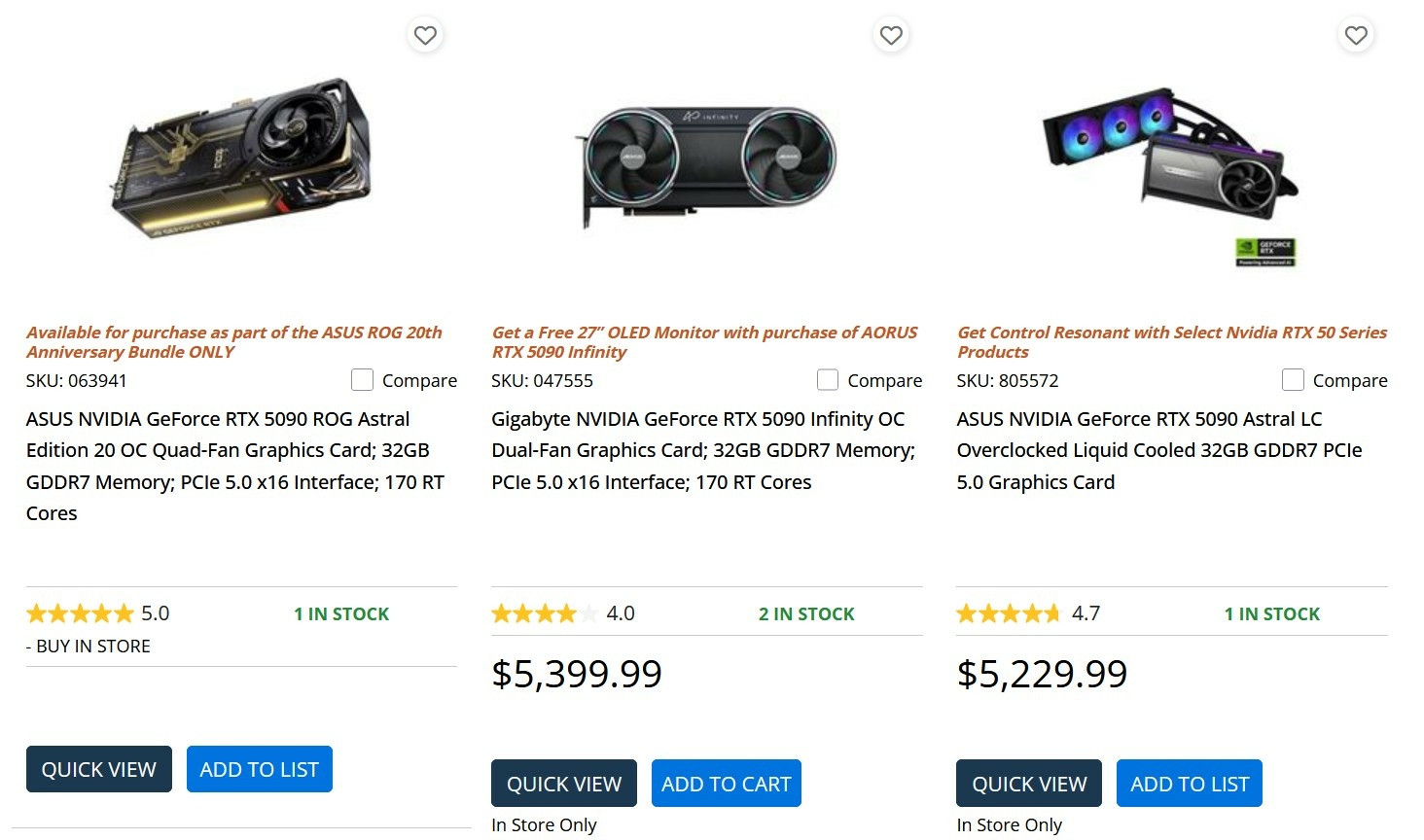
AMD 9070xt officially AMD's most popular GPU on Steam....at least some buyers understand it is the best bang:buck on the market by far --------------------------------------------------------------------------------------------------- Newegg is sold out of all 5090s (shipped and sold) except a combo deal with the Asus 20th edition combo along with a 9950X3D2 Amazon shipped and sold out of stock. Just scalpers scalping as always..... Best Buy is completely sold out of 5090s BH Photo is completely out of stock My local Microcenter only has three 5090s in stock with a grand total of 4 units on hand all $5k+ and the Gigabyte Infinity has gone up $100: @Papusan how is the stock situation over in the EU? ----------------------------------------------------------------------------------- Man.... if you had just held onto it a bit longer you could have gotten 50% more for it.... That lack of BIOS flashing was the deal breaker.... Astral is still the best looking card this generation IMHO but I do love the lit up Dragons on my Vanguard. While you did pay a bit more over an already inflated MSRP, the fact it goes for $5k now if you can even find it in stock was a good call if you wanted to ride the 5090 to 2028. -------------------------------------------------------------------- @win32asmguy DLSS5 on WoW looks pretty bonkers graphics wise, wow..... Any updates on the Raider? I haven't had time to really play with the G16 9955HX3D + 5070ti but it's still sitting on the table waiting 🤣
-
*Official Benchmark Thread* - Post it here or it didn't happen :D
electrosoft replied to Mr. Fox's topic in Desktop Hardware
Crazy how when Nvidia needed the PC market and enthusiasts they were there with all the crazy ideas and letting AIBs do what they wanted because they needed the market share and us, yet as soon as they capped off dominating since Pascal, they have slowly but sure tightened and locked down all that made them great. Jensen really gets on stage and spews that tripe and expects people to eat it up. But alas, the golden rule continues to be in effect and right now the Nvidia product stack reigns surpreme. It very much reminds me of Intel at the top forcing new chipsets every cycle, rehashing old nodes and technologies, spoon feeding us performance increases and locking out features to maximize profits expecting brand loyalty till AMD came in guns blazing and now Intel has had no choice but to bring it all to the table each and every cycle and now they're going to offer socket longevity because, well, they have to to hope to recapture and hold consumers. Heck, we're even getting bLLC to compact X3D! This all reminds me when AMD legitimately scared Nvidia with the 6000 series and lost market share. With that fear lighting their fire, 4000 series brought everything they had to the table full tilt (and a cost to match) and they just left AMD in the dust. 5000 series has extended that overall performance lead, but again, all reports point to RDNA 5 being a wrecking ball...... Being fancy for the sake of being fancy........ problematic connector and the revised edition still problematic. Maybe third time is the charm? -
*Official Benchmark Thread* - Post it here or it didn't happen :D
electrosoft replied to Mr. Fox's topic in Desktop Hardware
Despite Nvidia trying their damndest to kill off SLI, dual GPUs are all the rage now for offloading rendering and especially in AI boxes with software designed to patchwork them together quite effectively. Another technology that will require more and more powerful cards ala early RT days and justify future purchases.....at higher costs of course at this rate. All reports really do lean towards AMD producing a monster on the level of the 6000 vs 3000 series days. Fingers crossed! Sucks but still a good set of sticks for someone looking to run 1:1 6000 tight. At 6000, tuned, do they run better than your other sticks tuned at 6000? That is where they could shine. I saw that price for the 2x32GB C26 kit and ran away as fast as I could! 🤣 Oh I know you will!! 😁 Hmmm, I have never ever heard of that place, but it seems to be a good used market front. That's a good price on those sticks and they should be a good bit better than your current sticks at 1:1 nice find! -
*Official Benchmark Thread* - Post it here or it didn't happen :D
electrosoft replied to Mr. Fox's topic in Desktop Hardware
Yeah that is out of my neck of the woods at 1.7 VDD. I stick to 1.5 max and let the chips fall where they may still #2 at 1:1 is a 6400 beast. If you're hell bent on 1:1 that is the way I would go. Curious to see what #1 and #2 do at 8000+ maxed out for some H2H "which one stays and which one goes," game show elimination. 🤣 -
*Official Benchmark Thread* - Post it here or it didn't happen :D
electrosoft replied to Mr. Fox's topic in Desktop Hardware
OMG..... 🤣 -
*Official Benchmark Thread* - Post it here or it didn't happen :D
electrosoft replied to Mr. Fox's topic in Desktop Hardware
Lunacy pricing.... 5060ti costs more than the 9070xt in the US atm retail pricing....just how much Nvidia doesn't care as consumers swirl the "edge computing" toilet bowl atm.... 62% faster at 1440p. 71% faster at 4k, costs less yet you know people will keep scarfing up the Nvidia brand. PC Partpicker: Cheapest 9070xt = $739.99 (~23% over MSRP $599.99 launch price) Cheapest 5060ti 16gb = $749.99 (~75%+ over MSRP $429.99 launch price) ------------------------------------------------------- Hmmmm..... Well 6400 vs 8000 you're not going to see much difference on average so you're right there. I talked about that over a year or so ago but 8000 is a cake and eat it too frequency to run. I kept going back and forth testing 6400 1:1 c30 and 8000 1:2 c36 and my final conclusion (YMMV of course) was that at worse, 6400 = 8000 and at best it beats on a varying scale so if your system supports it, especially running dual CCD which I don't even run on desktop, I am hard pressed to finalize around 6400. I would settle in and test at 8000 across the board and see which chip is fully stable at 8000c34 and weigh that equally, if not higher than 1:1 testing at this point, but again, that's just me. That is also one reason I've been jumping through so many hoops lately testing memory cooling the last 5-6 months because of the 270k adventures and finally adopting 8000+ on AM5. All setups going forward, after having stuck to 1:1 for over a year, will be 8000+ and those temps are getting juicy. On the other hand, if you're fully locked into wanting to run 2167/6400 tuned to the gills, CPU#2 would be the direction I would go too because it just seems made for 1:1. I'm hoping you get to eat your cake and eat it too and #2 also turns out to be the best at 8000. But man that not hitting 2200 is a (mild) kick in the teeth. The real suck out scenario is if CPU #2 is a beast at 1:1 and CPU #1 is a beast at 1:2. In that scenario, I'm picking #1 all day everyday. As for overclocking, I was pulling teeth and went with per CCD not per core like @Mr. Fox because it was quicker and you know if your weakest core is rock solid, the rest of them are too even with ambient changes. Last time I did per core was my 5800x and that took forever and even then I would sometimes get little instability and crashes. I was content with per CCD but of course you're not extracting the most performance possible so there's a trade off. Yeah, I don't know if I could let the 2200 chip go...... -
*Official Benchmark Thread* - Post it here or it didn't happen :D
electrosoft replied to Mr. Fox's topic in Desktop Hardware
I am fully expecting you to snag one ASAP! 🤣 I did the exact opposite and we downsized from a monster sized house with a huge basement to a double wide since it is only the two of us now and the one thing I miss the most is the massive basement which was all mine and where I had multiple tables set up everywhere with room to spare. I had an "E" configuration with five 8' tables and closet space galore with a Vax 11/780 in the other corner I had picked up from the University of Penn they were tossing out back in the day. True fact, when we sold the house we left it in the basement because that thing was monstrous in size! It is the only reason I would entertain buying a small house with a same sized basement included is to set up my man cave again. -
*Official Benchmark Thread* - Post it here or it didn't happen :D
electrosoft replied to Mr. Fox's topic in Desktop Hardware
Loosen the timings and check 8000->8400 with TM5 Extreme and/or Karhu to see which one can truly stretch its wings the best unhindered by memory timing constraints but IMC or potentially MB constraints. See if 8200 can pass and if so maybe one of them can do an 8400 run. Once you see how high you can fly out the gate, then go back and start tightening up profiles. -
*Official Benchmark Thread* - Post it here or it didn't happen :D
electrosoft replied to Mr. Fox's topic in Desktop Hardware
First of all, congratz on getting two great chips! Second, have you tested their core strength and not just the IMC? Third, How are you testing? This is a situation I would throw Karhu at both of them and see what rises to the top for their IMCs Lastly, quite honestly to me, 8000+ is end game now for AM5 if only marginally so because while 6600 is nice the real end goal for AM5 is 2200+ and 8000+. I've upended all my timings and settings centered around 8000+ because at worst it performs the same as 6400 while at best it actually does a smidge better. The problem also is if you can only run 2167 then that throws out of sync a bit matching 2200:6600. Test both of them at 8000, 8200, 8400 and see which one rises to the top next. Real testing TM5 Extreme at least or Karhu if you want that end game verdict of where they stand realistically. I'm absolutely fine with powerhouse versions and this is exactly what I plan to pick up their 50 core + monstrosity. But with that being said, as long as they attach that cache to their 7 and 5 skus (or whatever they're going to call them), that will more than cover competing against AMD's 10850X3D (or whatever it ends up being called) along with the 9850X3D. I expect Intel to take the same approach as they did with Socket 1700 and to a degree 1851 and just come out blazing.... Keeping the same socket will also do much for longevity and good will. They finally realized the best way to keep customers locked in is making upgrades as easy as dropping in a new CPU. AMD figured this out a long time ago especially if your objective is to, well, sell CPUs? -
*Official Benchmark Thread* - Post it here or it didn't happen :D
electrosoft replied to Mr. Fox's topic in Desktop Hardware
I enjoyed this video. He states a lot of known truths from memory makers purposely constricting supply. Honestly I don't blame them with past precedent showing over production = collapsed markets. I think they know the AI market is tenuous at this point and to go all in could result in a massive collapse. I do think they are spring boarding off of the AI bubble with tightly controlled production to um "re-imagine" the consumer market pricing by overly constricting supply. There has to be a balance in there somewhere. Time will tell because right now memory is in stock everywhere in droves. Consumers aren't buying at these prices. Nvidia marginalizing gaming into edge computing because AI is the big thing right now I hope it bites them in the arse down the road but I suspect it won't because Nvidia is branching out into serious CPU production and other markets. Nvidia will be the final push that starts to seriously effect Intel and AMD's CPU production segment. All I'm saying is Intel better stay the course with their GPU division like AMD has to fall back upon. They need a two pronged attack while they continue to figure out a way to get their legacy x86 architecture modernized to compete against the M and M like chips coming into their own. "The craft builder is not really going anywhere because their reason to build was never the price and you can't price out a reason that was never about price." This is spot on. We build and tinker for the love of it. His comparison of craft builders vs necessity builders was very valid. He is also on point with the crowd that buys pre built because they just want to plug it in and go and how many who used to like to tinker have transitioned to this crowd. I have SO many life long friends and gaming buddies who used to get in the trenches to build and tweak their rigs to play Quake and Unreal Tournament and early days of WoW who just don't have the time or updated skill sets to build and tweak anymore and when problems arise they get immediately flustered and frustrated and usually turn to me for help where before we shared knowledge and ate our own chow. I think I have one friend left from the early days (circa 90s) who still insists on building his own rig. The rest either go pre-built, a laptop or have switched to Apple. ------------------------------------------------------------------------------------ Anyone who doesn't think 13th and 14th can still bring the pain where applicable is in denial. Dufus is stuck on bad testing and data gathering while asking us to "trust me bro" on the "feel" of games and a lack of consistency. I'm not saying there isn't some validity to what he is claiming, but he has built his entire brand around dry humping Socket 1700. But, as someone who still runs all three and routinely swaps and tests with them even now, Socket 1700 is showing its age. The most recent updates to Agesa (ugh) and gaming as a whole, all that dippity dip dip in WoW is basically gone at this point and remember, I was one of the early ones who was calling it out in the old forums and maybe even here with the 7800X3D vs 13900KS in WoW where there was some absolutely atrocious spots of it that are now gone. Even when I go back to my old "dip" spots to test that is streaming in assets at a high volume, the dip is no longer present. Best case, Socket 1700 is still a ripper in games that can't take advantage of X3D and doesn't pull a lot of power. Worse case, it is a very hot and heavy running CPU that gets left in the dust in games that love X3D while pulling 200w+. Intel badly needs a light and nimble 8 core / 16 thread large cache enabled CPU that doesn't suck down a metric ton of power to game and own. That's it. No more ; no less. I do think we will get that with Nova Lake as even Intel finally realizes they can't compete overall without a big 'ole chunk of cache. Nova Lake new architecture + bLLC is going to be an absolute wrecking ball. It is literally the #1 reason I am holding onto these Corsair Vengeance 9200 sticks to pick up a MB + CPU as soon as I get the ok from @Talon 🤣 ------------------------------------------------------------ Nvidia keeps pushing up pricing to protect margins and profit because quite honestly if the margins aren't there they won't stay engaged in even supplying to the gaming sector since we're now a blip in edge computing to them. Their objective is to keep pushing AI till they're blue in the face.... What's the alternative? People aren't buying 9070xt even though it is competitive against both the 5070ti and 5080. If the current pricing travesties won't push buyers to AMD, nothing will. -
*Official Benchmark Thread* - Post it here or it didn't happen :D
electrosoft replied to Mr. Fox's topic in Desktop Hardware
Temps are even better by 3c lower after a few adjustments down to ~71c vs 9800X3D sitting at ~80c. Not apples to apples though. #1. I didn't follow my own classic LM rule and actually apply a little extra on first application versus subsequent touch ups which I use less. I saw a few flat/dull spots and just added a touch more and reflowed the surface amount and redistributed on the heat spreader. #2. I added nylon flexible washers to the bottom plate. Something I've done on the regular in the past to not only compensate for any potential Z-height height issues (if any) but more importantly give a little flexibility to tamping down screws to auto compensate for any thermal expansion if I'm not using the ILM which I have sometimes removed for better/direct pairing and relied on hand cranked mounting pressure with a torque adjustable driver. I had initially opted to bypass this step but added it back in this time around. It provides more value on laptops that support desktop CPUs overall with all the various pairing issues and such. I ordered a few custom cut shims ~2mm that will arrive next week for some comparison data vs no washers vs several AIOs especially the ID Cooling Frost Flow x 280 which has zero compensation/extended range when tamping down the CPU block vs my EK CR240 or Lian Li II Performance Lite 360 which both give extra headroom for pairing and can somewhat compensate for the loss of the 2mm z-height with the TG Heatspreader. I do think TG should have offered a normal height heatspreader or at least present their data showing core temp differentials between both versions tested in house. Maybe it is floating around out there on the Internetz somewhere. -------------------------------------------------------------------------- What a great advertisement for the TG WV II Pro....... seriously, Roman sits around and thinks of the stuff HE would want as an enthusiast, former high level OCer and just lover of tech. Not sure why he doesn't have or used GPU Tweak III to see how it responded.... Watching it immediately pick up that load imbalance and spit out a warning was nice to see. Hook in the auto off wire function and it would even immediately shut down your system for you too. That's two be quiet! PSUs involved in meltdowns in the matter of a few days. One using the 12vhpwr and the other using 4x PCIe 8 pin. I don't think it is be quiet's fault at all. Just an odd coincidence but more importantly burns and failures completely away from the 12vhpwr connector on the GPU itself but instead the PSU and/or PSU cabling. I'm sure they're going into damage control mode though as a precaution. be quiet Dark Power 13 (This is HUB, I'll assume the 1600w model) be quiet! Dark Power 13 (Club386 burned at both ends) be quiet Straight Power 11 Platinum 1200w (Tech Notice) (time stamped at PSU ID) Just a trash connector....it really is...... -
*Official Benchmark Thread* - Post it here or it didn't happen :D
electrosoft replied to Mr. Fox's topic in Desktop Hardware
So glad everything is working out this time around! Last time, you had three points of failure to try and diagnose (MB, Mem, CPU), and returning it all was the right call and paid dividends nicely. 6600 is super golden as is 8800 like on Sugi's setup which is bonkers. Makes ya wonder about the second one you have at this point..... ------------------------------------------------------------------------------------ This 9850X3D can do 6600 but fails during TM5. 2233 flat out won't boot but 2200 on stock is just fine. Temps are the problem as they were fine the first few days (~74c under CB23 looping load) and now are hitting 95+ from the jump so I will need to pop the Thermal Grizzly Heatspreader and check the liquid metal application. I needed to install some nylon washers on the backplate anyhow to help with the ~2mm z-height differential anyhow for more AIO options as the eK cr240 Nucleus was the only model that allows a deeper hand torque to somewhat compensate but once offset temps will plummet even moreso. ----------------------------------------------------------------------------------- Still fighting the urge to install my 270k in my main rig and eat my own chow till Nova or Zen 6 since even on this Dark Hero with a 9850X3D, it is still more of the same just a bit better..... 🤣 I know if installed as my main, it will get real time tuning and TLC.... -
*Official Benchmark Thread* - Post it here or it didn't happen :D
electrosoft replied to Mr. Fox's topic in Desktop Hardware
Looks awesome @Reciever! You've really switched into that next gear with hardware and cooling! Do you have another platform to test it with the block on real quickly to see if it boots with a display out? -
*Official Benchmark Thread* - Post it here or it didn't happen :D
electrosoft replied to Mr. Fox's topic in Desktop Hardware
That makes sense and good to know they should work on the MSI and Gogabyte boards. The KingBank sticks being problematic on your former X870E Apex adds a nice bit of validation to the problem since we ordered them within a week or two of each other from da zon.... That also means that even with a BIOS update the HP 35L most likely would work with them as HP uses their own custom boards and cancerware. My problem is/was having 2x Asrock boards and 2x Asus boards. Asrock having problems with their sticks from the jump and Asus developing issues after this latest Agesa update (could be more even on the slightly older BIOS, but I didn't FAFO enough to see)....yet Corsair, Teamgroup and Kingston (HP) Rage sticks keep on truckin'..... I could get one stick of the KingBank to kinda, sorta sporadically post on the Dark Hero but then it would immediately freeze at the Asus logo screen. On the other hand, KingBank absolutely flawless on Intel and an absolute joy to use. Was able to get my 14900KS to post 8800 and the 270k pass TM5 up to 8933 in G4.... -------------------------------------------------------- Nice to see you in the 18k club! More importantly not needing the external hardware but software (as it should be) to use your GPU properly. If it turns out Nvidia is purposely going out of their way to neuter mVolt+, we'll be stuck with older drivers going forward just to be able to use our GPUs as we want. -
*Official Benchmark Thread* - Post it here or it didn't happen :D
electrosoft replied to Mr. Fox's topic in Desktop Hardware
So the AM5 and KingBank issues persist but I'm pretty sure I've narrowed down what is going on even further. I tried to pop them in the Dark Hero for heatsink / air cooling testing only to be met almost immediately with an "A6" error code and a bright yellow dram error light. AIO fans kept revving up and down in the oddest pattern. I know they work in my x870e Hero since I just posted and booted with them last month right? So I popped them in there and exact "A6" error code and bright yellow dram error light along with AIO fans revving up and down. I drag out the Microcenter combo deal Asrock B850 board and of course they don't post in there as expected but why not throw another data point on the pile..... They did post in the HP Omen 35L w/ 8400f but that drive is wiped atm so no further testing..... As a final checksum, I pop them into the 270k build and of course they not only boot right up but blew through TM5 looking at me like I'm the nut job in this scenario 🤣 I KNOW these sticks posted and booted in my x870e Hero last month, but in the interim I had updated my BIOS as I was running 2103 from March. Updating to 2402 updated Agesa from 1.3.0.0a to 1.3.0.1b. The HP is actually running a BIOS from earlier this year. The Dark Hero I updated upon initial install as it was running 0502 to the newest so it too is running 1.3.0.1b. I'm thinking if/when HP updates to a newer BIOS supporting 1.3.0.1b those sticks might stop working in that system too. On a whim, I rolled back the Asrock BIOS from 4.43 to 4.10 which supports 1.3.0.0a and the sticks still gave me a big middle finger but with the reported incompatibilities with these sticks on Asrock boards, I wasn't expecting them to work. Last gasp I popped in my TG sticks and set a loose 6000, 8000 and JEDEC profile and saved all three and sat there loading in each profile on the TG sticks then trying to get the KingBank sticks to boot using those known, working profiles but nope right to "A6" DRAM error light on both boards..... Can't roll back on the Asus boards but at this point I wouldn't anyhow. I'm just done with these KingBank sticks on AM5. I'll stick with the Vengeance 9200 and TG 8200 sticks which continue to work like butter no matter what. I picked them up June 2025 and outside of some quick testing on the x870e Hero at the time, they were primarily used in benching and testing my SP109 14900KS before I sold off the Z790i lightning and moved the 14900KS into the wife's system. It is only recently they're getting attention as they were slated for my SFF build. I know in my 270k they could post up to 8933 (maybe squeeze more out of them better cooled) so I'm just going to tune them up there around 8400-8600 and keep it moving or look to trade them for a set of 6000-6400 CL26 sticks or similar. Fun times! -
*Official Benchmark Thread* - Post it here or it didn't happen :D
electrosoft replied to Mr. Fox's topic in Desktop Hardware
Hopefully some 8000+ sticks under those heatsinks.... Yeah, I didn't expect it to perform as well as it did. I was pleasantly surprised. I really like this board. Would I recommend someone with a Hero to upgrade? No, but if it was my first board pick for an AM5 build and I wanted an upper tier MB, I would go with the Dark Hero. DUDE! Nice! Best Buy pulled an Amazon! 😂 Hopefully one of those is a beast 2200/8200/6400 and you can sell off or trade the other one for some killer ram if this kit is a bust and send in a monster payment or apply it elsewhere. Make sure to post up both so we can see what you're packing. I never get lucky from best buy. I'm the same one who: Received an empty box with no camera in it A 7950X instead of a 7950X3D in the box Three lost GPU orders that suddenly went missing at my local Best Buy (IE, "we're preparing your package for pickup" = It has arrived at our local store) then POOF gone....coincidentally, they were very well priced, routinely out of stock GPUs I managed to snag. Good thing my 5080FE was sent directly to my door..... Seriously though..... As predicted from Nvidia the anti-hobbyist police. When they needed us, they let us do almost anything but as what happens the bigger they got, the more control they exerted. They forgot who got them to where they are today to be able to dry hump the AI bubble..... As for memory, there will be no easing. There is zero reason to open up or expand other fabs. As long as AI demand is sufficiently met (which it is), the residual trickle leftover can continue to be marked up to disgusting levels for normal consumers... Until companies realize the race to AI doesn't need to be done at the current pace and still be viable, Nvdia will continue to capture record level income and profits along with AMD and now even Intel which contrary to many reports, is very much alive and well and profitable.... -
*Official Benchmark Thread* - Post it here or it didn't happen :D
electrosoft replied to Mr. Fox's topic in Desktop Hardware
I was wondering if you were gonna catch that reference 🤣 Looks like that monster SP chip is working out quite nicely! 5.9 benching and 8800 locked in tight....nice. I know your rig would provide some bleeding edge data for WoW out in the Xpac where it counts (I'm looking at you Eversong Woods). Just spectacular results @Mr. Fox! --------------------------------------------------------------------------------------- Yet again, do not sleep on the 9070xt: -
*Official Benchmark Thread* - Post it here or it didn't happen :D
electrosoft replied to Mr. Fox's topic in Desktop Hardware
I put up a video comparing ram air cooling via 4.5 different methods. Stock sticks = 76c. Asus 60mm fan = ~49c Noctua top shelf performance quiet 60mm fan on Asus bracket = ~49c Thermalright ram cooler = ~42c I've mastered the art of posting videos when I'm battling the flu or covid, lol. Sometimes I don't realize how under the weather I am till I watch something back and can hear it in my voice and a smidge of labored breathing. 🤣 -
*Official Benchmark Thread* - Post it here or it didn't happen :D
electrosoft replied to Mr. Fox's topic in Desktop Hardware
Whew when the nvidia approved (he was using the 5090FE OEM version from his 5090FE) tentacle goes boom...... Tentacle at fault? PSU side at fault? The fact three of them melted down makes me think it was a cascade failure of some sort but damn.... My response is always, "please show me where you can get this for even close to this price and we can talk," Somehow their mindset is stuck 12-18 months in the past. I can respect not wanting to pay the new prices and opting to either wait for the market to correct after the eventual bust or just resigning from the PC enthusiast scene. What I can't respect is catching an attitude or some sense of entitlement to previous pricing or even less because you feel a certain way and belittle sellers. One of my biggest pet peeves is still when someone feels the need to poo poo over seller's threads on forums because they don't like the pricing, the person or sometimes both (exhibit A: OCN FS forums). ------------------------------------------------------- Remove case specific games that love X3D and the 270k is a beast...an absolute beast when properly tuned. 14900KS which had been tuned every which way beat the 270k but once I dialed it in memory and 5.6 just like that it was neck and neck with the 14900KS in WoW in CPU limited scenarios. Seriously, expecting some major magick from Intel with Nova and bLLC to level the playing field in those case specific games that love that cache. -
*Official Benchmark Thread* - Post it here or it didn't happen :D
electrosoft replied to Mr. Fox's topic in Desktop Hardware
Thanks! I can see some areas to flesh out, but once I started tightening up my Corsair Vengeance 9200 sticks even at 6000 temps shot to 76c and errors so I plan on testing no fan (obvious overheating) vs with the included ram fan to see where it tops out vs the 140mm blaster master. Corsair heatsinks are just the worst.....followed by Patriots. Middle of the pack are G.Skill heat blankets and Kingston (HP). Best I've seen so far are KingBank and TeamGroup. Good call. That setup was just not delivering. Did you check Gear 4 just to remove the MB from the equation? The fact it was open box always leaves a "why was it returned?" on the table. 2200 fclk, 6400 and 8000 are the minimum entry bar for being "acceptable" in my book. I've binned ~7 9800X3D CPUs and sent back 4 and sold off 2 to guildies who don't care about that criteria. You would have to really remove the GPU wrong and it would take at least 50-60+ insertions and removals to notice anything. If you picked up the newer revision with the AIO power connector on board, it has been corrected on that model. It sucks that we sometimes have to parts fish, but for us PnP doesn't cut it. I assume you kept the Astral? Time to play around with mVolt+ with that big 'ole heatsink on it. I've been working with the eval x870e Dark Hero for ~3 days now and 2200/6400 and 8000-8200 is no problem on this delidded 9850X3D. I can't stabilize 8400 but I'll keep trying but I'm asking for unicorn magic sooo....yeah. I really like this motherboard as it is basically the Extreme bones underneath this time around vs the normal Hero and it shows. I may kick it into gear 4 so I can see if the Dark Hero can truly do 9200 since it is rated up to 9600 and I've already tested these Corsair sticks up to 9066 on the z890 Strix-A once in Gear 4 I do the no fan vs included Dark Hero fan vs 140mm fan tests as outlined above. On the other hand, I am also a firm believer that eval and review samples may get an extra bit of QC too..... Hopefully this 9950X3D2 is a 8400+ monster! -
*Official Benchmark Thread* - Post it here or it didn't happen :D
electrosoft replied to Mr. Fox's topic in Desktop Hardware
That was quick delivery. Are they available stateside for the wired version? Do you happen to have your best AM5 6000 2x24GB zentimings tune on hand? I'm in the process of tuning the Vengeance 9200 2x24GB sticks at 6000 now so I want to see how they stack up while dialing them in. I'll then take a small break to benchmark the 9070xt's and 5080 for comparison to the 14900KS / 270k data I've collected in WoW and FO76. Then head on to 2133/6400 and 8000 after. My ETA for actual Hero to Dark Hero swap is probably a week to ten days from now. -
*Official Benchmark Thread* - Post it here or it didn't happen :D
electrosoft replied to Mr. Fox's topic in Desktop Hardware
So far testing this 9850X3D, it is a slightly better sample than my 9800X3D. 9800X3D can do 2133/6400 but at 1.29 VSOC while the 9850X3D does it on auto no problem. 9850X3D can boot 6600 but fails TM5 even at 1.30v. 9800X3D isn't booting 6600 no matter what. 6600+ stable (let alone booting) is unicorn territory. 9850X3D can do 8200 on auto no problem but eventually fails at 8400. 8400+ is unicorn status so I wasn't expecting it to pass if it even managed to boot. 9800X3D can do 8000 but fails 8200. 8400 won't boot at all. 9800X3D = SP113 (solidly average) 9850X3D = SP120 (slightly above average) I'll end up tuning 2000/6000, 2133/6400 and the as always in sync 8000. I've never fully tuned all three sets of DDR5 around AM5 so this should be fun! Might do a 8200 profile since this chip can fully support it. ------------------------------------- Out of the box quick benching, it is literally identical to the 9800X3D running CB23 but we'll see where that goes down the road after I wrap up memory testing and lock down all three sets of DDR5 to really dial it in and as always do a static vs test for shiggles. I haven't done any game benching/testing yet. That will be in a few days once I get at least 2000/6000 locked down on the 9850X3D. Realistically I expect the CV 9200 sticks to reign supreme as they did testing on the 265k/270k but those are slated for Nova Lake later this year so I'll want to make sure to have the KingBank or TeamGroup on standby 🙂 -
*Official Benchmark Thread* - Post it here or it didn't happen :D
electrosoft replied to Mr. Fox's topic in Desktop Hardware
Man that is purdy. I said it before and I'll say it again. That industrial blue and off white with the black and just that TINGE of red from the Q-Code display always has that blend of blade runner meets Neuromancer. I might have to go with some Noctua or Arctic 140mm aRGB fans ------------------------------------------------------------------------------- No surprise here.....bots be botting trying to scarf up any type of hardware deal possible to regurgitate it back on the market at higher prices....#winning ---------------------------------------------------------------------------------