electrosoft
-
Posts
3,293 -
Joined
-
Last visited
-
Days Won
182
Content Type
Profiles
Forums
Events
Everything posted by electrosoft
-
Or a cherry picked unit was sent his way.
-
MSI's version of the 12950HX hitting 24140 @ ~160w / 95c -50uv in MSI BIOS out of the box in CB23:
-
So how goes the comparison with the NH55 vs the Scar? Leaning one way or the other yet? I suspect the Scar cost much more but the one stand out feature I do like is the 17.3" display. I wish they offered a version with the full fat HX but 3060 at a much reduced cost. Any side by side pics?
-
Welcome! 1. It has definitely been fixed and improved. You have to exert a little bit of force to get them to come out now. 2.780w will work but some of the old reports on the old forums said it had a not so great design and was a bit on the dirty side. 3. Problems with running 4 sticks at 3200 is a common problem. Locked down BIOS is another. 4. 12th gen Clevo is a 15.6" model for desktop CPU supported laptop here: Apparently the 17.3" X270 is BGA across the board. 5. Prema was supposed to be in the works but it looks like it is DOA due to many issues with the system implementing it. Prema is available on select X170SM-G models.
-

*Official Benchmark Thread* - Post it here or it didn't happen :D
electrosoft replied to Mr. Fox's topic in Desktop Hardware
To add to this, here is what it looks like when you pull the heatsink off after a K5 application. This is before clean up and with a LTX Golden 10900k with a BartX nickel plated IHS installed. It is a wash what sticks to what either the heatsink or the system but like I said before clean up is pretty quick with a TIM spreader. -
*Official Benchmark Thread* - Post it here or it didn't happen :D
electrosoft replied to Mr. Fox's topic in Desktop Hardware
If I know I'm doing temp test mounts when testing various CPU stuff on my X170SM-G I will leave the K5 Pro as is, but when it is my final remount I will use a thermal paste applicator and clean up the surrounding squeeze out and reapply it. Takes about 10 min tops. -
17400 is definitely with e-cores off as in an earlier post he said he got 23400 at full tilt. It definitely is a touch better than the NH55 atm but it is using slightly higher power limits and on paper and visual inspection has a much better cooling system so we will see what happens as tweaks are made. There is also the random luck of silicon too which can't be user addressable on BGA laptops.
-
I'm lean more towards real application testing like the software you're using now. Have you tested your software on a well cooled desktop vs Prime95? On a laptop it could be a case of Prime95 forcing a more brutal sustained throttle scenario via a combination of heat or pull (or both) vs your software giving the impression your software is hitting it harder and hotter when in actuality it is not. I've seen this happen before as Prime95 overwhelms a laptop. What is the name of your software? Which Clevo do you use?
-
WTH............. That is an insult to the Xx70 line if that is their successor.....
-
Prime95 is a near waste on desktops and a super waste on laptops unless the idea is to smash it into the ground with unrealistic loads. Ranks right up there with running Furmark to stress test your GPU.
-
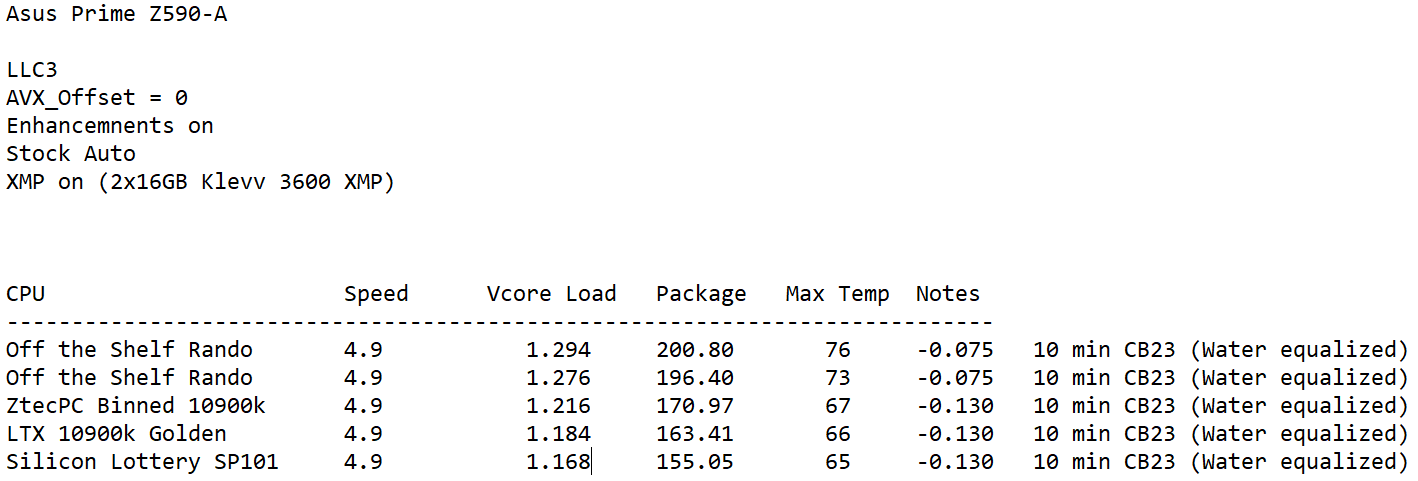
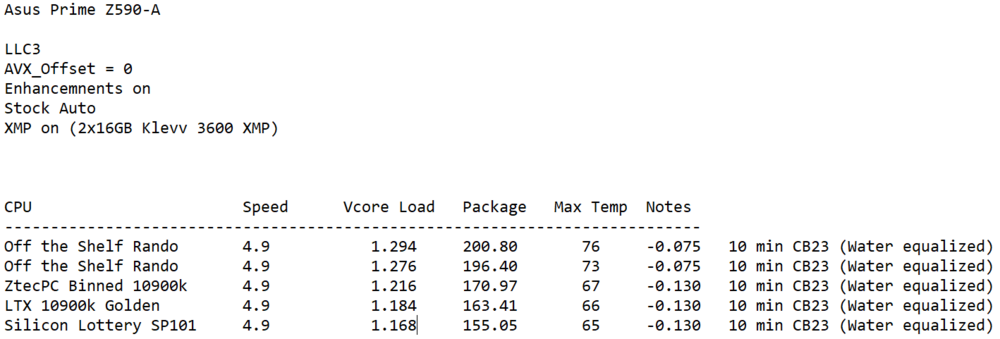
Zen and the art of binning aka why silicon quality counts in constrained laptops 5 10900k's. 2x off the shelf 1x ZtecPC binned 1x LTX Golden Limited Edition SP96 1x Silicon Lottery SP101 After much testing on the desktop to quantify and qualify them: EVGA CLC 360mm AIO + KPx TIM used for all desktop testing. The two garbage chips off the shelf had their stock lids. They weren't worthy of a delid The ZtecPC Binned was re-delidded and re-lidded by yours truly so real world temps may have been a touch higher if stock lid. The LTX was already delidded so I cleaned it up very professionally and relidded it with a BartX so real world temps may have been a touch higher if stock lid. The Silicon Lottery CPU still has its stock lid and has never been modified On the desktop, the Ztec, LTX and SL all could reach a full -0.130 uV and pass a 10 min CB23 (water equalized) run no problem. Desktop uV != Laptop uV since they run much hotter so laptop uV will always be lower. With NO delid, the SL ran cooler and pulled the least even with the Ztec and LTX being delidded. Testing in the X170SM-G: Measured center dollop of Nanogrease Extreme (using gram scale) for equal weight. Randos: I knew what the results were going to be with the off the shelf randos in my X170SM-G but popped them in there anyhow. Both immediately thermal throttled and couldn't handle > -0.055 uV without Bsod during a 2 run CB23. Poor silicon will have you falling behind right out of the gate in DTRs. ZtecPC binned 10900k: The established baseline binning criteria set by @Mr. Fox for ZtecPC shows why as with a min requirement of 5.1/1.35v or 5.0/1.31v V/F curve and -0.090 uV requirement they could pass CB23 at stock but temps did creep into the 90s. I'm sure if you went LM you could bring that down even more (as ZtecPC did sell it with this option). LTX 10900k: A clear step above the ZtecPC binned 10900k and closer to the SL as temps were in the high 80s during runs and could be done with ~ -0.100 uV SL SP101: The king but the LTX was right on its heels. Able to sit in the mid 80s with a ~0.100uv for CB23 run. I'm sure with a delid it would run even cooler/better but it runs so well as is and it is a rare 10900k that right from the factor core temp differentials are 5c max which is rare. I don't feel a need to delid it. Conclusion: LTX 10900k is a worthy competitor and clearly bests all the other chips but that SL SP101 is magic. If I didn't have the SL chip and just the LTX I would be just as happy with it they are just that close enough. On the desktop one thing I noticed is the LTX really stabilizes under Vdroop when benching and didn't fluctuate as much as the other chips. I'm so used to staring at the Vcore under load and watching the fluctuations that to see it sit there and barely fluctuate but lock in much better was odd. Maybe that was part of the Intel binning process for those chips? (less transients). @jaybee83 @Clamibot
-
Looking forward to a full head to head Scar vs Raptor....
-
Awesome! I'll go take a looksy. Looking forward to the results and higher level breakdown from you vs the standard YT affair.
-
Score another one for ZtecPC. While breaking down my SM to test my Silicon Lottery 10900k vs an LTX Golden Sample 10900k I decided to remove the tape/gunk and it was already removed and cleaned. They really did their homework looking to optimize the SM as much as possible.
-
Welcome Nico and thank you so much for adding more data and BIOS to the "maximize this mini beast" party! It is greatly appreciated. Agreed. So far, we have your PCS version and now Nico's Clevo-Computer version. Still need Eurocom's. Hopefully you and Prema can figure out how to get the Unicorn running free in the field! I keep loading up Eurocom's configurator page fighting the urge to order one. I wish they would offer a barebones version. I'll wait for a used model to hopefully pop up at a good price on eBay or similar. 🙂
-
I'm glad you were able to identify the diamond in the rough. When you test enough one will rise to the top. For your criteria, it even bests the 12900ks. Definitely the next step would be a delid and copper IHS relid as it has shown consistently with 12th gen to not only lower temps meaningfully (up to 10c) but help tighten core temp differentials. You also get a properly milled, flat IHS with a touch more height since most laptop heatsinks are flat for a better pairing. Even with that being a hard shill/sell video it really did present a better look inside and the approach they're taking. They even made sure to coat the heatsink contact plates with nickel to avoid any soak issues. That looks really nice! Looking forward to seeing your results. You might as well start a thread for it in the Asus forums so we can all follow the magic. Any ETA? And yeah, I just finished up my preliminary analysis and review of the GL66. Overheating everywhere it even overheated playing wow within 30min at 100c on the CPU. GPU isn't too bad. 73c tops and 85c hot spot. I'm going to crack it open soon and take a look since the surface / unboxing portion of the program is finished. 105w GPU rated but it is pulling 140w when gaming and that PSU is toasty.
-
23892 is really good all things considered and shows even in a sea of 12900k and one 12900ks) it rises to the top. If I threw all your 12900k's and 12900ks on my Asus board I suspect the one good newegg one would be SP90+, the others in the mid SP80s or lower and the 12900k would probably be high SP80s. Based on the reviews, the Strix Scar 17 SE w/ 12950HX is a monster system with proper cooling to back up the CPU performance. I think it will, at worst, perform as well as the X15 does now and at best will beat it flat out once fine tuned because the cooling is just better even if the silicon might be average plus it is a 17.3" display. The 3080ti is the icing on the cake. I expect it to be as beastly as a BGA laptop can be in every aspect. You could be in my predicament: I'm testing and reviewing an MSI GL66 Pulse 12700H atm and right now right out of the box it is pure garbage getting ~10.5k on CB23 on multi and 1771 on single. The 3070 is the 105w neutered version clocking in around a decent 3060 laptop GPU (TS = 8800). To top it off, it is overheating on both single and multi. Gear 2 memory = 91ns latency. If I paid out of pocket for something like this in its right out of the box state, I'd be pretty upset. I'll end up posting in the MSI thread down the road about the trials and tribulations of this thing. You and I (and @Clamibot and @jaybee83) all sound alike. I don't care much about other leisurely spending but I do like tech. A car to me is a means to and end and I am not into big houses, RVs, etc... We all have our vices. Tech just happens to be mine. 🙂
-
True, physically inspecting the Heatsink doesn't inspire reaching massive heights of cooling excellence but we haven't even reached the stage of modding the heatsink to help improve cooling yet. We'll look back a few months (or more) from now and be amazed at the improvements that were able to be implemented. It's the standard "Clevo Cha Cha" Taking to a crowbar to the BIOS will help too.
-
Hmmm, never thought about doing that. I might have to add it to my project tweaks list.
-
I was waiting till we have more substantive and definitive data and links. Right now, we're knee deep in the fact finding portion of the program. 😁
-
*Official Benchmark Thread* - Post it here or it didn't happen :D
electrosoft replied to Mr. Fox's topic in Desktop Hardware
I'm starting to think an end cycle approach might be the best bet going forward. Wait to upgrade at the end of each cycle vs the beginning. Better pricing, availability and all the bugs and issues have been worked out and you're getting a card with the highest level of maturity and refinements and driver optimizations. I've thought about getting a 3090ti KPE and not upgrading till end cycle of 4000 in a few years to whatever is the best then too. You could also just wait till launch and by the last, best card if you want potentially used. -
*Official Benchmark Thread* - Post it here or it didn't happen :D
electrosoft replied to Mr. Fox's topic in Desktop Hardware
With those killer heatsinks installed, the dual rank 4000 sticks I bought from you run cooler at 4000 than the single rank G.skill sticks I have run at 4000 with the G.Skill covers running TM5 exteme or aida by ~3c in my system and that is with the top heatsink removed since I am running a x4 dimm slot board vs x2. -
You can definitely see the uv definitely giving some head room. When you run the same range of uv's on your other 12900k's what range of scores do you achieve? Do the other 12900k's also make it through a run without thermal throttling at -100mv? You're reaching that point where your next step is a delid with a milled, flat (and probably ever so slightly taller) copper IHS. Delids on 12th (especially 12900k) have consistently shown. The idea now is to separate (even if only by the tiniest amount) the best of your group of 12900k's and delid that one and install a proper IHS. I can't recall if you did a spread test (dollop of compound, center application, install heatsink, run a few CB23 runs to heat it up and then remove heatsink to see how it naturally spread)?
-
By temps usually especially with the X15 as you are hitting thermal throttling in some instances. That last 12900k you picked up was able to pull a little more possibly because it is a better silicon sample and can pull a bit more because it isn't throttling at 125w but >125w instead. Same reason @jaybee83 might be able to pull 140w with his 12600 since it isn't as thermally limited at 125w. Nice! How is the 12900ks running in there versus the other 12900k's you've tested? I'm glad you have decently deep pockets to extend these tests to this level. Keep everything at stock and start setting some baselines and make a chart for UVs and see how they fair on a CB23 run (temp and pull wise) at -0.00, -0.50, -0.75, -0.100 (anything past this is gravy). You can also do some Cb23 10min runs to see how they handle sustained runs.
-
FS: zTecPC "binned" i9-10900k delidded x170sm-g x170km-g
electrosoft replied to electrosoft's topic in Computer Components
Yep. I will give this to the ZtecPC binned 10900k. It smashed the two lesser 10900k's I tested at stock. I mean it wasn't even close. Neither could take a >0.050 UV and at the same UV level, the ZtecPC one was just flat out superior but the ZtecPC can't even touch the Silicon Lottery or LTX GS. They both left it in the dust testing on the desktop. The LTX ran a CB23 30 min loop at a 0.130 UV @ LLC3 no problem so I can't wait to see what it does in the X170SM. I'm going to recertify the SL one on the desktop since all recent testing has been on an Asus Z590-A Prime so I want consistency of results then do two fresh, clean runs on the same install at uv intervals starting at -0.090 and see which one is the winner. You know it. 😁 I'll post all final results in the SM thread.