

SvenC
-
Posts
129 -
Joined
-
Last visited
Content Type
Profiles
Forums
Events
Everything posted by SvenC
-
What a bad joke is that?! We replaced a few older Docks with SD25TB5 for some colleagues and I was able to test one, just to check if displays, network and power supply works. Had no problems with Windows 11 Insider Beta channel (build 26220), but I was just using it for an hour or so. Kept my WD19DC which works OK with my MB18250. On rare occasions I get the boot message that the power supply is not sufficient. Had to unplug, power off the dock and retry. But other than that it works. Might be due to my system not having a dGPU, which needs less power.
-
After every few Windows Updates my Pro Max 18 Plus "loses" the camera: IR light is constantly flashing in red - it logs me in with Hello but after that it keeps flashing. The camera indicator stays on (white light) but neither the camera app nor Teams get video from the integrated camera. Uninstalling and reinstalling the latest WIndows Update (I use Windows 11 Insider beta channel, currently 25H2, 26220.8340) combined with uninstalling the camera and camera IR devices from device manager sometimes helps. Sometimes I uninstall & reinstall multiple times and at some point the camera device starts working again. Super time consuming procedure to get the laptop working normally again. Anybody with any idea what could cause such a behaviour and how it could be solved without hassle of uninstalling and reinstalling Windows Updates? Typically directly after the latest Windows Update everything is working, but later on, after a reboot or resume from hibernate that camera missbehaviour starts. BIOS is up to date and as far as I see I've got all relevant Dell driver updates installed.
-
Is it really too hard for Dell to auto switch back to iGPU output when running on battery? Maybe some of the more hardware experienced members here can add some knowlegde or explanation if and why that dGPU output mode cannot dynamically be adjusted at runtime based on running on battery or not? Having to reboot, change BIOS dGPU output mode and reboot again, if you just want to plug/unplug your laptop and run optimized for attached hardware or battery life, is not that user friendly 😉
-
I saved a link from support.dell.com where you can enter your service tag (saved that one for mine) or search by product name on that support page. That should bring you to the software downloads page as well.
-
This one? https://dl.dell.com/FOLDER14196338M/1/DellDockFirmwarePackage_WD19_WD22_HD22_WD25_SD25_01.01.13.exe
-
I am still using my old WD19DC which is enough for my iGPU only config. We have colleagues with the new SD25TB5, I'll ask if I can test one and check. But, if I don't have any TB5 hardware (displays still HDMI and DP attached) would that help to check your issue on my side?
-
Sad but true.
-
Did Dell Command Update find and install the latest BIOS 2.6.1? I don't use that updater, always manually checking and installing updates.
-
Dell Pro Max 18 Plus with iGPU only works pretty well. Battery drain is OK - too much is typically caused by virus full scans and Windows Updates and sometimes the Windows search indexer goes crazy - If those processes are "sleeping" I get around 5 to 6 hours on light work with dimmed display. One glitch with the latest Dell provided Intel graphics driver which turns off the brightness control - brightness always max - Windows UI brightness controls do not work either - had to install the old driver and block Windows Update from installing new drivers automatically - sigh... So, the hardware seems pretty OK for my tasks - maybe the additional dGPU cause too much stress if CPU and GPU are used.
-
Multi monitor DPI scaling with my additional 27" 2560x1440 + 24" 1920x1200 would be easier with 18" 1920x1200 - without quirks (*) the 18" DPI is a bit too high - and no, I do not want to exchange the other displays to higher DPI displays 😉 (*) advanced font changer vs WIndows 11 build in scaling
-
BIOS updates and weekly full virus scans (ESET, have to use, company policy...) bring up the fans loud and clear. Sometimes too many browser tabs (e.g. with animated advertising like winfuture.de) uses a few cores with high load Visual Studio updates in sequence for 2019, 2022, 2026 and Preview and SSMS updates. Normal work is pretty silent - but hey, whats normal anyways 😉 I would buy it again - only wishes: 1920x1200 pixels 500+ nits on my 18" and the name Dell Pro Precision 7 oder 9 😉
-
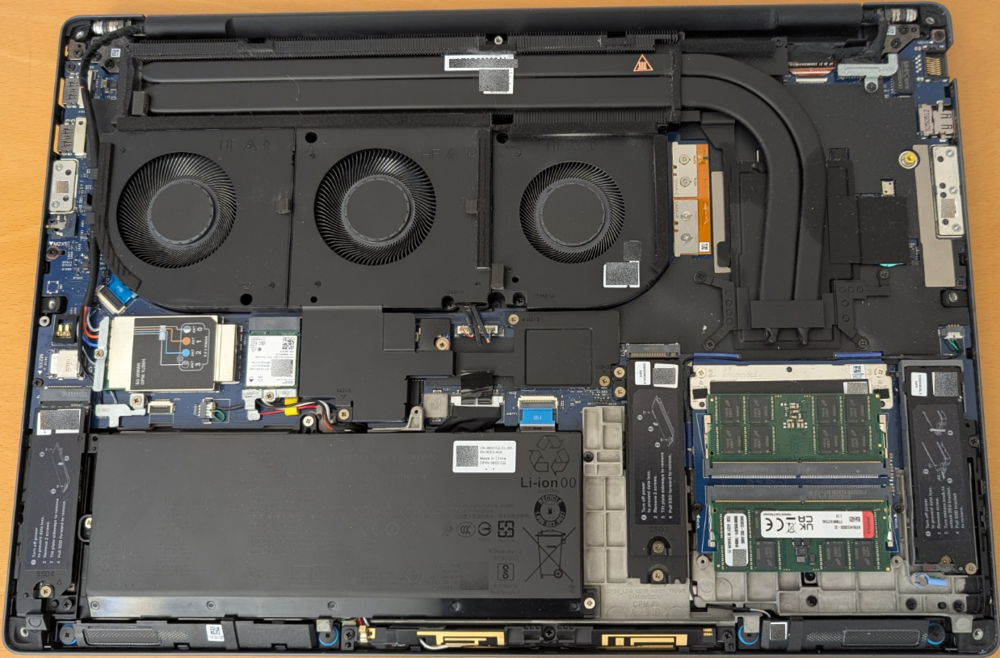
Here is mine with iGPU only
-
Did you check if disabling Intel SpeedStep fixes those intermittend noises? Maybe that cirrus driver "only" runs into trouble in some or all cases if ACPI stuff happens to save some power?
-
Funny, how new display technology seems announced as better for color accuracy (and whatever more) with potentially less power draw. But somehow an optimized LED 1920 x 1200 with 500+ nits (appreciated for both 16" and 18") could/should be even less power hungry, if you care about readability anywhere outside with daylight and much less about color accuracy - e.g. as a code and text reader and writer who likes contrast and reduced blue light 😉
-
I feel your pain and wished the same! I lost that control some years ago with Win10 updates and my need to run Hyper-V which disallowed some switches needed for undervolting my 7740 back in the times. Got worse with Win11 - never tried the BIOS offset patching way (no unimportant spare laptop to try that stuff) Would have loved to try undervolting, PLx and LLC customizations/optimizations on my 7680 which tended to get too warm and had too much battery drain - but too scared to brick my workday machine. Same with my PM18P - better than the 7680 (handed over to a colleague...) but still room for power and battery improvement. I guess Intel and Dell (and the other brands) do not want to test all power related permutations of BIOS settings and/or had too many support cases of "miss-patched" or even bricked systems if power users tried harder than they should... and Microsoft/Windows helped/helps to make undervolting and stuff as hard as possible - only those who dare know the current (always moving harder) outcome 😉 I moved on only to keep looking if this stuff comes back in an easier and saver way or if the BIOS defaults and public options are the best way to keep on going...
-
Not sure what you would like to me? Which cable switch? Which bios option switch? I did not follow your case here and too little time to do now. Could you provide context and test questions again? And I'll see if I can be of any help. My PM18P is with iGPU only and I kept my dock WD19DC with that Dell specific double USB-C cable which is using the two USB-C ports on the left side of my laptop. The dock uses an old "power brick" with 240W. IIRC the laptop gets around 210W from the dock with that dual USB-C connector. I do not connect an additional power adapter to the laptop - power only from WD19DC - and have no problems. Big difference in our setups is: no power draw from a dGPU. I do not need a dGPU for my work and that makes my WD19DC a supported dock.
-
I read about less SSD performance and less battery time somewhere and could measure that back in the days when I switched from Win 10 to 11 - first with dual boot to go back to 10 in case of issues and I checked SSD speeds of my data drive (m.2 NVMe - lower numbers with 11, same hardware, only 10 and 11 on two other drives. Shorter battery time on Win 11. From then on I read about some perf updates which came with "feature updates" and from time to time Win 11 seems to get faster drive speeds and more battery time than in the beginning of Win 11. Biggest SSD slow down is our company policy which forces another virus scanner on our systems so real time scanning slows down and DevDrive cannot use async file scanning... I understand your point of stability of features and behaviour and the choice when to upgrade to next H1 or H2 to avoid surprises after a forced Windows Update 😉
-
Understood. Thank you for the clarification!
-
How is the Enterprise LTSC version faster as 11 Pro (or other Enterprise flavours) ? Is there any bloatware on the none LTSC version which we cannot uninstall (either through settings UI or PowerShell cmdlets)? To my understanding any LTSC version (...24H2, 25H2...) does only receive security fixes. So, I believe that I could miss performance improvement updates on any current LTSC version, compared to Windows 11 Enterprise Insiders (Beta or Release Preview channels) which sometimes get performance improvements. Like kernel improvements to get SSD speeds up again, better battery performance due to some ACPI enhancements, faster Windows Update installs and/or less reboots and so on. I believe I would have to wait for 26H2 to get those performance feature improvements - is that a false expectation? If I uninstalled bloatware once, I'd expect Windows Update to not install that again with any future update package (if it does I'd just uninstall it again).
-
Absolutely agree! Hard to tell if my system with iGPU only causes less stress and systems with dGPU add complexity and sometimes two much load. If you have Dell support you might want to go the "swap some components way" until it behaves or argue for a system swap as early as possible. (I did not follow if you reported your Dell support conditions already). That machine is too professional and expensive and should not cause any kind of work hassle.
-
Is that the Dell installed Windows or did you do a clean install from a standard Windows install image? Could be that Dell preinstalled cares about clean Event Viewers - maybe not 😉 Could be that a clean Windows install by yourself and Windows Update for "standard" drivers and only then install missing Dell drivers might keep Event Viewer less red. I stopped caring because some finger print, smart card and Office errors are always there which could be influenced by company policies and a non native Windows virus scanner. As long as my PMP18 works I stopped caring about Application and System event log errors - I tried before and just wasted time. Just my two cents 😉
-
In addition: if your are patient enough and wait for the automatic reboot after the BSOD you might find a memory.dmp in c:\windows or c:\windows\temp (too long ago for me as well to know the exact steps and location to get the memory dump). If you find the dump file, try the windbg steps Aaron described above. If it is your dGPU, you might find someone to give advice which version of the nvidia drivers (from dell or nvidia driver downloads?) you could try with which version of the iGPU driver (from Dell or Intel downloads?) Some combinations might work better than others. DDU might be your friend to start all over if your installed versions of the graphics drivers are in a messed up state.
-
Actually I would have preferred 1920 x 1200 which would be a better DPI fit for my two additional displays 27" 2560 x 1440 (could not find a reasonable 16:10 2560 x 1600) plus 24" 1920 x 1200. Now I have to play tricks with the advanced font tool on Windows to set the font sizes of windows title, icon, toolbars and so on and replace the Segoe UI font, because the default DPI bases multi monitor scalings do not behave well with several older apps which are kind of blurry bitmap scaled instead of vector scaling only the fonts.
-
I use 2x Kingston CSODIMM 32 GB DDR5-6400 with no problems - bought them for about 110€ per stick, now 180€. But still cheaper than buying from Dell. 64GB is enough for me. Not sure how many sellers are offering 2x 64 GB CSoDimm - IIRC Crucial announced that.
-
I have the 18" with iGPU only and love it. Great display indoors and outdoors. Mobility is good for me. Worked in a train, Hotel no problem. WLAN and WWAN are great. Keyboard and touchpad good. Old Dock wd 19 dc works flawlessly with keyboard, LAN and two external displays plus internal display. No regrets 😀



