Leaderboard
.thumb.png.362386d2804d5f9fbcf2ec7f5aa009c5.png)


Popular Content
Showing content with the highest reputation since 09/01/2026 in Posts
-
Looks like my promotion is finally in the works. I am getting reports of multiple departments fighting to get me in their camp. Its a nice complement, but Im still treating it as non-existent until I get an offer letter. Due to my "detailed" approach, which is really just a really nice way of saying I demand details and ruffle quite a bit of feathers in the process. It has been deemed necessary for me to become an Engineer for Proof of Concept. Basically I work with onboarded clients and make the how-to for green IT'ish people to facilitate their orders. Still wont be able to justify a 5090 though lol5 points
-
so my 1 1/2 year old son figured out how to open the magnetic side panel on my corsair 9000d. next he decided to pull out one of the hard tubing causing coolant to spill everywhere. nothing was damaged thankfully, but I did learn my pump only runs like 50% most of the time even with cpu on full load, causing high temps. I fixed that and well this is what happens next lol. 4.5Ghz on all cores W7-3465X. Yeah I probably should have kept my 2 RTX 3090s instead of selling them. Turns out they would have lasted awhile longer , but my RTX Titans are fun too. Still need to do the shunt mod. i forgot if it was @electrosoft who sent me a picture of the mod. I saw you were rocking an AMD system. It's unfortunate Intel didn't release the W790 platform with a sibling for a true HEDT successor for us "normal" people. I bought the motherboard for $949 on "sale" at the time. I was lucky to find someone selling a QS CPU for less than half of the $2899 MSRP for the CPU. 128GB RDIMMs before the rampocolypse for ~$700. Overall it came out a bit more than a i9-7980XE platform did back then but this platform screams Mr. Fox especially with the X unlocked CPUs. Nothing like overclocking +1.3Ghz on water pulling over 500w of power. 😂5 points
-
back from vacation gaiz! and damn... who wouldve thought that my hardware setup actually generates more returns than my actual stock portfolio?! LULZ but even at an average selling price of 6080€ (bought my Suprim at 3300€ incl. tax and shipping, so +84% markup now) theres literally zero incentive for me to sell. just goes to show that when it comes to my PC hardware hobby, the passion and fun i get out of it far outweighs any monetary benefit it might generate. since basically all our everyday expenses are pretty much on the frugal side (aside from travels), i guess u can call that my one splurgeful vice 😄 btw if anyone is looking for a game to max out the power envelope, im currently playing Resident Evil 2 Remake and it basically pegs the GPU at 700-800W, was surprised to see that! was also pleasantly surprised to see Control Resonant getting released, got it right away 🙂 games backlog is filling up very nicely with lots of awesome games im looking forward to! same way im looking forward to the AI bubble popping.... 😛4 points
-
I've applied an 800W power limit to the 5080 using mvolt+ Extreme. Works great. WireView Pro 2 showed a max of 825W coursing through its veins. https://hwbot.org/benchmarks/3dmark_-_steel_nomad_dx12/submissions/6074856 https://www.3dmark.com/3dm/164088570 https://hwbot.org/benchmarks/3dmark_-_speed_way/submissions/6074814 https://www.3dmark.com/3dm/164083593 https://hwbot.org/benchmarks/3dmark_-_port_royal/submissions/6074816 https://www.3dmark.com/3dm/164083791 https://hwbot.org/benchmarks/3dmark_-_time_spy/submissions/6074821 https://www.3dmark.com/3dm/164084556 https://hwbot.org/benchmarks/3dmark_-_time_spy_extreme/submissions/6074828 https://www.3dmark.com/3dm/164084873 https://hwbot.org/benchmarks/3dmark_-_sky_diver/submissions/6074861 https://www.3dmark.com/3dm/164089114 https://hwbot.org/benchmarks/3dmark11_-_performance/submissions/6074851 https://www.3dmark.com/3dm11/170008694 points
-
656W on load at 4.6Ghz 😅 now I know why the breaker trips when my wife uses the microwave in the kitchen and I'm benchmarking LOL4 points
-
Here are some nice free to play internet arcade games.4 points
-
The 5090 pricing is really crazy right now for sure. I have not been tempted to sale my 5090 Astral, but my brother sure has been pestering me about selling it lol. Amazing GPU! I like it so much better than my FE, and I really liked my FE. But I think most of the likeness for the FE came from the low price and ability to actually get one fairly quickly after launch. I have decided to keep the 9950X3D2 that runs the 2,200fclk. The IMC has no issues stabilizing tuned 6400c26 with a mere 1.500v VDD, and 1.400v vddq. Using the new to me G.Skill 6000c26 sticks, and reducing VDDP voltage to 1.050v, has made its IMC feel just as strong as the other one. And now I actually got its tPHYRDL’s matching on both ram channels with both at 35, which is great! I noticed on AMD that they are sensitive to waterblock mounting pressure. And maybe this last mount last night swapping back to the 2,200fclk chip, must have gotten something perfect. I swapped between these two chips and unknown amount of times. I think I ran each one at least (3) times. This one also boosts higher in games. No PBO+ or anything like that is enabled. It’s running higher clocks on average by about 70-100Mhz. The AMD CCD0 and CCD1 in Windows is also quite good! I see my games typically use CCD0, while windows services are targeting the slower CCD1. It’s pretty amazing to see this work so well. For now I am hanging on to that 5090 Astral.3 points
-
Yeah, it does. If a person had the soldering skills and DDR5 BGA template, that would be a cheap way of "making" RAM as long as they didn't need 8000+ MT/S speeds. Congratulations, brother. I am glad that your dedication to excellence, faithfulness and hard work is finally being recognized. I'm glad you are being facetious, otherwise I would be concerned.3 points
-
thats the kind of stuff that reminds of the good ol' NBR days 🙂 very nice! no justifications necessary, JUST DO IT! 😄 at 6000+ bucks its a steal and totally worth it hahaha3 points
-
De8auer going over data from problems detected with the WVP2.... ~9 months in production data sample window compared against WVP1 dataset Sold 5x as many WVP2 as WVP1 WVP1 reports of melting/issues ZERO reports of melting WVP2 units 98% of the cases are cable issues 2% were WVP2 replacements for various reasons up to and including a faulty connector 0% were the GPU connector itself... Noctua edition has beautiful refinements and obviously runs quieter. Noctua uses a different heatsink and PCB for full PWM control vs just DC control on the original. Original WVP2 price on TG website is $140.28 Noctua Edition is $222.18 So Noctua is ~58% more Extrapolating on Amazon, the current WVP2 is 169.99 so expect potentially to pay ~268 on Amazon when it finally arrives.3 points
-
Thank you. Yeah, it does have a lot of headroom. The scores are lower but it is actually more fun due to the headroom. Here are the settings applied with mvolt+ Extreme. I still need to test with the 5090. If they can make the function survive NVIDIA driver updates this eliminates the need for hardware mods like EVC2 and shunt resistors.3 points
-
My new to me rams came!! MBPC.GG is totally legit. These bad boys were $429.99 which is amazing in today’s horrible hardware era. We shall play a game called “Limbo” and I’m going to run them at default 6000c26 Expo profile with merely a 65k tREFi and start taking voltage to see just how low they can go! @electrosoft After some testing on these 6000c26 rams with their stock Expo II timings and I only changed the tREFi to 65,535 I set 1.38v VDD and 1.35v VDDQ in bios and they are SOLID! They are definitely a decent enough bin. I will add this as well, this is with my weaker IMC X3D chip, my other CPU should run them with even lower VDD! Wow! 5090’s sale for $8,000-9,000 USD now.3 points
-
Yeah I just can’t see my self getting a RTX6090. I think of it like this, the RTX4090 cost $2,500+ so the RTX 5090 is at least +80% more expensive at $4,500 dollars. So we can only assume the RTX6090 at launch will be fetching $8,100+ dollars. And after it settles down probably closer to $7,000 dollars. So $7,000-$8,000 dollars. I cannot see anyway possible it would be less expensive than that. Are you going to get one? I think the gun hobby is the way! We could go buy a Barrett M82 50bmg instead! Or maybe automotive performance parts. Or even exotic unrealistic home improvements. High end GPU’s are dead forever it seems like. They’ll start building NVIDIA dealerships locally and we walk in and test drive the new RTX7090 and finance for 48-72 months with interest! 🤦♂️3 points
-
So 100% stability tested on all three tested 9950X3D2’s. (1) 2167fclk@6000c26 SP117 (Ultra Weak IMC) (This turd already went back) Ran this one on the Dark Hero open box I had. (2) 2200fclk@6200c26 SP118 (Cores use the least power of all, ultra efficient highest clocking chip, it uses the least pwr and has some very low temps. (I actually may have just stabilized 6400c26@1:1) I noticed a discrepancy in screenshots. The auto CLDO VDDP voltage was running at 1.150v stock, my other chip with the strong IMC will automatically run this at 1.045v. So I changed it on this one, and now it’s running VT3 at 6400c26 1:1. 🤷♂️ (3) 2167fclk@6400c26 SP118. The chip has such an easy going IMC, it’s just hard not to love it. But the cores don’t run as high although it’s still very good. I’ll probably be keeping chip #2. Further testing will be done with new G.Skill 6000c26 ram kit. Finally a high binned kit to test!3 points
-
So Im thinking the next step for my setup should be a UPS, I am currently using a really nice extension but its probably time to get a proper power delivery system. From what Im reading something with Sinewave PFC to clean up the power. What do you guys use? https://www.amazon.com/dp/B00429N19W?tag=ustxtaddt-20&plpRedirect=mhFallback&ref=clp_hp_h_pc&th=1 This appears to clean power from utility as well as on battery.3 points
-
Snagged another G.SKILL 8400 kit for a good price to have in my backup/spare parts stash. This was pre-rampocalypse pricing for this kit. It was interesting to see someone bashing the seller for asking too much. Not sure what planet they are from. This is the same memory part number running in the system built in the LIAN LI O11D MINI V2. https://www.overclock.net/threads/g-skill-trident-z5-rgb-ddr5-8400-48gb-2-x-24gb-f5-8400j4052g24gx2-tz5rk.1820341/3 points
-
The final words (19:06).... Jensen was spot on. Pay more... Get more. Less than this and you got almost nothing. DLSS 5 revives SLI setups: up to 127% more FPS using a second RTX for Neural Rendering The high performance cost of DLSS 5 Neural Rendering has led to SLI configurations gaining popularity among modders.3 points
-
3 points
-
Ironically I bought a RTX 5080 in early 2025 before all the AI hype but returned it because it felt weird going from 24GB RTX Titan SLI to RTX 5080. I was hoping to find a 5090 but at this rate I might as well wait for the 6090 😄3 points
-
I will hopefully be grabbing one day 1 LOL. I swear in my next house I need an entire basement as a man cave for all of this hardware I've been collecting over the years. I want to build a rack of test benches. Setup a nice home gym in one of the corners, a coffee bar and some nice lazy boys in the other corner with a big home theater setup.3 points
-
Me thinking Intel is going back to pump out more powa😀 Exactly as bro @Mr. Fox want. More to everyone😎 This is what intel need to do. Forget about lowest power possible. Win for every costs. If the cores and cache need more power, then let it get what it needs. And stop make desktop processors from power efficient mobile crap. Leak Confirms Intel's Long-Term Socket Plan with LGA-1954 Intel's "Nova Lake-S" desktop processors are drawing nearer, and today a leaked partner slide from China confirmed many of the plans we anticipated. Starting with the LGA-1954 socket, Intel's testing tools had already verified the pin count. This slide not only confirms the pin count but also introduces a small detail about it. In the bottom left corner, there is a disclaimer stating that Intel plans to keep the LGA-1954 socket for multiple generations.3 points
-
I enjoyed this video. He states a lot of known truths from memory makers purposely constricting supply. Honestly I don't blame them with past precedent showing over production = collapsed markets. I think they know the AI market is tenuous at this point and to go all in could result in a massive collapse. I do think they are spring boarding off of the AI bubble with tightly controlled production to um "re-imagine" the consumer market pricing by overly constricting supply. There has to be a balance in there somewhere. Time will tell because right now memory is in stock everywhere in droves. Consumers aren't buying at these prices. Nvidia marginalizing gaming into edge computing because AI is the big thing right now I hope it bites them in the arse down the road but I suspect it won't because Nvidia is branching out into serious CPU production and other markets. Nvidia will be the final push that starts to seriously effect Intel and AMD's CPU production segment. All I'm saying is Intel better stay the course with their GPU division like AMD has to fall back upon. They need a two pronged attack while they continue to figure out a way to get their legacy x86 architecture modernized to compete against the M and M like chips coming into their own. "The craft builder is not really going anywhere because their reason to build was never the price and you can't price out a reason that was never about price." This is spot on. We build and tinker for the love of it. His comparison of craft builders vs necessity builders was very valid. He is also on point with the crowd that buys pre built because they just want to plug it in and go and how many who used to like to tinker have transitioned to this crowd. I have SO many life long friends and gaming buddies who used to get in the trenches to build and tweak their rigs to play Quake and Unreal Tournament and early days of WoW who just don't have the time or updated skill sets to build and tweak anymore and when problems arise they get immediately flustered and frustrated and usually turn to me for help where before we shared knowledge and ate our own chow. I think I have one friend left from the early days (circa 90s) who still insists on building his own rig. The rest either go pre-built, a laptop or have switched to Apple. ------------------------------------------------------------------------------------ Anyone who doesn't think 13th and 14th can still bring the pain where applicable is in denial. Dufus is stuck on bad testing and data gathering while asking us to "trust me bro" on the "feel" of games and a lack of consistency. I'm not saying there isn't some validity to what he is claiming, but he has built his entire brand around dry humping Socket 1700. But, as someone who still runs all three and routinely swaps and tests with them even now, Socket 1700 is showing its age. The most recent updates to Agesa (ugh) and gaming as a whole, all that dippity dip dip in WoW is basically gone at this point and remember, I was one of the early ones who was calling it out in the old forums and maybe even here with the 7800X3D vs 13900KS in WoW where there was some absolutely atrocious spots of it that are now gone. Even when I go back to my old "dip" spots to test that is streaming in assets at a high volume, the dip is no longer present. Best case, Socket 1700 is still a ripper in games that can't take advantage of X3D and doesn't pull a lot of power. Worse case, it is a very hot and heavy running CPU that gets left in the dust in games that love X3D while pulling 200w+. Intel badly needs a light and nimble 8 core / 16 thread large cache enabled CPU that doesn't suck down a metric ton of power to game and own. That's it. No more ; no less. I do think we will get that with Nova Lake as even Intel finally realizes they can't compete overall without a big 'ole chunk of cache. Nova Lake new architecture + bLLC is going to be an absolute wrecking ball. It is literally the #1 reason I am holding onto these Corsair Vengeance 9200 sticks to pick up a MB + CPU as soon as I get the ok from @Talon 🤣 ------------------------------------------------------------ Nvidia keeps pushing up pricing to protect margins and profit because quite honestly if the margins aren't there they won't stay engaged in even supplying to the gaming sector since we're now a blip in edge computing to them. Their objective is to keep pushing AI till they're blue in the face.... What's the alternative? People aren't buying 9070xt even though it is competitive against both the 5070ti and 5080. If the current pricing travesties won't push buyers to AMD, nothing will.3 points
-
Thanks! It works! I copied all of your settings. Only thing I changed was, I flipped the CCD0 55.50 and CCD1 55.25 etc, and I ran 1.500v VDD mainly because I am not sure how good my ram is, I think you had the 6000c26 sticks. But I may try 1.480v now. Very proud of this Intel GSKILL 6800c34 ram kit right now. It has impressed me so much!! I’m absolutely thrilled. Its not a Expo kit, so it runs DCPO, but they seem like an amazing bin.3 points
-
So far I have been strictly playing with 1:1 memory tuning. 6400c28 is completely solid even with 2,200 fclk. I think I may even can stabilize 6600 1:1. But it starts to show IMC limits at 6600 (1:1) I just tried 1:2 today for the first time, DDR5 8000 1:2 posted up first try. Even with only 1.400v VDDIO. There was definitely something seriously wrong with my last setup to not work. PS: These are my setting below. I can't seem to get my latency down much. I am wondering if its OS related at this point. I even tried some manual Nitro Path settings. I am on a really old bios 1401 from 05/2025.3 points
-
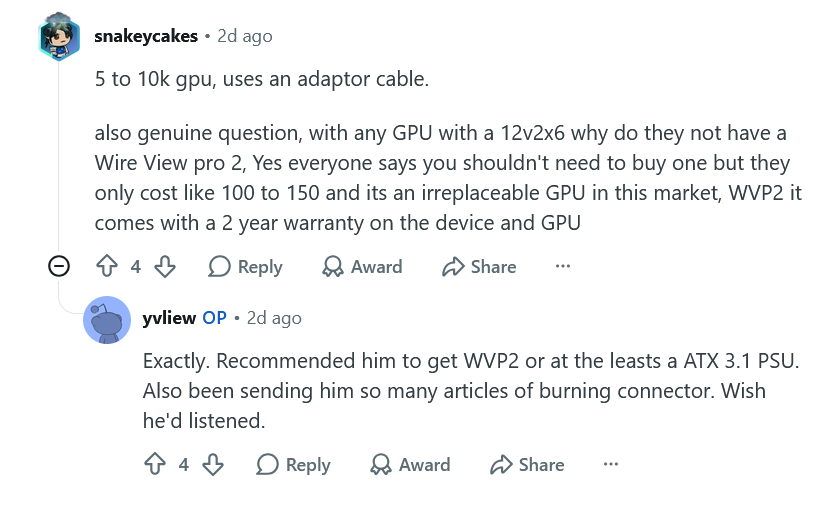
K|NGP|N coming back to the OC scene: "K-Pop Kung Fu Class" as a reason for switching studios was not on my bucket list of reasons to move to another location.... Looks like he's going with Asus..... New OC channel: https://www.youtube.com/channel/UClS4F_eKD3PCihwI9ZvrdwQ Welcome back! --------------------------------------------------------------------------------- Same boat.... I thought about selling but I switched to my Power Devil 9070xt then 5080 in my main rig for a few days and watching those frames seriously drop and sitting at 100% util more often than not in WoW 4k ultra 10 sent me scurrying back to my 5090. Yeah, I could pocket $3-4k+ profit right now and then what? Sit around and bitch whine and moan about being capped out and not getting the performance I want for the next 12-18 months just to see the prices of the 6090 requiring a kidney assuming it launches by Q1 2028? I'd rather enjoy the here and now with state of the art performance for the next 15 months if not more.... Have you given your 5090 the mvolt+ treatment yet? -------------------------------------------------------------------------- That is awesome news @Reciever! Know your worth and demand no less. Sometimes you have to be proactive and other times those around you will see and acknowledge your quality work and reward you thusly. Now, just go ahead and finance that 5090..... 🤣 ----------------------------------------------------------------------- Glad to see you taking the small, but meaningful, steps to right the ship and being able to drive again has to feel good. Losing self autonomy is never a good thing on any scale and driving is a big one. Just keep trying like you said to stick around and keep us up to date on the tech sector doom and gloom. 🙂 --- I am not shocked at that EVGA report. Nvidia and Jensen needed AIBs and gamers years ago but at every chance afforded to them well before the AI BS, they made sure to put the screws to AIBs and cook the books with crypto and continue to push prices as far as able while casting their illusions of MSRP and deliver less for more each and every cycle. EVGA went out on a high note with their GPUs and Motherboards and downsized to peripherals. I don't blame them one bit. --- The cable, according to TG data collected so far with the WVP2, is the primary issue regardless of MSI burning up or other makers like the PNY reported a day or two before this one. It was an Asrock PSU. In the comments: He literally recommended over and over to his friend to get a WVP2 or at least a better 3.1 compliant PSU. With the WVP2 I am pretty sure he would have immediately seen a high imbalance on a pin or two but without a WVP2, or a 3.1 PSU that reports pin monitoring or an Astral. Without any of these reporting protections, you are basically piddling blindly in the wind every time you use your 5090. Before my WVP2 and MSI sending me an Ai 1600T PSU, I purposely used the included tentacle just in case for warranty claims. Switched to the MSI PSU and its included 12vhpwr cable keeping MSI completely responsible for the warranty chain and then added a WVP2 and their warranty on top of it for extra added support. De8auer said they haven't had a single report of a WVP2 burning up yet from WVP2 to GPU connection. At this point, anyone running a 5090 without a WVP2, a pin monitoring compatible PSU or at the least using the tentacle to keep any burning issues warranty claims valid are playing with fire. -------------------------------------------------------------------------------------- Ditto, I'm holding onto my 5090 for at least another year if not more. Zero reason to sell. I'll re-evaluate the landscape next October/Nov when the 6000 series is potentially on the horizon. Hopefully the AI bubble will have popped or at least deflated a little by then. That makes sense with the 5090FE. The value proposition of it getting it for retail was its main draw by far. Price not being an issue, Astral is a sick card and removing price as a factor, I'd take an Astral over my Vanguard all day everyday on industrial aesthetics alone albeit I did find my Vanguard had the best silicon in my testing between it, the Astral and the Ventus but I would have to rerun those tests in the here and now with mvolt+. Whew, I'm glad you kept the overall better sample with the best fclk. It did seem the best on paper. Have you done any 8000+ testing yet? I agree on pressure. I was having issues with the delidded 9850X3D and the TG Heatspreader with 8000+ testing suddenly failing. One flaw I've found with the TG HS is heat expansion and cooling eventually loosens up the screws a bit. This might not be a problem with a tight pairing and a block keeping the pressure where it needs to be, but right now I'm still sorting out the Z-height issues so the pairing isn't as tight as it could or should be atm so eventually over the course of hours or days, my memory settings will fail. I dug through some older AM5 compliant heatsinks I have on the shelf and found a set of shorter by ~2.5mm non-spec standoffs I plan on swapping in to compensate to see if that helps along with shoring up proper pairing pressure to get temps to be a bit better. At the moment, I am not super pleased with the TG HS, but we'll see after this final testing. -------------------------------------------------------------------------------------------- I still need to get back to the G16 for some Bios tuning and testing but my desktop has been my focus atm. Yeah, three of them showed up. Two sold for $3500-3700. One was delisted but it had scam written all over it at the time. Do a completed sales history search on 9955HX3D 5090. Purchasing from an official outlet definitely was the way to go and get that three year warranty. With the way the market is going and offerings, it will be the best overall for the next few years. We won't see a 6000 mobile refresh till 2nd or 3rd quarter or 2028 at this rate. I plan on playing both retail and forever. I've always played Paladins since launch but I also alt druids and hunters from time to time. During Vanilla, I was all about my Paladin, priest and hunter. Priest had Benediction in Vanilla and Hunter had Rhok'Delar. I was guild leader with a top raiding guild back in the day and once we had MC and BWL on farm, loots eventually trickled down since we ran DKP globally and once everyone was geared up enough I let alts tag along for runs to get some good loot too. We had a server first Hand of Ragnaros but could NOT get the second half of the binding to drop for Thunderfury! 🤣 I burned out halfway through BWL and went casual after that. WoW stopped being fun and became more a job and managing egos. I'm pretty sure I am going to main a druid this time around and alt a hunter again.
 2 points
 -
Wow my ancient write up is still helping someone today! Nice!2 points
-
You are in our thoughts and prayers, brother. Glad things are moving in the right direction again. I hope the rest of the family is well.2 points
-
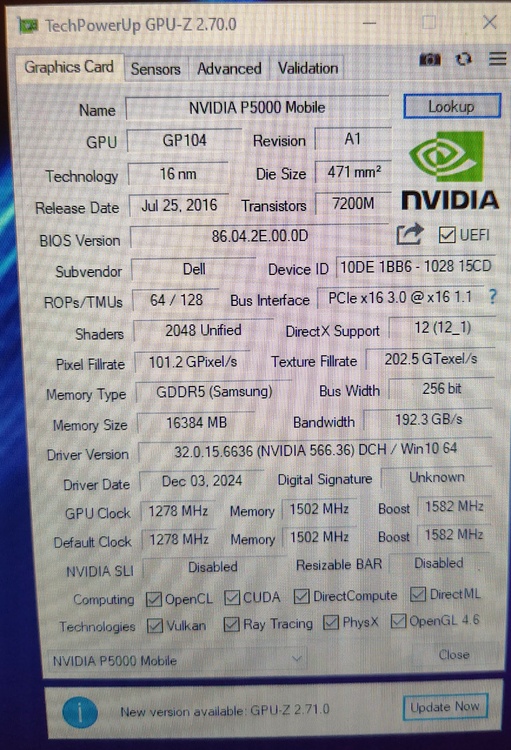
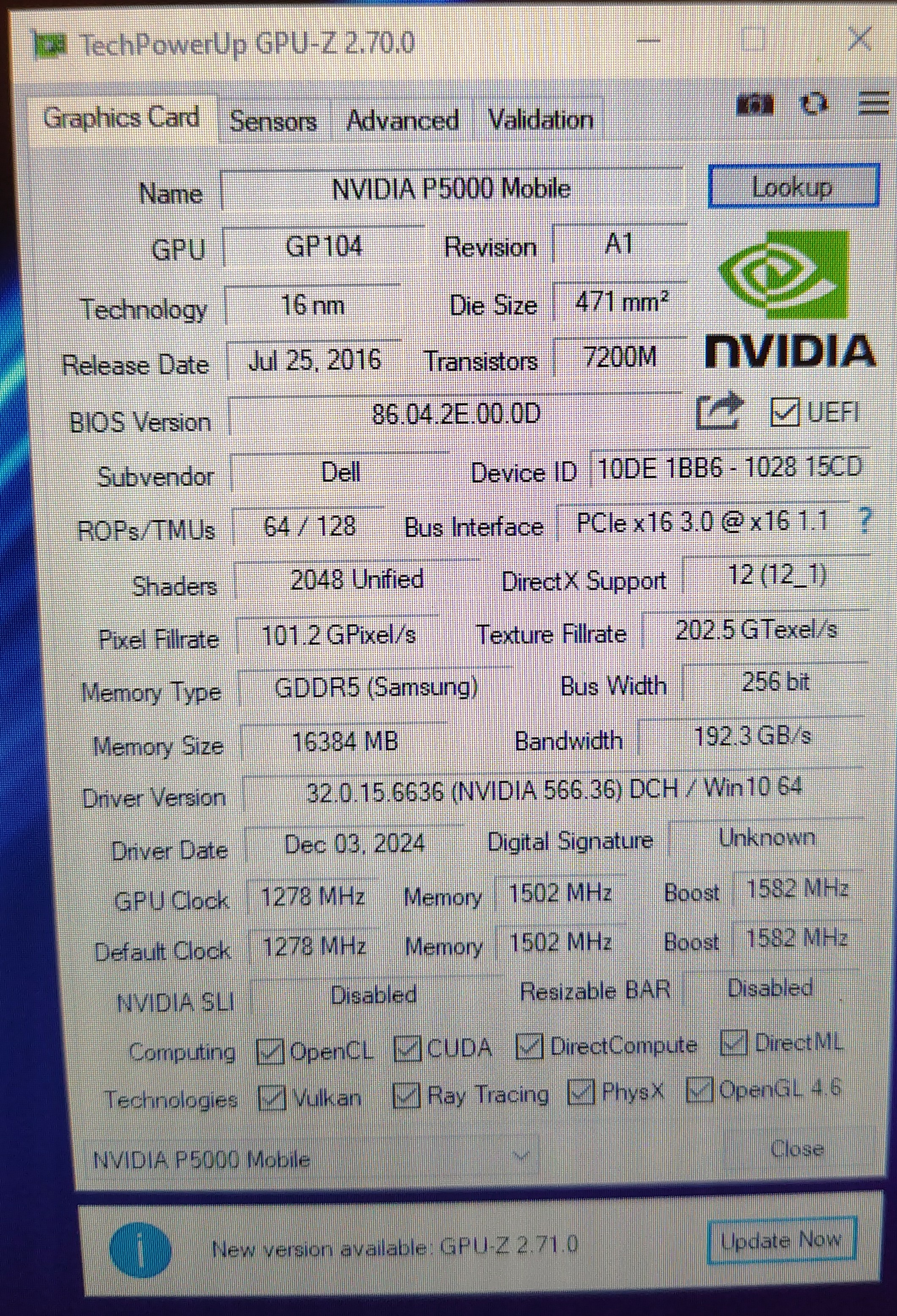
I have news, very good ones, the P5000 arrived, i filed the radiator a bit more after i dremeled it yesterday, i put it in, and half-assembled the upper half of laptop. I got into Linux Mint 18.3 and it saw the gpu, with ./nvflash --list then i flashed the vbios just like DynamiteZerg did in 2018 and after the reboot it went straight into Windows10. After some fighting with NVCleaninstall i present you another example of P5000 working in Dell Precision M6800 I want to thank everyone for the provided help, will post some updates later after i reassemble the laptop fully and test it in some benchmarks.
 2 points
 -
If it were up to me, NVIDIA would be legally bound and on the hook for all of the costs and footing the entire bill across the board for all GPU and PSU connector meltdowns, with no room for exceptions or fine print exclusions, because they are the idiots that ushered in the crappified connector and gave the OEMs an ultimatum requiring them to use an engineering abortion. If that were true, I suspect it would no longer be used and everyone would be back to using legacy 8-pin PCIe power connectors.2 points
-
M5 Ultra vs a 9950X3D + 5090 kitted out PC: CPU: Bonkers, next level CPU performance. Absolutely trashes Intel and AMD at 150w with their 36 core model both single and multi. Single core: ~44% faster Multi core: ~80% faster All this while consuming 25% less power in a small, compact box that makes zero noise 99% of the time and even under load is a fraction of the noise a typical PC generates. You're going to need a Threadripper 9970x (32 core) to compete, but not beat, at this point on multi. To flat out beat Apple, you will need a 9980x. On both, they absolutely get destroyed for single core performance. On Single, Intel and AMD are going to have to bring some serious magic in their next gen CPUs or Apple will just continue to dominate and I don't think they're going to even get close to catch Apple in single threaded performance. Looking forward to the 52 core Intel Nova "Open all salvos!" Lake beast vs the M5 Ultra. Heck, even the 28 core might get close in multi. Blender Render = M5 Ultra is ~72% faster GPU: Time to come back to reality Apple vs Nvidia..... Optimized for Nvidia, 5090 pulls ahead showing Nvidia's strength in terms of raw power, vertical integration and software stacks. LLMs: If memory isn't an issue, 5090 is a beast but obviously 32GB can't stack up against 96GB or 256GB. Toss in an RTX 6000 (or two or three) and it's game over but then again you can score a fully kitted M5 Ultra with 96GB of memory and 1TB storage and max CPU/GPU config for $6799.99 for less than half the price of an RTX 6000. You can score a 256GB model for $10799 which is 2/3 the cost of a single RTX 6000 at this point. In the end, Apple's massively upgraded Neural Processors are no match for Nvidia's raw power but their unified memory architecture is where they have always shined. Expect the 512GB model (not available yet) to cost ~$17k as the 256GB model is currently $10,799.,99 and upgrading from 96GB to 256GB is a $4k up charge. So you end up with a 512GB M5 Ultra for what is quickly becoming the cost of a single RTX 6000. Video editing, M5 Ultra: DaVinci = tied Abobe Pro = M5 Ultra finished in less than half the time Gaming: Time for a brutal reality check. Even Metal optimized, 5090 just trashes the M5 Ultra and is over twice as fast. M5 Ultra looks to be right between 5070ti-5080 in gaming performance but looking at some of the results that are actually taking advantage of the 80 core GPU, there is some optimizations to be had but....yeah, the 5090 just drops the hammer on Apple....just like Nvidia dropped the hammer on AMD with the 5090. My final verdict? M5 CPU architecture is next level. Absolutely next level. GPU has really come along way even vs M4 and its strength lies in its unified memory bandwidth especially in these AI driven days. For my personal use, target LLMs for particular use cases the 5090's 32GB is working out just fine and this is where it absolutely shines. If you need more than 32GB, performance scarily drops off as expected and you need to start looking at the 5080 based 4500 card with 48GB or even 5500 (barf) up to a 6000 to match the 96GB config from Apple. 256GB config for $10,799 really makes a compelling config for many small AI shops, startups or individuals because it costs less than a single 6000 by almost $5k and you get over 2.5x the memory. I suspect the 512GB will also be a very compelling buy for those on a budget but needing 512GB of memory.2 points
-
Yeah, the 5080 really has the headroom too fully appreciate overclocking at what tops out at an extreme but "sane"ish type level vs the 5090 requiring a nuclear reactor. Extrapolating, that Steel Nomad is like scoring ~ 21k+ on a 5090... That Timespy score is bonkers both GPU, CPU and combined... I see you right behind Jwick on the bot in the 2 slot a few times, lots of top 5/10 finishes and #1 in TSE! Excellent work!2 points
-
mvolt+ Extreme works nice. The highest power limit I could find for a 5080 vBIOS was 450W. I used it to unlock the power limit. Set it to 600W and applied my previous mvolt+ overclock profile and the WireView Pro 2 showed it pegged above 600W throughout the entire Steel Nomad run and instantly beat my previous best score by about 180 3DMarks with no change in core or memory clocks. It was definitely crippled by power limit. Now I will have to play around with higher power limits above 600W, additional voltage, XBAR, Sys and core clocks to see what it can do with no power limits crushing the GPU's gonads. https://hwbot.org/benchmarks/3dmark_-_steel_nomad_dx12/submissions/6074610 https://www.3dmark.com/compare/sn/15702068/sn/16244399#2 points
-
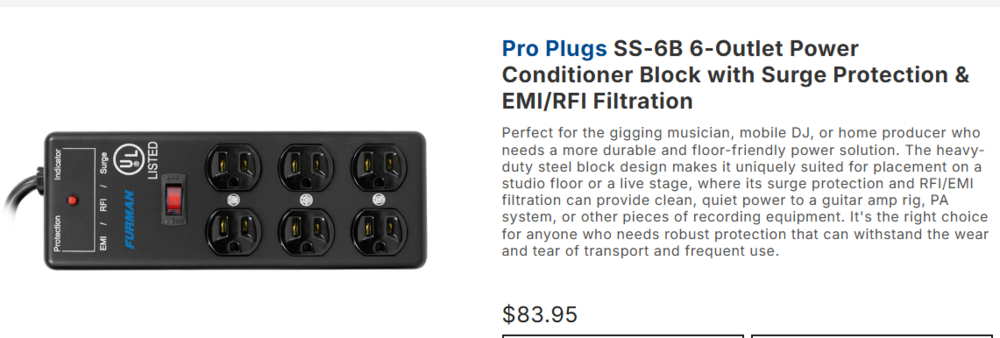
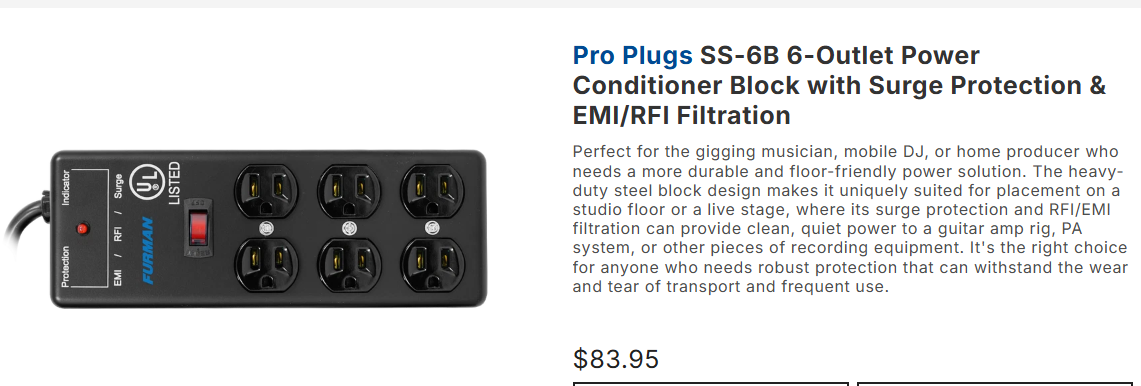
Upon further investigation it looks like it wasnt the PSU (sorry EVGA) but the Furman surge protector. Im currently using a cheaper surge protector until I get something to replace it.
 2 points
 -
WoW with DLSS5. Big frame hit, but hopefully they sort out a solution up to and including adding in an additional GPU to off render on the secondary card. Visually much more impactful than RT ever was IMHO Absolutely gorgeous and yes I would run this in a heartbeat when playable... Maybe see about slapping the 5080 in to run along side the 5090 if required. ------------------------------------------------------------------------------------- Somebody snagged it already lol. Did your other kit from that other site ship yet? I do remember him vividly along with his multiple bannings. Sorry to hear of his passing. AMD chips are sensitive odd ducks in that I've found more often than Intel chips that too much voltage can cause more instabilities and lowering definitely helps including macro voltages like VSOC to micro voltages like VDDP. This is regardless of thermals where you can have them locked down and those overvoltages can be just as destabilizing as undervoltages. It does make me wonder how your two follow up chips would have run on the Dark Hero but then again it could have been a dud board too considering it was a return. Glad to see #2 and the 2200 has the stronger cores. Still #3 is the clear winner for 1:1 overall but if #2 rules the roost at 8000+ I would still go with that one. I know BB sent you two, but did they note on the invoice/receipt the serial # of the one meant to be actually sent to see which one you could actually return? Worse case scenario, you can just sell off the second one though.2 points
-
Ouch, well as I've found over the years, wife requests override personal projects. 🙂 I didn't even know they "refreshed" the 2025 SKU with a 2026 SKU so I went and took a look. So basically, a 240hz->300hz display and jacking the price up from the original MSRP of $2499.99 -> $3299.99....yikes. Yeah, mine was open box for ~$1800 (1805.28 to be exact) listed as "used, acceptable" but arrived looking brand new with all accessories. Only the box was a little beat up. I realized I hadn't done anything with it and the return window is less than two weeks away (22nd) so I went ahead and finished setting it up and ran some basic benchmarks before I start tuning with the BIOS OC controls. Timespy performance is basically equal to Alienware performance mode just the G16 pulls 35w less. 9955HX3D definitely beats my Alienware 275hx in performance mode CPU wise in CB23. I said it before and I'll say it again, Asus fans have some of the best pitch I've heard on laptop fans. Definitely front and present, but max for max, I've always preferred their overall acoustics. Reviews were right. Even in Performance mode, this thing is nearly dead silent doing everything not stressful and even then the fans didn't really kick up that much. It took Turbo to bring it to life and Manual to really let you know it can move some air. All tests were run on a flat, hard surface with zero rear elevation which is how I would normally run it on the go with some laptop balls. I'll end up spending tomorrow playing and comparing Fallout 76 and WoW with my Alienware data but I expect the 9955HX3D to pretty much own it badly in Fallout 76 and beat it overall in WoW because of the lack of tuning available for the 275HX and dog slow 6400 memory. The real performance question will be can the 9955HX3D cap out the 5070ti in QHD in Fallout 76 because the 275HX couldn't only in pockets so we shall see. If it can really cap out the 5070ti, that makes a compelling argument to get a 9955HX3D + 5090. If it doesn't, then the G16 it is. Some data to compare against your Raider with the 5090 before I dive into the BIOS OC options.... Performance (default) mode: Turbo Mode: Manual Mode (All sliders to Max): ------------------------------------------------------ Nice snag! I was away from the forums over there so I just checked and saw the poor arguments for the price being asked. If they think prices are bad NOW, wait till next year..... I'm always on the lookout for good sets to grab, and I would have grabbed those and jettisoned my KingBank's to eBay or similar (or sell them in a parts constructed system). Actually, those KB sticks in the 265k box did 8933 so I shouldn't poo poo on them too bad. It's just their poor AsRock and Asus fails that has me salty. 🙂2 points
-
I have not had much time to do anything with the Raider either. My wife's Ford Explorer needed a new water pump, and that meant all timing components had to come out (and many replaced due to mileage). Its finally back together but still needs the active grill shutter to be replaced as well so that is next weekends project. The Raider generally does fine with the previous tuning config which focuses on low VSOC. Sometimes I still get the 10 seconds of lag / stuttering but I am hoping that is just video driver issues. I did get a Video TDR failure bugcheck reboot the other day but unsure if it was driver or ambient heat related issue. It may need PTM redone anyways as I probably messed it up when I pulled the heatsink to swap the display. I technically need to pull the heatsink again anyways so I can properly slip the hinge covers under the palm rest which is only possible before screwing down the hinges. Not exactly the best design but still way easier than pulling the display apart to swap the panel itself. The "new" 2026 G16 SKU with the same specs is much higher price so I think you got a great deal there. It was an open box correct? Hopefully you can at least stability test it before Amazon's return period lapses. G-Helper should work fine best I can tell. Others with the 9955HX variant reported usage results on Github so I cannot imagine the HX3D variant being any different.2 points
-
I have always held the opinion that Founders Edition GPUs are garbage, and the 50-series is their worst example to date. Tony reinforces it frequently in his videos. It seems like the engineers that design Founders Edition GPUs are always drunk or taking mind-altering drugs. Like my dad used to say "that piece of crap was designed by a drug Chinaman" LOL.2 points
-
Sadly we will never see 8 pins connectors on high end GPUs anymore. Even the less power hungry models come with the tiny trash. Even if 8 pins has been enough. Fragile 16-Pin Connectors Keep Melting RTX 5090s & Other GPUs, But Teclab Proves Old 8-Pin Connectors Can Handle The Load Just Fine And we all know why Nvidia do this.... NVIDIA keeps DLSS Multi Frame Gen locked to RTX 50, modders just got it working on RTX 30 with DLSS5 included Beacuse they sucks...2 points
-
Despite Nvidia trying their damndest to kill off SLI, dual GPUs are all the rage now for offloading rendering and especially in AI boxes with software designed to patchwork them together quite effectively. Another technology that will require more and more powerful cards ala early RT days and justify future purchases.....at higher costs of course at this rate. All reports really do lean towards AMD producing a monster on the level of the 6000 vs 3000 series days. Fingers crossed! Sucks but still a good set of sticks for someone looking to run 1:1 6000 tight. At 6000, tuned, do they run better than your other sticks tuned at 6000? That is where they could shine. I saw that price for the 2x32GB C26 kit and ran away as fast as I could! 🤣 Oh I know you will!! 😁 Hmmm, I have never ever heard of that place, but it seems to be a good used market front. That's a good price on those sticks and they should be a good bit better than your current sticks at 1:1 nice find!2 points
-
I ended up getting that kit just like you had previously. Amazing deal! Heck yes! My rams are sweet, but dang they need the JUICE! But now that I’ve tested the Corsair kit, and now my G.Skill 6800c34 kit. I’ll hopefully be able to fully appreciate the bin. This kit is a G.Skill 6000c26@1.450v (2x16GB) @electrosoft You ever buy from MBPC.GG? Looks like a small shop that sales used premium parts. They had a 6000c26@1.45v kit listed for $439.99, I used a -$10 off promo and got it for $429.99. https://mbpc.gg/products/g-skill-trident-z5-neo-rgb-32gb-ddr5-6000mhz-cl26-36-36-96-desktop-gaming-memory-ram-2x16gb?variant=53407464554785&country=US¤cy=USD&utm_medium=product_sync&utm_source=google&utm_content=sag_organic&utm_campaign=sag_organic&gad_source=1&gad_campaignid=21505374951&gbraid=0AAAAA-CjMDB6Y2qkjRbGAWsMtZp-CYEda&gclid=EAIaIQobChMI3LDl4ZjelgMVujgIBR0AHjBcEAQYASABEgKr6fD_BwE2 points
-
😬 It seems like the jump from 6400c28 to 6400c26 needs significantly more voltage, I am using 1.700v VDD currently. Anyone else try this profile before? What sort of voltages did you require? I do not know why, but for some reason I do like the 2167 chip #2 better, the memory controller is more fun to play with. I will enjoy it for another 1-2 days, and then I will pop Chip#1 back in for 2200fclk and more testing! And if I find myself where I cannot live without Chip#2, then we will go from there! lol. But 6400c26 is amazing to me. 1.700vdd is high, but keeping the 1.400vddq keeps temps realistic with a fan. (3) cycles on VT3 and sticks were 45c.2 points
-
That’s pretty amazing temps for an SFF! Can you tell me what sort of settings you run here on this SFF PC? Do you run a manual OC with this?2 points
-
CPU#2 might be the keeper for me. It’s only 2167fclk, but the memory controller easily stabilizes 6400c28 (Fully tuned timings) 1:1 with 1.480v vdd. I maybe can drop to even lower VDD voltage. I ran TM5 for several hours, ram temps were 51-52c and it still held up even with 65k tREFi. (I was using a fan on the memory) I’m going to test CPU#1 again, but I don’t think it’ll be able to do the same thing with 6400c28 1:1 so easily. Even though it has a 2200fclk. I will move to some 1:2 testing soon. It seems like either chip will post and run 8000c34, but I haven’t stability tested it. CPU#2 can run it easier. Which makes me lean towards it being the better choice. I haven’t tested any kind of core overlocking. I’m just not really any good at it, so I’ve stayed away from it lol. But I suppose it’s time to dig in. I’ve learned a lot about ram tuning on them though. Just not really sure what to do or start with on core clocks or CCD clocks and voltage etc, or load line etc. 6400 1:1 c28 performs STRONG. Just a little bit slower than 8000c34.2 points
-
The leaders of the computer tech industry are bad people, with bad intentions, that have no honor and deserve no respect from any of us. The only thing any of them deserve is misfortune and tragedy, and I hope that both are visited upon them corporately and personally.2 points
-
I am fully expecting you to snag one ASAP! 🤣 I did the exact opposite and we downsized from a monster sized house with a huge basement to a double wide since it is only the two of us now and the one thing I miss the most is the massive basement which was all mine and where I had multiple tables set up everywhere with room to spare. I had an "E" configuration with five 8' tables and closet space galore with a Vax 11/780 in the other corner I had picked up from the University of Penn they were tossing out back in the day. True fact, when we sold the house we left it in the basement because that thing was monstrous in size! It is the only reason I would entertain buying a small house with a same sized basement included is to set up my man cave again.2 points
-
I cannot run 1.480v VDD, but thats alright. When I run R23 it hangs the whole system. I’m not really sure where to start.2 points
-
Temps are even better by 3c lower after a few adjustments down to ~71c vs 9800X3D sitting at ~80c. Not apples to apples though. #1. I didn't follow my own classic LM rule and actually apply a little extra on first application versus subsequent touch ups which I use less. I saw a few flat/dull spots and just added a touch more and reflowed the surface amount and redistributed on the heat spreader. #2. I added nylon flexible washers to the bottom plate. Something I've done on the regular in the past to not only compensate for any potential Z-height height issues (if any) but more importantly give a little flexibility to tamping down screws to auto compensate for any thermal expansion if I'm not using the ILM which I have sometimes removed for better/direct pairing and relied on hand cranked mounting pressure with a torque adjustable driver. I had initially opted to bypass this step but added it back in this time around. It provides more value on laptops that support desktop CPUs overall with all the various pairing issues and such. I ordered a few custom cut shims ~2mm that will arrive next week for some comparison data vs no washers vs several AIOs especially the ID Cooling Frost Flow x 280 which has zero compensation/extended range when tamping down the CPU block vs my EK CR240 or Lian Li II Performance Lite 360 which both give extra headroom for pairing and can somewhat compensate for the loss of the 2mm z-height with the TG Heatspreader. I do think TG should have offered a normal height heatspreader or at least present their data showing core temp differentials between both versions tested in house. Maybe it is floating around out there on the Internetz somewhere. -------------------------------------------------------------------------- What a great advertisement for the TG WV II Pro....... seriously, Roman sits around and thinks of the stuff HE would want as an enthusiast, former high level OCer and just lover of tech. Not sure why he doesn't have or used GPU Tweak III to see how it responded.... Watching it immediately pick up that load imbalance and spit out a warning was nice to see. Hook in the auto off wire function and it would even immediately shut down your system for you too. That's two be quiet! PSUs involved in meltdowns in the matter of a few days. One using the 12vhpwr and the other using 4x PCIe 8 pin. I don't think it is be quiet's fault at all. Just an odd coincidence but more importantly burns and failures completely away from the 12vhpwr connector on the GPU itself but instead the PSU and/or PSU cabling. I'm sure they're going into damage control mode though as a precaution. be quiet Dark Power 13 (This is HUB, I'll assume the 1600w model) be quiet! Dark Power 13 (Club386 burned at both ends) be quiet Straight Power 11 Platinum 1200w (Tech Notice) (time stamped at PSU ID) Just a trash connector....it really is......2 points







This leaderboard is set to Edmonton/GMT-06:00