

jaybee83
-
Posts
2,421 -
Joined
-
Last visited
-
Days Won
57
Content Type
Profiles
Forums
Events
Posts posted by jaybee83
-
-
heyho waddhup guys, back from the (almost) dead here. so seems like after almost 4 years of successfully avoiding it, that damn covid bug finally got me. and OF COURSE i infected both my wife and lil babygirl in one fell swoop, ugh... keep your fingers crossed, i seem to be kinda on the mend, so hope i can take over babygirl care tomorrow seeing as my wife is crashing today...
anyways, so that happened while i was in the middle of figuring out the details of my custom IHS install, my desktop is still in pieces on my desk waiting for me to get back my strength haha. ill keep you guys posted on developments.
On 12/17/2023 at 8:13 PM, tps3443 said:
Sorry about that . It’s these sticks. Haven’t tried them just yet.
They only cost $230 dollars, and they are “No RGB”


dude thats some insane pricing, id have gotten a kit as well in your place.
On 12/17/2023 at 11:01 PM, Clamibot said:This is a Linus Tech Tips video you guys would definitely find interesting:
Linus builds his own laptop out of desktop parts. Now that's a REAL laptop! I've seen industrial rugged cases like this before, but never one that looked like a laptop that you could actually install some respectable hardware into. This is the link to the case: https://www.alibaba.com/product-detail/New-design-16-1-Inch-LCD_1600578225544.html
I also found a version that can fit an ATX motherboard: https://www.alibaba.com/product-detail/Panel-PC-Server-Case-With-LCD_1600578236601.html?spm=a2700.shop_plgr.41413.11.3e411b1cQlT2wq
We can make some very interesting builds with these! No need for me to custom fab my own case anymore!
ahaha THE FIRST INSTANT THOUGHT i had when i saw this video pop up on yt was our forum 😄 Janktop FTW!
-
 3
3
-
 2
2
-
-
6 hours ago, kojack said:
I live in Seafood heaven. Best fish and chips in the world! Best seafood in the world actually. Lobster from here is better than any other place!
enough already, send us some! 😛
-
 1
1
-
-
interesting, the highest end RTX 5000 is equipped with a 4080 die.
-
17 minutes ago, kojack said:
The two phones arrived today! They are awesome. Build quality and materials are great. We are just waiting for our cases and screen protectors to arrive before messing with them. Next week I will be free from iPhone YAY! ha ha.
music to my ears, switching from iphone to pixels 😄 what kinda cases did u guys go for?
-
 1
1
-
-
5 minutes ago, kojack said:
I have the bay blue, the wife got the porcelain color. We are going to enjoy these two.

noice, that blue looks amazing! i got the 7 pro in white, super happy with it 🙂 now if i just found the time to upgrade to Android 14.... 😄
-
1
-
-
13 hours ago, Papusan said:
An older article. But the reality is still true. The in-house oc'ers/elite/+ their best friends will always get an huge advantage. Getting free top binned HW/HW sharing isn't their only advantage... Backdoor to everything you wish is only for the few. The choosen one's @Mr. Fox
The dirty business behind the Hwbot Competitions – A field report | Editorial
Third, and probably most importantly, the rule change opens a backdoor where each motherboard manufacturer can now provide their sponsored overclockers with a special, tweaked BIOS that does not have to be public at the time of use. Only at the end of the stage, when the best results are uploaded, does the BIOS have to be available in the forum thread. This means that all other participants who are not sponsored by motherboard manufacturers and only have access to public BIOS versions will never have the chance to use this much better BIOS for the Competition Stage. Many of us tried several times to explain this problem to the moderators, but were dismissed as overdramatic and lazy.
nice, bookmarked the article. should a good read for my lunch break later 🙂
4 hours ago, tps3443 said:The day is over mission completed!! DDR5 8533 C36 is STABLE and PASSED!

nice, good job! now to tighten up all the subtimings as far as they can go 😄
-
3
-
-
7 hours ago, alloydog said:
Just found this forum when I looked for anyone who uses Clevo/XMG laptops, as the one I have just acquired is missing the "S" key - yes, typing this isn't fast...
I pretty much stopped using desktops nigh on 20-years ago. Stopped using Windows for a bit longer.
I'm now using a ten year old XMG P170EM, which has just replaced a DELL LATITUDE E5430. I use Linux Lite (6.6 at the moment), a distro that I have used since release 2.8 (2016).
So, yeah, that's pretty much it.
noice uve definitely found the right forum for Clevo freaks 😄 welcome!
-
2
-
-
12 hours ago, Eban said:
thought it was good! plus its a nicely wrapped story at the end... going out with a BANG (no spoilers 😛 )
-
1
-
-
5 hours ago, ryan said:
Woah. Learn something new each day. Have you ever used one? Real world usage would you see a snappiness improvement
nope thats why id be curious to get one 😄 other users have reported a considerable bump in system snappiness tho 🙂
-
1 hour ago, ryan said:
optane 1.6tb thats even a thing? why would you buy optane when memory and ssd prices are low. that would mean you need to speed up your hdd which next to noone buys these days. games require a ssd nowadays
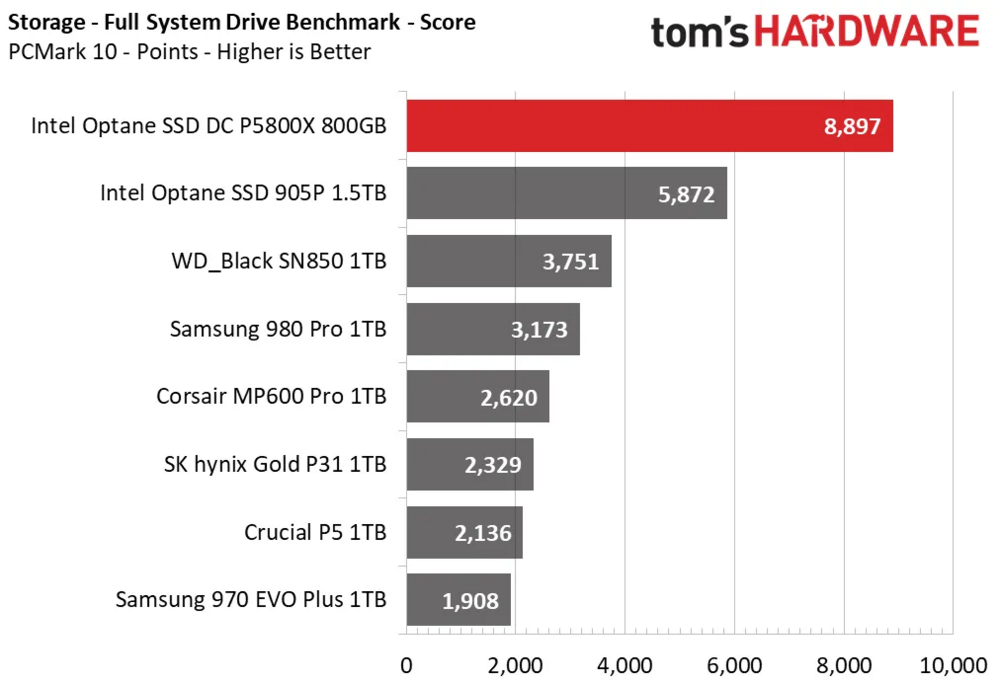
ah no, im not talking about the small capacity optane ssds used as caches to speed up slow HDDs. there are larger capacity optane drives such as the 1.6 TB ones to be used as the main drive in a machine.
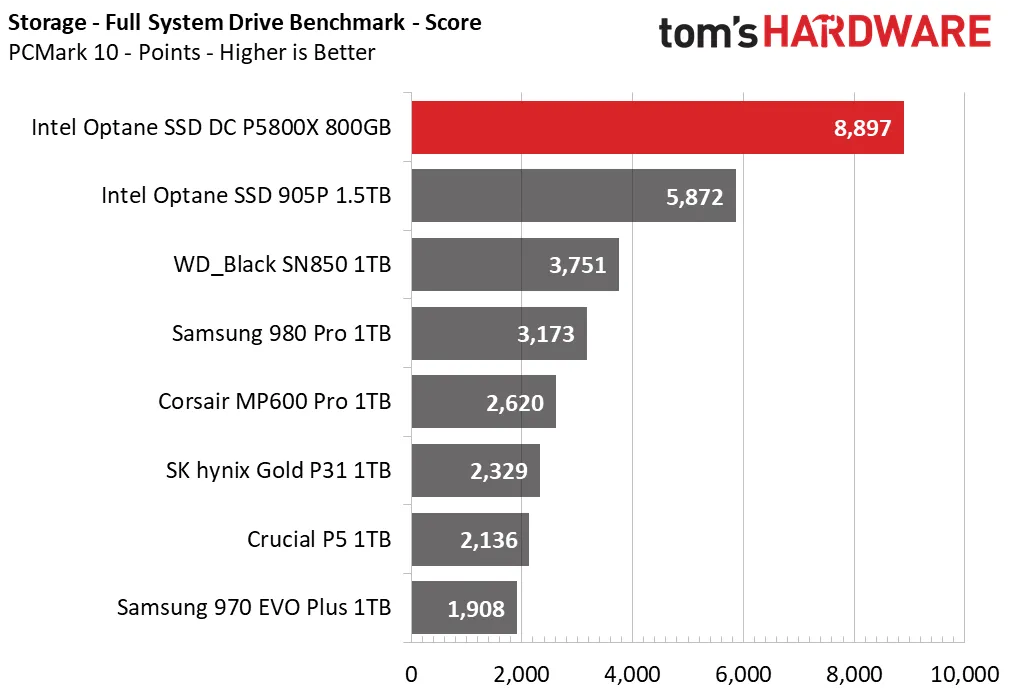
as such, they sport insane latencies and super high IOPS at low queue depths, plus they have absolutely insane writing durability and do not degrade in performance even when they are filled to the brink. not even the fastest regular NAND ssds can compete with that, thats why optane is priced so ludicrous (that and the comparably low storage density, were basically talking SLC here).
in short: an optane SSD is basically the 4090 of SSDs, ultra performance at ultra pricing 😄
here a review if youre interested:
https://www.tomshardware.com/reviews/intel-optane-ssd-dc-p5800x-review
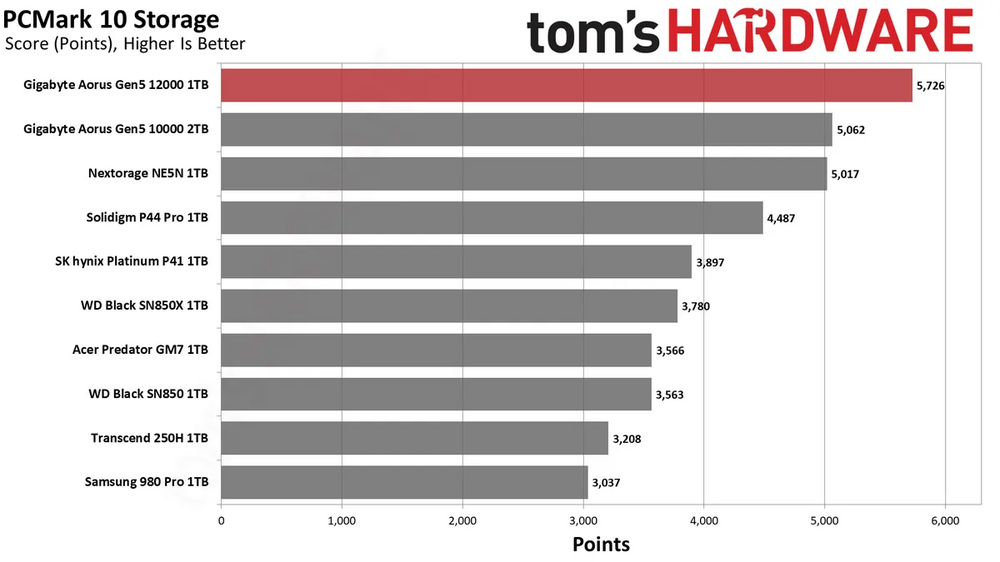
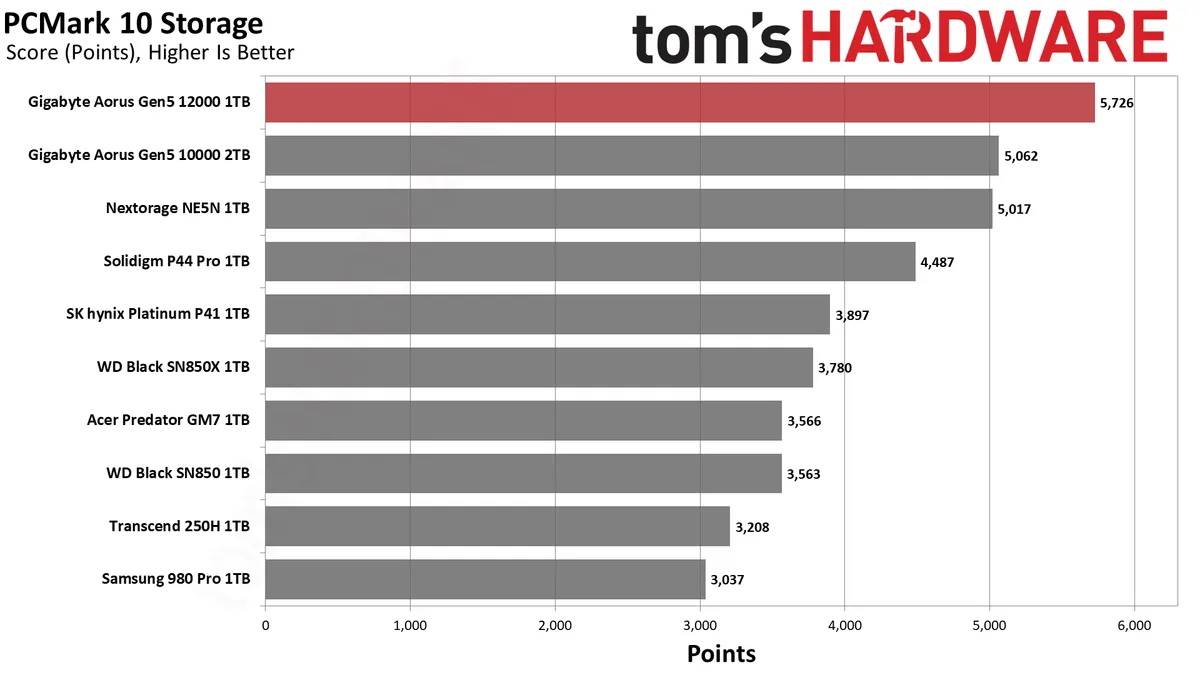
even compared to pcie 5.0 drives the P5800X is miles ahead:
-
 1
1
-
-
i admit im not a big GTA fan, i was rather old school and totally hooked into the OG GTAs of old with the birdview perspective:

and yes i know ive now outed myself as OLD but thats ok hahaha 😛
nevertheless im looking forward to all the "hidden lore" storylines in GTA VI, i thoroughly enjoyed watching the summary videos on the alien / bigfoot / mount chilliad of GTA V on yt 🙂
-
3
-
2
-
-
8 hours ago, electrosoft said:
The fact it can do G2 3800 bodes well as the memory at least is cleared for take off to 3800 and ~3500 on a 12600 sounds about right but the only way to truly know is to slap it in a desktop board to see. My daughter's 12400 tops out at 3366 DDR4 on her B660 Asus board. My 12900k topped out at 4133 on the Asus Z690 D4 (DDR4) and many 13th and 14th gen chips are sitting around the same level so if you:
Get a chip with a known, good 4000+ IMC
Hunt for good silicon / low bleeder (Focus on the 4300 curve)
I know both capped to ~130w, this 13900ks runs cooler and scores much higher than my 12900k that's in there now when simulated on a desktop board. When (if?) I switch back to AMD, I should pop this SP115 13900KS in my old Asus Z690 D4 board and see how far it can go with the B-die sticks that are in there that can do 4500 with 10th gen.
some good points right there, thanks bud 🙂
the 3500 / 3800 speeds were with her previous 2x8GB 3800 sticks tho. i have since upgraded her to 2x32GB 3200 sticks, so curious to see how far i can push those. probably not as far, but across the whole lifetime of her machine (im expecting 10yrs) capacity is more important than speed 🙂 plus, of course, its fun to keep upgrading it 😄
im currently preparing aan 8TB QVO 870 ssd for her as a xmas present, shes running out of space on her external 5TB spinner, so thats gonna be a nice bump both in capacity and speed for her. QLC should be fine in her case, were tallking mostly media stuff like movies, music, pics, etc.
-
1
-
-
4 hours ago, ryan said:
16tb holy smokes now thats an amount i would never need. i tap out at 5 tb with every game installed-300 plus and pron movies. literally would have no idea what to do with 16tb but would jump on one if it was closer to 400 bucks
i think u missed the point, its 1.6 not 16 hahaha. optane is friggin expensive per GB!!!
-
2 hours ago, tps3443 said:
Gear (1) low latency DDR4 performs really well. I had a 11900K that could reliably run about 4066-4100Mhz CL14. Back then, people were only running like DDR5 6000 range with 12900K chips. So it was very competitive.
What 14th gen model would you buy to replace a 12600?
i might as well just go all out with a 14900K 😄 but tbh im not planning to purchase one anytime soon, might wait until 15th gen comes out and prices come down. so far shes quite happy with the 12600.
mind you, thats a laptop shes rocking, so naturally the mobo traces and so-dimms are not able to compete with desktop hardware haha
-
3
-
-
3 minutes ago, tps3443 said:
Can you still run DDR4 on these newer AMD 7000 CPU’s? How does really fast/tuned DDR4 compare to faster DDR5 7600?
nope, as opposed to Intel Alder/Raptor/RPL-R Ryzen 7000 only supports DDR5, no hybrid IMC...
My lady's machine sports 12th gen paired with DDR4, curious to see how much RAM OC will improve once I bump her up to 14th gen 🙂 with the 12600 currently installed, she can do up to 3500 in Gear 1 and 3800 in Gear 2.
-
2
-
-
26 minutes ago, Mr. Fox said:
Nice write-up, brother.
Any idea what "misc" voltage is actually for?
thanks, appreciate it 😀
very good question, actually forgot to add an info relating to that:
The Misc voltage is a general power delivery path from the mobo to the CPU, the VDDG voltage is actually derived from that and controls the IF / FCLK voltage. funny enough, i had to increase the Misc voltage for RAM OC but VDDG didnt have any impact whatsoever, either for IF or RAM OC. I think that the stock VDDG voltage is already enough for any kind of IF or RAM OC, at least in my case. Could be that at even higher RAM or IF speeds one would need to also adjust VDDG in the future.
Ill add it to the above post 🙂
-
1
-
3
-
-
Aight gaiz, i know its been LONG overdue now, but finally getting around to writing up my AM5 / Ryzen 7000 DDR5 OC adventures 😄 hope this helps my fellow AM5 owners!
Stress testing: Ive been using Tm5 with Anta777 Absolut profile, which gave me very nice results in terms of stability. anything that passes that will pass everything else in my everyday usage. For my current 2x24GB kit, it needs roughly 3 hours to complete at SPD settings (5200 Mhz) and 2 hours at tuned settings (6200 or 7600 with tightened timings). I have also seen lots of recommendations for Karhu, but havent tested that yet.
Infinity Fabric (IF / FCLK)
- Stock is at 1800 - 2000 Mhz, depending on motherboard and bios revision
- Depending on CPU quality, typically maxes out around 2133 to 2200 Mhz (in my case 2167 Mhz)
- As opposed to Ryzen 5000, the IF is now decoupled from the Memory Controller (MCLK) and Memory itself (UCLK), so you can run it asynchronously
- Depending on the setup and settings, I found that sometimes synchronous, other times maxxed out IF clocks are better for the resulting memory latency (i.e. DDR5-6200 with IF at 2067 = 3x ratio synchronous vs. DDR5-6200 with IF 2167 = 2.86 asynchronous), so best to check both!
"Gears" = UCLK/MCLK ratios
- "Gear 1" = UCLK/MCLK = 1:1 ratio, i.e. Memory Controller at 3000 Mhz and DDR5-6000 at 3000 Mhz actual clocks
- "Gear 2" = UCLK/MCLK = 1:2 ratio, i.e. i.e. Memory Controller at 2000 Mhz and DDR5-8000 at 4000 Mhz actual clocks
- As with Intel, Gear 2 has a latency penalty but allows for much higher RAM frequencies and thus bandwidth.
- In my case, I maxed out at the following:
DDR5-6400 bootable and DDR5-6200 stable in Gear 1
DDR5-8000 bootable and DDR5-7600 stable in Gear 2
- From what ive seen, typical max ranges for Gear 1 are 6200-6600, for Gear 2 7600-8200. How stable those were though, I cannot judge 🙂 your results WILL vary depending on motherboard, CPU IMC quality and RAM sticks, as per usual...
Voltages
- VDDG does not have any impact on RAM OC (at least in my case, see next point directly below)
- The Misc voltage is a general power delivery path from the mobo to the CPU, the VDDG voltage is actually derived from that and controls the IF / FCLK voltage. funny enough, i had to increase the Misc voltage for RAM OC but VDDG didnt have any impact whatsoever, either for IF or RAM OC. I think that the stock VDDG voltage is already enough for any kind of IF or RAM OC, at least in my case. Could be that at even higher RAM or IF speeds one would need to also adjust VDDG in the future.
- SOC, VDDIO, Misc, VDDP, as well as RAM VDD and RAM VDDQ are important for RAM OC on AM5
- With a bit of trial and error, as well as lots of researching and comparisons I have found the following voltage ranges safe for testing (all of the listed max values I have been running for months during tuning of timings, so at least from my side I consider those safe for 24/7, your mileage may vary!):
SOC = Stock 1.00V, max. 1.30V (max possible with newer Bios revisions)
VDDIO = Stock 1.10V, max. 1.58V
Misc = Stock 1.10V, max. 1.55 V
VDDP = Stock 0.80V, max. 1.18V
RAM VDD = Stock 1.10V, max. 1.63V
RAM VDDQ = Stock 1.10V, max. 1.63V
Naturally, after finding ur best settings for timings, I would suggest to go back and lower the above voltages as much as possible to save on voltage wear and heat as much as possible. Here were the lowest settings I found to be stable at my tightened timings:
DDR5-6200 Gear 1 (G.Skill 2x16GB Kit DDR5-6600)
SOC = 1.20V
VDDIO = 1.31V
Misc = 1.10V (Stock)
VDDP = 1.03V
RAM VDD = 1.52V
RAM VDDQ = 1.52V
DDR5-6200 Gear 1 (Teamgroup 2x24GB Kit DDR5-8200)
SOC = 1.19V
VDDIO = 1.27V
Misc = 1.39V
VDDP = 0.81V
RAM VDD = 1.58V
RAM VDDQ = 1.59V
DDR5-7600 Gear 2 (Teamgroup 2x24GB Kit DDR5-8200)
SOC = 1.26V
VDDIO = 1.52V
Misc = 1.26V
VDDP = 1.10V
RAM VDD = 1.59V
RAM VDDQ = 1.59V
Notes:
- VDD can sometimes be lowered further than VDDQ, so check and see whats possible here. In my case only 0.01V was possible.
- As you can see, minimum required voltages are also different for each ram kit, so your results may vary, even with the same setup otherwise.
Additional Settings
Nitro Mode
The most recent Bios updates for AM5 boards, a new "Nitro Mode" has been implemented, which allows a more finegrained tuning of RAM training. Loosening up these settings allows for more stability at the cost of latency and potentially longer boot times. It includes the following settings:
Nitro Mode = Enabled / Disabled
Robust Training = Enabled / Disabled (Enable for better stability)
Nitro RX Data / Nitro Tx Data / Nitro Control Line / Nitro Rx Burst Length / Nitro Tx Burst Length = basically, the higher the factor, the higher the stability / latency / boot time.
What I did was to max out everything, same with the voltages, then tighten up all the timings, afterwards go back and find the lowest values that are still stable to improve on latency and boot times.
Other
There are two additional settings important for RAM tuning in this case: "Memory Context Restore" and "Power Down Enable"
For best latency and performance (i.e. reaching tighter timings / higher clocks) I recommend disabling them both. This will, however, significantly increase our boot times due to RAM retraining going on for every boot.
I leave them both disabled cuz i dont find the longer boot times that bad, were talking maybe 30-40 seconds vs. 10 seconds, definitely worth the tradeoff for better (and stable!) performance 🙂
Cooling
This is more of a general thing and not specific to AM5: DDR5 RAM is finicky when it comes to temperatures! In my case I leave the RGB switched off, which bring about 5-10C lower temps (crazy, right?). In addition, I have a 140mm fan pointed directly at the RAM sticks to further lower the temps. I am usually around 50C under full load with TM5 stress testing and in the high 40s when gaming and the whole case is heated up by the GPU and CPU. Ideally, you would replace the stock heatsinks with aftermarket ones or add liquid cooling to it.
Whatever you do, just keep an eye on temps! The lower, the more tight the timings and higher the clocks can be with good stability 🙂
Timings
I am including my tuned timing results for both my previous G.Skill 2x16GB DDR5-6600, as well as my current Teamgroup 2x24GB DDR-8200 kits.

Notes:
- The G.Skill kit SPD was at DDR5-4800, whereas the Teamgroup kit sports DDR5-5200 at stock.
- The G.Skill kit (on an older bios) profited from synchronous IF, whereas the Teamgroup kit preferred the max. IF clock at 2167 Mhz in both Gear 1 and Gear 2.
- For tightening the timings, i maxed out the voltages as well as Nitro Mode settings and then went back after tuning to lower everything again as much as possible.
Results
I checked performance with AIDA64, 10 consecutive runs for each setup and calculated the average for each parameter to account for any variability. I am using the DDR5-4800 G.Skill stock as the 100% baseline here.
G.Skill Stock DDR5-4800
Read = 54835
Write = 52866
Copy = 52664
Latency = 96.1
G.Skill Tuned DDR5-6200 Gear 1
Read = 90968 (+66%)
Write = 94858 (+79%)
Copy = 81608 (+55%)
Latency = 55.4 (+74%)
Teamgroup Stock DDR5-5200
Read = 64214 (+17%)
Write = 64992 (+23%)
Copy = 58463 (+11%)
Latency = 94.7 (+1%)
Teamgroup Tuned DDR5-6200 Gear 1
Read = 91237 (+66%)
Write = 95211 (+80%)
Copy = 85265 (+62%)
Latency = 54.6 (+76%)
Teamgroup Tuned DDR5-7600 Gear 2
Read = 99155 (+81%)
Write = 101802 (+93%)
Copy = 91402 (+74%)
Latency = 57.9 (+66%)
Conclusions
- Based on the obtained results and input that i saw from other AM5 users online, I am likely held back by the CPU IMC. The RAM sticks did not show much difference between the two kits in Gear 1. Also, I have seen differing results on the X670E Extreme and Hero boards, so that leads me to think that the CPU is my current bottleneck. Curious to see what Zen 5 will bring!
- As mentioned before, Gear 2 lets the latency suffer a bit, but provides a nice boost to bandwidth. I will stick to my Gear 2 settings for now, as the latency penalty is a mere 3 ns in my case, so nothing to worry about.
Overall quite happy with the results at roughly 60-90% performance uplift vs. stock speeds of my previous G.Skill RAM kit 🙂I didnt even really bother testing with the XMP / EXPO profiles tbh, just used them as a quick baseline for additional tuning 😄
Aight, with GPU and RAM tuning out of the way, Ill now shift my focus on tweaking my 7950X 🙂
-
2
-
5
-
1
-
-
An Intel Optane drive, specifically the P5800X with 1.6 TB capacity:
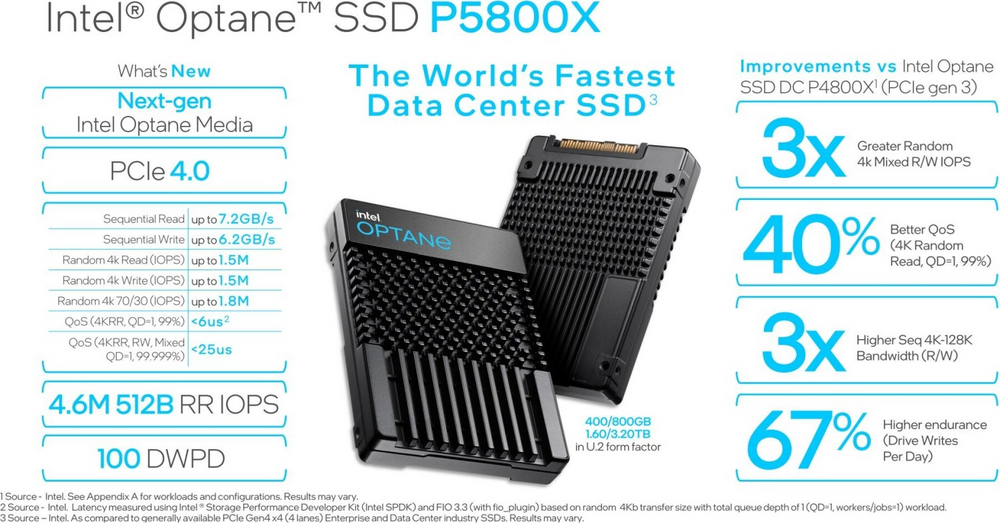
would be super curious to see firsthand how it fares in real world scenarios. but yeah, at currently 8000€ probably not gonna get that.... 😄 used to be a "super value" 3000€ tho! maybe i can get a good price on ebay hahaha
edit: yup, listings on ebay start at 2400€, total steal 😛
-
8 hours ago, electrosoft said:
LOL, if you were "safe" to upgrade from your 2080ti to a 3090, you are definitely safe to upgrade from a 3090 to a 4090. 🤣
I hope the 8900xtx smashes Nvidia into the ground because the 7900xtx was a bit of a let down after all the pre-launch hype and pseudo CU count that AMD didn't correct properly and let speculation fly amok.
I said it before and I'll say it again, you will get a 4080ti dab smack in the middle of the 4080 and 4090 for ~1299 or 1399 with 20GB and a slower memory bus.
I am guessing we might *might* get a 4090ti Summer of 2024 and the 5090 drops Q1 2025. Either scenario, if you have a 4090, a 4090ti is DOA as 5090 is right around the corner. Don't pull an "Electrosoft" 🤣 and get all nostalgic and order a KPE 3090ti for $2499 and end up regretting it (But then EVGA refunded me the $500 difference when it dropped and a collector wanted it for $2k so I broke even and am still using the included 1600w P2 to this day but still....)
You can always sit back and wait and compromise or you just order the new king launch card, ride it out for the entire cycle, get the new king launch card, sell your old card (or not) for what you can get...rinse/repeat.
My only problem when the 5090 drops is Fallout76 and WoW have met their 4k Ultra match even with RT enabled with the 4090 for 144hz displays. For the first time, I am hard pressed to find a compelling reason to upgrade next cycle outside of the ever present, "I want it."
I am rapidly coming up on a full year of owning this MSI 4090 Liquid Suprim X in one month and it has been an absolute joy and beast of a card. Outside of the price, I have zero complaints.
couldnt agree more with this. the main factor i focus on is "usage time". so get the king card right when its released and enjoy it for the longest time. IF a 4090 Ti ever comes out (which i doubt, no monetary incentive for Nvidia), ill be totally chill without any need to upgrade. at best, with full fat 102 die, itll be what? maybe 10-15% more performance? plus with my card oced to the max that gap gets quite small, so couldnt be bothered to upgrade. as you said, ill just wait and see what the 5090 brings to the table, until then i can save up enough money to do that upgrade without having to sell off my 4090 beforehand. no downtime, max usage time and some money back from selling off my 4090 in the end 🙂 and if the 5090 is NOT available ANYwhere due to "insert random tech hype for scalper prices" then i still have my 4090, all good!
5 hours ago, Papusan said:Yup, the Arctic Liquid Freezer II is still a good AIO. Even better if you swap the fans to something more powerful. No need to buy AIOs with all the disgusting bling bling all over the places
How good is cheap? Arctic Liquid Freezer II 240 and 360 in the test – This standard has to be beaten igorslab
A new 4080Ti won't be sold in China. A real scalpers card. Cheap enough to make proper profits when you ship it over to China. Hmmm. I wonder how high the Global price hike will be above MSRP.
oh yes, very happy with my AC LF II 420, especially with the 6x Noctua IndustriallPPC 3000 fans in push-pull, quite the cooling beast 😄
-
2
-
1
-
-
48 minutes ago, cylix said:
ITS HERE 😄
dude wtf, almost 50 million views inside 9 hours 😄 i think ppl are excited? hahaha
-
3
-
-
1 hour ago, tps3443 said:
This looks like a really tricky cpu to delid. Not just that, but you have 3 dies to clean and worry over lol. I’ve seen a few of these break after delids.
I am starting to change my views on delidding. Of course it works amazingly well on some chips. But I have kind of realized that the gains are only +100Mhz for Intel chips. I am gonna give the stock IHS and stock Intel solder a solid chance with my new 14900KF. And if it’s great I am gonna leave it be. But if it is unsatisfactory, then I’m delidding it and going back to Supercool direct die cooling. I’d rather run the stock Intel IHS and stock Intel solder because of its longevity and consistency after long periods of time. Fingers crossed. With chilled water and lots of flow rate, you’d think it would work extremely well. (I hope so) 🙂
oh yes definitely way more finicky. ive popped several intel cpus and compared to this total piece of cake 😄 but when it does work, all the more satisfying! likely wont be coming around to installing the custom TG ihs until next weekend, i need the machine working in the meantime 😛
-
4
-
1
-
-
all cleaned up, protected the SMDs with some fingernail polish from my wife (applied after i took this pic) and off back under the stock IHS with LM and kryonaut on top for some initial testing.

luckily the cpu still works 😁 got some baseline results before delidding with CB2024 60 min loop so had smth to compare this to. results aint too bad, -2.5C to -4.7C depending on CCD. so with the custom TG IHS should be even better, especially with double LM under and on top of it 😎
-
3
-
1
-
1
-
-
5 hours ago, anassa said:
https://www.ebay.com/itm/115283061485
Not sure where to post to get most views from clevo people, but for less then the price of the normal 330w AC adapter the 780w Eurocom ones are for sale!
I think they are normally $300~400 or something
very nice deal indeed, although shipping and customs would bring that up considerably for international customers 😅
-
10 hours ago, electrosoft said:
With the 4090 being such a great card and outclassing everything, you either step up for your overpriced spanking or suffer.
In theory, getting a 7900xtx, selling my 4090 and pocketing the substantial difference looks great on paper.....but Nvidia just has it down to a science both hardware and software right now for my needs.
Sold the 6700XT on Fleabay and returning the 7900XTX tomorrow. I'm officially done with AMD GPUs this time around. Gave the 7900XTX a chance twice in January and now. Two different models. Things actually got worse in 10 months!
Nvidia isn't innocent and did this before too for WoW players. They had bad drivers that broke when they updated their drivers for Cyberpunk 2077 during Ampere and textures flickered for a solid 9 months before they finally fixed it.
AMD drivers broke around March and it has been downhill since.
Still no proper frame cap.
Numerous issues in WoW (RT stutters, DX12 doesn't work, black screens, lock ups, freezes)
Absolutely gets crushed in FO76 compared to the 4090 in 4k.
Testing on 7800X3D or 13900KS made no difference with the issues.
I don't know what happened. The 5700XT was an absolute joy to use in WoW. and other games....
I will say the 7900XTX and even 6700XT held their own in Starfield though.
And of course my 7800X3D dying....lol....the hits keep on coming. 🤣
I ordered an Asrock B650M open box for $86 that arrived yesterday so I'll be able to test the CPU and memory independently of the MSI board just in case before sending it in for a replacement. I was going to build out an mATX system anyhow with some spare parts I have so it will end up there when all is said and done.
sad to hear man, but thanks for the valuable first hand info on current AMD gpus. as for X3D parts dying...welp that in combo with the limited tuning capabilities kinda keeps me from switching over. quite happy with my 7950X, curious to see what its actually capable of, so far ive been focusing on the 4090 and ram, now its cpu tuning time!
speaking of which:


was a bit more finicky than with intel cpus, where its just one "plopp" and done. due to the restricted movement area @SMDs its a lot of back and worth to make the indium solder layer fail via material fatigue.
still, works nicely with the delid-die-mate! cant test the cpu yet since were on the road (wifey driving, baby sleeping, daddy casually delidding on his lap in the backseat 😂), but result looks very promising, no obvious chip damage. ill clean up the pcb, dies and stock ihs and update again once done 😁
-
3
-
2
-




*Official Benchmark Thread* - Post it here or it didn't happen :D
in Desktop Hardware
Posted
AI cover of all i want for xmas is you by freddie mercury...boy the times we live in 😄 sounds amazing! hahaha