
solidus1983
-
Posts
415 -
Joined
-
Last visited
-
Days Won
1
Content Type
Profiles
Forums
Events
Everything posted by solidus1983
-
@Sydneyblue Are we talking about the Limit reason of Voltage, if that is the cause its because you have hit the limit set by nvidia in the vbios and thats totally normal. The fact that your GPU usage is in the 90's is good. If its frame pacing issues thats down to nvidia drivers bud. @Jaggy84 Nice one mate and some nice temps too!
-
Copper IHS is more likely Copper IHS Kit - Intel 10th Gen – RockItCool , LM should be fine just got the semi-conductors with something like Thermal Grizzly High Performance Cooling Solutions - TG Shield (thermal-grizzly.com) then reseal the IHS with silicon.
-
Did they say what the shore hardness was as I used them sizes last time using gelids and got no contact with the dies.
-
That's not good, might be worth while asking HID for some pads, could you also measure them before installing as I don't even know the sizes for the CPU or GPU thermal pads. Still waiting on PCS to get back to me on it so I can get some proper pads when I upgrade CPU.
-
I got that one for christmas lol however with the X170KM i can't use the mobile holder lol. Only using it for benchmarking right now though so its back in box, still waiting on my new metal Laptop cooler but my friend is busy right now so not bothering him.
-
Going to be away for a day or two. I have to solve an Microsoft Windows issue again, Going to start sending Microsoft a bill for the SSD wear as its another back up and format.
Why oh Why can't they test updates before releasing them as this Patch Tuesday has brought me a borked system again.
At this rate, i am moving ship to Linux big time getting fed up with doing reinstalls all the time.
Thankfully its all scripted so i won't loose tooooooooo much sleep, also User Profile and main data is not on the same OS drive so i can nuke with ease without data loss worry unless i use diskpart and select the wrong disk before issuing the clean command oops!
-
Going off in what term is it showing yellow or red? or is it audible alarm? I have a server thats NVME based currently being hammered for the past 12 hours with no heatsink on. nvme-pci-0100 Adapter: PCI adapter Composite: +66.8°C (low = -20.1°C, high = +84.8°C) (crit = +81.8°C) Sensor 1: +66.8°C (low = -20.1°C, high = +84.8°C) Is it causing your system to shutdown whilst its at 60+c?? if not your fine.
-
Does your TV/External Monitor have any modes on it like Game mode etc or any image processing. If so TURN them off if its only on the external screen your seeing the stuttering on. If however your seeing stuttering on both screens its going to be either the Cable to the external screen or its a nvidia driver issue, the latter can be tested by downgrading the GPU driver after a DDU clean back to the 472 branch of drivers. Also are you using Slimmed drivers or the drivers directly from Nvidia? if the former try the latter if the latter try the former.
-
60c is totally fine on NVME bud, its not as if your going to hit the trip point unless your writing 1's and 0's 24/7/365 without a break. See with SSD's the NAND loves to be warm whilst the controller likes to be chilled, a fine balance however there is a trick as i bet you place the thermal pad across the whole nvme ssd. There is a slight difference in height between the NAND and controller in fact the controller is slightly higher then the NAND what i would normally do is just cover each sperate and use a slight thicker pad on the NAND, if you want full coverage. Else like i have done with my current SSD's just have the controller connected to the heatsink.
-
Keyboard anchors???? Do you mean the posts or the magnets? When you say firmware do you mean the EC firmware as 1.07.07 is the latest UEFI Firmware Bios update and the current stable EC is 1.07.03 right now (Yes there is a 1.07.04 EC Firmware update but even i have gone back to 1.07.03 due to shutdowns whilst on 1.07.04). As for the NVME SSD's if they are PCI-E 4.0 NVME's they are toasty by default, you could if the heatsinks are not helping try a heatsink mod to connect it to the the fan some how with another copper pipe up towards the fin array on the side. Else if you have the sticker still on might help removing that but that will void warranty that i know for sure. Heck even my PCI-E 3.0 NVME hits 63-68c when on full tilt which is in the PCI-E 4.0 slot, however the PCI-E 3.0 SSD in the PCI-E 3.0 slots hits tops 58c which is the same as the SATA M.2 SSD's i use. If your PCI-E 4.0 NVME SSD is below 70c its fine.
-
@crossshot welcome to the site bud glad to see you, Could you DM me the older EC and BIOSes please making a collection myself to make in to packs for easy flashing, for the not so savy people. This includes removing the DMI Edits that older XMG bioses did as well.
-
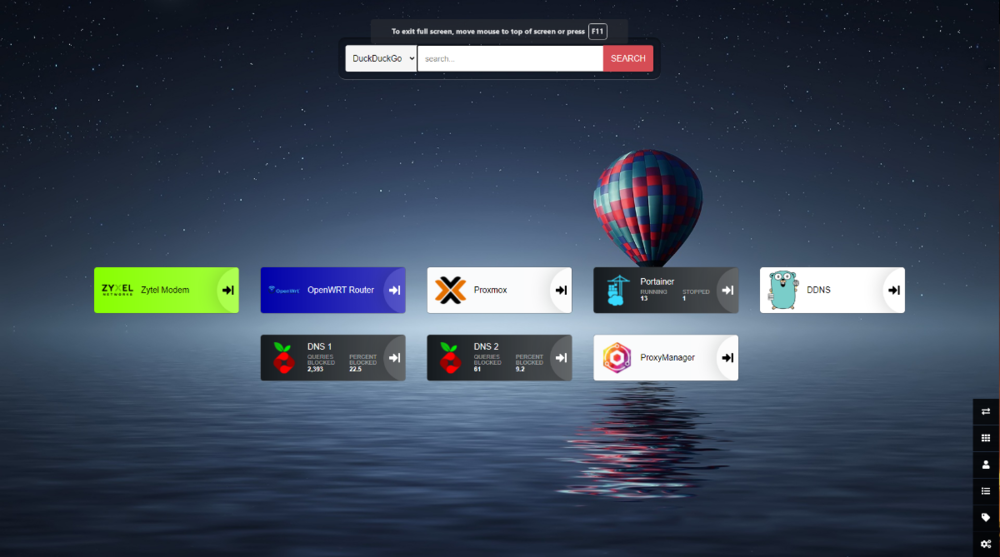
Oh god get ready to laugh at mine. So here we go. ISP: SSE Vodaphone FTTC 50/5 sync on 80/20 Package Modem: Zytel VMG4005-B50A (VDSL2 with line bonding support) Router: Linksys WRT32X with my personal custom OpenWRT firmware (Yep i know) Server: Seed Odyssey x86 8GB, 1.25TB Storage running Proxmox 7.1 running 4 VM's, 1 Windows VM for Driver mods, 1 Linux Container for OpenWRT Compiling, 1 Linux VM for Docker/Portainer which hosts what is in the screenshots minus Nextcloud and another Linux VM for Nextcloud. Server runs everything from VPN to Pihole Unbound DNS with DoH and DNSEC, which has a 4 Million block list for Malware, Trojan, Gambling, Adult Content, Crypto Miners, Telemetry.




-
@Jaggy84 How's the throttle stop coming along? Hopefully when i get the 11700KF it will be the same as when i was using an 6700HQ in terms of setting up throttle stop.
-
 I myself am a Pre-Spreader type of guy but some times use the line method on Rectangle Dies and Blob + X on Squared Dies.
 -
What phone are you daily driving currently?
solidus1983 replied to Katja's topic in Mobile Devices & Gadgets
Huawei Mate 20 Lite's and have been for a while now. Looking to get something newer but Audio Jack is a must as well as Micro-SD Storage. which seems to have gone the way of the dodo. -
Yeah Kryonaut Extreme performs much better then Kryonuat, also much more cleaner. I purchased a small amount at first and it was so much better i purchased a tub of it. I might when funds are available after upgrades do a shoot out as some of the pastes in the 14W/m*k range or above has peeked my interest. As for ICD i would take that out CPU Dies and IHS's will thank you for that.
-
You can add Thermal Grizzly Kryonaut Extreme to that list currently running that stuff right now, its pink instead of grey! Spec Sheet: https://www.thermal-grizzly.com/images/downloads/TG-Datasheet-KryonautExtreme-EN.pdf Product Page: https://www.thermal-grizzly.com/en/products/359-kryonaut-extreme-en Rating: 14,2 W/m*K
-
@Jaggy84 How did your Firmware flash go bud?
-
@Jaggy84 Check you DM's!
-
Sweet the instructions will be in the zip file and it includes not only how to flash bios with 2 sticks but also 4 sticks. G1 is for 2 Sticks and G2 is for 4 sticks as your on EC 1.07.05 you don't need to update that, as thats the latest as far as i know. Hopefully the instructions will help you through the whole process. Once i have the link up for you it will be set to expire 4 days after.
-
Nahimic 3 UAD Modified Driver for Unsupported MSI Hardware
solidus1983 replied to solidus1983's topic in MSI
Yep it sure is! -
Nope after testing Windows 11 on a VM and on my Lenovo R61e, its not touching any system in my house at all. If its forced i have my Linux OS ready and waiting for me to jump ship.
-
The bios is flashed via UEFI shell. I will find the instructions and make you a zip file with all the files needed what ram configuration are you using 2 sticks or 4 sticks? Sorry for delay in response didn't get a notification. Update: I have made a USB.zip file with everything including instructions for flashing. Once i have backed up my file server i will upload it and then send link in DM.
-
What bios version and ec version are you running as having OC enabled in bios has been known to cause stability issues, which is what I was talking about buggy code.
-
Ouch that sucks about the KM bud, Mine has had issues as well with shutdowns but that seems to have settled after Bios and EC firmware update, my issue was more RAM compatibility issues more then anything else. Totally agree Locked Bios sucks, however Clevo can be stubborn i have heard. @Jaggy84 Nice temps on CPU still though i see your running entertainment mode (As thats the only mode that throttles at 86c), I will soon be getting an i7 11700K so i can do some undervolting on CPU, got a decent volt cure on GPU but locked CPU can't use XTU or even TS to undervolt (Thanks intel), heck i can't even enable XMP unless a K/KF SKU CPU is inserted. As for any more DTR's from Clevo i think their hands are tied due to the route that Intel has taken with the lack of MXM support on 12th gen, i also wouldn't be surprised if Nvidia goes that route as well.